
Our readers keep the lights on and my morning glass full of iced black tea. As an Amazon Associate, I earn from qualifying purchases.
Finding a usable computer for around three hundred dollars used to mean scrounging for decade-old parts or settling for a sluggish tablet. That market has changed. With advances in miniaturization and the flood of refurbished enterprise hardware, you can now walk away with a machine that handles 4K video output, multitasking across a dozen browser tabs, and even light photo editing without making you wait. The challenge isn’t finding a cheap box — it’s separating the truly capable from the underpowered and unreliable.
I’m Min — the co-founder and writer behind Gadgets Feed. My deep market research and analysis of technical specifications for this category have focused on identifying which components actually deliver a smooth experience at this specific budget ceiling.
For this guide, I analyzed current listings, scrutinized processor benchmarks, and compared memory and storage configurations to find the real-world performers. The result is the definitive resource for finding the best 300 dollar pc that won’t leave you frustrated.
How To Choose The Best 300 Dollar PC
In this budget tier, you are trading off between processor generation, memory capacity, and storage type. Knowing which trade-offs to make and which to avoid will keep you from buying a machine that feels slow out of the box.
Prioritize the Platform: Processor Generation
An AMD Ryzen 5 3500U or Intel Core i7-7700 represents the baseline for smooth multitasking in this price band. These CPUs have enough single-threaded speed for web apps, video streaming, and Office work. Avoid older processors from six or seven generations back — the efficiency and performance gap is massive even if the core count appears similar.
Storage is Non-Negotiable: SSD or NVMe Only
At this price, you will see machines with a 1TB hard drive (HDD). Do not fall for it. An SSD, especially an NVMe drive, makes the entire system feel responsive. An HDD system will spend ages booting and loading programs. If you need bulk storage later, add an external drive. For the primary boot drive, an SSD or NVMe is mandatory.
Memory: 8GB is a Start, 16GB is a Safe Bet
Windows 11 alone uses more than 4GB of RAM. With several browser tabs open, 8GB fills up quickly. A machine with 16GB of DDR4 RAM will feel fluid for much longer and handle more demanding applications. If the PC has expandable RAM slots, 8GB is acceptable as a starting point.
Quick Comparison
On smaller screens, swipe sideways to see the full table.
| Model | Category | Best For | Key Spec | Amazon |
|---|---|---|---|---|
| GEEKOM A5 | Premium Mini PC | Best Overall Performance | Ryzen 5 7430U / 16GB RAM / 512GB NVMe | Amazon |
| ACEMAGIC Kron K1 | Mid-Range Mini PC | Expandable & Compact | Ryzen R2544 / 8GB RAM / 256GB SSD | Amazon |
| BOSGAME E4 Air | Value Mini PC | 4K Triple Display Setup | Ryzen 5 3500U / 8GB RAM / 256GB SATA SSD | Amazon |
| Dell Optiplex 5050 SFF | Refurbished SFF | Robust Business Workstation | i7-7700 / 16GB RAM / 512GB NVMe | Amazon |
| HP Elite Desktop Bundle | Budget All-in-One Bundle | Everything Included Out of Box | Intel i5 / 16GB RAM / 1TB HDD | Amazon |
In‑Depth Reviews
1. GEEKOM A5 Mini PC

The GEEKOM A5 represents a genuine performance jump at the top end of this budget. Powered by the AMD Ryzen 5 7430U processor and Radeon Vega 7 graphics, it delivers smooth 4K video streaming and handles light creative work like photo editing or running Adobe tools without hesitation. The 16GB of DDR4 RAM (expandable up to 96GB) and the 512GB M.2 NVMe SSD provide a responsive experience out of the box, with plenty of room for future upgrades.
The chassis is a standout detail — a metal frame rated to withstand 440 lbs of pressure, making it far more durable than typical plastic mini PCs. It also supports quad 4K displays via dual HDMI and dual USB-C ports, with one USB-C capable of 8K output. The built-in Wi-Fi 6 and Bluetooth 5.2 ensure lag-free connections. It is nearly silent during normal office work and draws only around 30W under load, making it highly energy-efficient.
The main trade-off is that the processor’s integrated graphics are not built for heavy gaming; you will get acceptable frame rates in titles like Fortnite at low settings, but the fan will become audible under sustained load. Also, the initial Windows 11 Pro setup can take up to an hour for updates. For a primary desktop replacement that covers office, home server, and streaming duties, this is the most future-proof choice available.
Why it’s great
- Very fast Ryzen 5 7430U with Vega 7 graphics for smooth 4K and light creative work.
- 16GB RAM and 512GB NVMe storage with easy upgrade paths to 96GB/4TB.
- Rugged metal frame with Wi-Fi 6 and Bluetooth 5.2 for reliability.
Good to know
- Not suited for AAA gaming; fan noise increases under sustained load.
- Initial Windows setup can be lengthy due to updates.
2. ACEMAGIC Kron K1 Mini PC
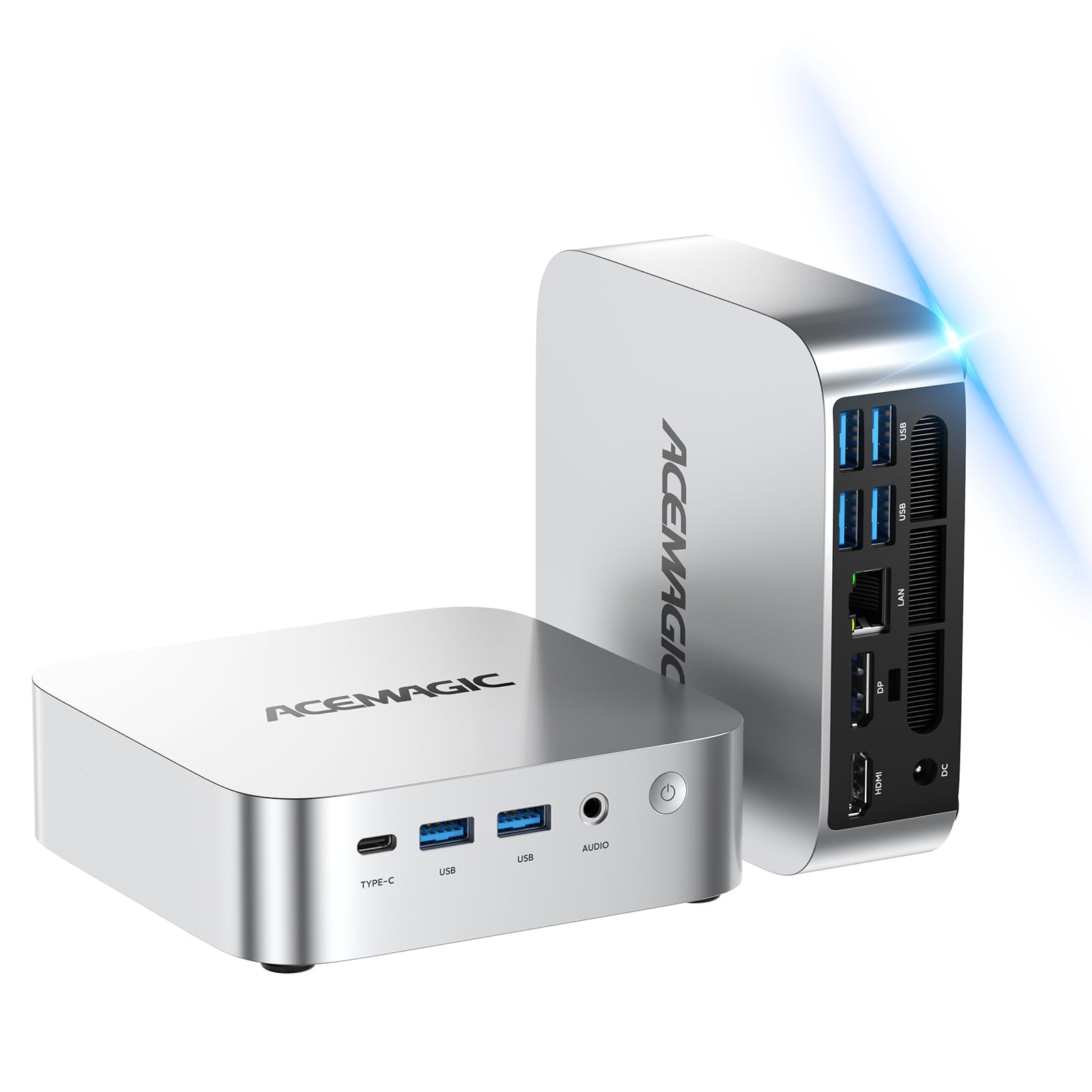
The ACEMAGIC Kron K1 is a solid mid-range entry that prioritizes expandability and connectivity. Its AMD Ryzen Embedded R2544 processor is a quad-core chip that boosts to 3.7GHz, paired with 8GB of DDR4 RAM and a 256GB SSD. The real selling point is its flexible expansion: it has two DDR4 RAM slots supporting up to 32GB, and dual M.2 slots for storage (one SATA, one NVMe PCIe 3.0) that can handle up to 4TB total. This makes it a smart choice for users who want to upgrade performance incrementally.
Connectivity is generous for the price: it includes a USB-C port with DP1.4 video output, an HDMI 2.0 port, and a DP1.4 port, enabling triple 4K display setups. Gigabit Ethernet and Wi-Fi 5 keep networking stable. Users have reported it works excellently for video conferencing tools like Teams and WhatsApp when mounted behind a TV, and it runs quietly thanks to its 28W cooling system with an 80mm fan. The compact size, at about 5 inches square, fits easily into any workspace.
The processor is adequate for office tasks and 4K playback but can feel sluggish for more demanding applications like spreadsheet-heavy data analysis or multitasking with many browser tabs. One reviewer noted their first unit arrived with a defective video card, indicating some quality control variance. For a budget-friendly mini PC that you can grow into, the Kron K1 is a very capable starting point.
Why it’s great
- Highly expandable: dual DDR4 slots (up to 32GB) and dual M.2 slots (up to 4TB).
- Triple 4K display support via HDMI, DP, and USB-C with DP1.4.
- Compact, quiet design with efficient 28W cooling.
Good to know
- Processor is entry-level; not ideal for heavy multitasking or demanding software.
- Quality control can be inconsistent; some units arrive with defects.
3. Dell Optiplex 5050 SFF (Renewed)

The Dell Optiplex 5050 Small Form Factor is a refurbished enterprise desktop that punches well above its weight. It comes equipped with an Intel Core i7-7700 Quad-Core processor running at 3.6GHz with a turbo boost up to 4.2GHz, 16GB of DDR4 RAM, and a 512GB NVMe SSD. This combination delivers snappy boot times and fluid multitasking for demanding office applications, data analysis, and even running lightweight virtual machines.
The build quality is classic Dell enterprise: a metal chassis with a slim profile that fits into tight spaces, plus a wired keyboard and mouse included. It runs Windows 11 Pro without any bloatware, and the NVMe drive makes the entire experience feel responsive. Users have reported using it as a reliable home server running Debian with hardware transcoding, or as a fast Windows machine for daily tasks. The included optical drive is a rare bonus for reading physical media.
Its main limitation is the lack of modern connectivity. There is no onboard Wi-Fi or Bluetooth — you must use the Ethernet port or add a USB dongle (some units arrive with one included). The keyboard and mouse are barely functional and best replaced immediately. Expansion is limited to swapping the primary drive; there are no extra RAM slots for future upgrades. For a robust but basic workstation, this is a fantastic deal.
Why it’s great
- Fast Intel i7-7700 processor combined with 16GB DDR4 RAM and 512GB NVMe SSD.
- Rock-solid enterprise build quality with a slim, space-saving design.
- Runs Windows 11 Pro smoothly with no bloatware.
Good to know
- No built-in Wi-Fi or Bluetooth; relies on Ethernet or a USB adapter.
- No upgrade path for RAM or GPU; expansion is limited to the primary drive bay.
- Included keyboard and mouse are low quality and should be replaced.
4. BOSGAME E4 Air Mini PC

The BOSGAME E4 Air is a compact mini PC that serves as a strong contender for multi-display productivity and home entertainment. Powered by the AMD Ryzen 5 3500U processor with Radeon Vega 8 Graphics, it offers four cores and eight threads, which is sufficient for web browsing, office document handling, and 4K video playback. It comes with 8GB of DDR4 RAM and a 256GB SATA SSD, providing a noticeable boot-speed upgrade over a traditional hard drive.
Its standout feature is the ability to drive three 4K monitors simultaneously via HDMI, DisplayPort, and USB-C. This makes it excellent for stock trading, data monitoring, or content creation multi-screen workflows. The inclusion of dual Gigabit Ethernet ports is a bonus for users who need a stable wired connection, perhaps for a home server or firewall setup. It also comes with Wi-Fi 5 and Bluetooth 5.0 for wireless peripherals. One reviewer noted it runs Stanley Parable at 40-60 FPS on low settings, confirming its light gaming capability.
The main drawbacks are the SATA SSD, which is not as fast as an NVMe drive, and the limited 8GB of RAM, which can be restrictive for heavy multitasking. Memory upgrades are possible but not officially specified. Additionally, if you need to reinstall Windows, the process requires a proprietary BOSGAME image due to specific driver implementations — a significant inconvenience for advanced users. For a compact, dual-LAN, triple-display device, it offers good value.
Why it’s great
- Triple 4K display output via HDMI, DP, and USB-C for serious multitasking.
- Dual Gigabit Ethernet ports ideal for networking or server use.
- Compact package that handles light gaming and 4K streaming well.
Good to know
- Storage is a slower SATA SSD, not NVMe.
- 8GB RAM may feel limiting for heavy multitasking; upgrades are unclear.
- Reinstalling Windows requires a manufacturer-specific image.
5. HP Elite Desktop PC Bundle (Renewed)

The HP Elite Desktop Bundle is built for the buyer who wants everything in one box: the computer, a new 22-inch Full HD LED monitor with a 75Hz refresh rate, an RGB keyboard and mouse, and an RGB speaker. The tower itself is powered by an Intel Core i5 processor and 16GB of DDR4 RAM, which is a substantial memory allocation for this price tier. The 1TB hard drive offers generous storage space for apps, music, and media files.
The 22-inch monitor with an IPS panel provides good viewing angles and a crisp 1080p picture, making it suitable for work, streaming, and casual use. The included RGB peripherals add a gaming aesthetic, though the components are not built for actual gaming. The computer runs Windows 11 Pro, and the setup is straightforward. Users have reported that it handles multitasking with 15+ browser tabs and multiple applications without major delays, and the fans are quieter than older office PCs.
The critical flaw is the 1TB hard drive — it is the single component that will hold the entire system back. Booting and loading programs will feel slow compared to any SSD-equipped machine. The included keyboard and mouse are also low quality, with some users reporting non-functional backlights or broken parts on arrival. For a user who absolutely needs a full setup immediately and prioritizes storage capacity over speed, this bundle works. Otherwise, budget for an SSD upgrade soon after purchase.
Why it’s great
- Complete setup with monitor, keyboard, mouse, and speaker in one purchase.
- 16GB of RAM provides excellent headroom for multitasking.
- 1TB HDD offers substantial storage for files and media.
Good to know
- Slow 1TB hard drive severely impacts boot and load times.
- Included keyboard, mouse, and speaker have inconsistent quality and feel cheap.
- Not a gaming PC despite the RGB aesthetic.
FAQ
Can a PC at this price handle 4K video streaming?
Is it better to buy a new mini PC or a refurbished business desktop?
What gaming performance can I expect from a 300-dollar PC?
Final Thoughts: The Verdict
For most users, the best 300 dollar pc winner is the GEEKOM A5 because it offers the most modern processor, ample RAM and storage, and the best upgrade path — all in a quiet, durable package. If you want a compact device with triple display support and dual LAN, grab the BOSGAME E4 Air. And for raw processing power and build quality in a refurbished chassis, nothing beats the Dell Optiplex 5050 SFF.