
Nothing kills workflow or game immersion faster than a keyboard warning you about low battery mid-session. A 3000 mAh battery changes that equation entirely, letting you forget about charging cables for weeks on end while delivering the responsive keystrokes you expect.
I’m Min — the co-founder and writer behind Gadgets Feed. I spend my days dissecting battery capacities, switch mechanisms, and connectivity standards so you don’t have to guess which wireless keyboard actually performs..
Whether you’re an all-nighter gamer, a multi-device professional, or a student who hates hunting for outlets, finding the right 3000 mah keyboard means balancing battery stamina with typing feel and reliable wireless connectivity.
How To Choose The Best 3000 mAh Keyboard
Buying a keyboard with a high-capacity battery is about more than just the milliamp-hour number. You need to consider how the keyboard uses that power, how it connects to your devices, and what typing feel you prefer for your specific use case.
Switch Type Dictates Battery Life
Mechanical keyboards with clicky or tactile switches typically draw more power than membrane or low-profile mechanical alternatives. A 3000 mAh keyboard can run for two months with RGB off on a membrane board, but that same capacity might last only three weeks on a full mechanical with all LEDs blazing. Know your switch preference before you buy.
Connectivity Options Affect Workflow
Tri-mode keyboards (Bluetooth, 2.4GHz dongle, and USB-C wired) offer the most flexibility for switching between desktop, laptop, and tablet. Dual-mode options save money but lock you into fewer connection paths. If you juggle three devices daily, tri-mode is worth the premium.
Build Quality and Keycaps Matter Long-Term
PBT keycaps resist shine and wear far better than ABS, especially under heavy daily typing. Aluminum or reinforced plastic frames add weight and stability, preventing the keyboard from sliding on your desk. A 3000 mAh battery should live inside a chassis that lasts as long as it does.
Quick Comparison
On smaller screens, swipe sideways to see the full table.
| Model | Category | Best For | Key Spec | Amazon |
|---|---|---|---|---|
| Logitech Signature Slim K950 | Membrane | Multi‑device office work | AAA batteries (replaceable) | Amazon |
| HP K500F | Membrane | Stylish compact gaming | 3000 mAh internal | Amazon |
| Keychron K3 V2 | Low‑Profile Mech | Portable productivity | White LED, Bluetooth 5.1 | Amazon |
| DGG KW104 + Mouse | Mechanical | Full combo value | 3000 mAh + 600 mAh mouse | Amazon |
| CHONCHOW G312 + Mouse | Membrane | Budget gamer setup | 2500 mAh + 500 mAh mouse | Amazon |
| Redragon K552-KRS | Mechanical | Entry‑level tactile typing | Hot‑swap red switches | Amazon |
| LexonElec M96 | Mechanical Feeling | Minimalist desk aesthetic | 94‑key + LED display | Amazon |
In‑Depth Reviews
1. Logitech Signature Slim K950

The Logitech Signature Slim K950 takes a different approach to battery life: instead of a fixed internal pack, it runs on two standard AAA batteries. That means you can swap fresh cells in seconds and get years of use without the battery degrading. The 685‑gram full‑size frame feels solid and weighted, while the scissor‑switch membrane delivers a quiet, laptop‑like keystroke that coexists peacefully in shared workspaces.
Tri‑device switching via Bluetooth or Logi Bolt happens instantly with one tap, and the Logi Options+ app unlocks customizable shortcuts for mute, volume, snipping tool, and media controls. The K950 supports Windows, macOS, Chrome OS, Linux, iPadOS, iOS, and Android, making it the universal companion for multi‑OS professionals. There is no backlighting, but the trade‑off is exceptional battery stamina that can stretch past two years on a single set of batteries under normal use.
The chassis incorporates a minimum of 48% post‑consumer recycled plastic without feeling cheap. Users consistently report it surviving drops and heavy daily pounding. For anyone who needs a reliable, quiet, cross‑platform keyboard that never needs to be tethered to a charging cable, this is the benchmark.
Why it’s great
- Replaceable AAA batteries eliminate battery degradation concerns
- Near‑silent typing ideal for open offices
- Seamless switching between three devices
Good to know
- No backlighting for dark room use
- Membrane feel may disappoint mechanical fans
2. HP K500F Wireless Gaming Keyboard
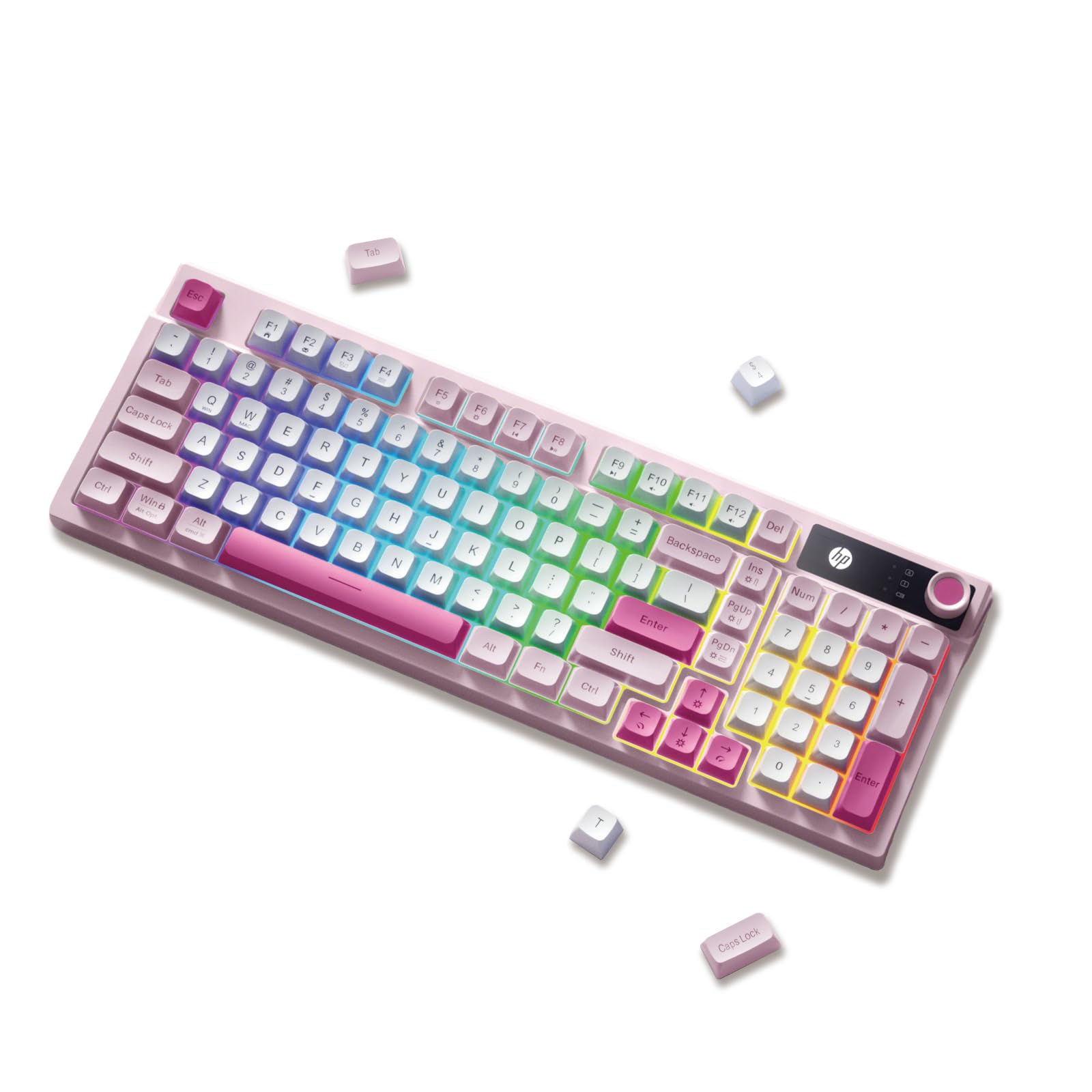
The HP K500F packs a genuine 3000 mAh rechargeable battery into a compact 98‑key layout that keeps the number pad while reclaiming desk space. The tri‑mode connectivity (Bluetooth 5.0, 2.4GHz dongle, USB‑C wired) lets you pivot between a gaming desktop, a work laptop, and a tablet without re‑pairing. The RGB backlighting includes a side light bar that adds ambient glow without washing out the keycaps.
The membrane switches are softer and quieter than typical clicky mechanical boards, and the retro round ABS keycaps give it a distinctive vintage aesthetic. The integrated volume knob works for quick audio adjustments during gaming or conference calls. HP claims the 3000 mAh cell delivers extended use even with lighting active, though running full RGB will cut that runway significantly compared to turning it off.
Dual‑stage adjustable feet let you tweak the typing angle for ergonomic comfort, and the 15.98‑inch width keeps it manageable on modest desks. Some users noted the keycaps feel slightly shallow, but the overall build quality and battery capacity make this a compelling pick for anyone who wants a stylish, long‑lasting wireless keyboard with a dedicated volume knob.
Why it’s great
- True 3000 mAh internal battery with tri‑mode support
- Compact layout retains number pad
- Unique retro styling with RGB side bar
Good to know
- Membrane switches, not mechanical
- ABS keycaps may develop shine over time
3. Keychron K3 Version 2

The Keychron K3 V2 stands out for its ultra‑slim profile — just 0.87 inches thick — making it the most travel‑friendly 3000 mAh keyboard on this list. The 75% layout with 84 keys keeps essential rows intact while cutting the bulk, and the low‑profile Keychron mechanical brown switches offer tactile feedback with 40% less travel than standard mechanical switches. The result is a typing feel that lands between a laptop keyboard and a full‑size mechanical board.
Bluetooth 5.1 allows pairing with up to three devices, switching via hotkeys. The reinforced aluminum top plate adds rigidity without much weight, and the floating keycap design paired with white LED backlighting creates a clean, professional look. Keychron includes extra keycaps for both Mac and Windows layouts, and the K3 works natively with macOS multimedia keys out of the box.
Battery life is the one compromise here: the slim chassis doesn’t accommodate a 3000 mAh cell, so you get roughly 34 hours with backlighting on. That’s still respectable for a low‑profile mechanical, but it can’t match the multi‑week endurance of bulkier boards. If portability and typing feel matter more than raw battery capacity, the K3 V2 is a top-tier choice.
Why it’s great
- Ultra‑slim 0.87‑inch design for easy travel
- Low‑profile mechanical switches with good tactile feel
- Dual‑OS keycaps included for Mac and Windows
Good to know
- Battery life shorter than membrane competitors
- White backlight only, no RGB
4. DGG KW104 Wireless Keyboard + Mouse

The DGG KW104 combo delivers a genuine 3000 mAh battery in the keyboard plus a 600 mAh cell in the matching mouse, both rechargeable via USB‑C. The pudding keycaps are translucent at the bottom, allowing the six RGB backlighting effects to bleed through dramatically. The keycaps are PBT, which resist the shine and wear that plague cheaper ABS caps, so the legends stay legible for years.
The keyboard uses membrane switches with a mechanical feel, striking a balance between cost, noise, and tactile response. The vertical‑ergonomic mouse included in the bundle helps reduce wrist strain during long sessions, with six DPI levels ranging from 600 to 4800. Everything connects through a single 2.4GHz USB receiver stored in the keyboard’s underside — plug and play with no pairing required.
Battery life is impressive: users report 70 hours of continuous use with lighting on. The automatic sleep function kicks in after 6‑8 minutes of inactivity, and waking is instant. Some users noted that the keyboard stopped working after a few days, though the majority of feedback highlights excellent value for the price. If you want a complete desktop solution with a massive battery, this combo is hard to beat.
Why it’s great
- Full keyboard + mouse combo with large batteries
- Pudding PBT keycaps for vibrant RGB
- Ergonomic vertical mouse included
Good to know
- Single receiver ties keyboard and mouse together
- Some units reported early failures
5. CHONCHOW G312 + Mouse Combo
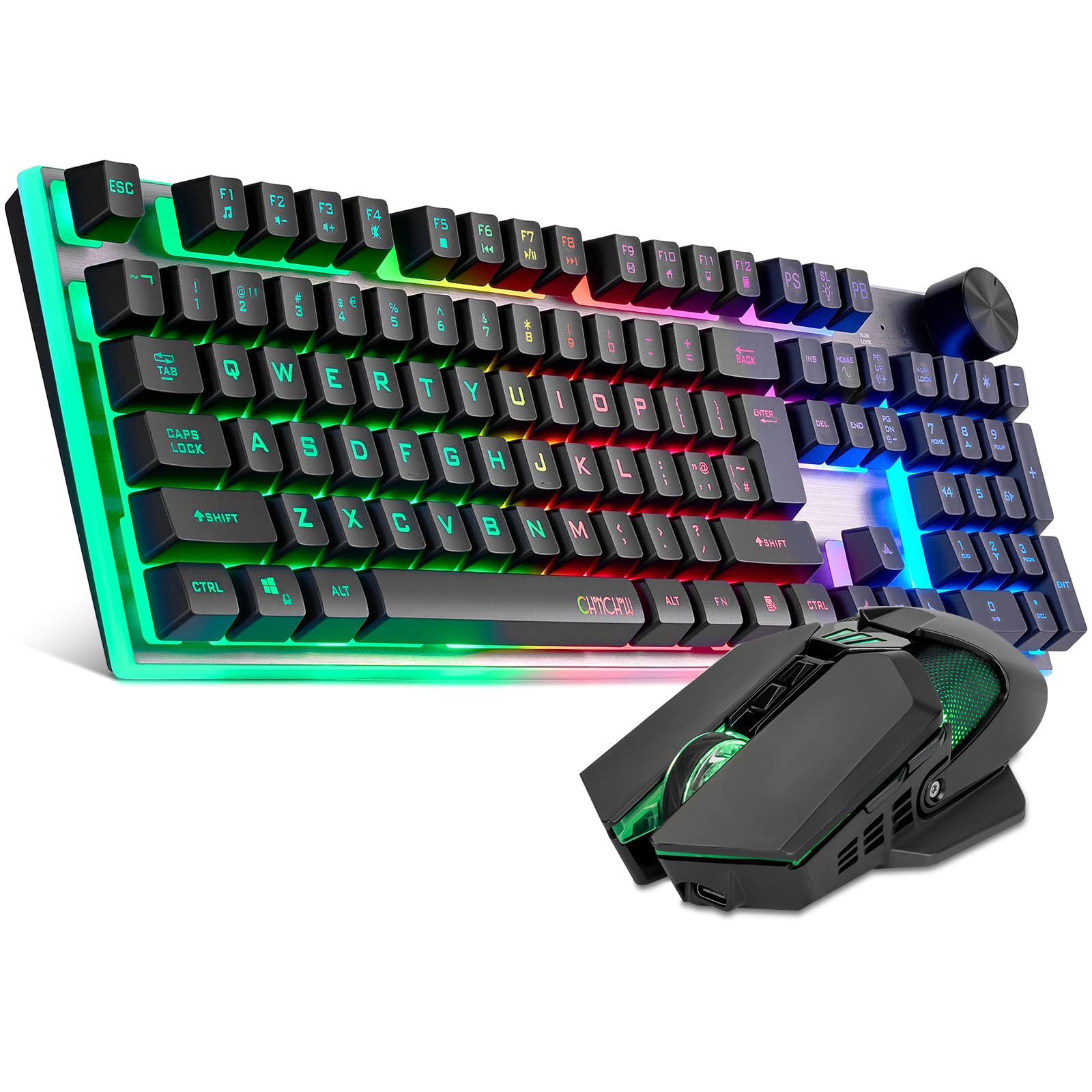
The CHONCHOW G312 combo brings a 2500 mAh battery in the keyboard (close to the 3000 mAh threshold) and a 500 mAh cell in the mouse. The full 104‑key layout includes a multifunction control knob that switches between backlight brightness adjustment and volume control with a click. The low‑carbon brushed stainless steel panel resists oxidation and aging, giving this budget board a premium metallic look.
The 2.4GHz wireless connection uses a single USB‑A dongle for both keyboard and mouse, keeping your ports free. The membrane switches are quiet enough for shared spaces, and the 19 key non‑conflict function handles gaming inputs without missed presses. The RGB backlighting wraps around the edges of the stainless steel panel, creating a glow effect that doesn’t wash out the key legends.
Battery life lands around 40 hours with lighting active, and the smart sleep function kicks in after five minutes. Some users reported keycap legends wearing off after a couple months, which is a common trade‑off at this price tier. For a beginner gamer or a secondary setup where budget is the priority, the CHONCHOW G312 delivers solid stamina without breaking the bank.
Why it’s great
- Stainless steel panel feels premium
- Multifunction knob for volume and lighting
- 19 key anti‑ghosting for gaming
Good to know
- ABS keycaps may wear over time
- Not a full 3000 mAh in the keyboard
6. Redragon K552-KRS

The Redragon K552-KRS is a tri‑mode mechanical keyboard (2.4GHz, Bluetooth, wired) that brings hot‑swap capability to the budget segment. The 87‑key tenkeyless layout frees up mouse space while retaining all essential typing keys. Red linear switches deliver smooth, linear actuation with no tactile bump, and they’re hot‑swappable with 98% of 3‑pin switches if you want to customize the feel later.
The metal panel reinforces the chassis, and the keys have been tested for 500,000 presses. The 19 rainbow backlight modes include five brightness and speed levels. The board doesn’t carry a 3000 mAh battery — it’s powered by a smaller internal cell — but the tri‑mode connectivity and programmable software make it a versatile entry point into mechanical keyboards. Users report a noticeable increase in typing speed and accuracy compared to membrane boards.
The clicky blue switch variant is loud enough to be heard across a room, so this isn’t a quiet office board. However, the hot‑swap socket means you can swap in silent switches with a simple tool. The software is only available in wired mode, and some users experienced occasional misfiring keys. For the price, the K552-KRS offers an affordable on‑ramp to customizable mechanical typing with wireless freedom.
Why it’s great
- Hot‑swappable switches for easy customization
- Tri‑mode connectivity at a budget price
- Solid metal panel and compact TKL layout
Good to know
- Very loud clicky switches (blue variant)
- Smaller battery capacity than dedicated 3000 mAh boards
7. LexonElec M96
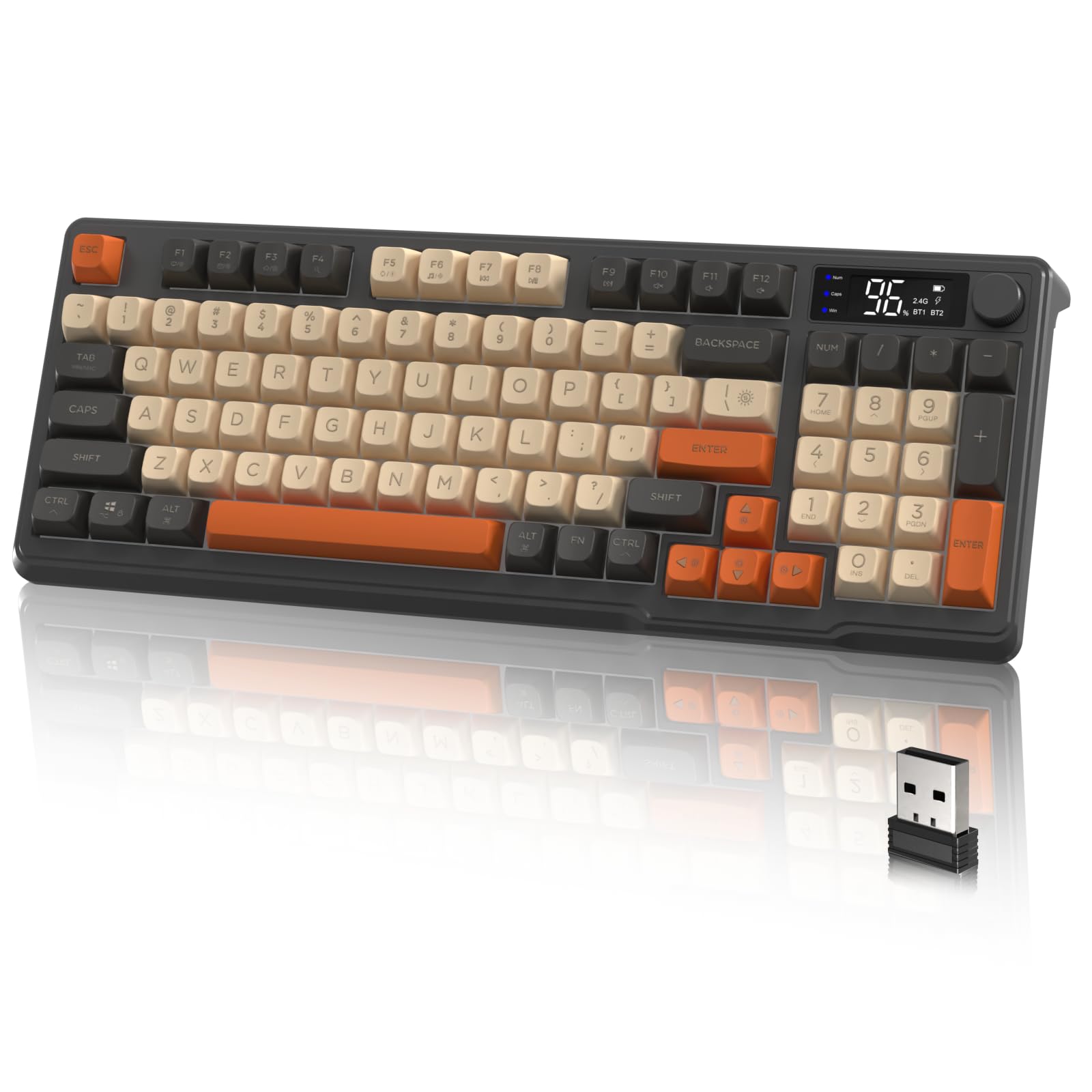
The LexonElec M96 adopts a compact 94‑key layout, trimming the navigation cluster while keeping arrow keys and a functional F‑row. The standout feature is the built‑in LED display that shows battery level and connection status — a rare convenience at this price tier. The mechanical‑feeling membrane switches are described as “marshmallowy” by users, offering a quiet, cushioned keystroke that’s comfortable for extended typing sessions.
It connects via 2.4GHz or Bluetooth, with a 10‑meter wireless range. The PBT keycaps resist oil and shine, keeping the legends crisp. The multimedia knob controls volume or backlight modes depending on the setting. Battery life is exceptional: one user reported 76% remaining after 10 days of 8‑hour daily use with backlighting off, suggesting the 2000 mAh cell (noted in the specs) punches above its weight thanks to efficient power management.
A handful of users reported the keyboard briefly disconnecting and reconnecting during gameplay, which could be a unit‑specific issue. Overall, the M96 delivers a creamy, quiet typing feel with practical extras like the status screen and volume knob. For a minimalist desk aesthetic that doesn’t sacrifice battery stamina, this is a smart pick.
Why it’s great
- On‑board LED display for battery and status
- Quiet, marshmallowy keystrokes
- PBT keycaps resist wear over time
Good to know
- Occasional connection drops reported
- Advertised as 3000 mAh but specs suggest 2000 mAh
FAQ
How long does a 3000 mAh keyboard last on a single charge?
Can I use a 3000 mAh keyboard while it’s charging?
Does a higher mAh rating mean a heavier keyboard?
Final Thoughts: The Verdict
For most users, the 3000 mah keyboard winner is the HP K500F because it combines a true 3000 mAh internal battery with tri‑mode connectivity and a compact layout that keeps the number pad. If you want ultra‑portable low‑profile mechanical typing, grab the Keychron K3 V2. And for a complete desktop solution with a vertical mouse included, nothing beats the value of the DGG KW104 combo.