
A print bed that measures 300mm on one side unlocks a new class of projects—functional cosplay helmets printed in one piece, large architectural models, and batch production of mechanical parts. But a larger frame introduces its own set of challenges: maintaining flatness across a wide surface, resisting wobble during fast moves, and heating a big bed evenly. Choosing the wrong machine means battling first-layer adhesion and ghosting on tall prints.
I’m Min — the co-founder and writer behind Gadgets Feed. I’ve spent hundreds of hours analyzing build volumes, motion systems, hotend capabilities, and user reliability data across dozens of large-format FDM printers to separate the true workhorses from the frustrating projects.
This guide walks through the real strengths and quirks of each option so you can confidently pick the 300mm 3d printer that matches your budget and expectations.
How To Choose The Best 300mm 3D Printer
Selecting a printer with a 300mm build volume means balancing speed, reliability, and material compatibility. The bigger the frame, the more important the motion system and chassis rigidity become.
CoreXY vs. Bedslinger Motion Systems
At this scale, a CoreXY architecture is far superior to the traditional moving bed design. In a CoreXY printer, the print head moves in X and Y by coordinating two stationary motors, keeping the bed fixed on the Z-axis. This reduces the mass that needs to shift back and forth, allowing higher speeds—typically 500mm/s to 800mm/s—without sacrificing accuracy. A bedslinger, by contrast, shoves a heavy 300mm bed forward and backward, creating momentum issues that limit speed and can introduce artifacts on tall prints.
Heated Chamber and Hotend Temperature
A 300mm build volume is ideal for engineering-grade materials like ABS, ASA, polycarbonate, or nylon-carbon fiber composites. These filaments require a stable, warm environment to prevent warping and layer separation. Look for a printer with an active heated chamber capable of holding at least 55°C to 65°C. Similarly, a hotend that can reach 300°C to 370°C is essential for melting high-temperature materials. A hotend that only reaches 260°C limits you to basic filaments like PLA and PETG.
Auto Bed Leveling and Frame Rigidity
Leveling a 300mm build plate manually is tedious and error-prone. An inductive or strain-gauge sensor that performs multi-point leveling—anywhere from 16 to 64 points—dramatically increases first-layer success. The frame must also be robust. Look for die-cast aluminum frames, linear rails on all axes, and dual Z-axis leadscrews. These features prevent the gantry from sagging and keep the print head moving precisely across the entire build area.
Quick Comparison
On smaller screens, swipe sideways to see the full table.
| Model | Category | Best For | Key Spec | Amazon |
|---|---|---|---|---|
| Sovol SV08 | CoreXY | Open-source tinkerers | 350mm³ build, 700mm/s, Klipper | Amazon |
| Flashforge AD5X | CoreXY | Multi-color beginners | 220mm³, 600mm/s, 4-color | Amazon |
| ELEGOO Centauri Carbon | CoreXY | Plug-and-play out of box | 256mm³, 500mm/s, enclosed | Amazon |
| Anycubic Kobra S1C | CoreXY | Active filament drying | Enclosed, 600mm/s, 4-color | Amazon |
| Creality Ender 3 V3 Plus | Bedslinger | Budget value with speed | 300mm³, 600mm/s, CoreXZ | Amazon |
| SainSmart ZR | CoreXY | True 300mm multi-color | 300mm³, 600mm/s, 4-color | Amazon |
| QIDI PLUS4 | CoreXY | Engineering materials | 305mm³, 600mm/s, 65°C chamber | Amazon |
| Sovol T500 | CoreXY | Massive 500mm³ scale | 500mm³, 500mm/s, Klipper | Amazon |
| Creality Ender 5 Max | CoreXY | Print farm operations | 400mm³, 700mm/s, 64-point leveling | Amazon |
| QIDI Max4 Combo | CoreXY | Industrial-grade production | 390mm³, 800mm/s, 16-color option | Amazon |
| Snapmaker Artisan | CoreXY | 3-in-1 versatility | 400mm³, dual extrusion, modular | Amazon |
In‑Depth Reviews
1. Sovol SV08 Core-XY 3D Printer

The Sovol SV08 delivers a 350x350x345mm build volume on a Voron 2.4-inspired open-source platform. It hits a maximum speed of 700mm/s and 40,000mm/s² acceleration thanks to CoreXY kinematics and linear rails on all seven axes. The quad-gantry auto-leveling system uses four independent Z motors to keep the large bed trammed, and the 300°C ceramic hotend reaches 220°C in 40 seconds.
Klipper firmware comes pre-installed, giving you full access to input shaping, pressure advance, and PID tuning. Users consistently report excellent print quality after calibration, with the open-source design enabling endless upgrades. The built-in camera supports real-time monitoring and time-lapse capture. The printer weighs 39 pounds and requires about an hour of assembly.
Some units have reported Klipper crash issues during power loss recovery, and the PEI plate can wear faster than expected. Z-offset drift between hot and cold states has also been noted. The SV08 rewards users willing to dial in settings and benefits from a strong community of Voron enthusiasts.
Why it’s great
- Open-source Klipper firmware with no paywalls
- Quad-gantry auto leveling for large build area
- Linear rails on all axes for precision
Good to know
- Requires manual calibration for best quality
- Power loss recovery can cause crashes
- PEI plate wear reported by some users
2. QIDI PLUS4 3D Printer

The QIDI PLUS4 offers a 305x305x280mm build volume with an active 65°C heated chamber, making it a top choice for printing engineering-grade filaments like PPS-CF, PPA-CF, and polycarbonate. Its 370°C all-metal hotend with a hardened steel nozzle handles abrasive composites without wear. The CoreXY structure supports speeds up to 600mm/s.
Users report excellent print quality for high-temperature materials, with consistent results over thousands of hours of use. The independent dual Z-axis motors and 10mm linear shafts keep the gantry stable during fast moves. The unit supports remote monitoring via a built-in HD camera and the QIDI mobile app. It weighs 59.4 pounds and arrives mostly pre-assembled.
Some units have experienced factory-jammed hotends and bed leveling inconsistencies that required support intervention. The OTA update process can be finicky, sometimes requiring a manual USB flash. While the print quality is strong once set up, beginners may find the initial troubleshooting frustrating.
Why it’s great
- 65°C active heated chamber for ABS and nylon
- 370°C hotend handles abrasive composites
- Proven reliability over 4000+ hours of use
Good to know
- Some units arrive with hardware defects
- OTA firmware updates can be unreliable
- Not recommended for absolute beginners
3. QIDI Max4 Combo 3D Printer

The QIDI Max4 Combo steps up to a 390x390x340mm build area with closed-loop motors on the X and Y axes for higher precision. It reaches 800mm/s and 30,000mm/s² acceleration. The 65°C active heated chamber and 40mm³/s high-flow hotend support industrial-grade materials like carbon fiber reinforced nylon and PPS-CF. The built-in AI camera detects print failures and automatically pauses the job.
Users highlight the excellent surface quality on functional parts and the seamless integration with the QIDI BOX for up to 16-color multi-material printing. The full-surface silicone heated bed ensures even temperature distribution. The printer weighs 120 pounds and has a massive footprint, but delivers reliable, continuous production quality. First prints with generic PETG come out fantastic with minimal tuning.
The toolhead sensor can trigger false readings unless the printer is tilted back, and the multi-material unit can jam if brittle filament is used. The user interface feels somewhat choppy compared to other premium models. Initial power consumption is high during the chamber warm-up phase.
Why it’s great
- Closed-loop motors for enhanced precision
- AI camera with automatic failure detection
- Up to 16-color multi-material support
Good to know
- Extremely heavy at 120 pounds
- Toolhead sensor can be finicky
- High pre-print power consumption
4. SainSmart x WonderMaker ZR CoreXY 3D Printer
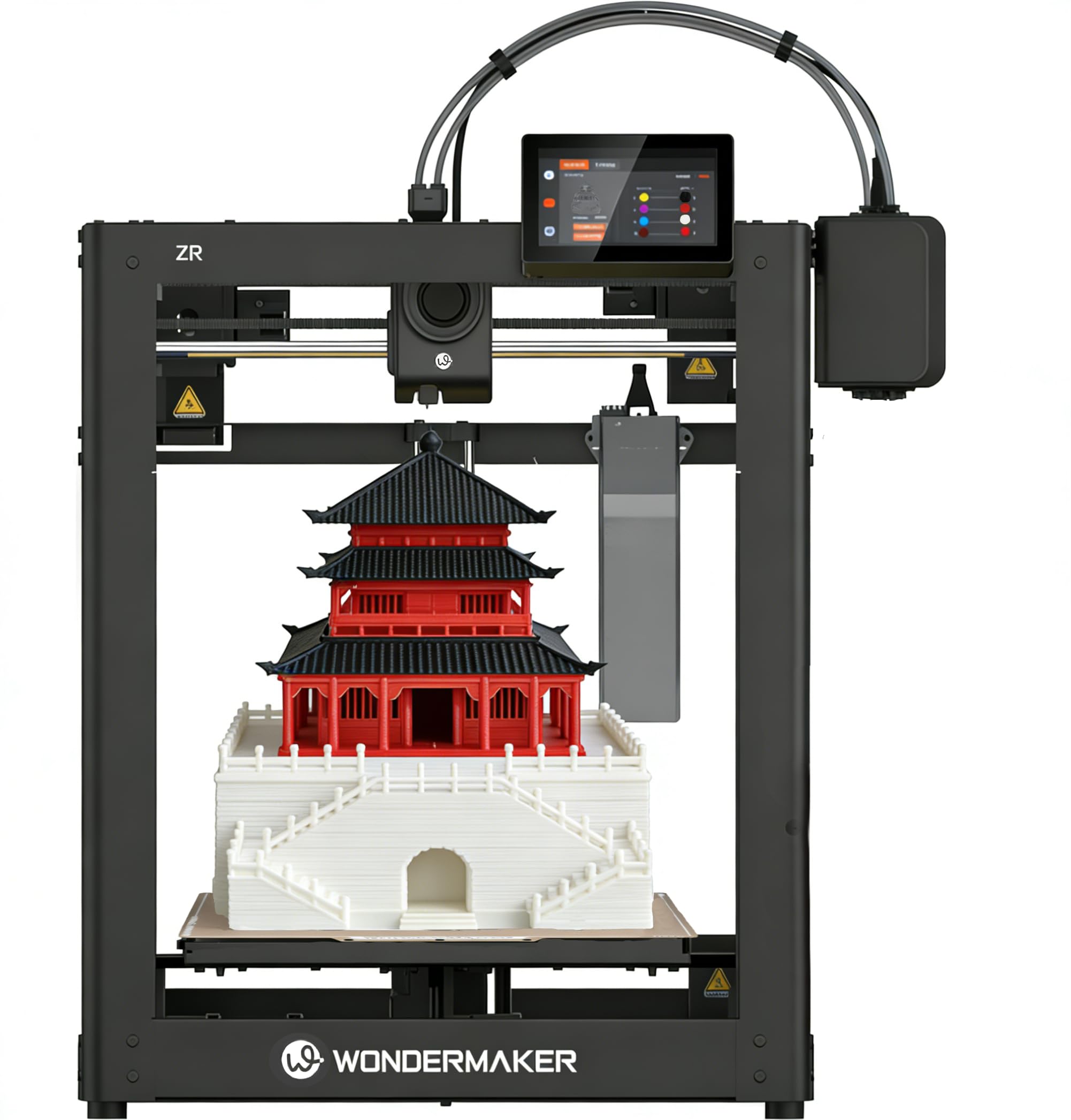
The WonderMaker ZR delivers a true 300x300x300mm build volume with an integrated Multicolor Integrated Filament System (MIFS) for 4-color printing out of the box. It reaches 600mm/s and 20,000mm/s² acceleration on a CoreXY frame. The 300°C hardened steel nozzle paired with a dual-gear all-metal extruder handles TPU, PEBA, PETG-CF, and composites. Dual-fan cooling with a 15,000 RPM hotend fan improves overhang performance.
Users report print quality that matches the Bambu P1S at nearly half the price. The double-sided PEI plate ensures strong adhesion, and Klipper firmware with ORCA Slicer provides Wi-Fi connectivity and remote monitoring. Silent mode operates down to 48 dB. Assembly is straightforward, with clear instructions and a setup time under 20 minutes.
The MIFS system can be unreliable for some users, with reports of filament feeding errors and excessive waste. The software stack is lackluster compared to more polished ecosystems, and the camera and enclosure are sold separately. Some units arrive with poorly written instructions that leave beginners stranded.
Why it’s great
- True 300mm³ build volume with 4-color printing
- Print quality rivals Bambu P1S
- Quiet operation at 48 dB in silent mode
Good to know
- MIFS system can be unreliable
- Camera and enclosure not included
- Software experience is mediocre
5. Snapmaker Artisan 3D Printer

The Snapmaker Artisan features a 400x400x400mm build volume and a modular quick-swap design that converts between 3D printing, laser engraving, and CNC carving. The dual extrusion module uses a 7.5:1 planetary gear ratio for reliable filament feeding. The all-metal frame uses industrial-grade steel linear rails ground at the micron level, and the one-piece die-cast base plate provides exceptional rigidity during high-speed operations.
Users praise the build quality and the versatility of having three manufacturing methods in one machine. The 7-inch touchscreen offers live status views and G-code previews. The software supports 600+ materials across all three modes. Laser engraving performance is rated excellent, and CNC carving handles tough materials with the 200W module.
The assembly process is challenging due to sparse instructions, taking around 4 hours. The dual extrusion system has been reported to produce strings and blobs, and calibration can be difficult. The software occasionally shows blank screens or Chinese error messages. The Snapmaker is best for makers who value versatility over pure 3D printing reliability.
Why it’s great
- 3-in-1 functionality (3DP, laser, CNC)
- Industrial-grade linear rails for precision
- Large 400mm³ build volume
Good to know
- Difficult assembly with sparse instructions
- Dual extrusion can be unreliable
- Software has stability issues
6. Anycubic Kobra S1C Multi-Color 3D Printer

The Kobra S1C combines an enclosed CoreXY chassis with an integrated ACE Pro unit that actively dries filament during printing. Reaching 600mm/s speed, it includes full-auto calibration with one-click leveling, vibration compensation, and flow rate calibration. The quick-swap nozzle design allows changes in seconds, and the Anycubic App provides remote control and monitoring.
Users report an impressively smooth setup, going from unboxing to first print in under 90 minutes. The multi-color system works reliably with generic PLA, and the enclosed chamber stabilizes temperatures for ABS and ASA. The active drying feature significantly improves success rates for long prints. The printer is quiet and produces no noticeable fumes during operation.
The ACE Pro unit is the weakest link, struggling with matte PLA and certain filament loading sequences. The built-in camera is low-resolution and only suitable for monitoring, not time-lapse photography. The unit is heavy at 56 pounds and requires ample desk space. Multicolor printing creates purge waste that needs to be managed.
Why it’s great
- Active filament drying inside the enclosure
- Very novice-friendly setup and operation
- Smooth multi-color printing with ACE Pro
Good to know
- ACE Pro unit can be finicky with some filaments
- Low-resolution camera for monitoring only
- Heavy and requires dedicated space
7. Sovol T500 3D Printer

The Sovol T500 is a massive 500x500x500mm CoreXY printer that ships 95% pre-assembled for a 15-minute setup time. It reaches 500mm/s with 8,000mm/s² acceleration. The direct drive extruder with a 6.5:1 gear ratio delivers a 25mm³/s flow rate. The 7-inch Klipper touch screen with 1024×600 resolution provides remote control, and the 300°C all-metal hotend supports carbon fiber and wood-filled filaments.
Users with large-scale projects praise the T500 for printing objects in one-third the time of a standard Ender 3. The industrial-grade linear rails on all axes reduce friction and improve layer alignment. The 49-point auto leveling system ensures first-layer adhesion across the enormous bed. The built-in LED lights allow monitoring in low-light conditions.
The T5 has a reputation for requiring extensive tuning out of the box. Some units arrive with a tilted gantry, and the SD card slot has alignment issues. The extruder tensioner and PTFE liner have been reported to fail over time, and the stepper motors can overheat, requiring upgraded cooling. This printer is not recommended for users who want a hassle-free experience.
Why it’s great
- 500mm³ build volume for massive single prints
- 95% pre-assembled for quick setup
- Industrial-grade linear rails on all axes
Good to know
- Requires significant tuning out of the box
- Some components prone to failure
- Loud fans and stepper motors
8. Creality Ender 5 Max 3D Printer

The Ender 5 Max is a 400x400x400mm CoreXY printer designed for print farm scalability. It hits 700mm/s on a reinforced die-cast aluminum frame with an X-axis linear rail for precision. The 64-point auto leveling system and automatic Z-offset ensure strong first layers without manual adjustment. The 1000W rapid-heating bed reaches temperature in minutes, and the dual-gear direct drive extruder supports continuous 24/7 production.
Users appreciate the WLAN multi-printer control for grouped management and the tri-color status indicator visible from across the room. The build quality is solid for the price, and the printer handles PLA, PETG, ABS, and ASA without issues when enclosed. The fast heating bed speeds up the workflow significantly.
Reports of bed adhesion problems and severe shaking during fast moves are common. Some units arrive with loose parts and broken extruder casings. The Creality presets in the slicer can cause print failures, and replacement parts are difficult to source. The build quality consistency appears to be a roll of the dice—some units work beautifully, while others fail within hours.
Why it’s great
- 400mm³ build volume for large prototypes
- WLAN multi-printer control for farms
- 1000W rapid-heating bed
Good to know
- Significant quality control issues
- Bed adhesion can be problematic
- Shakes severely at high speeds
9. ELEGOO Centauri Carbon 3D Printer

The ELEGOO Centauri Carbon arrives fully assembled and pre-calibrated, with a 256x256x256mm build volume. Its CoreXY structure supports 500mm/s printing and 20,000mm/s² acceleration. The 320°C brass-hardened steel nozzle and enclosed chamber with enhanced cooling are optimized for carbon fiber reinforced filament. The die-cast aluminum frame minimizes vibration. A built-in chamber camera and dual LED lighting enable real-time monitoring and time-lapse capture.
Users highlight the truly out-of-box experience—turn it on, load filament, and print. The auto leveling is excellent, and the preset slicer profiles work perfectly. The printer is reliable for continuous 8 to 10 hour workdays. The dual-sided build plate has a PLA Specific Surface that provides excellent adhesion without glue.
Some units have died within days due to a hotend communication error. The USB-C connector design on the mainboard is poorly routed and can fail. Tech support, while responsive, can be slow, especially for users outside of China. The printer shakes heavily during fast moves, despite the rigid frame, which can affect print quality for very tall objects.
Why it’s great
- Truly plug-and-play out of the box
- Excellent auto leveling and slicer profiles
- Built-in camera with time-lapse support
Good to know
- Some units arrive with fatal hardware defects
- USB-C connector design is fragile
- Shakes noticeably at high speeds
10. Flashforge AD5X Multi-Color 3D Printer

The Flashforge AD5X brings 4-color printing to a 220x220x220mm CoreXY frame at 600mm/s and 20,000mm/s² acceleration. Its 300°C direct-drive extruder supports four nozzle sizes from 0.25mm to 0.8mm. The 1-click auto leveling system and dual-channel cooling fan with vibration compensation deliver consistent print quality. The built-in resume printing function handles power loss, and the Flash Maker mobile app provides remote printing.
Users report fast setup, with some completing the process in under 30 minutes. The PEI plate offers strong adhesion, and the multi-color system works reliably with SunLu PLA Plus. The printer is quiet and includes a responsive touch screen. It provides a good entry point for users wanting to explore multi-color printing without a huge investment.
The software stack is the weakest point, with a clunky PC app and a poorly rated phone app. Some units have experienced filament jams at the 4-in-1 connector and inconsistent first layers. The bed is made of thin plastic and the Z-axis moves loudly. The test filament included is not on a spool, which can cause feeding issues.
Why it’s great
- Affordable entry into multi-color printing
- Fast 30-minute setup time
- Quiet operation with good print quality
Good to know
- Software stack is poor and clunky
- Filament jams at the connector
- Build quality feels less premium
11. Creality Ender 3 V3 Plus 3D Printer

The Ender 3 V3 Plus offers a 300x300x330mm build volume on a CoreXZ and Y-axis dual motor system. It reaches 600mm/s and 20,000mm/s² acceleration. The direct drive extruder features a bolstered spring and ball plunger for 1000+ hours of clog-free extrusion. The tri-metal unicorn nozzle integrates the nozzle and throat into a single hardened steel piece for easy swaps. One-tap calibration handles auto-leveling, Z-offset, and input shaping automatically.
Users highlight its impressive speed and value for a large-format printer. The auto-leveling works reliably out of the box, and the machine ships in highly pre-assembled modules. The two Y-axis motors move the large bed swiftly along linear rods, and dual support rods connect the base and gantry top to reduce Z-axis shaking. It’s a solid foundation for beginners who want a 300mm build without a premium price tag.
Quality control is inconsistent. Some units arrive with the gantry not square to the bed, making prints over 30mm tall useless. The maximum Y-axis acceleration has been measured at 1500mm/s² rather than the advertised 8000mm/s². The fans are loud, and the included filament can have winding defects that cause collisions. The printer may require significant rebuild effort to function correctly.
Why it’s great
- True 300mm build volume at a low price
- Fast 600mm/s CoreXZ motion system
- Easy one-tap auto calibration
Good to know
- Inconsistent quality control on arrival
- Advertised acceleration not always achievable
- Loud fans and potential gantry misalignment
FAQ
Why is CoreXY preferred over a bedslinger for a 300mm build?
Do I really need a heated chamber for PLA?
How many leveling points are enough for a 300mm bed?
Can I leave a 300mm printer running unattended?
Final Thoughts: The Verdict
For most users, the 300mm 3d printer winner is the Sovol SV08 because it delivers a 350mm³ build area, open-source Klipper firmware, and excellent print quality at a mid-range price. If you want an active 65°C heated chamber for engineering materials, grab the QIDI PLUS4. And for budget-conscious users who need a true 300mm footprint, nothing beats the Creality Ender 3 V3 Plus for raw value.