
Choosing the right RTX 3060 Ti variant means navigating a maze of boost clocks, cooler designs, and physical dimensions, all while trying to land the best price-to-performance ratio in the current market. This GPU remains a sweet spot for 1440p gaming, delivering excellent frame rates with ray tracing and DLSS enabled, making it a top consideration for gamers and creators alike.
I’m Min — the co-founder and writer behind Gadgets Feed. My analysis of these cards comes from cross-referencing hundreds of verified buyer reports, clock-for-clock benchmark data, and thermal performance patterns across the most popular 3060 Ti board designs on the market.
This guide helps you compare cooling solutions, clock speeds, and build quality to find the best 3060 ti 8gb graphics card for your specific rig and budget.
How To Choose The Best 3060 Ti 8GB Graphics Card
All RTX 3060 Ti cards share the same GA104 GPU core and 8GB of GDDR6 memory, but the cooler design, power delivery, and factory overclock create real differences in noise, temperatures, and sustained performance. Focus on these factors to match a card to your build.
Cooler Design and Noise Levels
The cooler is the single biggest differentiator. A triple-fan design with a large heatsink, like the MSI Gaming X Trio or GIGABYTE Gaming OC PRO, will keep the core below 65°C under load while staying nearly silent. Dual-fan cards like the ZOTAC Twin Edge are more compact but run hotter and louder, often requiring an undervolt to keep fan speeds comfortable. Check whether fans feature dual ball bearings for longevity, especially if you plan to keep the card for several years.
Physical Dimensions and Compatibility
Many premium 3060 Ti models are surprisingly large. The ASUS TUF Gaming and MSI Gaming X Trio exceed 11 inches in length and take up 2.5 to 2.75 slots. Measure your case’s maximum GPU clearance and ensure your motherboard’s PCIe slot alignment leaves room for thick coolers. Smaller dual-fan cards like the ZOTAC Twin Edge or Founders Edition fit easier in Mini-ITX and compact mid-tower cases.
Factory Overclock and Boost Behavior
Factory overclocks range from a conservative 1695 MHz on the MSI Ventus 2X up to 1830 MHz on the MSI Gaming X Trio. In practice, the difference is only a few percent in frame rates because NVIDIA’s GPU Boost dynamically scales clocks based on thermal headroom. A card with a better cooler will sustain higher boost clocks longer under load, making thermal performance more impactful than the advertised boost number.
Build Quality and Feature Set
Metal backplates, RGB lighting, dual BIOS, and reinforced PCIe brackets add durability and aesthetic value but also increase weight and cost. The EVGA FTW3 Ultra and ASUS TUF Gaming use all-metal shrouds that feel premium and improve heat dissipation. Cheaper models may use plastic shrouds and lighter heatsinks, which can lead to higher temperatures and more fan noise over sustained gaming sessions.
Quick Comparison
On smaller screens, swipe sideways to see the full table.
| Model | Category | Best For | Key Spec | Amazon |
|---|---|---|---|---|
| MSI Gaming X Trio | Premium | Silent 1440p Gaming | Boost 1830 MHz / Tri-Frozr 2 | Amazon |
| ASUS TUF Gaming V2 | Premium | Durability & Cool Temps | Boost 1785 MHz / All-Metal | Amazon |
| EVGA FTW3 Ultra | Premium | Overclocking Headroom | Boost 1800 MHz / iCX3 Cooling | Amazon |
| GIGABYTE Gaming OC PRO | Mid-Range | Triple-Fan Value | Boost ~1740 MHz / Windforce 3X | Amazon |
| ASUS TUF Gaming OC | Mid-Range | Reliable All-Rounder | Boost 1785 MHz / Axial-Tech Fans | Amazon |
| MSI Ventus 2X OC | Mid-Range | Compact ITX Builds | Boost 1695 MHz / Torx Fan 3 | Amazon |
| NVIDIA Founders Edition | Mid-Range | Reference Design Stability | Boost 1665 MHz / Dual-Axial | Amazon |
| ZOTAC Twin Edge OC | Budget | Compact & Affordable | Boost 1695 MHz / IceStorm 2.0 | Amazon |
| ZOTAC AMP White Edition | Budget | White Themed Builds | Boost ~1725 MHz / White Design | Amazon |
In‑Depth Reviews
1. MSI Gaming GeForce RTX 3060 Ti Gaming X Trio

The MSI Gaming X Trio is the quietest and coolest RTX 3060 Ti you can buy. Its Tri-Frozr 2 cooler with three Torx Fan 4.0 blades keeps the GDDR6 memory and GPU core below 60°C under sustained load while remaining nearly inaudible — a rarity for a 200-watt card. The 1830 MHz boost clock is the highest factory overclock among the models reviewed, and MSI’s dual BIOS lets you switch between silent and gaming profiles without software.
At 12.7 inches long and taking up 2.5 slots, this card demands serious case clearance. Owners consistently report flawless 1440p performance with ray tracing enabled, praising the build quality and RGB lighting. The heatsink is massive, so verify your chassis supports the length before purchasing. It pairs beautifully with a Ryzen 5 5600X or i5-12400 for a high-end mid-range gaming rig.
For a quiet, high-performance 3060 Ti that handles demanding titles at high settings without thermal throttle, the Gaming X Trio is the definitive choice. The premium cooling investment pays off in lower noise and higher sustained clocks over years of use.
Why it’s great
- Exceptionally quiet operation under load
- Highest factory boost clock among reviewed 3060 Ti cards
- Dual BIOS for silent and gaming profiles
Good to know
- Very large – 12.7 inches long and 2.5 slots thick
- Premium pricing compared to dual-fan models
2. ASUS TUF Gaming NVIDIA GeForce RTX 3060 Ti V2 OC Edition

The ASUS TUF Gaming V2 is built like a tank, with an all-aluminum and steel shroud that provides rigidity and excellent heat dissipation. Its triple Axial-Tech fans with dual ball bearings deliver long-lasting cooling performance, keeping the core below 58°C under load in a well-ventilated case. The V2 revision adds LHR (Lite Hash Rate) and maintains the same 1785 MHz OC boost clock that outperforms most mid-range 3060 Ti cards out of the box.
Users upgrading from GTX 1060 or 1660 Super cards report massive gains in Cyberpunk 2077, Warzone, and Forza, with all settings maxed at 1440p. The metal construction adds weight (2.5 pounds), so a GPU support bracket is recommended. The subtle RGB on the side is unobtrusive, and ASUS GPU Tweak II provides intuitive voltage and fan curve controls.
If you value military-grade capacitors and a cooler that outlasts the competition, the TUF Gaming V2 is the most durable RTX 3060 Ti on this list. Its combination of low temperatures and quiet fans makes it ideal for long gaming sessions or streaming setups.
Why it’s great
- All-metal shroud with dual ball bearing fans
- Runs very cool – under 58°C under load
- Military-grade capacitors enhance reliability
Good to know
- Heavy card – use a support bracket
- 2.75 slot thickness may limit case airflow
3. EVGA GeForce RTX 3060 Ti FTW3 Ultra Gaming

EVGA’s FTW3 Ultra is a serious overclocking card. With an 1800 MHz boost clock and iCX3 cooling that monitors nine thermal zones, it can sustain high boost speeds in demanding titles. The all-metal backplate and adjustable ARGB lighting give it a premium look, and the triple-slot cooler keeps the GDDR6 memory cool even during extended benchmarking sessions. Enthusiasts report this card can match 3080-level performance in Time Spy with a good silicon lottery draw.
The card is extremely long at 14.9 inches and heavy enough to require a brace. Full fan speed can get loud, but the default fan curve is reasonable for gaming loads. EVGA’s Precision X1 software offers granular control, though some users report a learning curve. Benchmark data shows consistent 65°C maximum temperatures under load with stock fan settings.
For builders who plan to undervolt and overclock, the FTW3 Ultra offers the most headroom among 3060 Ti cards. Its build quality and cooling infrastructure justify the premium for those who want to push every last frame.
Why it’s great
- Excellent overclocking headroom and silicon lottery potential
- iCX3 cooling with nine thermal sensors
- Premium all-metal build with ARGB
Good to know
- Very heavy – support brace essential
- Fans can be loud at 100% speed
4. GIGABYTE GeForce RTX 3060 Ti Gaming OC PRO 8G

The GIGABYTE Gaming OC PRO delivers triple-fan cooling at a competitive price point. Its Windforce 3X system with alternate-spinning fans reduces turbulence and keeps the card quiet during light loads. The 8GB GDDR6 memory on a 256-bit bus provides solid bandwidth for 1440p textures, and the factory boost clock around 1740 MHz is well within the average for mid-range 3060 Ti cards.
Buyers upgrading from older cards like the GTX 750 Ti or GTX 970 report night-and-day improvements in ray tracing and DLSS performance. Users note the card runs cool and quiet, though some report horizontal flickering lines on high-refresh monitors that may require a DisplayPort cable upgrade. The card measures 11 inches, making it easier to fit than the longer premium models.
If you want a reliable triple-fan 3060 Ti without paying a premium for extreme overclocking or RGB, the Gaming OC PRO offers the best balance of cooling and cost. It’s a solid pick for 1440p gaming with ray tracing features enabled.
Why it’s great
- Efficient triple-fan cooling at a mid-range price
- Quiet operation under normal loads
- Compact 11-inch length fits most cases
Good to know
- Some units experience display flicker with certain monitors
- No dual BIOS feature
5. ASUS TUF Gaming NVIDIA GeForce RTX 3060 Ti OC Edition

This original ASUS TUF Gaming OC edition set the standard for reliability in the 3060 Ti lineup. Its triple Axial-Tech fans with reversed center fan rotation reduce turbulence, while dual ball bearings extend fan lifespan significantly over sleeve-bearing designs. The 2.75-slot cooler keeps the GDDR6 memory within safe limits even during Unreal Engine development or extended gaming sessions.
Reviewers praise the card’s performance jump from a GTX 1070, noting massive gains in 1440p gaming. It runs cool with low power draw, but its size is a major consideration at 16 inches long — the longest card in this lineup. Some users report fan vibration or abnormal noise under load, though replacement fans are available from ASUS. It handles 8K output via HDMI 2.1 for creative professionals.
For a first-generation TUF design that proved the formula, this card offers proven reliability and military-grade components. Ensure your case can handle its length before purchase.
Why it’s great
- Dual ball bearing fans with long lifespan
- Military-grade capacitors for durability
- Supports 8K output via HDMI 2.1
Good to know
- Extremely long at 16 inches
- Some units have fan noise or vibration issues
6. MSI Gaming GeForce RTX 3060 Ti Ventus 2X OC

The MSI Ventus 2X OC is the go-to choice for compact builds. At just 9.1 inches long with a dual-fan Torx Fan 3 cooler, it slides into Mini-ITX cases and cramped mid-towers that reject larger triple-fan cards. The 1695 MHz boost clock is modest, but the card performs within 1% of the 3060 Ti average in benchmarks. Owners report very quiet operation and easy installation in ITX systems with i5-9400F or similar.
While the dual-fan cooler cannot match triple-fan designs under sustained load, the Ventus 2X handles 1440p gaming well in less demanding titles. It doesn’t have RGB or a metal backplate, keeping costs down. Some users report BIOS bricking issues, though these are isolated and resolved with M-Flash recovery procedures.
If space is your primary constraint, this card delivers full 3060 Ti performance in the smallest package without sacrificing noise levels. It’s also a strong performer for 1080p high-refresh setups where frame rates exceed 144 FPS.
Why it’s great
- Compact 9.1-inch length for ITX builds
- Very quiet dual-fan operation
- Good benchmark performance close to average
Good to know
- Dual-fan cooling runs hotter than triple-fan models
- No RGB or metal backplate
7. NVIDIA GeForce RTX 3060 Ti Founders Edition

NVIDIA’s Founders Edition is the reference baseline for all 3060 Ti cards. Its dual-axial push-pull cooler exhausts air out the back of the case, making it ideal for small form factor builds where recirculated hot air is a concern. The 1665 MHz boost clock is lower than aftermarket cards, but the card benefits from NVIDIA’s rigorous QA and stable driver support. It features a metal shroud and a clean, industrial look that fits minimalist builds.
Owners transitioning from a 2060 Super report a noticeable uplift in performance, with quieter operation under light loads. The card can get loud under heavy gaming, but undervolting drops temperatures and noise significantly. It supports all modern features including HDMI 2.1, DisplayPort 1.4a, and DLSS. Some units arrive used, so inspect for dust and fan condition.
For purists who want the card as NVIDIA intended, the Founders Edition delivers reliable performance with rear-exhaust cooling that benefits small cases. It represents the standard against which all other 3060 Ti models are measured.
Why it’s great
- Rear exhaust cooling ideal for small cases
- NVIDIA reference quality and driver support
- Clean, minimalist industrial design
Good to know
- Lower factory boost clock than aftermarket cards
- Can be loud under heavy gaming loads
8. ZOTAC Gaming GeForce RTX 3060 Ti Twin Edge OC
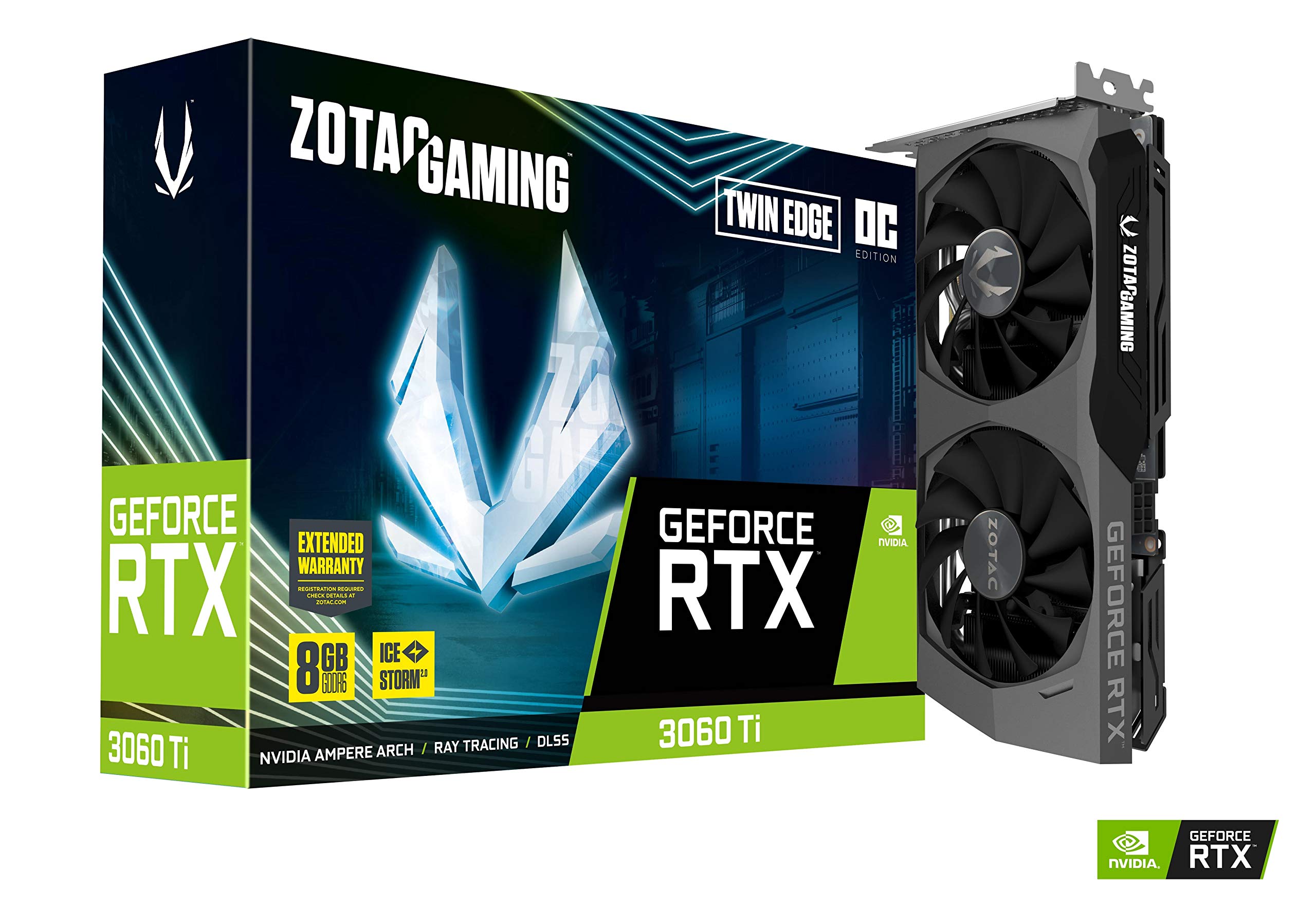
The ZOTAC Twin Edge OC is a compact dual-fan card that prioritizes value. At 8.7 inches with an IceStorm 2.0 cooler, it fits easily into smaller cases while still delivering full 3060 Ti performance. The 1695 MHz boost clock is competitive, and the card features white LED logo lighting and a metal backplate. It supports DisplayPort 1.4a and HDMI 2.1 for modern displays.
Users upgrading from an RX 580 report dramatic FPS gains, going from 22 FPS to over 100 FPS in 4K gaming. However, the Twin Edge runs hot out of the box, with many owners recommending an undervolt to 135W to keep temps around 61-62°C and reduce fan noise. The cooler is less efficient than Gigabyte or PNY alternatives, so good case airflow is essential.
If you’re on a tight budget, the ZOTAC Twin Edge OC offers solid 1440p gaming performance in a travel-friendly size. Just plan to undervolt it for the best experience.
Why it’s great
- Compact 8.7-inch length fits small cases
- Affordable entry into 3060 Ti performance
- Includes metal backplate and LED lighting
Good to know
- Runs hot – undervolting strongly recommended
- Dual-fan cooler is louder than competitors
9. ZOTAC Gaming GeForce RTX 3060 Ti AMP White Edition

The AMP White Edition is ZOTAC’s answer to all-white PC builds. Its white shroud and backplate stand out in themed systems, and the dual-fan cooler is finished in matching white. The boost clock reaches around 1725 MHz, putting it above the Twin Edge in performance. It outputs 8K via HDMI 2.1 and supports all the usual RTX 30-series features.
In real-world 1440p gaming, owners report 125-140 FPS on high settings in Warzone and Forza, even paired with an older i7-7700K. The card is powerful but has a reputation for noisy fans and a relatively small radiator. Undervolting is almost mandatory to achieve comfortable noise levels. Some buyers note the price was inflated during shortages, so current market pricing should be more reasonable.
For a white-themed build that doesn’t compromise on 1440p performance, the AMP White Edition is the only dedicated white 3060 Ti available. Factor in the cost of undervolting tools and good case airflow.
Why it’s great
- Unique white design for themed builds
- Good 1440p frame rates at high settings
- Supports 8K output
Good to know
- Noisy fans without undervolting
- Small radiator limits cooling capacity
FAQ
Does the RTX 3060 Ti support DLSS 3?
What power supply wattage do I need for a 3060 Ti?
Is the RTX 3060 Ti good for 4K gaming?
Final Thoughts: The Verdict
For most users, the 3060 ti 8gb graphics card winner is the MSI Gaming X Trio because it offers the quietest and coolest triple-fan cooling with the highest factory boost clock, making it ideal for long gaming sessions. If you want a durable all-metal build with excellent temperatures, grab the ASUS TUF Gaming V2. And for compact ITX builds where space is tight, nothing beats the MSI Ventus 2X OC for its small footprint and quiet operation.