
The NVIDIA GeForce RTX 3060 laptop GPU represents a specific inflection point in mobile gaming — a moment when ray tracing and DLSS became genuinely usable on a 15-inch chassis without requiring a bank loan. Unlike its desktop counterpart, the mobile 3060 operates within strict thermal and power budgets, making chassis design and cooling implementation as critical as the GPU itself. The right implementation delivers 100+ frames per second in modern titles at 1080p high settings, while the wrong one leaves performance on the table due to thermal throttling or a low-wattage BIOS.
I’m Min — the co-founder and writer behind Gadgets Feed. I’ve spent hundreds of hours analyzing GPU wattage configurations, cooling solution effectiveness, and real-world benchmark deltas across dozens of 3060 laptop SKUs to separate the well-engineered from the merely well-marketed.
After weeks of cross-referencing performance data and user reports, I’ve assembled the definitive guide to the best 3060 ti laptop options that actually deliver on the GPU’s potential.
How To Choose The Best 3060 Ti Laptop
Selecting a 3060 laptop is more nuanced than picking the cheapest option with the right GPU sticker. The RTX 3060 mobile’s performance varies dramatically based on the wattage the manufacturer allows it to draw — a 130W implementation can be 25% faster than a 60W version. Your decision should hinge on three factors: thermal design, CPU pairing, and display suitability.
GPU Wattage and Thermal Headroom
The RTX 3060 mobile ships with a TGP range between 60W and 130W. Most budget-tier chassis cap the GPU at 80-90W, which leaves significant performance untapped. A premium chassis with a higher TGP limit and effective cooling (dual fans, multiple heat pipes) allows the 3060 to sustain higher clock speeds during extended gaming sessions. Check reviews for sustained boost clock behavior before committing.
CPU-GPU Balance for 1080p Gaming
A 3060 paired with an underpowered CPU creates a bottleneck at 1080p high settings. Look for at least a 10th-gen Intel Core i7 or an AMD Ryzen 7. Newer 12th-gen and 13th-gen Intel Core i7 processors with performance hybrid architecture offer better frame time consistency, especially in CPU-bound titles like esports shooters and strategy games.
Display Refresh Rate and MUX Switch
A 3060 can comfortably push 100+ fps in many titles at 1080p high settings, making a 144Hz or higher display essential. A MUX switch allows the laptop to bypass the integrated graphics and route frames directly from the 3060 to the display, reducing latency and increasing frame rates by 5-10%. A 3060 laptop without a MUX switch leaves free performance on the table.
Quick Comparison
On smaller screens, swipe sideways to see the full table.
| Model | Category | Best For | Key Spec | Amazon |
|---|---|---|---|---|
| ASUS ROG Strix G16 (2025) | Premium | Ultimate performance & 240Hz display | Ryzen 9 9955HX3D + 5070 Ti | Amazon |
| Lenovo Legion 5 (i9) | Premium | OLED display & workstation power | i9-14900HX + RTX 5070 | Amazon |
| Lenovo Legion 5i (i7) | Premium | OLED gaming & student mobility | i7-14700HX + RTX 5070 | Amazon |
| GIGABYTE Gaming A16 (RTX 5070) | Premium | High-refresh & 32GB RAM value | i7-13620H + RTX 5070 | Amazon |
| MSI Crosshair A16 HX | Premium | QHD+ 240Hz & Ryzen 9 power | Ryzen 9 8940HX + RTX 5060 | Amazon |
| Acer Nitro V 16S AI | Mid-Range | 180Hz display & ample RAM | Ryzen 7 260 + RTX 5060 | Amazon |
| Acer Nitro V (i9) | Mid-Range | i9 CPU & spacious 1TB storage | i9-13900H + RTX 5060 | Amazon |
| GIGABYTE Gaming A16 (Intel) | Mid-Range | Slim chassis & Wi-Fi 6E | i7-13620H + RTX 5060 | Amazon |
| GIGABYTE Gaming A16 (AMD) | Mid-Range | Long battery & AMD efficiency | Ryzen 7 260 + RTX 5060 | Amazon |
| MSI Thin 15 | Mid-Range | Ultra-thin & 13th-gen CPU | i5-13420H + RTX 4060 | Amazon |
| ASUS TUF Dash 15 (2022) | Mid-Range | Military-grade durability & DDR5 | i7-12650H + RTX 3060 | Amazon |
| Acer Nitro 5 AN515-58-725A | Mid-Range | MUX switch & 144Hz gameplay | i7-12700H + RTX 3060 | Amazon |
| MSI GF65 Gaming | Budget | Entry-level 3060 at lowest cost | i7-10750H + RTX 3060 | Amazon |
In‑Depth Reviews
1. ASUS ROG Strix G16 (2025)
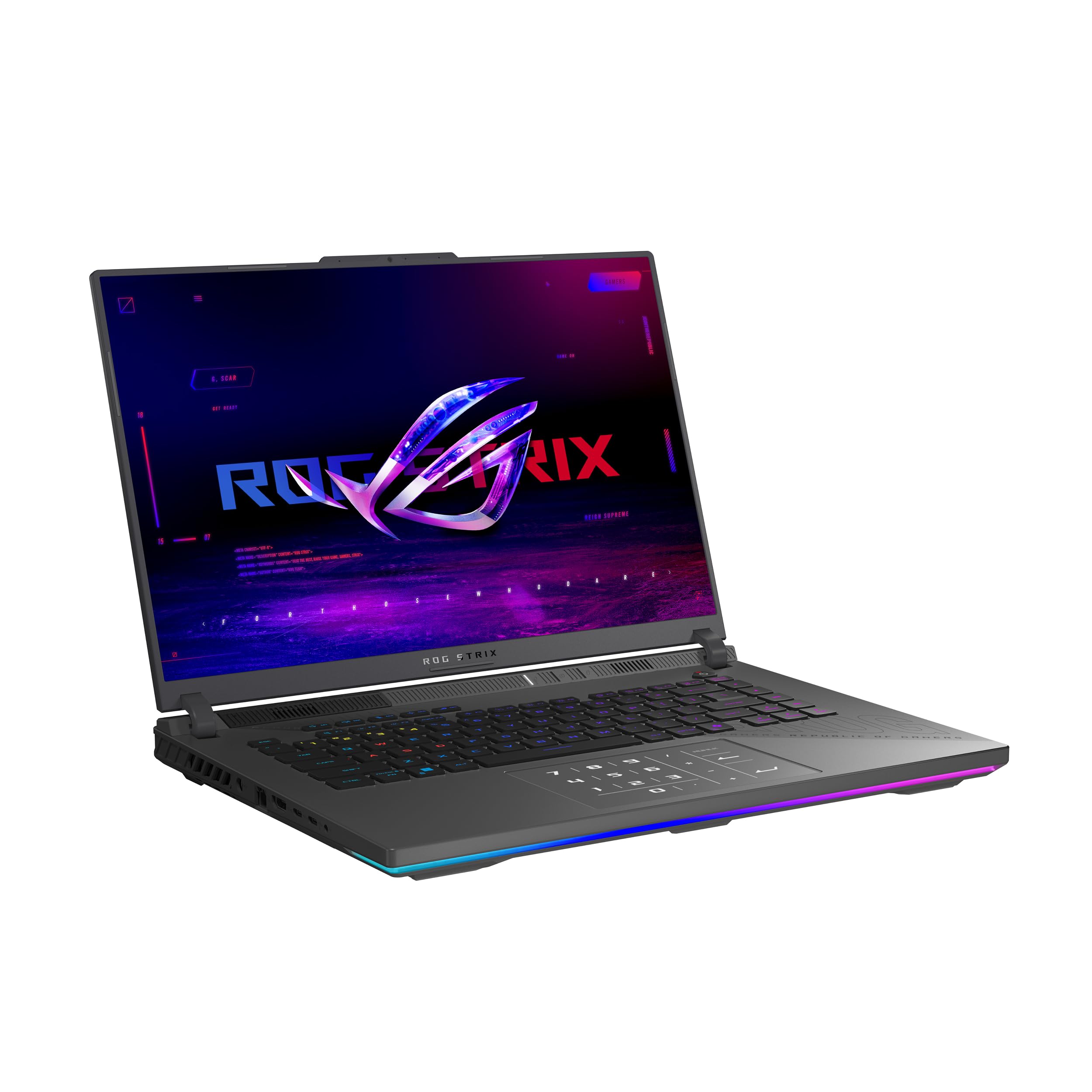
The ASUS ROG Strix G16 sets the performance ceiling for this roundup with an AMD Ryzen 9 9955HX3D processor — a 3D V-Cache monster that obliterates CPU-bound bottlenecks in titles like Counter-Strike 2 and Factorio. Paired with an RTX 5070 Ti at what appears to be its full wattage envelope, this system delivers 240 frames per second on the 16-inch 2.5K Nebula display with a 3ms response time. The tri-fan cooling system with Conductonaut liquid metal on the CPU keeps thermals under control during extended sessions.
The 32GB of DDR5-5600 memory and 1TB PCIe Gen 4 SSD mean zero compromises for multitasking or game load times. The MUX Switch with Advanced Optimus automatically routes frames directly to the dGPU during gaming and switches back for battery efficiency — no restarts required. The customizable RGB lightbar adds personalization without being garish.
User feedback confirms the system excels for graphic design work and rendering alongside gaming, though a cooling pad is recommended for peak sustained performance. The RTX 5070 Ti at this price point ensures the 3060 is generations behind in raw rasterization power, but the value proposition of a complete no-compromise mobile gaming rig is undeniable.
Why it’s great
- AMD 3D V-Cache CPU eliminates CPU bottlenecks for high-frame-rate gaming
- 240Hz 2.5K Nebula display with 3ms response offers elite visual fluidity
- Tri-fan cooling with liquid metal sustains peak performance under load
Good to know
- Requires a cooling pad for optimal sustained thermal performance
- Premium price tier reflects top-tier component pairing
2. Lenovo Legion 5 (i9)
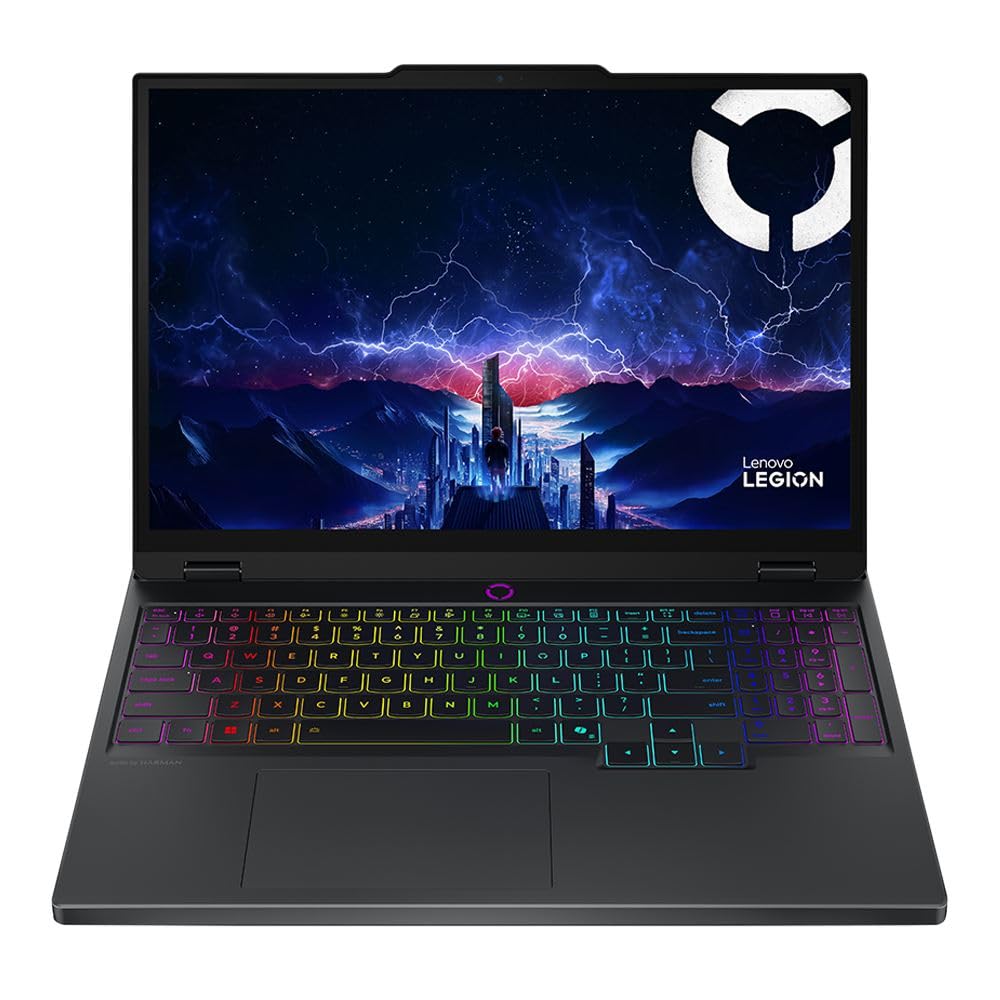
The Lenovo Legion 5 equipped with an Intel Core i9-14900HX and an RTX 5070 represents the pinnacle of Intel-based mobile gaming in this roundup. The 14th-gen i9 with 24 cores (8 P-cores, 16 E-cores) running up to 5.8 GHz is overkill for most gaming workloads but provides headroom for streaming, recording, and content creation simultaneously. The 32GB of DDR5-5600 RAM ensures no stutter during multitasking.
The standout feature is the 15.1-inch WQXGA OLED display at 165Hz. OLED’s per-pixel lighting delivers infinite contrast ratio and true blacks, making HDR content and dark game scenes look dramatically better than any IPS panel. The 5-megapixel front-facing camera with privacy shutter is a rare addition for a gaming laptop, and Wi-Fi 7 ensures future-proof wireless connectivity.
User reviews highlight that the display exceeds expectations for both gaming and productivity, and the light 1.90 kg chassis makes it more portable than most 15-inch gaming rigs. The RTX 5070 paired with this CPU can handle any current title at high settings on the OLED panel, making it a workstation-grade machine that excels at gaming.
Why it’s great
- WQXGA OLED 165Hz display delivers unmatched color accuracy and contrast
- 24-core i9-14900HX handles any multitasking scenario with ease
- Wi-Fi 7 and 5MP webcam add future-proof connectivity and clarity
Good to know
- Premium pricing reflects the OLED panel and top-tier CPU
- Some units have been reported with single-channel RAM configuration
3. Lenovo Legion 5i (i7)

The Lenovo Legion 5i targets the student gamer who needs mobility and display quality in equal measure. The 15-inch 2.5K PureSight OLED panel at 165Hz is a standout feature — OLED provides per-pixel lighting for true blacks and infinite contrast, while the 165Hz refresh rate keeps competitive titles fluid. The Intel Core i7-14700HX with 20 cores (8 P-cores + 12 E-cores) offers strong multitasking performance without the thermal demands of the i9.
The Legion Coldfront: Hyper cooling system uses dual stealth fans and copper heat pipes to keep noise levels down during less demanding tasks while ramping up effectively under load. The 80Wh battery with fast charging (0 to 70% in 30 minutes via USB-C) makes it practical for campus use. The Legion AI Engine+ optimizes frame rates in AAA titles and render times in creative apps automatically through the Legion Space interface.
User feedback confirms the OLED screen is breathtaking for both gaming and media consumption, though the 16GB of single-channel RAM in some configurations can cost up to 10% performance in CPU-intensive games. The RTX 5070 at 1080p high settings on this OLED panel delivers a premium visual experience that justifies its mid-premium price tier.
Why it’s great
- 2.5K PureSight OLED 165Hz display offers incredible contrast and fluidity
- Legion AI Engine+ optimizes performance automatically per application
- Fast charging via USB-C provides practical campus mobility
Good to know
- Single-channel RAM configuration can reduce CPU performance by up to 10%
- Cooling fans can become audible even during routine office tasks
4. GIGABYTE Gaming A16 (RTX 5070)

The GIGABYTE Gaming A16 with an RTX 5070 and 32GB of DDR5 RAM punches above its price tier by offering a next-generation GPU with double the memory of most competitors at this level. The Intel Core i7-13620H is a capable mid-range CPU with 10 cores (6 P-cores + 4 E-cores) that won’t bottleneck the 5070 in most scenarios. The 165Hz WUXGA display provides smooth motion for competitive gaming.
The 180-degree hinge and slim 19.45mm chassis make this laptop versatile for LAN parties and shared workspaces. However, the GiMate AI software has received criticism for consuming up to 2.5GB of RAM and interfering with GPU performance — many users recommend uninstalling it immediately. The RTX 5070 here runs Cyberpunk 2077 at 165 fps on 1080p Ultra with DLSS 4X frame generation, demonstrating the raw power of the Blackwell architecture.
Battery life in non-gaming scenarios reaches 5-7 hours, but the RTX 5070 draws significant power under load, requiring the AC adapter for gaming sessions. The cooling system keeps GPU temperatures around 71°C under maximum load, though fans become audible. For buyers prioritizing raw GPU performance per dollar, this configuration is difficult to beat.
Why it’s great
- RTX 5070 at this price tier delivers exceptional ray tracing and DLSS 4 performance
- 32GB DDR5 RAM provides ample headroom for multitasking and future games
- Thin 19.45mm chassis with 180-degree hinge enhances portability
Good to know
- GiMate AI software can interfere with gaming performance and consume RAM
- Battery drains quickly during gaming; AC plug is required for sustained play
5. MSI Crosshair A16 HX

The MSI Crosshair A16 HX pairs an AMD Ryzen 9 8940HX with an RTX 5060 and a 16-inch QHD+ 2560×1600 display at 240Hz — a combination that excels for both high-frame-rate competitive gaming and high-resolution immersive titles. The Ryzen 9 HX series processor delivers desktop-class performance in a mobile form factor, with Zen 4 architecture providing strong single-threaded performance for gaming.
The Cooler Boost 5 system uses dual fans and multi-directional airflow to keep the Ryzen 9 and RTX 5060 within their thermal envelopes. The 1TB NVMe SSD and 16GB DDR5 RAM provide ample storage and memory for any game library. The 24-zone RGB keyboard adds a level of customization appropriate for the premium chassis. The fingerprint reader is a rare but welcome addition for Windows Hello authentication.
User reviews confirm that the Ryzen 9 CPU is significantly stronger than the RTX 5060 GPU, making this ideal for CPU-heavy games like simulation titles and strategy games. Some users report graphics tearing in older titles and bloatware affecting performance out of the box. The battery life is limited to 2-3 hours under load, which is typical for a QHD+ 240Hz system of this caliber.
Why it’s great
- QHD+ 240Hz display offers exceptional clarity and fluidity for competitive play
- Ryzen 9 8940HX provides elite CPU performance for demanding workflows
- Cooler Boost 5 maintains stable thermals during extended gaming sessions
Good to know
- RTX 5060 is the bottleneck in this configuration for GPU-heavy titles
- Bloatware can cause performance issues out of the box
6. Acer Nitro V 16S AI

The Acer Nitro V 16S AI represents a compelling mid-range option with a generous 32GB of DDR5-5600 RAM — double what most competitors offer at this tier. The 16-inch WUXGA 1920×1200 IPS display with 100% sRGB coverage and 180Hz refresh rate provides accurate colors and smooth motion suitable for both gaming and content creation. The AMD Ryzen 7 260 processor with its AI TOPS capability adds future-proofing for AI-assisted applications.
The cooling system keeps the CPU at a maximum of 79°C under heavy gaming loads, and the build quality feels solid with minimal flex. The RTX 5060 with 572 AI TOPS enables DLSS 4 frame generation for smooth performance in modern titles. The 1TB Gen 4 SSD provides fast load times and ample storage for a large game library.
User reports indicate the display is somewhat dim, making it less suitable for bright environments. The included 135W power supply is insufficient for sustained performance mode gaming, causing the battery to drain during extended sessions. The RTX 5060 at this configuration handles 1080p gaming with ease, making it a strong value proposition for buyers who prioritize RAM capacity and display quality.
Why it’s great
- 32GB DDR5-5600 RAM provides exceptional multitasking headroom
- 180Hz 100% sRGB display offers accurate colors and smooth motion
- Effective cooling keeps CPU under 80°C during heavy gaming
Good to know
- 135W power supply is insufficient for peak performance; battery drains under load
- Display brightness is below average for use in well-lit environments
7. Acer Nitro V (i9)

The Acer Nitro V with an Intel Core i9-13900H processor offers a CPU-first approach to mobile gaming. The 13th-gen i9 with 14 cores (6 P-cores + 8 E-cores) running up to 5.4 GHz delivers exceptional performance for CPU-bound games like simulation titles, strategy games, and content creation workloads. The RTX 5060 benefits from this CPU power, avoiding bottlenecks at 1080p high settings.
The 15.6-inch FHD IPS display at 165Hz provides a smooth gaming experience with minimal ghosting. The 1TB PCIe Gen 4 SSD is double the storage of many competitors at this tier, reducing the need for immediate upgrades. The Thunderbolt 4 port adds versatility for external displays and fast charging up to 65W. The dual-fan cooling system with quad exhaust ports maintains stable thermals under load.
User reviews indicate the laptop runs quietly during light tasks but can become warm during basic productivity. The RTX 5060 handles modern titles well without DLSS, and the i9 ensures smooth performance in CPU-heavy scenarios. Some units may arrive with display issues, and the build quality is consistent with the Nitro line’s mid-range positioning.
Why it’s great
- i9-13900H provides elite CPU performance for CPU-bound games and workloads
- 1TB Gen 4 SSD offers double the storage of most competitors at this tier
- Thunderbolt 4 port enables external displays and 65W fast charging
Good to know
- Display panel quality may vary between units
- Chassis can become warm during light productivity tasks
8. GIGABYTE Gaming A16 (Intel)
The Intel version of the GIGABYTE Gaming A16 swaps in an Intel Core i7-13620H (10 cores, up to 4.9 GHz) for the AMD Ryzen 7 found in its sibling. This configuration targets users who prefer Intel’s performance hybrid architecture for gaming and streaming workloads. The RTX 5060 GPU delivers strong performance with DLSS 4 support for modern titles.
The 165Hz WUXGA display provides smooth motion, and the slim 19.45mm chassis makes this one of the more portable options in the mid-range segment. The 180-degree hinge allows for flexible positioning during LAN parties or presentations. The 1TB SSD and 16GB DDR5 RAM provide a solid foundation for gaming and productivity.
User feedback is mixed — some praise the slim build, gaming performance, and speaker quality, while others report severe performance issues including system crashes, GPU disconnects, and problematic GiMate software that throttles performance. The Amazon return window limits recourse after 30 days. For buyers willing to tinker with software configuration, the hardware foundation is solid, but the software ecosystem needs work.
Why it’s great
- Slim 19.45mm chassis with 180-degree hinge enhances portability and flexibility
- Intel 13th-gen i7 provides strong multi-core performance for streaming
- 165Hz WUXGA display delivers smooth motion for competitive gaming
Good to know
- GiMate software can cause system instability and throttling
- Performance consistency varies significantly between units
9. GIGABYTE Gaming A16 (AMD)
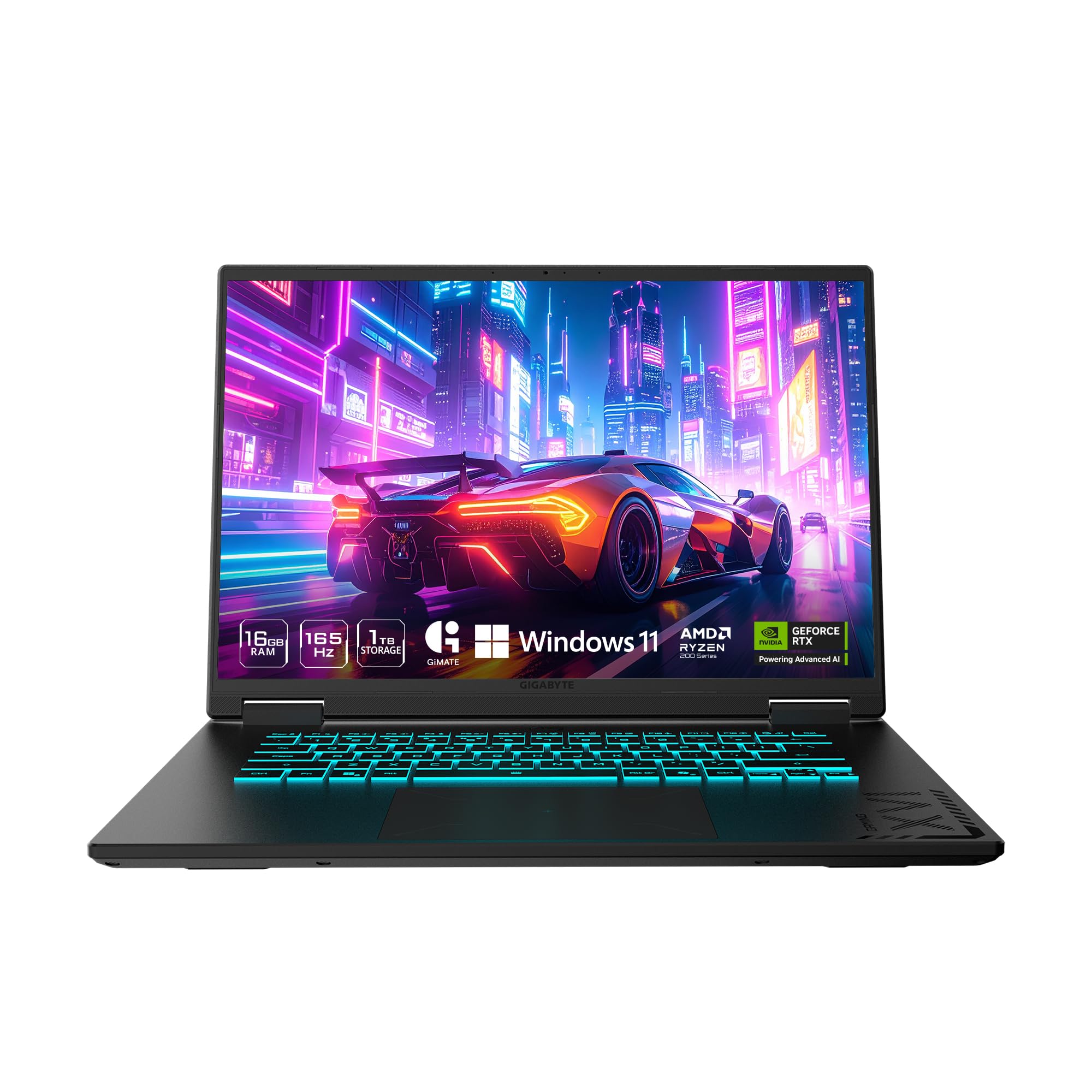
The AMD version of the GIGABYTE Gaming A16 features a Ryzen 7 260 processor, offering superior power efficiency compared to its Intel counterpart. The quoted 14-hour battery life is exceptional for a gaming laptop, making this a viable option for students or professionals who need all-day computing without being tethered to a power outlet. The RTX 5060 ensures gaming performance remains strong when plugged in.
The 165Hz WUXGA display and slim 19.45mm chassis mirror the Intel version, providing the same portability and visual experience. The 180-degree hinge adds flexibility for collaboration or media consumption. The 1TB SSD provides ample storage, and the 16GB DDR5 RAM handles gaming and multitasking with ease.
User reviews highlight the solid build quality and competitive price-to-performance ratio. The GiMate AI software is again a point of concern, with reports of it optimizing system resources in ways that sabotage gaming performance. The fan noise is noted as audible under load. For buyers who prioritize battery life and AMD efficiency in a gaming chassis, this configuration offers unique value in the market.
Why it’s great
- Ryzen 7 260 offers exceptional power efficiency with 14-hour battery life claim
- Slim 19.45mm chassis with 180-degree hinge is highly portable
- RTX 5060 provides strong gaming performance when connected to power
Good to know
- GiMate AI software can interfere with gaming performance
- Fan noise is audible under gaming loads
10. MSI Thin 15

The MSI Thin 15 lives up to its name with a slim profile that prioritizes portability over raw cooling capacity. The Intel Core i5-13420H is a solid mid-range CPU with 8 cores (4 P-cores + 4 E-cores) running up to 4.6 GHz, and the RTX 4060 offers a generation-over-generation improvement over the 3060 in ray tracing and DLSS 3 frame generation. The 15.6-inch FHD IPS 144Hz display provides a standard but capable gaming canvas.
The build quality reflects its budget-tier positioning — user reviews note the use of cheaper materials in the chassis construction. The 512GB SSD fills up quickly with modern game installations, and the storage limitation is the most common complaint. The 16GB of DDR5 RAM is sufficient for gaming but not future-proof for heavy multitasking.
Performance is strong for the price, with the RTX 4060 handling 1080p gaming with ease. The cooling system is adequate but not exceptional, and the thin chassis means thermals can become constrained during extended sessions. The included USB-C hub adds value for peripheral connectivity. For budget-conscious buyers who want 40-series features in a portable form factor, the MSI Thin 15 delivers.
Why it’s great
- Slim chassis makes it one of the most portable options in its class
- RTX 4060 delivers DLSS 3 frame generation for smoother gaming
- 13th-gen i5 processor offers strong performance for the price tier
Good to know
- 512GB storage fills quickly; upgrade recommended for game libraries
- Chassis uses cheaper materials and runs warm under extended load
11. ASUS TUF Dash 15 (2022)

The ASUS TUF Dash 15 brings MIL-STD-810H military-grade durability to the RTX 3060 laptop segment. The Intel Core i7-12650H with 10 cores (6 P-cores + 4 E-cores) running up to 4.7 GHz provides solid gaming performance, and the 16GB of DDR5-4800 RAM offers faster memory bandwidth than the DDR4 found in older 3060 laptops. The MUX Switch allows direct GPU-to-display communication for reduced latency and higher frame rates.
The self-cleaning Arc Flow fans with anti-dust technology extend system longevity by reducing dust buildup on the cooling fins. The 144Hz FHD IPS display provides smooth visuals, and the Thunderbolt 4 port with USB-C charging capability (up to 100W) adds versatility for travel. The lightweight ~2kg chassis makes it easier to carry than many 15-inch gaming rigs.
User reviews over a three-year period confirm the laptop’s durability, though hinge covers can loosen and the display is not the brightest in its class. The cooling system is effective but loud under gaming loads. The RTX 3060 at 105W TGP provides strong 1080p performance. For buyers who need a laptop that can withstand drops, vibration, and humidity, the TUF Dash 15 is a legitimate choice.
Why it’s great
- MIL-STD-810H certification ensures durability against drops and extreme conditions
- Self-cleaning Arc Flow fans with anti-dust technology extend cooling longevity
- Thunderbolt 4 with USB-C charging adds versatility for travel
Good to know
- Hinge covers may loosen over extended use
- Display brightness is below average for outdoor or bright room use
12. Acer Nitro 5 AN515-58-725A

The Acer Nitro 5 AN515-58-725A is a well-rounded mid-range 3060 laptop that checks most boxes for serious gamers. The Intel Core i7-12700H with 14 cores (6 P-cores + 8 E-cores) delivering up to 4.7 GHz is a significant step up from the 10th-gen chips found in older 3060 laptops. The 144Hz display with 3ms response time minimizes motion blur for competitive titles, and the MUX switch enables direct dGPU output for a 5-10% frame rate boost.
The dual-fan cooling with quad exhaust ports keeps the 3060 at its full 140W TGP, delivering approximately 80% of the performance of a 3070 Ti with less heat generation. The Killer DoubleShot Pro allows simultaneous use of Wi-Fi and Ethernet with traffic prioritization, reducing latency in online games. The port selection is comprehensive, including Thunderbolt 4, HDMI 2.1, and multiple USB 3.2 Gen 2 ports.
User feedback confirms strong 1080p gaming performance at very high settings across all modern titles. The thermal tuning is slightly behind the Legion 5 but still adequate for sustained gaming. The 5.51 lbs weight is typical for this class. The RTX 3060 at 140W makes this system future-proof for 1080p gaming for several years to come.
Why it’s great
- 140W RTX 3060 delivers near-full desktop-class performance in a mobile chassis
- MUX switch provides direct GPU output for reduced latency and higher frame rates
- 12th-gen i7 with 14 cores handles CPU-bound games and multitasking easily
Good to know
- Weight of 5.51 lbs reduces portability compared to thinner options
- Thermal tuning is slightly below top competitors like the Legion 5
13. MSI GF65 Gaming

The MSI GF65 Gaming represents the entry-level point for RTX 3060 laptops, pairing a 10th-gen Intel Core i7-10750H with the 3060 in a budget-oriented chassis. The 144Hz FHD display ensures smooth visuals despite the older CPU platform. The Cooler Boost 5 system with enlarged thermal pipe diameters provides adequate cooling for the 3060 in the compact chassis.
The 16GB of RAM and 512GB NVMe SSD provide a functional baseline, though the storage will require upgrading for a large game library. The port selection includes 2x USB-A, 2x USB-C, and 1x HDMI supporting 4K at 60Hz, though DisplayPort is absent. The battery life is limited to approximately 2 hours under gaming load, and performance drops significantly when unplugged.
User reviews confirm the RTX 3060 delivers 100-200 fps in titles like Rainbow Six Siege, Destiny 2, and Rogue Company at 1080p high settings. The CPU runs hot (mid-80s, spikes to 95°C), requiring undervolting or power limiting for optimal thermal performance. A cooling pad is essential for sustained gaming sessions. For buyers on a tight budget who still want RTX 3060 performance, the GF65 delivers the core experience with compromise.
Why it’s great
- Lowest entry price for RTX 3060 gaming performance
- 144Hz display provides smooth motion for competitive titles
- Easy NVMe upgrade path for storage expansion
Good to know
- 10th-gen i7 runs hot (95°C spikes); undervolting recommended
- Battery life under 2 hours during gaming; performance halves unplugged
FAQ
What TGP should I look for in an RTX 3060 laptop?
Does an RTX 3060 laptop need a MUX switch?
Can an RTX 3060 laptop handle 1440p gaming?
How much RAM do I need in a 3060 gaming laptop?
Is a 10th-gen Intel Core i7 enough for an RTX 3060?
Final Thoughts: The Verdict
For most users, the best 3060 ti laptop winner is the ASUS ROG Strix G16 (2025) because it combines a top-tier AMD processor, a high-refresh 240Hz display, and a robust cooling system that unlocks the full potential of its RTX 5070 Ti GPU. If you want the best OLED display experience for gaming and media, grab the Lenovo Legion 5i. And for pure CPU-bound gaming performance on a budget, nothing beats the Acer Nitro V (i9).