
The NVIDIA GeForce RTX 3070 laptop GPU sits in a performance sweet spot that few other mobile graphics cards have ever managed to hit. It delivers genuine 1440p gaming at high frame rates, hardware-accelerated ray tracing, and enough VRAM to handle modern textures without choking—all without the thermal headaches or massive chassis requirements of the higher-end 3080. The right 3070 laptop can still trade blows with newer mid-range GPUs, but only if you know which implementation has the TGP and cooling to back it up.
I’m Min — the co-founder and writer behind Gadgets Feed. My buying guides are built on months of competitive analysis, specification sheet mining, and real user feedback aggregation across the most popular models in this performance bracket.
If you want a mobile rig that balances raw pixel-pushing power with a reasonable chassis size and heat output, the most reliable path is to find the best 3070 laptop gpu configuration paired with a capable processor and a high-refresh display.
How To Choose The Best 3070 Laptop GPU
The RTX 3070 for laptops is not a single, uniform part. NVIDIA allows manufacturers to set the TGP anywhere from 80W to 150W, and that power budget dictates at least 25% of the performance you will actually see. Before you click buy, understand the three variables that separate a great 3070 laptop from a disappointing one.
TGP is the real spec
A 3070 running at 80W performs closer to an RTX 3060 in many titles. A 3070 at 130W+ outperforms lower-power variants of the same card by a wide margin in sustained gaming. Always check the wattage rating in the manufacturer specs or third-party reviews. The chassis and cooling solution must be able to handle that heat output without throttling.
CPU pairing and bottleneck risk
The 3070 demands a processor that can feed it. An older quad-core i7 from the 10th Gen or a low-end Ryzen 5 can create a CPU bottleneck, especially at 1080p where the GPU waits for the CPU to draw each frame. Look for at least an 8-core chip from Ryzen 5000 series or Intel 11th Gen or newer to keep the GPU fully utilized.
Display resolution and refresh rate
The 3070 is a 1440p-capable GPU. Pairing it with a 1080p 144Hz panel is fine, but you leave some visual clarity on the table. A 1440p 165Hz or QHD display lets the 3070 stretch its legs, while a 4K screen will force settings down to medium in demanding AAA titles. Choose the panel that matches your target resolution and frame rate.
Quick Comparison
On smaller screens, swipe sideways to see the full table.
| Model | Category | Best For | Key Spec | Amazon |
|---|---|---|---|---|
| Lenovo Legion 5 Pro | Premium | Best Overall 3070 laptop | 140W TGP RTX 3070 | Amazon |
| ASUS ROG Strix G17 | Premium | High-refresh 300Hz gaming | 130W TGP RTX 3070 | Amazon |
| Alienware m15 R4 | Premium | Alienware build and support | 300Hz FHD display | Amazon |
| ASUS ROG Zephyrus | Mid-Range | Thin and light 3070 build | QHD 165Hz display | Amazon |
| Acer Predator Triton 500 SE | Mid-Range | Creator and gaming hybrid | 3070 Ti, 240Hz WQXGA | Amazon |
| ASUS V16 | Mid-Range | Intel Core 7 value | RTX 5060, 144Hz FHD+ | Amazon |
| Acer Nitro V 16S AI | Mid-Range | AI TOPS and 32GB RAM | RTX 5060, 180Hz FHD+ | Amazon |
| GIGABYTE Gaming A16 | Mid-Range | Thin chassis with RTX 5060 | 165Hz WUXGA display | Amazon |
| HP OMEN | Mid-Range | AMD Ryzen 9 and RTX 5060 | 144Hz 2K display | Amazon |
| MSI Katana 15 HX | Mid-Range | i9 + RTX 5070 combo | 165Hz QHD+ display | Amazon |
| MSI Crosshair 18 HX AI | Premium | Large screen AI gaming | 240Hz QHD+ display | Amazon |
| ASUS ROG Strix G16 | Premium | Ultra 9 with RTX 5070 | 240Hz 2.5K display | Amazon |
| Lenovo LOQ | Value | Budget upgrade path | RTX 4050, 144Hz FHD | Amazon |
In‑Depth Reviews
1. Lenovo Legion 5 Pro 16ACH6H

The Lenovo Legion 5 Pro is the reference design for what a 3070 laptop should be. Its 140W TGP RTX 3070 paired with the 8-core AMD Ryzen 7 5800H delivers the kind of 1440p performance that rivals desktop-class GPUs from a generation ago. The 16-inch 2560×1600 165Hz display is crisp, bright, and color-accurate out of the box, with a 16:10 aspect ratio that gives extra vertical space for both gaming and productivity tasks.
The cooling solution is exceptional for this price tier. Dual fans and large heat pipes keep CPU and GPU temperatures under 85°C during sustained gaming sessions, and the fans stay quieter than most competitors under similar loads. The keyboard has satisfying key travel with per-key RGB, and the build quality feels dense and premium without being overly heavy.
On the connectivity side you get two USB-C ports with DisplayPort support, HDMI 2.1, and a full-size SD card reader. The only real compromises are a somewhat short battery life of around 5 hours under light use and a bulky 300W power brick that takes up significant bag space. The 16GB of DDR4-3200 RAM is upgradeable, and the two M.2 slots allow for easy storage expansion. For pure gaming value with the full 3070 experience, this is the benchmark.
Why it’s great
- Full 140W TGP unlocks the 3070’s real potential at 1440p
- QHD 165Hz 16:10 display with excellent color accuracy
- Solid thermals with quiet fan operation under load
Good to know
- Battery life averages under 5 hours for light tasks
- Large 300W power brick is cumbersome for travel
- Stock RAM is DDR4-3200, not the faster DDR5 found in newer models
2. ASUS ROG Strix G17 (2021)

The ASUS ROG Strix G17 takes a different approach to the 3070 laptop formula: prioritize refresh rate over resolution. The 17.3-inch 1080p panel runs at a blistering 300Hz with a 3ms response time, which makes it an ideal choice for competitive gamers playing titles like Valorant, CS2, or Overwatch where every millisecond of input lag matters more than pixel density.
Under the hood, the AMD Ryzen 9 5900HX is one of the fastest mobile CPUs of its generation, and the 130W TGP RTX 3070 pairs with it to push those high frame rates without bottlenecking. The ROG Intelligent Cooling system uses liquid metal thermal compound on the CPU, which keeps temperatures reasonable even during extended sessions. The keyboard is excellent, with per-key RGB and satisfying mechanical-feel switches.
The trade-offs are worth noting. The 1080p panel means you are leaving some visual clarity on the table compared to 1440p options, and there is no webcam, which is a hassle for video calls. The 16GB of DDR4-3200 RAM is soldered in some regions, limiting future upgrades. But for esports-focused users who want the smoothest possible motion clarity from a 3070 laptop, the Strix G17 delivers exactly that.
Why it’s great
- 300Hz 3ms panel is outstanding for competitive gaming
- Liquid metal cooling keeps CPU temperatures in check
- Ryzen 9 5900HX is a top-tier CPU for its generation
Good to know
- No built-in webcam for video conferencing
- 1080p display limits visual fidelity at this price point
- RAM is partially soldered, limiting future upgrades
3. Alienware m15 R4

The Alienware m15 R4 is a statement piece that happens to be a capable gaming machine. The Lunar Light chassis with its bold RGB lighting and premium metal construction feels expensive from the moment you open the box. The 15.6-inch 1080p 300Hz display delivers ultra-smooth motion, and the 100% sRGB coverage ensures good color accuracy despite the mainstream resolution.
The 10th Gen Intel Core i7-10870H is the oldest CPU in this premium selection, and it can create a minor bottleneck in CPU-bound titles compared to newer Ryzen options. However, the 8GB GDDR6 RTX 3070 still delivers excellent frame rates in most modern games, and the Killer Wi-Fi 6 adapter ensures low-latency online play. The keyboard has excellent Alienware-style RGB per-key lighting and a comfortable key travel distance.
The thermal system runs hot under load, which is common for thin Alienware designs, and the fans ramp up noticeably when pushing the GPU hard. Battery life is limited to around 3-4 hours for general use. Alienware Command Center gives you granular control over power profiles and fan curves, but the default settings favor spectacle over silence. This is a laptop for those who value brand cachet and build quality above absolute raw performance per dollar.
Why it’s great
- Premium build quality with distinctive Alienware design
- 300Hz display with excellent color reproduction
- Killer Wi-Fi 6 provides low-latency online gaming
Good to know
- 10th Gen Intel CPU can bottleneck in CPU-heavy titles
- Runs hot and loud under sustained gaming loads
- Battery life is short, around 3-4 hours for general use
4. ASUS ROG Zephyrus GA503QR

The ROG Zephyrus lineup exists to prove that a 3070 laptop does not need to look like a bulky gaming rig. The GA503QR model packs a Ryzen 9 5900HS and an RTX 3070 into a 15.6-inch chassis that is noticeably thinner and lighter than the competition. The 1440p 165Hz display is sharp and color-accurate, making it suitable for both gaming and creative work.
The 3070 in this chassis runs at a lower TGP than the Legion 5 Pro or Strix G17, which means you give up about 10-15% raw performance in demanding titles. However, the trade-off is a machine that slides easily into a laptop bag and weighs under 4.5 pounds. The thermal solution uses a unique rear-folding design that lifts the chassis when opened, improving airflow and keeping temperatures manageable.
The build quality is excellent, with a magnesium-aluminum alloy body that feels premium. The keyboard has solid key travel, and the touchpad is large and responsive. Downsides include no built-in webcam, a fingerprint reader that can be inconsistent, and 8GB of soldered RAM that limits total memory to 24GB. For users who want a powerful daily driver that doesn’t scream gamer, the Zephyrus is a strong contender.
Why it’s great
- Thin and light design with premium magnesium-aluminum build
- QHD 165Hz display is excellent for both gaming and creative tasks
- Innovative cooling design with lifted chassis for better airflow
Good to know
- Lower TGP 3070 sacrifices some raw gaming performance
- No built-in webcam for video calls
- 8GB of RAM is soldered, limiting upgrade potential to 24GB max
5. Acer Predator Triton 500 SE

The Acer Predator Triton 500 SE is built for users who split their time between gaming and content creation, and the inclusion of an RTX 3070 Ti with 8GB of dedicated GDDR6 VRAM gives it an edge over standard 3070 models in GPU-accelerated rendering tasks. The 16-inch 2560×1600 IPS display runs at 240Hz with 100% DCI-P3 coverage, providing the color accuracy needed for photo and video work while delivering the fluid motion demanded by fast games.
The Intel Core i7-12700H with 14 cores and 20 threads handles CPU-intensive workloads like video encoding and 3D rendering without breaking a sweat. The 5th Gen AeroBlade 3D fan technology and liquid metal thermal compound keep the system running within acceptable temperature ranges even during sustained loads, though the fans do become audible under stress. The Intel Killer DoubleShot Pro networking gives you dual connection management for reduced latency.
The build quality is solid with a brushed aluminum finish that looks professional in an office setting. The 16GB of LPDDR5 memory is soldered and not upgradeable, which limits future expansion. Battery life is moderate at around 5 hours for light productivity work. The 3070 Ti variant provides a meaningful boost over the standard 3070 in both gaming and professional apps, making this a genuine dual-purpose machine.
Why it’s great
- RTX 3070 Ti offers a real performance uplift over the standard 3070
- 240Hz WQXGA display with 100% DCI-P3 is ideal for creators
- Intel Killer DoubleShot Pro for optimized network traffic
Good to know
- 16GB RAM is soldered with no upgrade path
- Fans become loud under sustained heavy loads
- Battery life is average at around 5 hours
6. ASUS V16 Gaming Laptop

The ASUS V16 delivers a modern entry-level gaming experience at a budget-conscious price point. The 16-inch WUXGA display with 144Hz refresh rate provides smooth visuals at 1920×1200 resolution, and the 16:10 aspect ratio gives a bit more vertical space than traditional 16:9 displays. The Intel Core 7 Processor 240H with 10 cores and 16 threads handles multitasking and gaming with reasonable efficiency.
The NVIDIA GeForce RTX 5060 with 8GB of GDDR7 VRAM brings Blackwell architecture and DLSS 4 support to the table, offering AI-driven frame generation that can significantly boost performance in supported titles. The 16GB of DDR5 memory and 512GB PCIe 4.0 SSD provide a solid foundation for gaming and general productivity, though the storage fills quickly with modern game installations.
The build quality is what you would expect at this price tier: a mostly plastic chassis that feels sturdy enough but lacks the premium feel of higher-end models. The thermals are adequate for the hardware, but sustained gaming sessions will push fan noise to noticeable levels. The V16 is a solid entry point for buyers who want access to the latest NVIDIA GPU features without spending premium money.
Why it’s great
- Modern RTX 5060 with Blackwell architecture and DLSS 4
- 144Hz display with 16:10 aspect ratio
- Competitive pricing for the hardware bundle
Good to know
- Primarily plastic chassis lacks premium feel
- 512GB SSD fills quickly with modern games
- Fan noise is noticeable under sustained gaming loads
7. Acer Nitro V 16S AI

The Acer Nitro V 16S AI is built around the concept of AI-accelerated computing, boasting 572 AI TOPS from the RTX 5060 GPU combined with 38 AI TOPS from the AMD Ryzen 7 260 CPU. This makes it uniquely positioned for users who want to experiment with on-device AI inference, local LLMs, and AI-assisted creative workflows alongside traditional gaming.
The 16-inch WUXGA IPS display runs at a rapid 180Hz refresh rate with 100% sRGB color coverage, providing smooth and vibrant visuals. The 32GB of DDR5-5600MHz memory is generous for this price tier, ensuring you rarely hit memory limits during multitasking. The 1TB PCIe Gen 4 SSD offers fast load times and decent storage space out of the box, with a second M.2 slot available for expansion.
The build quality is a step up from entry-level Acer models, with a clean aesthetic and decent thermal performance. The included 135W power adapter has been noted by some users as insufficient for maintaining full performance under sustained gaming, potentially causing battery drain during extended sessions. The 180Hz display is a highlight at this price, and the combination of 32GB RAM and AI-capable hardware makes this a forward-looking choice.
Why it’s great
- Generous 32GB DDR5 memory for heavy multitasking
- High 572 AI TOPS for local AI workloads
- 180Hz IPS display with 100% sRGB coverage
Good to know
- 135W power adapter may be insufficient for sustained full performance
- Fingerprint-prone chassis surface
- Pre-installed bloatware needs to be cleaned up
8. GIGABYTE Gaming A16

The GIGABYTE Gaming A16 takes a minimalist approach to the gaming laptop formula, packing an Intel Core i7-13620H and an RTX 5060 into a chassis that measures just 19.45mm thin. The 16-inch 1920×1200 display with a 165Hz refresh rate provides a balanced visual experience, and the 180-degree hinge makes the laptop adaptable to various use scenarios.
The RTX 5060 benefits from NVIDIA Blackwell architecture and DLSS 4, giving it a solid performance boost in supported titles. Intel’s 13th Gen i7-13620H is a capable processor with 10 cores and 16 threads, handling gaming and productivity workloads comfortably. The GiMATE AI assistant software provides system optimization and control, though some users find the software intrusive.
The build quality is decent for the price, with a slim profile that looks professional. The 16GB of DDR5 RAM and 1TB SSD provide a good starting configuration. Thermal management is adequate for the slim chassis, but sustained gaming will push fan noise to audible levels. The A16 represents a balanced option for buyers who prioritize portability and aesthetics alongside gaming performance.
Why it’s great
- Slim chassis at 19.45mm with 180-degree hinge
- RTX 5060 with DLSS 4 and Blackwell architecture
- Balanced 165Hz display with 16:10 aspect ratio
Good to know
- GiMATE AI software can be intrusive for some users
- Fan noise is noticeable under gaming loads
- Customer support for international users is limited
9. HP OMEN 16
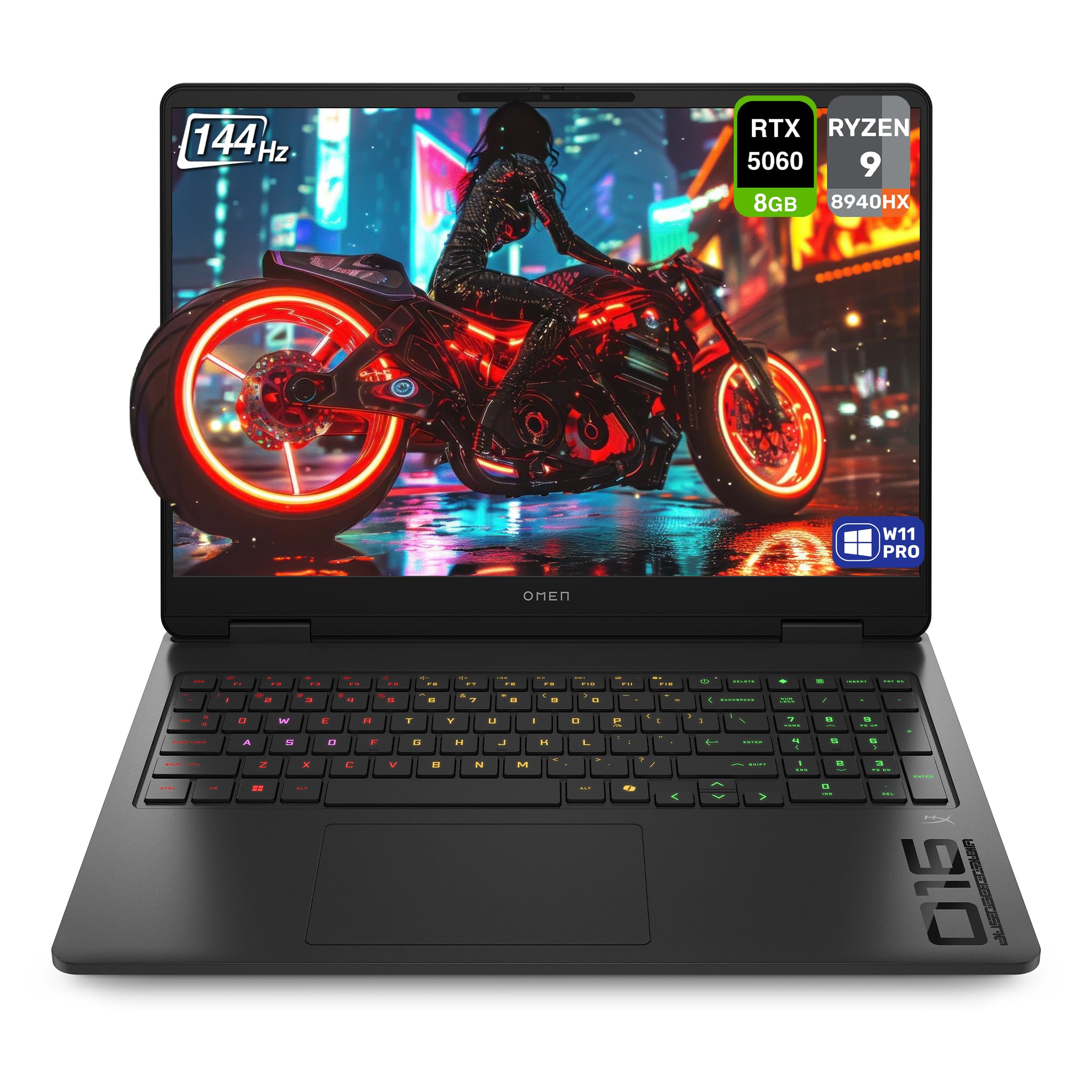
The HP OMEN 16 brings AMD’s top-tier Ryzen 9 8940HX processor together with the RTX 5060 GPU, creating a combination that excels in both CPU-intensive and graphics-heavy workloads. The 16-inch 2K IPS display at 144Hz offers a good balance between resolution and refresh rate, and the 100% sRGB coverage ensures accurate colors for content creation.
The 32GB of DDR5 RAM and 1TB SSD provide ample memory and storage for most users. The OMEN AI software adapts power profiles to your specific usage patterns, automatically optimizing performance for gaming or productivity. The port selection is comprehensive with HDMI 2.1, USB-C with DisplayPort and Power Delivery, and a full-size RJ45 Ethernet port for wired connectivity.
The chassis has a clean, understated Shadow Black finish that doesn’t scream gamer. The backlit keyboard is comfortable for extended typing sessions. Some users have reported occasional lag during basic browsing tasks, which may be related to software or driver issues. The Copilot button on the keyboard can be annoying for those who don’t use Microsoft’s AI assistant. Overall, the OMEN 16 delivers strong performance in a professional-looking package.
Why it’s great
- AMD Ryzen 9 8940HX is a powerhouse for CPU-heavy tasks
- 32GB DDR5 RAM and 1TB SSD out of the box
- Comprehensive port selection with HDMI 2.1 and USB-C PD
Good to know
- Occasional lag reported during basic browsing tasks
- Copilot button can be intrusive for some users
- Keyboard backlight reported as inconsistent on some units
10. MSI Katana 15 HX

The MSI Katana 15 HX is built around the Intel Core i9-14900HX, a 24-core behemoth that delivers incredible multi-threaded performance for demanding tasks. Paired with the RTX 5070 GPU built on NVIDIA Blackwell architecture, this laptop handles modern titles at 1440p with high settings and good frame rates. The 15.6-inch QHD display runs at 165Hz with 100% DCI-P3 coverage, providing vibrant colors and smooth motion.
The Cooler Boost 5 thermal solution uses dual fans and five heat pipes to manage the heat output from the i9 and RTX 5070. Under sustained gaming load, the fans become loud, but temperatures remain within acceptable ranges. The 32GB of DDR5 memory and 1TB NVMe SSD provide a modern configuration that handles any task you throw at it.
The 4-zone RGB keyboard offers customization options, and the highlighted WASD keys are a nice touch for gamers. The port selection includes USB-C Gen 2 with DisplayPort, HDMI 2.1 supporting up to 8K output, and Wi-Fi 6E for fast wireless connectivity. Battery life is limited to around 2-3 hours under gaming load, and some users have reported audio glitches out of the box. The Katana is a raw performance machine that doesn’t compromise on CPU power.
Why it’s great
- Intel Core i9-14900HX with 24 cores for extreme CPU performance
- RTX 5070 with DLSS 4 and Blackwell architecture
- QHD 165Hz display with 100% DCI-P3 color accuracy
Good to know
- Fans are loud under sustained gaming loads
- Battery life is limited to 2-3 hours under gaming
- Some units reported audio glitches out of the box
11. MSI Crosshair 18 HX AI

The MSI Crosshair 18 HX AI is a desktop replacement class laptop with an 18-inch QHD+ IPS display running at 240Hz with 100% DCI-P3 color gamut. The Intel Core Ultra 9 275HX processor with 24 cores ensures that no CPU workload can bottleneck the RTX 5070 GPU. This is a machine built for maximum visual immersion and performance, with a display that rivals many external monitors in quality.
The 32GB of DDR5-5600MHz memory and 1TB NVMe SSD provide a high-end configuration. The SteelSeries 24-zone RGB keyboard with 99 anti-ghost keys offers excellent input responsiveness for gaming. The Dynaudio speaker system with dual 2W drivers and dual 2W woofers delivers audio that is genuinely usable without external speakers, a rarity in gaming laptops.
The thermal system handles the high-power components well, with the 240W power adapter ensuring the laptop can maintain full performance under sustained load. The chassis is large at 6.83 pounds, but it is surprisingly thin for an 18-inch model at just over an inch thick. The comprehensive port selection including Thunderbolt 4 and HDMI 2.1 makes it easy to connect multiple external displays. This is a premium machine for users who want the largest possible screen without sacrificing portability.
Why it’s great
- Massive 18-inch 240Hz QHD+ display with excellent color accuracy
- Core Ultra 9 275HX with 24 cores and 5.4 GHz boost
- Dynaudio speaker system delivers genuinely good audio
Good to know
- Heavy at 6.83 pounds, requires a large bag
- Needs a cooling pad for optimal performance in long gaming sessions
- Premium pricing puts it out of reach for budget-conscious buyers
12. ASUS ROG Strix G16 (2025)

The ASUS ROG Strix G16 (2025) represents the cutting edge of mobile gaming hardware with the Intel Core Ultra 9 275HX and RTX 5070 GPU. The ROG Nebula Display is the highlight here: a 16-inch 2560×1600 240Hz panel with a 3ms response time and an ACR film that enhances contrast and reduces glare. Dolby Vision HDR support brings games and content to life with richer, more vivid colors.
The 32GB of DDR5-5600MHz memory and 2TB PCIe Gen 4 SSD provide massive storage and fast load times, ensuring you can install your entire library without worrying about space. The ROG Intelligent Cooling system uses a vapor chamber and tri-fan technology to keep the high-power components cool, allowing the system to maintain boost clocks during extended gaming sessions. The full-surround RGB lightbar adds a premium aesthetic touch.
The build quality is exceptional, with a solid feel and premium materials throughout. The keyboard is comfortable for both gaming and typing, and the port selection includes Thunderbolt 4 and Wi-Fi 7 for future-proof connectivity. Battery life is improved over previous ROG models, though still not enough for a full day of gaming unplugged. This is a flagship laptop that justifies its premium price with top-tier build quality, performance, and display technology.
Why it’s great
- Stunning ROG Nebula Display with 240Hz and Dolby Vision HDR
- Massive 2TB SSD and 32GB DDR5 out of the box
- Premium cooling with vapor chamber and tri-fan design
Good to know
- Premium pricing is at the top of the market
- Second drive bay lacks thermal pads included in some regions
- Battery life is improved but still limited for unplugged gaming
13. Lenovo LOQ 15
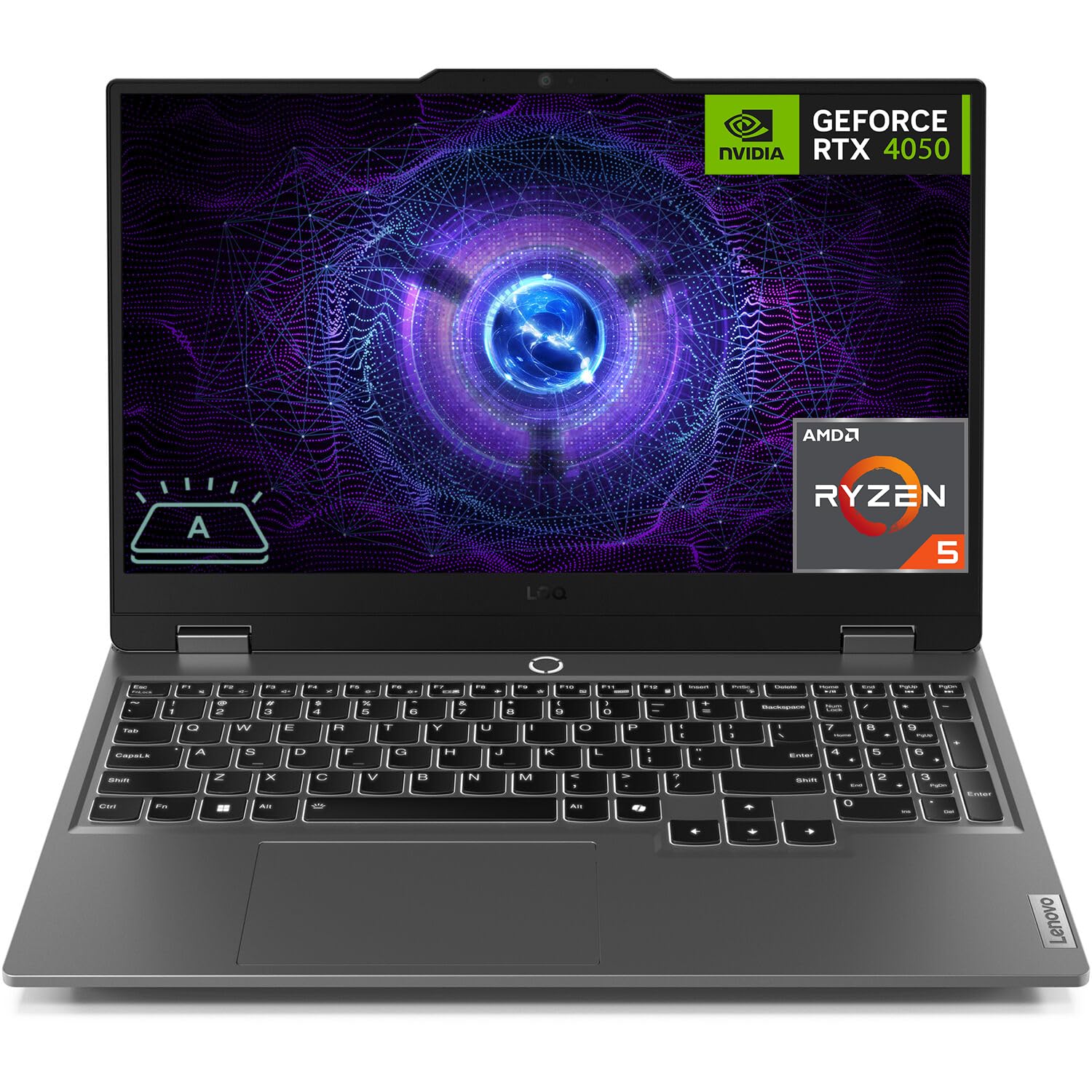
The Lenovo LOQ 15 is the budget entry point into dedicated GPU gaming, offering an RTX 4050 with 6GB of VRAM in a familiar 15.6-inch form factor. The 144Hz FHD IPS display with G-Sync support provides smooth gameplay without screen tearing, and the anti-glare coating makes it usable in brightly lit rooms. The AMD Ryzen 5 7235HS with 4 cores and 8 threads is a capable entry-level processor for gaming at 1080p.
The 32GB of DDR5 RAM is generous for this price tier, ensuring you won’t hit memory limits in modern titles. The 1TB PCIe SSD provides ample storage for a large game library, and the dual M.2 slots and dual memory slots make upgrades straightforward. The FN+Q key lets you toggle between performance modes and fan speeds, giving you control over the thermal profile.
The build quality is solid for the price, with a matte grey finish that doesn’t look cheap. The port selection includes USB-C, HDMI, and Ethernet, covering the basics well. Battery life is limited as expected for a budget gaming laptop. Some users have reported receiving used units sold as new, and the 4-core CPU can be a bottleneck in CPU-heavy titles. The LOQ is a solid starting point for gamers on a tight budget who want a dedicated GPU and upgrade potential.
Why it’s great
- Generous 32GB DDR5 RAM and 1TB SSD at an entry-level price
- 144Hz FHD display with G-Sync for smooth gameplay
- Easy upgrade ability with dual memory and storage slots
Good to know
- 4-core CPU can bottleneck in CPU-intensive titles
- Some users report receiving used units sold as new
- Battery life is limited for a budget gaming laptop
FAQ
Is the RTX 3070 laptop GPU still good for gaming in 2025?
What CPU should I pair with an RTX 3070 laptop GPU?
What TGP should I look for in an RTX 3070 laptop?
Can the RTX 3070 laptop GPU handle ray tracing well?
How much VRAM does the RTX 3070 laptop GPU have?
Final Thoughts: The Verdict
For most users, the best 3070 laptop gpu implementation belongs to the Lenovo Legion 5 Pro because its 140W TGP, Ryzen 7 5800H, and QHD 165Hz display deliver the full 3070 experience without compromises. If you want the fastest possible refresh rate for competitive gaming, grab the ASUS ROG Strix G17. And for a thin, portable 3070 laptop that doubles as a daily driver, nothing beats the ASUS ROG Zephyrus GA503QR.