
The GeForce RTX 3080 Ti remains a benchmark for high-refresh 4K and ray-traced gaming, slotting neatly between the 3090 and the 3080 in NVIDIA’s Ampere lineup. With 12GB of GDDR6X memory and a 384-bit bus, this GPU was engineered to demolish demanding titles at ultra settings without breaking the bank of a flagship 3090. The question for any serious builder or buyer isn’t whether the card is capable—it’s finding the complete system that balances this graphics power with a processor, cooling solution, and power supply that won’t create a bottleneck.
I’m Min — the co-founder and writer behind Gadgets Feed. I’ve spent years tracking GPU pricing trends, analyzing thermal performance across case designs, and comparing pre-built system configurations to help buyers navigate the complex tradeoffs in high-end gaming PCs. (And Homer 🐱 supervised this analysis from atop a warm 360mm radiator box).
Make no mistake: a properly specced machine with the right pairing can push over 100 FPS in Cyberpunk 2077 with ray tracing enabled. Whether you prefer a fully assembled pre-built from a trusted integrator or a custom configuration centered around this specific chip, this guide breaks down the complete landscape for the 3080 ti pc market.
How To Choose The Best 3080 Ti PC
Selecting the right machine around this GPU involves more than just checking the graphics card model. The RTX 3080 Ti demands a robust ecosystem of supporting components to deliver its full potential. Focus on these three pillars when evaluating any system.
CPU Pairing and Resolution Targets
At 4K, the GPU becomes the primary workload driver, making a last-generation high-core-count CPU like an Intel Core i7-14700F or AMD Ryzen 9 5900X a perfect match. Avoid pairing this card with older or entry-level processors, as the GPU will sit idle waiting for data. A balanced setup allows the 12GB frame buffer to work at maximum efficiency.
Thermal Management and Memory Junction Temps
The GDDR6X memory on the RTX 3080 Ti runs notoriously hot, often reaching 95°C under heavy ray-traced loads. Look for systems with excellent front intake airflow, multiple case fans, and either a large air cooler or a 240mm+ AIO liquid cooler for the CPU. Cases with mesh front panels and direct GPU airflow paths help prevent thermal throttling that would otherwise reduce frame rates.
Power Supply Headroom and Certification
NVIDIA recommends a minimum 750W power supply for the RTX 3080 Ti, but transient power spikes can exceed that briefly. A high-quality 850W unit with 80+ Gold certification or better provides the necessary headroom and voltage stability. Systems with lower-rated or off-brand PSUs risk system instability and component longevity.
Quick Comparison
On smaller screens, swipe sideways to see the full table.
| Model | Category | Best For | Key Spec | Amazon |
|---|---|---|---|---|
| HP OMEN 45L | Premium Pre-built | Out-of-box 4K Gaming | RTX 3080 Ti 12GB + Ryzen 9 5900X | Amazon |
| Zotac Trinity OC | GPU (DIY Build) | Custom Build Core | 1695 MHz Boost Clock | Amazon |
| Skytech King 95 (5070 Ti) | High-End Pre-built | Ultra Settings 1440p | Ryzen 7 9800X3D + 32GB DDR5-6000 | Amazon |
| Skytech Azure 3 (5080) | Premium Pre-built | High-FPS 4K Gaming | RTX 5080 16GB + Ryzen 7 9800X3D | Amazon |
| Skytech King 95 (5080) | Ultra-Enthusiast | Maxed 4K + Streaming | 64GB DDR5 RAM + RTX 5080 16GB | Amazon |
| Cooler Master NR2 Pro | Compact ITX | Small Form Factor Build | 18.25L Case + 280mm AIO | Amazon |
| MSI Aegis R2 | Mid-Range Pre-built | VR-Ready System | Intel Core Ultra 9 285 + 2TB SSD | Amazon |
| Lenovo Legion Tower 5i | Mid-Range Pre-built | Tool-less Upgrades | Intel Core Ultra 7 265F + RTX 5070 Ti | Amazon |
| iBUYPOWER Y40 PRO | Mid-Range Pre-built | Video Editing + Gaming | AMD Ryzen 9 7900X + RTX 5070 Ti | Amazon |
| Alienware Aurora ACT1250 | Premium Pre-built | Brand Ecosystem + Support | Intel Core Ultra 7 265F + RTX 5070 | Amazon |
| CyberPowerPC Gamer Xtreme | Budget Option | Entry-Level High-Performance | RTX 5060 Ti 8GB + Intel i7-14700F | Amazon |
| Skytech Gaming Shadow | Budget Option | 1440p Gaming Starter | RTX 5060 Ti 16GB + Intel i7-14700F | Amazon |
| NVIDIA RTX 3090 FE | GPU (DIY Build) | Content Creation + Gaming | 24GB GDDR6X, 384-bit Memory | Amazon |
In‑Depth Reviews
1. HP OMEN 45L Gaming Desktop

The HP OMEN 45L delivers exactly what the name suggests: a system built around the RTX 3080 Ti with a proprietary Cryo Chamber cooling solution that separates the CPU liquid loop into a top-mounted chamber for superior heat exhaust. This design keeps the 12GB GDDR6X memory running cooler than most competing pre-builts, directly addressing the 95°C memory junction temperature issue that plagues this GPU in cases with poor airflow.
Paired with the AMD Ryzen 9 5900X, this combination handles 4K ray-traced workloads without bottlenecking—the 12-core processor keeps frame times consistent while the GPU pushes 60-80 FPS in titles like Cyberpunk 2077 at ultra settings. The 32GB of HyperX DDR4 memory and 1TB PCIe NVMe SSD provide ample multitasking headroom for streaming or content creation alongside gaming.
The tool-less upgradeability and OMEN Gaming Hub software make this a future-proof platform where you can swap storage or memory down the line. Some users found the system benefited from a clean Windows reinstall to remove bundled bloatware, but the hardware foundation is rock-solid for anyone wanting a true 3080 Ti experience straight out of the box.
Why it’s great
- Proprietary Cryo Chamber cooling keeps GPU memory temps lower than standard tower designs
- 12-core Ryzen 9 CPU pairs perfectly with the 3080 Ti for 4K gaming without bottlenecking
- Tool-less chassis makes future upgrades straightforward for storage and RAM
Good to know
- Some users report needing to remove bloatware or downgrade to Windows 10 initially for optimal performance
- Wi-Fi performance can be inconsistent out of the box depending on driver versions
2. Zotac GEFORCE RTX3080 Ti Trinity OC

For builders who want to construct their own 3080 Ti PC from the ground up, the Zotac Trinity OC represents a solidly built aftermarket card with a 1695 MHz boost clock out of the box. Its triple-fan cooler pushes air across a large aluminum fin stack that covers both the GPU die and the 12GB of GDDR6X memory, which is critical since this memory type is known to hit 95°C under extended ray tracing sessions in enclosed cases.
The card supports a maximum display resolution of 7680×4320 via DisplayPort and HDMI outputs, making it suitable for multi-monitor productivity setups or driving a single 8K display. With a PCI-Express x4 interface, it maintains full compatibility with modern and last-generation motherboards without bandwidth limitations.
Buyers should note that this card runs warm even with good case airflow—one user measured memory temperatures around 95°C in a Corsair 4000X case with stock fan configuration. Adding a bottom intake fan or switching to a mesh-front case can lower those temps by 5-8°C, ensuring the card maintains its boost clock without throttling during demanding titles.
Why it’s great
- Out-of-the-box boost clock of 1695 MHz for strong stock performance
- Triple-fan cooler effectively covers the GPU die and memory modules
- Supports 8K output at 60Hz for future-proof display connectivity
Good to know
- GDDR6X memory can reach 95°C under sustained loads, demanding good case airflow
- Card dimensions require a case with adequate GPU clearance for proper airflow
3. Skytech Gaming King 95 (RTX 5070 Ti)

The Skytech King 95 pairs the legendary AMD Ryzen 7 9800X3D processor with an NVIDIA RTX 5070 Ti 16GB graphics card, creating a system that excels at 1440p ultra settings with ray tracing enabled. The 3D V-Cache technology in the 9800X3D dramatically reduces latency in CPU-bound titles like Escape from Tarkov and Counter-Strike 2, while the 16GB of GDDR7 memory on the GPU ensures textures load instantly at high resolutions.
This pre-built comes with 32GB of DDR5 RAM clocked at 6000MHz in dual-channel configuration, a 2TB Gen4 NVMe SSD for rapid load times, and a 360mm AIO liquid cooler that keeps the 8-core processor well under throttling thresholds during extended gaming sessions. The 850W 80+ Gold power supply provides sufficient headroom for sustained GPU boost clocks, though some users reported that the included peripherals are basic and may be replaced immediately.
One area of concern is that certain units have arrived with loose screws or a silicone spacer lodged in a fan, which can cause stalling. Checking all connections and fan spin upon arrival is recommended, but once verified, this system delivers outstanding frame rates and whisper-quiet operation under normal loads.
Why it’s great
- Ryzen 7 9800X3D delivers industry-leading gaming performance with 3D V-Cache technology
- 360mm AIO liquid cooler keeps CPU temperatures well-controlled during intense sessions
- 2TB Gen4 NVMe SSD provides massive storage and instant game loading
Good to know
- Some units arrive with loose internal components that need checking before first use
- Included keyboard and mouse are basic and likely to be upgraded by serious users
4. Skytech Gaming Azure 3 (RTX 5080)

The Skytech Azure 3 steps up the performance ceiling with an RTX 5080 16GB and the same Ryzen 7 9800X3D CPU found in the King 95, making it one of the fastest pre-built gaming PCs available for high-refresh 4K gaming. The 5080’s GDDR7 memory architecture and increased CUDA core count over the 3080 Ti deliver 30-40% higher frame rates in demanding titles like Alan Wake 2 and Cyberpunk 2077 with path tracing enabled.
The system features 32GB of DDR5 RAM at 6000MHz, a 2TB NVMe SSD, an 850W 80+ Gold ATX 3 power supply, and a 360mm ARGB AIO liquid cooler. The white Azure case with tempered glass provides excellent airflow for the high-wattage components, and the inclusion of Wi-Fi and Bluetooth connectivity eliminates the need for separate adapters.
Setup is relatively straightforward for experienced users, though the packaging does not include clear instructions for the 16-pin 12VHPWR power adapter. First-time PC buyers may need to consult online resources for proper cable management. Once configured, the system handles streaming and recording at 4K simultaneously without dropping frames.
Why it’s great
- RTX 5080 with GDDR7 memory provides a massive generational leap over Ampere cards
- Ryzen 7 9800X3D eliminates CPU bottlenecks at all resolutions
- 850W ATX 3 PSU meets the transient power demands of the high-end GPU
Good to know
- Power connector setup instructions are sparse, requiring online research for new builders
- The white color scheme may not suit all desk aesthetics
5. Skytech Gaming King 95 (RTX 5080, 64GB)
This configuration of the Skytech King 95 takes everything from the previous model and amplifies it: 64GB of DDR5-6000 RAM, a 4TB Gen4 NVMe SSD, and the same Ryzen 7 9800X3D with RTX 5080 16GB combination. The 64GB capacity is particularly valuable for users who stream, edit 4K video, or run virtual machines alongside their games, as it prevents any memory swapping that could cause micro-stutters during gameplay.
The 4TB NVMe SSD provides enough space for an entire AAA game library without needing to uninstall titles. The 850W 80+ Gold ATX 3 power supply handles the transient loads of the RTX 5080 without issue, and the 360mm AIO liquid cooler keeps the 9800X3D operating in its boost range even during synthetic benchmarks.
Some users have reported a faulty onboard Ethernet port on certain units, which can be resolved via a USB-to-Ethernet adapter or motherboard replacement. The system is large and heavy due to the King 95 case design, so buyers should measure their desk space carefully. Overall, this build represents one of the most complete high-end configurations available from a pre-built integrator.
Why it’s great
- 64GB DDR5-6000 provides massive headroom for streaming, content creation, and gaming
- 4TB Gen4 NVMe SSD eliminates storage anxiety for large game libraries
- No bloatware pre-installed for a clean Windows 11 experience from first boot
Good to know
- Onboard Ethernet port may be faulty on some units, requiring a USB workaround
- Case footprint is large and requires significant desk space
6. Cooler Master NR2 Pro Gaming PC

The Cooler Master NR2 Pro proves that high-end gaming performance can fit into an ITX form factor without sacrificing component quality. This 18.25-liter system packs a Gigabyte RTX 5070 Ti 16GB and an AMD Ryzen 7 9800X3D onto a Gigabyte B850I AORUS PRO motherboard, all cooled by a custom 280mm AIO radiator that fits into the NR200P Max chassis. The result is a machine that delivers over 120 FPS at 1440p in most titles while occupying roughly the footprint of a large shoebox.
The build includes 32GB of DDR5-6000 RGB memory, a 2TB Gen4 M.2 SSD, and an 850W 80+ Gold SFX power supply. The compact design makes it ideal for college students, LAN party attendees, or anyone with limited desk space. The included mesh and glass panel options allow users to choose between maximum airflow or showing off the internal components.
One common issue reported is that the GPU riser cable and graphics card may arrive slightly disconnected during shipping, requiring the user to reseat both components before the system will display. This is a relatively easy fix for anyone comfortable opening a PC case, but first-time ITX builders should be prepared to inspect the installation upon arrival. Once properly seated, the system runs quietly and handles all modern titles without breaking a sweat.
Why it’s great
- 18.25-liter ITX design fits in tight spaces while housing high-end components
- Custom 280mm AIO provides excellent cooling for both CPU and GPU in a small footprint
- Interchangeable mesh and glass panels for airflow or aesthetics preferences
Good to know
- GPU riser cable may disconnect during shipping, requiring user intervention
- Front USB-C port may not function on some units without internal connection verification
7. MSI Aegis R2 AI Gaming Desktop

The MSI Aegis R2 features an Intel Core Ultra 9 285 processor with a 5.7 GHz boost clock, making it one of the few pre-builts to leverage Intel’s new architecture for AI-accelerated workloads. Paired with an RTX 5070 Ti and 32GB of DDR5 RAM, this system delivers outstanding performance in both gaming and productivity tasks like video encoding and 3D rendering where the Intel chip’s efficiency cores provide a measurable advantage.
MSI designed the Aegis R2 with four system cooling fans—three front intake and one rear exhaust—working alongside an RGB air cooler for the CPU. The chassis layout creates positive air pressure that minimizes dust accumulation while maintaining GPU temperatures well below throttling thresholds during extended sessions. The built-in MSI LED button allows users to cycle through lighting profiles without needing to open software.
While the system runs cool and quiet under normal loads, some users experienced a critical failure after one month requiring a Windows reinstall. This appears to be an isolated issue rather than a widespread defect, but it underscores the importance of purchasing from a retailer with a solid return policy. The included keyboard and mouse are functional but basic, and the Wi-Fi antenna design differs slightly from the manual illustrations.
Why it’s great
- Intel Core Ultra 9 285 with 5.7 GHz boost provides top-tier CPU performance
- Four-fan cooling system maintains excellent airflow and low GPU temps
- MSI Center software offers detailed performance monitoring and lighting control
Good to know
- A small number of units may experience system instability requiring a Windows reinstall
- Wi-Fi antenna style may differ from the one shown in the setup guide
8. Lenovo Legion Tower 5i

The Lenovo Legion Tower 5i offers a transparent, tool-less side panel that makes upgrading components effortless, a rare feature in the pre-built market that appeals to users who want to tweak their system over time. Equipped with an Intel Core Ultra 7 265F processor and an NVIDIA GeForce RTX 5070 Ti 16GB, this machine targets smooth 1440p gameplay at high frame rates while keeping the option open for future GPU swaps as the market evolves.
The system ships with 32GB of 5600MHz DDR5 memory, which can be expanded up to 128GB across four slots, and a 1TB Gen4 NVMe SSD. The 180W optimized air-cooling solution maintains GPU temperatures in the mid-60s Celsius and CPU temperatures in the high-50s to low-60s during gaming, which is impressive for an air-cooled system. Connectivity includes a 2.5G Ethernet port and Wi-Fi 6E, ensuring fast and stable online gaming.
Lenovo includes three months of Xbox Game Pass and EA Play, adding immediate value for new buyers. The system delivers around 180 FPS in Forza Horizon 5 at 1440p max settings and roughly 97 FPS in Monster Hunter Wilds. Some users noted that the “GEFORCE” text on the GPU is white rather than RGB, but this is a minor cosmetic detail that does not affect the stellar thermal and performance profile of the machine.
Why it’s great
- Tool-less side panel and interior design make upgrades incredibly user-friendly
- Excellent thermals from the 180W optimized air-cooling system
- 2.5G Ethernet and Wi-Fi 6E provide fast, reliable network connectivity
Good to know
- Only 1TB of storage may fill quickly for users with large game libraries
- GPU branding text is white rather than RGB for those wanting full lighting control
9. iBUYPOWER Y40 PRO

The iBUYPOWER Y40 PRO packages an AMD Ryzen 9 7900X with an NVIDIA RTX 5070 Ti 16GB into a tempered glass RGB case at a price point that often beats the cost of building the same components individually. The 12-core Ryzen 9 7900X is a productivity powerhouse that handles video editing and 3D rendering alongside gaming, while the 32GB of DDR5 RGB memory at 5200MHz provides sufficient bandwidth for multitasking.
The 2TB NVMe SSD offers double the storage of many competitors at this tier, accommodating the growing install sizes of modern AAA titles. The 16-color RGB lighting case and included iBUYPOWER gaming keyboard and mouse complete the package, though serious gamers will likely upgrade the peripherals. The system supports NVIDIA Studio drivers, accelerating workflows in DaVinci Resolve, Blender, and Adobe Premiere Pro with dedicated RTX acceleration.
Some buyers have reported crashing issues within the first two weeks, potentially related to faulty RAM modules that require replacement. The support experience has been mixed, with some users receiving timely help and others experiencing delays. Purchasing from Amazon with a solid return policy is advisable for peace of mind. When functioning correctly, this system delivers over 100 FPS at ultra settings in most current games.
Why it’s great
- Ryzen 9 7900X provides strong multi-core performance for productivity and gaming
- 2TB NVMe SSD offers ample storage for a large game library
- Excellent value proposition often beating DIY build costs
Good to know
- Some units may experience crashing due to RAM defects requiring replacement
- Customer support response times can vary in quality
10. Alienware Aurora Gaming Desktop ACT1250

The Alienware Aurora ACT1250 brings Dell’s premium support ecosystem and a distinctive stadium-lighting design to the gaming desktop market. It pairs an Intel Core Ultra 7 265F processor with an NVIDIA RTX 5070 and 32GB of DDR5 RAM, all powered by a 1000W Platinum-rated PSU that delivers exceptionally clean power. The 1 Year Onsite Service warranty means a technician will come to your home for covered issues, which adds significant value for buyers who want peace of mind.
The chassis features customizable AlienFX lighting zones across the front stadium-lighting panel and interior components. Alienware Command Center software allows users to create custom performance profiles, monitor temperatures, and synchronize lighting across all Alienware peripherals. The system supports 4K output at 60+ FPS in most modern titles, though the RTX 5070 is the entry point for the Blackwell generation rather than the top tier.
A few concerning reports indicate that some units may arrive with missing HDMI ports or a visibly incomplete tower interior, suggesting quality control issues during the holiday season. The system also does not support Linux well according to some users, with the cyan lighting being unchangeable via third-party software. For buyers who stay within the Windows ecosystem and value the Dell support infrastructure, this remains a solid choice.
Why it’s great
- 1000W Platinum-rated PSU provides clean power with headroom for future upgrades
- 1 Year Onsite Service from Dell for convenient hardware support
- Customizable AlienFX stadium lighting for a distinctive visual presence
Good to know
- Quality control issues have been reported with incomplete or missing components
- No Linux support for lighting controls; lights remain bright cyan in non-Windows environments
11. CyberPowerPC Gamer Xtreme

The CyberPowerPC Gamer Xtreme offers one of the most approachable entry points into high-performance gaming with its Intel Core i7-14700F and NVIDIA RTX 5060 Ti 8GB combination. While the 8GB VRAM buffer is smaller than the 16GB found on some competitors, this system is optimized for 1440p gaming at high settings where it delivers smooth frame rates in titles like Helldivers 2 and Company of Heroes without stuttering.
The B760 chipset motherboard supports 16GB of DDR5 RAM and a 1TB PCIe 4.0 NVMe SSD, with expansion slots available for additional storage. Connectivity is solid with Wi-Fi 6, Bluetooth 5.3, a USB-C 3.2 port, and multiple USB-A ports. The white tempered glass case with custom RGB lighting creates an attractive setup that fits well in most gaming rooms.
Some units have shipped with the HDD LED and reset switch wires swapped on the motherboard header, which is a minor annoyance that does not affect performance. The system runs cool and quiet even during extended gaming sessions. CyberPowerPC provides a 1-year parts and labor warranty with free lifetime tech support, which adds significant value for first-time gaming PC buyers who may need assistance with driver updates or troubleshooting.
Why it’s great
- Intel i7-14700F provides strong multi-core performance for gaming and productivity
- Wi-Fi 6 and Bluetooth 5.3 offer modern wireless connectivity standards
- Free lifetime tech support and 1-year warranty provide peace of mind for new buyers
Good to know
- 8GB VRAM buffer is limiting for 4K gaming and heavy ray tracing workloads
- Front panel wiring may have swapped HDD LED and reset switch headers
12. Skytech Gaming Shadow Desktop PC
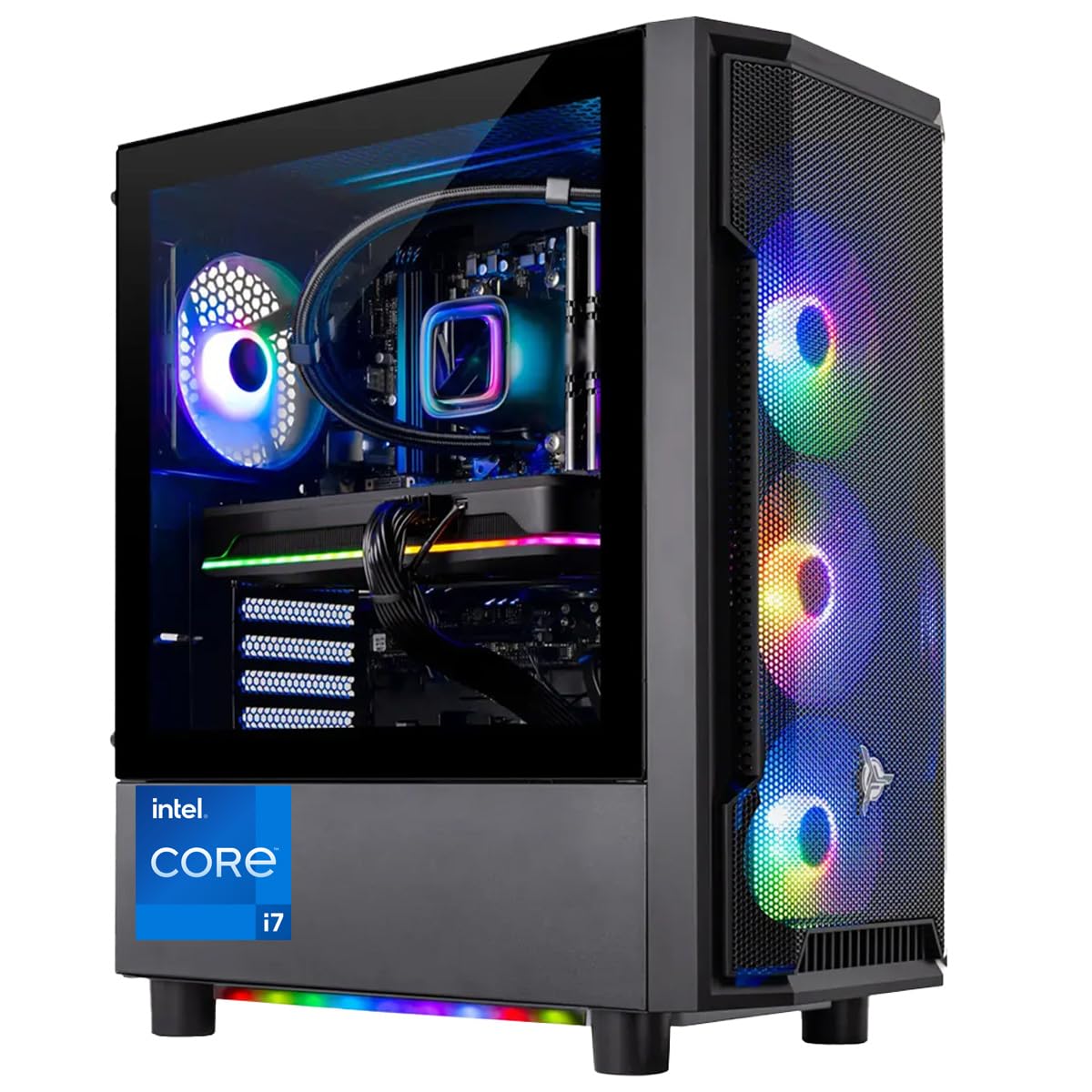
The Skytech Gaming Shadow targets budget-conscious gamers who want modern performance without breaking the bank. It features an Intel Core i7-14700F processor with an NVIDIA RTX 5060 Ti 16GB—the 16GB VRAM variant that provides more texture memory than the 8GB version, making it better suited for modded games and 1440p texture packs. The 360mm AIO liquid cooler is an unusual inclusion at this price point, delivering excellent CPU thermal headroom for sustained boost clocks.
The system ships with 16GB of DDR5 RAM and a 1TB Gen4 NVMe SSD, which provides fast boot times and ample storage for a starter library. The 650W 80+ Gold PSU meets the power requirements of the RTX 5060 Ti while maintaining energy efficiency. Skytech assembles these units in the USA and includes a 1-year warranty with free technical support.
Some users received units where the GPU fans did not spin under stress or USB ports were non-functional, indicating a quality control variance that requires careful inspection upon arrival. The included keyboard and mouse are basic and the LED lighting on the mouse can be difficult to toggle off. When functioning correctly, the system runs all modern titles at 1440p high-ultra settings with 60+ FPS, making it an excellent value for its performance tier.
Why it’s great
- RTX 5060 Ti with 16GB VRAM provides superior texture handling at 1440p
- 360mm AIO liquid cooler is rare at this price point and keeps the CPU very cool
- No bloatware pre-installed for a clean Windows experience
Good to know
- Quality control can be inconsistent, with some units having GPU fan or USB port issues
- 650W PSU leaves minimal headroom for future GPU upgrades
13. NVIDIA GeForce RTX 3090 Founders Edition

The RTX 3090 Founders Edition remains a compelling choice for the 3080 Ti PC builder who needs the extra 12GB of VRAM for professional workloads. With 24GB of GDDR6X memory on a 384-bit bus, this card is built for 8K video editing, 3D rendering, and machine learning tasks that simply cannot fit into the 12GB frame buffer of the 3080 Ti. For pure gaming, the 3090 is only 10-15% faster than the 3080 Ti, but for content creators, the memory capacity is transformative.
The Founders Edition design features NVIDIA’s unique dual-axis flow-through cooler, which pushes air through the card and out the back of the case rather than recirculating it internally. This design keeps the GPU temperature around 75°C under load while maintaining a quiet acoustic profile. The card includes three DisplayPort 1.4a outputs and one HDMI 2.1 port, supporting up to 7680×4320 resolution at 60Hz.
Buyers should be extremely cautious when purchasing from third-party sellers on Amazon, as several reviews indicate used mining cards being sold as new. The card runs hot when mining cryptocurrency (often above 105°C memory junction temperature), so a cleaned and repasted used card can be a gamble. For new-in-box units, the RTX 3090 FE provides laughably fast rendering speeds in DaVinci Resolve, reducing 20-30 minute CPU renders to just 4 minutes.
Why it’s great
- 24GB GDDR6X VRAM handles massive 8K video files and 3D scenes that won’t fit in 12GB
- NVIDIA Founders Edition flow-through cooler design is both effective and quiet
- Up to 60% faster rendering times in content creation apps compared to lower VRAM cards
Good to know
- High risk of receiving used mining cards from third-party sellers on Amazon
- Card runs hotter than 3080 Ti under sustained load due to higher memory density
FAQ
What power supply wattage do I need for an RTX 3080 Ti system?
Will a last-generation CPU bottleneck the RTX 3080 Ti?
How hot does the GDDR6X memory on the 3080 Ti get?
Final Thoughts: The Verdict
For most users, the 3080 ti pc winner is the HP OMEN 45L because its proprietary Cryo Chamber cooling directly addresses the thermal challenges of the GDDR6X memory, and the Ryzen 9 5900X provides balanced performance at 4K without causing a CPU bottleneck. If you want a compact system that delivers desktop-class performance in a tiny footprint, grab the Cooler Master NR2 Pro. And for the best pure value in a pre-built system that leaves room for future upgrades, nothing beats the Lenovo Legion Tower 5i.