
Finding a compact TV or monitor that delivers the jaw-dropping contrast and inky blacks of OLED without jumping to a 55-inch or larger screen has been a frustrating search for years. Most OLED panels start at 42 inches, leaving those with smaller desks, bedrooms, or secondary viewing spaces with limited options that often compromise on panel technology.
I’m Min — the co-founder and writer behind Gadgets Feed. For years I’ve been tracking the panel supply chain, comparing spec sheets on pixel response times, color gamut coverage, and burn-in mitigation features to help buyers navigate this niche segment. (And Homer 🐱 supervised the unboxing from his perch on the warm receiver box).
After analyzing the current landscape, the options cluster around a few distinct approaches: ultra-smooth gaming monitors with refresh rates up to 240Hz, lifestyle TVs designed to blend into your decor, and larger-screen OLEDs that can double as a monitor. This guide breaks down the strongest candidates to help you pick the best 32 inch oled tv for your space and your eyes.
How To Choose The Best 32 Inch OLED TV
The 32-inch OLED market is a hybrid space — it blends high-end gaming monitors with compact televisions. Understanding your primary use case is the first filter.
Panel Type: QD-OLED or WOLED
Quantum Dot OLED panels, like those from Samsung and MSI, deliver wider color volume and higher peak brightness for HDR content. WOLED panels, from LG and Sony, offer excellent contrast and typically better text clarity for desktop productivity, though they may not hit the same color brightness peaks.
Refresh Rate and Response Time
If gaming is your priority, look for a 120Hz or 240Hz refresh rate paired with a 0.03ms response time. The higher refresh rate ensures smoother motion in fast-paced shooters and racers, while 0.03ms virtually eliminates ghosting. For pure TV and movie watching, a standard 60Hz or 120Hz panel is more than sufficient.
Burn-in Protection
OLED panels are susceptible to image retention from static elements like taskbars and logos. Modern monitors include features like pixel refresh, logo detection, and proximity sensors that automatically dim the screen when you step away. Consider these features if the display will see heavy desktop or news-channel use.
Connectivity and Ports
Check for HDMI 2.1 ports for 4K at higher refresh rates, especially for consoles like the PlayStation 5 or Xbox Series X. USB-C with power delivery (90W or more) is a major advantage for laptop users, letting you charge and display video with a single cable.
Brightness and Glare
OLEDs typically have lower full-screen brightness than LCDs. Look for VESA DisplayHDR True Black 400 certification for decent highlight pop in a dark room. If your room has windows or overhead lights, a matte or anti-reflection coating makes a big difference in perceived contrast.
Quick Comparison
On smaller screens, swipe sideways to see the full table.
| Model | Category | Best For | Key Spec | Amazon |
|---|---|---|---|---|
| ASUS ROG Swift PG32UCDM | Gaming Monitor | Competitive PC Gaming | 240Hz / 0.03ms / Custom Heatsink | Amazon |
| LG C4 42-inch (OLED42C4PUA) | OLED TV | Movies & Console Gaming | 144Hz / 0.1ms / a9 AI Gen7 | Amazon |
| MSI MPG 321URX QD-OLED | Gaming Monitor | High-End Gaming & Work | 240Hz / 0.03ms / KVM Built-in | Amazon |
| Dell 32 Plus S3225QC | Desktop Monitor | Productivity & Media | 120Hz / 0.03ms / 90W USB-C PD | Amazon |
| Samsung 32″ Odyssey G8 (G81SF) | Gaming Monitor | Bright Room Gaming | 240Hz / 0.03ms / Glare Free Tech | Amazon |
| ASUS ROG Strix XG32UCWG | Gaming Monitor | Dual-Resolution Gaming | 4K 165Hz / FHD 330Hz / WOLED | Amazon |
| MSI MPG 321CURX QD-OLED | Curved Gaming Monitor | Immersive Curved Gaming | 240Hz / 0.03ms / 1700R Curve | Amazon |
| LG 32GX870A Ultragear | Gaming Monitor | E-Sports & AAA Gaming | 240Hz 4K / 480Hz FHD / MLA+ | Amazon |
| Sony A90K 42-inch (XR42A90K) | OLED TV | Filmmaker Mode & PS5 | 120Hz / XR OLED Contrast Pro | Amazon |
| Samsung The Frame LS03C (QN32LS03CB) | Lifestyle TV | Living Room Decor | 1080p / QLED / Art Mode Matte | Amazon |
| Sony A90K Bundle (XR42A90K w/ Plan) | OLED TV Bundle | PS5 & Dark Room Theater | 120Hz / 8.5ms Input Lag | Amazon |
In‑Depth Reviews
1. ASUS ROG Swift PG32UCDM

This 32-inch QD-OLED panel from ASUS hits a rare trifecta: 4K resolution, a blistering 240Hz refresh rate, and a custom heatsink backed by graphene film to manage heat. The result is a display that feels impossibly responsive — motion blur is non-existent, and the 0.03ms gray-to-gray response time makes every mouse movement feel wired directly to the pixels.
Color volume is outstanding. The 99% DCI-P3 coverage and true 10-bit depth deliver HDR content with punchy highlights and deep, inky shadows. The glossy screen coating enhances perceived contrast and clarity in controlled lighting, though it will show reflections if you have a bright window behind you. The VESA DisplayHDR True Black 400 certification means blacks stay truly black even in HDR mode.
ASUS backs this monitor with a 3-year warranty that includes burn-in coverage, which is reassuring given the price tier. The stand offers height, tilt, and swivel adjustment, and the OSD menu is easy to navigate via a joystick. For a pure gaming and media machine at this size, the PG32UCDM sets the benchmark.
Why it’s great
- Class-leading 240Hz QD-OLED performance
- Burn-in coverage included in the 3-year warranty
- Glossy finish for stunning contrast and clarity
Good to know
- Glossy screen can reflect strong ambient light
- No built-in speakers
- Premium price reflects top-tier specs
2. LG C4 42-inch (OLED42C4PUA)

While technically a 42-inch TV, the LG C4 is the go-to choice for many who want a compact OLED for dual monitor-plus-console setups. The a9 AI Processor Gen7 handles upscaling beautifully, making 1080p content look crisp on the 4K panel. Dolby Vision and Dolby Atmos support make it a true home theater experience in a smaller footprint.
For gamers, the C4 offers four HDMI 2.1 ports, NVIDIA G-Sync and AMD FreeSync Premium compatibility, and a 144Hz refresh rate with a 0.1ms response time. The webOS 24 smart platform is fast and includes access to major streaming apps out of the box. The included Magic Remote with pointer control makes navigating menus effortless.
The biggest trade-off is the size — at 42 inches, it requires a deeper desk and more viewing distance than a true 32-inch monitor. But if you have the space, the C4 delivers a richer TV feature set, including built-in speakers that sound decent, and a polished smart platform that no monitor can match.
Why it’s great
- Excellent Dolby Vision HDR and upscaling
- Four HDMI 2.1 ports for multi-device setups
- 144Hz refresh rate with G-Sync and FreeSync
Good to know
- 42-inch size may be too large for a standard desk
- WebOS can feel sluggish compared to pure monitors
- Not ideal for bright rooms due to moderate brightness
3. MSI MPG 321URX QD-OLED

The MSI MPG 321URX packs the same 4K QD-OLED panel as the ASUS ROG Swift but at a more accessible price point. It features a 240Hz refresh rate, 0.03ms response time, and VESA DisplayHDR True Black 400 certification. The 99% DCI-P3 gamut and Delta E ≤ 2 color accuracy mean it doubles as a capable monitor for photo and video editing work.
A standout feature is the built-in KVM switch, letting you control two devices with a single keyboard, mouse, and monitor. This is a huge productivity boost for anyone juggling a work laptop and a gaming PC. The USB-C port delivers 90W of power delivery, so your laptop stays charged without a second cable.
OLED Care 2.0 includes pixel shift and panel refresh routines that run in the background to reduce burn-in risk. The 4-way adjustable stand offers height, swivel, tilt, and pivot adjustments. For a mid-range price, this monitor delivers nearly flagship performance with productivity features the competition leaves out.
Why it’s great
- Built-in KVM switch for two-device workflows
- 90W USB-C power delivery
- Excellent color accuracy for creative work
Good to know
- Stand lacks the premium feel of ASUS competitors
- On-screen menu interface is slightly complex
- No built-in speakers
4. Dell 32 Plus S3225QC
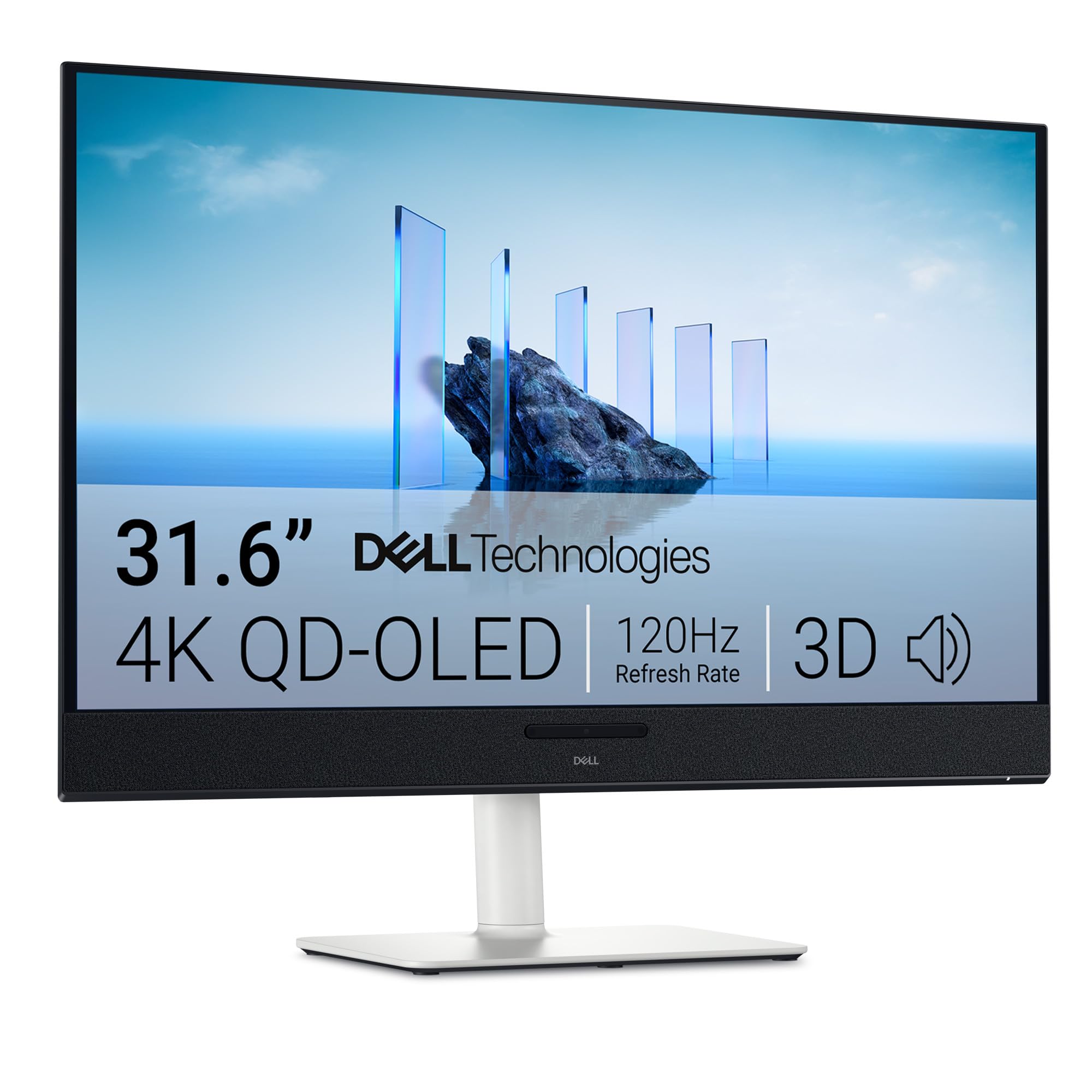
Dell targets the productivity user who also wants OLED’s per-pixel contrast with the S3225QC. This 31.6-inch QD-OLED panel runs at 4K with a 120Hz refresh rate — more than enough for smooth desktop navigation and light gaming. The 0.03ms response time still eliminates ghosting for fast-moving windows or casual games.
Where this monitor shines is connectivity. A single USB-C cable delivers 90W of power to your laptop and carries the video signal. The pop-out ports on the front are a clever touch for quickly plugging in a flash drive or headphone dongle. The built-in 5W speakers with AI-driven spatial audio are surprisingly good for a monitor, though they won’t replace a dedicated soundbar for serious media consumption.
ComfortView Plus reduces blue light without washing out colors, which is beneficial for all-day work sessions. The ash white color scheme is a refreshing departure from the sea of black monitors, though it may not match every desk aesthetic. At this price, it’s one of the most affordable genuine QD-OLED options available.
Why it’s great
- Single USB-C with 90W PD for clean desks
- Built-in spatial audio speakers
- Entry-level price for QD-OLED technology
Good to know
- Only one HDMI 2.1 port
- 120Hz refresh rate, not 240Hz
- Brightness is lower than gaming-focused QD-OLEDs
5. Samsung 32″ Odyssey G8 (G81SF)

Samsung’s 2025 Odyssey G8 G81SF takes a different approach to the 32-inch QD-OLED: it prioritizes ambient light handling. The Glare Free technology reduces reflections by 54% compared to conventional anti-reflection films, making this the best choice if your desk sits near a window or under direct overhead lighting. The 240Hz refresh rate and 0.03ms response time keep it competitive for gaming.
The Dynamic Cooling System uses a pulsating heat pipe to manage heat more efficiently than graphite sheets, which helps reduce burn-in risk during long sessions. The Thermal Modulation System adjusts brightness automatically to prevent overheating. For PC gaming, it supports both G-Sync Compatibility and AMD FreeSync Premium Pro.
CoreSync lighting on the back of the monitor projects on-screen colors onto your wall, adding to immersion. The ergonomic stand supports height, tilt, and swivel adjustments. Some users report that the matte coating can slightly soften text compared to glossy panels, but for a bright-room gaming setup, this trade-off is well worth it.
Why it’s great
- Excellent anti-glare coating for bright rooms
- Pulsating heat pipe cooling for longevity
- G-Sync Compatible and FreeSync Premium Pro
Good to know
- Matte finish can reduce perceived sharpness
- Limited to one HDMI and one DisplayPort
- Warranty documentation can be confusing
6. ASUS ROG Strix XG32UCWG

The ROG Strix XG32UCWG uses a WOLED panel with ASUS’s TrueBlack Glossy coating, which delivers a zero-haze surface that makes images pop with exceptional clarity. Its dual-mode functionality lets you switch between 4K at 165Hz for visually rich titles and Full HD at 330Hz for hyper-competitive shooters — all at the touch of a button.
The Neo Proximity Sensor is a standout burn-in prevention feature. It detects when you leave your desk and automatically switches the screen to a black state, preserving the panel during coffee breaks or meetings. ASUS’s OLED Care Pro includes pixel cleaning and logo brightness adjustment to further protect the display.
The monitor includes a 3-year warranty with burn-in coverage. Keep in mind that WOLED panels generally have a slightly lower color volume than QD-OLED panels, though the deep blacks and excellent response times (0.03ms) still deliver a fantastic gaming experience. The stand is sturdy but offers limited adjustment range compared to competitors.
Why it’s great
- Dual-mode: 4K 165Hz or FHD 330Hz
- Neo Proximity Sensor for burn-in protection
- Glossy WOLED with stunning clarity
Good to know
- Lower color volume compared to QD-OLED rivals
- Stand adjustment range is limited
- PWM sensitivity may affect some users
7. MSI MPG 321CURX QD-OLED

If you prefer a curved screen for deeper immersion, the MSI MPG 321CURX wraps a 32-inch QD-OLED panel around a 1700R radius. This 3rd-gen panel delivers the same 240Hz refresh rate and 0.03ms response time as its flat sibling, but the curve pulls peripheral vision into the action, which is especially noticeable in racing and flight sim titles.
The USB-C port here pushes up to 98W of power delivery — enough to charge a high-end gaming laptop during use. The KVM functionality remains intact, allowing seamless switching between two connected devices. Console gamers will appreciate the full 48 Gbps HDMI 2.1 bandwidth for 4K at 240Hz on supported consoles.
MSI’s Gaming Intelligence app lets you create custom profiles for specific games and adjust OLED Care settings from your desktop. The Delta E ≤ 2 calibration ensures accurate colors out of the box. The curve may not be ideal for productivity tasks that require straight lines, but for pure gaming immersion, this is one of the best curved options at this size.
Why it’s great
- 1700R curve for immersive gaming
- 98W USB-C power delivery
- Full HDMI 2.1 bandwidth at 48 Gbps
Good to know
- Curved screen not ideal for productivity work
- Firmware update needed out of the box
- Large footprint requires a deep desk
8. LG 32GX870A Ultragear

LG’s 32GX870A pushes the boundaries of refresh rate with its dual-mode design: 4K at 240Hz for AAA gaming and Full HD at an astonishing 480Hz for competitive e-sports. The Micro Lens Array+ technology boosts typical brightness to 275 nits and peak brightness to 1300 nits, making it one of the brightest OLED monitors tested.
The panel is a WOLED design with an anti-glare/low-reflection coating that minimizes distractions in most lighting conditions. The 0.03ms response time and support for both G-Sync Compatible and FreeSync Premium Pro ensure tearing-free gameplay across PC and console platforms. The built-in 4-pole headphone jack supports DTS Headphone:X for spatial audio in FPS titles.
The Switch app transforms the monitor into a multitasking hub, allowing split-screen layouts for work and gaming simultaneously. The 2-year limited warranty covers the OLED panel, and the pixel cleaning routines run automatically. The matte coating is more effective at reducing glare than most, though some users note a slight graininess on solid white backgrounds during productivity use.
Why it’s great
- Dual-mode: 4K 240Hz or FHD 480Hz
- Highest peak brightness among tested OLEDs
- DTS Headphone:X for immersive game audio
Good to know
- Matte coating can appear slightly grainy
- Limited to 2-year panel warranty
- Full-screen brightness drops with large bright areas
9. Sony A90K 42-inch (XR42A90K)

The Sony A90K is the closest you can get to a reference monitor for movies at this size. The Cognitive Processor XR analyzes how humans see and hear, optimizing contrast, brightness, and color in real time. The XR OLED Contrast Pro technology delivers intense blacks and lifelike brightness that rival professional monitors.
For PlayStation 5 owners, this TV is a no-brainer. It supports Auto HDR Tone Mapping and Auto Genre Picture Switch, automatically optimizing settings when you start a game. Input lag is as low as 8.5ms at 120Hz, making it responsive enough for competitive play. The Acoustic Surface Audio+ uses actuators behind the screen to produce sound directly from the display, creating a convincing sense of audio direction without external speakers.
The Google TV interface is snappy and organizes streaming services cleanly. BRAVIA Core app comes with credits to redeem 4K UHD movies. The multi-position stand is versatile for different cabinet sizes. The main hurdle is the price — it’s the most expensive option here — and the 42-inch size again requires more space than a true 32-inch monitor.
Why it’s great
- Industry-leading motion processing for film
- Perfect integration with PlayStation 5
- Acoustic Surface Audio+ for immersive sound
Good to know
- Premium price for the compact size segment
- 42-inch may be too large for desk use
- Only two HDMI 2.1 ports
10. Samsung The Frame LS03C (QN32LS03CB)

Note: The Frame LS03C is a QLED TV, not an OLED. It uses Quantum Dot technology with a full-array backlight rather than self-emissive pixels. However, it’s included here because its 32-inch size, anti-reflection matte display, and Art Mode fill a unique niche that true OLEDs don’t serve — a TV that looks like a framed picture when turned off.
The matte display is genuinely effective at reducing glare from windows and lamps, making it an excellent choice for a bright living room or kitchen. Art Mode lets you display personal photos or art from Samsung’s Art Store, and the included Slim Fit Wall Mount allows the TV to hang flush against the wall. The customizable bezel snaps on magnetically, letting you match your decor.
At 1080p resolution, this isn’t a 4K screen, so sitting close will reveal a softer image compared to the 4K OLEDs on this list. For casual viewing at a distance in a bright room, though, the trade-off in resolution is acceptable for the lifestyle aesthetic it delivers. The sound is adequate for a small room, and the Tizen smart platform covers all major streaming apps.
Why it’s great
- Excellent matte screen for bright rooms
- Art Mode mimics real framed artwork
- Slim Fit Wall Mount included for flush installation
Good to know
- 1080p resolution — not a true UHD OLED
- Does not use self-emissive OLED pixels
- Best suited for viewing at a distance
11. Sony A90K Bundle (XR42A90K w/ Protection Plan)

This bundle pairs the same excellent Sony A90K 42-inch OLED TV described above with a 2-year Amber Protection plan and a screen cleaner kit. The TV itself is identical to the standalone model — the same Cognitive Processor XR, XR OLED Contrast Pro, and Acoustic Surface Audio+ that make it a top choice for film enthusiasts and PS5 gamers.
The added protection plan provides an extra layer of security for a premium purchase. The bundle includes a non-ammonia screen cleaning solution specifically designed for delicate OLED panels, removing fingerprints and dust without risking damage. For someone planning to mount this TV and keep it for years, the added peace of mind is genuine value.
Hardware-wise, the 42-inch size delivers 4K resolution, 120Hz refresh rate, and Dolby Vision support. The multi-position stand gives flexibility for different media consoles. All the same pros apply: incredible motion clarity for movies, low input lag for gaming, and a smart TV platform that doesn’t require a separate streaming device.
Why it’s great
- Includes extended protection plan for peace of mind
- Same elite picture processing as standalone A90K
- Screen cleaner kit included for safe maintenance
Good to know
- Premium price point
- 42-inch size still requires adequate space
- Default picture settings may need calibration
FAQ
Will a 32-inch OLED monitor suffer from burn-in during desktop use?
Can I use a 42-inch OLED TV like the LG C4 as a computer monitor?
What is the difference between 120Hz and 240Hz for a 32-inch OLED?
Final Thoughts: The Verdict
For most users, the best 32 inch oled tv is the Dell 32 Plus S3225QC because it delivers genuine QD-OLED quality at an accessible price with productivity-friendly features like 90W USB-C charging. If you want the absolute smoothest gaming experience, grab the ASUS ROG Swift PG32UCDM for its 240Hz refresh rate and excellent burn-in warranty. And for the ultimate movie and PlayStation experience, nothing beats the Sony A90K 42-inch with its unmatched motion processing and Acoustic Surface Audio.