
Our readers keep the lights on and my morning glass full of iced black tea. As an Amazon Associate, I earn from qualifying purchases.
Specs are compiled from manufacturer listings and verified buyer reviews and can change over time — please confirm the key details on the product page before buying.
Choosing a 32GB RAM laptop is a serious decision because it means you’re planning to keep it for years, not months. That much memory lets you run dozens of browser tabs, heavy spreadsheets, and creative apps side by side without constant stuttering. This guide focuses entirely on machines that carry exactly 32GB of RAM, sorted by the real-world strengths and trade-offs that buyers report, so you can match the right one to your own routine.
I’m Min — the founder and writer behind Gadgets Feed. This guide is built by comparing the manufacturers’ published specifications and the patterns across verified customer reviews, so you get each pick’s real strengths and trade-offs instead of marketing spin.
In short, the best 32gb ram laptop balances the latest AI-capable processors, a sharp display, and honest battery life that won’t leave you hunting for an outlet.
Our Picks at a Glance



How To Choose The Best 32GB RAM Laptop
When you are shopping specifically for a 32GB RAM laptop, you already know you need heavy multitasking headroom. The real question is which processor and screen combo makes that RAM feel instant, because a slow chip can bottleneck even 32GB of memory.
Processor architecture: Arm vs x86
Some new laptops use an Arm-based chip, like the Snapdragon X Elite, while most traditional ones use x86 chips from Intel or AMD. Arm chips tend to offer dramatic battery life and run cool, but they can struggle with older software written for x86. If you depend on specific legacy apps, verify compatibility before choosing a Copilot+ PC with an Arm processor.
Integrated vs dedicated graphics
An integrated GPU shares system memory and is perfect for office work, streaming, and light photo editing. A dedicated GPU, like an NVIDIA RTX 5060 or RTX 5070, has its own video memory and is essential for serious gaming and 3D rendering. This choice changes the laptop’s weight, thickness, fan noise, and battery drain more than any other single spec.
Quick Comparison
| Model | Best For | Processor | Display | Graphics | Amazon |
|---|---|---|---|---|---|
| Microsoft Surface Laptop★ Best Overall | All-day premium productivity | Snapdragon X Elite | 15″ Touchscreen | Integrated | Amazon |
| HP 15 LaptopBest Value | Budget school & office work | Intel Core i5-1334U | 15.6″ FHD Touch | Intel Iris Xe | Amazon |
| Acer Aspire 2026Most Versatile | Portable AI-powered work | Intel Ultra 7 258V | 14″ Touchscreen | Intel Arc 140V | Amazon |
| Acer Nitro V 16S | Serious gaming on a budget | AMD Ryzen 7 260 | 16″ WUXGA 180Hz | RTX 5060 | Amazon |
| Dell 14 Plus | Portable AI workhorse | Intel Ultra 7 258V | 14″ | Integrated | Amazon |
| Lenovo ThinkPad T14 Gen 6 | Durable business reliability | Intel Ultra 5 225U | 14″ WUXGA IPS | Intel Graphics | Amazon |
| HP Elite x360 1040 | Business 2-in-1 versatility | Intel Ultra 7 155H | 14″ 2.8K OLED Touch | Intel Arc | Amazon |
| Lenovo ThinkPad E14 Gen 7 | Business with touch input | Intel Ultra 7 258V | 14″ WUXGA IPS Touch | Intel Arc 140V | Amazon |
| MSI Katana 15 HX | Raw desktop-class gaming | Intel Core i9-14900HX | 15.6″ QHD 165Hz | RTX 5070 | Amazon |
| GIGABYTE AERO X16 | Thin creator gaming laptop | AMD Ryzen AI 9 HX 370 | 16″ 165Hz WQXGA | RTX 5070 | Amazon |
| ASUS ROG Strix G16 | High-refresh premium gaming | Intel Ultra 9 275HX | 16″ 2.5K 240Hz | RTX 5070 Ti | Amazon |
| LG gram Pro 17 | Ultra-light large-screen power | Intel Core Ultra 9 285H | 17″ | RTX 5050 | Amazon |
In‑Depth Reviews
1. Microsoft Surface Laptop (2024)
Our pick — over 4★ from 300+ verified ratings; the strongest balance of quality and price.
The featherweight that keeps you unplugged for days, not hours
This is the laptop that redefines what an all-day machine feels like. At the heart is the Snapdragon X Elite chip with 12 cores, and it runs so cool and efficient that the battery stretches to a full 20 hours on a single charge. Owners describe the battery life as “pretty long,” and in practice, you can leave the charger at home for an entire work trip.
The 15″ touchscreen is bright and razor-thin, making it a joy for both spreadsheets and streaming. What wins people over is the performance — the thing everyone raves about is how this machine feels faster than the MacBook Air M3, handling intense workloads without breaking a sweat. The speakers use Dolby Atmos, and the touchpad gets consistent praise from users who have owned premium laptops before.
There is an honest catch for developers: because this is an Arm-based chip, a few x86 apps won’t run. Virtual machines like VMware and VirtualBox are not supported, though Docker and WSL2 do work fine. The touch responsiveness and software compatibility get mixed feedback from owners, so it is best if you stick to mainstream apps and web-based tools.
Day-to-day feel: Cool, quiet, and genuinely fast — the sort of machine that makes heavy multitasking feel easy without the fan roaring.
Before you buy: If your work depends on niche x86 software or virtual machines, verify compatibility first; this is the machine’s only real limit.
The pick for: anyone who prioritizes battery life and a premium build above raw gaming power, especially business travelers and students.
Who should pause: developers and IT pros running legacy x86 VMs, who would hit compatibility walls.
2. HP 15 Laptop
The budget champion that still packs a full 32GB punch
If you want the 32GB experience without the premium price tag, this HP 15 delivers the functionality that owners describe as a workhorse. The Intel Core i5-1334U processor runs up to 4.6 GHz, and combined with 32GB of DDR4 RAM and a 1TB PCIe NVMe M.2 SSD, it boots quickly and handles everyday multitasking without complaint. It performs faster than older i7-1255U models in real use.
The 15.6-inch FHD touchscreen with a micro-edge bezel keeps the laptop thin and portable, and you can expand to an external 4K monitor at 30Hz via HDMI. The built-in numeric keypad makes number-heavy tasks like accounting and data entry noticeably faster. With up to 10 hours of battery life and HP Fast Charge, a quick top-up before a class or meeting gets you through the day.
The recurring reliability concern shows up in owner feedback as an occasional unit stopping after months of use, so it is not the machine for someone who needs zero-risk durability. But for a 9th-grader or a student who needs schoolwork, streaming, and video calls handled reliably at a budget-friendly price, the value is hard to argue with — owners say it is “perfect for his needs.”
What earns its keep
- Full 32GB RAM with a 1TB SSD for serious multitasking headroom
- 10-hour battery plus fast charge for all-day classes
- Numeric keypad speeds up data entry and accounting work
Where to be cautious
- Reliability feedback is mixed, with rare reports of failures after two months
- No dedicated graphics, so heavy gaming is off the table
Reach for this if: you are a student or casual user who wants the full 32GB multitasking experience at the friendliest price.
Look elsewhere if: you rely on this daily for critical work and cannot tolerate any reliability risk.
3. Acer Aspire Laptop 2026
A featherlight AI powerhouse that follows you anywhere
Weighing just 3.09 lbs and measuring 0.7″ thin, this Acer slips into any bag and turns into a full home office wherever you land. The Intel Core Ultra 7 258V processor runs up to 4.8 GHz and carries a dedicated NPU (47 TOPS), so AI features like real-time background blur and auto-framing run locally for privacy. Owners call it “very fast” and love the responsive touchscreen.
For creative work, the Intel Arc 140V graphics with 8 Xe cores accelerate photo editing in Lightroom and handle 1080p video editing in Premiere or DaVinci Resolve. The 14″ touchscreen supports stylus input for precise retouching. With WiFi 6E and an included USB hub offering HDMI, USB-A, USB-C, SD card, and Ethernet, you can set up a professional workspace in seconds without carrying a pile of dongles.
The main point of confusion for some buyers is the software bundle. One owner noted that the advertised “Lifetime Office 365” is not included — what you get is Microsoft Office for the Web. Everything else, owners say, works as described, and the functionality and performance both earn consistent praise. The 1920×1200 display gives you extra vertical space for documents.
Remote-work ready: The 32GB of LPDDR5X RAM handles dozens of browser tabs plus multiple apps without a stutter, and the 1TB PCIe SSD delivers near-instant boot times.
Know the terms: It is a Copilot+ PC, so AI tools are baked in, but the “Lifetime Office” claim refers to the free web version — check what matters to you.
Best for: freelancers, consultants, and digital nomads who want desktop-level performance in a sub-3.1-pound chassis with AI features.
The honest limit: not a gaming machine — the integrated Arc 140V handles creative work, not demanding modern titles.
4. Acer Nitro V 16S AI Gaming Laptop

The gaming workhorse that punches well above its price
This Acer Nitro V 16S is the crowd favorite among the gaming picks, beating the pricier MSI on value and owner satisfaction. It pairs an AMD Ryzen 7 260 processor with an NVIDIA GeForce RTX 5060 laptop GPU packing 572 AI TOPS, so it runs modern titles with full ray tracing at high settings. Owners mention it handles games like Helldivers and EU4 with no issues, and one noted it “surpasses Xbox” performance.
The 16″ WUXGA display at 1920 x 1200 with a 180Hz refresh rate and 100% sRGB color coverage delivers smooth, true-to-life visuals. With 32GB DDR5 5600MHz memory and a 1TB PCIe Gen 4 SSD, there is an extra M.2 slot available if you want to expand storage later. The RGB keyboard is a practical touch, helping you find keys in the dark.
The honest trade-offs are the battery life and fan noise — under load, owners say you will want to stay plugged in, and the fans get loud. Performance exceeds expectations for the price, but a few owners note the FHD screen is a bit dim and the lid attracts fingerprints. It is a serious gaming laptop that delivers, provided you manage the heat with a cooling pad during long sessions.
Why gamers love it
- RTX 5060 with 572 AI TOPS runs ray tracing smoothly
- 180Hz display with 100% sRGB for fluid, accurate visuals
- 32GB DDR5 plus an open M.2 slot for future storage
Gamer’s reality check
- Battery life is short under load — plan to stay plugged in
- Fans get loud during intense gaming sessions
- Bloatware and a forced Microsoft sign-in annoy some owners
The verdict: the best-balanced gaming laptop here — fast, cool enough with a stand, and priced right for what it delivers.
Who it isn’t for: users who need all-day unplugged battery life; this is a plug-in-and-play machine.
5. Dell 14 Plus Laptop DB14250

A compact aluminum AI companion with a rock-solid frame
If build quality is your top priority, this Dell 14 Plus is where owners are most impressed — it is crafted from high-quality aluminum and passes military-grade testing for durability. It is built from the ground up around Intel’s Core Ultra 7 258V processor, which runs up to 4.8 GHz and is designed for the newest AI experiences with better power efficiency. The result is a machine that stays cooler and quieter through a full day of work.
At 14 inches, it is small and light enough for travel, and it ships with Bluetooth 5.4 for fast wireless accessories. The high-resolution screen fits a lot of content on screen, making it responsive for YouTube, multiple browser tabs, and LibreOffice work. Owners say it is “fast loading and lots of memory,” ideal for graduate school or professional work. The 65W Type-C adapter keeps the setup clean and portable.
There is a split in owner opinions on performance. While many find it fast and reliable, a few report it being slower than expected with some CPU or RAM hiccups. The build quality and value for money are the clear highlights, so if you want a well-put-together, portable AI-capable machine, this is a strong candidate — just know that speed varies by unit in the feedback.
Premium feel: The military-grade tested aluminum chassis gives a confident, durable foundation that most budget laptops cannot match.
Speed variance: Most owners find it quick, but a minority report performance issues — worth buying from a source with easy returns.
The pick for: professionals and students who value a premium, durable build and portability over maximum raw speed.
Who should skip: anyone who needs guaranteed top-tier speed — this one has mixed reports, unlike the top pick.
6. Lenovo ThinkPad T14 Gen 6

The dependable workhorse that outlives trends and upgrades
ThinkPad owners are a loyal bunch, and this T14 Gen 6 explains why — it is tested to MIL-STD-810H standards for proven durability. The Intel 12-Core Ultra 5 225U processor runs up to 4.8 GHz, and with 32GB DDR5 memory and a 1TB PCIe NVMe M.2 SSD, it starts up quickly and loads apps fast. One owner has owned three ThinkPads in 21 years, each lasting a decade and still functional.
The 14″ WUXGA IPS display at 1920×1200 with 400-nit brightness and an anti-glare finish keeps your eyes comfortable during focused work. Dual Thunderbolt 4 ports and one HDMI let you connect up to three external 4K monitors at 60Hz without a docking station. The 5MP IR webcam ensures sharp video calls and supports secure Windows Hello facial login, while a fingerprint reader and backlit keyboard round out security and comfort.
With Wi-Fi 6E and Bluetooth 5.3, connections stay fast and stable, and the battery supports long workdays away from an outlet. The only real caveats are that the 45% color gamut is not ideal for color-critical work, and at 3.2 lbs it is not the lightest option. For business professionals, developers, and designers who need a reliable, secure machine, owners say it is “more than enough for work and light gaming” with no problems even after a year.
Built to last: MIL-STD-810H testing and a decade-plus reputation make this the most durable pick for daily business abuse.
Display note: Great for productivity, but the 45% color gamut means serious photo editors should look at the OLED options instead.
Best for: enterprise users and professionals who need a secure, durable machine with excellent ports and all-day battery.
The trade-off: not the flashiest display for color work, and there are lighter ultrabooks if weight is your main concern.
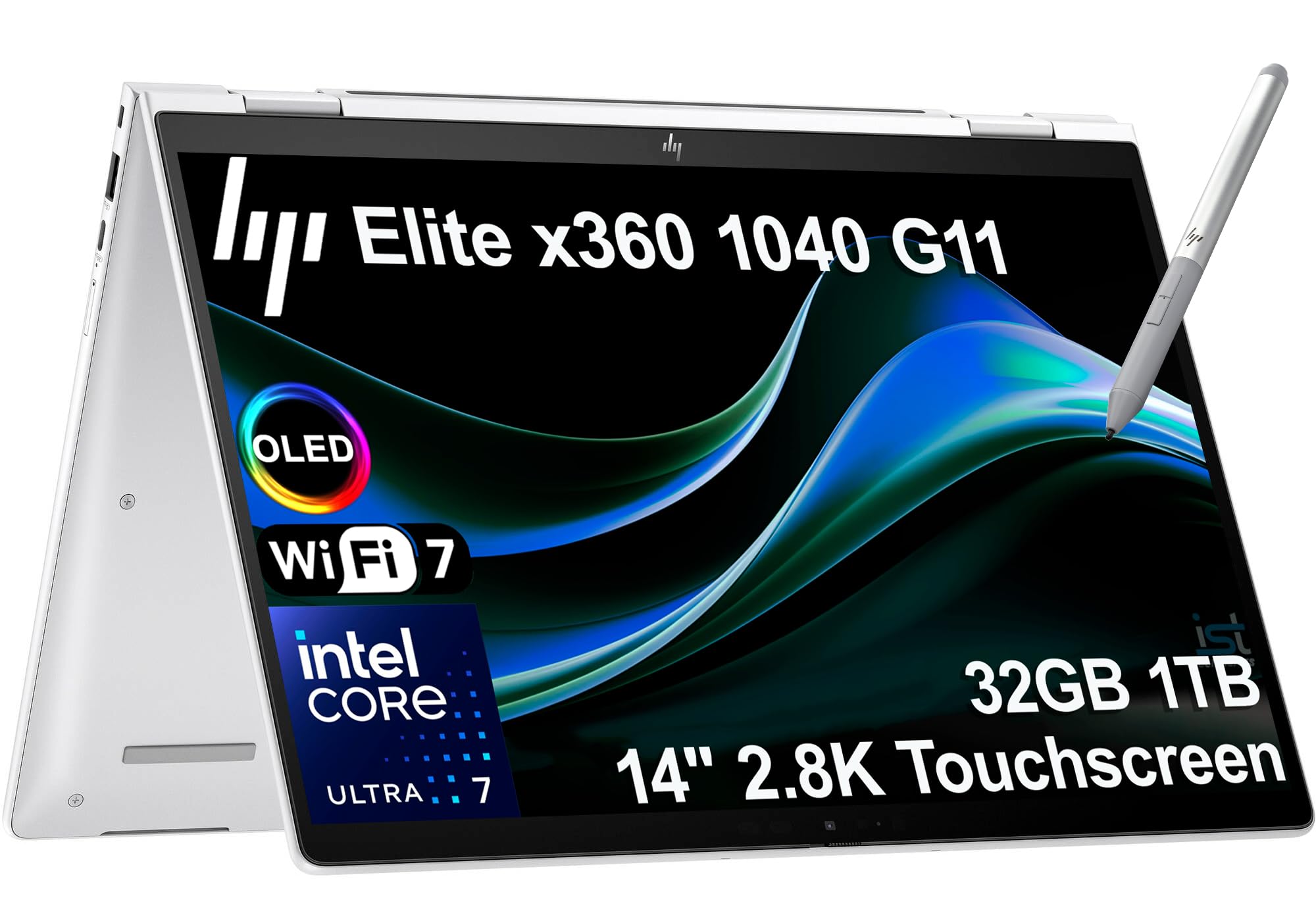
7. HP Elite x360 1040 G11
A business 2-in-1 with a screen that makes colors sing
This HP Elite x360 has a 360-degree hinge, so it bends into laptop, stand, tent, or tablet mode — and the display is the star of the show. The 14″ 2.8K (2880 x 1800) OLED IPS touchscreen with 400 nits brightness and 100% sRGB delivers vibrant, accurate colors that bring presentations and creative work to life. It is powered by an Intel Core Ultra 7 155H vPro processor with 16 cores running up to 4.8 GHz.
The 5MP IR webcam with a privacy shutter keeps video calls sharp and secure, while quad stereo speakers tuned by Poly Studio Audio provide spatial sound. With 32GB DDR5 7500 MT/s and a 1TB PCIe NVMe M.2 SSD, it boots super quick and handles demanding professional applications smoothly. Owners using it for freelance accounting say it is exactly what they needed, boots up quickly, and is not too heavy.
Connectivity is future-proof with Wi-Fi 7 and Bluetooth 5.4, plus 2 x Thunderbolt 4, USB-C, USB-A, and HDMI 2.1 for up to 3 external 4K monitors at 60Hz. An HP Active Pen is included for note-taking and precise input, and a fingerprint reader and backlit keyboard round out the package. The face recognition security adds convenience for Windows Hello login.
Screen magic: The 2.8K OLED with 100% sRGB is the most visually stunning display on this list — perfect for designers and presenters.
Full package: vPro security, Wi-Fi 7, Thunderbolt 4, and an included active pen make this genuinely business-complete.
Reach for this if: you are an executive, consultant, or creative who needs premium portability with a gorgeous display and 2-in-1 flexibility.
The honest note: a 360-degree OLED with vPro is a premium product — you pay for that versatility and screen quality.
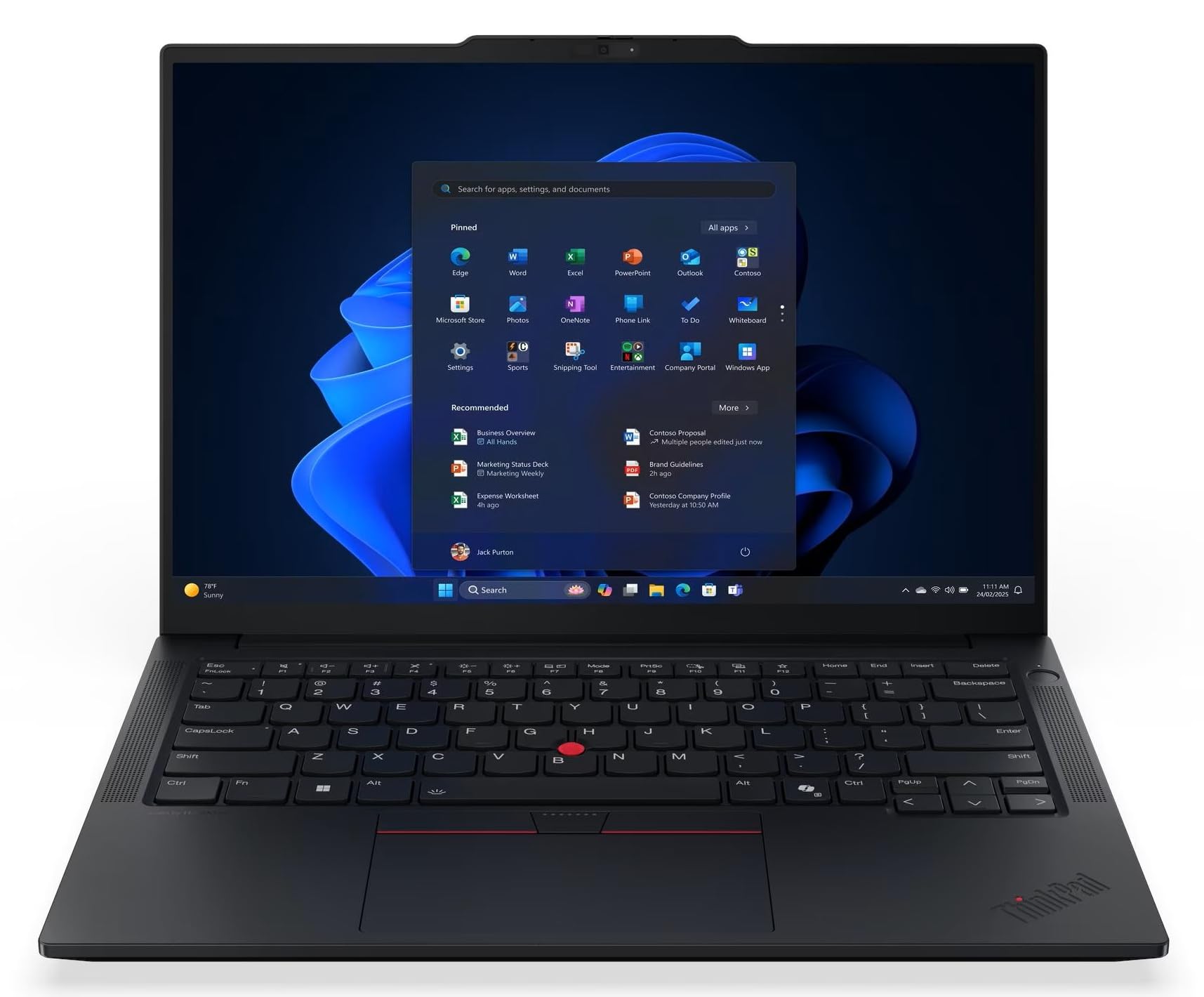
8. Lenovo ThinkPad E14 Gen 7
A teacher-approved ThinkPad that switches between laptop and tablet
This ThinkPad E14 Gen 7 brings a touchscreen to the business-class formula, and teachers are the loudest fans. The 14″ WUXGA IPS touch display at 1920 x 1200 flips into tablet mode, and owners rave that it handles “many tabs with no lag.” Inside, the Intel Core Ultra 7 258V processor runs up to 4.8 GHz, with 32GB of lightning-fast LPDDR5X-8533MT/s memory and a 1TB PCIe Gen4 SSD.
The integrated Intel Arc 140V GPU handles everyday graphics and even light creative work smoothly. It is lightweight and easy to move between different programs and apps, which one senior owner appreciated for its simplicity. With a fingerprint reader and backlit keyboard, it works comfortably in any lighting, and Bluetooth 5.3 plus Ethernet, HDMI, and USB keep it versatile for office setups.
The reliability feedback is positive, with owners saying the machine “performs great” and that they “would recommend” it. One recurring minor frustration involves the included stylus — it does not ship with batteries, and finding the right ones can be a hassle. If you plan to use the pen heavily, be prepared to source batteries separately; otherwise, this is a flexible, dependable business machine.
What owners confirm
- Fast with many open tabs — no lag for daily work
- Lightweight with a responsive touchscreen and flexible modes
- Fingerprint reader adds quick, secure login
Minor gripes
- Stylus ships without batteries — hunting for the right ones is a hassle
- 45% NTSC color gamut is fine for work, not for color editing
Pick this for: teachers, presenters, and workers who want a reliable touchscreen ThinkPad that also folds into a tablet.
skip it if: you need the pen day one without fuss, or you do color-critical creative work.
9. MSI Katana 15 HX

Desktop-class CPU power crammed into a 15.6-inch frame
If raw processing power is the mission, the Katana 15 HX answers with an Intel Core i9-14900HX and its 24-core hybrid architecture running up to 5.8 GHz. Paired with the NVIDIA GeForce RTX 5070 with ray tracing and DLSS 4, this machine is described as an absolute beast for gaming. The QHD 165Hz display with 100% DCI-P3 color reveals more detail and reduces motion blur in fast-paced titles.
The Cooler Boost 5 system uses dual fans and a 5-heat-pipe design to keep the CPU and GPU stable during long gaming marathons. A 4-zone RGB keyboard with highlighted WASD keys adds style, and the port selection covers USB-C Gen 2, HDMI up to 8K, multiple USB-A, and RJ45 for wired networking. Owners say it handles games like Fortnite and 7D2D at max settings with ease on an external monitor.
The mixed feedback here revolves around thermals and power. Customers note the laptop runs hot and needs a cooling pad, and Fan Boost mode is loud enough to sound like an air pump. Battery life is short under load — about 45 minutes of gaming — and a minority report reliability issues after several months. The i9 and RTX 5070 combo is a genuine desktop replacement for gaming, but it demands care with cooling and expectations.
Raw muscle
- 24-core i9-14900HX up to 5.8 GHz for uncompromised speed
- RTX 5070 with DLSS 4 and ray tracing for modern titles
- QHD 165Hz display with 100% DCI-P3 for vivid gaming
The honest costs
- Runs hot — a cooling pad is practically required
- Fan Boost is very loud; battery drains fast under load
- A minority report reliability issues after months of use
Who it serves: hardcore gamers who want desktop-class performance and are willing to manage heat with a cooling stand.
The trade-off: you trade portability and quiet for raw power — this is not an unplugged machine.
10. GIGABYTE AERO X16

A premium thin-and-light that games without the bulk
This AERO X16 is shockingly thin at just 0.65 inches (16.75 mm) and light at 4.18 lbs (1.9 kg), yet it packs an AMD Ryzen AI 9 HX 370 processor and an NVIDIA GeForce RTX 5070. Owners call it “solid, fast, well built” and highlight that it runs games smoothly and handles heavy tasks like video editing without skipping a beat. The premium aluminum build draws consistent praise.
The 16″ 165Hz WQXGA 2560×1600 display is bright and accurate, ideal for both gaming and creative work. With 32GB DDR5 RAM and a 1TB SSD, boot times are fast and multitasking is easy. Reviewers point out it stays cool with a cooling pad, hitting mid-60s°C with no throttling, and it is remarkably quiet during normal use — the fans only get loud when gaming.
There is one software caveat to know: the bundled GiMATE AI software has frustrated some owners. One reported it disables the GPU, limits the CPU, drops the refresh rate to 60Hz, and causes crashes — the fix is uninstalling it and managing GPU settings manually. Battery life is decent for a gaming laptop, though a few note real-world usage is far from the advertised figure.
Build to admire: Few gaming laptops feel this premium and stay this portable — the aluminum chassis is a genuine highlight.
Software warning: The GiMATE AI companion is buggy for some; plan to uninstall it and control the GPU yourself for best results.
Best suited to: creators who game on the side and want a thin, classy machine that does not scream “gamer.”
Not for: users who want AI software that works from the start without tinkering.
11. ASUS ROG Strix G16 (2025)

A 240Hz monster that handles 4K gaming without breaking a sweat
This ROG Strix G16 is the enthusiast’s choice, pairing an Intel Core Ultra 9 Processor 275HX running up to 5.4 GHz with an NVIDIA GeForce RTX 5070 Ti. Shoppers say 4K gaming at over 200 fps in titles like Fortnite and The Finals, with the GPU staying at a cool 65-70°C. The 16″ ROG Nebula display at 2560×1600 with a blazing 240Hz refresh rate and 3ms response delivers buttery-smooth motion.
The 32GB DDR5-5600MHz memory and 1TB PCIe Gen 4 SSD handle massive game libraries and heavy multitasking with ease. ROG’s intelligent cooling uses a vapor chamber, tri-fan technology, and Conductonaut extreme liquid metal on the chipset to keep it cool and quiet. A full-surround RGB light bar syncs with the keyboard, and Stealth Mode turns off all lighting for professional settings. Architecture professionals report it runs Lumion, SketchUp, and Blender without overheating.
Battery life is the honest compromise — owners note about an hour of gaming on full battery, though one measured around 4.5 hours for lighter use. The value-for-money opinion is mixed, with several owners saying it is excellent when bought on sale but overpriced at its full list price. There is notable bloatware including McAfee, so a fresh start is recommended. This is a top-tier gaming flagship that shines brightest when the price is right.
Elite gaming power
- RTX 5070 Ti with 240Hz display for ultra-smooth, high-fps gaming
- Vapor chamber cooling with liquid metal keeps it cool and quiet
- Runs heavy creative apps like Lumion and Blender flawlessly
Premium caveats
- Battery life is short — about an hour of full gaming
- Heavy bloatware means a fresh Windows install is wise
- Value is debated unless bought on a strong sale
Pick this if: you want the best gaming display and GPU combo here and can catch it at a discount.
Think twice if: you need portability or all-day battery — this is a powerful desktop replacement, not a road warrior.
12. LG gram Pro 17-inch

A 17-inch giant that weighs less than most 14-inch rivals
This LG gram Pro is the ultimate surprise — a 17″ laptop that weighs just 3.3 lbs and is only 0.6 inches thin. Owners love handing it to people and watching their reactions to how light it feels. It pairs the Intel Core Ultra 9 285H processor with an NVIDIA RTX 5050 GPU, so it handles business, video editing, and even light gaming. The 32GB DDR5 memory means no lag for serious multitasking.
The 90Wh battery delivers up to 25 hours of video playback, a standout figure for a 17-inch screen. The Variable Refresh Rate display adapts from 31Hz to 144Hz, keeping visuals smooth while saving power. With a full numeric keyboard and many ports including USB-C and Bluetooth 5.4, it is a complete productivity machine. It has passed seven military-grade standards for durability, so it is strong despite the light frame.
There are two honest complaints from owners. Setup can be frustrating because of preinstalled antivirus and unnecessary apps, and there is no live customer service. It also lacks an Ethernet port, which some business users miss. Owners otherwise call it “near perfect” and “super fast,” with one noting it lets them retire their older bulky 17-inch laptops entirely.
The wow factor: 17 inches of screen at 3.3 lbs with a25-hour battery is the category’s standout spec combo.
Setup friction: Expect to clean out preinstalled apps and antivirus on day one — it is the one rough edge on an otherwise premium experience.
Reach for this if: you want maximum screen real estate with minimum weight, plus class-leading battery life for travel.
pass on it if: you need an Ethernet port, live phone support, or a zero-friction out-of-box setup.
Understanding the Specs
NPU and AI TOPS
An NPU is a dedicated neural processing unit that handles AI tasks locally on your laptop, and TOPS measures how fast it works (a higher number means quicker AI tasks). This powers Copilot+ features like real-time video effects, background blur, and auto-framing without needing an internet connection. If you do video calls or use AI editing tools, a laptop with a capable NPU makes those features feel instant and private.
Refresh rate
Refresh rate is how many times per second your screen updates the image, measured in hertz (Hz). A 60Hz display is standard for office work, but a 165Hz or 240Hz panel makes fast-moving games and scrolling look dramatically smoother. If you game competitively, the higher number directly improves your experience by reducing motion blur and making gameplay feel more responsive.
FAQ
Is 32GB RAM worth it for a typical student or office worker?
What does the NPU number (like 47 TOPS) actually mean for me?
Should I buy an Arm-based laptop or a traditional x86 one?
What is the difference between integrated and dedicated graphics?
How long should a 32GB RAM laptop last before needing an upgrade?
Is a 32GB RAM laptop good for gaming?
What does a 2-in-1 laptop give me over a traditional clamshell?
Does 32GB RAM make a laptop boot up faster?
Final Thoughts: The Verdict
The 32gb ram laptop that wins the overall crown is the Microsoft Surface Laptop because it delivers the best blend of performance, premium build, and a 20-hour battery that genuinely frees you from the charger. If you want the best value for school and everyday work, the HP 15 gives you the full 32GB experience at a budget-friendly price. And for gaming or creative work, the Acer Nitro V 16S is the smartest balance of power and price, with the flagship ASUS ROG Strix G16 there if you want top-tier visuals on a 240Hz display.
How We Picked
We do not accept paid placement. Every pick is matched to a real buyer and a real use-case; we do not hands-on test units.
Sources & Methodology
Specifications: manufacturer listings and product documentation. Review insights: verified customer reviews, as of August 2026. Pricing: not shown on this page (it changes often); check the current price via the retailer link.
As an Amazon Associate, Gadgets Feed earns from qualifying purchases. This does not affect which products we feature.