
Our readers keep the lights on and my morning glass full of iced black tea. As an Amazon Associate, I earn from qualifying purchases.
Specs are compiled from manufacturer listings and verified buyer reviews and can change over time — please confirm the key details on the product page before buying.
You want a bigger, wider view without the bezel gap of two monitors — but the specs for a 34-inch ultrawide curved monitor jump from 60Hz to 240Hz, VA to OLED, and USB-C to none. This guide sorts the screens that actually make a difference in games, work, or both.
I’m Min — the founder and writer behind Gadgets Feed. This guide is built by comparing the manufacturers’ published specifications and the patterns across verified customer reviews, so you get each pick’s real strengths and trade-offs instead of marketing spin.
We broke down eight of the top contenders in the 34-inch, 21:9 curved space — from budget workhorses to OLED flagships — to help you land the right 34 inch ultrawide curved monitor for your setup without the guesswork.
Quick Picks
- LG 34GS95QE — Top Performer
- Amzfast AMZG34C8 Pro — Best Value
- LG 34GN850-B — Color Master
- Dell S3425DW — Productivity Hub
- Alienware AW3425DWM — Balanced Performer
- GIGABYTE G34WQC2 — High-Contrast Pick
- ViewSonic VX3418C-2K — Entry-Level Smooth
- Philips 346E2CUAE — USB-C Workhorse
How To Choose The Best 34 Inch Ultrawide Curved Monitor
The 34-inch ultrawide curved monitor market is dense with choices that look similar on paper but feel very different in use. Your decision hinges on a few key specs that align with what you actually do.
Refresh Rate and Response Time — The Motion Duo
The refresh rate (measured in Hertz, or Hz) tells you how many times the screen updates per second. A 60Hz monitor refreshes 60 times a second, while a 240Hz monitor refreshes 240 times. Higher numbers mean smoother motion, crucial for fast-paced games. Response time (in milliseconds, or ms) is how fast a pixel changes color; lower numbers reduce ghosting (a blurry trail behind moving objects). A 1ms GTG (gray-to-gray) response time is the current gold standard for minimizing blur.
Panel Technology — VA, IPS, or OLED
This is the heart of the image. VA (Vertical Alignment) panels offer high contrast ratios like 3000:1, giving deep blacks and good darkness in movies. IPS (In-Plane Switching) panels provide the best color accuracy and wide viewing angles, but contrast is lower, around 1000:1. OLED (Organic Light Emitting Diode) panels are the pinnacle — each pixel emits its own light, so blacks are absolute (infinite contrast) and colors look punchy, but they are more expensive and require care to prevent burn-in.
Curvature and Resolution — The Immersion Factors
Curvature is measured by the radius of the circle the curve would form (in millimeters). A 1500R curve is the most common for 34-inch screens, wrapping around your field of view more tightly than a 1800R or 3800R. Resolution matters because a 3440×1440 (WQHD) panel has nearly 2.4 times the pixels of standard 1920×1080, making text crisper and games more detailed — but it also demands more graphics horsepower to drive.
Quick Comparison
| Model | Best For | Refresh Rate | Contrast Ratio | Color Gamut | Amazon |
|---|---|---|---|---|---|
| LG 34GS95QE | Ultimate gaming immersion | 240Hz | 1.5M:1 | — | $699.99Amazon |
| Amzfast AMZG34C8 Pro | High-refresh on a budget | 240Hz | 3000:1 | 131% sRGB | $284.99$369.99Amazon |
| LG 34GN850-B | Fast IPS color work | 144Hz | 1000:1 | 98% DCI-P3 | $1,100.00Amazon |
| Dell S3425DW | USB-C productivity hub | 120Hz | 3000:1 | 99% sRGB | $376.99$419.99Amazon |
| Alienware AW3425DWM | Balanced gaming + work | 180Hz | 3000:1 | 95% DCI-P3 | $349.99Amazon |
| GIGABYTE G34WQC2 | Great contrast for value | 200Hz | 4000:1 | 95% DCI-P3 | $269.99Amazon |
| ViewSonic VX3418C-2K | Entry-level smooth gaming | 180Hz | 4000:1 | — | $289.99Amazon |
| Philips 346E2CUAE | Single-cable laptop setup | 100Hz | — | 121% sRGB | $309.99Amazon |
In‑Depth Reviews
1. LG 34GS95QE

The OLED champion that turns black into a physical absence of light.
This is the display that redefines what you see. The LG 34GS95QE uses a self-emissive OLED panel with a 240Hz refresh rate and a near-instant 0.03ms GTG response time. That means motion clarity is so crisp that one reviewer noted, “The first time my desktop loaded, I thought the monitor was off,” because the blacks are truly absolute — a 1.5M:1 contrast ratio (1.5 million to one) that makes dark scenes in games or movies feel infinite. The 800R curve is the most aggressive in this roundup, wrapping deeper around your peripheral vision; it helps in fast FPS games by keeping more of the action in your direct line of sight.
Colors are vibrant and accurate from the start, and the 240Hz refresh rate makes the Amzfast’s 240Hz feel more fluid due to the OLED’s instantaneous pixel response. However, the 800R curve can feel overwhelming for productivity — text clarity takes a slight hit due to the subpixel layout of OLED, and the steep curve makes side-by-side document work feel cramped. It is also the most expensive pick here, and burn-in protection requires enabling settings manually.
Where It Shines
- Infinite contrast from OLED gives HDR content real depth and pop.
- 240Hz refresh rate with 0.03ms response delivers class-leading motion sharpness.
- Anti-glare coating minimizes reflections in bright rooms.
The Trade-offs
- Aggressive 800R curve reduces effective workspace for spreadsheets or code.
- Lower brightness (275 nits) than high-end LCDs in SDR mode.
- Burn-in risk requires active care features; no built-in speakers.
Ideal for: The pure gamer who wants the best motion clarity and contrast, and is willing to deal with a steep curve and premium price.
Think twice if: You need a productivity workhorse — the curve and subpixel text rendering will frustrate daily office tasks.
2. Amzfast AMZG34C8 Pro
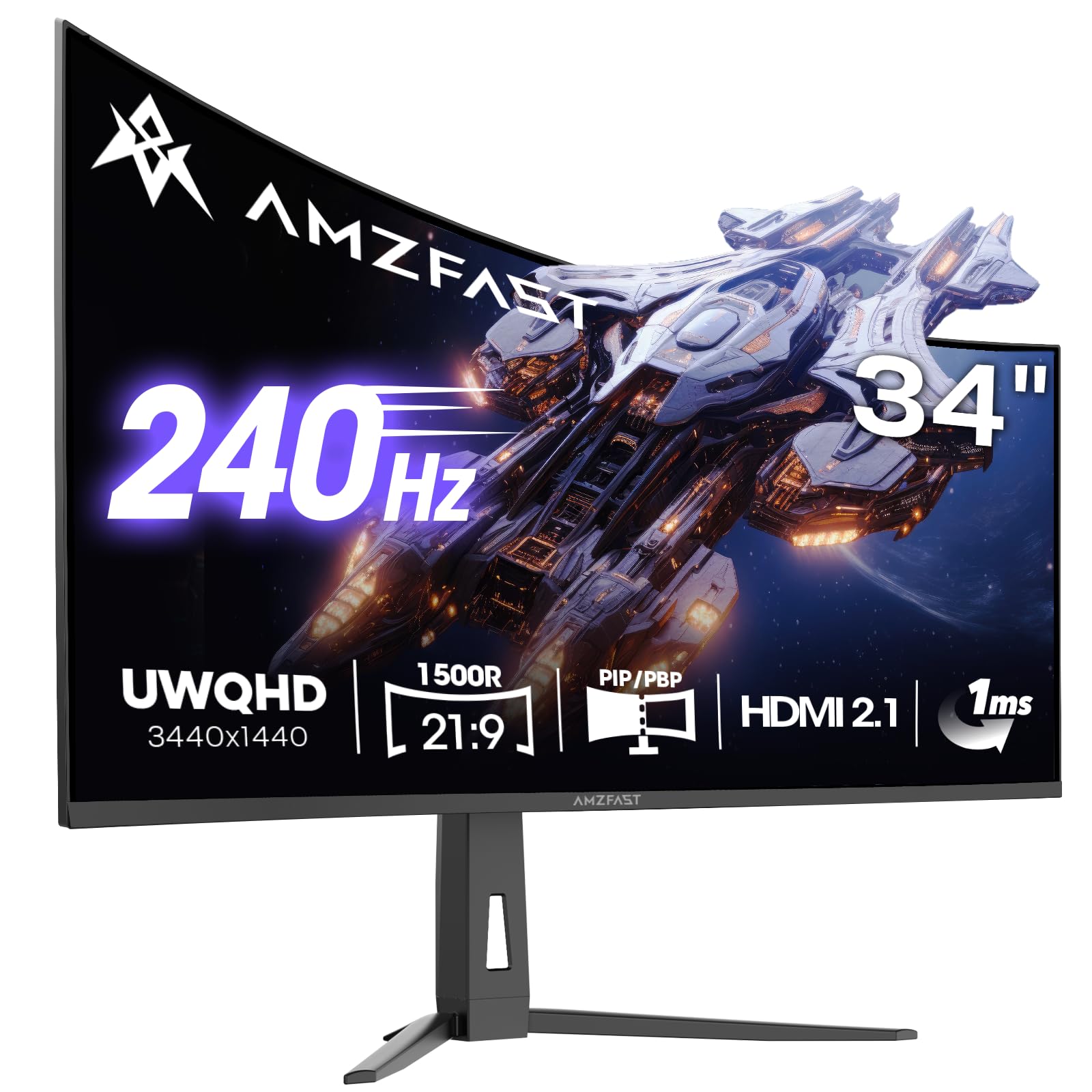
The budget 240Hz contender that punches far above its price tag.
If you want the butter-smooth feel of 240Hz without paying OLED money, the Amzfast delivers. It pairs a 240Hz refresh rate and 1ms OD (overdrive) response time with a 3440×1440 VA panel that hits 3000:1 contrast and covers 131% sRGB color gamut. The 240Hz refresh rate versus the Philips 100Hz is enormous for competitive gaming — you see enemies and motion trails as clean, fluid sweeps rather than blur. The inclusion of dual HDMI 2.1 ports is rare at this tier, letting you run two consoles at full 240Hz without swapping cables.
One seasoned gamer who tested the unit described it as “Best at 120/200Hz (165Hz felt off),” suggesting the overdrive tuning has sweet spots. The stand is a real weak point: a buyer warned that “stand is insecure, causing backward tilt,” so you will likely want a VESA arm (100x100mm). The HDR400 mode is decent but not transformative — good enough for games, not for HDR movie nights. For the price, you get a raw frame-rate advantage that is tough to top.
The Frame-Rate Advantage
- 240Hz refresh rate
- Dual HDMI 2.1 ports allow full 240Hz from new consoles.
- Wide color coverage (131% sRGB) makes games look vibrant.
Where It Cuts Corners
- Stand feels flimsy — some units tilt backward under their own weight.
- Overdrive tuning is inconsistent across the refresh range.
- HDR performance is entry-level; do not expect OLED-like highlights.
Reach for this if: You are a competitive gamer on a strict budget who wants high refresh rates and does not mind using a monitor arm.
Look elsewhere if: You need a rock-solid out-of-box stand or do high-end color-accurate work — the VA panel’s gamma shift and stand wobble will annoy.
3. LG 34GN850-B

The IPS legend that balances speed and color for dual-role gamers and creators.
This LG uses a Nano IPS panel that covers 98% of the DCI-P3 color space — a milestone for color-critical work in a 144Hz gaming monitor. The 3440×1440 resolution renders crisp text, and the 144Hz refresh rate (overclockable to 160Hz) with 1ms GTG response delivers smooth motion without the black-level compromises of VA panels. Where the Amzfast shows its VA’s gamma shift from off-center, the IPS on this LG holds color and brightness at any angle up to 178°/178°. Buyers consistently describe it as “no compromise” — one noted “no dead pixels or backlight bleed,” proof of LG’s quality control.
The catch is contrast. At 1000:1, blacks look grayish in a dark room — a far cry from the 4000:1 or infinite contrast of VA or OLED rivals. The stand is large and lacks swivel, so you lose desk space. Some units also show “brightness issues with Adaptive-Sync turned on,” requiring an RMA. At its price point, you pay a premium for IPS color fidelity and motion performance that competitive-level players and photo editors will appreciate equally.
Why It Stands Out
- 98% DCI-P3 color gamut is accurate enough for light creative work.
- IPS viewing angles keep color consistent — no VA gamma shift.
- 144Hz native with 1ms GTG response feels snappy in all games.
The Limits
- 1000:1 contrast means blacks are not deep — mediocre for night scenes.
- Cannot overdrive to 160Hz while using 10-bit color; must choose one.
- Large stand footprint with no swivel; VESA arm recommended.
Best for: The mixed-use buyer who plays fast shooters and edits photos — the IPS color accuracy is a genuine asset.
skip it if: You primarily watch HDR movies or play single-player titles in the dark — the low contrast washes out deep blacks.
4. Dell S3425DW

The single-USB-C-cable desk cleaner for laptop warriors.
If your daily driver is a MacBook or a Windows laptop, the Dell S3425DW simplifies your life: one USB-C cable carries video, data, audio, and up to 65W power delivery to your machine. That is a massive convenience over the ViewSonic VX3418C-2K, which lacks USB-C and requires separate cables. The 34-inch VA panel delivers 3000:1 contrast with 99% sRGB coverage, making text sharp and blacks decent for watching videos during breaks. The ComfortView Plus (hardware low blue light) cuts blue emissions to under 35% without washing out colors — a real benefit for 8-hour workdays.
The monitor is not without quirks. At 120Hz, it is fast enough for casual gaming but will feel slow next to the Amzfast’s 240Hz. A buyer flagged that “VESA bracket recessed ~1/4″, requiring awkward assembly” if you plan to mount it. Also, the port selection is sparse — no DisplayPort, just one HDMI and one USB-C — so you cannot daisy-chain multiple displays. For pure productivity with a single modern laptop, though, this is the most friction-free choice here.
The Office Advantage
- Single USB-C cable charges your laptop and transmits video — clutter-free desk.
- ComfortView Plus reduces eye strain without muddying colors.
- VA panel’s 3000:1 contrast helps readability and video watching.
What It Lacks
- Only one HDMI and one USB-C — no DisplayPort and limited expansion.
- VESA mounting requires longer screws due to recessed bracket design.
- 120Hz refresh rate is fine for work but not competitive gaming.
Ideal for: Anyone who wants to dock their laptop with one USB-C cable and work all day — perfect for remote work.
Think twice if: You game seriously or want to connect multiple desktops — the port shortage and modest refresh rate limit options.
5. Alienware AW3425DWM

The Dell-built VA ultrawide that splits the difference between work and play.
The Alienware AW3425DWM brings the build quality you expect from Dell’s premium line: a tool-less height-adjustable stand that a buyer called “the best stand” for how easy it is to set and lock in position. Under the hood, it packs a 34-inch VA panel with 3440×1440 resolution, a 180Hz refresh rate, and 1ms GTG response time. The 3000:1 contrast ratio and 95% DCI-P3 color coverage deliver vibrant, deep images that beat the LG 34GN850-B’s IPS contrast for dark gaming scenes. AMD FreeSync Premium and VESA AdaptiveSync keep motion smooth.
It is not an OLED, so blacks are excellent but not perfect, and the VA panel can show some gamma shift when viewed off-angle. There are no built-in speakers, which the similarly-priced ViewSonic also lacks but the GIGABYTE includes. A reviewer noted it is “worth on sale, not over,” meaning the value is strong when discounted but less compelling at full price. For a gamer who also needs a work monitor with a quick, adjustable stand, this is a confident middle ground.
What Makes It Great
- Tool-less height adjustment and sturdy stand — best in class for ergonomics.
- 180Hz refresh rate hits a balance for smooth motion without maxing out GPU.
- VA panel delivers excellent 3000:1 contrast for rich single-player games.
Where It Falls Short
- No built-in speakers — you need external audio.
- VA gamma shift means off-center viewing loses some color accuracy.
- Best value when on sale; at full price, alternatives offer similar specs.
Reach for this if: You want a reliable, all-around VA ultrawide with a top-tier stand and smooth 180Hz for mixed gaming and everyday use.
Look elsewhere if: You need speakers or a USB-C hub — the Philips or Dell models are better for a clean laptop connection.
6. GIGABYTE G34WQC2
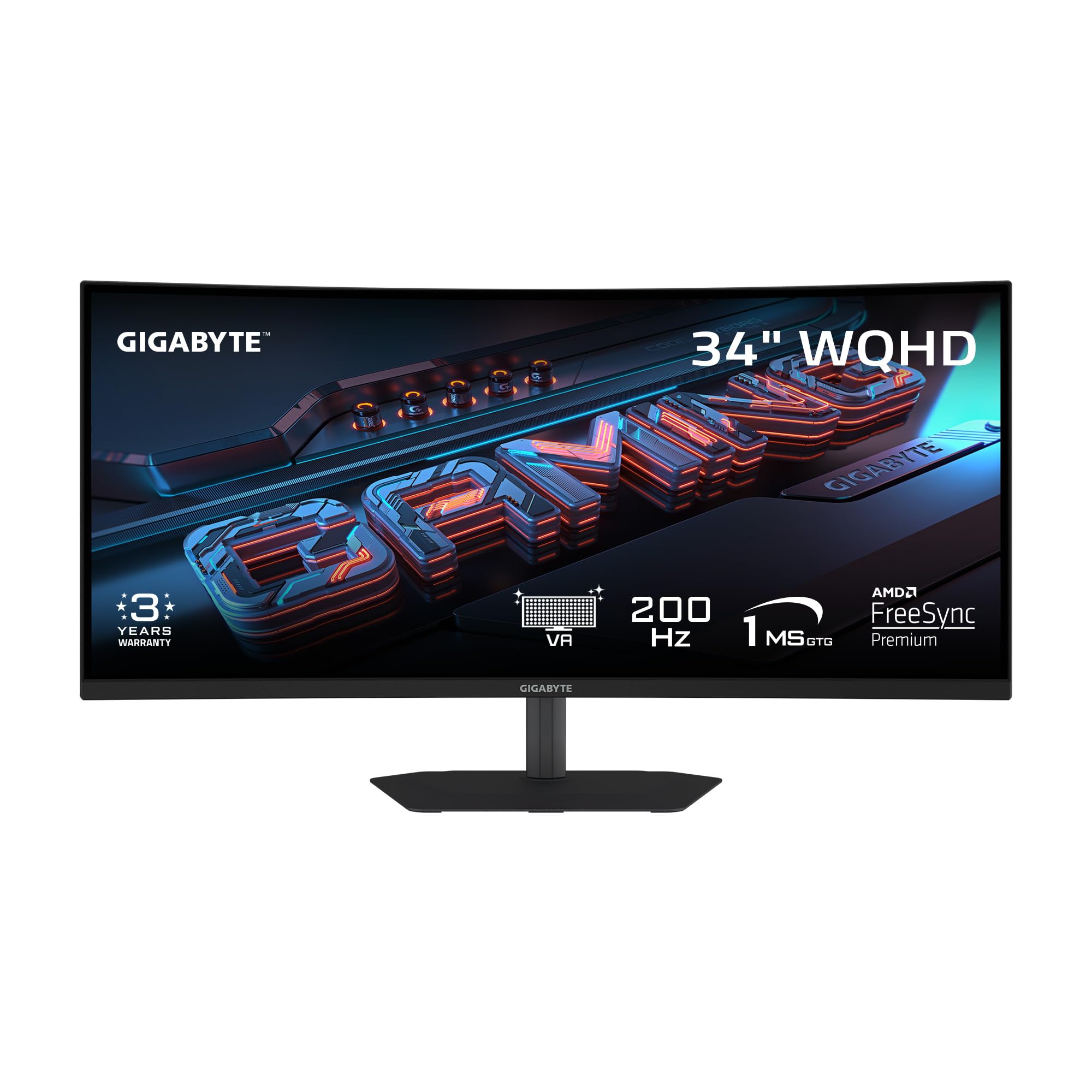
The depth champion — 4000:1 contrast that makes VA a dark-room star.
That means deeper blacks and better shadow detail in dark game scenes like dungeons or night races. It runs at 200Hz with a 1ms GTG response time, putting it between the Amzfast’s 240Hz and the ViewSonic’s 180Hz. The 1500R curvature is standard but effective, and the stand offers full ergonomic range: 130mm height, tilt (-5° to +21°), and swivel (±15°).
Buyers love the image quality — one called it “beautiful picture and great gaming monitor” — but one noted the packed-in “DisplayPort cable was dead,” causing two hours of troubleshooting. The 2W x 2 built-in speakers are present but are weak — fine for voice chat, not for music. With 95% DCI-P3 coverage and VESA DisplayHDR 400, it is a strong all-rounder for gamers who want deep contrast at a mid-range price. The extra contrast over the Amzfast is noticeable in dark games, though the Amzfast wins on raw refresh rate.
The Contrast Advantage
- 4000:1 native contrast beats most VA panels — better shadow depth and black levels.
- 200Hz refresh rate is fast enough for competitive play.
- Full ergonomic stand (height, tilt, swivel) from the start.
The Downsides
- Included DisplayPort cable dead on some units — budget for a replacement.
- Built-in speakers are weak; external speakers or headphones are preferred.
- OSD menu is slightly clunky with a single joystick button.
Best for: The gamer who plays dark, atmospheric single-player titles (horror, RPGs, racing at night) where deep contrast adds immersion.
pass on it if: You are a pure esports player who wants the highest possible refresh rate — the Amzfast’s 240Hz gives you more headroom.
7. ViewSonic VX3418C-2K
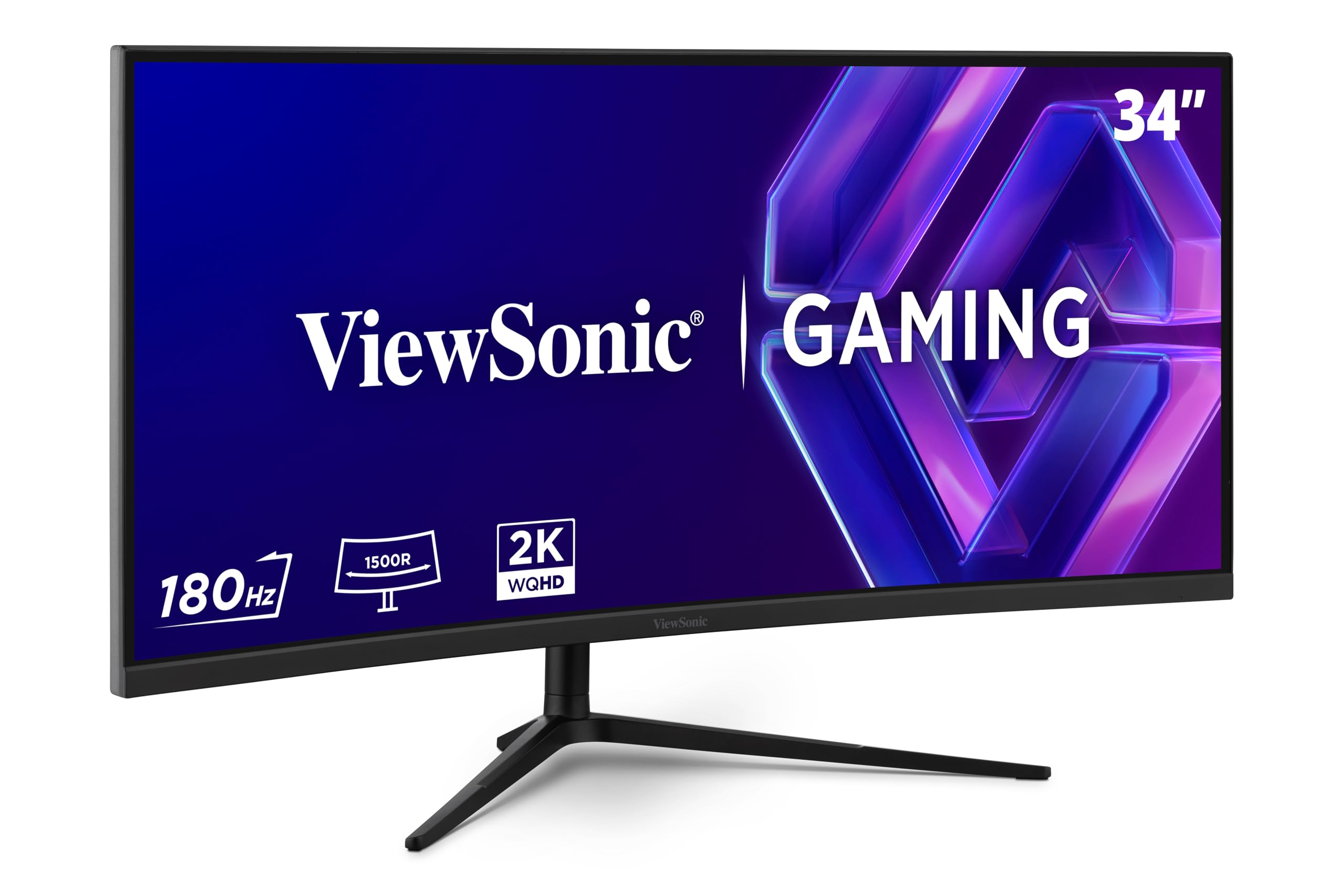
The baseline ultrawide that gets the essentials right for a low price.
The ViewSonic VX3418C-2K is the entry point into 34-inch ultrawide gaming, pairing a 180Hz refresh rate with a 1ms MPRT (moving picture response time) on a VA panel that offers 4000:1 contrast — the same deep blacks as the GIGABYTE above. At its price, it undercuts the GIGABYTE and Amzfast while still delivering a 3440×1440 resolution and FreeSync Premium support. Buyers report that the “extra 400 pixel count is nice” versus standard 3440×1440, though it likely refers to the overall width feeling wider. The stand is adjustable but one buyer warned it is “not useful; recommend an arm” — similar to the Amzfast’s stand gripes.
The biggest trade-off is brightness. At 250 nits, it is noticeably dimmer than the GIGABYTE’s 450 nits or the Amzfast’s 450 nits — so in a bright room, the screen can look washed out. The built-in speakers are also “nearly useless,” per multiple buyers, who recommend an external soundbar. It also lacks USB-C, so if you want a single-cable laptop setup, the Dell or Philips are better fits. For the price, you get a smooth 180Hz ultrawide with great contrast — just plan to add a monitor arm and speakers.
Why It Is a Good Deal
- 180Hz refresh rate with 4000:1 VA contrast — smooth and immersively dark.
- Low price point for a 3440×1440 ultrawide from a major brand.
- Flicker-Free and Blue Light Filter reduce eye strain during long sessions.
Where It Shows Its Cost
- Brightness at only 250 nits — struggles in well-lit rooms.
- Stand is wobbly; most buyers recommend a VESA arm immediately.
- No USB-C, poor built-in speakers, limited port selection.
Ideal for: A budget-conscious gamer who already has a monitor arm and speakers — you get smooth 180Hz and deep contrast for the lowest cash outlay.
Think twice if: You want a ready-to-use out-of-box experience or need USB-C — you will spend more on extras.
8. Philips 346E2CUAE

The office-first ultrawide that charges your laptop via USB-C while you work.
The Philips 346E2CUAE is built around the USB-C cable: a single connection handles video, data, and power delivery for your laptop, keeping your desk clean. It stops there for gaming, offering a modest 100Hz refresh rate and 1ms MPRT response. That is a 2.4x gap in refresh rate compared to the Amzfast’s 240Hz, so fast-paced shooters will feel sluggish here. But the 121% sRGB coverage and 1500R VA panel deliver crisp text and vibrant colors ideal for spreadsheets, coding, and design work. The 4-year advance replacement warranty is a standout for long-term confidence.
Buyers noted that “USB-C connectivity works smoothly with Mac/Windows laptops,” but one pointed out the “stand height adjustment is too low,” and the built-in speakers “are adequate” — fine for YouTube, not for immersion. The 100Hz cap means it is not for gamers, but for anyone who spends their day typing, reading, and video conferencing, the single-cable convenience and wide color gamut make it a productivity champion. The ViewSonic wins on motion, but the Philips wins on desk simplicity.
The Productivity Perks
- USB-C with power delivery — charges your laptop and transmits video in one cable.
- 121% sRGB coverage makes text and images look vibrant and accurate.
- 4-year advance replacement warranty is excellent for business use.
Where It Lags
- 100Hz refresh rate versus the Amzfast’s 240Hz — noticeable in games and fast scrolling.
- Stand height adjustment range is too low for many desk setups.
- Audio quality is muddled; external speakers recommended for calls.
Reach for this if: You are a laptop-centric professional who wants a one-cable workstation for documents, spreadsheets, and calls.
Look elsewhere if: You game at all — the 100Hz cap and lack of high-refresh features make it a poor choice for even casual shooters.
Understanding the Specs
Contrast Ratio and Static vs. Dynamic
The contrast ratio is the difference between the brightest white and the darkest black a monitor can produce. A 4000:1 ratio (like the GIGABYTE and ViewSonic) means white is 4000 times brighter than black — producing deep blacks for dark game scenes. A 1000:1 IPS panel (like the LG 34GN850-B) looks washed out in a dark room. OLED monitors (like the LG 34GS95QE) have an effectively infinite contrast ratio because each pixel turns off to show pure black — but that extra performance comes at a premium price.
Color Gamut — sRGB, DCI-P3, and NTSC
Color gamut describes the range of colors a monitor can display. sRGB is the standard for web and office use. DCI-P3 is a wider gamut used in digital cinema and modern games. A higher percentage (like 98% DCI-P3 on the LG 34GN850-B) means more vibrant, realistic reds and greens. The Philips 346E2CUAE covers 121% sRGB — that means it can show more saturated colors than the baseline sRGB standard, which is great for photo editing and design work but can oversaturate games if not calibrated.
FAQ
Will a 34-inch ultrawide curved monitor fit on my desk?
Can my computer run a 3440×1440 ultrawide monitor?
Is 100Hz enough for gaming on a 34-inch ultrawide?
What is the difference between a 1500R and 800R curved monitor?
Do I need HDMI 2.1 for a 34-inch ultrawide monitor?
Are built-in speakers good enough on ultrawide monitors?
What does VESA DisplayHDR 400 mean?
Can I use a console like the PS5 on a 34-inch ultrawide?
Final Thoughts: The Verdict
Across the board, the 34 inch ultrawide curved monitor winner is the Amzfast AMZG34C8 Pro because it delivers a 240Hz refresh rate and WQHD resolution at an incredible value — just budget for a monitor arm. If you want ultimate contrast and motion clarity, grab the LG 34GS95QE for its transformative OLED blacks and 240Hz response. And for a pure productivity setup with USB-C convenience, the standout is the Dell S3425DW.
How We Picked
We do not accept paid placement. Every pick is matched to a real buyer and a real use-case; we do not hands-on test units.
Sources & Methodology
Specifications: manufacturer listings and product documentation. Review insights: verified customer reviews, as of July 2026. Pricing: not shown on this page (it changes often); check the current price via the retailer link.
As an Amazon Associate, Gadgets Feed earns from qualifying purchases. This does not affect which products we feature.
Related Guides
Product prices and availability are accurate as of the date/time indicated and are subject to change. Any price and availability information displayed on Amazon at the time of purchase will apply to the purchase of this product. As an Amazon Associate I earn from qualifying purchases.
CERTAIN CONTENT THAT APPEARS ON THIS SITE COMES FROM AMAZON. THIS CONTENT IS PROVIDED "AS IS" AND IS SUBJECT TO CHANGE OR REMOVAL AT ANY TIME.
Amazon and the Amazon logo are trademarks of Amazon.com, Inc. or its affiliates.