
A 36-inch computer monitor represents a specific sweet spot in desktop display real estate — large enough to replace dual 24-inch setups without the overwhelming footprint of a 40-inch panel, yet still requiring careful attention to resolution density, panel technology, and connectivity to avoid ending up with a screen that looks pixelated or fatiguing after hours of use. The challenge is finding a monitor that delivers sharp text, accurate color, and smooth motion at this less-common size, where the market often lumps in 32-inch and 34-inch models under the same search.
I’m Min — the co-founder and writer behind Gadgets Feed. I’ve spent countless hours analyzing resolution charts, refresh rate specs, panel-type trade-offs, and customer feedback to isolate the monitors that genuinely perform at this scale, ensuring you don’t waste your money on a model that looks good on paper but disappoints on your desk.
After sifting through dozens of contenders and cross-referencing real-world performance data, I’ve curated a focused lineup of the best 36 inch computer monitor options that balance pixel density, ergonomics, and connectivity for work and play.
How To Choose The Best 36 Inch Computer Monitor
Choosing a monitor in this size class means navigating a few key decisions that directly affect daily usability. You cannot just pick a large screen and assume it will work — you’ll need to resolve the right resolution, panel type, and feature set for your specific workload or gaming habits.
Resolution: The PPI Threshold
A 36-inch screen at 1080p produces a pixel density of roughly 61 pixels per inch (PPI), which means visible pixels and a grainy image during normal desktop use. At 1440p (2560×1440 or 3440×1440), PPI jumps to around 95–109, offering a much sharper reading and coding experience. True 4K (3840×2160) pushes PPI past 120, delivering razor-sharp text and photo detail. For this category, at least 1440p class resolution is the baseline for productive work — anything less will cause eye strain and frequent frustration with font clarity.
Panel Technology: VA, IPS, or OLED
The panel type dictates contrast, viewing angles, and black levels. VA panels offer the best contrast ratio (3000:1 or higher) for deep blacks in dark scenes, making them strong for media consumption and games with shadowy environments. IPS panels deliver superior color consistency and wider viewing angles, ideal for collaborative work and color-accurate photo editing. OLED panels provide infinite contrast and pixel-level lighting, resulting in stunning HDR and perfect blacks, but they come at a premium and require care regarding burn-in over long static desktop use. Your choice should align with whether you value contrast, color accuracy, or absolute image quality.
Refresh Rate and Adaptive Sync
Standard office monitors run at 60Hz, which is fine for document work and spreadsheets. For gaming, a 120Hz or higher refresh rate dramatically improves perceived smoothness. 160Hz and 240Hz panels reduce motion blur further, making fast-paced shooters feel responsive. Adaptive sync technologies like AMD FreeSync Premium and NVIDIA G-Sync Compatible eliminate screen tearing without the input lag of V-Sync, a critical feature for anyone who plays games on this monitor. Check whether the monitor supports HDMI 2.1 or DisplayPort 1.4 to hit higher refresh rates at full resolution.
Quick Comparison
On smaller screens, swipe sideways to see the full table.
| Model | Category | Best For | Key Spec | Amazon |
|---|---|---|---|---|
| LG 45GX900A-B | Premium OLED Ultrawide | Immersive Gaming & Race Sims | 45″ 3440×1440 OLED, 240Hz | Amazon |
| LG 32GX870A-B | High-End 4K OLED | Competitive & Story Gaming | 32″ 4K OLED, 240Hz / 480Hz Dual Mode | Amazon |
| Samsung 37” Odyssey G7 | Curved 4K Gaming | Single-Large Screen Work & Console | 37″ 4K VA, 165Hz, 1000R Curve | Amazon |
| ASUS ROG Strix XG32UCG | Dual-Mode Gaming | Versatile 4K / FPS Gaming | 32″ 4K Fast IPS, 160Hz / 320Hz Dual Mode | Amazon |
| Dell Pro 32 Plus P3225QE | Professional 4K IPS | Office Productivity & Color Work | 32″ 4K IPS, 100Hz, USB-C 90W PD | Amazon |
| Samsung 43” Smart Monitor M7 | Smart 4K All-in-One | Streaming & Casual Multi-Device | 43″ 4K VA, 60Hz, Smart TV OS | Amazon |
| CRUA 32″ 4K Curved | Value 4K Curved | Budget 4K Gaming & Media | 32″ 4K VA, 240Hz, 1500R Curve | Amazon |
| SANSUI 34″ 240Hz Ultrawide | Ultrawide Gaming Value | Affordable 21:9 Gaming | 34″ 3440×1440 VA, 240Hz, HDR400 | Amazon |
| Dell 32 Plus S3225QS | Balanced 4K Multimedia | Work & Casual Console Gaming | 32″ 4K VA, 120Hz, Built-in Speakers | Amazon |
| LG 34G600A-B Ultragear | Entry Ultrawide Gaming | Multi-Tasking & Immersive Gaming | 34″ 3440×1440 VA, 160Hz, FreeSync Premium | Amazon |
| ViewSonic VX3276-4K-MHD | Budget 4K Entry | Budget 4K Office & Photo Editing | 32″ 4K MVA, 60Hz, Eye Care | Amazon |
In‑Depth Reviews
1. LG 45GX900A-B

The LG 45GX900A-B is an absolute beast of an ultrawide monitor, pairing a 45-inch WQHD (3440×1440) OLED panel with a steep 800R curve that wraps around your peripheral vision. This isn’t a screen you look at — it’s a screen you sit inside. The 240Hz refresh rate and 0.03ms GtG response time make motion incredibly fluid, and the OLED’s 1.5M:1 contrast ratio delivers inky blacks that make standard VA and IPS panels look washed out in comparison. At 275 nits typical brightness with peaks up to 1300 nits on small highlights, HDR content has genuine punch without the blooming artifacts of edge-lit LCDs.
Connectivity is well-sorted for a premium gaming rig: HDMI 2.1, DisplayPort 1.4, and a USB-C port delivering 65W of power delivery, which means you can charge a laptop with a single cable while driving the monitor. The 21:9 aspect ratio gives you more horizontal space than a 49-inch 32:9 screen, according to LG’s math, and the extra vertical height compared to narrower ultrawides makes it much more practical for productivity tasks alongside gaming. AMD FreeSync Premium Pro and NVIDIA G-SYNC compatibility ensure tear-free gameplay across both ecosystems.
Be aware that this is a large physical monitor — it demands a deep desk (at least 30 inches) and some adjustment to the aggressive curve if you’re coming from a flat panel. The WQHD resolution at 45 inches yields a pixel density of around 84 PPI, which is sharp enough for gaming and general use but not as crisp as a 32-inch 4K panel for extended text work. A few users noted intermittent vertical line issues, so checking your unit early in the return window is wise. For pure gaming immersion and cinematic ultrawide experiences, however, this OLED is in a class of its own.
Why it’s great
- OLED contrast and color that make HDR games look stunning
- 240Hz refresh with 0.03ms response for buttery-smooth motion
- USB-C with 65W PD for single-cable laptop setups
Good to know
- WQHD resolution at this size yields lower PPI than 4K panels
- Aggressive 800R curve may bother some users during productivity
- Requires significant desk depth to accommodate the 45-inch width
2. LG 32GX870A-B

The LG 32GX870A-B is a 32-inch 4K OLED gaming monitor that brings Dual Mode capability, allowing you to toggle between 4K at 240Hz and Full HD at a blistering 480Hz with a single hotkey. This is a genuine competitive advantage: you get razor-sharp resolution for story-rich single-player titles, then one click later you’re running at 480 frames per second in CS2 or Valorant for near-zero motion blur. The OLED panel features Micro Lens Array+ technology, delivering a typical brightness of 275 nits and peaks up to 1300 nits, earning VESA DisplayHDR True Black 400 certification. The 1.5M:1 contrast ratio means blacks are truly black — no gray glow, no blooming.
Build quality is excellent, with a virtually borderless design and a full ergonomic stand offering height, tilt, swivel, and pivot adjustments. Anti-glare low-reflection coating minimizes distractions from ambient light without washing out the image, a common complaint on older OLED monitors. Connectivity includes HDMI 2.1, DisplayPort 2.1, and USB-C, along with built-in speakers and a 4-pole headphone jack with DTS Headphone:X for spatial audio. The Switch app lets you split the screen into up to six sections, which is handy for multitasking between your PC and the built-in webOS streaming platform.
The main drawback is the matte coating, which some users describe as slightly grainy on static white backgrounds (like a browser or document). Initial vertical banding has been reported but typically fades after a few hours of use. Text clarity on OLED can be slightly softer than a high-end IPS, though disabling ClearType often mitigates this. If you want the absolute best image quality for both work and competition gaming, and you can accept the OLED burn-in caveats (mitigated by LG’s pixel cleaning tools and a 2-year warranty), this monitor is a serious contender for the best all-arounder in the premium space.
Why it’s great
- Dual Mode lets you switch between 4K 240Hz and FHD 480Hz instantly
- OLED contrast and HDR brightness far exceed LCD alternatives
- Full ergonomic stand and extensive connectivity including DP2.1
Good to know
- Matte coating can appear slightly grainy on static white screens
- Text clarity is softer than high-end IPS monitors
- OLED burn-in risk requires periodic pixel cleaning routines
3. Samsung 37” Odyssey G7 (G75F)

The Samsung Odyssey G7 G75F is a 37-inch 4K UHD curved gaming monitor with a 1000R curvature that matches the natural field of human vision, creating an immersive feel that flat panels simply cannot match at this size. The VA panel delivers a 3000:1 native contrast ratio, which means deep blacks and excellent shadow detail in dark games, while VESA DisplayHDR 600 certification ensures specular highlights have real impact — not just brightness, but brightness with contrast. The 165Hz refresh rate and 1ms GtG response time are well-suited for both PC gaming and console use, and AMD FreeSync Premium Pro eliminates tearing and stuttering across the full refresh range.
Software engineers and professionals have praised this monitor for its ability to comfortably display four windows side by side at 4K resolution without scaling headaches. The 37-inch size is a sweet spot: larger than the typical 32-inch panel for real productivity gains, but not so wide that you end up turning your head constantly. The stand offers height, swivel, and tilt adjustments, and the built-in media includes HDMI and DisplayPort cables. For PS5 users, the monitor runs 4K at 120Hz over HDMI, and the curve makes cinematic games feel genuinely enveloping.
The single biggest caveat is the aggressive 1000R curve itself — some users simply cannot adapt to a curved screen for desktop work, especially if you do a lot of spreadsheet or CAD work where straight lines matter. A few reviewers who preferred flat monitors found the curve “too extreme” and returned the unit. Additionally, at its full retail price point, strong OLED alternatives like the LG 32GX870A-B offer better contrast and faster response times, though they lack this specific size. If you embrace the curve, the Odyssey G7 is a fantastic single-monitor solution for mixed gaming and productivity.
Why it’s great
- 1000R curve creates a genuinely immersive viewing experience
- VA panel provides deep 3000:1 contrast and good HDR brightness
- 37-inch size is ideal for multi-window productivity without excessive head movement
Good to know
- Aggressive curve is polarizing — not comfortable for all users
- Premium pricing approaches OLED alternatives with better black levels
- No built-in speakers included in the package
4. ASUS ROG Strix XG32UCG

The ASUS ROG Strix XG32UCG is a 32-inch 4K gaming monitor that packs a versatile Dual Mode feature similar to LG’s offering but at a significantly lower price point. You get 4K at 160Hz for immersive, detailed gaming, and with a single press you can drop to Full HD and run at 320Hz for competitive shooters where raw frame rate matters more than pixel count. The Fast IPS panel delivers a 0.3ms minimum response time, which eliminates ghosting even in the most chaotic scenes, and ASUS’s Extreme Low Motion Blur Sync (ELMB SYNC) technology works alongside variable refresh rate to keep motion sharp without introducing tearing artifacts.
Color performance is strong with a 95% DCI-P3 gamut coverage and ASUS’s gray-scale tracking technology for smooth gradation. The semi-gloss screen finish strikes a nice balance — it retains punchy contrast without becoming a mirror in bright rooms. The stand is sturdy with full tilt, swivel, pivot, and height adjustments, and the box includes a DisplayPort cable, ROG pouch, and stickers. For desk flexibility, USB-C with DP Alt mode allows a single-cable connection to a laptop, and the DisplayWidget Center software lets you tweak settings with a mouse rather than fiddling with on-screen menus.
While this monitor doesn’t reach the absolute peak HDR brightness of OLED panels, its dynamic contrast ratio of 100,000,000:1 (combined with a 1,000:1 static contrast) means HDR content still looks impressive. The built-in speakers are functional but not particularly powerful. A few users reported wanting better out-of-box color accuracy, though calibration resolves this quickly. Considering the combination of Dual Mode, Fast IPS responsiveness, and a sub-premium price, the XG32UCG is an excellent entry point into high-refresh 4K gaming without moving to OLED pricing.
Why it’s great
- Excellent Dual Mode for both 4K detail and FHD speed gaming
- Fast IPS with 0.3ms response eliminates ghosting effectively
- USB-C with DP Alt mode simplifies laptop connection
Good to know
- Speakers are underwhelming for a monitor at this tier
- Out-of-box color accuracy may need minor calibration
- HDR brightness still lags behind OLED competitors
5. Dell Pro 32 Plus P3225QE
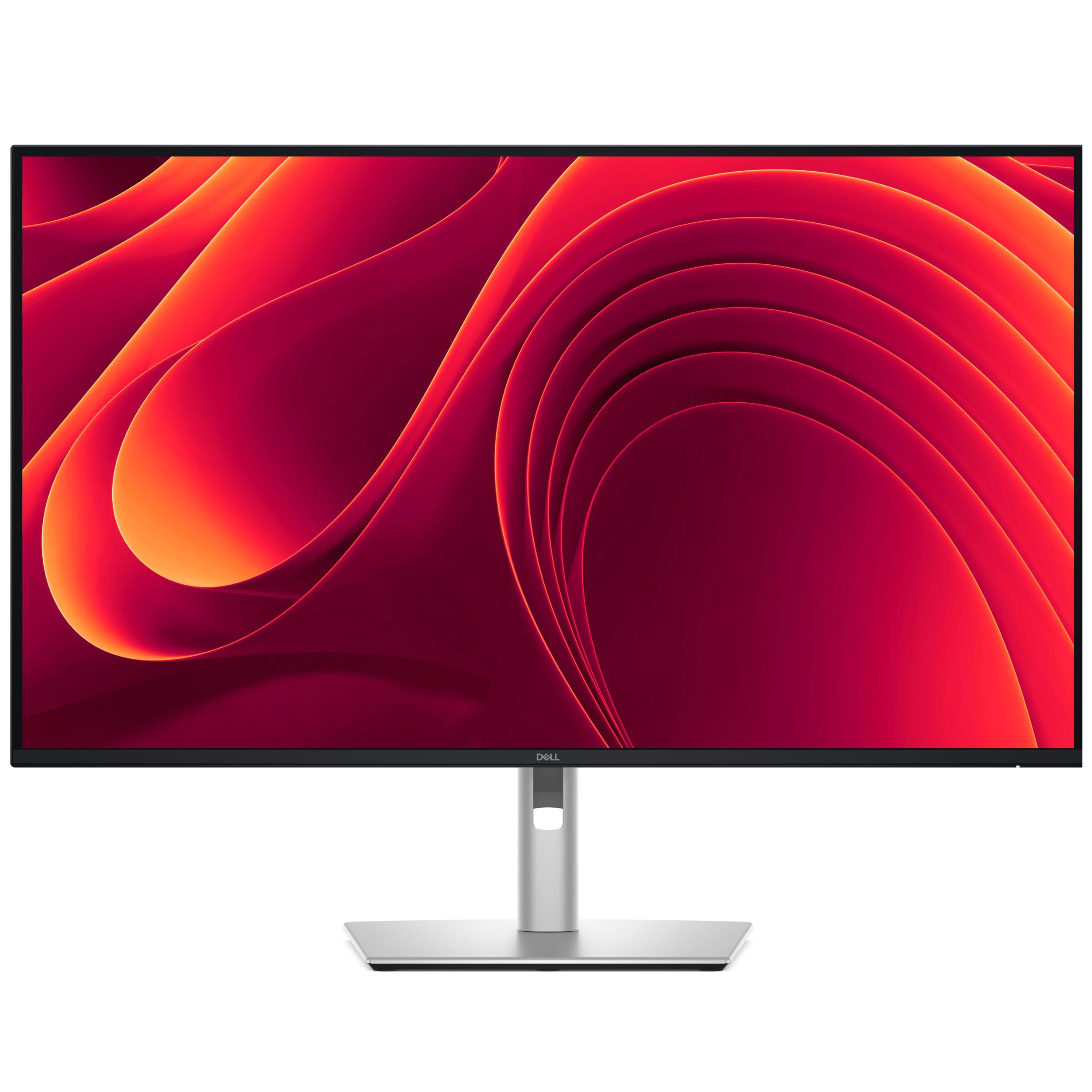
The Dell Pro 32 Plus P3225QE is built for the professional who needs a reliable 4K IPS panel with excellent connectivity and ergonomic flexibility. The 31.5-inch 4K Ultra HD (3840×2160) resolution on an IPS panel provides consistent color from every angle, and the 100Hz refresh rate offers a noticeable upgrade over standard 60Hz office monitors for smoother scrolling and window management. The 99% sRGB coverage (CIE 1931) ensures color-accurate work for photo editing, design, and document review, and the 3000:1 contrast ratio (a rarity for IPS panels) helps text stand out against backgrounds.
Where this monitor truly shines is connectivity. The USB-C port delivers up to 90W of power delivery, which means a single cable can connect, charge, and drive a modern laptop. HDMI 2.1, DisplayPort 1.4, and an Ethernet port are all present, turning this into a true docking-station alternative. The fully adjustable stand — tilt, swivel, pivot, and height — combined with narrow bezels makes it an obvious choice for multi-monitor setups where consistency across displays matters. Dell’s ComfortView Plus reduces blue light emissions to 35% or less without washing out color accuracy, making it suitable for all-day coding sessions.
On the downside, the 100Hz refresh is fine for office work and light gaming but won’t satisfy competitive players. The 5ms GTG response time also means some motion blur on fast-moving content. A small number of users reported quality control issues like a blue line on screen, which is concerning at this price bracket. The lack of built-in speakers or an audio pass-through means you’ll need external audio. If your priority is a crisp, color-accurate productivity panel with best-in-class ergonomic adjustment and single-cable USB-C convenience, the Dell P3225QE is a top-tier choice.
Why it’s great
- USB-C with 90W PD acts as a built-in docking station
- Fully adjustable ergonomic stand with tilt, swivel, pivot, and height
- IPS panel with 99% sRGB and strong 3000:1 dynamic contrast
Good to know
- 100Hz and 5ms response are not suited for competitive gaming
- No built-in speakers; need external audio
- Some reported QA issues like screen defects
6. Samsung 43” Smart Monitor M7 (M70F)

The Samsung Smart Monitor M7 M70F is a 43-inch 4K VA display that doubles as a smart TV, offering a full Tizen operating system with built-in streaming apps, Samsung TV Plus, and even a Gaming Hub for cloud gaming. This is a different category of monitor — it’s designed for users who want a single large screen for both productivity and entertainment without needing a separate TV or streaming device. The VA panel provides a 5000:1 contrast ratio, which delivers deeper blacks than typical IPS monitors, making movies and HDR content look richer. The 60Hz refresh is not suited for gaming beyond casual use, but for media consumption and office work, it’s perfectly adequate.
Connectivity is versatile: USB-C, two HDMI ports, and USB-A ports allow you to connect a laptop, a console, and peripherals simultaneously. The solar-charging remote control is a thoughtful addition, and Samsung Knox provides multi-layered security for IoT connections. AI Picture Optimizer adapts the picture to the current content — switching between document mode and game mode automatically — and Active Voice Amplifier uses AI to boost dialogue volume when ambient noise increases. For multi-computer workflows, the built-in auto source switch+ detects which device is active and switches inputs seamlessly.
The downsides are significant for pure productivity use. Several users reported that the monitor could lose focus or change settings randomly after the return window closed, and the picture quality for text work is not as sharp as dedicated 4K office monitors due to the larger 43-inch size and VA panel characteristics. The color accuracy also received mixed reviews — some found it excellent, others described it as “inaccurate” for color-critical work. The 60Hz refresh makes even desktop scrolling feel less fluid than a 100Hz or 120Hz panel. The Smart Monitor M7 is best viewed as a hybrid device: a decent 4K monitor that happens to be an excellent TV, rather than a top-tier computer display.
Why it’s great
- Built-in smart TV platform eliminates need for a separate streaming device
- USB-C connectivity and auto source switching simplify multi-device setups
- VA panel provides excellent 5000:1 contrast for media and HDR
Good to know
- 60Hz refresh feels sluggish for scrolling and is unsuitable for gaming
- Some units reported reliability issues after the return window
- Text sharpness and color accuracy trail dedicated productivity monitors
7. CRUA 32″ 4K Curved Gaming Monitor

The CRUA 32-inch 4K Curved Gaming Monitor is an aggressive value proposition, offering a 3840×2160 resolution VA panel with a 240Hz refresh rate and a 1500R curve at a price that undercuts most competitors by a wide margin. The VA panel delivers a 3000:1 contrast ratio and 120% sRGB coverage, which translates to deep blacks and vibrant colors for both gaming and media consumption. AMD FreeSync support helps reduce tearing, and the inclusion of both HDMI 2.1 and DisplayPort 1.4 means you can actually hit the full 240Hz refresh rate without bandwidth bottlenecks — something many budget 4K monitors cannot claim.
The design is notably clean, available in a white finish that sets it apart from the sea of black gaming monitors. PIP/PBP mode is included for picture-in-picture multitasking, and the 75x75mm VESA mount compatibility allows for easy wall mounting. Built-in speakers are present, though they are basic and likely to be replaced by external speakers for serious use. The stand offers tilt adjustment (-5° to 15°) but no height or swivel adjustment, which is a compromise at this price point. The anti-blue light feature was noted by users as excellent for long sessions.
Potential drawbacks include a stand that some users found difficult to assemble, and the built-in speakers on certain units were reported as non-functional, requiring external audio. The 240Hz rate is real, but driving 4K at 240Hz requires a powerful graphics card — most users will be running at lower refresh rates in demanding titles. Some reviews noted the settings menu was confusing without a remote, and the monitor lacks the robust ergonomic adjustability of premium options. For users on a tighter budget who want a large, curved 4K screen with high refresh capability, the CRUA delivers specs that punch well above its price tier.
Why it’s great
- Rare combination of 4K resolution and 240Hz at a budget-friendly price
- VA panel provides strong contrast and vibrant color coverage
- HDMI 2.1 support enables full-bandwidth high-refresh gaming
Good to know
- Stand lacks height and swivel adjustment; tilt only
- Built-in speaker quality and reliability are inconsistent
- Driving 4K at 240Hz demands a very powerful graphics card
8. SANSUI 34″ 240Hz Ultrawide Curved
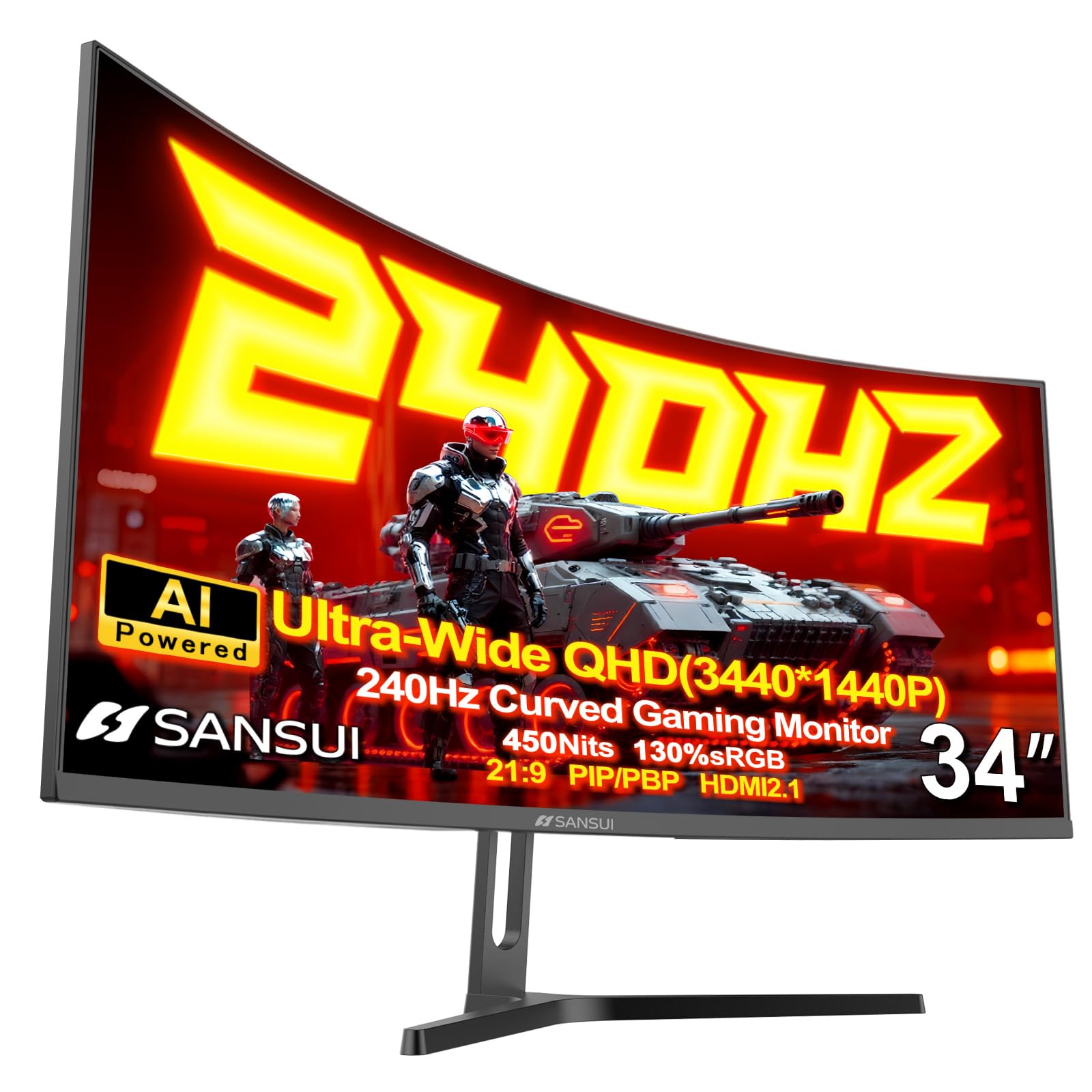
The SANSUI 34-inch Ultrawide Curved Gaming Monitor brings a 3440×1440 UWQHD resolution, 240Hz refresh rate, and a 1500R curve at a price that makes ultrawide gaming accessible without sacrificing high refresh. The Fast VA panel delivers a 3000:1 contrast ratio and 130% sRGB coverage, with a peak brightness of 450 nits that qualifies for HDR400 certification. In real-world use, this translates to rich, punchy colors in games like racing titles and open-world RPGs, where the 21:9 aspect ratio reveals peripheral detail that standard 16:9 monitors simply cut off. The 1ms MPRT response time keeps motion blur minimal during fast-paced action.
Connectivity is generous for the price tier: two HDMI 2.1 ports and two DisplayPort 1.4 ports, all capable of running the full 240Hz at the monitor’s native resolution. The monitor includes AI Crosshair, AI Blue Light filtering, and AI Picture Quality enhancement, though these are software-based features that some users may find gimmicky. The stand offers tilt adjustment (-5° to 15°) and uses a durable metal construction, but again, there is no height or swivel adjustment. The monitor is VESA compatible (75x75mm) for third-party arm mounting. FreeSync support works across the full refresh range, and VRR compatibility extends to Xbox and PlayStation consoles through HDMI 2.1.
The most common complaint involves customer service responsiveness for defective units, though several users noted that after receiving a replacement, the panel was flawless. The monitor lacks built-in speakers entirely, so external audio is mandatory. Some users found the 240Hz refresh required multiple adjustments to eliminate ghosting in certain titles. Considering the price, the SANSUI delivers impressive specifications for an ultrawide 21:9 format — just ensure your warranty route is clear before purchasing. For gamers on a budget who want the immersive ultrawide format with high refresh, this is a compelling option.
Why it’s great
- Ultrawide 21:9 format with 240Hz refresh at an aggressive price
- Two HDMI 2.1 ports support full-bandwidth console and PC connectivity
- VA panel provides strong contrast and higher brightness than budget competitors
Good to know
- No built-in speakers — external audio is required
- Stand lacks height and swivel adjustment
- Customer service experience has been inconsistent according to some reviews
9. Dell 32 Plus S3225QS

The Dell 32 Plus S3225QS is a 31.5-inch 4K VA panel that strikes an excellent balance between work and entertainment, offering a 120Hz refresh rate that makes both scrolling and casual gaming feel noticeably smoother than standard 60Hz monitors. The VA panel provides a 1500:1 contrast ratio (native) and covers 99% sRGB and 95% DCI-P3, which means color accuracy is strong enough for photo editing while also delivering punchy HDR visuals. Dell’s ComfortView Plus technology reduces harmful blue light emissions to 35% or less without shifting the color temperature toward yellow, making this monitor comfortable for long work sessions.
One standout feature is the improved built-in speakers, which have more output power, deeper frequency response, and wider decibel range than the previous generation. Users consistently praise the speakers as surprisingly good, with one reviewer noting they had “deep bass” and worked well for PS5 gaming. The ultra-thin bezel design in ash white gives the monitor a modern, minimalist aesthetic that fits well in a living room or home office setting. The stand is sturdy and includes tilt adjustment, though it does not offer height or swivel. AMD FreeSync Premium is supported for tear-free gaming up to 120Hz.
The main limitation is the lack of a fully ergonomic stand — you cannot adjust the height, which may be a dealbreaker for users who need precise monitor positioning. Some users noted that the included HDMI cable is short (6 feet), so plan your cable routing accordingly. The 120Hz refresh is excellent for console gaming (PS5 supports 4K 120Hz) but falls short of the 144Hz to 240Hz range that PC gamers typically target for competitive play. For users who want a single monitor that handles office productivity, photo editing, media consumption, and console gaming with strong built-in audio, the Dell S3225QS is an excellent all-rounder.
Why it’s great
- Strong built-in speakers are genuinely usable for movies and gaming
- 120Hz refresh with FreeSync Premium for smooth console and casual PC gaming
- Wide color coverage (95% DCI-P3) with ComfortView Plus eye care
Good to know
- Stand lacks height adjustment — tilt only
- 120Hz not competitive for high-FPS PC gaming
- Included HDMI cable is relatively short at 6 feet
10. LG 34G600A-B Ultragear
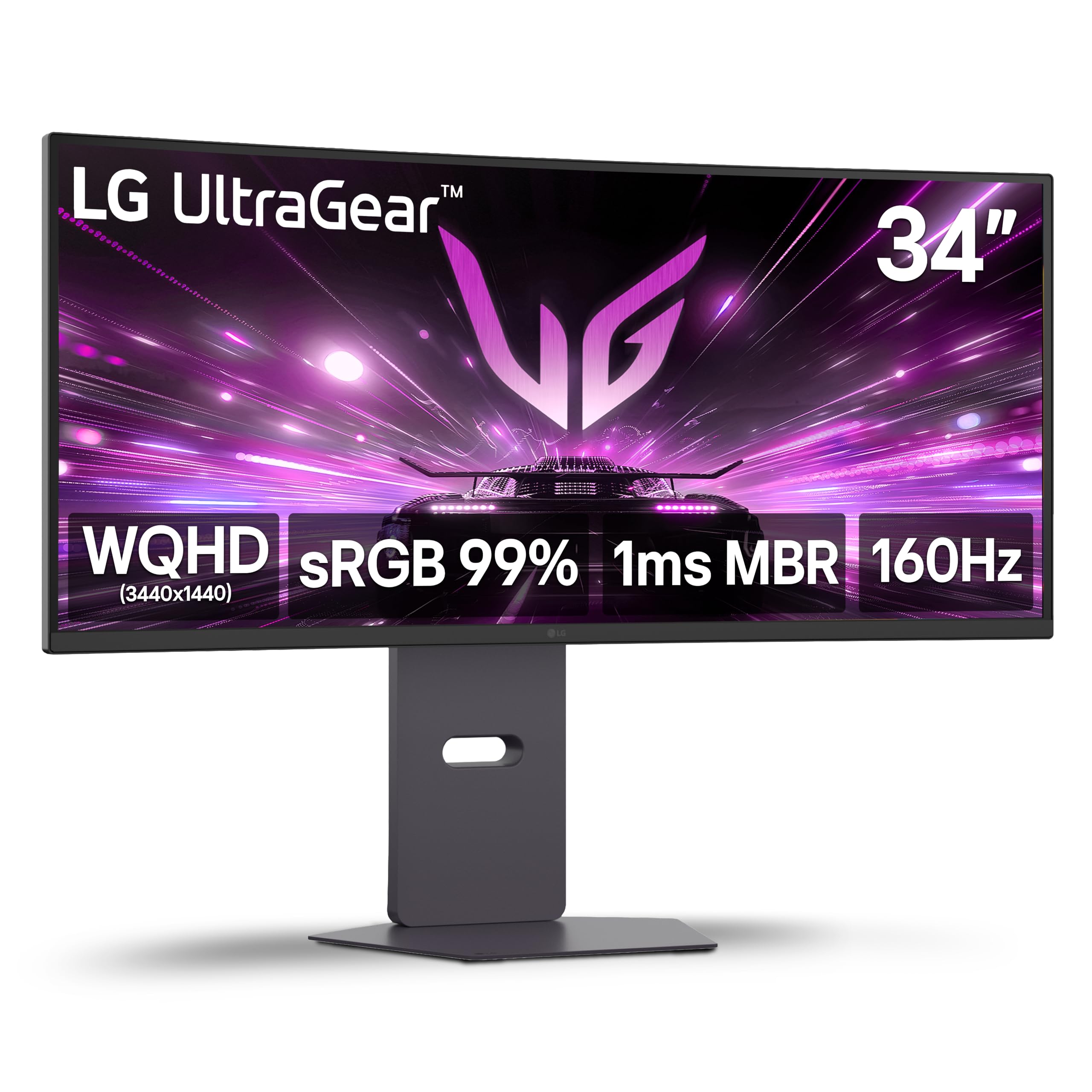
The LG 34G600A-B Ultragear is a 34-inch WQHD (3440×1440) curved gaming monitor that serves as an excellent entry point into the ultrawide format without the premium pricing of OLED or high-end IPS ultrawides. The 1800R curvature provides a natural immersion that makes the 21:9 aspect ratio feel cohesive, and the VA panel delivers a 4000:1 contrast ratio that produces deep blacks and good shadow detail for games and movies. The 160Hz refresh rate and 1ms Motion Blur Reduction (MBR) keep motion smooth, and AMD FreeSync Premium certification ensures consistent tear-free performance across the entire refresh range.
This monitor is particularly well-suited for productivity multitasking — the 3440×1440 resolution fits three full-size windows side by side without feeling cramped, and users have praised its sharpness for AutoCAD and other detailed design work. The stand is a significant upgrade over budget options, offering full tilt, swivel, and height adjustments, enabling proper ergonomic positioning. Built-in stereo speakers with Waves MaxxAudio provide better-than-basic audio output for casual use. Dynamic Action Sync reduces input lag, and Black Stabilizer helps spot enemies in dark scenes. Crosshair overlay provides an accuracy boost in FPS games.
The main sticking point is that the HDMI 2.1 ports are bandwidth-limited — they support up to 85Hz at 4K on Mac Mini rather than the full 160Hz, which is a misleading specification in some listings. The full 160Hz is achievable via DisplayPort. A small number of users found the VA panel’s viewing angles less consistent than IPS, with some color shift at extreme angles. For its price tier, the LG 34G600A-B offers robust ergonomics, good contrast, and a reliable 160Hz ultrawide experience that improves on cheaper ultrawide options with its adjustable stand and FreeSync Premium support.
Why it’s great
- Fully adjustable stand with height, tilt, swivel for ergonomic comfort
- VA panel offers 4000:1 contrast for deep blacks in games and movies
- 160Hz with FreeSync Premium provides smooth, tear-free ultrawide gaming
Good to know
- HDMI 2.1 ports do not achieve full 160Hz bandwidth — use DisplayPort
- VA panel viewing angles narrower than IPS for color-critical work
- Built-in speakers are adequate but not a replacement for dedicated audio
11. ViewSonic VX3276-4K-MHD

The ViewSonic VX3276-4K-MHD is a 32-inch 4K UHD monitor that prioritizes pure resolution and value over refresh rate or gaming features. At 60Hz with an MVA panel, this monitor is clearly aimed at office productivity, photo editing, and content consumption rather than competitive gaming. The 2500:1 contrast ratio provides deeper blacks than typical IPS panels at this price point, and the 4K resolution delivers sharp text and detailed images that make multi-window multitasking a genuinely pleasant experience. The ultra-thin bezel design and silver/black metal frame give it a polished, premium look that belies its price.
Connectivity is surprisingly robust: two HDMI ports, one DisplayPort, and one Mini DisplayPort can connect up to four different sources simultaneously. The on-screen display includes presets for Game, Movie, Web, Text, and Mono modes, which adjust gamma and color temperature for different content types. Flicker-Free technology and a Blue Light Filter help reduce eye strain during extended sessions — a critical feature for an office-focused monitor. Users have reported excellent build quality with a stable base, and the panel’s color accuracy is good enough for light photo work after a minor calibration adjustment.
The most obvious limitation is the 60Hz refresh rate — scrolling web pages and moving windows will look less fluid compared to even a 100Hz panel, and gaming at 4K 60Hz is possible but far from ideal for fast-paced titles. The fixed stand offers no height or swivel adjustment, so you’ll need to place it on a riser or use a VESA arm for proper ergonomic positioning. Additionally, the viewing angles on the MVA panel are narrower than IPS — color shift occurs when viewed off-center. For budget-conscious buyers who need a large, sharp 4K screen for spreadsheets, coding, and document work, the VX3276-4K-MHD offers outstanding value and a proven track record.
Why it’s great
- Excellent value for a 4K panel with 2500:1 contrast ratio
- Multiple connectivity options including Mini DisplayPort
- Flicker-Free and Blue Light Filter for reduced eye strain
Good to know
- 60Hz refresh is limiting for gaming and general fluidity
- Fixed stand with no height or swivel adjustment
- MVA panel has narrower viewing angles than IPS alternatives
FAQ
Is 1080p acceptable on a 36-inch monitor?
What is the ideal refresh rate for a 36-inch monitor that I use for both work and gaming?
Should I choose a curved or flat panel for a 36-inch computer monitor?
Final Thoughts: The Verdict
For most users, the best 36 inch computer monitor winner is the LG 32GX870A-B because it combines a stunning 4K OLED panel with a versatile Dual Mode that covers both high-resolution immersion and blazing-fast competitive gaming in a single screen. If you want a large ultrawide format for immersive gaming and sim racing, the LG 45GX900A-B delivers an unmatched OLED experience with its dramatic 800R curve. And for pure office productivity with best-in-class USB-C connectivity and ergonomic adjustment, nothing beats the Dell Pro 32 Plus P3225QE.