
Our readers keep the lights on and my morning glass full of iced black tea. As an Amazon Associate, I earn from qualifying purchases.
Specs are compiled from manufacturer listings and verified buyer reviews and can change over time — please confirm the key details on the product page before buying.
If you are tired of juggling two monitors, a 3840 x 1600 display gives you the width of a dual-screen setup without the bezel splitting your work in half. The refresh rate (how many times the screen updates per second) decides your experience: 60Hz suits pure productivity, while 144Hz handles gaming smoothly on the same panel.
I’m Min — the founder and writer behind Gadgets Feed. This guide is built by comparing the manufacturers’ published specifications and the patterns across verified customer reviews, so you get each pick’s real strengths and trade-offs instead of marketing spin.
These ultrawide panels replace dual monitors, save desk space, and cut cable clutter. The crowd favorite — 4.8 stars across 900+ owners — gets praised for its crisp text and easy setup. If you are shopping for a 3840 x 1600 monitor, this guide breaks down the five best options by their real-world performance and build quality.
Our Picks at a Glance

How To Choose The Best 3840 X 1600 Monitor
Buying a 3840×1600 monitor is a big purchase, so you want to match the panel to your actual daily work. The main decision is whether you prioritize color accuracy for creative projects or a high refresh rate for fast-paced gaming.
Refresh Rate: Work vs. Play
A 60Hz panel is perfectly smooth for spreadsheets, code, and video playback. If you play competitive shooters or racing games, a 144Hz panel makes motion look dramatically smoother — it refreshes 2.4 times more often than a standard 60Hz screen. That difference is the single biggest reason to pay more.
Connectivity and Laptop Charging
Check whether the monitor has USB-C with power delivery. This lets one cable carry video, data, and up to 90W of charging to your laptop. You skip a separate power brick and keep your desk clean. Without it, you will need multiple cables running across your desk.
Curvature and Ergonomics
Most 38-inch ultrawides use a 2300R curvature, which wraps the screen around your field of view. The 2300R curve keeps screen edges closer to your natural field of view, reducing eye strain. Look for height, tilt, and swivel adjustment so you can set the panel at eye level.
Quick Comparison
| Model | Best For | Refresh Rate | Connectivity | Color Coverage | Amazon |
|---|---|---|---|---|---|
| Dell U3818DW★ Best Overall | Productivity & KVM | 60Hz | USB-C, DisplayPort, HDMI | 99% sRGB | Amazon |
| Gawfolk 37.5″Top Performer | High-refresh gaming | 144Hz | 2x HDMI 2.0, 2x DP | 80% gamut | Amazon |
| Dell U3821DW | USB-C hub (90W) | 60Hz | USB-C, RJ-45, DP, HDMI | 95% DCI-P3 | Amazon |
| ViewSonic VP3881 | Color-critical design | 60Hz | USB-C, HDMI, DisplayPort | 100% sRGB | Amazon |
| ViewSonic VP3881A | Mac + Ethernet hub | 60Hz | USB-C, RJ-45, HDMI, DP | 100% sRGB | Amazon |
In‑Depth Reviews
1. Dell U-Series 38″ 4K UHD 1600p Ultra Wide Screen LED-Lit Monitor (U3818DW)
Our pick — 4.5★ from 700+ verified ratings; the strongest balance of quality and price.
This 38-inch curved ultrawide replaces two monitors with a single 3840×1600 panel.
Buyers report that this 38-inch ultrawide replaces dual monitors, saving desk space and roughly on mounts. The 3840 x 1600 resolution keeps a tall vertical height — you see more of a webpage or code file with less scrolling. Brightness sits at 350 cd/m², which is comfortable for an office with windows.
The thing everyone raves about is display quality — by far the most-discussed trait, and it reads as crisp and clear in real use. A photographer found the panel noticeably sharper and more color-accurate than a BenQ 32″ 4K HDR model they had been using. It is a 60Hz screen, so it is built for productivity rather than competitive gaming; this is the trade-off for the stellar workspace experience.
You control two different PCs with a single keyboard, video, and mouse through the built-in KVM feature. A USB Type-C cable transmits power, audio, and video between your laptop and the monitor, so you can dock with one connection. The 21:9 aspect ratio with a gentle curve makes the edges of the screen easier to see during long work sessions.
What wins people over
- Display quality is the #1 praise — 185 buyers call it out
- Saves desk space by replacing dual monitors
- KVM lets you control two PCs with one keyboard and mouse
Honest trade-offs
- 60Hz refresh — not built for fast-paced gaming
- Some users find the brightness slightly dim in very bright rooms
- Mac users report occasional sleep-wake quirks
Reach for this if: you want a proven workhorse that replaces two monitors, charges your laptop over USB-C, and lets you control two PCs at once.
Think twice if: you plan to play competitive games — the 60Hz panel means the 144Hz Gawfolk below is the better fit for that.
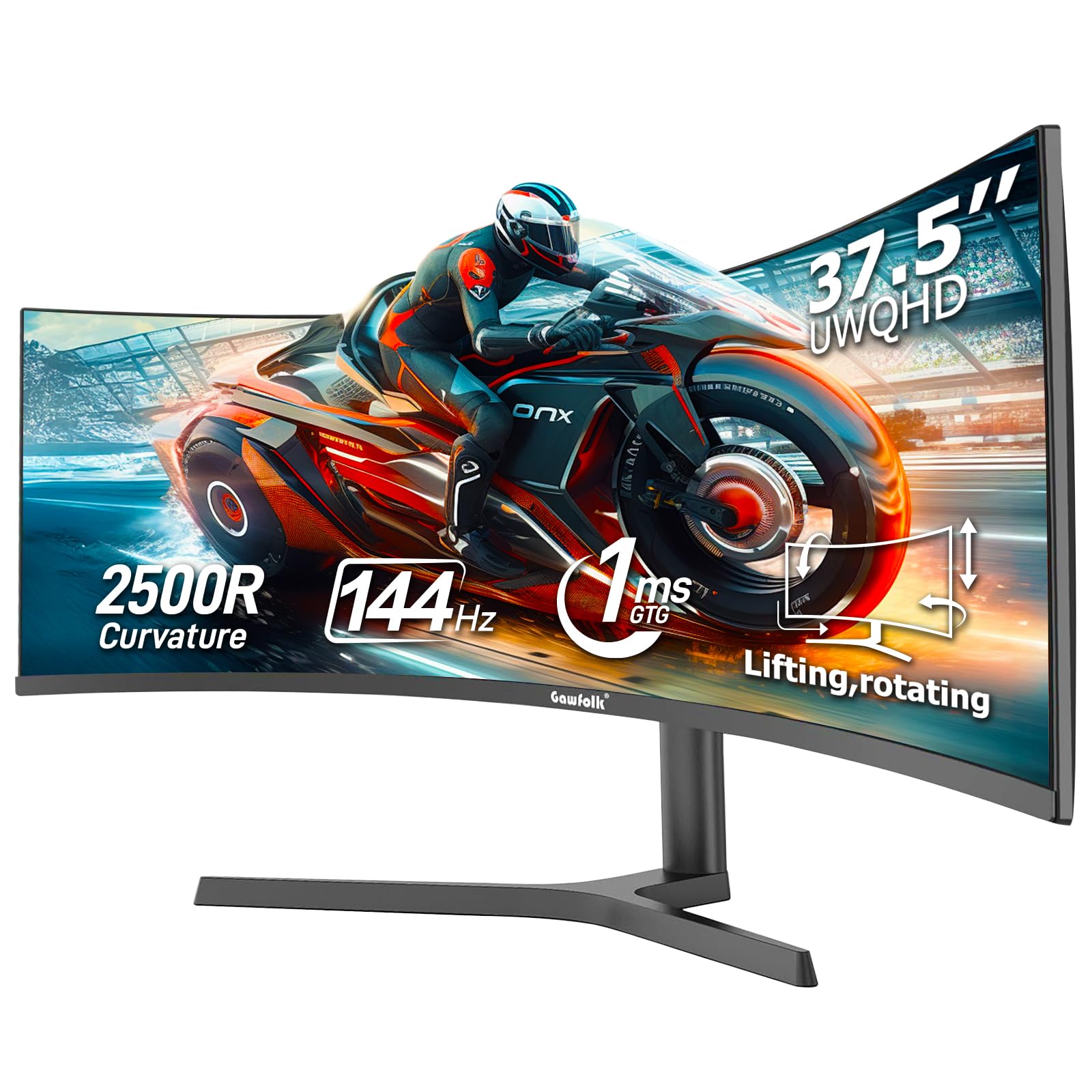
2. Gawfolk 37.5 Inch Gaming Curved Monitor 3840x1600p 144Hz PC Monitor
This is the only 3840×1600 monitor here with a 144Hz refresh rate for smooth gaming.
This is the standout pick if you game and work on the same screen. It runs 3840×1600 at 144Hz — a 2.4x refresh-rate gap over the 60Hz panels elsewhere on this list — which makes fast motion look dramatically smoother. The 2500R curvature wraps around your vision to reduce peripheral distortion during long sessions.
The 1000:1 contrast ratio with HDR support pulls detail out of dark shadows and bright highlights. It supports both G-Sync and FreeSync, which sync the refresh rate to your graphics card to stop screen tearing. A built-in ambient backlight adds preset lighting effects for atmosphere, though you cannot customize the colors yourself.
Connectivity is generous with two HDMI 2.0 ports and two DP ports, so you can hook up a desktop and a console at once. For the best 3840×1600 experience, use the DisplayPort input — HDMI 2.0 tops out at 75Hz at this resolution. The stand adjusts height and tilts from 5° to 15°, and it is VESA-compatible (100x100mm) if you prefer a desk-mounted arm.
Motion-smoothness king: the 144Hz refresh rate beats every other pick here for gaming, and the red-dot “game cross” feature owners mention is a handy aiming aid once you realize it is not a dead pixel.
The catch: shipping damage shows up occasionally, so inspect the box carefully on arrival — the screen itself earns strong praise.
Pick this for: a hybrid work-and-play desk where smooth gaming matters more than factory color calibration.
Look elsewhere if: you are a photo editor who lives in sRGB — the color gamut here is narrower than the ViewSonic options below.
3. Dell U3821DW UltraSharp Curved USB-C Hub Monitor – 37.52-inch WQHD (3840 x 1600)

One USB-C cable delivers 90W charging, Ethernet, and data to power your entire desk setup.
This Dell acts as a full productivity hub. One USB-C connection delivers up to 90W of power to your laptop, while the built-in RJ45 Ethernet port gives you a stable wired network connection. Owners describe using it as a built-in docking station — one charging cord replaces the usual tangle of adapters.
Color accuracy is the headline here. It covers 100% sRGB, 100% Rec 709, and 95% DCI-P3 — the wider DCI-P3 gamut shows nearly 25% more color range than sRGB, which matters if you edit video or design graphics. The 2300R curvature creates a wider field of view and minimizes reflection, and integrated dual 9W speakers deliver surprisingly solid sound.
The intelligent Auto KVM feature detects the latest connected PC and switches your keyboard and mouse over automatically. You can view content from two PC sources side by side with Picture-by-Picture mode, or overlay one with Picture-in-Picture. The platinum silver finish and 3-sided narrow bezel make it look at home in a modern office.
True docking-station monitor: the 90W USB-C plus Ethernet plus KVM turns this into the cleanest single-cable desk setup you can buy.
Worth noting: this panel runs at 60Hz with an 8ms response time (the delay before pixels change), so it is built for work, not fast-paced gaming. Owners mention that a fragile unit can arrive damaged in shipping, though the build quality itself earns high marks.
Choose this for: a tidy professional workstation where one USB-C cable powers the laptop, the network, and the peripherals.
skip it if: you want 144Hz gaming or need the widest DCI-P3 coverage — the ViewSonic panels below go further on color.
4. ViewSonic VP3881 38-Inch Premium IPS WQHD+ Curved Ultrawide Monitor with ColorPro

This IPS panel delivers Delta E<2 color accuracy, trusted by graphic designers and photographers.
This is the pick for creative professionals. The SuperClear IPS panel delivers lifelike colors across 100% sRGB, Rec. 709, and DICOM-SIM color spaces, with Delta E<2 accuracy — meaning the colors you see are extremely close to the original file. It comes with a Factory Color Calibration Report in the box, so the screen is tuned before it even reaches you.
Owners in After Effects, Photoshop, and Illustrator praise the huge screen real estate and excellent color accuracy. A designer using it for professional color grading calls the accuracy “fantastically accurate,” and the gentle 2300R curve is easy on the eyes after four-hour sessions. The 4.39 trillion-color palette (via 14-bit 3D LUT) keeps gradients smooth without banding.
One USB-C cable carries video, audio, data, and power, while the built-in USB hub lets you plug in drives and a mouse. It supports HDR10 content for a fuller viewing experience. The main ergonomic gripe is the rear-mounted controls, which feel awkwardly placed — a minor issue on an otherwise excellent panel.
Why creatives love it
- Delta E<2 color accuracy for true-to-file color
- Factory calibration report included in the box
- Wide 21:9 workspace replaces dual 24″ monitors
What to know
- 60Hz panel — not for fast-paced gaming
- Rear controls are awkwardly placed
- Make sure your desk is big enough for a 38″ panel
Best for: graphic designers, photographers, and video editors who need trustworthy color straight from the start.
Not for: gamers chasing high refresh rates, or anyone who hates reaching behind the monitor to change settings.
5. ViewSonic VP3881A 38 Inch WQHD+ ColorPro Monitor, Curved IPS with 100% sRGB and Pantone Validated

This ultrawide charges your MacBook at 90W and runs Ethernet plus peripherals over one USB-C cable.
This upgraded VP3881A adds Ethernet and 90W USB-C charging, making it a genuine hub for Mac users. A MacBook Pro M2 owner reports the monitor powers the laptop and runs a camera, headset, and Ethernet connection all flawlessly through the USB hub. It even works smoothly with a Mac Mini M1, according to another owner.
Color accuracy remains the core strength. It covers 100% sRGB, EBU, SMPTE-C, Rec. 709, DCI-P3, and DICOM-SIM color spaces with Delta E<2 accuracy, and it is Pantone Validated for professional graphic design. The factory hardware calibration means the color displays correctly from the start, with the calibration report included in the box.
The 2300R curved IPS panel with thin bezels and HDR10 support delivers rich, vibrant color — owners describe the out-of-box accuracy as excellent for photo and video editing. Flicker-Free technology and a Blue Light Filter minimize eye fatigue during extended use. The main complaints are the bulky base and awkwardly placed OSD buttons on the back that do not always align with the menu.
One-cable Mac setup: the 90W USB-C plus Ethernet plus a fully powered USB hub means your MacBook docks the moment you plug in a single cable.
The trade-off: the base is bulky and the rear controls are fiddly — minor annoyances on a monitor that otherwise nails the color and connectivity.
Reach for it if: you run a MacBook or Mac Mini and want one cable for power, network, and peripherals with factory-calibrated color.
Look elsewhere if: you want a compact footprint or a 144Hz refresh — this one is a productivity and color tool, not a gaming display.
Understanding the Specs
Refresh Rate & Adaptive Sync
Refresh rate is how many times per second the screen redraws the image — 60Hz is standard, 144Hz is for smooth gaming. Adaptive sync (G-Sync or FreeSync) matches the monitor’s refresh to your graphics card’s output, which stops screen tearing during fast motion.
Color Gamut & Delta E
Color gamut is the range of colors a monitor can display — sRGB is the baseline, DCI-P3 is a wider space used in video production. Delta E measures color error; a value under 2 means colors are virtually indistinguishable from the original source file.
USB-C Power Delivery
USB-C power delivery lets a single cable carry video, data, and charging to your laptop. Higher wattage (like 90W) means it can charge a larger laptop like a MacBook Pro at full speed, so you can leave your charger at home.
KVM & Picture-by-Picture
A KVM switch lets you control two different computers with one keyboard, mouse, and monitor. Picture-by-Picture shows both computers side by side on the same screen, which is ideal when you work on a work laptop and a personal desktop at once.
FAQ
Is 3840 x 1600 better than standard 4K for work?
Can a 3840 x 1600 monitor replace two monitors?
Is 60Hz enough or do I need 144Hz?
Will this monitor charge my MacBook Pro over USB-C?
What does a KVM feature do on a monitor?
Does the 2300R curvature really reduce eye strain?
Can I mount these monitors on a desk arm?
What is the difference between the ViewSonic VP3881 and VP3881A?
Do I need a powerful graphics card for 3840 x 1600?
Which monitor is best for photo and video editing?
Final Thoughts: The Verdict
For the majority of shoppers, the best 3840 x 1600 monitor is the Dell U3818DW because it combines the most-praised display quality with a KVM feature and USB-C charging in a proven package. If you want smooth gaming on the same screen, grab the Gawfolk 37.5-inch for its 144Hz refresh rate. And for color-critical creative work, the ViewSonic VP3881 is the one to reach for. The Dell U3821DW is your pick if a single USB-C cable must run the whole desk, while the ViewSonic VP3881A adds Ethernet for Mac users who want a true docking experience.
How We Picked
We do not accept paid placement. Every pick is matched to a real buyer and a real use-case; we do not hands-on test units.
Sources & Methodology
Specifications: manufacturer listings and product documentation. Review insights: verified customer reviews, as of August 2026. Pricing: not shown on this page (it changes often); check the current price via the retailer link.
As an Amazon Associate, Gadgets Feed earns from qualifying purchases. This does not affect which products we feature.