
The moment you plug in a power-hungry external drive and the connection stutters, or when four low-power USB devices sharing a bus start randomly disconnecting under load, you realize that not all USB hubs are built the same. A standard unpowered pass-through hub cannot deliver consistent current to multiple devices simultaneously, which is why the spec 3A USB Hub category exists — it guarantees that each port receives enough amperage to stay stable under sustained use.
I’m Min — the co-founder and writer behind Gadgets Feed. I have spent months researching the powered USB hub market, cross-referencing port configurations, real-world charging throughput, and power adapter specs to identify which units actually deliver on their current ratings without introducing noise or instability.
This guide breaks down the top powered hubs that provide individual port control, reliable data syncing, and stable charging. Whether you are building a desktop command center or consolidating peripheral clutter, the right 3a usb hub will save you from the frustration of flaky connections and underpowered ports.
How To Choose The Best 3A USB Hub
A 3A USB Hub is not just about adding ports — it is about maintaining consistent current across all connected peripherals. Non-powered hubs that draw power solely from your PC’s USB port can only supply about 0.5A per port, which is insufficient for external hard drives, DACs, or multiple charging devices. The following criteria will ensure you pick a hub that actually delivers on its 3A rating.
Powered vs. Unpowered — The Defining Factor
The most important decision is whether the hub includes an external power supply. A powered hub with a 5V/3A or 12V/3A brick can deliver the full amperage to each port simultaneously, preventing voltage drop that causes disconnections and data errors. Unpowered hubs are fine for low-power devices like keyboards and mice, but if you plan to connect a USB hard drive or charge a tablet, a powered unit is non-negotiable.
Individual Port Switches and LED Indicators
Hubs with independent ON/OFF switches let you disconnect devices without physically unplugging them, which reduces wear on both the hub and your peripherals. This is especially useful for audio interfaces that draw phantom power in their idle state or for security-minded users who want to cut power to unverified drives. LED indicators should be dim enough for a dark office — some units have overly bright blue LEDs that can be distracting near a monitor.
Data Transfer Speed and Compatibility
All USB 3.0 hubs in this guide support 5Gbps data rates, which is 10 times faster than USB 2.0. However, the actual speed you experience depends on the uplink cable and the combined bandwidth of your connected devices. A 3A hub with a dedicated data uplink port ensures that your storage and streaming peripherals do not compete for bandwidth with charging devices. Check the operating system compatibility — most modern hubs support Windows 10/11, macOS, ChromeOS, and Linux out of the box without drivers.
Quick Comparison
On smaller screens, swipe sideways to see the full table.
| Model | Category | Best For | Key Spec | Amazon |
|---|---|---|---|---|
| ONFINIO 10-Port Hub | Mid-Range | High-volume peripheral setups | 12V/3A, 10 ports, red/blue LEDs | Amazon |
| atolla 7-Port Hub | Premium | Gamers and streamers | 12V/3A, swappable icon switches | Amazon |
| WENTER 5-Port Powered Hub | Mid-Range | Desktops with external drives | 5V/3A, dedicated 2.4A charge port | Amazon |
| vantisan 4-Port Powered Hub | Mid-Range | Raspberry Pi and compact workstations | 5V/3A, 5Gbps data per port | Amazon |
| SABRENT 4-Port Hub | Budget | Travel and low-power peripherals | Unpowered, 2 ft cable, LED switches | Amazon |
| HEITUDI 10-Port Charger | Budget | Multi-device family charging | 100W total, 10 USB-A/C ports | Amazon |
| FRISATPOW 12-Port Station | Budget | Cruise and travel organization | 100W total, 8C + 4A ports | Amazon |
In‑Depth Reviews
1. ONFINIO Powered USB Hub, 10-Port
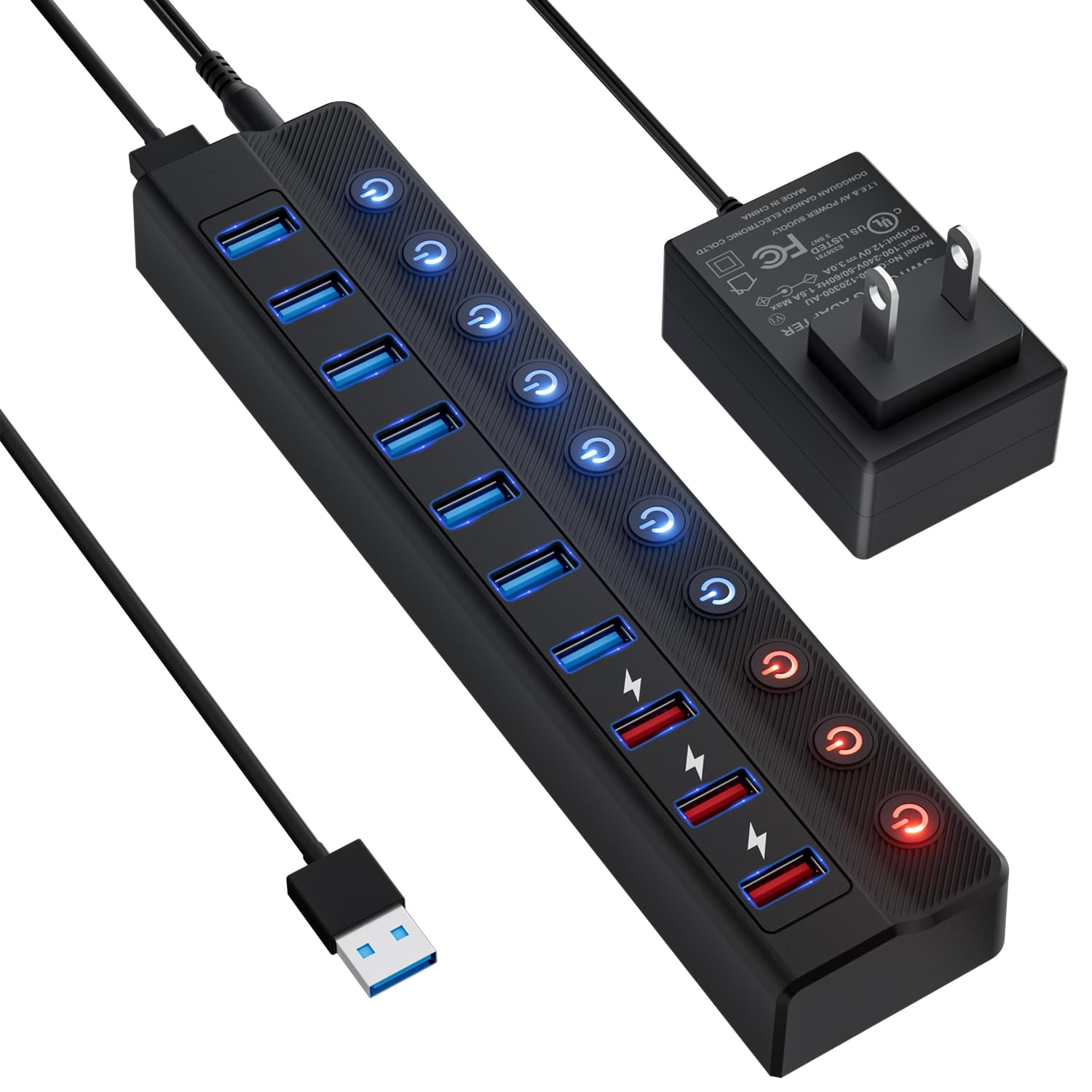
The ONFINIO 10-Port hub delivers exactly what a power-hungry setup demands: a 12V/3A external brick that keeps all ports stable even when six high-draw peripherals are connected simultaneously. Seven of its ports are dedicated USB 3.0 data-transfer ports running at 5Gbps, while the remaining three are smart-charging ports capable of 2.4A each — enough to fast-charge a tablet while an external SSD is syncing files in the next port over.
Individual ON/OFF switches for every port are differentiated by blue (data) and red (charging) LEDs, which avoids confusion when toggling specific devices in a dark room. Users report that this hub solved flickering LED issues they experienced with cheaper alternatives, and the 12V/3A supply ensures no peripheral “ghosting” occurs even after a 20-year-old workstation resumes from sleep. The compact plastic enclosure stays cool under load, and the 5Gbps uplink cable is long enough to reach behind a desk or mount to a wall.
For anyone who needs a large port count with reliable power distribution, the ONFINIO is the clear choice. It handles everything from a Meta Quest headset to a laser engraver without stumbling, and the individual switches make it easy to manage power-hungry devices without constant plugging and unplugging.
Why it’s great
- 10 total ports (7 data + 3 charge) with individual switches
- 12V/3A power supply handles high-draw peripherals reliably
- Color-coded LEDs prevent confusion between data and charge ports
Good to know
- Blue LEDs on data ports are bright — may need taping in dark rooms
- Single 5Gbps uplink limits total bandwidth across all ports
2. atolla Powered USB Hub, 7-Port

The atolla 7-Port hub stands apart from the crowd with its illuminated icon-based switches that allow you to assign visual labels — microphone, headphones, hard drive, keyboard, mouse, and extra buttons included in the box — to each port. Six of the ports are superspeed USB 3.0 data-transfer ports running at 5Gbps, while the seventh is a dedicated 18W fast-charging port that delivers up to 2.4A for phones and tablets.
The 12V/3A power adapter provides enough current to run a full audio interface, external hard drive, and a KVM monitor switch simultaneously without signal drop or disconnects. After a year of daily use, reviewers report that the tactile switches remain crisp and the interchangeable icon caps do not fade or loosen. The hub’s heavier build (13.12 ounces) keeps it planted on a desktop, and the upward-facing rear ports help manage cable bends for a cleaner look.
This is the ideal hub for gamers and streamers who want instant visual recognition of which peripheral is active, and the ability to cut power to idle devices without digging behind the desk. The only trade-off is bulk — the 8.26-inch length takes up more desk space than smaller 4-port alternatives.
Why it’s great
- Swappable icon buttons for instant visual port labeling
- 18W fast-charging port with reliable 2.4A output
- Clicky tactile switches rated for thousands of cycles
Good to know
- Bulky footprint — not ideal for small travel bags
- Only one USB-C port; predominantly USB-A design
3. WENTER Powered USB Hub, 5-Port

The WENTER 5-Port hub hits the sweet spot for users who need a powered solution without paying for more ports than they can use. Four of its ports are USB 3.0 data-transfer ports with individual ON/OFF switches and soft LED indicators, while the fifth port is a dedicated smart-charging port that can deliver up to 2.4A from the 5V/3A external adapter. The power supply is the key differentiator here — it transforms a standard USB hub from a pass-through bottleneck into a reliable peripheral manager.
Users have successfully connected a laser engraver, external DVD drive, and multiple 16GB thumb drives simultaneously without any disconnections or data corruption. The 3.3ft USB cable and 4ft power cable give enough reach to hide the hub behind a monitor or under a desk. All four data ports accept full 5Gbps throughput, which is rare in hubs at this tier where bandwidth is often shared across fewer channels.
For anyone who needs a powered hub primarily for data devices with occasional charging, the WENTER delivers exactly what it promises. The individual switches are durable and the dedicated charging port eliminates the need for a separate wall wart, making this the most cost-effective entry point into proper powered USB expansion.
Why it’s great
- 4 full-speed USB 3.0 ports with independent switches
- Dedicated 5V/3A AC adapter ensures stable power delivery
- Smart charge port provides up to 2.4A for tablets
Good to know
- Plastic enclosure feels light but is not as premium as metal
- Individual port spacing is tight for wide USB plugs
4. vantisan Powered USB 3.0 Hub, 4-Port

The vantisan 4-Port hub packs a 5V/3A powered setup into one of the smallest footprints in its class — 4.25 inches by 1.69 inches, making it easy to slip into a laptop bag or mount beside a Raspberry Pi cluster. It offers four USB 3.0 data-transfer ports with individual blue LED switches and a dedicated smart-charging port that delivers up to 2.4A for phones and tablets. Data speeds hit a steady 5Gbps, and the hub is fully plug-and-play on Windows 11, macOS, and Linux.
Reviewers running Raspberry Pi 4 clusters report that the vantisan maintains stable connections across three Pis simultaneously without needing to share bandwidth or negotiate power draw. The compact design does not compromise port durability — the Type-A connectors are snug and the switches are tactile. The 3A power adapter ensures that high-consumption devices like a camera or external DVD player do not cause voltage sag on the data ports.
If you need a genuinely portable powered hub that does not sacrifice current delivery for small size, the vantisan is the best trade-off. The only limitation is port count: at four data ports plus one charge port, it is best for a tightly curated set of peripherals rather than a full desktop expansion.
Why it’s great
- Ultra-compact design ideal for travel and SBC projects
- 5V/3A adapter ensures reliable power delivery to all ports
- Individual switches with clear blue LED indicators
Good to know
- Only 4 data ports — limited for multi-device setups
- Plastic housing feels less robust than premium alternatives
5. SABRENT 4-Port USB 3.0 Hub

The SABRENT 4-Port hub is the workhorse unpowered option for users who need a simple, reliable expansion for low-power peripherals. It provides four USB 3.0 ports with individual LED-lit ON/OFF switches and a 2-foot integrated cable that keeps things tidy on a desk. Data speeds reach 5Gbps for USB 3.0 devices and it is fully backward compatible with USB 2.0 and 1.1 peripherals. Plug-and-play installation requires no drivers and works across PC, MacBook, iMac, XPS, and Linux systems.
Reviewers have used this hub effectively with audio interfaces like the Topping E30II DAC on an M4 MacBook Air, praising the solid aluminum build and snug port fit. The 2-foot cable is long enough to reach a raised laptop on a stand but short enough to avoid cable clutter. The individual switches allow power cycling of individual devices — useful for resetting finicky USB peripherals without unplugging the entire hub.
The catch is that this hub is unpowered, meaning it draws all current from the host computer’s USB port. It is reliable for keyboards, mice, flash drives, and audio interfaces that have their own power, but it should not be trusted for bus-powered external hard drives or multiple charging devices. Within its limitations, it is a fantastic low-cost choice.
Why it’s great
- Slim, portable aluminum housing with a 2ft cable
- Individual ON/OFF switches with bright blue LEDs
- Works flawlessly with audio interfaces and DACs
Good to know
- Not suitable for high-draw peripherals or charging tablets
- Switch may turn off on MacBook Pro reboot, requiring manual power-on
6. HEITUDI 10-Port USB Charger Block
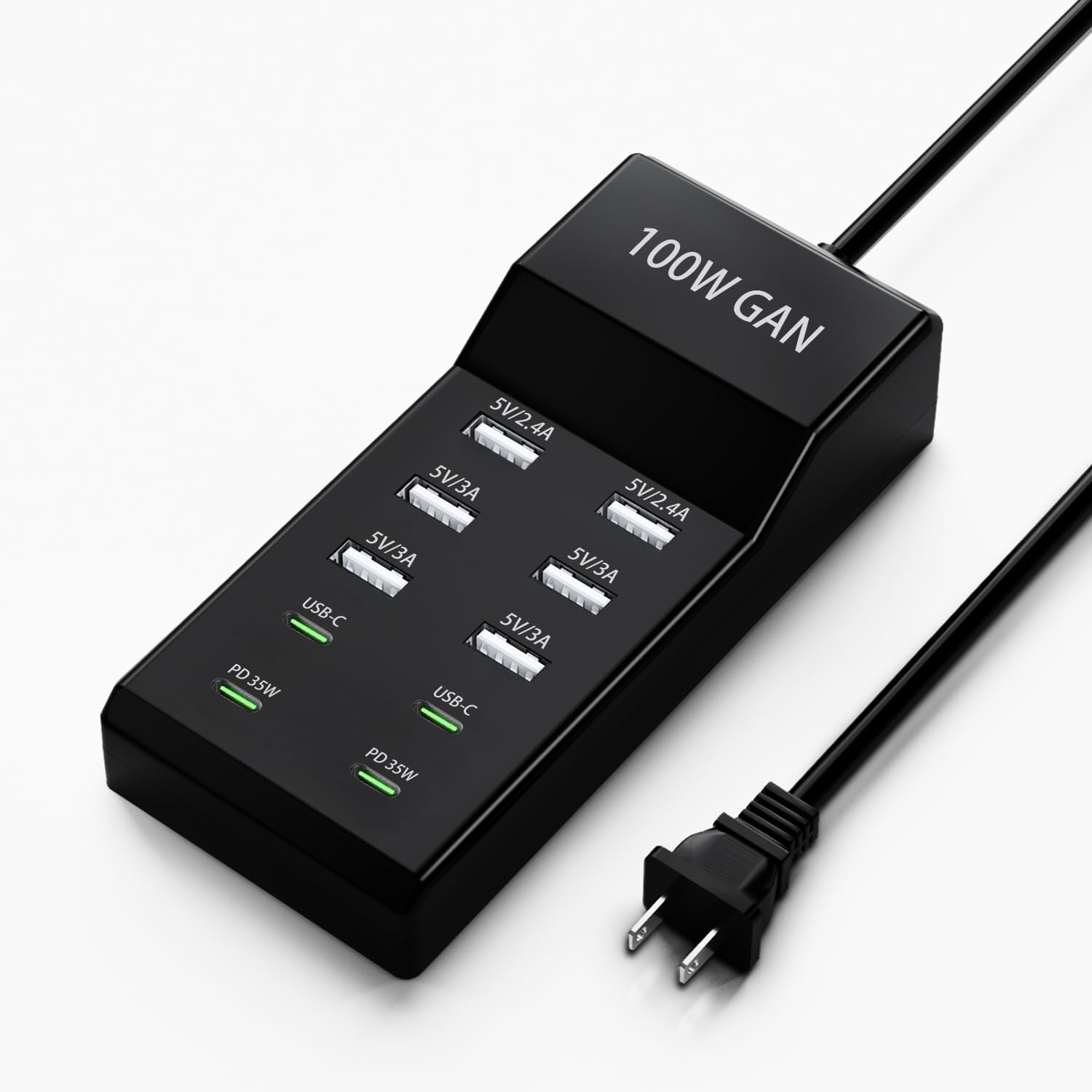
The HEITUDI 10-Port charger block is more of a multi-device charging station than a traditional data hub, providing 100W total power distributed across two USB-C PD 35W ports, two USB-A 5V/2.4A ports, and four USB-A 5V/3A ports. The 120V AC input with a built-in power cord means no separate brick is needed — just plug it into a wall outlet and it instantly becomes a central charging point for phones, tablets, headphones, and smartwatches.
This unit includes overcurrent, overvoltage, and short circuit protection mechanisms built into the ABS enclosure. Users confirm it charges a variety of iPhones from the 11 Pro to the 15 Pro Max, Galaxy S series, iPads, and AirPods without issue. The 3A rating across the four USB-A ports ensures that even lower-priority devices receive adequate current for overnight charging.
The HEITUDI is best for a family kitchen counter or a guest room where multiple people need to charge their devices simultaneously. It is not designed for data syncing or for powering peripherals that require a stable data connection — the ports are optimized for charging only. For pure charging density at a competitive starting point, it delivers solid performance.
Why it’s great
- 10 total ports with 100W total output capacity
- 2x USB-C PD 35W ports for fast laptop/tablet charging
- Built-in AC cord — no separate block needed
Good to know
- No data transfer capability — charging only
- Struggles with full port usage; slower per-port than OEM chargers
7. FRISATPOW 12-Port USB Charging Station
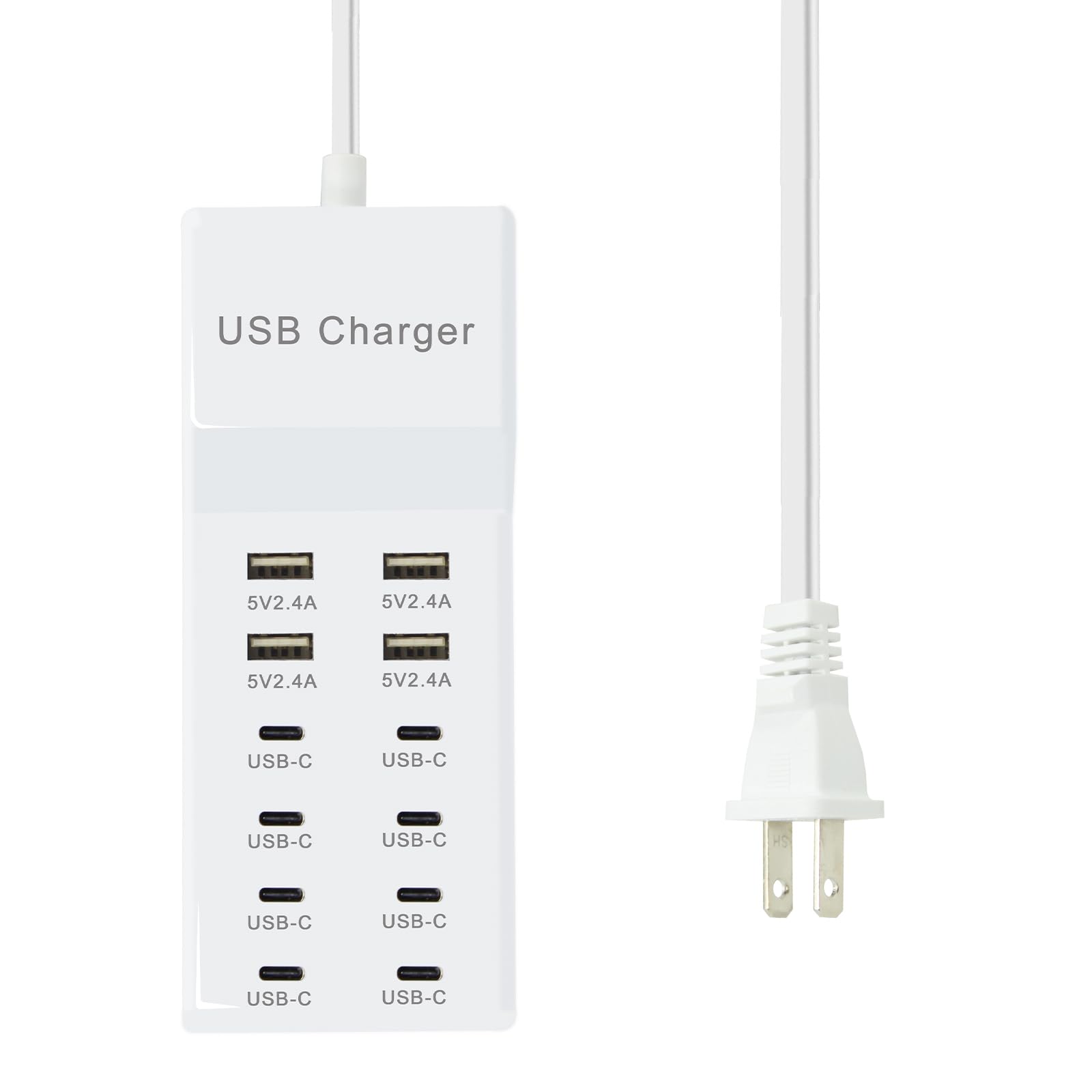
The FRISATPOW 12-Port charging station is designed for travelers and households that need maximum port density in a compact white plastic body. It features 8 USB-C ports and 4 USB-A ports, all sharing a total 100W pool that is automatically distributed via auto-detect technology. Each USB-C port has its own independent current output, which improves safety and prevents a single failing device from pulling down the rest of the station.
Reviewers find this station most useful on cruises and in family rooms where multiple people need to charge overnight. The lightweight design (0.28 kg) makes it easy to pack, and the flame-retardant PC shell with overheat and short circuit protection provides peace of mind in shared spaces. Compatibility extends across iPhone 15 series, Galaxy S series, iPads, AirPods, Google Pixel devices, and Android tablets.
The main reliability concern is consistency — some users report units failing after a few weeks or only working once before stopping completely. The auto-detect system also tends to charge more slowly than a dedicated high-wattage charger, so it is best suited for overnight top-ups rather than quick refuels. For the port count and price, it remains a compelling organizational tool for those who accept the trade-off.
Why it’s great
- 12 ports (8C + 4A) handle the entire family’s devices at once
- Auto-detect technology distributes current per port
- Flame-retardant shell with multiple safety protections
Good to know
- Some units fail within weeks — quality control is inconsistent
- No surge protector, so not suitable for cruise ship voltage
FAQ
Can I use a 3A USB hub to charge my tablet while transferring data to an SSD?
What does the “3A” rating actually mean for a USB hub?
Do I need a powered hub if I only use a keyboard, mouse, and flash drive?
Final Thoughts: The Verdict
For most users, the 3a usb hub winner is the ONFINIO 10-Port Hub because it offers the best balance of port density, stable 12V/3A power delivery, and individual switches with color-coded LEDs — all at a compelling price for a 10-port unit. If you want a streamer-focused hub with custom icon switches and a fast-charge port, grab the atolla 7-Port Hub. And for a compact travel-friendly powered hub that does not sacrifice current output, nothing beats the vantisan 4-Port Hub.