
Our readers keep the lights on and my morning glass full of iced black tea. As an Amazon Associate, I earn from qualifying purchases.
Specs are compiled from manufacturer listings and verified buyer reviews and can change over time — please confirm the key details on the product page before buying.
You want a 3D mini printer for one reason: to turn a digital file into a physical toy, part, or gift without a engineering degree. The real challenge isn’t the printing — it’s choosing a machine that doesn’t demand hours of leveling, slicing, and troubleshooting before your first successful print. This guide focuses on compact, beginner-friendly models that get you from unboxing to a finished object as quickly as possible.
I’m Min — the founder and writer behind Gadgets Feed. This guide is built by comparing the manufacturers’ published specifications and the patterns across verified customer reviews, so you get each pick’s real strengths and trade-offs instead of marketing spin.
Whether you’re buying for a child, a classroom, or your own hobby desk, the right 3d mini printer balances ease of use, print quality, and a small footprint that fits your space.
Our Picks at a Glance


How To Choose The Best 3D Mini Printer
Before you buy your first mini printer, ask yourself three things: how quickly can you start printing, what size objects do you need, and which materials do you plan to use. Answer those honestly, and the right machine becomes obvious.
Auto-Leveling Changes Everything
Manual bed leveling is the #1 frustration for beginners — you’re adjusting knobs, using a piece of paper to feel for the right gap, and praying the first layer sticks. Auto-leveling does this for you with sensors. Look for it on every candidate; it’s the difference between a fun hobby and a frustrating chore.
Match the Print Volume to Your Projects
A mini printer’s build volume is measured in inches or millimeters — like 3.9 x 3.9 x 3.9 inches. That’s perfect for figurines, keychains, cable clips, and small toys. If you think you’ll want bigger objects like vases or phone stands, you need a larger volume, which usually means a bigger footprint on your desk.
FDM vs. Resin: Know the Difference
Most mini printers here are FDM — they melt a plastic filament (usually PLA) and lay it down layer by layer. These are safe, simple, and great for kids. Resin printers use liquid resin cured by light and produce far more detailed miniatures, but require handling liquid chemicals, making them better for adults who want tiny, intricate parts.
Quick Comparison
| Model | Best For | Print Volume | Weight | Leveling Type | Amazon |
|---|---|---|---|---|---|
| TINA2S (Wiiboox)★ Best Overall | Overall beginners & kids | Small (mini figures) | 6.4 lbs | Auto | Amazon |
| Bambu Lab A1 miniPremium Pick | Premium plug-and-play | Small (3.9″ cube) | 12.1 lbs | Auto | Amazon |
| Entina TINA2S WiFiModel Library King | Huge model library | 3.9 × 4.7 × 3.9 in | 9.08 lbs | Auto | Amazon |
| Entina Tina2C | Fast app-based start | 3.9 × 3.9 × 3.9 in | 5.28 lbs | Auto | Amazon |
| Geeetech M1 | High speed on a budget | 3.94×4.33×3.94 in | 8.81 lbs | 16-point auto | Amazon |
| TINA2 (HEPHI3D) | Entry-level value | Small (mini trinkets) | 5.68 lbs | Auto | Amazon |
| Creality K2 SE | Multicolor on desktop | 220 × 215 × 245 mm | 27.5 lbs | Auto | Amazon |
| Phrozen Sonic Mini 8K S | Ultra-detailed resin prints | 16.5 x 7.2 x 17 cm | 22 lbs | Manual Z-calibration | Amazon |
In‑Depth Reviews
1. TINA2S Fully Assembled Mini 3D Printer (Wiiboox)
Our pick — 4.5★ from 400+ verified ratings; the strongest balance of quality and price.
The crowd favorite that gets your first print going in under 15 minutes, right from the start.
This is the printer that removes every excuse not to start. It arrives fully assembled — no building, no wiring, no calibration puzzles — just add filament and press print. The kit bundles a 10M spool of PLA, a microSD card pre-loaded with models and splicing software, so you have everything in one box. In practice, buyers report it starts printing in less than 15 minutes, making it “worth the price” for a family gift.
What wins people over is the print quality, which gets the most praise by far. A dual z-axis rail and auto-leveling keep the nozzle steady for high-precision results, while the flexible magnetic build plate lets you pop finished models off with a simple bend. The 2.4″ LCD screen and one-touch filament loading make it approachable for kids, and it handles 1.75mm PLA, PLA pro, and TPU.
Compared to the cheaper TINA2 basic model, this one weighs 6.4 pounds vs 5.68 pounds — a bit more heft for stability — and supports WiFi printing alongside the standard slicing software like Cura and Simplify3d. The honest limit: the small bed is for mini figures and trinkets, not large parts, and there’s no heated bed, so you’re sticking to PLA. Families report kids choosing toys on a phone and watching them print with impressive detail, nightly.
What families love
- Genuinely plug-and-play — fully assembled from the start
- Auto-leveling plus dual z-axis for steady, detailed prints
- Everything included: filament, microSD with models, software
- Quiet and compact enough for a bedroom or dorm desk
Know before you buy
- Small build bed limits you to figurines and keychains
- No heated bed, so PLA is your main filament
- Must use the included magnetic metal plate for the sensor to work
The king of easy starts: if you want the least friction between unboxing and a finished toy, this is the one — the quality and ease-of-use wins owners over again and again.
Reach elsewhere if: your projects will outgrow mini trinkets or you need to print in materials beyond PLA.
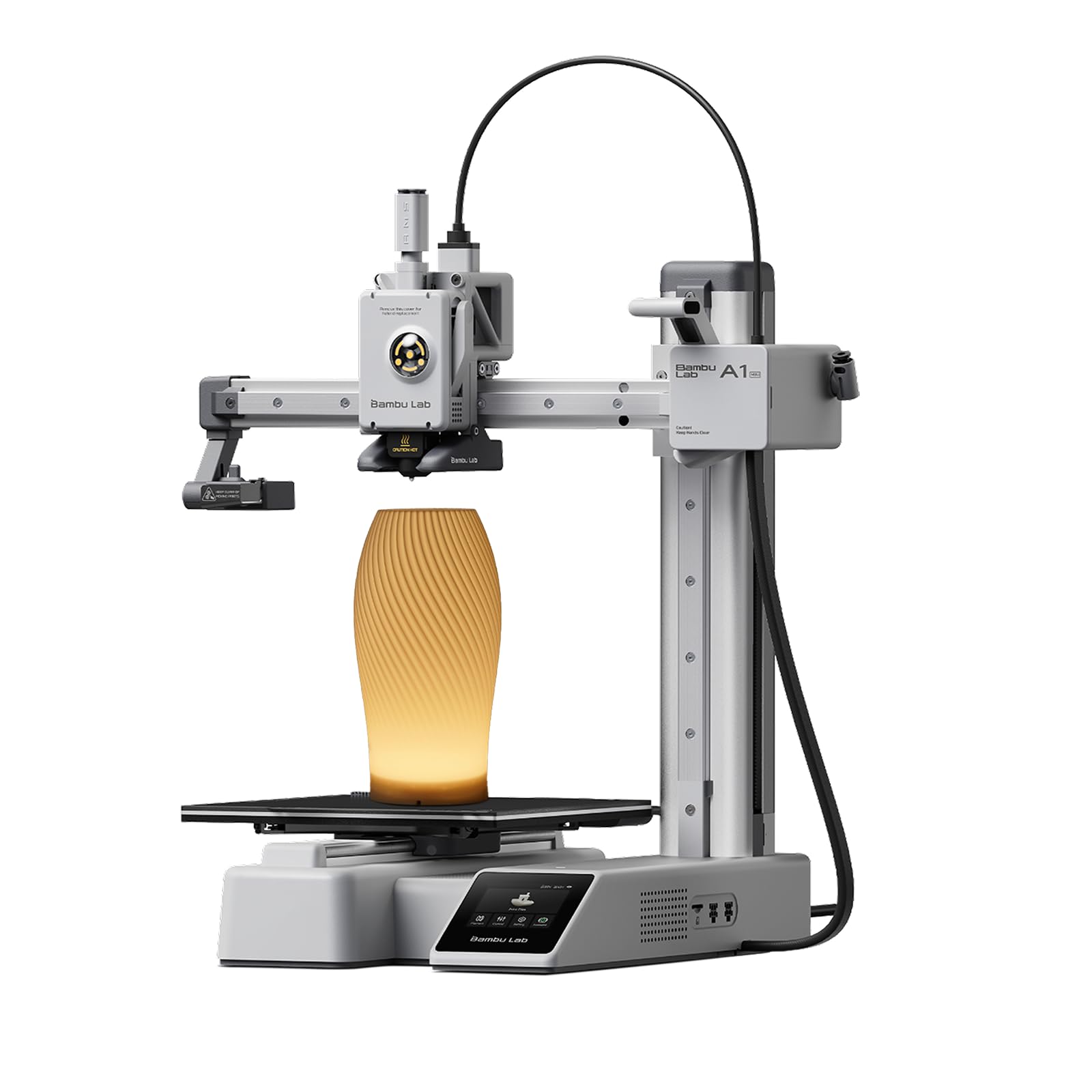
2. Bambu Lab A1 mini 3D Printer + LED Lamp Kit
The premium compact that feels less like a hobby kit and more like a finished appliance.
If you want the experience that owners describe as “works right from the start as advertised,” this is it. The A1 mini performs automatic calibration — it sets itself up without you touching a knob — and owners mention printing within 30 minutes of setup. The included LED Lamp Kit turns your prints into functional decorative lights, which is a genuinely unique bonus for a first machine.
Performance is the most-praised aspect here, and it’s easy to see why: high-speed, high-quality printing with full-auto calibration and an intuitive touchscreen. The Bambu Lab ecosystem (MakerWorld library and the Bambu Handy app) means thousands of ready-to-print models are a tap away. It’s heavier than the TINA2S at 12.1 pounds, which gives it a solid, premium feel on the desk.
Expect some noise: a few customers note annoying high-pitched fan sounds. Still, most feedback is positive — one buyer ran it nonstop for a month with rare failures, and a market vendor called it “the best machine for a beginner.” The only real limit is the tiny 3.9-inch cube build volume, which rarely matters for toys and small parts.
Why it wins: you’re paying for a curated, reliable experience — automatic leveling, abundant free models, and an app that guides every step. It’s the least intimidating premium machine you can buy.
The only ask: the high-pitched fan noise is the one thing owners wish was quieter; treat it as a hum you’ll get used to.
3. Entina TINA2S 3D Printer with WiFi Cloud Printing
A beginner machine that hands you a 1,500-model library so you never wonder what to print.
The biggest hurdle for new owners isn’t leveling — it’s finding something to print. This TINA2S solves that with the Poloprint Cloud app, which grants access to 1,500+ ready-to-print models with regular updates. Kids can pick a toy and be printing within minutes, which is exactly what families report: an 11-year-old grandson works it “just fine.”
It’s also genuinely fast for a mini, delivering up to 200 mm/s print speed with 0.04 mm precision. The upgraded WiFi module provides 5x faster file transfer speeds, so you’re not waiting around for uploads. Auto bed leveling and a flexible spring steel build plate keep first-layer consistency solid, and the dual Z-axis adds movement stability.
Quality gets the most positive mentions — “I was really impressed with the resolution quality for this level of printer” sums up the owner consensus. The caveats are real but not deal-breaking: a few reviewers point out the occasional nozzle clog and note that WiFi setup took around 15 minutes. It’s heavier than the other Entina at 9.08 pounds, and its 3.9 × 4.7 × 3.9 inch volume is still firmly in mini territory.
The creative hub: if you want the biggest safety net of ready-to-print ideas plus fast speeds, this is the pick — the app ecosystem is the standout reason families choose it.
Who it fits: best for kids and hobbyists who want to print from a curated catalog before they learn to design their own files.
4. Entina Tina2C 3D Printer for Kids & Beginners

The lightest full-featured mini here, promising a first print in as little as 8 minutes.
At just 5.28 pounds, this is the easiest machine to lift onto a shelf or pack for a classroom. Its defining promise is speed to first print: guided setup through the Poloprint Cloud app gets you printing in as fast as 8 minutes. It supports both 2.4G WiFi and TF card offline modes, so kids aren’t dependent on a connection.
The app adds AI-powered features like photo-to-print and 20+ creative DIY modules, plus regularly updated STEM learning courses — a real draw for homeschoolers and teachers. The self-cleaning nozzle and quick-swap printhead simplify maintenance, which is a genuine relief for first-time users who dread clogged nozzles. Auto-leveling and power-loss recovery round out a forgiving package.
This is an honest mixed bag on durability, though. A set of shoppers say prints coming out of alignment, filament breaking mid-print, and one unit that malfunctioned within hours. Those are real frustrations from real households — but they sit alongside owners who call it “not a toy but an actual 3D printer” and love it for their grandkids. The quiet, rounded design and integrated LED lighting make it safe for a child’s room.
Why it’s appealing: the app-first design and 8-minute start make this the fastest path from box to toy for a young beginner.
Know the risk: reliability gets mixed feedback — an occasional unit struggles with alignment or filament breaks, so keep expectations set for a budget-friendly learning tool.
5. Geeetech M1 High-Speed Mini 3D Printer

The budget speedster that out-prints pricier machines right from the start.
If speed is your priority, the Geeetech M1 delivers print speeds up to 250mm/s (millimeters per second) using a 50W heating rod, and owners say it “prints better out-of-box than upgraded pricier printer.” Its print area is a compact 3.94×4.33×3.94 inches, yet the 16-point full-auto leveling and a heated, flexible magnetic build plate keep prints precise and warp-resistant.
what separates it is the hardware: a 16-point auto-leveling system (more calibration points than most rivals), a heated bed (which the TINA2S lacks), and a direct-drive extruder with a dual-drive metal gear system at a 1:5 gear ratio for strong extrusion. It’s significantly heavier than the TINA2S at 8.81 pounds vs 6.4 pounds, which adds stability during high-speed moves.
Print quality earns the most praise, with ease of use close behind. The trade-off: it requires full slicing software like Orca or Cura rather than a kid-friendly app, so it suits a child ready to learn, not a toddler. A few owners hit filament clogs and needed help with the stock spool holder for 1kg spools — you’ll want to print the included replacement holder. The 30-day return policy, 12 months of free repair, and lifetime support add confidence.
The speed advantage
- Up to 250mm/s print speed — among the fastest here
- Heated build plate reduces warping on first layers
- 16-point auto-leveling for precise, even prints
- Strong 1:5 gear-ratio extruder handles TPU and PLA
The learning curve
- Needs full desktop slicing software, not a kid app
- Stock spool holder struggles with 1kg reels — plan to print the fix
- An occasional unit reports clogs and skipped layers on pause
The speed-first choice: grab this if you want fast, high-quality prints and don’t mind learning a real slicer — it’s a superb first “real” printer.
Skip it for: young children who need pure app-guided simplicity rather than desktop software.
6. TINA2 3D Printer (HEPHI3D) Fully Assembled

The entry-level TINA2 that keeps setup simple, if you can handle a learning curve.
This is the most budget-friendly way into the TINA2 family. It arrives fully assembled with a 2.4″ LCD display, a sample PLA filament roll, and a Micro SD card loaded with model files — so the box genuinely has everything. One-touch auto-leveling removes the scariest part of setup for a novice.
At 5.68 pounds, it’s the lightest printer in this lineup (the Geeetech M1 is 55% heavier at 8.81 pounds) and its 8.27 x 8.27 x 11.42 inch frame is compact enough for a school desk. The dual Z-axis and dual Y-axis rails keep the print head stable for a machine at this price, and the removable magnetic build plate bends for easy removal.
Here’s the honest picture: owners praise enjoyment most, especially for kids doing small projects. But print quality, reliability, and ease of use get mixed feedback. One child may print constantly, while another family reports it “stopped working after a week” and found it “complicated to operate.” The biggest friction point: printing requires a computer app plus a memory card or USB converter, so younger kids need adult help. If you’re on a tight budget and willing to guide a child through the first few prints, it’s a fair value.
The budget entry: this is the cheapest way to test whether 3D printing clicks for your family, with auto-leveling doing the heavy lifting.
Who it’s not for: anyone expecting a fully hands-off, app-driven experience — the computer-and-card workflow adds a step that frustrates some beginners.
7. Creality K2 SE 3D Printer

The desktop workhorse that open up multicolor prints the others simply can’t do.
This is the biggest and most capable machine here, and it earns its size. The K2 SE supports one Color Filament System (CFS, sold separately) holding 4 filament spools — and by connecting up to four CFS units, you can print in as many as 16 colors. That’s figurines and props with real color detail, which no other mini on this list can match.
Its build volume is a generous 220 × 215 × 245 mm (larger than a 3.9″ cube), and it’s tune for high-speed filaments with up to 500mm/s printing speed. A rigid die-cast aluminum alloy frame minimizes vibration for accuracy, and smart auto leveling probes only the active print area for faster setup. Owners upgrading from an Ender 3 call it “much less fuss” and report 30+ prints with zero failures.
Printer quality is the top praised aspect, with ease of use second. But this is a heavier commitment: at 27.5 pounds it’s a permanent desk resident, and reliability gets mixed feedback overall — some owners hit software bugs or needed a glue stick for easier part removal. It’s also less DIY-friendly than Creality’s older Ender line. This one suits a hobbyist or adult who wants multicolor capability without moving to a full-size machine.
The multicolor step-up: if you’re ready to add the CFS later and want larger, colorful prints, this grows with you — far beyond what a fixed-color mini can do.
Who should wait: total beginners who want a -ish toy for a kid — this is a heavier, more serious desktop tool than that.
8. Phrozen Sonic Mini 8K S Resin 3D Printer

For miniature painters and modelers who demand detail that FDM simply can’t produce.
This is a different kind of 3D printer, and it’s here for a specific buyer. Instead of melting plastic filament, it uses liquid resin cured by a light — and the payoff is extraordinary detail. The Sonic Mini 8K S delivers an XY resolution of 22 microns on an 8K monochrome LCD, which means tiny facial features, armor details, and action-figure textures come out crisp. It’s the go-to for tabletop miniatures and cosplay props.
Reliability gets the most praise here, with owners calling it “a workhorse and very reliable” and noting it works right from the start. The printing volume of 16.5 x 7.2 x 17 cm handles a decent-size model, with a load capacity of up to 22 lbs. It’s fully open-source, supporting slicers like Lychee, Chitubox, and Tango, so you’re never locked into proprietary software.
The honest catch is the juggling. Resin printing involves handling liquid chemicals, cleaning prints, and curing them — it’s messier than filament. The only complaint in an otherwise glowing set of reviews is that you must use a USB drive to print files, with no WiFi option. It’s also a hefty 22 pounds. This is for the adult hobbyist who wants jaw-dropping miniature detail and doesn’t mind the resin workflow.
The detail specialist: buy this for miniature wargaming, dental models, or any project where 22-micron resolution makes the difference — nothing else here comes close on detail.
Not your first printer: if you want a simple, clean family hobby, a filament printer is far friendlier — resin demands careful handling and cleanup.
Understanding the Specs
Print Volume & Build Area
This is the maximum size object your printer can create, measured in inches or millimeters — like 3.9 x 3.9 x 3.9 inches or 220 × 215 × 245 mm. Think of it as the size of the “box” your prints must fit inside. For a mini printer, that box is perfect for figurines, keychains, cable clips, and small toys. If you plan to print phone stands or vases, you need a larger volume, which usually means a bigger and heavier machine on your desk.
Auto-Leveling & Calibration
Leveling means making sure the print bed is perfectly flat and the right distance from the nozzle — if it’s off, prints fail or stick badly. Manual leveling has you adjust knobs and test with paper; auto-leveling uses sensors to do it for you. This is the single biggest quality-of-life feature for beginners. Some machines go further with 16-point leveling (more checks = more precision) or full automatic calibration that also sets up other settings on its own.
Filament Types & Heated Beds
FDM printers melt plastic filament, and the most common is PLA — it’s easy, safe, and perfect for beginners. Some machines list PLA pro and TPU (flexible rubber-like plastic) support too. A heated bed warms the platform so the first layer sticks and doesn’t warp; it’s a nice-to-have for PLA and nearly essential for other materials. If a printer has no heated bed, you’re effectively limited to PLA, which is fine for toys and trinkets.
Print Speed & Resolution
Speed is measured in mm/s — how fast the print head moves. Entry-level minis sit around 200mm/s; faster machines like the Geeetech hit 250mm/s and the Creality K2 SE up to 500mm/s. Resolution (like 0.04 mm precision) describes the layer height and detail. For resin printers, the key spec is XY resolution in microns (22 microns here) — the lower the number, the finer the detail, which is why resin wins for miniatures.
FAQ
Is a mini 3D printer good for a child?
What’s the difference between FDM and resin printing?
How long does it take to make a first print?
What size objects can a mini printer make?
What filament should I buy for a beginner mini printer?
Does a mini 3D printer need WiFi or an app?
How noisy are these mini printers?
Can these printers print multicolor objects?
What happens if the power goes out mid-print?
Are these printers safe to use in a child’s bedroom?
Final Thoughts: The Verdict
For most buyers, the 3d mini printer winner is the TINA2S because it delivers the best balance of true plug-and-play setup, impressive print quality, and a complete starter kit that wins families over. If you want the most polished, reliable premium experience with an app ecosystem full of ready-to-print models, grab the Bambu Lab A1 mini. And for the hobbyist chasing tiny, museum-grade detail, the Phrozen Sonic Mini 8K S is the one to reach for — just be ready for the resin workflow.
How We Picked
We do not accept paid placement. Every pick is matched to a real buyer and a real use-case; we do not hands-on test units.
Sources & Methodology
Specifications: manufacturer listings and product documentation. Review insights: verified customer reviews, as of August 2026. Pricing: not shown on this page (it changes often); check the current price via the retailer link.
As an Amazon Associate, Gadgets Feed earns from qualifying purchases. This does not affect which products we feature.