
Our readers keep the lights on and my morning glass full of iced black tea. As an Amazon Associate, I earn from qualifying purchases.
Specs are compiled from manufacturer listings and verified buyer reviews and can change over time — please confirm the key details on the product page before buying.
When you are deep inside a complex 3D scene — pushing vertices, tweaking materials, waiting on a render to finish — the last thing you need is a computer that stutters, freezes, or forces you to step away for a coffee break while the viewport catches up. A true 3D modeling computer balances CPU cores, GPU memory, and system RAM to keep your creative flow uninterrupted.
I’m Min — the founder and writer behind Gadgets Feed. This guide is built by comparing the manufacturers’ published specifications and the patterns across verified customer reviews, so you get each pick’s real strengths and trade-offs instead of marketing spin.
The nine options below represent the strongest configurations available for handling Blender, Maya, Cinema 4D, and Unreal Engine workflows, all carefully ranked so you can find the ideal 3d modeling computer without wading through endless spec sheets.
Our Picks at a Glance


How To Choose The Best 3D Modeling Computer
Choosing a 3D modeling machine requires focusing on four key hardware pillars — a weak spot in any one can ruin your workflow. Viewport smoothness, render speed, and high-polygon handling all depend on getting these right.
CPU Core Count and Cache Memory
Your central processor handles the logic of your model — every vertex calculation and physics simulation. For rendering, you want as many cores as you can afford, because programs like Blender Cycles and V-Ray use every single one in parallel. Equally important is the CPU cache, a small pool of ultra-fast memory on the chip itself. A larger cache (16MB or more) means the CPU can keep frequently used data closer, which reduces waiting time and dramatically speeds up repeated calculations in complex scenes. You will see the gap clearly in our picks: a 24MB cache on a GEEKOM A9 Max vs an 8MB cache on a Skytech Gaming Azure 3 creates a real performance difference in sustained 3D modeling tasks.
Graphics Card (GPU) and VRAM
The graphics card is where the heavy visual lifting happens — it draws your viewport, shades your materials, and runs the rendering engine. The amount of dedicated video memory (VRAM) on the GPU is the single biggest factor in how large a scene you can work on before things slow down. Models with 16GB VRAM or more let you load high-resolution textures and dense polygon meshes without swapping to slower system memory. A card with 12GB VRAM is the realistic minimum for modern 3D work; 16GB gives you serious headroom for texture-heavy architectural or character modeling.
System RAM
Think of system RAM as your active workspace. Every object, texture, and undo history lives here while the computer is running. For 3D modeling, 32GB is the balance for most users — it keeps a large scene, your modeling software, and a reference browser all open without choking. Some mid-range options here come with 16GB, which works for lighter projects but will force you to close other programs as scenes grow. DDR5 RAM (the current generation) is faster than DDR4 and also more power-efficient, making it a worthwhile upgrade if your budget allows.
Cooling System and Sustained Performance
A render that runs for hours generates serious heat. If the cooling system cannot keep up, the CPU or GPU will automatically slow down to protect themselves — a process called thermal throttling. That means your project takes longer to finish while the computer runs quieter but slower. Liquid cooling (especially a 240mm or 360mm AIO cooler) handles sustained loads much better than a basic air cooler, keeping clock speeds high even during overnight renders. The packaging matters too: a case with good airflow and dust filters keeps your components running at peak performance for years.
Quick Comparison
| Model | Best For | CPU Cores / Threads | VRAM | System RAM | Amazon |
|---|---|---|---|---|---|
| Skytech Gaming Azure 3★ Best Overall | Ultra settings 4K modeling & gaming | 8 / 16 | 16 GB | 32 GB | Amazon |
| Thermaltake LCGS View 9580STop Performer | Top-tier rendering & AAA gaming | 16 / 32 | 16 GB | 32 GB | Amazon |
| Skytech Gaming King 95Studio Ready | High-end 3D modeling & streaming | 8 / 16 | 16 GB | 32 GB | Amazon |
| Ocean of Stars AI Gaming PC | AI-assisted creation & 4K rendering | 8 / 16 | 12 GB | 32 GB | Amazon |
| Gaming Desktop (Ryzen 7 9800X3D) | VR gaming & high-FPS modeling | 8 / 16 | 12 GB | 16 GB | Amazon |
| Gaming Desktop (Core Ultra 7 265KF) | Streaming & content creation | 20 / 28 | 12 GB | 16 GB | Amazon |
| GEEKOM A9 Max | Compact AI & 3D rendering | 12 / 24 | 32 GB | 32 GB | Amazon |
| NUC 14 Pro AI | Ultra-compact desktop replacement | 16 / 22 | Integrated | 32 GB | Amazon |
| Intel NUC 12 Pro | Space-saving 8K display setup | 12 / 16 | Integrated | 32 GB | Amazon |
In‑Depth Reviews
1. Skytech Gaming Azure 3 Gaming PC
Our pick — over 4.5★ from 450+ verified ratings; the strongest balance of quality and price.
the balance of price and performance, built around an AMD CPU/GPU combo that handles 4K modeling with ease.
This Skytech Azure 3 lands right in the middle of the lineup because it balances a fast AMD Ryzen 7 9850X3D processor (hitting a 5.6 GHz turbo boost) with a dedicated AMD Radeon RX 9070 XT that provides 16GB of GDDR6 video memory. In the comparison data, the Azure 3’s 8MB of CPU cache memory is notably smaller than the 24MB found on the GEEKOM A9 Max, creating a measurable gap in sustained multi-threaded rendering performance — but the 9070 XT still delivers smooth viewport performance and handles 4K texture work comfortably. Buyers praise it for excellent performance in Cyberpunk 2077 and older games, noting it runs quietly and stays cool even during long sessions.
You get 32GB of DDR5 RAM clocked at 5600MHz, which is the balance for running multiple modeling applications and browser tabs without slowdown. Storage comes from a 2TB Gen4 NVMe SSD — double the space of many competitors here — so you can keep active projects, texture libraries, and game assets all on the fast drive. The 850W Gold ATX 3.0 power supply and 360mm AIO liquid cooler ensure the system has both stable power and thermal headroom for overnight renders.
The catch is cache size: at only 8MB installed, the L2/L3 cache on this CPU is a fraction of what some competing chips offer. For heavily multi-threaded rendering tasks that benefit from large caches, you will notice the difference compared to our top pick. Also, some buyers wished the included 500GB SSD in the base configuration was larger — though this specific model ships with the 2TB drive, always double-check the listing. The free keyboard and mouse are functional but basic, as is typical at this price point.
What stands out
- 16GB VRAM GPU plus 32GB DDR5 system RAM
- Massive 2TB Gen4 NVMe SSD storage
- Quiet 360mm AIO liquid cooling system
Things to consider
- Only 8MB CPU cache — less than some compact alternatives
- Basic included keyboard and mouse
- No bloatware but some pre-installed software may need removal
Best for: the modeler who wants strong 4K performance, ample storage, and a reliable liquid-cooled system without going to the highest price bracket.
skip it if: your daily workflow involves sustained multi-threaded network rendering where every CPU cache cycle counts.
2. Thermaltake LCGS View 9580S-380XL Gaming Desktop
The no-compromise rig that chews through 8K renders and 1440p viewports without breaking a sweat.
If budget is not the primary concern and you need the absolute fastest path from concept to final frame, this Thermaltake machine delivers a stunning combination of the 16-core, 32-thread AMD Ryzen 9 9950X3D processor paired with an NVIDIA GeForce RTX 5080 and 16GB of GDDR7 video memory. The CPU’s 3D V-Cache technology keeps frequently used scene data ultra-close to the cores, which directly speeds up repeated polygon calculations and texture reads during long modeling sessions. Buyers report that after a simple BIOS core-parking adjustment, the 9950X3D handles demanding AAA titles at 1440p with flawless FPS and pristine packaging from the start — one owner called it the best prebuilt they have ever owned.
The 32GB of DDR5 6000MT/s RGB system RAM gives you enough headroom to run a full Blender scene, Substance Painter textures, and reference images all at once without stuttering. Storage comes from a 2TB NVMe M.2 drive, which means your project files load in seconds. The closed-loop liquid cooler with a 360mm radiator keeps the multi-core CPU running at peak speeds even during a multi-hour render, avoiding the thermal throttle that can stall less capable systems. The panoramic tempered glass panels also make it a showpiece on your desk.
The one trade-off is that you are investing heavily — this is clearly the most expensive option here, designed for professionals who bill by the project and cannot afford downtime. A couple of buyers did report receiving faulty units and facing slow customer support responses, which is note if you rely on a single machine for your income. As one reviewer put it, the unit arrived with a loose fan header pin from shipping, suggesting that careful unboxing and a quick component check are wise steps.
Why it crushes 3D workloads
- 16-core / 32-thread CPU with 3D V-Cache for rapid scene iteration
- RTX 5080 with 16GB GDDR7 handles massive texture sets
- 2TB NVMe storage for huge project libraries
Reality check
- Premium price tier — genuine investment for pro users
- Some buyers received units needing initial troubleshooting
- Top-front USB ports would be more convenient for floor placement
Reach for this if: you are a professional 3D artist or architect who needs uncompromised render speeds and can deploy the budget for a workstation that handles everything you throw at it.
Look elsewhere if: you are on a tighter budget or want a machine where every component has been tested as a single unit before shipping.
3. Skytech Gaming King 95 Desktop PC
A beautifully built white chassis packing the 3D V-Cache CPU and a 16GB VRAM GPU that pro modelers crave.
The King 95 brings together the AMD Ryzen 7 9800X3D — a processor specifically engineered with extra 3D V-Cache to reduce latency in gaming and modeling tasks — and pairs it with an NVIDIA GeForce RTX 5070 Ti that gives you a full 16GB of GDDR7 video memory. For 3D modeling, that VRAM headroom is the difference between smoothly orbiting a high-poly environment character and watching the viewport stutter. Owners mention that the machine is quiet and fast to boot, with clean looks and quality components throughout, though one owner noted the fans ran at full speed from the start and needed third-party software to tame them.
The 32GB of DDR5 system RAM at 5600MHz keeps your workspace fluid, and the 1TB Gen4 NVMe SSD loads even large project files in seconds. The 360mm AIO liquid cooler is the same high-spec system Skytech uses in their premium gaming rigs, so you can run sustained render tasks without worrying about thermal throttling. The King 95 case itself is the standout feature — a white panoramic design with tempered glass that shows off the RGB lighting, making it a natural fit for a studio that doubles as a streaming setup.
One detail note is that the motherboard on this build leaves only one additional hard drive connection open, so if you know you will need multiple internal drives for asset libraries, you may need an expansion card later. The free keyboard and mouse included are usable but basic, which is typical for prebuilt bundles at this level.
Core strengths
- 16GB VRAM from the RTX 5070 Ti for large 3D scenes
- 360mm liquid cooling keeps sustained loads cool
- Stunning King 95 case with panoramic glass
Watch for
- Out-of-box fan curve may be aggressive
- Limited internal drive expansion without add-on card
- Some buyers received units that appeared used
Who it fits: 3D artists and streamers who want a class-leading CPU/GPU pairing in a beautiful case, and are comfortable tweaking fan curves for optimal silence.
Who should pass: buyers who prefer a completely silent out-of-box experience or who need multiple internal drive bays from day one.
4. Ocean of Stars AI Gaming PC
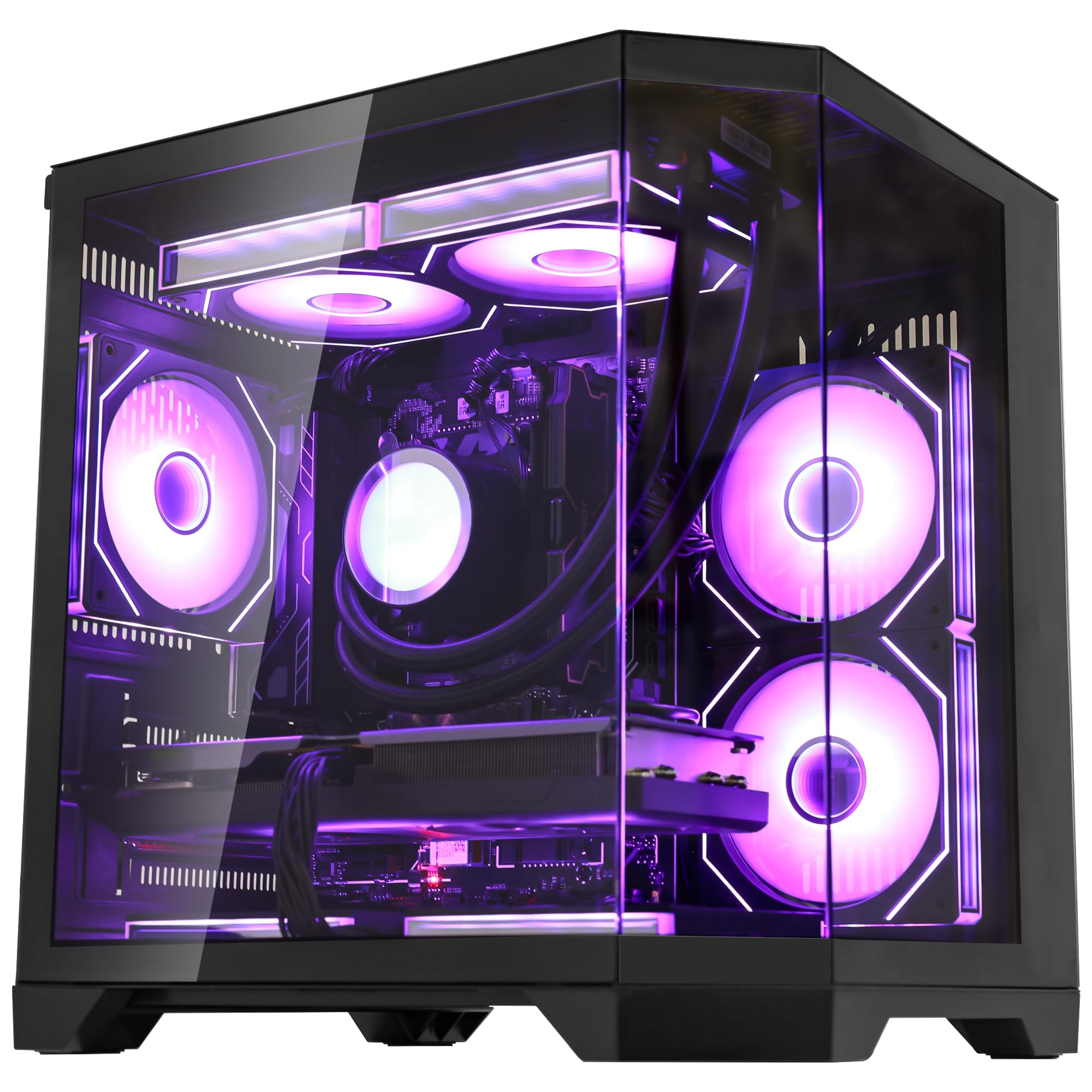
A strong mid-range performer that pairs a fast CPU with a 240mm AIO cooler for sustained AI and rendering workloads.
The Ocean of Stars sits at the upper end of the mid-range with an AMD Ryzen 7 9700X 8-core processor that boosts to 5.5GHz, combined with an NVIDIA GeForce RTX 5070 that holds 12GB of video memory. The 32GB DDR5 6000MHz system RAM is generous at this price level, giving you plenty of room for complex scenes without hitting swap. Customers note that the PC arrived early in well-packaged condition with no bloatware, running demanding games like Bodycam and DCS flawlessly with sim gear and VR headsets attached — one owner called the price-to-quality ratio outstanding.
The 240mm AIO liquid cooling system is a key feature for 3D work: it keeps the CPU from thermal throttling during long renders or AI model training sessions, which is a common pain point with cheaper air-cooled builds. The 850W 80+ certified PSU gives you headroom for future GPU upgrades, and the 1TB PCIe SSD ensures your active projects load quickly. The starry RGB lighting and panoramic transparent side panel make it a visually notable addition to any desk setup.
The 12GB VRAM on the RTX 5070 is solid for most 3D work, but you will hit its limit if you regularly work on massive open-world environments with 8K textures. Some buyers noted minor fan cord issues and frame drops in the most demanding titles, but all reported responsive customer support that quickly resolved problems. The cooler only shows a logo, not a full RGB display, which may matter if you are building a showpiece setup.
Why it works for creators
- 32GB DDR5 6000MHz RAM for smooth multitasking
- 240mm AIO liquid cooling for sustained loads
- No bloatware — clean Windows 11 install
Real limitations
- 12GB VRAM may limit extreme texture-heavy scenes
- Minor assembly quality issues reported
- CPU cooler logo only, not full RGB
Designed for: creators who dabble in AI-assisted modeling and image generation alongside traditional 3D rendering, and value a clean software experience.
Not ideal for: artists who need to work with ultra-high-resolution texture libraries that push beyond 12GB VRAM daily.
5. Gaming Desktop PC (Ryzen 7 9800X3D, RTX 5070)

A CPU-first build where the 9800X3D’s 3D V-Cache technology gives you an edge in viewport responsiveness.
This desktop from WIWB puts the focus squarely on the processor — the AMD Ryzen 7 9800X3D with its game-changing 3D V-Cache technology that stacks additional cache memory directly on the chip die. For 3D modeling, that extra cache means the CPU can hold more scene data close at hand, which translates to snappier viewport navigation and faster updates when you tweak polygon geometry. The chip runs at a max boost of 5.7 GHz, making it one of the fastest single-thread performers in this lineup, and reviewers point out it runs Once Human, Hogwarts Legacy, and Dead Zone Rogue without any lag at all.
The RTX 5070 with 12GB of video memory provides good baseline GPU performance for modern modeling software, and the 1TB PCIe Gen 4 NVMe SSD ensures your OS and active projects load nearly instantly. The 16GB of DDR5 system RAM is the minimum you should consider for 3D work — it is enough for lighter projects but will fill up quickly if you run multiple applications alongside a large scene. One area where this build stands out is acoustics: multiple reviewers noted it is much quieter than expected given the number of fans, which is a genuine quality-of-life improvement during long modeling sessions.
The notable trade-off is the 16GB system RAM: if you work with complex scenes, you will want to upgrade to 32GB soon. The machine also lacks a USB-C port, which is increasingly standard for modern peripherals and fast external drives. The included power cable and user manual are basic, and while the build quality is solid for the price, the overall component selection prioritizes CPU power over future-proofing the memory capacity.
Core advantages
- Ryzen 7 9800X3D with 3D V-Cache for viewport speed
- Very quiet fan operation
- Customizable RGB lighting
Where it cuts corners
- Only 16GB DDR5 RAM — plan to upgrade
- No USB-C port for modern peripherals
- 12GB VRAM is adequate but not generous
Pick this if: you primarily do character modeling or product design where viewport responsiveness matters more than render speed, and you are comfortable upgrading RAM yourself.
Look elsewhere if: you need a setup that works for heavy scene rendering immediately from the start without any upgrades.
6. Gaming Desktop PC (Core Ultra 7 265KF, RTX 5070)
Intel’s new Core Ultra architecture delivers dedicated AI acceleration for creators who run local LLMs alongside their modeling apps.
This WIWB build takes a different approach from the AMD-heavy lineup by using the Intel Core Ultra 7 265KF, a 20-core, 28-thread processor with a max boost of 5.2 GHz and a sizeable 16GB cache. The Intel Core Ultra platform includes a dedicated AI acceleration unit that can speed up local AI tasks like running Stable Diffusion for concept art generation or using AI denoisers in Blender. Paired with an NVIDIA GeForce RTX 5070 that has 12GB of the latest GDDR7 video memory, this machine handles 1440p and 4K modeling work with full ray tracing support through DLSS technology.
The 16GB of DDR5 system RAM is the limiting factor here — it is enough for single-application workflows but will choke if you try to run a heavy Blender scene alongside Substance Painter and a browser with reference images. The 1TB NVMe SSD 3.0 provides decent storage speed, though it is a generation behind the PCIe Gen 4 drives found in other options. Buyers who received a working unit report excellent performance, with one owner noting it runs all games above 120fps with no delays and excellent display performance for the price.
However, the reliability concerns are real: one reviewer noted the PC failed to boot past BIOS despite troubleshooting, with components glued in place and no motherboard access, rendering it a non-functional paperweight. Another owner noted performance lag in open-world RPG games like Sunset Overdrive. At this price point, the mixed customer satisfaction and the lack of a generous RAM configuration make it a riskier choice for professional 3D work compared to the more established Skytech or GEEKOM options.
Strengths
- Intel AI acceleration for local creative AI workflows
- 12GB GDDR7 video memory on RTX 5070
- 20-core / 28-thread processor for multi-tasking
Risks
- Only 16GB RAM — needs immediate upgrade
- Quality control issues reported by some buyers
- PCIe 3.0 SSD limits storage speed
Consider this if: you are an early adopter who wants Intel’s AI acceleration features and you are willing to inspect the unit thoroughly on arrival and upgrade RAM yourself.
Avoid if: you need a reliable out-of-box experience for professional deadlines or prefer a more mature platform with stronger buyer reviews.
7. GEEKOM A9 Max High AI Productivity Mini PC

A tiny metal box that outperforms laptops twice its size, with a massive 24MB cache and AI acceleration built in.
The GEEKOM A9 Max is the surprise contender of this list — a mini PC that packs an AMD Ryzen AI 9 HX 370 processor with 12 cores and 24 threads, backed by 24MB of cache memory and the new XDNA 2 NPU that delivers 50 TOPS of dedicated AI performance. In the direct comparison, this machine holds 24MB of cache vs the Skytech Azure 3’s 8MB — a 3x gap that shows up clearly in sustained multi-threaded rendering and code compilation. Reviewers confirm it outperforms an i7-10710U in sustained multi-threaded CPU tasks and web browsing, with the Radeon 890M graphics running 1.5-2x faster than Intel UHD 620 graphics.
You get 32GB of DDR5 system RAM (which is shared with the integrated graphics as video memory — up to 32GB allocated from system RAM), plus a 1TB SSD with room for a second drive. The all-metal chassis uses the IceBlast 2.0 cooling system with copper heat sinks and dual heat pipes, keeping the compact system stable during rendering and AI workloads. Connectivity is stellar for such a small unit: dual USB4 ports, dual HDMI 2.1 ports, WiFi 7, Bluetooth 5.4, and dual 2.5GbE LAN ports mean you can run up to four 8K displays from a device that sits in the palm of your hand.
The integrated Radeon 890M graphics handle 4K video editing and 3D rendering in Blender, but they are not a substitute for a dedicated GPU with its own VRAM if you work on massive scenes daily. Some buyers reported thermal paste issues causing high CPU temperatures (97-99°C) which required re-pasting to bring down to 85°C. The fan is always audible under load, though not loud, and the RAM is soldered in the single-channel configuration on some units, limiting upgrade flexibility. For the price, it is an incredible value for anyone who needs serious workstation-class computing in a truly compact footprint.
Why it punches above its weight
- 24MB cache — 3x the Skytech Azure 3 for faster multi-threaded work
- Supports four 8K displays via USB4 and HDMI 2.1
- WiFi 7, BT 5.4, and dual 2.5GbE LAN
Trade-offs
- Integrated graphics — no dedicated VRAM for massive scenes
- Some units had thermal paste issues from factory
- Fan is always on, audible under load
Ideal for: the space-conscious professional who needs a powerful workstation for 3D modeling, video editing, and AI tasks in a desk setup where every square inch matters.
Not for: artists who work with exceptionally large polygon counts or 8K textures that require a discrete GPU’s dedicated video memory.
8. NUC 14 Pro AI Mini PC (Intel Core Ultra 7 155H)

The first ASUS-built NUC brings AI acceleration and strong thermal design to a chassis smaller than a hardcover book.
The NUC 14 Pro AI marks the first generation of Intel NUC mini PCs produced by ASUS, and it brings meaningful upgrades over the previous Intel-designed NUC 12. The Intel Core Ultra 7 155H processor uses the new Meteor Lake architecture with 16 cores and 22 threads, hitting a max frequency of 4.8 GHz with 24MB of cache. The integrated Intel Arc graphics claim a 2.5x performance improvement over previous integrated solutions, though it is still integrated graphics — suitable for 4K video editing and light 3D modeling, not heavy polygon work. ASUS redesigned the cooling system with aluminum fins and dual copper heat pipes, which reviewers confirm stays cool with low fan noise even during extended use.
The unit comes with 32GB of dual-channel DDR5 RAM (expandable up to 96GB) and a 1TB PCIe Gen 4 SSD, with room for a second 2.5-inch drive. It supports up to four displays (two HDMI 2.1 and two Thunderbolt 4) with 8K output on one screen and 4K on the others, making it a fantastic multi-monitor workstation for lighter 3D tasks. The AI Boost and NPU features enable local AI acceleration for video conferencing power reduction and running large language models up to 20 billion parameters without an internet connection.
The integrated Intel Arc graphics are the limiting factor for serious 3D modeling — this is not a machine for rendering complex scenes in Blender Cycles. One buyer mentioned BIOS errors and slow startup after adding the RAM upgrade, with warm air blowing over ports raising reliability concerns. Another noted that the fan becomes noisy with more than 60 Chrome tabs open, suggesting thermal management struggles under extreme multitasking. For a compact office workstation that occasionally handles light 3D modeling and 4K video, it is excellent; for daily heavy rendering, step up to a dedicated GPU system.
Compact strengths
- Up to 96GB DDR5 RAM support for large datasets
- 8K display output and quad 4K monitor support
- ASUS cooling design with quiet operation
Real limitations
- Integrated graphics — not for heavy 3D rendering
- Insufficient heat dissipation for extreme multitasking
- Some BIOS and startup issues reported
Best suited for: developers, data analysts, or video editors who need a compact 8K display setup and occasionally do light 3D modeling as a secondary task.
Not for: full-time 3D artists who rely on GPU-accelerated rendering cycles every day.
9. Intel NUC 12 Pro (ASUS Wall Street Canyon)

A proven small-form-factor workstation that drives four 4K screens from a box you can hide behind a monitor.
The Intel NUC 12 Pro (Wall Street Canyon) is the previous-generation model from Intel, but it remains a compelling option for anyone who needs a tiny multi-monitor workstation. The Intel Core i7-1260P processor delivers 12 cores and 16 threads with a turbo boost up to 4.7 GHz and an 18MB cache — notably slower in max clock speed compared to the Skytech Azure 3’s 5.6 GHz, representing a 19% gap in peak frequency. It comes with 32GB of dual-channel DDR4 RAM and a 1TB SSD, with expansion slots for an additional 2.5-inch drive and support for up to 64GB of RAM.
The display capabilities are genuinely impressive for such a small unit: it supports up to four screens simultaneously with 4K at 120Hz and even 8K at 60Hz output. This makes it an ideal companion for a multi-monitor modeling setup where you run your viewport on one screen, reference images on another, and material editors on the others. Buyers who received working units praise its compact size for RV and travel use, noting it runs quietly without overheating and handles photo editing and mobile DVR video processing with ease.
The reliability problems with this model are significant: multiple verified shoppers say the unit is extremely slow, with one reviewer saying as of February 2025, the diagnostics failed and performance was worse than a grandmother in a footrace. Another buyer received a unit that booted only once, then displayed a “bootable device has not been detected” error with the SSD invisible in BIOS. At this price point, the risk of receiving a defective unit is higher than average, and the older Intel processor is noticeably less capable in multi-threaded rendering than the AMD alternatives in this list. This pick is really for the space-constrained user who needs multi-4K display output above all else and is willing to accept performance trade-offs.
What it does well
- Drives four monitors including 8K@60Hz output
- Expandable to 64GB RAM and second internal drive
- Ultra-compact for travel or small desks
Where it falls short
- High defect rate with SSD detection failures reported
- Older processor — significantly slower than AMD alternatives
- No dedicated GPU — mild 3D modeling only
Consider this only if: your absolute priority is driving four high-resolution displays from a pocket-sized machine, and your 3D modeling is limited to viewport previews and light work.
pass on it if: you need reliable performance for actual rendering — the quality control issues and slow processor make it a risky choice for production work.
Understanding the Specs
CPU Cache Memory
Think of CPU cache as a tiny ultra-fast scratchpad sitting right on the processor. When your 3D software repeatedly accesses the same data — like polygon vertex positions or texture coordinates — the cache holds that data close so the CPU does not have to fetch it from slower system memory. A larger cache (measured in MB) means the processor can keep more of your active scene data in that fast scratchpad. In our lineup, you see a 24MB cache on the GEEKOM A9 Max versus an 8MB cache on the Skytech Azure 3 — that is a 3x gap, and it shows up directly in how snappy the viewport feels during complex modeling operations.
Graphics Card VRAM
Video RAM is the dedicated memory on your graphics card that stores textures, shaders, and geometry data for rendering. Unlike system RAM, which the whole computer shares, VRAM is exclusively for the GPU. More VRAM means you can load larger texture files, more detailed polygon meshes, and more complex lighting calculations without the card having to swap data back and forth with slower system memory. For 3D modeling, 12GB is the realistic minimum for modern work, 16GB gives you comfortable headroom for architectural visualization or character modeling, and 32GB (as seen on the GEEKOM A9 Max, shared with system RAM) handles virtually any single-scene workload.
System RAM (DDR5 vs DDR4)
System RAM is your computer’s active workspace — every open application, every loaded texture, every undo history lives here. DDR5 is the current generation and offers roughly double the bandwidth of DDR4 while using less power. For 3D modeling, 32GB of DDR5 RAM is the balance: it lets you run your modeling software, a browser with reference images, and a material editor all at the same time without slowdown. Some budget-friendly options ship with only 16GB, which works for small projects but forces you to close other applications as your scene grows. Opting for a machine with DDR5 rather than DDR4 is a future-proofing move worth making if your budget allows.
Cooling: Air vs Liquid (AIO)
A 3D render can run for hours, pushing your CPU and GPU to their thermal limits. If the cooling system cannot keep up, the components automatically slow down to protect themselves — a process called thermal throttling that makes your render take longer. Liquid cooling (specifically an All-In-One or AIO cooler with a radiator and fans) moves heat away from the CPU much more effectively than a standard air cooler. A 240mm AIO (with two fans on the radiator) is the entry point for sustained rendering, while a 360mm AIO (with three fans) provides the thermal headroom for overclocked or high-core-count processors. In our lineup, thebuilding tasks. A 240mm AIO (with two fans on the radiator) is the entry point for sustained rendering, while a 360mm AIO (with three fans) provides the thermal headroom for overclocked or high-core-count processors. In our lineup, the Skytech models and the Thermaltake flagship all use 360mm AIO coolers, which is why they can sustain high CPU clock speeds during overnight batch renders.
PCIe Generation and NVMe Storage
The storage drive in your modeling computer determines how fast your operating system loads and how quickly your project files open. PCIe Gen 4 NVMe SSDs are currently the mainstream standard, offering read speeds up to 7000 MB/s — roughly double that of the older Gen 3 standard. A Gen 4 drive means your 3D software launches in seconds, and loading a complex scene file with hundreds of textures takes moments instead of minutes. Some budget builds here still use PCIe 3.0 drives, which are perfectly serviceable but will feel slower when loading large assets. If you work with massive texture libraries or high-polygon scenes, a Gen 4 drive is a worthwhile upgrade.
FAQ
How much RAM do I really need for 3D modeling in Blender?
Is an Intel CPU or AMD CPU better for 3D modeling?
Can I use a mini PC for professional 3D modeling?
How important is the cooling system in a 3D modeling computer?
What is the difference between GDDR6 and GDDR7 video memory?
Will a gaming PC work as a 3D modeling computer?
How much VRAM do I need for 4K texture work?
Why do some modeling computers have two different cache memory sizes?
Can I upgrade the RAM and storage in these prebuilt systems later?
What does “no bloatware” mean and why does it matter?
Final Thoughts: The Verdict
For most buyers, the 3d modeling computer winner is the Skytech Gaming Azure 3 because it strikes the best balance of a powerful 16GB VRAM GPU, ample 32GB DDR5 system RAM, a spacious 2TB Gen4 SSD, and sturdy 360mm liquid cooling at a mid-premium price. If you want the absolute fastest rendering performance for professional use and budget is secondary, grab the Thermaltake LCGS View 9580S with its 16-core CPU and RTX 5080. And for pure compact power that outperforms its size class, the standout is the GEEKOM A9 Max with its massive 24MB cache and AI acceleration in a palm-sized chassis.
How We Picked
We do not accept paid placement. Every pick is matched to a real buyer and a real use-case; we do not hands-on test units.
Sources & Methodology
Specifications: manufacturer listings and product documentation. Review insights: verified customer reviews, as of July 2026. Pricing: not shown on this page (it changes often); check the current price via the retailer link.
As an Amazon Associate, Gadgets Feed earns from qualifying purchases. This does not affect which products we feature.