
Our readers keep the lights on and my morning glass full of iced black tea. As an Amazon Associate, I earn from qualifying purchases.
Specs are compiled from manufacturer listings and verified buyer reviews and can change over time — please confirm the key details on the product page before buying.
If you spend your day inside Blender, SolidWorks, or Fusion 360, a regular mouse fights you at every orbit, pan, and zoom. A 3D modeling mouse changes that by putting a dedicated middle button and programmable keys under your fingers, so you can fly around your model instead of wrestling with the viewport. The real question is if you need a full 3D navigation puck, a precision CAD mouse, or the complete kit that does both.
I’m Min — the founder and writer behind Gadgets Feed. This guide is built by comparing the manufacturers’ published specifications and the patterns across verified customer reviews, so you get each pick’s real strengths and trade-offs instead of marketing spin.
Your next 3d modeling mouse should match how you actually work, from button counts to battery life and ergonomic shape.
Our Picks at a Glance

How To Choose The Best 3D Modeling Mouse
Before you click buy, you need to know if you want a navigation puck, a precision pointer, or both. These are two different tools that solve two different problems, and picking the wrong one leaves you stuck with the exact frustration you are trying to escape.
Navigation Puck vs Traditional Mouse
A traditional mouse moves the cursor and clicks tools; a 3D navigation puck like the SpaceMouse adds a second input that orbits, pans, and zooms the viewport while your other hand runs the cursor. Serious modelers often use both at once — one hand on each — to cut the time spent switching tools. If you mostly work in 2D or light 3D, a CAD-tune mouse alone may be all you need.
Button Count and Programmability
Every extra programmable button is a shortcut you do not have to reach for the keyboard to press. A dedicated middle mouse button is the make-or-break feature for CAD users who need to pan the view constantly, and it takes less force to press than a standard scroll-wheel click. Look for software that lets you map those buttons to your most-used commands in your specific application, whether that is SolidWorks, Blender, or Maya.
Wireless, Wired, and Battery Life
Wireless cuts the desk clutter, but you pay for the convenience in battery management. Rechargeable models range from about 1 to 2 months per charge depending on use, so think about whether you can remember to top it up. Wired options eliminate both lag and charging anxiety entirely, which is why some heavy users still prefer a cable.
Quick Comparison
| Model | Best For | Navigation Type | Buttons | Connectivity | Amazon |
|---|---|---|---|---|---|
| 3Dconnexion SpaceMouse Wireless – Bluetooth Edition★ Best Overall | 3D viewport control | 6-DOF Puck | 2 | Wireless + USB-C | Amazon |
| 3Dconnexion CadMouse Compact Wireless | Portable CAD precision | Standard Cursor | 7 | Bluetooth | Amazon |
| 3Dconnexion CadMouse Pro Mouse (Wired) | Ergonomic desktop CAD | Standard Cursor | 7 | Wired | Amazon |
| 3Dconnexion SpaceMouse Wireless Kit 2 | Complete dual-hand setup | 6-DOF Puck + Mouse | 7 | Bluetooth / RF | Amazon |
In‑Depth Reviews
1. 3Dconnexion SpaceMouse Wireless – Bluetooth Edition 3DX-700115
Our pick — 4.5★ from 200+ verified ratings; the strongest balance of quality and price.
The wireless puck that makes orbiting a model feel like an extension of your hand, not a tool.
This is the tool that turns viewport navigation into a one-handed glide. Instead of holding down keyboard modifiers to orbit and zoom, you push, pull, and tilt the cap to move through your model in 3D space, leaving your other hand free for the cursor and shortcuts. Owners call it a standout for 3D printing and CAD, praising the solid, weighty build.
It connects over Bluetooth or USB-C, and the rechargeable battery is rated to last up to 1 month between charges. In practice, heavy uninterrupted use can drain it in about 2 weeks, while lighter use stretches it to months — either way, it recharges easily. The two programmable side buttons let you map your most-used commands, and one owner’s tip stands out: mapping a button to Ctrl in SolidWorks is the key to a smooth workflow.
Setup is genuinely painless for most people — it works from the start on a MacBook and connects instantly to FreeCAD, Blender, and Fusion 360. The honest caveat is that the driver software leaves some users wanting more versatility, and Mac connectivity can occasionally be finicky, so it is worth checking your exact OS version first. Buyers also note there is no storage for the wireless dongle, so keep track of it or lean on Bluetooth.
What wins people over
- Solid, weighty build that feels durable on the desk
- easy connection to Blender, Fusion 360, and FreeCAD
- Rechargeable battery rated up to 1 month per charge
What to plan around
- Mac connectivity can occasionally be inconsistent
- No built-in storage for the wireless dongle
- Driver software lacks some advanced versatility
Reach for this if: you want one hand on a 3D puck and one on the mouse, and you work in Blender, Fusion 360, or SolidWorks on a recent Windows or Mac system.
Look elsewhere if: you need a precise cursor mouse first — this puck has only 2 buttons and is not a replacement for your pointer.
2. 3Dconnexion CadMouse Compact Wireless
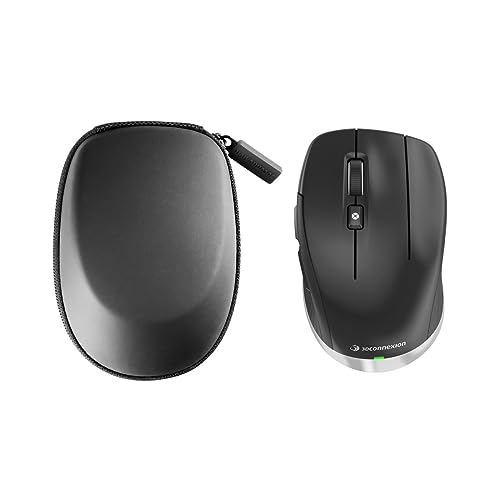
A right-handed CAD pointer that proves 7 buttons and Bluetooth fit in a pocket-sized frame.
If you want the dedicated middle mouse button that CAD work demands but you need something that travels, this is the slim answer. At 4.3 inches long by 2.6 inches wide, it is dramatically more compact than the full-size CadMouse Pro below, so it slips into a laptop bag without a second thought. That size is the whole point — it keeps the ergonomics and button layout of a proper CAD mouse in a travel-friendly body.
The 7 total buttons are programmable, and owners consistently call the design ergonomic, with several noting it is “robustly built, with quality switches for perfect button feel.” The dedicated middle button is the standout feature: it takes less force than a scroll-wheel click, which matters when you are panning around a model all day. Bluetooth wireless keeps your desk free of cables while you work.
Battery life is rated at 2 months per charge, at 2 months versus the wireless puck’s 1 month — one less thing to remember to charge. The honest trade-off is that responsiveness gets a mixed read from owners, and a few report the scroll wheel can be a weakness. This is a tool for the modeler who values portability and button programmability over raw heft.
Strongest point: the compact size and 7 programmable buttons make it the most versatile travel companion here for right-handed CAD users.
Real limitation: some owners found the scroll wheel unusable, so test the wheel feel early in your return window.
Best for: right-handed technical designers, artists, and CAD users who need a precise mouse at a desk and on the road.
Think twice if: you need an ambidextrous shape or you rely heavily on a flawless scroll wheel.
3. 3Dconnexion CadMouse Pro Mouse – Optical – Cable – 7 Button(s) – Black

The full-size wired workhorse whose slanted shape was built for long CAD sessions.
This is the desk-bound specialist for anyone who spends eight-hour days in SolidWorks, Maya, or AutoCAD. Its defining feature is the angled body and incurvated thumb rest, which push your hand into a more natural posture to reduce the muscle and tendon strain that flat mice cause. At 7.6 inches long by 5.83 inches wide, it fills the hand completely — a very different feel from the Compact model above.
The dedicated middle button is engineered specifically for CAD users, taking less force than a scroll-wheel click so you can pan your viewport easily. The optical sensor gives slick, precise cursor control, ideal for artists and drafters who need pinpoint accuracy. Because it is wired, there is no battery to charge and no wireless lag, which is exactly why some heavy users prefer a cable.
The review pages tell an honest two-sided story. On the positive side, the functionality and sharp click are praised, and the new version has a lighter scroll. But the reliability concerns are hard to ignore: buyers report the scroll wheel failing after heavy daily use, sometimes around the 1.5-year mark, and one noted four units failed that way. The same owner also found the left-click can fail if you rest your hand on the mouse, and the bottom pads wear quickly.
Ergonomic strengths
- Angled shape with thumb rest reduces strain
- Dedicated middle button uses less force than a wheel click
- Wired connection means zero lag and no charging
Durability watch
- Scroll wheel failures reported after heavy use
- Left-click can fail if hand rests on the mouse
- Bottom pads wear out faster than expected
- Not supported on Windows 7 — needs Windows 8.1 or newer
Who it beats: any flat, non-angled mouse for all-day comfort in CAD and office work, with a sharp click and excellent driver software.
Who it does not suit: heavy daily users who cannot tolerate a scroll wheel that may need warranty service, or anyone on Windows 7.
4. 3Dconnexion SpaceMouse Wireless Kit 2 3DX-700136

The complete dual-hand kit that pairs a 7-button mouse with a 6-DOF navigation puck.
This is the fullest answer to the question of what a 3D modeling setup should be — it bundles the navigation puck and a mouse together so you get the best of both hands in one purchase. The puck uses the 3Dconnexion six-degrees-of-freedom sensor to move your view in 3D space, while the mouse brings 7 total buttons for your cursor work and shortcuts. Owners who are new to CAD call it a great set, praising the quick response and natural feel.
Both units pair over Bluetooth or RF wireless at 2.40 GHz, and the kit is designed for one convenient Bluetooth USB receiver that auto-connects to both devices. At 1.5 pounds total, it is portable enough to move between a desktop and a laptop, and it works across desktop, laptop, PC, smartphone, and tablet. The rechargeable battery is rated at 1 month per charge, and owners confirm the battery life is solid.
The single honest gripe in the reviews is the included mouse pad — owners mention particles under it can cause a crunching noise, which is a minor annoyance you can fix by swapping in your own pad. One owner preferred this wireless setup over a wired alternative specifically for the convenience. For a modeler who wants everything in one box, this kit removes the guesswork.
Why buy the kit: the single Bluetooth receiver for both units plus the 7-button mouse and 6-DOF puck make it the most complete turnkey setup here.
The small catch: the bundled mouse pad can make a crunching sound when particles get under it — an easy swap if it bothers you.
Reach for this if: you are starting out in 3D modeling or CAD and want the full dual-hand workflow without buying parts separately.
Pick the single puck instead if: you already own a mouse you love and only need the 3D navigation half of the equation.
Understanding the Specs
6-DOF Navigation Sensor
The six-degrees-of-freedom sensor is the brain of a SpaceMouse. It detects push, pull, tilt, and twist in all directions, so a tiny movement of the cap orbits, pans, and zooms your viewport simultaneously. This is what lets you fly around a 3D model with one hand instead of holding down keyboard modifiers.
Dedicated Middle Mouse Button
A standard scroll-wheel click is stiff and imprecise for CAD work. A dedicated middle button is engineered to take less force to press and gives you a reliable way to pan the view constantly. For anyone doing 3D CAD work, this single button is often the reason to upgrade from a regular mouse.
FAQ
Do I need both a SpaceMouse and a CadMouse?
Will the SpaceMouse Wireless work with Blender and Fusion 360?
How long does the battery last on these wireless models?
What is the difference between the CadMouse Compact and the CadMouse Pro?
Is a 3D modeling mouse worth it for a beginner?
Can I use a 3Dconnexion mouse with my MacBook?
How many programmable buttons should I look for?
Why does the CadMouse need a dedicated middle mouse button?
Final Thoughts: The Verdict
For most people, the 3d modeling mouse winner is the SpaceMouse Wireless – Bluetooth Edition because it delivers the 6-DOF navigation experience that transforms 3D viewport work, and owners overwhelmingly praise its build quality. If you want a precise cursor mouse that travels well, grab the CadMouse Compact Wireless with its 7 programmable buttons. And for the complete dual-hand setup in one box, the SpaceMouse Wireless Kit 2 is the one to reach for. With 4.5 stars across 200+ owner reviews, the SpaceMouse Wireless is the safest first pick.
How We Picked
We do not accept paid placement. Every pick is matched to a real buyer and a real use-case; we do not hands-on test units.
Sources & Methodology
Specifications: manufacturer listings and product documentation. Review insights: verified customer reviews, as of August 2026. Pricing: not shown on this page (it changes often); check the current price via the retailer link.
As an Amazon Associate, Gadgets Feed earns from qualifying purchases. This does not affect which products we feature.