
Our readers keep the lights on and my morning glass full of iced black tea. As an Amazon Associate, I earn from qualifying purchases.
Specs are compiled from manufacturer listings and verified buyer reviews and can change over time — please confirm the key details on the product page before buying.
A 3D pen sounds simple: melt plastic, draw in the air, make cool stuff. The reality is a lot trickier. The best ones balance heat control, feed speed, and filament choice so you spend your time creating, not fighting a clogged nozzle or a busted motor.
I’m Min — the founder and writer behind Gadgets Feed. This guide is built by comparing the manufacturers’ published specifications and the patterns across verified customer reviews, so you get each pick’s real strengths and trade-offs instead of marketing spin.
You want to sculpt jewelry, repair a broken plastic part, or just doodle something weird for your desk. The right tool makes all the difference. After digging through the specs and what real buyers actually say, here is the honest breakdown of the best 3d pens for adults that won’t leave you frustrated.
Quick Picks
- 3Doodler Flow 3D Printing Pen (Black) — Top Performer
- MYNT3D Pro 3D Pen + 10 Color PLA + DesignPad Mat Kit — Best Value
- Juku™ 3Doodler Create+ 3D Printing Pen (Steel Blue) — Premium Pick
- SCRIB3D P1 3D Printing Pen with 3 Starter Colors and PLA Refill Pack — Budget Champion
How To Choose The Best 3D Pens For Adults
A 3D pen is not a toy. If you pick one based only on price you will likely end up with uneven lines, a clogged nozzle, or a device that dies after a few uses. Here is what actually matters.
Feed Speed Control
You need a stepless speed slider — a dial that lets you set the extrusion rate (how fast melted plastic comes out) anywhere between slow and fast, not just at two fixed speeds. Too slow and the plastic blobs. Too fast and you get thin, weak strings. Look for a pen that gives you this control.
Filament Compatibility
Most pens work with 1.75mm PLA (a corn-based plastic that is easy to use and low-odor). Some also handle ABS (stronger but smells) or FLEXY (rubber-like). Broader compatibility means more creative options.
Nozzle and Heating Design
A replaceable sealed nozzle resists clogs. A ceramic nozzle distributes heat evenly. Read reviews on this — nothing kills the fun faster than a jammed pen you cannot fix.
Quick Comparison
On smaller screens, swipe sideways to see the full table.
| Model | Best For | Filament | Speed Control | Nozzle Type | Amazon |
|---|---|---|---|---|---|
| 3Doodler Flow | Reliability & LCD control | PLA, ABS, Wood (1.75mm) | 2-speed | Standard | $79.99Amazon |
| MYNT3D Pro Kit | Complete all-in-one setup | PLA (1.75mm) | Stepless | Replaceable sealed | $89.97Amazon |
| Juku 3Doodler Create+ | Dual-drive detail work | PLA, ABS, FLEXY | Dual-drive (fast/slow) | Standard | $64.95Amazon |
| SCRIB3D P1 | Budget-friendly bundle | PLA (3mm) | Stepless slider | Ceramic | $48.21$52.98Amazon |
In‑Depth Reviews
1. 3Doodler Flow 3D Printing Pen (Black)

The pen you can actually trust to work, with a screen that tells you the temp in real time.
The 3Doodler Flow earns the top spot because it is the only pen here with a built-in LCD display that shows you the real-time nozzle temperature. That means you always know if the plastic is at the right heat to flow smoothly — no guessing, no clogs from a cold nozzle. It is compatible with 1.75mm plastic filaments including PLA, ABS, and even wood, giving you the broadest material range in this lineup.
It is also one of the lighter pens here. It weighs 15.8 ounces, while the Juku Create+ weighs 1.3 pounds. That makes the Flow easier to handle during long drawing sessions. The 80 feet of included spools (8 colors) let you start immediately. Buyers report the pen is “super fun” and “great for kids and adults.” However, some owners say the first unit failed within a month due to a heating element defect, and a replacement also had problems. One reviewer noted the pen requires 3Doodler-brand filaments to work reliably — off-brand ones are too thin. The company’s customer service is praised for sending replacements quickly, but build quality inconsistency is a real caveat at this price point.
What makes it worth the money
- Real-time LCD temperature readout prevents mistakes
- Works with PLA, ABS, and wood filaments for creative variety
- Lightweight and compact design makes extended use comfortable
- Excellent customer support turnaround when issues arise
The frustrating side
- Some units fail within weeks (heating element or motor defect)
- Strictly requires 3Doodler brand filaments for reliable performance
- USB power mode drops out after 3-4 seconds, limiting portability
Best for the serious creator: pick the Flow if you want the most reliable brand with real-time temp feedback and multi-material support — it is the premium choice for adults who value consistency.
Watch out for: the build quality lottery means you might need to contact customer service, and you are locked into 3Doodler-brand filaments for best results.
2. MYNT3D Pro 3D Pen + 10 Color PLA + DesignPad Mat Kit
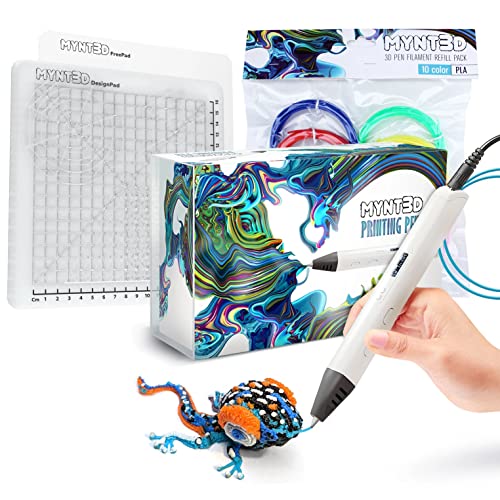
The complete starter package that skips the guesswork and includes everything needed to create immediately.
This kit delivers the most value per dollar because it bundles the PRO pen with 10 colors of PLA filament and a double-sided silicone DesignPad mat that has channels for drawing perfect shapes. The pen itself features stepless speed control — so you can fine-tune the extrusion rate smoothly rather than jumping between two fixed speeds like on the 3Doodler Flow — plus discrete temperature adjustability. The replaceable sealed nozzle design helps prevent clogs and extends the pen’s working life.
Owners mention the pen “heats quickly, comfortable grip, adjustable temp/speed” and call it a “great STEM gift for creativity.” One owner even made magnets with their child. The included filaments are vacuum-sealed PLA in ten colors including blue, green, red, yellow, orange, pink, black, tan, brown, and gold. But note the power draw: one buyer mentioned the pen “draws so much power that it melted my USB port connected to my gaming desk.” That means you must plug it directly into a wall outlet, not a computer or hub. The total 14 items in the box include everything most beginners need for weeks of projects.
Why this kit stands out
- Stepless speed and adjustable temperature give precise control for fine work
- Replaceable sealed nozzle design resists clogs for long-lasting use
- Comes with 10 color PLA and a DesignPad mat — everything needed from the start
- 1-year warranty with direct customer service access
Real-world concerns
- High power draw can melt USB ports — must use a wall outlet
- Requires practice for true 3D objects; not instantly intuitive
Reach for this if: you want a complete kit with the most value — pen, 10 colors of PLA, and a drawing mat — all in one box with great control features.
skip it if: you plan to power it from a computer or USB hub; this pen needs a real wall outlet to operate safely.
3. Juku™ 3Doodler Create+ 3D Printing Pen (Steel Blue)

The dual-drive pen that switches between fast fills and slow detail mode with a click.
The Juku Create+ stands out because of its dual-drive technology — it lets you toggle between a fast extrusion rate for covering large surface areas and a slow rate for precision detail work. That makes it the best pick if you want to switch between rough fills and fine lines without changing pens. It works with 3Doodler’s PLA, ABS, and FLEXY filaments, so you can go from rigid repairs to flexible creations in one session.
At 10.8 x 4.55 x 3.13 inches and 1.3 pounds, it is one of the larger and heavier pens here, while the Flow is listed at 3.1 x 10.74 x 4.44 inches and 15.8 ounces. That size difference matters if you plan to use it for long sessions. The included Ultimate Guide to Doodling offers 5 projects, and you get 2 packs of ABS and PLA 3mm plastic refills in 15 colors plus a power adapter and tools. Customers note the pen is “easy to use and simple” and “heats up fast and very easy to hold,” with praise for results like 3D animals and buildings. However, some owners found it difficult to control: one owner reported their son “found 3D pen hard to control; difficult to make steady lines and realize vision.” There are also quality control concerns, with reports of a brand-new unit arriving “with rust on the metal parts.”
Strengths at a glance
- Dual-drive fast/slow speeds handle both fill and detail work
- Compatible with PLA, ABS, and FLEXY filaments for diverse projects
- Includes 15 color refill packs and a project guide to start immediately
Weaknesses to know
- Larger and heavier than compact alternatives like the Flow
- Users report difficulty controlling for precise line drawing
- Some units arrive rusted or broken on arrival
Ideal for multipurpose creators: pick the Juku Create+ if you need dual-speed extrusion for both broad fills and detail etching, and you appreciate the broad filament options including FLEXY.
Look elsewhere if: you want a compact, lightweight pen you can easily handle for long periods, or if you are concerned about receiving a rusted or defective unit from the start.
4. SCRIB3D P1 3D Printing Pen with 3 Starter Colors and PLA Refill Pack

The entry-level bundle with a ceramic nozzle and 358 total feet of filament to burn through.
This bundle gives you the most filament of any pick — 358 total feet of PLA — so you can experiment without buying refills right away. The SCRIB3D P1 uses a ceramic nozzle that heats evenly and resists clogs, plus a stepless speed slider for adjusting extrusion rate. The soft grip body is comfortable to hold for longer sessions. The included PLA refill pack covers blue, green, red, yellow, and more colors. One buyer notes that “it takes a little bit of tinkering to figure out how to get the feed speed and temp right (read the manual) but once thats set right, its quite fun.” Another mentions their 11-year-old enjoys it, though it is “not intuitive” and requires the directions page. The SCRIB3D P1 is listed with a 3mm line size, while the MYNT3D uses 1.75mm filament, so the SCRIB3D is geared more toward thicker output than fine precision. Compared to the Juku Create+, which is more premium but risks rust and breakage, the SCRIB3D P1 is a safer bet for beginners on a budget who are willing to read the manual.
Why this makes sense
- 358 total feet of PLA filament included — more material than any other bundle here
- Ceramic nozzle heats evenly and resists clogging
- Stepless speed slider gives you control over extrusion rate
- Low cost of entry for casual experimenting
Where it falls short
- 3mm line size produces thicker strokes, not ideal for fine detail work
- Requires manual reading and tinkering to dial in the right temperature and speed
- Not as intuitive as higher-end pens; beginners should plan for trial and error
Best for the curious beginner: grab the SCRIB3D P1 if you want a massive filament bundle at a low cost and you do not mind spending an hour reading the manual to dial in settings.
Who should move on: if you need fine, precise line work (the listed 3mm line size is thicker) or want a pen that works perfectly straight from the start without tinkering, look at the MYNT3D Pro Kit instead for smoother setup.
Understanding the Specs
Filament Diameter (1.75mm vs 3mm)
This is the thickness of the plastic strand the pen melts. Standard 1.75mm filament is the most common and gives you finer lines, which is better for detailed work like lettering or small figures. The 3mm filament (used by the SCRIB3D P1) produces thicker, bolder strokes — good for rapid fills and chunky designs but harder to control for precision. Most pens in this list use 1.75mm; check before buying refills.
Stepless Speed vs Fixed Speeds
Stepless speed control lets you slide a dial to gradually adjust how fast the plastic extrudes, giving you infinite variation between slow and fast. Fixed-speed pens (like the 3Doodler Flow’s 2-speed and the Juku Create+’s dual-drive) let you toggle between defined presets — fine for switching between modes but less flexible for subtle adjustments mid-line. Stepless is generally better for learning because you can find your personal balance.
FAQ
What is the difference between PLA and ABS filament for a 3D pen?
Can I use any brand of filament in my 3D pen?
Do 3D pens for adults use the same filament as 3D printers?
Can a 3D pen be used to repair broken plastic items?
How long does it take for a 3D pen to heat up?
Is it safe to plug a 3D pen into a computer USB port?
Why is my 3D pen clogging so often?
Can I draw directly on paper or fabric with a 3D pen?
Final Thoughts: The Verdict
If you want one dependable pick, the best 3d pens for adults winner is the 3Doodler Flow because it combines real-time temperature monitoring with reliable multi-material support in a compact, lightweight body. If you want a complete everything-in-the-box kit with great control features, grab the MYNT3D Pro Kit. And for the budget-curious beginner who has time to learn, the SCRIB3D P1 and its 358 feet of included filament offer class-leading entry-level value.
How We Picked
We do not accept paid placement, and we did not hands-on test every unit. Instead, we match each pick to a real buyer and use-case by comparing the manufacturers’ published specifications against the patterns in verified customer reviews — so you get each pick’s real strengths and trade-offs instead of marketing copy.
Sources & Methodology
Specifications: manufacturer listings and product documentation. Review insights: verified customer reviews, as of July 2026. Pricing: not shown on this page (it changes often); check the current price via the retailer link.
As an Amazon Associate, Gadgets Feed earns from qualifying purchases. This does not affect which products we feature.
Product prices and availability are accurate as of the date/time indicated and are subject to change. Any price and availability information displayed on Amazon at the time of purchase will apply to the purchase of this product. As an Amazon Associate I earn from qualifying purchases.
CERTAIN CONTENT THAT APPEARS ON THIS SITE COMES FROM AMAZON. THIS CONTENT IS PROVIDED "AS IS" AND IS SUBJECT TO CHANGE OR REMOVAL AT ANY TIME.
Amazon and the Amazon logo are trademarks of Amazon.com, Inc. or its affiliates.