
Our readers keep the lights on and my morning glass full of iced black tea. As an Amazon Associate, I earn from qualifying purchases.
Specs are compiled from manufacturer listings and verified buyer reviews and can change over time — please confirm the key details on the product page before buying.
You want a 3D PLA printer that matches how you actually print—fast single-color parts or vibrant multi-material models. A fast machine can blur fine details, and a multi-color one can waste half a spool on purge towers (the plastic towers that flush old color between swaps). Your pick depends on which trade-off you can live with.
I’m Min — the founder and writer behind Gadgets Feed. This guide is built by comparing the manufacturers’ published specifications and the patterns across verified customer reviews, so you get each pick’s real strengths and trade-offs instead of marketing spin.
We break down the nine strongest models, from budget-friendly workhorses to premium machines, so you can find the 3d pla printer that fits your workspace, skill level, and project ambitions.
Our Picks at a Glance


How To Choose The Best 3D PLA Printer
Before you compare specs, know that PLA is the easiest filament to print, but not every printer handles it equally well. Your main decisions are about speed, color capability, and how much tinkering you are willing to do. A printer that is fast on paper is useless if it fails on the first layer.
Speed vs. Quality vs. Waste
High-speed printers use a CoreXY motion system to hit numbers like 500 mm/s or 600 mm/s. That speed is great for prototypes, but multi-color printing traditionally creates a lot of waste from purging old filament. Some printers now swap entire toolheads instead of purging, which cuts waste dramatically.
Enclosed vs. Open Frames
An enclosed frame keeps heat in, which helps when you move beyond PLA to materials like ABS or ASA that warp in drafts. For pure PLA printing, an open frame is often easier to access and cheaper. A heated chamber is a premium feature that adds cost but expands your material options.
Leveling and First-Layer Success
Auto-leveling is now standard on most machines, but the quality of that system varies. A good system measures the nozzle-to-bed distance and adjusts automatically, making your first layer stick perfectly. This is the single biggest factor in whether a beginner enjoys printing or gives up.
Quick Comparison
| Model | Best For | Build Volume | Max Speed | Weight | Amazon |
|---|---|---|---|---|---|
| Snapmaker U1★ Best Overall | Multi-Color & Multi-Material | 270 x 270 x 270 mm | 500 mm/s | 59 pounds | Amazon |
| FLASHFORGE Adventurer 5MBest Value | Beginner-Friendly Speed | 220 x 220 x 220 mm | 600 mm/s | 23.8 pounds | Amazon |
| Creality Ender 3 V3 KETop Performer | Budget High-Speed | 250 x 220 x 220 mm | 500 mm/s | 17.16 pounds | Amazon |
| FLASHFORGE AD5M | Easy Maintenance | 220 x 220 x 220 mm | 600 mm/s | 22 pounds | Amazon |
| Creality K1C | Carbon Fiber & Quiet Mode | — | 600 mm/s | 27.5 pounds | Amazon |
| Bambu Lab P1S Combo | Enclosed Multi-Color | — | 500 mm/s | 40.8 pounds | Amazon |
| QIDI PLUS4 | Heated Chamber & High-Temp | 12 x 12 x 11 in | — | 59.4 pounds | Amazon |
| QIDI Q2 Combo | Multi-Color with Dry Box | — | 600 mm/s | 54.9 pounds | Amazon |
| Prusa MK4S | Reliable Workhorse | 9.84 x 8.3 x 8.6 in | — | 15.4 pounds | Amazon |
In‑Depth Reviews
1. Snapmaker U1 3D Printer
Our pick — 4.5★ from 100+ verified ratings; the strongest balance of quality and price.
The multi-color champion that swaps toolheads in seconds instead of purging filament.
The U1’s four-toolhead design eliminates purge waste, cutting multi-color print time from 58 to 32 hours. Instead of loading and purging filament between colors, the U1 uses four independent toolheads that swap in about 5 seconds. That means a print that takes 58 hours on a single-nozzle machine finishes in 32 hours here, and it saves around 350g of waste on a multi-color project. The crowd favorite — 4.5 stars across 100+ owners — is built on a rigid CoreXY frame with carbon fiber X-axis rails for stability at 500 mm/s.
The defining spec is the build volume: 270 x 270 x 270 mm, which is 23% more space than the FLASHFORGE Adventurer 5M’s 220 x 220 x 220 mm. It also handles a huge material range — PLA, PVA, TPU, PETG, PCTG, ABS, ASA, PA, PC — letting you mix rigid and flexible parts in a single print. Beginners get a built-in model library and a 3.5-inch touchscreen, while pros get AI-powered print monitoring and remote app control.
The trade-off is physical size and weight. At 59 pounds and 22.6 x 13 x 14.2 inches, it is more than 2.5x heavier than the 23.8-pound Adventurer 5M, so you will want a dedicated, sturdy table. The review pages sum it up: “4 Tigers: 32h vs 58h single-nozzle, 350g waste saved.” The noise level gets mixed feedback, but the quality and setup ease win people over consistently.
Why It Wins
- Four toolheads mean near-zero waste multi-color printing
- 270 mm cube build volume fits large projects
- Automatic toolhead offset calibration for reliable first layers
Heads Up
- 59-pound frame needs a solid stand
- Open top design may need a lid for some materials
Grab it for: makers and small businesses that want true multi-color without wasting spools of filament.
Think twice if: you have a tiny desk — this is a heavy, large-format machine that demands floor space.
2. FLASHFORGE Adventurer 5M
The beginner-friendly speed demon that goes from unboxing to printing in 10 minutes.
If you want a fast, reliable first printer while staying affordable, this is the one. The Adventurer 5M hits 600 mm/s max speed with a CoreXY system that accelerates from zero to full speed in 0.025 seconds. One-click auto-leveling gets your first layer right every time, and the flexible removable PEI steel plate makes pulling prints off easy. It supports PLA, PETG, TPU (with the 0.4mm nozzle) and even PLA-CF (with the 0.6mm nozzle).
The 50W heating power brings the nozzle to 200°C in 35 seconds, so you are not waiting around. A filament run-out sensor pauses the print if your spool empties, and power-loss recovery resumes from where it stopped after an outage. At 23.8 pounds and 14.29 x 15.83 x 17.64 inches, it is lightweight and compact enough to sit on a regular desk.
Owners praise its easy setup, speed, and auto-leveling, calling it a reliable workhorse. Some units arrive with a bowed bed, causing adhesion failures—one owner reported a “10% success rate; 90% failures.” The build volume is on the smaller side at 220 x 220 x 220 mm, which is 23% less space than the Snapmaker U1, so plan your projects accordingly.
Solid pick for: first-time buyers who want speed and simplicity at a friendly price, with the understanding that some units may need a bit of tuning.
3. Creality Ender 3 V3 KE
The Ender legacy, upgraded with a 300°C hotend and 500 mm/s speed for under.
Creality’s Ender series has long been the gateway into 3D printing, and the V3 KE modernizes it with a 500 mm/s max speed and 8000 mm/s² acceleration. The Sprite direct extruder and a 60W ceramic heater melt filament fast for high-speed printing, while the copper nozzle handles up to 300°C. That opens the door to Hyper PLA, PETG, ABS, TPU (95A), and ASA.
The build volume is 250 x 220 x 220 mm, which is notably larger than the FLASHFORGE Adventurer 5M’s 220 x 220 x 220 mm, giving you more room for bigger models. It ships mostly assembled, and the Creality Cloud app lets you print from your phone with one click, pulling from a library of free models. Smart self-tests handle Z-offset and auto-leveling with a single tap.
What wins people over is the speed and value — owners routinely mention how fast it prints and how little finishing work the parts need. The recurring caveat is reliability over time, with some buyers finding the build plate adhesion gets finicky after a few dozen prints and needs a plate replacement. It’s a strong budget pick, but expect to replace the build plate after a few dozen prints.
Best bet if: you want the most features per dollar and do not mind occasional tinkering to keep the build plate sticky.
4. FLASHFORGE AD5M

A step up from the Adventurer 5M with a tool-free nozzle you can swap in 3 seconds.
The AD5M builds on the Adventurer 5M formula with a patent quick-release nozzle that swaps in as little as 3 seconds, with multiple diameters available (0.25/0.4/0.6/0.8 mm) for different precision and speed needs. It keeps the 600 mm/s max speed and one-click leveling, and adds a double-sided PEI steel plate — one side tuned for PLA, the reverse side for PETG.
At 22 pounds, it is a touch lighter than the Adventurer 5M’s 23.8 pounds, and the all-metal CoreXY structure keeps noise low even at high speed. The Orca-flashforge slicer enables one-click batch file transmission and multi-printer network monitoring, while the Flash Maker APP lets you watch prints remotely from your phone. Power-loss recovery saves your layer and resumes when electricity returns.
Owners call it a “dream machine” for its ease of use and beginner-friendly Orca slicer. The main gripes are connectivity issues with the monitor cable and the fact that it is single-color only — so if you want multi-color later, you would look at the Snapmaker U1 instead. It also runs on the lighter side of reliability, with mixed value-for-money feedback.
Reach for this if: you want a fast, quiet printer with painless nozzle maintenance and do not need multi-color.
Look elsewhere if: you plan to print multi-color — this machine is strictly single-extruder.
5. Creality K1C

The enclosed high-speed printer that handles carbon fiber and runs near-silent.
If you want to print tough materials like PLA-CF and PETG-CF, the K1C is purpose-built for it. A hardened steel nozzle tip and closed chamber let it confidently handle carbon fiber filaments that would clog a standard brass nozzle. It reaches 600 mm/s with accelerations up to 20,000 mm/s², and the quick-swap tri-metal nozzle blocks thermal creep for smoother material flow.
The built-in AI camera monitors prints in real time and alerts you to errors, plus it does time-lapse shooting. Silent mode drops noise to ≤45dB — quiet enough to leave running in a living space — and an active carbon filter purifies fumes from molten filament. It supports CF, PLA, ASA, PETG, TPU and more, making it a versatile workhorse.
Owners coming from an Ender 3 call it a fantastic upgrade, with 200+ prints across TPU, PETG, and PLA and consistent quality. The thing everyone raves about is the speed and precision combination. The honest fit note: some owners found the included smooth sheet needs glue for adhesion and recommend a textured PEI “B Plate,” and a few had faulty touchscreens that pushed them to Bambu Labs instead. It is a strong mid-range pick if you want enclosure and speed.
Strong for: users who want to experiment with carbon fiber composites and appreciate a quiet, enclosed machine.
6. Bambu Lab P1S Combo

The enclosed workhorse that brings multi-color printing to life with an AMS unit.
The P1S Combo pairs the enclosed P1S printer with the AMS (Automatic Material System) for up to 16-color printing. It hits 500 mm/s with 20,000 mm/s² acceleration, and the fully enclosed body improves print performance for advanced filaments like ABS and ASA. Auto bed leveling handles the first layer, and setup takes about 15 minutes from the start.
The P1S Combo’s AMS automates filament swaps, so multi-color prints run without manual intervention. — the AMS feeds and swaps filaments automatically, and the Bambu Studio software is intuitive enough that a 9-year-old can use it. The build quality is excellent, with owners noting tolerances around ±0.003 inches and print quality that rivals professional machines like the Ultimaker S5. It supports PLA, PETG, TPU, PVA, PET, ABS, and ASA as ideal filaments.
Owners consistently rate it a great value, with one noting it “could pay for itself in months.” and delivers print quality that rivals professional machines like the Ultimaker S5.. The recurring gripe is quality control on delivery — some units arrive with broken front handles.
Choose this if: you want enclosed, multi-color printing with minimal tinkering and a proven ecosystem.
skip it if: you are on a strict budget — the AMS system and enclosure carry a premium price.
7. QIDI PLUS4

The heated-chamber specialist that tames high-temperature filaments with a 370°C nozzle.
If your projects demand materials beyond PLA, the PLUS4 is built for them. The 2nd-generation active chamber heating system uses 400W of power with air circulation and dual-layer insulation to hold a balanced temperature, reducing warping and cracking on high-temp prints. The 80W high-temperature hotend and multi-metal integrated nozzle reach 370°C, supporting PPS-CF, PPA-CF/GF, ABS, ASA, PC, PA, PET and more.
The build volume is a generous 12 x 12 x 11 inches, and the independent dual motor-driven Z-axis with a 6mm thickened aluminium bed keeps prints flat and precise. It unboxes to printing in about 10 minutes, with a HD camera for remote monitoring and time-lapse photography. Filament wrap and break detection reduce waste, and the QIDI mobile app tracks progress in real time.
Owners call it a reliable workhorse with amazing print quality, with one buyer logging 100+ hours on ASA, ABS-GF, PA12-CF, and PLA+ without trouble. It is a big machine at 59.4 pounds and 19.29 x 20.07 x 22.24 inches, so plan your workspace. The catch: reliability is mixed, with some units arriving defective, and the pre-print heating and leveling takes 10+ minutes. It is worth it for the high-temp capability, but test yours early.
Best for: engineers and hobbyists who want to print advanced composites that need a hot, stable chamber.
8. QIDI Q2 Combo
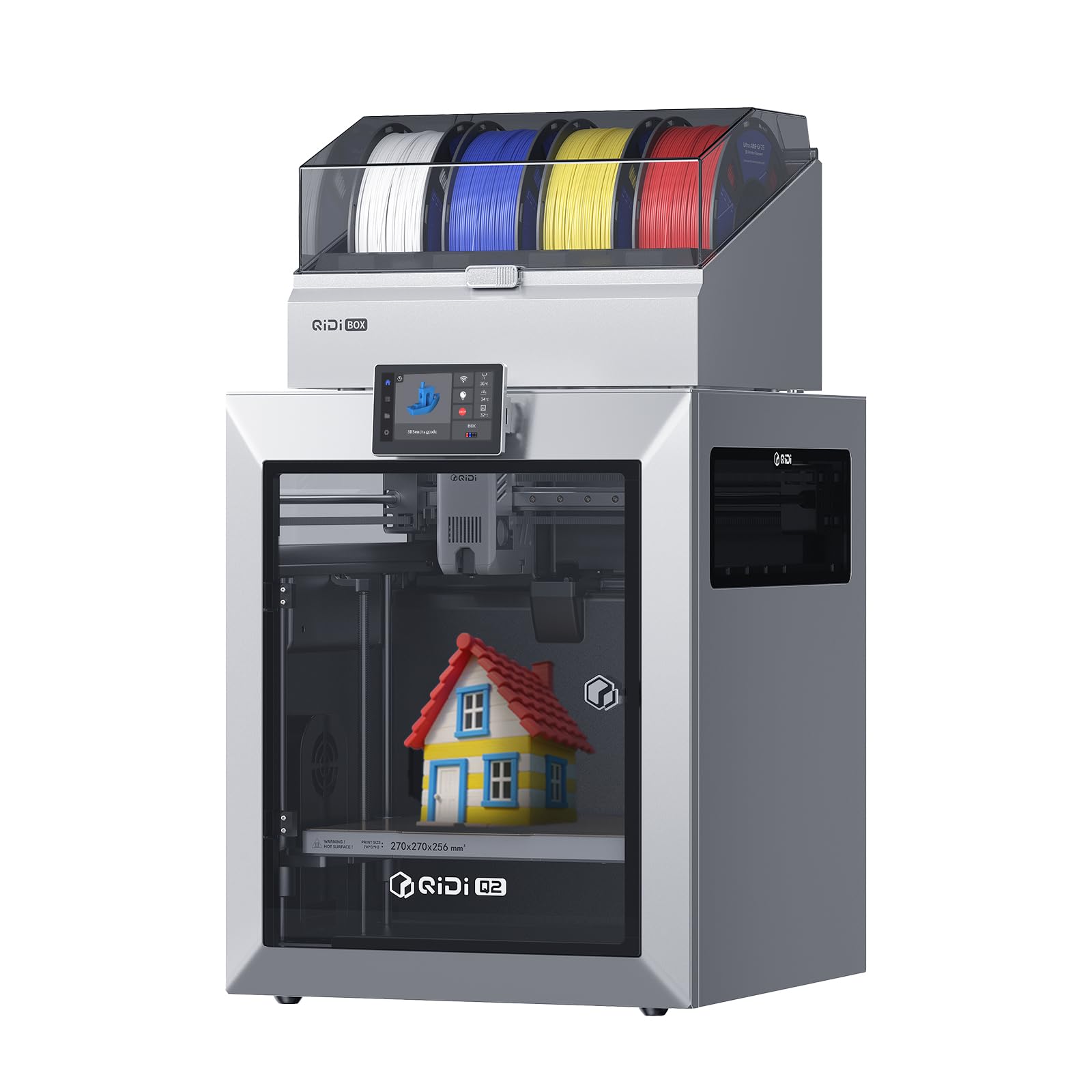
The multi-color machine that dries your filament while it prints, up to 16 colors at once.
The Q2 Combo pairs the full-metal CoreXY printer with the QIDI BOX, an automatic filament feeder that adds dry-while-print technology. That built-in 65°C drying system keeps filaments at optimal moisture levels for stable extrusion, and the hardened steel dual-gear extruder handles tough carbon fiber materials. NFC technology recognizes QIDI filament and applies the right settings automatically.
You get first-layer accuracy without a separate leveling probe, because the nozzle itself senses the bed—so your first layer sticks evenly every time. It prints up to 600 mm/s (about 10 times faster than typical budget printers) and the 370°C nozzle (hot enough for engineering plastics, not just PLA) handles high-temp filaments. The 2nd-generation PTC heated chamber holds 65°C to stop warping (when corners curl up as plastic cools), and a triple filtration system—G3 pre-filter, H12 HEPA, and activated carbon—cuts odors. Real-time monitoring and automatic power cutoff add safety, so you can step away mid-print.
Owners love the customizability and print quality, with one calling it the “best purchase I have ever made” after printing engineering-grade parts for a car. The QIDI BOX is a standout — it dries, auto-rotates, monitors humidity, and switches filaments on run-out. The flip side: reliability and connectivity get mixed reviews, with some owners dealing with constant errors and a loud QIDI BOX. If you want multi-color with advanced material support, this is a compelling package.
Reach for it if: you want multi-color plus the ability to print carbon fiber composites with dry filament.
Be prepared for: a learning curve and occasional firmware quirks, per some owners.
9. Original Prusa MK4S

The fully assembled Prusa that prioritizes reliability and open-source longevity over flashy speed.
Prusa has a legendary reputation for reliability, and the MK4S delivers that in a fully assembled, high-speed FDM package. It uses input shaping (advanced motion compensation) to reduce ringing and vibrations for sharper edges at higher speeds. The print size is 9.84 x 8.3 x 8.6 inches, which is on the smaller side but perfect for functional parts and detailed prototypes.
The open-source system is the real draw — it is built on Prusa’s ecosystem with long-term firmware updates and hardware upgrade paths, so your machine gets better over time. It ships with a 1 kg spool of Prusament PLA Galaxy Black so you can start printing immediately, and it is backed by lifetime technical assistance from Prusa Research.
Owners describe it as one of the top two printers they own and note it “never had a problem,” which speaks to the reliability. The downsides are clear: it is the most expensive pick on this list at the premium tier, and the build volume is smaller than the FLASHFORGE Adventurer 5M’s 220 x 220 x 220 mm. A few owners also note the support process can be picky about packaging if you need repairs. If you want a dependable, upgradeable machine and are willing to pay for it, this is the one.
Worth it for: professionals who value uptime and long-term support over raw speed or multi-color gimmicks.
Understanding the Specs
Build Volume
This is the maximum size object your printer can create, measured in millimeters or inches. A larger volume like 270 x 270 x 270 mm lets you print bigger pieces or multiple smaller ones in a single run. Smaller volumes, like 220 x 220 x 220 mm, are fine for most hobby projects but limit your larger builds.
Max Print Speed
Measured in mm/s, this tells you how fast the print head can move. A 600 mm/s machine is nearly twice as fast as older models, but speed alone does not guarantee quality. Look for a rigid frame and vibration compensation — like the CoreXY systems — to keep prints clean at high speeds.
FAQ
Is a heated chamber necessary for printing PLA?
What is the difference between a single-toolhead and a multi-toolhead printer?
How much filament waste does multi-color printing create?
Will a 3D PLA printer work with other filaments like ABS or PETG?
How long does it take to set up a new 3D printer?
What is auto bed leveling and why do I need it?
Is a higher print speed always better?
Can I print with carbon fiber filament on any 3D PLA printer?
Final Thoughts: The Verdict
For most people, the 3d pla printer winner is the Snapmaker U1 because it solves the biggest pain of multi-color printing — waste and slow tool changes — with four toolheads and a 5-second swap. If you want a beginner-friendly, budget-conscious machine, grab the FLASHFORGE Adventurer 5M. And for enclosed, multi-color reliability with minimal tinkering, the Bambu Lab P1S Combo is the one to reach for.
How We Picked
We do not accept paid placement. Every pick is matched to a real buyer and a real use-case; we do not hands-on test units.
Sources & Methodology
Specifications: manufacturer listings and product documentation. Review insights: verified customer reviews, as of August 2026. Pricing: not shown on this page (it changes often); check the current price via the retailer link.
As an Amazon Associate, Gadgets Feed earns from qualifying purchases. This does not affect which products we feature.