
A 3D printer is only as good as the surface it sits on. The wrong cabinet introduces micro-vibrations that ghost every layer, traps heat without venting, and turns filament storage into a humidity nightmare. A purpose-built 3D printer cabinet solves all this at once.
I’m Min — the co-founder and writer behind Gadgets Feed. By analyzing the load capacities, vibration-dampening designs, and ventilation specs of the most popular cabinets on the market, this guide identifies the models that actually protect your print quality and material investment.
Whether you own a Bambu Lab, Creality, or Anycubic, finding the right 3d printer cabinet means matching your machine’s footprint with a stable frame and smart storage that keeps spools dry and tools organized.
How To Choose The Best 3D Printer Cabinet
A 3D printer cabinet must do three things at once: eliminate vibration for print quality, manage humidity for filament longevity, and provide adequate ventilation for safe material handling. Buying a generic side table means you sacrifice at least one of these.
Frame Stability and Vibration Damping
Look for cabinets with reinforced steel frames and cross bracing (X-brackets or rear diagonal supports). Models with adjustable leveling feet compensate for uneven floors and decouple the printer from floor vibrations. A 300+ lb top shelf rating is a good indicator of structural rigidity, not just raw capacity.
Integrated Ventilation and Fume Management
If you print ABS, ASA, polycarbonate, or nylon, a sealed enclosure with an active exhaust fan is non-negotiable. A 4- to 5-inch vent port allows you to hook up a hose to a window or filter system. For PLA-only users, passive ventilation and a draft shield may be enough to prevent warping.
Filament Storage and Climate Control
Humidity is the silent killer of filament. A good cabinet keeps spools in a sealed compartment with a dehumidifier or desiccant system. Built-in thermo-hygrometers let you monitor conditions at a glance. For high-volume setups, look for shelves holding 40+ spools with separate feed-through ports that route filament directly to the printer without opening the enclosure.
Quick Comparison
On smaller screens, swipe sideways to see the full table.
| Model | Category | Best For | Key Spec | Amazon |
|---|---|---|---|---|
| Crafit 3D Printer Cabinet | Enclosure + Storage | All-in-one enclosed setup with ventilation | 48 spool capacity, 5” exhaust fan, LED light | Amazon |
| BIQU Panda Station | Mobile Workstation | Bambu Lab printers, modular expansion | Aluminum/steel frame, 360° casters | Amazon |
| Kerty Upgraded 3D Printer Stand | Dual-Printer Rack | Holding two printers on one stand | 40.6” top shelf, 300 lbs capacity | Amazon |
| Anrigeail 3D Printer Stand | Integrated Power Hub | Heavy duty with filament drawer | X-bracket steel frame, 2 AC + 2 USB | Amazon |
| Unikito Lateral File Cabinet | Mobile Office Cart | Budget-friendly with power strip | 3 AC outlets, 2 USB ports, lockable | Amazon |
| Unikito Rolling Cabinet | Adjustable Shelf Cart | Versatile with adjustable shelves | Locking casters, 200 lbs capacity | Amazon |
| Halitaa Farmhouse Cabinet | Aesthetic Wood Cabinet | Home office decor with file storage | 3 drawers + cabinet, anti-tip device | Amazon |
| DEVAISE File Cabinet | Lockable Entry-Level | Lowest cost, lockable drawers | 3 lockable drawers, rolling wheels | Amazon |
| RJOKMT 300L Filament Cabinet | Industrial Sealed Storage | High-volume filament storage + drying | 160 spools, built-in dehumidifier | Amazon |
In‑Depth Reviews
1. Crafit 3D Printer Cabinet with 48 Spools Filament Storage Rack
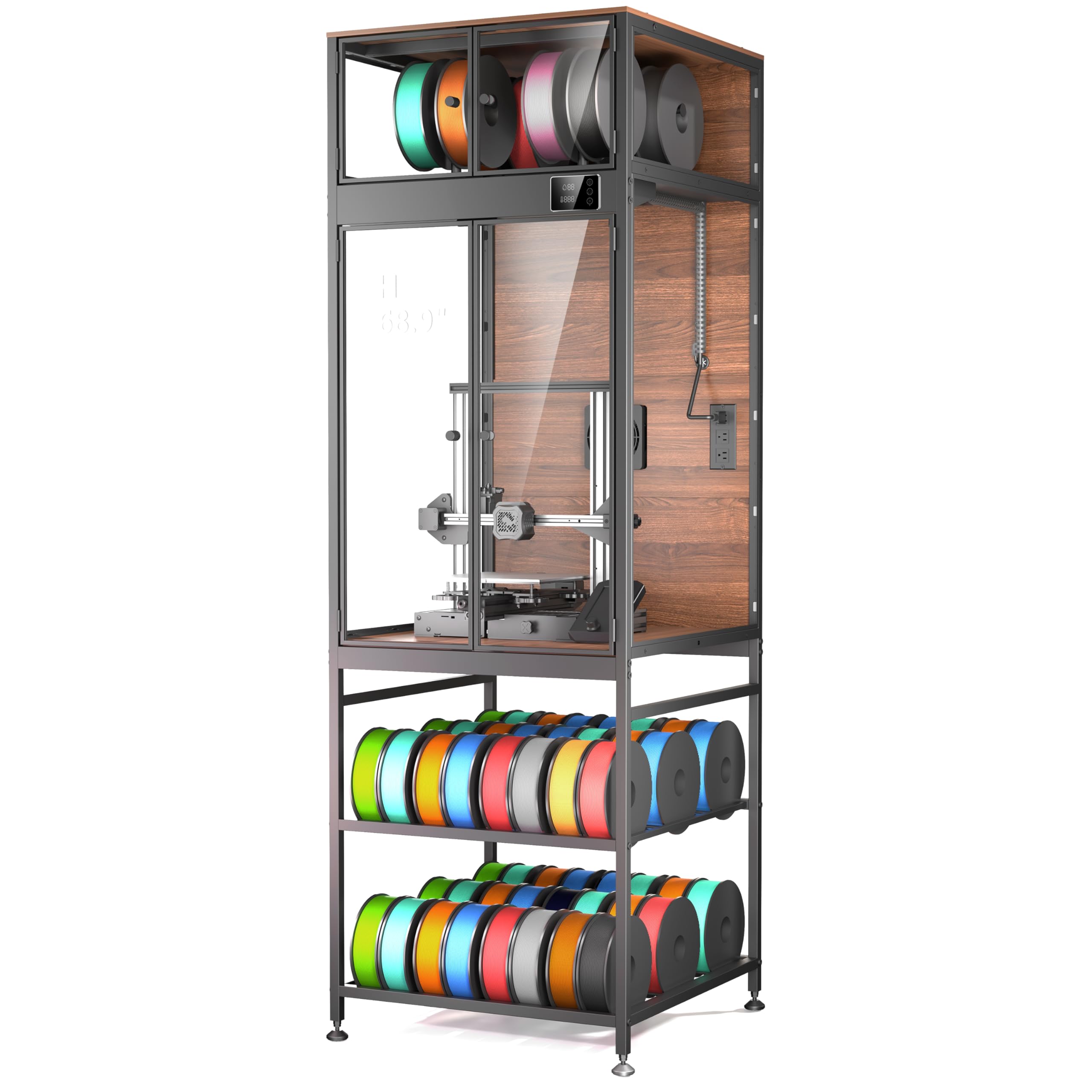
The Crafit is the rare cabinet that does it all: it encloses the printer, carries up to 48 filament spools in its base shelf, and includes a 5-inch exhaust fan for active fume extraction. The internal volume fits printers up to 21.6″ x 22″ x 28.7″, which covers the Bambu Lab P1S/X1, Creality K1 Max, and Ender 3 series. A built-in LED spotlight through high-clarity PET panels lets you inspect prints without cracking the door open.
The carbon steel frame and rigid composite walls reduce enclosure noise by an estimated 40%, and the top compartment routes up to four filaments via feed-through ports for multi-material setups. The manual fan switch is a smart touch — it stays off to maintain a stable chamber climate during prints and purges fumes when you’re done. The integrated thermo-hygrometer gives you real-time data so you know the interior is within spec.
Assembly takes around 2.5 hours and the PET panels are thinner than solid acrylic, but the overall package delivers thermal stability, dust protection, and pet-proofing that a generic furniture piece simply cannot. For makers running a single printer with a growing filament library, this is the most cohesive solution at this price point.
Why it’s great
- Full enclosure with active 5-inch exhaust fan for fume safety
- Holds 48 standard filament spools in the base storage shelf
- LED interior light and clear PET panels for print monitoring
- Carbon steel frame reduces vibration and noise transmission
Good to know
- PET panels and MDF construction not airtight; some users add weather stripping
- Assembly requires 2+ hours and moderate effort
- Bottom shelf plastic rods can feel flimsy under heavy spool loads
2. BIQU Panda Station 3D Printer Working Stand Cabinet
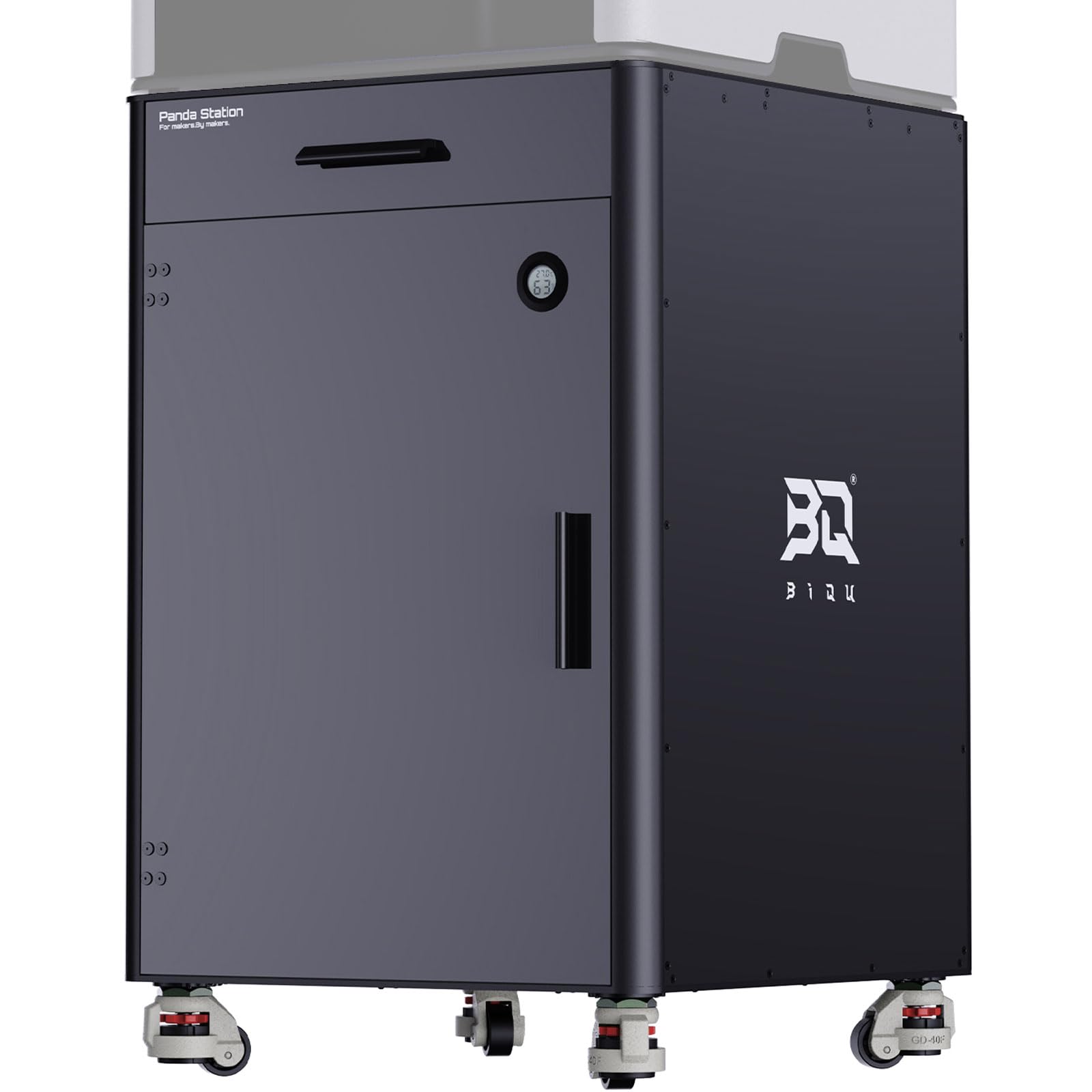
The BIQU Panda Station is a purpose-built mobile workstation designed explicitly for Bambu Lab printers (P1P/P1S/X1C/X1E/A1/A1 Mini/H2S/H2D/H2C). The aluminum and steel construction with rubber retractable feet delivers industrial-grade stability: roll the unit into place, twist the feet down, and the printer stays locked for precise printing. The dual-layer pull-out drawers can store two AMS units or 20 filament spools, and pre-positioned routing ports keep AMS cables tidy.
Expandability is the headline feature. DIY holes on both sides accept side support modules and add-ons, and the unit integrates with other Panda Verse products like the Panda Den and Panda Perch for vertical stacking. The top tool drawer (38 x 42 x 6 cm) is pre-drilled for custom 3D-printed dividers, turning wasted space into organized tool storage. A built-in hygrometer helps monitor the sealed interior’s humidity level.
At 70.4 pounds, the Panda Station is heavy enough to stay planted during high-speed printing, yet rolls smoothly on 360° casters when you need to reconfigure. The trade-off is that it comes without a top enclosure — it’s a stand, not a full cabinet. You’ll need to pair it with an enclosed printer or add an aftermarket cover. For users with Bambu Labs who want a modular, expandable foundation, this is the cleanest long-term investment.
Why it’s great
- Industrial aluminum and steel frame with retractable rubber feet for stability
- Modular design with expandable side mounts and Panda Verse compatibility
- Dual-layer pull-out drawers for 2 AMS units or 20 spools of filament
- Built-in hygrometer and pre-routed cable ports
Good to know
- No included top enclosure; needs enclosed printer or aftermarket cover
- Spool holder not included for some configurations
- Premium price point compared to open-frame racks
3. Kerty Upgraded 3D Printer Stand
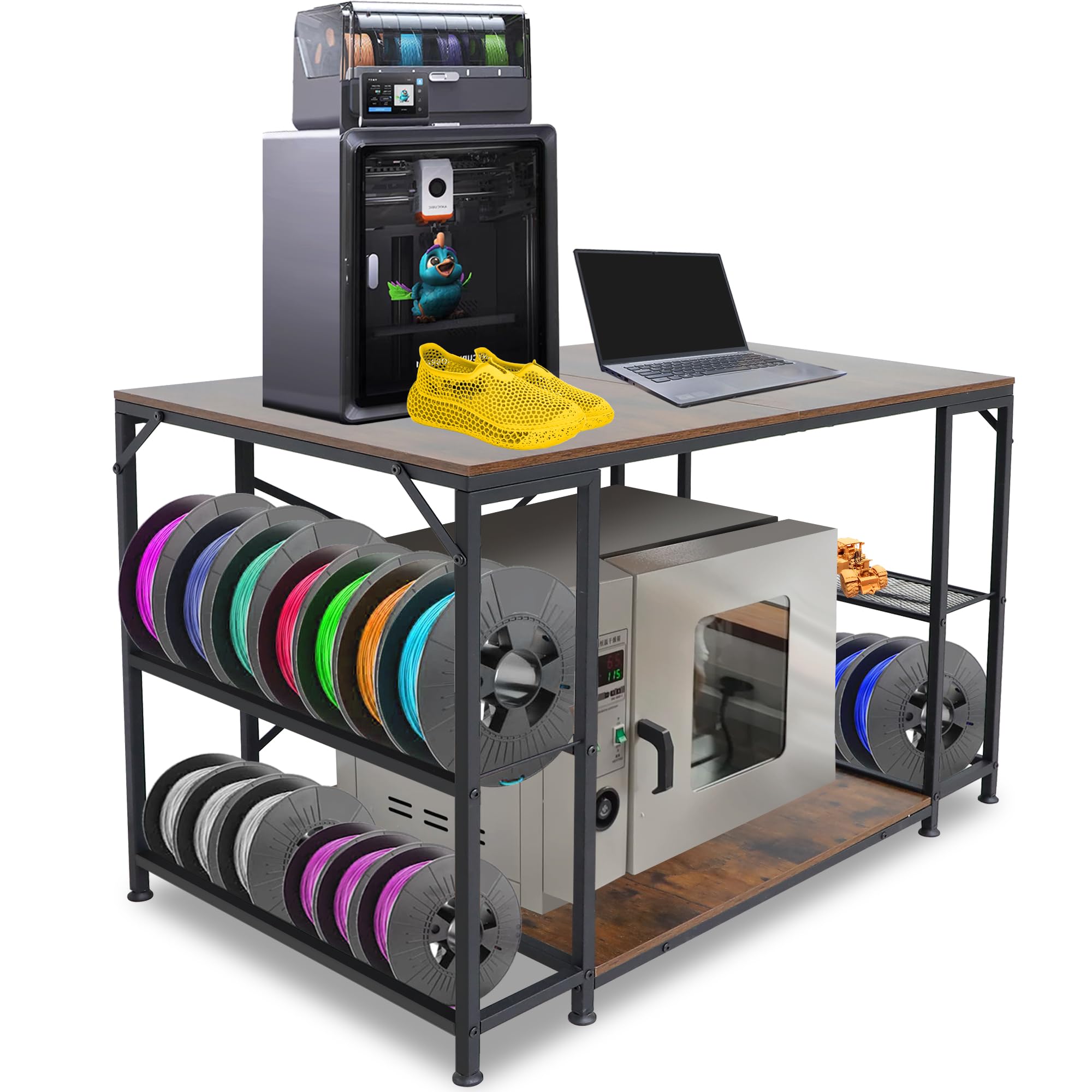
The Kerty stand is built for density. The top shelf measures 40.6 inches wide and 23.6 inches deep with a 300-pound rating — enough to hold two full-size printers side by side or one large-format machine with an AMS unit. The lower shelf adds another 150-pound capacity, creating space for a third printer or heavy filament boxes. This is the stand to buy when you need to stack printers vertically without feeling like the structure will wobble.
The metal side racks are a clever addition: each side holds up to eight 1 kg filament spools per layer, and one side includes a mesh grid shelf for tools, gloves, and accessories. The anti-vibration foot pads and full back cross bracing keep micro-movement to a minimum. Users report that even a Bambu Lab H2S with dual AMS units on top and an X1C below prints without ghosting or layer shifts.
Assembly can be frustrating — some pre-installed threaded inserts spin loose, and the instructions are sparse. Plan for about 30 minutes to an hour, and consider using Loctite on critical bolts. Once assembled, the Kerty delivers space efficiency and load handling that make it the best option for expanding print farms in tight workspaces.
Why it’s great
- 40.6” top shelf accommodates two standard printers simultaneously
- 300 lbs top / 150 lbs bottom load rating for heavy setups
- Side racks hold up to 16 filament spools plus tools
- Anti-vibration foot pads and full cross bracing for stability
Good to know
- Threaded inserts may spin loose during assembly
- Side storage racks lack solid bottoms; DIY fix possible with printed trays
- Instructions are unclear, requiring trial and error
4. Anrigeail 3D Printer Stand with Filament Storage
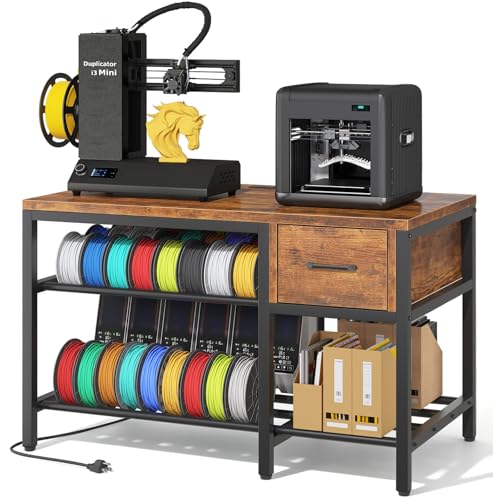
The Anrigeail stand brings a filament drawer, a power hub, and a reinforced X-bracket frame together at a mid-range price that undercuts most 3D-specific furniture. The all-in-one design integrates a printer table, a dedicated drawer for tools and nozzles, and dual open compartments for filament boxes or accessory bins. The built-in power strip gives you 2 AC outlets and 2 USB ports, which cuts cable clutter without a separate extension cord.
The heavy-duty steel frame with X-bracket reinforcement is a serious upgrade from generic shelving. The manufacturer claims up to 40% reduction in vibration and wobble, and user reports confirm the stand stays planted even with large-format Creality and Anycubic printers. The 3-tier layout (32″W x 24″D x 32″H) fits most desktop printer footprints without protruding. Walnut laminate surfaces look good in a home office or studio setting.
Assembly difficulty is average: the instructions lack clarity on the rear support mount orientation, and over-tightening the rod threads can strip them. Hand-tightening with light torque is sufficient. For a single-printer user who wants an organized workspace with built-in power and filament storage, this stand delivers a focused solution without stepping up to enclosure-level pricing.
Why it’s great
- X-bracket reinforced steel frame reduces vibration for cleaner layers
- Built-in power hub (2 AC + 2 USB) powers printer and accessories
- Dedicated drawer for tools and filament storage compartments
- Walnut laminate finish fits home office and studio aesthetics
Good to know
- Assembly instructions can cause backward installation of support mount
- Rod threads strip easily; hand-tighten only
- USB ports may be blocked by some printer enclosures
5. Unikito Lateral File Cabinet with Power and USB
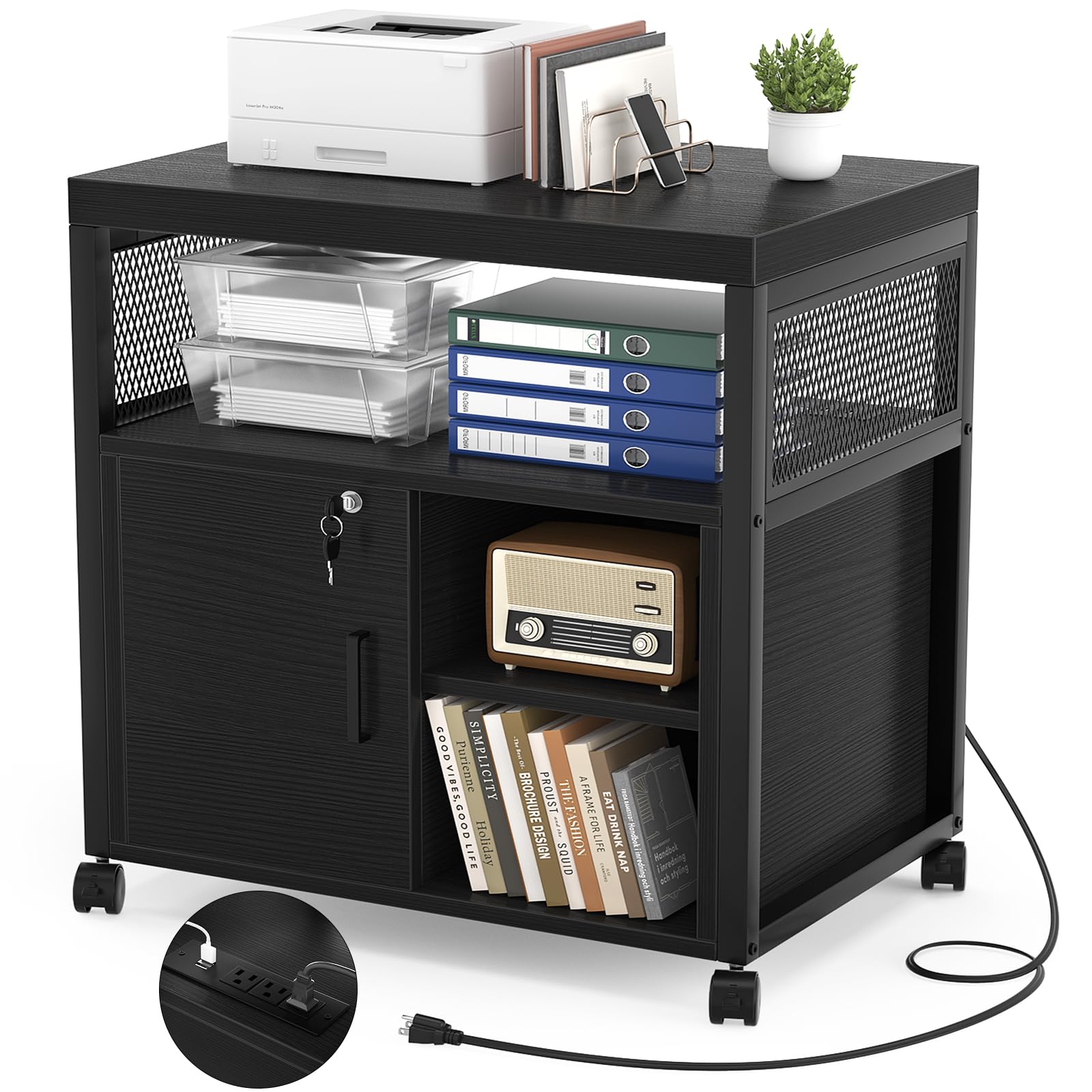
The Unikito Lateral File Cabinet is a printer stand repurposed for 3D printing duty, and it works surprisingly well. It comes with 3 built-in AC outlets and 2 USB charging ports built right into the top surface, giving you a single plug point for the printer, a laptop, and a phone. The lockable door keeps tools and materials secure, and the two open shelves can be adjusted in height to accommodate different printer footprints or filament boxes.
The rolling design (4 locking casters) makes it easy to reposition the printer when needed. The metal frame and MDF construction is rated for 200 pounds, which comfortably supports a 40-50 pound printer with materials loaded on the shelves. Users report that the cabinet holds up well with Bambu Lab and Creality machines, and the assembly process is quick — about 30 minutes with labeled parts and included tools.
The USB ports are low-wattage and only suitable for small devices like mice or desk lamps, not for charging tablets or phones fast. The lock mechanism also has no pre-drilled pilot holes, so you’ll need to carefully self-tap.
Why it’s great
- Built-in 3 AC outlets and 2 USB ports eliminate extra power strips
- Lockable door secures printer and accessories from tampering
- Adjustable shelves accommodate various printer heights and sizes
- Locking casters allow easy repositioning while maintaining stability
Good to know
- USB ports are low wattage and cannot fast-charge phones or tablets
- No pre-drilled holes for the lock screws; requires self-tapping
- MDF construction less durable than all-steel frames
6. Unikito Rolling File Cabinet with Socket and USB

This is the black oak variant of the Unikito cart, sharing the same power hub design (3 outlets + 2 USB) and lockable door but with a key differentiator — the interior shelf is fully adjustable. You can move the shelf up to fit a taller 3D printer inside the cabinet or slide it down to create two equal storage compartments for filament and tools. The 200-pound total capacity is generous for a rolling cart of this footprint.
The grid door design gives the cabinet a modern look that blends into home offices without screaming “tech hardware.” The four locking casters let you roll the whole setup to a different room or lock it in place during a long print job. Build quality is the same MDF/metal frame formula as its sibling, and assembly follows the same straightforward 30-minute process.
Like the other Unikito model, the USB ports here are low-power and won’t charge a tablet — plan to use the AC outlets for that. The adjustable shelf is a meaningful upgrade if your printer has a non-standard height or if you plan to swap printers down the line. For the price, this is a versatile foundation that doubles as a storage cabinet when not printing.
Why it’s great
- Adjustable shelf accommodates printers of varying heights
- Built-in power outlets and USB ports for streamlined cable management
- Lockable door and rolling casters provide security and mobility
- Stylish grid design fits home office decor
Good to know
- USB ports are low wattage; not suitable for charging larger devices
- MDF construction less robust than purpose-built steel 3D printer stands
- Lock screws require self-tapping; no pre-drilled holes
7. Halitaa Farmhouse File Cabinet with Adjustable Shelf
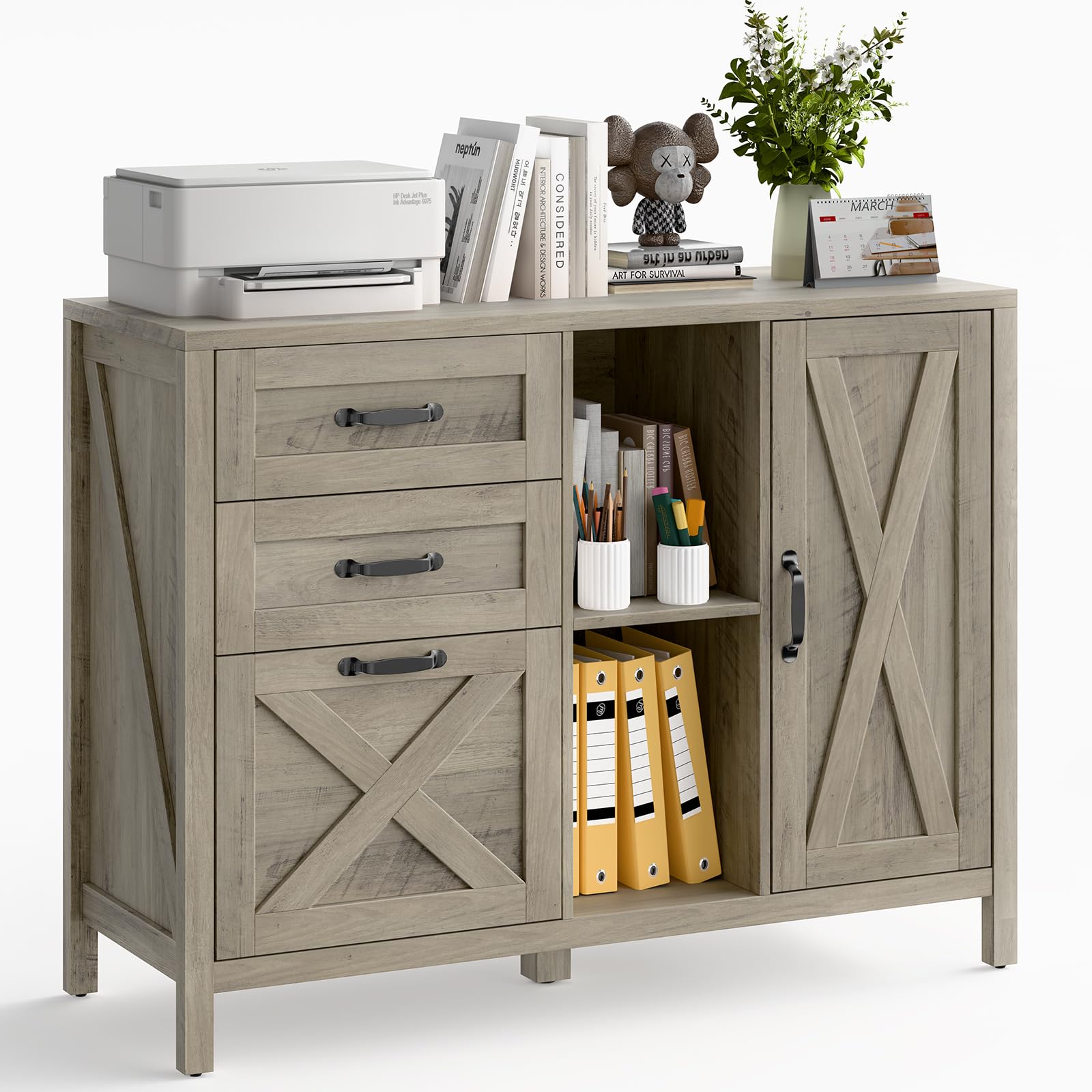
The Halitaa farmhouse cabinet is a furniture-first approach to printer storage. It combines three file drawers, a spacious lower cabinet with an adjustable shelf, and two open top shelves — all in a rustic grey finish that disappears into a living room or home office. The top surface is spacious enough to sit a printer and a small tool organizer, while the drawer and cabinet below store filament, files, and supplies.
The cabinet is reinforced with a thick-legged base and solid wood top, rated for decent weight without wobble. An anti-tipping device adds safety, which matters if you have children or pets. The hanging file drawer is letter/A4 compatible, making this a genuine dual-purpose piece of furniture. Assembly is detailed and user-friendly — one 87-year-old reviewer assembled it solo.
This is not a specialized 3D printer cabinet: there is no ventilation, no power hub, and no sealed filament compartment. You’ll need to add your own exhaust solution if printing ABS. But for a PLA-only user who wants the printer to look like just another piece of furniture, the Halitaa delivers charm and organization that no metal rack can match.
Why it’s great
- Farmhouse design blends into home decor without looking industrial
- 3 drawers plus a cabinet with adjustable shelf for versatile storage
- Anti-tipping device improves safety around pets and children
- Assembly is user-friendly with clear labeling and instructions
Good to know
- No ventilation or exhaust provisions for printing fumes
- No built-in power hub or cable management
- Smaller than expected; verify dimensions before ordering
8. DEVAISE 3-Drawer Wood File Cabinet with Lock
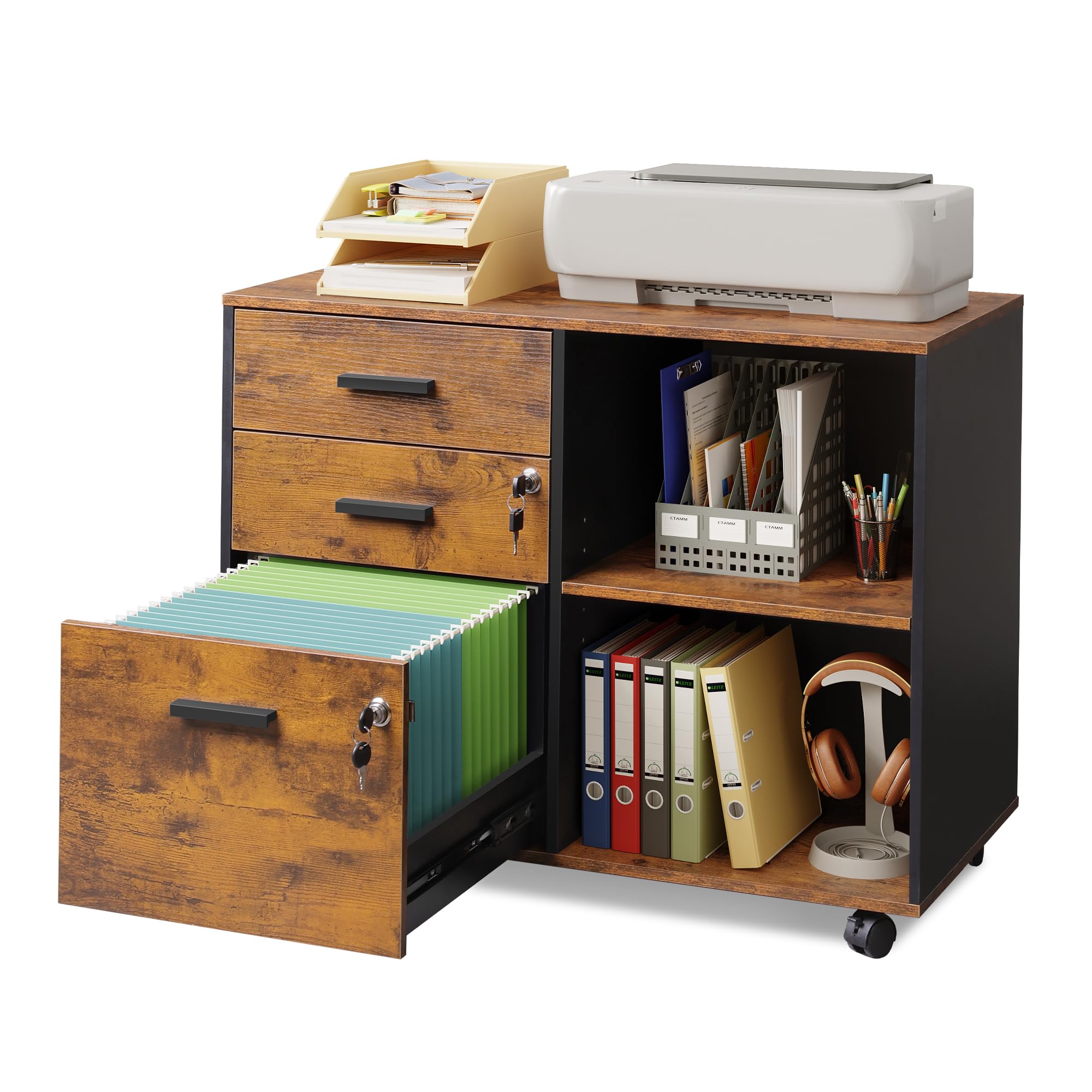
The DEVAISE file cabinet is the entry-level option for makers who need a flat, stable surface and lockable storage at the lowest investment. The three drawers are all lockable via two included key locks, and the bottom drawer can accommodate hanging files in letter and A4 sizes. The top surface is rated for 150 pounds — enough for most mid-size printers like the Ender 3 or Anycubic Kobra.
The rustic brown finish and 31.3-inch width make it a decent fit under a desk or beside a workbench. Five rolling wheels with two front brakes and an anti-tip center caster give decent mobility without sacrificing stability. The bottom drawer fully extends for easy access, and the open shelves above the drawers provide quick-grab space for print removal or tool setting.
Assembly is the weak point: multiple reviewers report misaligned screw holes, nearly stripped screws, and confusing rail installation. It’s functional once assembled but takes patience. The engineered wood construction means it won’t absorb vibration like a steel frame — you may notice minor layer artifacts on fast prints. For the absolute lowest cost to get a printer off a desk and into a lockable rolling cabinet, the DEVAISE gets the job done.
Why it’s great
- Three lockable drawers secure filament and personal items
- 150-pound top capacity supports most mid-size desktop printers
- Five rolling wheels with brakes for easy repositioning
- Bottom drawer extends fully for hanging file access
Good to know
- Assembly is frustrating with misaligned holes and stripped screws
- Engineered wood does little to reduce vibration during fast printing
- Drawers may not sit perfectly flush after assembly
9. RJOKMT 300L Large Filament Storage Stand with Dehumidifier
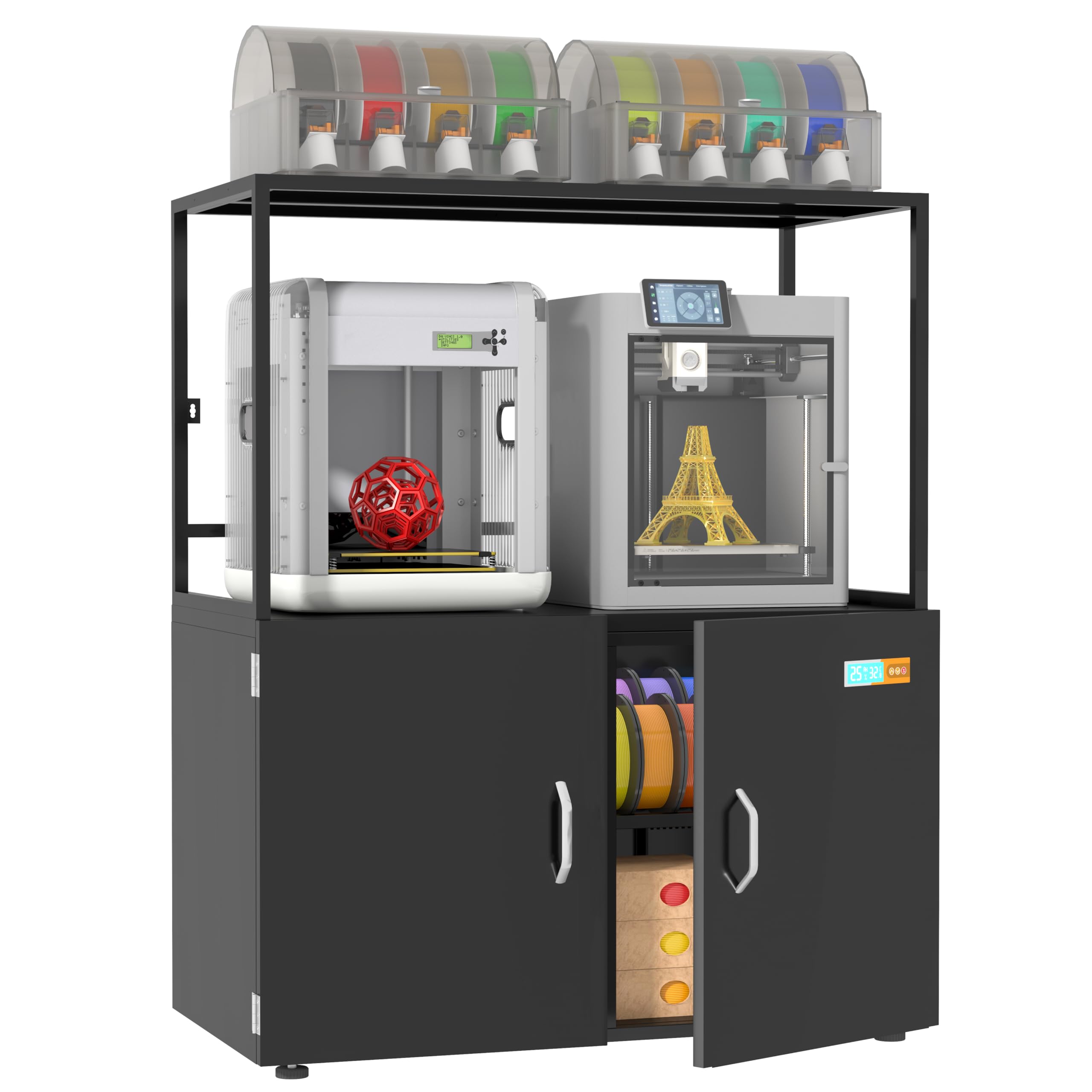
The RJOKMT 300L flips the typical cabinet approach: instead of holding a printer, its primary job is to store up to 160 standard filament spools in an air-tight, dehumidified environment. The built-in dehumidification module actively pulls moisture out of the sealed cabinet, protecting PLA, ABS, PETG, and TPU from the brittleness and stringing that wet filament causes. The 300-pound capacity frame is sturdy enough to also serve as a secondary work surface or a dedicated filament pantry.
The multi-layer compartment layout keeps spools organized by material type, and the high-density sealing strip blocks external humidity even in coastal or rainy climates. The dehumidifier operates quietly and requires minimal maintenance — run the unit empty for one day before loading spools, then allow 1-2 days for the cabinet to stabilize at target humidity after loading. An illustrated guide and video tutorial make assembly straightforward despite the unit’s size.
Some users report that the metal cabinet body can feel slightly flimsy under full load and that the display panel may arrive crooked. The shelf depth is also not full cabinet depth, which wastes some interior volume. But for any maker managing more than 20 spools of material, this cabinet is the most cost-effective way to ensure every print starts with dry, consistent filament — no silica gel packs needed.
Why it’s great
- Built-in active dehumidifier protects up to 160 spools from moisture damage
- High-density sealing strip blocks external humidity in any climate
- Large 300-pound capacity frame doubles as a secondary work surface
- Quiet, maintenance-free dehumidification module
Good to know
- Cabinet can feel flimsy under full load; some users note metal flex
- Display panel may arrive misaligned from factory
- Shelves are not full depth; some interior space goes unused
FAQ
Do I need a sealed enclosure for my 3D printer cabinet?
What is the minimum load capacity I should look for?
Can I use a regular filing cabinet as a 3D printer stand?
How do I route filament from a storage compartment to the printer?
What size cabinet do I need for a Bambu Lab X1C with AMS?
Final Thoughts: The Verdict
For most users, the 3d printer cabinet winner is the Crafit 3D Printer Cabinet because it combines a full enclosure, active exhaust, integrated LED lighting, and 48-spool filament storage in one cohesive package. If you want a modular, expandable workstation for your Bambu Lab printer, grab the BIQU Panda Station. And for high-volume filament storage with climate control, nothing beats the RJOKMT 300L Sealed Cabinet.