
Our readers keep the lights on and my morning glass full of iced black tea. As an Amazon Associate, I earn from qualifying purchases.
Specs are compiled from manufacturer listings and verified buyer reviews and can change over time — please confirm the key details on the product page before buying.
Picking the right replacement isn’t about grabbing the first 40mm square you find; the wrong voltage, thickness, or bearing type can make your prints worse. This guide covers six options that solve specific noise and airflow problems.
I’m Min — the founder and writer behind Gadgets Feed. This guide is built by comparing the manufacturers’ published specifications and the patterns across verified customer reviews, so you get each pick’s real strengths and trade-offs instead of marketing spin.
You need a 3d printer cooling fan that matches your machine and environment. The right one balances noise, airflow, and long-term reliability in a way that fits your exact printer and where you print.
Our Picks at a Glance

How To Choose The Best 3D Printer Cooling Fan
Picking the right fan for your printer depends on three main things: the physical space you have, the cooling job you need it to do, and how much noise you can tolerate. A fan that is too thick won’t fit between the heat block and the shroud, and a fan with sleeve bearings will start grinding after a few hundred hours of printing.
Match the thickness to your mount
Most printers use either 10mm-thick (4010) or 20mm-thick (4020) fans. The WINSINN 4020 delivers 9.2 CFM (cubic feet per minute), the WINSINN 4010 delivers 4.69 CFM. But the thicker fan won’t fit in tight hotend shrouds designed for 10mm. Measure your mount depth before buying.
Bearing type determines how long it lasts
Sleeve bearings work fine for occasional use, but they wear out fast in a 3D printer that runs 24/7. Dual ball bearings are the standard for long-term reliability here — they resist the heat and continuous rotation much better. The WINSINN and GDSTIME models in this list all use dual ball bearings, while the Noctua uses its premium SSO2 bearing (a self-stabilizing oil-pressure bearing) rated for over 150,000 hours of life.
Axial fan vs blower fan
Axial fans (the flat square ones) push air straight through and work best for hotend cooling and electronics enclosure ventilation. Blower fans (the snail-shell shaped ones) concentrate airflow into a narrow jet, making them ideal for part cooling fans that need to blast air right under the nozzle. The GDSTIME 4010 blower reaches 0.68 In H2O (inches of water column, a measure of static pressure), which is far higher than any axial fan of the same size.
Quick Comparison
| Model | Best For | Max Speed (RPM) | Airflow (CFM) | Noise (dBA) | Amazon |
|---|---|---|---|---|---|
| Noctua NF-A4x10 24V PWM★ Best Overall | Near-silent hotend upgrade | 5000 | — | 19.6 | Amazon |
| WINSINN 40mm 4020 24V (2-Pack)High Airflow | Maximum airflow in a tight spot | 8500 | 9.2 | 27 | Amazon |
| GDSTIME 40mm 4020 24V (2-Pack) | Quiet all-rounder for multiple printers | 6000 | 6.78 | 24.6 | Amazon |
| WINSINN 40mm 4010 24V (5-Pack) | Bulk buying for multiple machines | 5000 | 4.69 | 26 | Amazon |
| GDSTIME 40mm 4010 24V Dual Ball Bearing (2-Pack) | High-speed 4010 for compact builds | 7500 | 8.29 | 29.8 | Amazon |
In-Depth Reviews
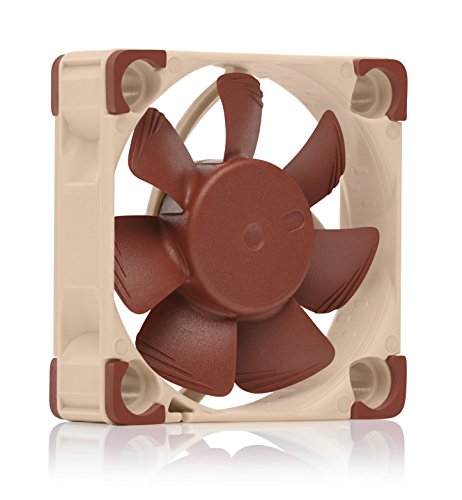
1. Noctua NF-A4x10 24V PWM
Our pick — over 4.5★ from 700+ verified ratings; the strongest balance of quality and price.
The gold standard for silent hotend upgrades with a 4-pin PWM connector for automatic speed control.
If noise drives you crazy while you print, this is the fan that stops it. At just 19.6 decibels, it operates at a whisper — far quieter than the WINSINN 4020’s 27 dBA at full speed. The 5000 RPM maximum speed is modest compared to the 8500 RPM of the WINSINN 4020, but the real advantage is the 4-pin PWM connector (Pulse Width Modulation), which lets your printer’s mainboard automatically slow the fan down when full cooling is not needed. This means quieter prints overnight.
The included accessory kit makes installation simple. Buyers report it is a “direct fit for Ender 3 V2 hot-end fan terminal; no wire stripping needed.” The NA-AC9 adaptor cable connects to popular printers with JST XHP-2 headers, and the OmniJoin adaptor set handles proprietary connectors. The SSO2 bearing (self-stabilizing oil-pressure bearing) is rated for over 150,000 hours of operation, backed by UL and TÜV safety certifications.
Why it stands out
- Extremely quiet at 19.6 decibels
- 4-pin PWM allows automatic speed control
- Over 150,000 hours of expected bearing life
- Comes with anti-vibration mounts and multiple adaptors
One real limitation
- Only 5000 RPM max, so it moves less air than high-speed fans
- Price is higher than most 40mm fans
Reach for this if: you want the quietest possible hotend fan and your printer accepts a 4-pin PWM signal or the included adaptors.
Look elsewhere if: you need maximum airflow in a compact space — the GDSTIME 4010 blows 8.29 CFM at 7500 RPM.
2. WINSINN 40mm Fan 24V (4020 Dual Ball Bearing, 2-Pack)
A 20mm-thick fan that pushes double the air of a standard 40mm fan for demanding hotend cooling.
This is the fan to reach for when you need serious airflow in a hotend or electronics enclosure. At 8500 RPM, it delivers 9.2 CFM; the WINSINN 4010 delivers 4.69 CFM. The dual ball bearings are rated for 50,000 hours, and WINSINN backs it with a 5-year warranty. The noise level sits at 27 decibels, which is noticeable but not obnoxious for a high-speed fan.
The catch is thickness. At 20mm, it will not fit in every mount. One reviewer noted that the 4020 was too thick for their Ender 3 V2 hotend, hitting the heat block. The XH2.54 connector cable is 11.8 inches long, which is short for some setups. One buyer mentioned that a fan died after 500 hours, but the issue was fixed by replacing the wire — the other fan in the pack kept working fine.
Top strengths
- 9.2 CFM airflow at 8500 RPM — class-leading for a 40mm fan
- Dual ball bearings with 50,000-hour lifespan
- 5-year warranty included
What to check first
- 20mm thickness may not fit shallow mounts
- Short 11.8-inch cable may require an extension
- Noise at 27 dBA is higher than quieter options
Ideal for: people who have the vertical space and want the highest airflow from a 40mm axial fan, such as in a custom enclosure or electronics box.
Not ideal for: tight hotend shrouds designed for 10mm fans — measure your mount first.
3. GDSTIME 40mm 4020 24V (2-Pack)
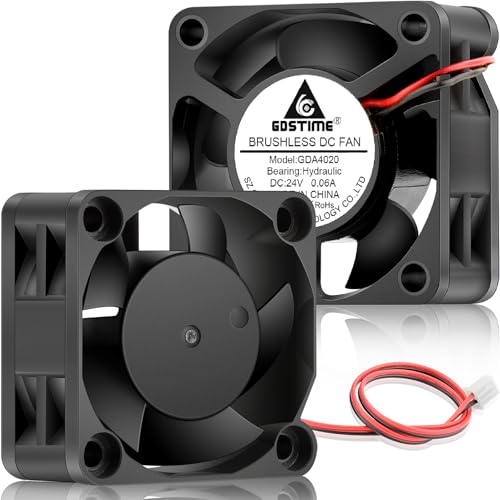
A quiet 4020 fan with hydraulic bearings that balances airflow and noise for daily printing.
This GDSTIME fan sits in a balance between the raw power of the WINSINN 4020 and the silence of the Noctua. With 6.78 CFM of airflow and just 24.6 decibels of noise, it moves plenty of air without sounding like a miniature jet engine. The hydraulic bearing is less common in 3D printing, but it offers a good compromise between quiet operation and longevity at 40,000 hours.
Buyers praise its versatility. One owner wrote: “I bought two of these to use as bed fans in my Voron Trident 300 and they are working flawlessly and didn’t increase the noise level too much.” The included 1-meter extension cable gives you plenty of reach for routing, and the 2-pin JST XH connector is a standard fit for many Creality-style printers. It fits Ender 3, Ender 3 V2, Ender 3 Pro, and Ender 5 Pro models as a direct replacement.
Why it works well
- Quiet 24.6 dBA noise level
- 40,000-hour hydraulic bearing lifespan
- Includes 1-meter extension cable
- Solid ventilation for Voron bed fans or UPS units
One thing to know
- 6000 RPM is slower than the 8500 RPM WINSINN 4020
- Not a dual ball bearing, so it may not last as long in high-vibration setups
Go for this if: you want a quiet, balanced 4020 fan for daily printing and you need the long extension cable for routing.
Pick the WINSINN 4020 instead if: you need the maximum 9.2 CFM airflow and prefer dual ball bearings for 24/7 operation.
4. WINSINN 40mm 4010 24V (5-Pack)
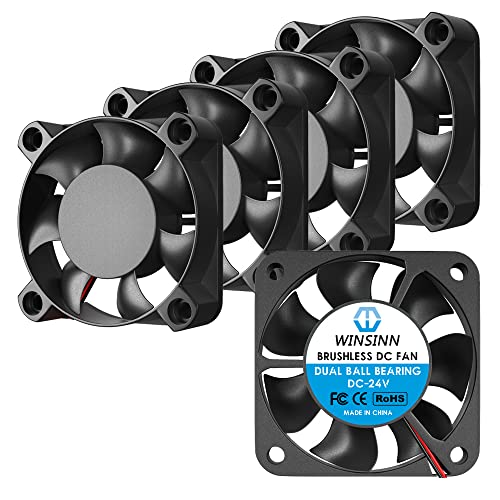
Five 4010 fans in one pack at a per-unit price that makes stocking spares painless.
If you have multiple printers or just want a few backups on the shelf, this 5-pack makes financial sense. Each fan delivers 4.69 CFM at 5000 RPM with a noise rating of 26 decibels. That is enough airflow for a standard hotend replacement on an Ender 3 or CR-10, and the sound level is low enough that one owner reported “these fans really quieted my printers down barely notice them running now and they have been running almost 2 years now no issues.”
The dual ball bearings eliminate the startup rattle that sleeve-bearing fans develop over time. At just 10mm thick, this fan fits almost any stock hotend mount. The XH2.54 2-pin connector is a direct match for most Creality-style boards. Bear in mind that at 5000 RPM, this is a moderate-speed fan — it does not have the 9.2 CFM punch of the thicker 4020 fan from the same brand. One reviewer called it “slightly overpriced” at the per-unit cost, but the 5-pack brings the price down significantly.
Why buy five
- Great per-unit value for multiple printers
- Dual ball bearings for long life and quiet startup
- 10mm thickness fits standard hotend shrouds
- CE, FCC, and ROHS certified
The trade-off
- 5000 RPM is slower than the 7500 RPM GDSTIME 4010
- Only 4.69 CFM, so not ideal for high-heat environments
Best suited for: makers who maintain two or three printers and want a stock of reliable 4010 hotend fans that fit everywhere.
skip it if: you need higher airflow for a single printer — a single 4020 fan will move more air.
5. GDSTIME 40mm 4010 Dual Ball Bearing (2-Pack)
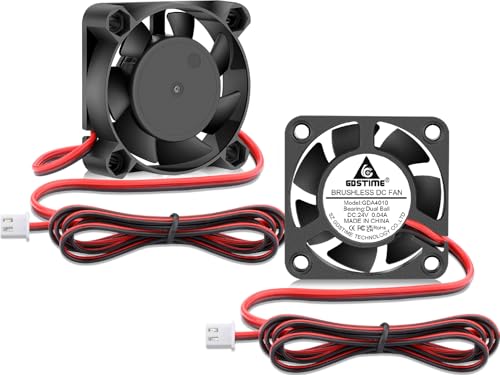
A 10mm-thin fan that pushes an impressive 8.29 CFM for compact printers that need high airflow.
This is the 4010 fan that defies expectations. At just 10mm thick, it still manages 8.29 CFM at 7500 RPM; the WINSINN 4010’s airflow is 4.69 CFM. The noise level sits at 29.8 decibels, which is louder than the Noctua but still reasonable for the amount of air it moves. The dual ball bearings give it a 50,000-hour operating life.
Buyers confirm it works as a drop-in replacement for the stock heat break fan on the Flashforge Adventurer 5M, with one noting “this is a drop in replacement for the stock heat break cooling fan in the Flashforge Adventurer 5m, just swap the plug’s polarity.” A reviewer on a Qidi printer said it was “a bit louder, but that is due to more airflow. I’ll take a few db’s higher for a cold heatbreak.” Just watch the installation depth — one buyer found it too tall to fit beneath their Elegoo Neptune 3 Pro.
What makes it special
- 8.29 CFM in a thin 10mm package
- 7500 RPM with dual ball bearings
- 50,000-hour lifespan
- Fits many printer hotends as a direct swap
Watch out for
- 29.8 dBA is louder than the Noctua NF-A4x10
- May be too tall for some low-profile mounts
- Requires polarity check on some printers
Pick this for: compact printer upgrades where you need high airflow but only have 10mm of vertical clearance, like in a Flashforge Adventurer 5M or a custom hotend shroud.
Skip if: silence is your top priority — the Noctua runs far quieter.
Understanding the Specs
CFM and Static Pressure
CFM (cubic feet per minute) measures how much air a fan moves overall. A higher CFM means more total cooling, but for part cooling fans (blowers), static pressure measured in In H2O (inches of water column) matters more — that tells you how hard the fan can push air through a narrow duct. The GDSTIME blower hits 0.68 In H2O, which is excellent for focused cooling. For hotend axial fans, CFM is the more useful number.
Bearing Types and Lifespan
Dual ball bearings are the default choice for 3D printers that run 24/7. They resist heat better and last longer than sleeve bearings, typically rated for 50,000 hours. The Noctua uses a premium SSO2 bearing (self-stabilizing oil-pressure bearing) rated for over 150,000 hours. Hydraulic bearings (used on the GDSTIME 4020 axial fan) are quieter than dual ball bearings but generally do not last as long under constant high-temperature operation.
Noise Level in Decibels
Every 10 dB increase sounds about twice as loud to the human ear. The Noctua’s 19.6 dBA is nearly silent, while the GDSTIME blower’s 35 dBA is clearly audible in a quiet room. If you print in a bedroom or office, look for fans at or below 26 dBA. For a garage or workshop, higher noise is more acceptable.
Voltage and Connector Type
All fans here are 24V DC, which matches most common 3D printers like Creality, Anycubic, and Flashforge models. The 2-pin connector (XH2.54) is the standard for simple on/off fans. The Noctua’s 4-pin PWM connector (Pulse Width Modulation) allows the mainboard to vary speed, which can reduce noise when full cooling is not needed. Always check your printer’s fan header before buying.
FAQ
Will a 4020 fan fit in place of a 4010 fan?
What is the difference between 2-pin and 4-pin fan connectors?
Can I use a 12V fan on a 24V printer?
How long do dual ball bearing fans last?
Why does my printer fan make a rattling noise at startup?
What is the ideal noise level for a bedroom 3D printer?
Should I use an axial fan or a blower fan for part cooling?
Can I use a 40mm fan to replace the motherboard fan on my printer?
What tools do I need to replace a 3D printer cooling fan?
Are all 40mm fans the same hole spacing?
Final Thoughts: The Verdict
If you want one dependable pick, the 3d printer cooling fan winner is the Noctua NF-A4x10 24V PWM because it combines near-silent 19.6 dBA operation with a 4-pin PWM connector for automatic speed control and a premium SSO2 bearing rated for over 150,000 hours. If you want maximum airflow in a compact space, grab the WINSINN 40mm 4020 with its 9.2 CFM and 8500 RPM. And for focused part cooling with high static pressure, the standout is the GDSTIME 4010 Blower Fan at 0.68 In H2O.
How We Picked
We do not accept paid placement. Every pick is matched to a real buyer and a real use-case; we do not hands-on test units.
Sources & Methodology
Specifications: manufacturer listings and product documentation. Review insights: verified customer reviews, as of July 2026. Pricing: not shown on this page (it changes often); check the current price via the retailer link.
As an Amazon Associate, Gadgets Feed earns from qualifying purchases. This does not affect which products we feature.