
Our readers keep the lights on and my morning glass full of iced black tea. As an Amazon Associate, I earn from qualifying purchases.
Specs are compiled from manufacturer listings and verified buyer reviews and can change over time — please confirm the key details on the product page before buying.
You dial in your slicer settings perfectly, but a draft from an open window or a drop in room temperature still ruins your print overnight. The real fix is an enclosure that traps consistent heat, blocks dust, and muffles noise during long unattended prints. A good enclosure also keeps pets and kids away from hot moving parts and contains fumes from ABS or ASA.
I’m Min — the founder and writer behind Gadgets Feed. This guide is built by comparing the manufacturers’ published specifications and the patterns across verified customer reviews, so you get each pick’s real strengths and trade-offs instead of marketing spin.
You need an enclosure that keeps your printer safe from dust, muffles the noise, and won’t catch fire if something goes wrong. The best 3d printer enclosure for your Bambu Lab A1, Ender 3, or Neptune 4 Plus depends on fireproof materials, integrated lighting, noise reduction, and a size that actually clears your printer’s full build volume and spool height.
Quick Picks
- TOPCUBE 3D Printer Enclosure — Best Overall
- YOOPAI 3D Printer Enclosure — Best Value
- Large 3D Printer Enclosure with LED Light — Most Spacious
- VEVOR 3D Printer Enclosure with Ventilation — Best Built-in Vent
- Creality Official K1 SE Enclosure — OEM Fit
- Creality Official 3D Printer Enclosure — Brand-Matched
- TOPCUBE 3D Printer Enclosure for Bambu Lab A1 — Budget Ace
How To Choose The Best 3D Printer Enclosure
Three decisions separate a smart buy from a frustrating one: getting the size right, picking fire-resistant material, and deciding on a built-in ventilation fan for high-temp filaments. Here is what to look for.
Size and Fit: Always Measure Your Printer Height with the Spool
The most common mistake buyers report is an enclosure that looks big in photos but does not clear the spool holder or the full Z-axis travel. Measure the total height from the surface the printer sits on to the top of the filament spool or spool holder — that is the number that must be smaller than the enclosure’s internal height. A buyer of the Large YOOPAI enclosure noted it fits an Elegoo Neptune 4 Plus perfectly but is too short for the Max version. The Creality enclosure is 21.65 x 25.59 x 29.53 inches, and its 29.53-inch height handles tall Creality printers like the Ender 5 S1. For the TOPCUBE models designed for Bambu Lab A1, the height is 26.37 inches, so you need to check that the AMS Lite cable inlet sits comfortably inside.
Material and Fire Safety: Aluminum Foil Cloth vs. Oxford Cloth
Fire-resistant material saves your printer and home if a thermal runaway occurs. The Creality enclosure uses flame-retardant aluminum foil cloth, which is also waterproof and corrosion-resistant and reflects heat back inside to maintain a steady temperature. The VEVOR enclosure uses 600D Oxford cloth with an inner composite aluminum film, which is lighter at 5 pounds but still rated as flame retardant. The YOOPAI and TOPCUBE enclosures use fabric with fire-resistant properties backed by real customer reviews — one YOOPAI reviewer in Florida specifically notes the fire-resistant enclosure keeps ABS and ASA prints clean in high humidity. Look for “flame retardant” or “fire-resistant” in the spec sheet, not just “dustproof.”
Noise Reduction: What the Decibel Numbers Actually Mean
A 60-decibel printer sounds like a normal conversation, which can be annoying in a living room or bedroom. The TOPCUBE enclosure for the A1 states it cuts noise from 60 decibels to 40 decibels, and a verified buyer confirms it “muffles high-frequency noise” into a background hum. The standard large 3D Printer Enclosure from YOOPAI blocks noise on all six sides. A quieter enclosure lets you run long prints without disturbing Zoom calls or sleep.
Quick Comparison
| Model | Best For | Internal Dimensions | Weight | Noise Reduction | Amazon |
|---|---|---|---|---|---|
| TOPCUBE for A1 Combo (Stainless Steel) | Premium Bambu Lab A1 owners | 33 x 23 x 23 in | 8.36 lb | 60dB to 40dB | Amazon |
| YOOPAI Premium with Ventilation | Versatile mid-range with fan kit | 25.6 x 21.6 x 29.5 in | 5.71 lb | Six-side blocking | Amazon |
| Large 3D Printer Enclosure (YOOPAI) | Large printers like Neptune 4 Plus | 29.5 x 27.5 x 35.4 in | 4.4 lb | Six-side blocking | Amazon |
| VEVOR 3D Printer Enclosure | Dustproof and fast cooling | 31.5 x 22.83 x 22.83 in | 5 lb | Not specified | Amazon |
| Creality Official Enclosure (Fan Interface) | Creality printer ecosystem | 21.65 x 25.59 x 29.53 in | 4.05 lb | Not specified | Amazon |
| Creality K1 SE Enclosure | 360° full-view for K1 SE | Fits K1 SE (OEM specific) | 6.71 lb | Noise barrier | Amazon |
| TOPCUBE for Bambu Lab A1 | Budget-friendly A1 enclosure | 23.62 x 21.65 x 26.38 in | 3.96 lb | 60dB to 40dB | Amazon |
In‑Depth Reviews
1. TOPCUBE 3D Printer Enclosure for Bambu Lab A1 Combo, Stainless Steel Frame
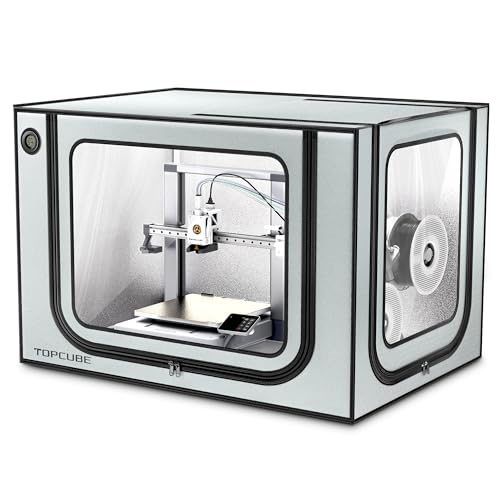
The stainless-steel fortress that keeps temperature steady and noise low for serious A1 Combo users.
The heaviest pick in this lineup at 8.36 pounds — compared to the 5.71-pound YOOPAI Premium and the 4.05-pound Creality enclosure — gets its heft from a stainless steel frame that resists flexing and vibration over years of use. It is specifically designed for the Bambu Lab A1 Combo, with a dedicated AMS Lite cable inlet and a four-way pneumatic interface for the automatic material system. At 33 x 23 x 23 inches, this enclosure gives the A1 Combo room to breathe without being oversized on your desk. Owners mention it reduces noise from 60 decibels to 40 decibels, turning a typical printing session into a background whisper that does not interrupt the room.
The integrated LED light strip inside the “extra large transparent observation window” lets you catch filament jams or early-layer issues without cracking the door and losing heat. The manufacturer states the internal temperature will not exceed 40°C even during long prints, so there is no risk of overheating the printer’s motherboard. Unlike the YOOPAI Premium that includes a ventilation fan, this model does not ship with one — you rely on the four-way pneumatic interface to route fumes if you install an external exhaust. That trade-off is fine for PLA and PETG, but if you print ABS regularly, you might want the YOOPAI Premium’s built-in ventilation.
The Case for It
- Stainless steel frame is the most durable in this comparison — the 8.36-pound build reduces vibration better than 3.96-pound fabric-only enclosures.
- Noise drops from 60dB to 40dB — customers note it becomes a “quiet humming” background sound.
- AMS Lite cable inlet and four-way pneumatic interface mean you do not have to modify the enclosure to run the automatic material system.
One Thing to Note
- No included ventilation fan — you must add an external exhaust for ABS or ASA fume control.
- At 8.36 pounds, moving it for maintenance is more of a chore than with the 3.96-pound TOPCUBE for the standard A1.
Grab it if: You own a Bambu Lab A1 Combo and want the most stable, quiet enclosure that does not flex after a year of daily use.
Look elsewhere if: You print ABS regularly and need a factory-installed exhaust fan, or you swap enclosures between different printer models often.
2. YOOPAI 3D Printer Enclosure with Ventilation Kit & LED

The mid-range enclosure that packs a ventilation fan and LED at a price most competitors charge for the bare box.
Most enclosures in the mid-range tier give you a fabric tent and a LED — the YOOPAI Premium adds a real ventilation kit and a temperature-humidity display without jumping into premium pricing. One buyer in humid Florida reported that the fire-resistant material and active fume extraction made ABS and ASA prints come out clean where they previously failed. The LED light runs on an included LR44 battery and lights up the reflective interior so you can spot a clog from across the room. A verified reviewer noted that the assembly takes 10 to 15 minutes with the included instructions. The same reviewer flagged finicky zippers and a creased window panel as minor annoyances, but called it “great value at ~.”
At 25.6 x 21.6 x 29.5 inches, this enclosure fits Creality Ender 3 V3 SE, Ender 3 V2, Ender 3 Pro, Neptune 4, and AnkerMake M5 — essentially any printer smaller than 29.5 x 25.6 x 21.6 inches including the spool height. One buyer found it did not fit the Ender-3 S1 Plus, which is 3-4 inches taller than the enclosure’s interior. This is where the stainless-steel TOPCUBE leads — it is purpose-built for one printer and fits perfectly — while the YOOPAI’s wider compatibility means you have to measure carefully. The built-in ventilation kit is the decisive feature here: it actively pulls fumes out through a duct, unlike the Creality K1 SE enclosure which only traps particles passively.
Why It Stands Out
- Ventilation kit included — no extra purchase needed for ABS or ASA odor control.
- Temperature and humidity display built in gives you real-time feedback without a separate hygrometer.
- Wide compatibility across Creality, Elegoo, Anycubic, and AnkerMake printers under 29.5 x 25.6 x 21.6 inches.
Watch Out For
- Not tall enough for Ender-3 S1 Plus — the full Z-axis travel does not clear the roof.
- Plastic frame connectors can break under tension; reviewers suggest gentle finger-tightening.
Reach for this if: You switch between PLA, PETG, and ABS and want an enclosure with a real exhaust fan from the start.
skip it if: You own a tall printer like the Ender-3 S1 Plus — you need the larger YOOPAI or the Creality official enclosure for that Z-height.
3. Large 3D Printer Enclosure with LED Light, Fireproof Dustproof Tent
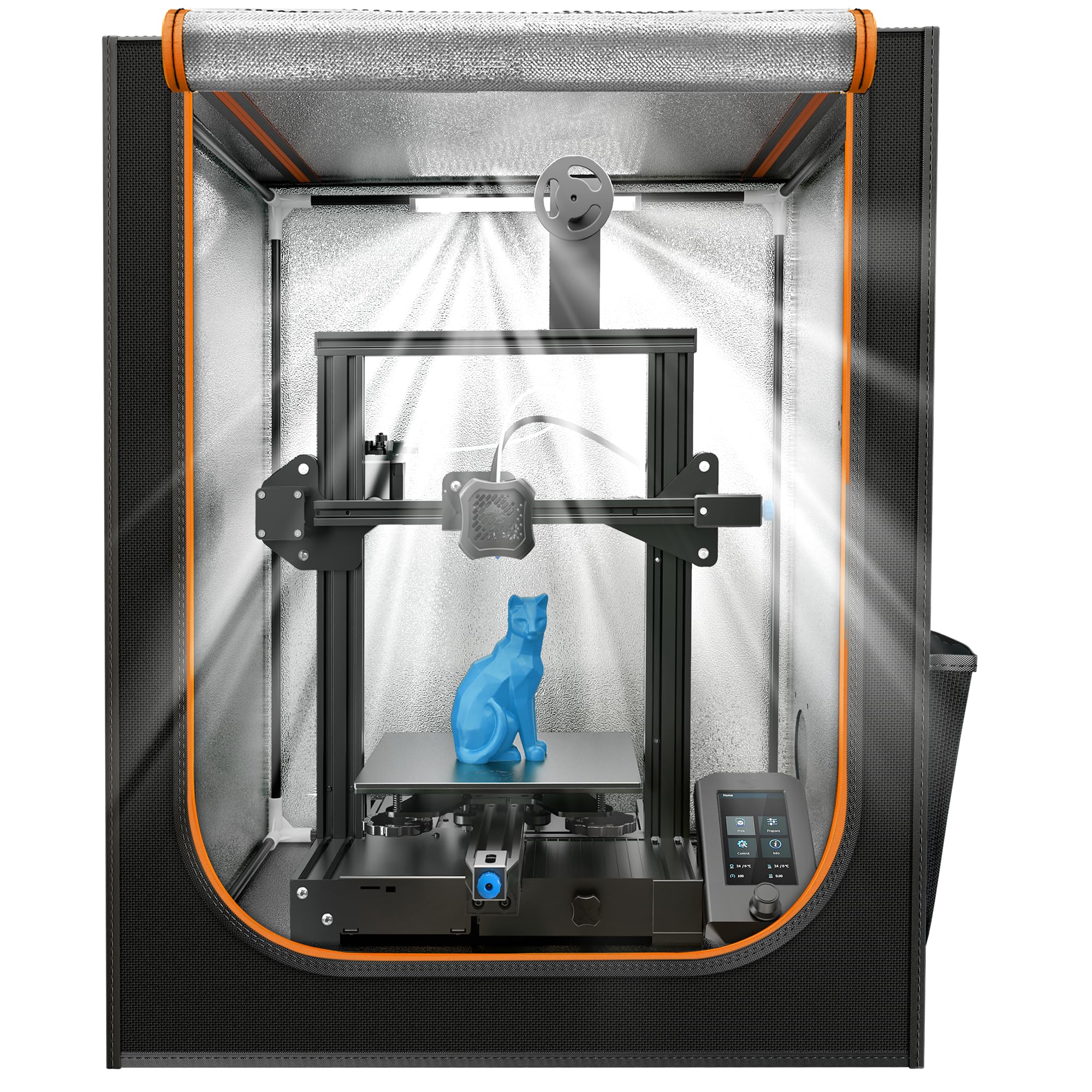
The tent that swallows a Neptune 4 Plus with room left for a second AMS unit on top.
At 29.5 x 27.5 x 35.4 inches, this enclosure is larger than the Creality official enclosure (21.65 x 25.59 x 29.53 inches), making it the only pick in this list that fits an Ender 5 Plus, CR-10, or Elegoo Neptune 4 Plus without the Z-axis hitting the ceiling. One buyer verified it fits a Bambu P2S with an AMS2 on top and still has “extra room” — they even kept two HT AMS units inside for future projects. The 4.4-pound weight is light enough to fold up and store if you switch back to open-air printing, ; the TOPCUBE for A1 is 3.96 pounds and the Creality tent is 4.05 pounds.
Reviewers point out the assembly is straightforward with a single-page instruction sheet and a video link. The front and top unzip completely for full access, which is handy when you are leveling the bed or swapping hotends. The LED strip runs along the interior top edge, illuminating the entire build plate. One buyer in a garage workshop said the enclosure keeps dust and temperature swings under control during winter prints. The trade-off: at 4.4 pounds, the poles and fabric are lighter-duty than the stainless-steel TOPCUBE, so it might not dampen vibration as effectively at high speeds.
What Works Great
- Fits printers up to 29.5 x 27.5 x 35.4 inches — handles mammoth machines like CR-10 and Neptune 4 Plus.
- Zippable front and top give easy access for maintenance without lifting the whole enclosure off.
- Buyers mention side pockets are large enough to hold AMS units or tool kits.
What to Know
- Does not fit CR-10 MAX or CR-10 S4/S5 — check dimensions before buying.
- No built-in ventilation port or fan — you must cut or modify if you need active fume extraction.
Perfect for: Anyone with a large-format printer (Neptune 4 Plus, CR-10, Ender 5 Plus) who needs dust and temperature control on a budget.
Swap for: The YOOPAI Premium if your printer fits its smaller footprint but you want the ventilation fan included.
4. VEVOR 3D Printer Enclosure with Ventilation, Dustproof Waterproof
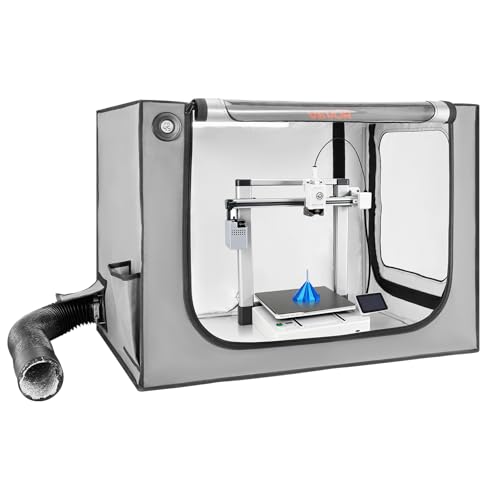
A fabric enclosure with a dedicated ventilation system that pushes smoke out fast after each print finishes.
The VEVOR enclosure stands out because it comes with a ventilation system designed to quickly expel smoke and dust after printing — it is one of the few picks in this list that addresses what happens after the print is done, not just during. The 600D Oxford cloth outer shell with an inner composite aluminum film makes it flame retardant and waterproof, giving you a second layer of protection beyond basic dust blocking. At 31.5 x 22.83 x 22.83 inches, it is purpose-sized for the Bambu Lab A1 Combo; the manufacturer includes a thermohygrometer so you can see the internal temperature and humidity at a glance.
The integrated LED provides clear visibility into the transparent window, and the flame-retardant materials reduce accident risk. If you print with PLA, TPU, or ABS, the ventilation system lets harmful particles settle inside rather than venting them into your room air — a feature the Creality K1 SE enclosure does not advertise. The trade-off: VEVOR is a power-tool brand, not a 3D-printing specialist, so compatibility is narrower. At 5 pounds, it is slightly heavier than the Creality fan-interface enclosure (4.05 pounds) but lighter than the YOOPAI Premium (5.71 pounds). The 22.83-inch depth might be tight for some printers with protruding power supplies.
Strong Points
- Ventilation system designed for post-print smoke evacuation — speeds cool-down and clears the chamber.
- 600D Oxford cloth with composite aluminum film is tougher than standard tent fabric.
- Thermohygrometer included means you do not need to buy a separate sensor.
Limitations
- Only 22.83 inches deep — may not fit printers with large rear-mounted spool holders.
- Less brand-specific engineering than the TOPCUBE; universal sizing can mean loose spots or tight corners.
Reach for this if: You run prints back-to-back and want a ventilation system that actively clears smoke and heat between jobs.
Pass if: Your printer extends deeper than 22.83 inches or you prefer an enclosure from a dedicated 3D-printing brand.
5. Creality Official K1 SE Enclosure, Professional Constant-Temperature
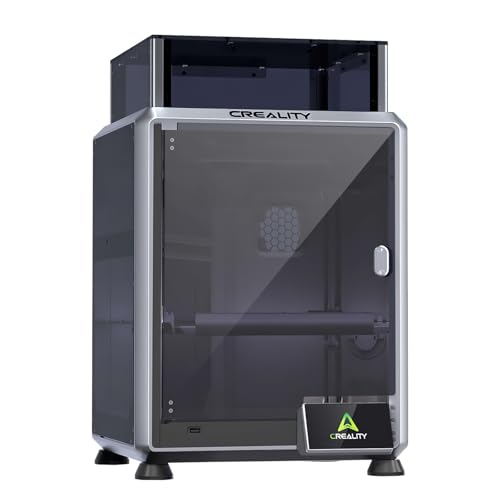
First-party drop-in fit for the K1 SE with a panoramic window you can see through from every angle.
If you own a Creality K1 SE, K2 SE, or K2 SE Combo, this enclosure is the OEM option — no measuring, no guessing, no zipper misalignment. Creality designed it specifically for those printers, so the fit is precise down to the cable routing and spool clearance. The upgraded black high-transparency PC material provides a completely unobstructed panoramic view — you can watch the print head move from the front, the sides, and the top without opening anything. At 6.71 pounds, it is the second-heaviest enclosure in this list behind the stainless-steel TOPCUBE, reflecting the thicker PC panels and Creality’s reinforced frame.
The constant-temperature environment improves bed adhesion in winter and wet rooms, reducing warping on tall prints. Creality states the enclosure traps fine plastic particles and odors to keep them from spreading. It also acts as a noise barrier and dust cover against pet hair and accidental contact. Compared to the VEVOR enclosure, the Creality lacks a dedicated ventilation system — you rely on passive containment rather than active extraction. And unlike the standard Creality enclosure with fan interface, this model does not include a built-in fan port, so adding exhaust requires modification.
Why It Works
- Perfect OEM fit for K1 SE / K2 SE — no need to check dimensions or buy adapters.
- Panoramic PC window is clearer than standard vinyl or acrylic panels.
- 6.71 pounds of thick panels and sturdy frame reduce operational vibration and noise.
Consider This
- No built-in fan or ventilation port — you must add your own exhaust for ABS.
- Only fits the K1 SE series; no compatibility with Ender 3 or other Creality models.
Best for: K1 SE owners who want a factory-fit enclosure with no assembly surprises and clear 360° visibility.
Not for: Anyone who prints ABS or ASA frequently and needs active fume extraction without modifying the cover.
6. Creality Official 3D Printer Enclosure with Fan Interface
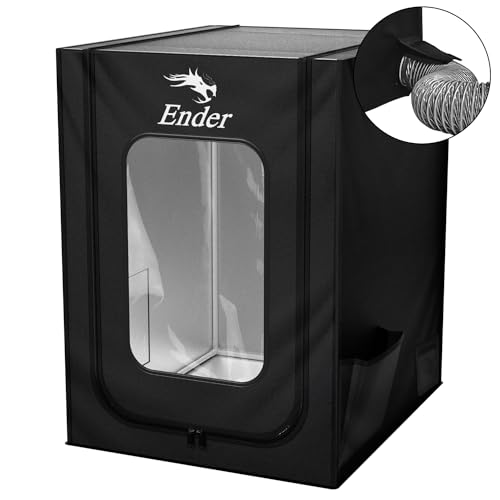
Creality’s official tent that lets you bolt on a smoke exhaust kit for serious fume control.
This enclosure is designed specifically for Creality printers — Hi, Ender 3 V3, V3 KE, V3 SE, Ender 3 S1 line, Ender 5 line, CR-6 SE, and Ender 2 series — and it comes with a fan interface that works with a separately purchased smoke exhaust kit. That is the key feature: unlike the K1 SE enclosure which has no venting provisions, this one has a built-in fan port so you can run ducted fume extraction without cutting a hole in the fabric. The material is flame-retardant aluminum foil cloth, which is corrosion-resistant and reflects heat back to keep the chamber warm.
At 21.65 x 25.59 x 29.53 inches and 4.05 pounds, it is smaller and lighter than the Large YOOPAI tent, so it takes up less space on a desk or shelf. The large transparent viewing window and a side tool pouch for wrenches and nozzles are convenient touches. Assembly uses glass fiber solid rods and takes just a few steps without tools. The downside: the smoke exhaust kit is sold separately, so the effective cost is higher than the YOOPAI Premium which includes both LED and fan in one box. Also, the 29.53-inch height is generous for most Ender printers, but you still need to measure your spool height before buying.
Reasons to Pick It
- Official Creality fit for Ender 3, Ender 5, and CR-6 SE series — no compatibility surprises.
- Fan interface allows adding a smoke exhaust kit for ABS/ASA ventilation.
- Aluminum foil cloth is flame-retardant, waterproof, and heat-reflective.
Reasons to Pause
- Smoke exhaust kit not included — total cost climbs if you need active ventilation.
- At 4.05 pounds, the fabric-only construction is lighter on vibration damping than heavier enclosures.
Grab it if: You want a brand-matched Creality enclosure that can be upgraded to active exhaust without cutting the tent yourself.
Look elsewhere if: You need LED lighting or a temperature monitor from the start — those are not included here.
7. TOPCUBE 3D Printer Enclosure for Bambu Lab A1, Upgraded Large Size
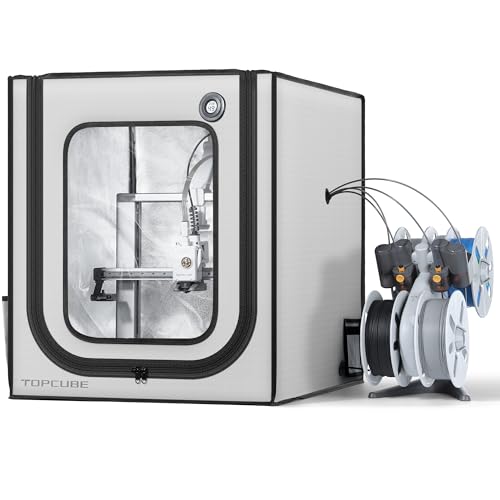
The lightest dedicated A1 enclosure that shoppers say maintains 10-15°C above ambient in real use.
At 3.96 pounds and 23.62 x 21.65 x 26.38 inches, this TOPCUBE is the most compact and budget-friendly option specifically tailored for the Bambu Lab A1 with AMS Lite. What makes it punch above its weight class is the real-world performance buyers report: one verified owner noted it “maintains 10-15°C above ambient” and “muffles high-frequency noise” — exactly the two things you want from an enclosure. Another buyer with a Prusa i3 MK3s & MMU3 fitted it in, confirming the noise drops from 60 decibels to 40 decibels and the enclosure keeps dust off long overnight prints.
The integrated LED light strip is USB-A powered with a simple toggle switch, which makes it easy to turn on without reaching for a phone app. Pass-through ports have rubber gaskets to keep warmth sealed, and side pouches store tools or spare filament. The manufacturer explicitly states the internal temperature will not exceed 40°C, so the printer’s motherboard stays safe. Compared to the stainless-steel TOPCUBE which weighs 8.36 pounds, this lighter option trades frame rigidity for portability — you can pick it up and relocate it easily. The zipper gap is not fully airtight according to a buyer, but for PLA and PETG printing it is more than adequate; ABS users may want the sealed-fit Creality enclosure instead.
What Buyers Love
- Actual temperature rise of 10-15°C above ambient — enough to prevent warping on tall PETG prints.
- Noise reduction from 60dB to 40dB turns the printer into a background hum.
- Easy 5-minute assembly with labeled X/Y/Z poles and straightforward instructions.
What to Watch
- Not fully airtight — zipper gaps visible; may leak heat for ABS in very cold rooms.
- Thermometer only reads Celsius; one reviewer noted max temp 30.5°C at 72°F ambient.
Best for: Budget-conscious Bambu Lab A1 owners who want proven temperature lift and noise reduction without spending on a steel frame.
Skip it for: ABS printing in a cold garage where airtight heat retention matters more than cost savings.
Understanding the Specs
Noise Reduction (Decibel Drop)
Enclosures that state a specific noise reduction figure, like “60 decibels to 40 decibels,” are giving you a real metric you can trust. A 20-decibel reduction halves the perceived loudness — your printer goes from sounding like a conversation to sounding like a quiet library. Look for this number in the spec sheet; if a brand only says “noise barrier” without a decibel figure, the real-world result may be much smaller. The TOPCUBE models and the Large YOOPAI enclosure all back noise blocking with six-side coverage.
Fireproof Material Types
Not all “fireproof” labels are the same. Flame-retardant aluminum foil cloth (used on the Creality enclosure) is heat-reflective and corrosion-resistant — it bounces heat back to the print bed and contains any small fire inside. 600D Oxford cloth with inner composite aluminum film (used on the VEVOR) is tougher against punctures but slightly less heat-reflective. Standard tent fabric on budget enclosures may be treated with a flame-retardant coating, but the coating can wear off over time. If you print with ABS (which requires 100-110°C bed temperatures), prioritize aluminum foil cloth for better long-term safety.
FAQ
Will any enclosure fit my Bambu Lab A1 Combo with AMS?
How much does a 3D printer enclosure reduce noise in a bedroom?
Can I print ABS in a fabric enclosure without a ventilation fan?
What is the difference between 600D Oxford cloth and aluminum foil cloth?
How do I measure my printer to pick the right enclosure size?
Do these enclosures work with Prusa i3 MK3s or MK4 printers?
How long does it take to assemble one of these enclosures?
What temperature can I expect inside an enclosure during a long print?
Can I stack another printer or filament dry box on top of the enclosure?
Final Thoughts: The Verdict
If you want one dependable pick, the best 3d printer enclosure winner is the TOPCUBE 3D Printer Enclosure for Bambu Lab A1 Combo, Stainless Steel Frame because its 8.36-pound steel frame, spec-confirmed noise drop from 60dB to 40dB, and AMS Lite integration give you the most stable, quiet, and precisely-fitted protection for a popular printer. If you want a ventilation fan included and flexible compatibility across multiple brands, grab the YOOPAI Premium with Ventilation Kit. And for a true giant that houses large-format printers like the Neptune 4 Plus or CR-10, the standout is the Large YOOPAI enclosure with its 35.4-inch height and buyer-confirmed ease of assembly.
How We Picked
We do not accept paid placement. Every pick is matched to a real buyer and a real use-case; we do not hands-on test units.
Sources & Methodology
Specifications: manufacturer listings and product documentation. Review insights: verified customer reviews, as of July 2026. Pricing: not shown on this page (it changes often); check the current price via the retailer link.
As an Amazon Associate, Gadgets Feed earns from qualifying purchases. This does not affect which products we feature.