
Our readers keep the lights on and my morning glass full of iced black tea. As an Amazon Associate, I earn from qualifying purchases.
Specs are compiled from manufacturer listings and verified buyer reviews and can change over time — please confirm the key details on the product page before buying.
Architects don’t just need a 3D printer — they need a machine that turns a 3D model into a physical proof-of-concept at scale, without losing a single window mullion or facade seam. A poor printer introduces layer lines, dimensional drift, and failures that waste filament and deadlines.
I’m Min — the founder and writer behind Gadgets Feed. This guide is built by comparing the manufacturers’ published specifications and the patterns across verified customer reviews, so you get each pick’s real strengths and trade-offs instead of marketing spin.
Whether you are iterating a massing model or producing a final presentation piece, this roundup of the best 3d printer for architects focuses on the build volume, speed, material support, and reliability that actually matter in a studio workflow.
Our Picks at a Glance



How To Choose The Best 3D Printer For Architects
An architectural model demands dimensional accuracy, crisp surface detail, and a build area large enough for a massing study or scaled floor plate.
Build Volume: Fit the Whole Project
A 220mm cube printer forces you to split every facade into glued segments. Look for at least 300mm on the longest axis. Bigger volumes (400mm and up) let you print a full one-story massing model in one go, saving glue-work and alignment headaches.
Print Speed & Kinematics: Iteration Counts
Architects run multiple versions of the same part. A Core XY printer running 500–600mm/s can turn a new Revit export into a physical object in the same afternoon, while a bed-slinger at 80mm/s costs you a day every revision. Speed drives iteration, and iteration drives design.
Material Support: From PLA Concept to ABS Presentation
PLA works for early studies. But a final review model needs ABS, PETG, or even a carbon-fiber composite for strength and a vapor-smooth finish. An all-metal hotend that hits 300°C or higher and an enclosed, heated chamber (55–65°C) make those materials printable without warping or delamination.
Reliability & Auto-Leveling: Stop Watching, Start Working
A 12-hour print that fails at hour 11 on a bed adhesion issue is a lost day. Reliable auto-leveling, strain sensors, and a heated build plate separate a tool from a project. Look for automated calibration systems that handle the first layer for you.
Quick Comparison
| Model | Best For | Build Volume | Max Speed | Weight | Amazon |
|---|---|---|---|---|---|
| Bambu Lab P1S Combo★ Best Overall | Best Overall — Reliability & Color | 256 x 256 x 256 mm | 500 mm/s | 47.5 lb | Amazon |
| Anycubic Kobra XBest Value Speedster | Budget Multi-Color Speed | 260 x 260 x 260 mm | 600 mm/s | 20.9 lb | Amazon |
| ELEGOO Neptune 4 PlusLarge Format Pick | Affordable Large Format | 320 x 320 x 385 mm | 500 mm/s | 31.7 lb | Amazon |
| FLASHFORGE AD5M Pro | Family-Friendly Simplicity | 220 x 220 x 220 mm | 600 mm/s | 33 lb | Amazon |
| QIDI Q2 | Enclosed Chamber Value | 270 x 270 x 256 mm | 600 mm/s | 39.8 lb | Amazon |
| Creality K1 Max | AI-Enhanced Production | 300 x 300 x 300 mm | 600 mm/s | 39.7 lb | Amazon |
| Creality Ender 5 Max | Print Farm & Jumbo Models | 400 x 400 x 400 mm | 700 mm/s | 68.9 lb | Amazon |
| QIDI PLUS4 | High-Temp Engineering Materials | 305 x 305 x 280 mm | 600 mm/s | 59.4 lb | Amazon |
| Original Prusa MK4S Kit | DIY Build & Open Source | 250 x 210 x 220 mm | — | 15.4 lb | Amazon |
| Original Prusa CORE One | Premium Enclosed Workhorse | 250 x 220 x 270 mm | — | 56.8 lb | Amazon |
In‑Depth Reviews
1. Bambu Lab P1S Combo
Our pick — over 4★ from 550+ verified ratings; the strongest balance of quality and price.
The enclosed studio workhorse that prints landscapes reliably while you design.
For architects, the P1S Combo is a floor-ready production tool. The enclosed CoreXY body (15.31 x 18.03 x 15.31 inches and 47.5 pounds) feels planted, and buyers report a ~95% success rate over 100 prints — calling the rare failures user error. That kind of reliability means you can hit print on a 12-hour massing model and walk away.
It hits 500mm/s with 20,000 mm/s² acceleration, and the included AMS lets you feed up to 16 colors or multiple materials (PLA, PETG, TPU, PVA, PET, ABS, ASA) into one model without pausing. That is a serious advantage when a presentation board needs color-coded zones or a structural skin in PETG over a PLA core.
The crowd favorite earns its 4.4-star consensus from nearly 600 owners for print quality and reliability above all — 75 owners single out the print quality as the headline feature, and 54 call it reliably flawless. The flip side is a small minority reporting a defective hot end or a clunky software experience; the recurring caveat from those few is to be prepared for a learning curve if you are not used to slicer workflows. Even so, the first print lands inside an hour, and the auto bed leveling removes the worst of the tinkering.
Studio-Ready Strengths
- Up to 16-color/multi-material printing with the AMS — no filament swaps mid-print for color-coded models
- Enclosed body handles advanced filaments (ABS/ASA) without warping
- Set up in 15 minutes; crowd reports a ~95% success rate over 100 prints
Honest Trade-Offs
- Heavy at 47.5 lb — plan a dedicated table, not a shared desk
- A small number of owners ran into a defective hot end or finicky WiFi binding
Reach for the P1S if: you need a set-and-forget workhorse that handles multi-color presentation models and advanced materials with an enclosed chamber.
Look elsewhere if: you want the absolute fastest speed on paper — at 500mm/s versus the Kobra X’s 600mm/s, and the software interface frustrates some beginners.
2. Anycubic Kobra X Multicolor
The lightest speed demon — 20.9 lbs and 600 mm/s for rapid iteration.
The Kobra X is a mid-range entry that punches hard on speed. At 600mm/s versus the Bambu P1S’s 500mm/s and at 20.9 pounds versus the Bambu P1S’s 47.5 pounds, making it genuinely portable between a home office and a studio desk. The 260mm³ build volume (23 x 13 x 22 inches overall footprint) is large enough for most scaled massing models without taking over the room.
It debuts native 4-color printing from the start (expandable to 19 colors with four ACE 2 Pro units), and owners running it for 265 hours report only a single user-caused failure. The hardened steel nozzle handles PLA, PETG, TPU, PVA, and ASA, so you can move from concept PLA to a more durable PETG for a review model. The AI camera spots spaghetti failures, which is a time-saver on unattended overnight prints.
The catch is reliability — the aspect consensus is mixed, with 28 owners citing reliability as a hit-or-miss point, and a few reporting severe software/WiFi glitches that forced a return. The value for money is undeniable (11 owners call it out), but if you need a rock-solid studio backup, the P1S is safer. For an architect on a tight budget who needs speed and multi-color, the Kobra X is excellent.
Our take: The fastest printer in the list by spec at 600mm/s, paired with a native 4-color ACE system. Best for architects who iterate fast on PLA and PETG models and want the lowest barrier to multi-color. skip it if you want an enclosed chamber for ABS or a proven track record of reliability over hundreds of hours.
Grab it for: budget-conscious studios that run quick color studies and need 600mm/s speed in a light 20.9-lb frame.
Think twice if: you need an enclosed chamber for warping-prone materials like ABS or ASA, or you want a proven reliability record above a mixed-aspect score.
3. ELEGOO Neptune 4 Plus
The Z-axis monster — 385mm tall lets you print a full tower in one go.
The Neptune 4 Plus answers the biggest architectural limitation: height. With a build volume of 320 x 320 x 385mm, it clears the standard 300mm-cube printers by a significant margin on the Z-axis, so a full multi-story massing model or a tall column study prints in one piece, not split and glued. The 31.7-pound weight is a solid half-step between the portable Kobra X and the 47.5-pound P1S.
It runs Klipper firmware at up to 500mm/s (12,000 mm/s² acceleration) with a 300°C nozzle, input shaping, and pressure advance. Owners praise the print quality (29 call it out positively) and the easy setup (12 mention it). The direct-drive extruder with a 5.2:1 reduction ratio handles PLA, PETG, ABS, TPU, and nylon. But the reliability score is mixed (29 owners flag it), and a few units have reportedly stopped working within two weeks — the risk of a lemon is higher here than on the P1S.
The trade-off is speed: 500mm/s trails the Kobra X’s 600mm/s, and the lack of a built-in multi-material system means no color swaps mid-print without manual intervention. For an architect who prizes tall, single-piece prints and is comfortable with some tuning, the Neptune 4 Plus delivers the biggest build volume for the dollar.
Our read: The largest build volume in the affordable tier (385mm on the Z-axis) with Klipper firmware for speed. Best for tall architectural models like scaled towers or column studies. The reliability split (positive vs. mixed in equal measure) means expect some tinkering or an occasional unit swap.
Best for: architects printing tall, single-piece models who are willing to do some bed-leveling and firmware tuning to open up reliability. Not for: anyone who needs a guaranteed out-of-box experience for production deadlines.
4. FLASHFORGE AD5M Pro
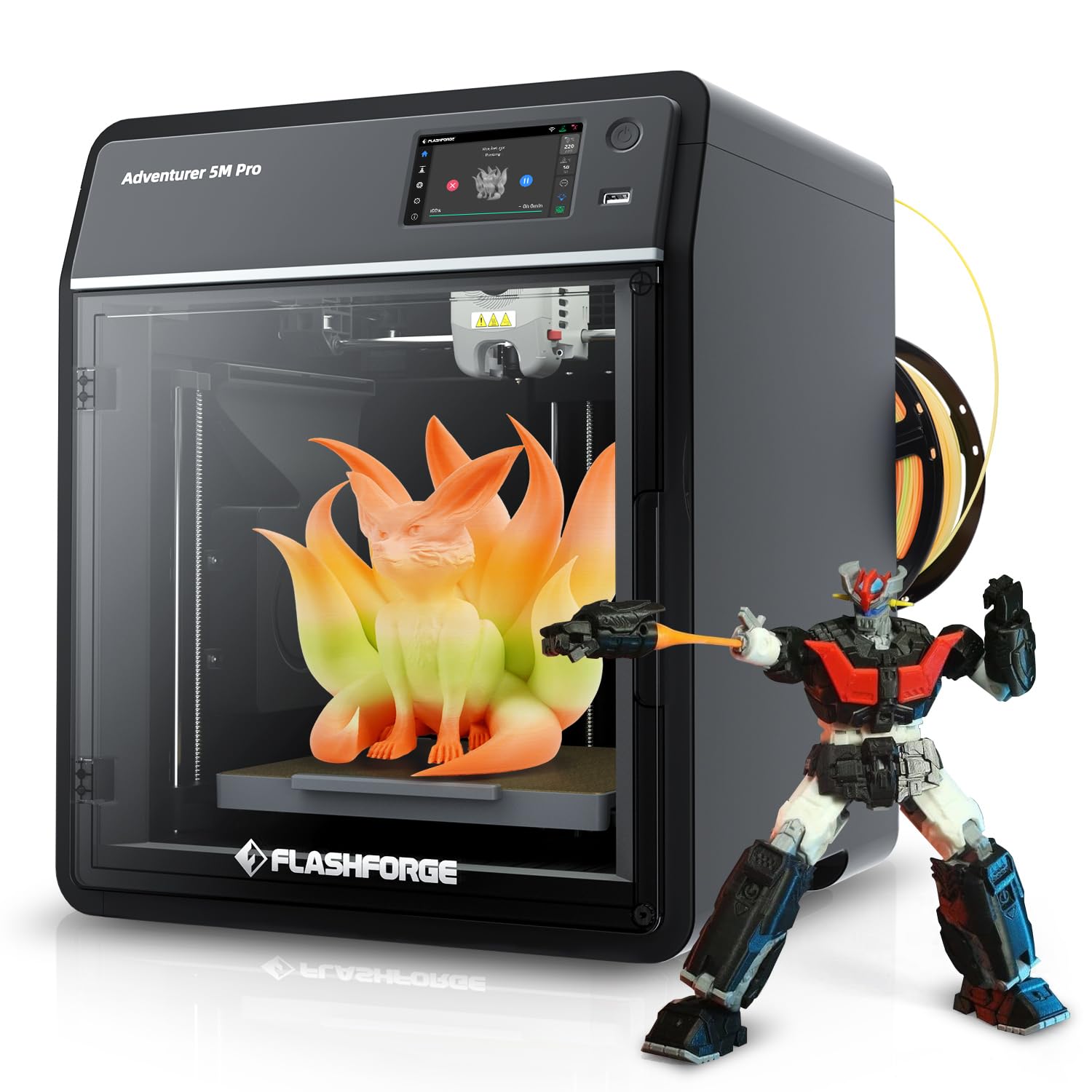
The quiet Core XY (50dB) that delivers fast prints in a shared space without the noise.
The AD5M Pro is the rare fast printer that stays quiet — 50dB is library-level, making it the best choice for an open-plan studio or a home office where the printer runs during calls. It hits 600mm/s with a Core XY structure and a quick-swap hotend (0.4mm and 0.6mm included), and the 220mm³ build volume (15.75 x 17.83 x 14.96 inches at 33 pounds) keeps the footprint compact.
The real draw is ease of use: the crowd praises printer quality (14 mentions) and ease of setup (5 mentions). One owner notes their kid uses it with an app to start prints remotely — suggesting a low barrier to entry. The bundled 250g PLA gets you started immediately. But the build volume at 220mm³ is the smallest here, so you will split any model larger than a shoebox. The hotend swap is fast, and the built-in camera helps with monitoring.
The main constraint for an architect is the 220mm³ build volume — you cannot print a full-scale massing model in one piece. The reliability rating is mixed (9 owners flagged it), but the positive consensus is strong from the 74 reviews. This is a capable secondary printer for detail parts and prototypes, not a primary production machine.
Perfect fit: The quietest Core XY at 50dB, with a quick-swap hotend and 600mm/s speed. Ideal for a shared studio where noise matters and you primarily print small detail parts or educational models. The 220mm³ build volume is the tightest here — it is a specialist tool, not a generalist.
Best for: noise-sensitive environments and smaller architectural details (window mullions, joint mock-ups). pass on it if: you need to print any model larger than a 220mm cube in one piece.
5. QIDI Q2

The 65°C heated chamber that kills warping on ABS architectural models.
The QIDI Q2 is built for the architect who needs engineering-grade materials. The 270 x 270 x 256mm build volume (15.83 x 17.24 x 19.45 inches, 39.8 pounds) is generous, but the real weapon is the second-generation PTC heated chamber that reaches 65°C. That consistent heat kills warping and delamination on ABS, ASA, polycarbonate, and even carbon/glass-fiber composites — exactly the materials that give presentation models their strength and finish.
It runs a full-metal Core XY at 600mm/s with a 370°C nozzle, linear rails, and the nozzle itself acts as the leveling sensor (giving what owners call “class-leading first-layer accuracy”). The triple filtration system (G3 pre-filter + H12 HEPA + activated carbon) means you can print ABS indoors without overwhelming the studio with fumes. Owners praise the print quality (61 mentions) and the easy setup (20), with many calling it the “best value” printer for the features.
The reliability rating is mixed (42 owners flag it), and a few report AI spaghetti detection false positives and an occasional chamber heater fan failure. For the price tier, the Q2 packs features that typically cost hundreds more — it is the best mid-range option for architects who need advanced materials in an enclosed, filtered chamber.
Smart buy: The 65°C active chamber, 370°C hotend, and triple HEPA filtration make the Q2 the most capable mid-range printer for engineering-grade filaments. The crowd consensus is split on long-term reliability, but the positive feedback on print quality (61 owners) is the strongest in this tier.
Reach for this if: you need ABS, PC, or carbon-fiber composites for durable presentation models and want an enclosed, filtered chamber without paying premium-tier prices. it’s not for you if: you only print PLA or PETG and are not ready for the tuning that advanced materials demand.
6. Creality K1 Max

The 1-micrometer LiDAR that scans each first layer and stops failures before they compound.
The K1 Max is the most-reviewed printer in the list (nearly 10,000 owners) with a 4.3-star consensus, and it earns the attention. It packs a 1 Micrometer Resolution AI LiDAR that scans the first layer and stops the job if it detects a problem — a feature set that directly addresses the architect’s fear of an 8-hour print failing overnight. The AI Camera also recognizes spaghetti failures and foreign objects, and supports real-time monitoring and time-lapse filming.
The 300mm³ build volume (11.81 x 11.81 x 11.81 inches) with a Core XY structure hits 600mm/s and 20,000mm/s² acceleration, . The strain sensors in the heatbed enable dual hands-free auto leveling — no manual adjustments. At 39.7 pounds and 17.12 x 18.18 x 20.7 inches, it is a defined floor footprint that requires permanent placement.
The crowd loves the print quality (363 call it out), the value (376), and the ease of setup (328). But reliability is heavily mixed (546 owners flag it), and the bed-leveling process specifically attracts negative feedback (174 call it a pain point). Owners consistently say this is “not for plug-and-play people” — you need to be willing to check belt tension, square the frame, and troubleshoot. For an architect comfortable with a few hours of initial tuning, the K1 Max delivers class-leading AI safety nets at its price.
Data-driven take: The AI LiDAR (1-micrometer resolution) and AI camera make the K1 Max the safest printer for unattended overnight prints — it scans the first layer and stops failures before they waste hours. But 546 owners flag as mixed on reliability, and 174 specifically hate the bed leveling process. Best for the tinkerer; skip if you want a truly out-of-box experience.
Ideal for: architects who run long, unattended prints and want AI-based failure detection as a safety net. look elsewhere if: you want a plug-and-play machine — the tuning curve is real, and the bed-leveling frustration is well-documented.
7. Creality Ender 5 Max

The 400mm³ monster that plates a whole floor plan in one go.
The Ender 5 Max is the largest build volume in the list at 400 x 400 x 400mm — at 400 x 400 x 400mm (64,000,000 mm³) versus a 300mm-cube printer’s 27,000,000 mm³. For an architect, that means you can print a 1/8th-scale floor plate of a small house or a facade section with deep reveals in a single piece, reducing post-processing glue-work significantly. The all-metal die-cast aluminum frame (68.9 pounds) keeps vibration minimal on tall models.
It runs a Core XY system at up to 700mm/s (the fastest speed spec here) with a 1000W rapid-heating bed and 64-point auto leveling. The direct-drive dual-gear extruder supports PLA, PETG, ABS, ASA, PA, and more. It is built for print-farm operation with WLAN multi-printer control and a tri-color status indicator. Owners who run it for production love the speed and build volume (one calls it “perfect to start your small business”).
The reliability is split: some owners mention bed adhesion worse than nonstick cookware and parts loosening over time. The 4.0-star rating from 115 owners is the lowest in this list, reflecting quality-control inconsistencies. For an architect who needs jumbo prints and has time to dial in the machine, the Ender 5 Max delivers scale class-leading by anything here. But the reliability risk is higher, and replacement parts may be slow to arrive.
Scale champion: 400mm³ build volume and 700mm/s speed in a reinforced all-metal frame. The largest and fastest printer here, but the 4.0-star average and mixed reliability reviews (some customers note severe bed adhesion issues) mean it rewards patience and tuning. Best for a dedicated production studio, not a beginner.
Go for this if: you need the absolute largest build volume (400mm³) for oversized architectural models and have the floor space (68.9 lb frame). steer clear if: you need out-of-box reliability; the quality-control split on this model is the widest in the list.
8. QIDI PLUS4

The 370°C hotend that prints PPS-CF — the strength architects trust for structural models.
The QIDI PLUS4 is built for one thing: printing the hardest engineering filaments. Its 370°C all-metal hotend and 400W dual-layer-insulated active chamber (which holds 65°C) enable PPS-CF, PPA-CF/GF, ABS, ASA, PC, and more — materials that produce models with real-world structural properties. The 12 x 12 x 11-inch build volume (305 x 305 x 280mm) on a reinforced frame (19.29 x 20.07 x 22.24 inches, 59.4 pounds) handles large composite parts without flex.
Owners who run the machine for months praise the quality (134 call it out) and the print speed (40 mention it). The crowd consensus: “prints flawlessly from the start across multiple materials” and runs at full rated 600mm/s without issues. The automatic filament cutter, nozzle cleaning, and bed leveling make it feel polished. The 4.1-star average from 440 owners is solid.
The mixed feedback (121 owners flag reliability) centers on occasional factory defects — a jammed hotend or a failed OTA update — rather than design flaws. Customer support is described as responsive, sending replacement parts with DIY videos. The open-source Klipper firmware also gives experienced users full control. For an architect running a design-build studio who prints carbon-fiber composites frequently, the PLUS4 is a specialist tool that pays off in material versatility.
Specialist verdict: The 370°C nozzle and 400W active chamber make the PLUS4 the go-to for PPS-CF and PPA-CF composites. The 4.1-star rating from 440 owners confirms it prints flawlessly across materials, though 121 flag potential factory defects. Strong for high-temp production; overkill if you only ever print PLA.
Best for: architects who need to print carbon-fiber and glass-fiber composites for functional prototypes or structural models. skip it if: your material list stops at PLA and PETG — you are paying for capability you will not use.
9. Original Prusa MK4S Kit
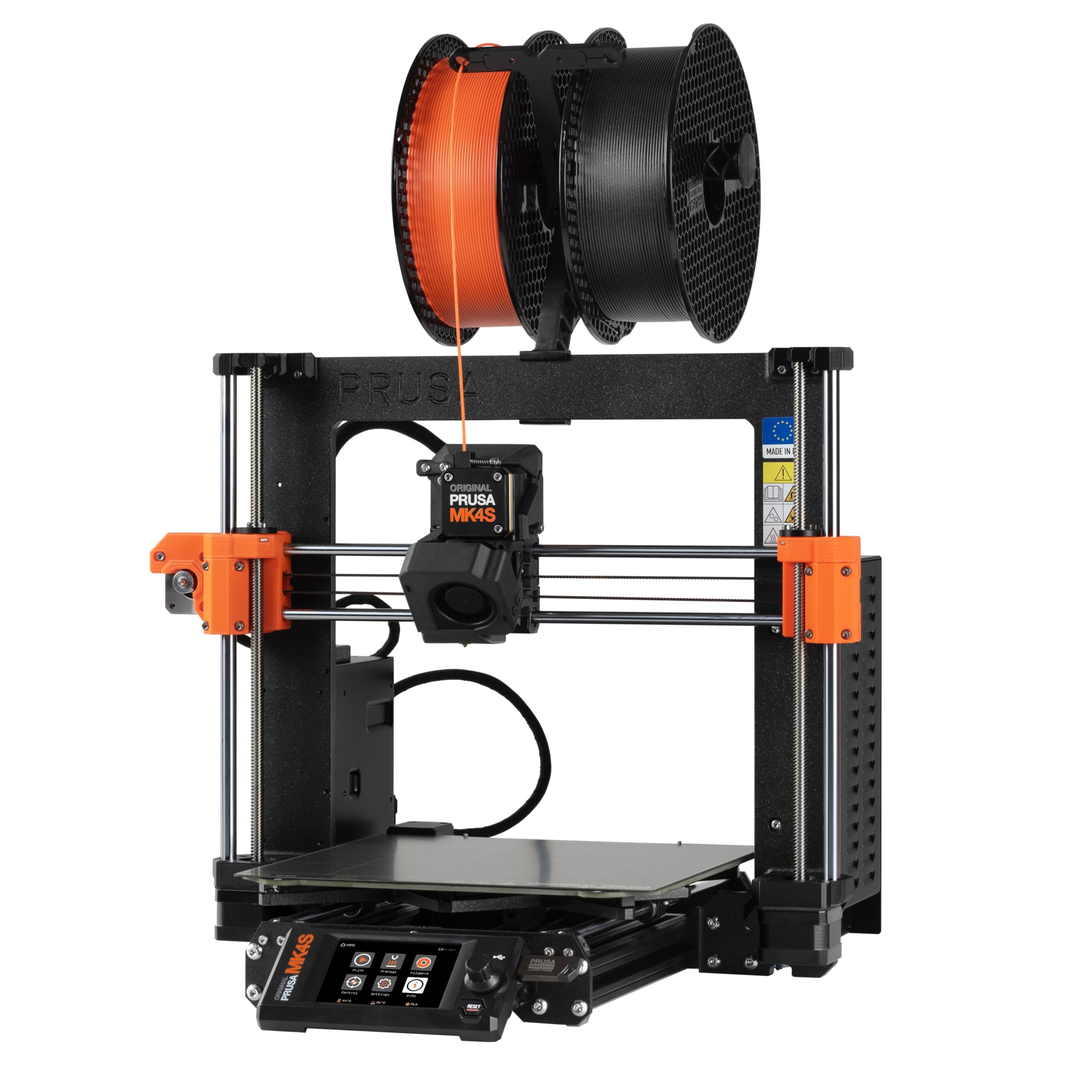
The self-build that teaches you the printer’s anatomy while you assemble it.
The MK4S Kit is not for someone who needs a print on the desk in 15 minutes. It is a rewarding one-day DIY build (15.4 pounds, 19.6 x 15.7 x 21.6 inches) that teaches the full mechanics and electronics of professional FDM printing. The payoff is a printer you truly understand — and one that delivers print quality owners call “class-leading by lower-cost printers,” with a 12-hour complex print needing zero supports.
The 9.84 x 8.3 x 8.6-inch build volume (250 x 210 x 220mm) is modest, but the input shaping cuts ringing and vibration artifacts on fast prints. The open-source design means you can upgrade it for years, and Prusa’s firmware support is legendary. Owners love the quality (18 call it out) and find the assembly process educational rather than frustrating, though a few report missing parts or an LCD failure.
The mixed reliability score (13 owners flag it) and the 4.2-star average from 83 reviews reflect occasional QC gaps (missing trapezoid nuts, a dead LCD after three days). The price is the highest for its build volume on this list. For an architect who values deep mechanical understanding and long-term upgradability, the MK4S Kit is the most future-proof machine here. For a deadline-driven studio, the assembly time and small volume make it a secondary or educational tool.
Our read: A DIY kit that delivers professional-grade print quality (18 owners praise it) with full open-source upgradability. The 15.4-pound weight and modular design make it portable and repairable. Best for educational settings or architects who want to understand their tool completely. The assembly process takes a full day.
Best for: the architect who enjoys the build process as much as the printing and wants a fully repairable, open-source platform. pass on it if: you need a large build volume (220mm tall only) or immediate out-of-box production.
10. Original Prusa CORE One

The made-to-last Prusa that brings Core XY speed to a 55°C sealed chamber.
The CORE One is Prusa’s first Core XY machine, and it shows the brand’s trademark “made to last” philosophy. The all-steel exoskeleton frame (56.8 pounds, 16.3 x 17.5 x 21.8 inches) provides maximum firmness, and the enclosed chamber with active temperature control reaches 55°C — hot enough to print ASA, PC, and nylon with the door closed while still handling PLA and PETG without heat-creep issues.
The 250 x 220 x 270mm build volume (9.8 x 8.6 x 10.6 inches) is modest for the price, but the quality and open-source ethos justify the premium. Owners call it a “solid, dependable workhorse” with “amazing print quality and speed” compared to Flash Forge and Creality machines. The build time (~25 hours for the kit version) is substantial, but the assembled-and-tested option (listed here) removes that hurdle. A free 1kg spool of Prusament PLA Galaxy Black is included.
The 4.0-star average from 86 owners is pulled down by complaints that it is “overpriced vs. Bambu” and that the quality at this price point should feel more premium. Some units arrived with firmware issues or missing parts. For a studio that values the Prusa ecosystem, open-source repairability (no cloud lock-in), and a sealed chamber for advanced materials, the CORE One is a long-term investment. For the same or less money, the Bambu P1S offers a larger build volume and multi-color AMS.
Premium verdict: The CORE One is Prusa’s statement Core XY with a 55°C active chamber and an all-steel frame. Owners love the print quality (26 praise it) and speed (8 mention it), but the price is the highest in the list for a 270mm-tall build volume. Best for the Prusa loyalist who wants an enclosed, open-source machine; the Bambu P1S offers more volume and multi-color for less.
Go for this if: you value open-source, right-to-repair design, and are willing to pay a premium for Prusa’s reliability and a 55°C enclosed chamber. it’s not for you if: you want the largest build volume or multi-color printing for the dollar — the Bambu P1S offers more for less.
Understanding the Specs
Build Volume (mm³)
This is the physical space your printer can fill. A 300 x 300 x 300mm cube lets you print a 1/8th-scale massing model of a small house in one piece. Anything under 250mm on the Z-axis will force you to split taller elements. For architectural work, prioritize at least 300mm on the longest axis.
Print Speed (mm/s)
Measured in millimeters per second (mm/s), this tells you how fast the print head moves. A 600mm/s printer can finish a Benchy benchmark in around 14 minutes, while a 150mm/s machine takes over an hour. Speed directly controls your iteration rate — the faster the printer, the more design versions you can hold in a single afternoon.
FAQ
What build volume do I need for an architectural model?
Is an enclosed chamber necessary for architectural printing?
What is the difference between Core XY and bed-slinger printers?
Can you print a full-color architectural model on a single-material printer?
How fast should a 3D printer be for architectural iteration?
What materials are best for architectural models?
How important is auto bed leveling for an architect?
Can a 3D printer handle carbon-fiber reinforced filaments?
Is a Prusa worth the premium over a Creality or Bambu?
How loud are these printers in a shared studio?
Final Thoughts: The Verdict
For most architects, the 3d printer for architects winner is the Bambu Lab P1S Combo because it delivers an class-leading balance of reliability (4.4 stars across nearly 600 owners), multi-material capability (16 colors via AMS), and a 500mm/s Core XY speed in an enclosed chassis that handles advanced filaments. If you prioritize raw speedand need a budget-friendly multi-color option, grab the Anycubic Kobra X. And for those requiring engineering-grade materials like PPS-CF in a filtered chamber, the QIDI Q2 is the specialist to reach for.
How We Picked
We do not accept paid placement. Every pick is matched to a real buyer and a real use-case; we do not hands-on test units.
Sources & Methodology
Specifications: manufacturer listings and product documentation. Review insights: verified customer reviews, as of July 2026. Pricing: not shown on this page (it changes often); check the current price via the retailer link.
As an Amazon Associate, Gadgets Feed earns from qualifying purchases. This does not affect which products we feature.