
Choosing a 3D printer for a business environment shifts the conversation entirely. Consumer machines prioritize tinkering and speed, while a production tool demands consistent uptime, repeatable accuracy, and material versatility that can handle engineering-grade filaments without constant recalibration. The wrong choice here means lost hours, failed parts, and a machine that becomes a shelf ornament rather than a profit center.
I’m Min — the co-founder and writer behind Gadgets Feed. I’ve spent hundreds of hours analyzing the technical specifications, real-world reliability data, and ecosystem maturity of every major industrial and prosumer 3D printer on the market to build this guide for serious buyers.
After comparing build volumes, heated chamber capabilities, multi-material support, and print-farm networking features, I’ve narrowed the field to the most reliable options for scaling production. Read on for the definitive 3d printer for business lineup.
How To Choose The Best 3D Printer For Business
Buying a 3D printer for a business is an investment in production capacity, not a hobby. The machine you choose must deliver consistent results across hundreds of hours of operation, support the materials your parts require, and integrate into your workflow without constant babysitting. Below are the critical factors to evaluate before you buy.
Build Volume and Footprint
Your typical part size determines the minimum build volume you need. A 300mm³ workspace handles most prototypes and jigs, but producing larger single pieces or batch-printing multiple parts simultaneously demands a 350mm or 400mm cube. Remember that the printer’s physical footprint is larger than its build area — a 400mm machine often requires a dedicated table and weighs over 60 pounds, so measure your floor plan before committing.
Heated Chamber and Material Range
An enclosed printer with an actively heated chamber is non-negotiable for engineering-grade filaments like ABS, ASA, PC, and carbon-fiber composites. A chamber temperature of at least 55°C to 65°C drastically reduces layer separation and warping. Without it, you are confined to PLA and PETG, which limits functional part strength and heat resistance. Check the rated nozzle temperature too — 300°C is the baseline for standard engineering materials, while 370°C or higher is needed for PEEK or Ultem.
Motion System and Print Speed
CoreXY architectures dominate the mid-to-premium tier because they allow faster print speeds without sacrificing rigidity. Look for linear rails on the X and Y axes, as they reduce maintenance frequency compared to V-slot wheels. Acceleration figures matter more than raw speed — 20,000 mm/s² to 30,000 mm/s² translates to real-world throughput gains. Closed-loop stepper motors add position verification, eliminating skipped steps during long runs.
Multi-Material and Multi-Color Capability
If your business produces parts requiring soluble supports (PVA, BVOH) or multi-color branding, you need a printer that supports filament changers or dual-tool heads. The Bambu Lab AMS and QIDI BOX systems enable up to 16 colors with intelligent dry-box storage. For true dual-extrusion without a swap, a two-toolhead system like the Prusa XL allows simultaneous material switching with minimal purge waste.
Quick Comparison
On smaller screens, swipe sideways to see the full table.
| Model | Category | Best For | Key Spec | Amazon |
|---|---|---|---|---|
| QIDI Max4 Combo | Premium FDM | Large engineering prototypes | 390×390×340mm, 800mm/s, 65°C chamber | Amazon |
| Prusa MK4S | Premium FDM | Reliable daily production | 250×210×210mm, Input Shaping | Amazon |
| Bambu Lab P1S Combo | Mid-Range FDM | Multi-color rapid prototyping | 256×256×256mm, 500mm/s, 16 colors | Amazon |
| Creality K2 Plus Combo | Premium FDM | High-speed multi-color production | 350×350×350mm, 600mm/s, CFS | Amazon |
| Creality Ender 5 Max | Mid-Range FDM | Large-format batch printing | 400×400×400mm, 700mm/s, 1000W bed | Amazon |
| Creality K1 Max | Mid-Range FDM | Fast out-of-box workflow | 300×300×300mm, 600mm/s, AI LiDAR | Amazon |
| ANYCUBIC Photon P1 | Premium Resin | High-detail dental & jewelry parts | 223×126×230mm, 14K LCD, 8000 cps | Amazon |
| QIDI Q2 | Mid-Range FDM | Entry-level business FDM | 270×270×256mm, 600mm/s, 65°C chamber | Amazon |
| Prusa XL 2-Toolhead | Industrial FDM | High-end dual-material production | 360×360×360mm, CoreXY, dual tool | Amazon |
In‑Depth Reviews
1. QIDI Max4 Combo

The QIDI Max4 Combo is the most compelling large-format 3D printer for businesses that need to produce functional prototypes and end-use parts from demanding materials. Its 390×390×340mm build volume is 55% larger than its predecessor, and the fully enclosed 65°C actively heated chamber with a Polar Cooler system creates ideal conditions for ABS-CF, PC, and PPS-CF — filaments that warp or delaminate in unheated machines. The closed-loop motors on the X and Y axes provide position verification, hitting a maximum speed of 800mm/s with 30,000 mm/s² acceleration while maintaining layer-to-layer accuracy.
Multi-material flexibility is handled by the QIDI BOX, which supports up to 16 colors with intelligent filament management, real-time level monitoring, and automatic pause on run-out. The high-flow hotend with a hardened steel nozzle delivers 40mm³/s throughput, essential for filling the large build area efficiently. An integrated AI camera detects spaghetti failures and pauses the print automatically, saving material during unattended overnight runs.
Several reviewers noted a choppy user interface and a longer pre-print preparation time compared to smaller machines. The 120-pound weight requires a dedicated, sturdy table, and the Polar Cooler must be purchased separately — it is not included in the base model. However, for a business scaling engineering-grade production, the combination of build volume, chamber temperature, and open-source Klipper firmware makes the Max4 Combo a solid long-term investment.
Why it’s great
- Massive 390mm³ build volume reduces part splitting and enables batch production
- Active 65°C chamber unlocks high-temperature engineering filaments reliably
- Closed-loop stepper motors prevent layer shifts during long prints
Good to know
- Polar Cooler accessory is not included and must be bought separately
- Pre-print calibration cycle takes several minutes before each job
- High power draw during initial chamber heat-up may require a dedicated circuit
2. Prusa MK4S

The Prusa MK4S continues the tradition of exceptional reliability that has made Prusa machines the standard in educational and small-production environments. Its 250×210×210mm build volume is modest compared to the large-format competitors on this list, but the trade-off is a proven motion system enhanced with Input Shaping, which actively compensates for ringing and vibrations at higher speeds. The result is sharp corners and smooth surfaces even when printing PETG or ABS at 200mm/s, making it ideal for functional parts that require dimensional accuracy.
What sets the MK4S apart for business use is its open-source architecture. The firmware is fully customizable, spare parts are readily available, and Prusa provides long-term firmware updates that extend the printer’s useful life. The included 1kg spool of Prusament PLA Galaxy Black gets you printing immediately, and the Prusa Connect platform offers cloud monitoring and remote management for small print farms. The self-cleaning nozzle and automatic first-layer calibration reduce operator intervention between jobs.
Reviews consistently praise the print quality and quiet operation, but note the price premium — the MK4S costs roughly double what a comparable spec Bambu Lab P1S costs. Additionally, the build volume is too small for larger industrial parts, and the kit version requires several hours of assembly. For a business prioritizing reliability and long-term support over raw volume or speed, however, the MK4S is hard to beat.
Why it’s great
- Exceptional dimensional accuracy with Input Shaping motion compensation
- Fully open-source design with guaranteed parts availability and firmware updates
- Quiet operation suitable for office environments
Good to know
- Build volume is small at 250×210×210mm — unsuitable for large prototypes
- Premium price point compared to similar-spec Chinese competitors
- Kit assembly takes several hours; pre-assembled units cost more
3. Bambu Lab P1S Combo

The Bambu Lab P1S Combo has become the benchmark for value in the prosumer 3D printing space, delivering a fully enclosed printer with an Automatic Material System (AMS) that supports up to 16 colors or multi-material prints. The CoreXY motion system achieves 500mm/s print speeds with 20,000 mm/s² acceleration, and the enclosed design improves ABS and ASA print quality by stabilizing the ambient temperature around the part. The AMS keeps filaments dry during operation, which is critical for hygroscopic materials like PETG and PVA.
Setting up the P1S takes roughly 15 minutes, and the auto bed leveling system ensures consistent first layers without manual intervention. The machine supports PLA, PETG, TPU, PVA, ABS, and ASA with pre-configured profiles, while PA and PC are rated as capable but require fine-tuning. The Bambu Handy app provides remote monitoring and print management, making it easy to check on jobs from a phone.
Customer reviews report a 95% success rate over hundreds of prints, with failures attributed mostly to user error. The main limitation is that the P1S is not recommended for carbon-fiber or glass-fiber reinforced filaments — the standard nozzle and extruder cannot handle abrasive materials without upgrading to a hardened steel assembly. Additionally, the AMS is locked into the Bambu ecosystem, meaning third-party filament integration requires manual setup without RFID detection.
Why it’s great
- Excellent value with included AMS for multi-color and multi-material printing
- Fast setup and reliable auto leveling reduce operator overhead
- Enclosed design improves ABS and ASA part quality
Good to know
- Not suitable for carbon-fiber or glass-fiber filaments without hardened upgrades
- AMS is proprietary and does not support RFID detection for non-Bambu spools
- Build volume is limited to 256mm³ for large-scale production
4. Creality K2 Plus Combo

The Creality K2 Plus Combo brings a 350×350×350mm build volume and multi-color capability via the Creality Filament System (CFS) to the mid-premium bracket, making it a strong contender for businesses that need large, colorful parts without jumping to industrial pricing. Its step-servo motor system achieves 30,000 mm/s² acceleration and 600mm/s print speed, with a high-flow hotend delivering 40mm³/s output. The actively heated chamber and hardened steel nozzle unlock materials including PLA, ABS, PETG, PA-CF, and PPA-CF, covering most engineering requirements.
The dual AI cameras provide real-time monitoring and spaghetti failure detection, while the anti-tilt auto leveling system uses independent dual Z-axis motors with strain-gauge compensation for reliable first layers. The “Matrix” frame construction with die-cast aluminum and four linear rods on the Z-axis virtually eliminates layer shift, even when printing tall objects at high speeds.
While many users report zero failed prints and easy setup, a minority experienced hardware defects including Y-axis communication failures and extruder motor wiring issues that required Creality support intervention, which can be slow (parts took about two weeks to arrive). The printer is also heavy — requiring two people for unboxing — and the CFS system can be loud during color changes. For a business that can handle occasional troubleshooting, the K2 Plus offers tremendous size and speed per dollar.
Why it’s great
- Large 350mm³ build volume with multi-material CFS support handles batch production
- Step-servo motors deliver quiet, vibration-free high-speed printing
- Actively heated chamber and hardened nozzle support carbon-fiber composites
Good to know
- Some units arrive with hardware defects requiring support intervention
- CFS system is loud during multi-color filament changes
- Assembly instructions are vague; the printer is very heavy at 120+ pounds
5. Creality Ender 5 Max

The Creality Ender 5 Max is engineered specifically for large-scale production and print-farm operations. Its 400×400×400mm build volume is the largest among the FDM printers on this list, allowing you to produce oversized prototypes or print dozens of small parts in a single run. The CoreXY motion system with high-torque motors achieves 700mm/s, and the 1000W rapid-heating bed reaches working temperature in minutes, supporting PLA, PETG, ABS, ASA, PA, and more.
Print-farm management is a key differentiator: the Ender 5 Max supports WLAN multi-printer control with grouped management and a tri-color status indicator for at-a-glance monitoring across a bank of machines. The 64-point automatic leveling system with auto Z-offset ensures first-layer reliability without manual calibration, saving time on each job. The direct-drive dual-gear extruder is built for 24/7 operation with hardened gears that minimize clogging.
However, long-term reliability reports are mixed. Several users experienced major failures including bed adhesion issues, violent shaking that broke the extruder casing, and parts loosening during operation. Replacement part availability was also cited as a problem. The printer does not come with an enclosure, so printing ABS or ASA requires fabricating one — which adds cost and complexity. For a business willing to invest in strong quality control and an aftermarket enclosure, the massive build volume can be a productivity boon.
Why it’s great
- Massive 400mm³ build volume for oversized parts or high-volume batch printing
- WLAN multi-printer control streamlines print-farm management
- 1000W heated bed heats up quickly for minimal downtime between jobs
Good to know
- No enclosure included — requires aftermarket solution for high-temp materials
- Reports of mechanical failures and loose parts during extended use
- Replacement parts are difficult to source through Creality support
6. Creality K1 Max
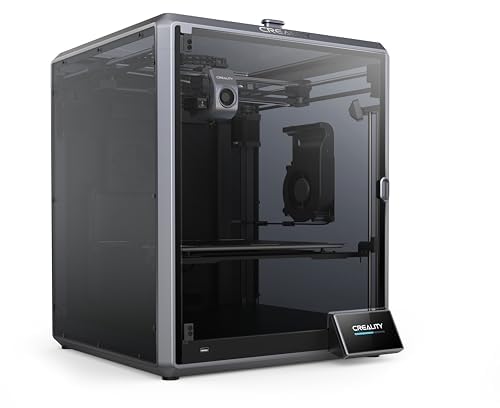
The Creality K1 Max earned a Red Dot Award for its integrated design and remains one of the fastest out-of-box experiences for businesses that want minimal setup friction. It arrives fully assembled and calibrated, with a quick start guide that lets you run the first test print within minutes. The AI LiDAR system scans the bed tilt at a million points with 1-micron resolution, automatically compensating for surface irregularities without any manual adjustment.
The 300×300×300mm build volume is ample for most prototyping needs, and the 600mm/s speed with 20,000 mm/s² acceleration cuts production time significantly compared to standard printers. The ceramic heater surrounding the hotend ensures consistent melt temperature up to 300°C, while dual cooling fans — one on the print head and one inside the chamber — harden layers quickly to prevent deformation. The AI camera monitors spaghetti defects and foreign objects, pausing the print if a problem is detected.
User reviews are generally positive but highlight that the K1 Max requires a more hands-on approach than the Bambu P1S. The slicer software is functional but bare-bones, and some users report that support responsiveness is inconsistent — a major concern for a business machine. Additionally, the K1 Max does not include a multi-material system by default; the CFS must be purchased separately. For a business that values rapid setup and LiDAR-leveling precision, the K1 Max delivers, but plan for a learning curve on material profiles.
Why it’s great
- Fully pre-assembled and calibrated — print-ready in under 30 minutes
- AI LiDAR leveling with 1-micron resolution ensures perfect first layers
- Fast 600mm/s speed reduces per-part production time
Good to know
- Multi-color CFS system is an optional add-on, not included
- Slicer software is bare-bones compared to Bambu or Prusa ecosystems
- Customer support responsiveness is inconsistent
7. ANYCUBIC Photon P1
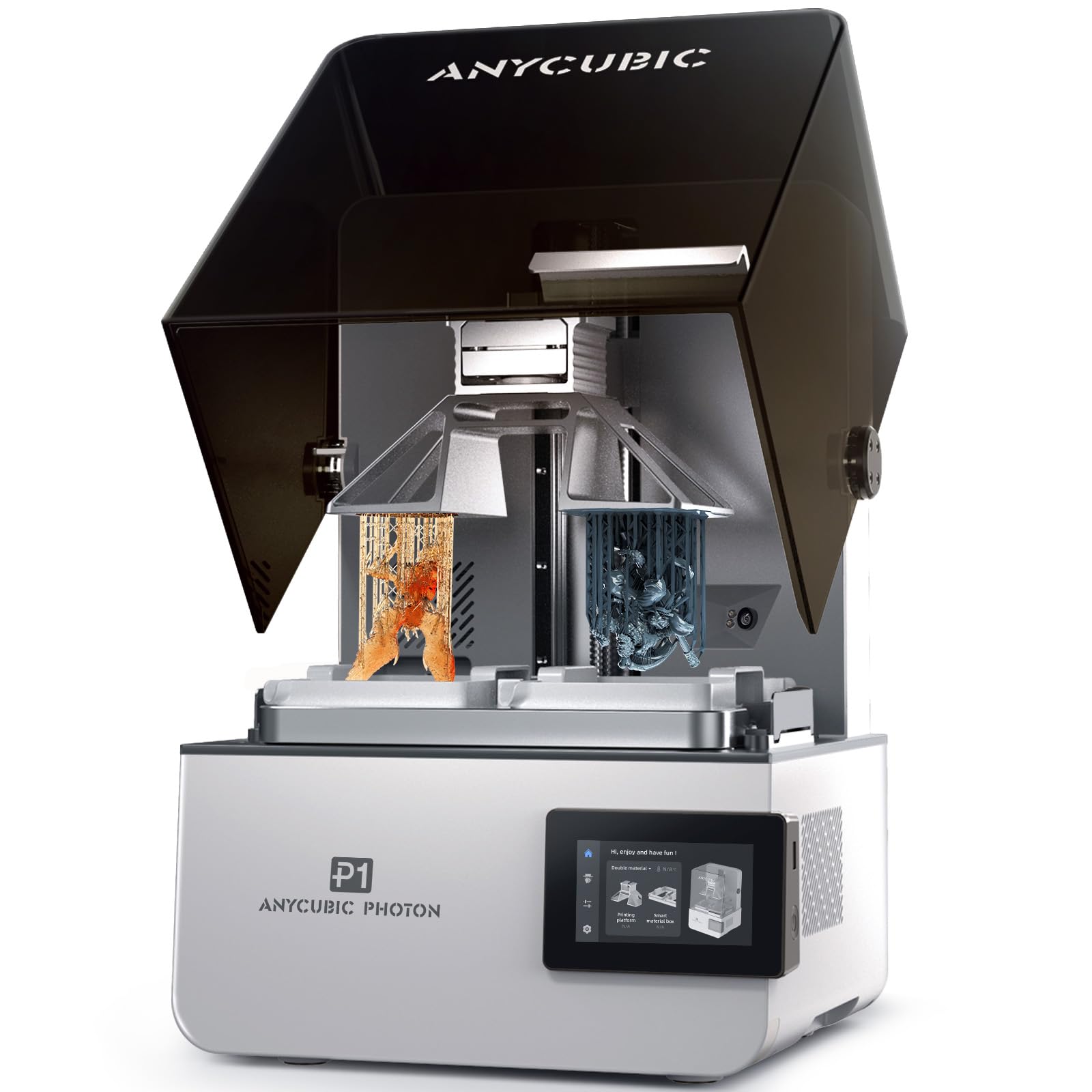
For businesses that require extreme detail — dental models, jewelry patterns, microfluidic devices — the ANYCUBIC Photon P1 delivers resin printing quality that bridges the gap between hobbyist and industrial. Its 14K 10.1-inch LCD provides an XY resolution of 16.8×24.8 microns, capturing fine features and smooth surfaces that FDM cannot match. The dual-color and dual-material printing capability allows two different resins or colors in a single print, reducing manual post-processing.
The Photon P1’s build quality is a step up from previous Anycubic models: a stable ball screw and dual linear rails on the Z-axis eliminate wobble, while Wave Release Technology reduces peel force by 60% for higher success rates on delicate parts. It handles ultra-high viscosity resins up to 8,000 cps — 40 times that of standard resins — making it compatible with engineering-grade materials. The heated vat (20-40°C) ensures consistent viscosity in cooler environments.
Users report excellent out-of-box print quality with no manual dialing-in needed, but the dual-color workflow has a steep learning curve and the slicer occasionally crashes on complex models. Resin printing also requires proper ventilation, PPE, and post-processing equipment (wash and cure stations), adding to the total investment. For a dental lab or jewelry studio that needs high accuracy and dual-material capability, the Photon P1 offers exceptional value.
Why it’s great
- 14K resolution with 16.8-micron XY detail for ultra-fine features
- Dual-color and dual-material printing without tool changes
- Handles high-viscosity industrial resins up to 8,000 cps
Good to know
- Resin printing requires dedicated ventilation and protective equipment
- Dual-color workflow has a steep learning curve for new users
- Slicer software occasionally crashes on very complex models
8. QIDI Q2

The QIDI Q2 delivers many of the premium features found on more expensive machines — a 65°C actively heated chamber, CoreXY motion system with linear rails, and 600mm/s print speed — at an aggressive price point. The 270×270×256mm build volume is sufficient for most functional prototypes and small production runs, and the 370°C hotend supports advanced materials including nylon, PC, and carbon-fiber composites. The triple filtration system (G3 pre-filter, H12 HEPA, activated carbon) enables safer operation in office environments by reducing VOCs and particulates.
The Q2 uses the nozzle itself as the leveling sensor, delivering consistent first-layer accuracy even on uneven build surfaces. The second-generation PTC heated chamber and 1.5GT synchronous belt reduce vibration artifacts for smoother surface finishes. The included AI camera provides real-time monitoring and spaghetti detection, and the power-loss recovery and filament run-out sensors ensure job continuity during unattended operations.
Customer reviews highlight excellent print quality on PLA, PETG, and ABS with warp-free results thanks to the chamber heater. However, the AI spaghetti detection has a tendency to false-trigger, and some users experienced heater and fan errors that required support resolution (which was responsive). The auto-leveling system lacks a pre-print Z offset adjustment, which can be frustrating for users who want fine-grained control. For a budget-friendly entry into business-grade FDM, the Q2 is a strong option.
Why it’s great
- Premium heated chamber feature at a significantly lower price point
- Triple filtration system allows safer indoor use
- 370°C hotend handles carbon-fiber and glass-fiber composites
Good to know
- AI spaghetti detection false triggers can interrupt successful prints
- Auto-leveling system lacks manual Z offset adjustment
- Some users report hardware errors that require support intervention
9. Prusa XL 2-Toolhead

The Original Prusa XL is the definitive large-format, multi-material 3D printer for engineering teams and production studios that demand industrial reliability without a commercial lease contract. Its 360×360×360mm build volume and dual-toolhead CoreXY system allow simultaneous printing with two materials — such as PLA for the structure and PVA for soluble supports — without a filament swap box. The segmented heated bed uses intelligent heating zones to reduce energy consumption and minimize warping on large parts.
Prusa’s philosophy of open-source design means the XL runs fully customizable Marlin firmware with no forced cloud accounts or login requirements. It integrates seamlessly with PrusaSlicer and Printables.com for streamlined multi-material workflows. The dual-tool system minimizes purge waste compared to single-nozzle color changers, making it cost-effective for businesses that use expensive engineering filaments. The package includes a satin print sheet and a 1kg spool of Prusament PLA.
Customer feedback is polarized. Enthusiasts praise the print quality, open ecosystem, and the reliability of Prusa support. Critics note that the “assembled” version still requires significant manual assembly — the extruders, LCD, and Wi-Fi antenna are packed separately for shipping safety, taking half a day to install. The price is also roughly three times that of a comparable-spec Bambu Lab X1C. For a business that values long-term repairability and data sovereignty over upfront cost, the Prusa XL is a sound investment.
Why it’s great
- True dual-toolhead printing with minimal waste between material swaps
- Segmented heated bed improves energy efficiency on large prints
- Completely open-source ecosystem with no mandatory cloud accounts
Good to know
- “Assembled” version still requires several hours of user assembly
- Premium price — roughly 3x the cost of comparable prosumer machines
- Some users report broken plastic parts and software bugs after delivery
FAQ
Is a heated chamber necessary for printing ABS in a business environment?
Can a resin printer replace an FDM printer for functional prototyping?
What is the real-world difference between a dual-toolhead printer and a filament changer like the AMS?
Final Thoughts: The Verdict
For most businesses, the best 3d printer for business overall is the QIDI Max4 Combo because it combines a massive 390mm build volume, a 65°C actively heated chamber, and closed-loop CoreXY motion — enabling production of large engineering-grade parts without splitting models or constant recalibration. If you need multi-color capability and a faster out-of-box experience, grab the Bambu Lab P1S Combo, which offers exceptional value with its integrated 16-color AMS and reliable auto-leveling. And for a business that prioritizes long-term repairability, open-source freedom, and true dual-material printing, nothing beats the Prusa XL 2-Toolhead — a machine built to last through years of production.