
Our readers keep the lights on and my morning glass full of iced black tea. As an Amazon Associate, I earn from qualifying purchases.
Specs are compiled from manufacturer listings and verified buyer reviews and can change over time — please confirm the key details on the product page before buying.
You need a 3D printer that finishes a project in one class period but stays safe enough that you are not watching every student every second. The wrong machine is either too slow to keep attention or too open for a room full of kids. The fully enclosed models below solve both problems at once.
I’m Min — the founder and writer behind Gadgets Feed. This guide is built by comparing the manufacturers’ published specifications and the patterns across verified customer reviews, so you get each pick’s real strengths and trade-offs instead of marketing spin.
Whether you are equipping a STEM lab or an elementary makerspace, the best 3d printer for classroom needs an enclosed build chamber, reliable auto-leveling, and a speed that keeps young minds engaged without cutting into lesson plans.
Quick Picks
- Bambu Lab P1S 3D Printer — Best Overall
- ELEGOO Centauri Carbon 3D Printer — Top Performer
- FLASHFORGE AD5M Pro 3D Printer — Value Pick
- Anycubic Kobra S1 Combo Multi-Color 3D Printer — Premium Pick
- AOSEED X-Maker AI+ 3D Printer — Best for Kids
- Entina Tina2S 3D Printer for Kids & Beginners — Budget Champion
How To Choose The Best 3D Printer For Classroom
Picking a printer for a classroom is different from buying one for your garage. You are not the only user, and the machine needs to survive a steady stream of different hands touching the controls. Three factors matter most for a school setting.
An enclosed frame is non-negotiable
A fully enclosed printer keeps fingers away from the hot nozzle (which can reach 320°C) and moving belts. It also traps heat, which helps advanced filaments like ABS stick layer to layer. In a classroom, the enclosure is your primary safety barrier — every model here has one.
Auto bed leveling saves the lesson plan
Manual leveling — turning tiny screws under the print bed until a piece of paper drags evenly — is the single biggest time-waster for a beginner. A printer with automatic bed leveling (a sensor that measures the bed’s tilt and adjusts the nozzle height in software) lets a student hit “print” on the first try without an adult leaning over their shoulder.
Speed and build volume set the pace
A printer that crawls at 60 mm/s will test a class’s patience. Look for CoreXY-style machines (a belt system that moves the print head more efficiently) that advertise 400 mm/s or higher. At that pace, a small model finishes in 20-30 minutes, which fits neatly into a class rotation. Build volume (the space you can print inside) matters too — a 220×220×220 mm box handles most student projects without hogging desk space.
Quick Comparison
| Model | Best For | Build Volume | Max Speed | Weight | Amazon |
|---|---|---|---|---|---|
| Bambu Lab P1S | Multi-color projects | 256×256×256 mm | 500 mm/s | 38.9 lbs | $369.00$399.00Amazon |
| ELEGOO Centauri Carbon | High performance materials | 256×256×256 mm | 500 mm/s | 38.5 lbs | $359.99Amazon |
| FLASHFORGE AD5M Pro | Quick-swap versatility | 220×220×220 mm | 600 mm/s | 32.2 lbs | $379.00Amazon |
| Anycubic Kobra S1 Combo | Multi-color with active drying | 256×256×256 mm | 600 mm/s | 56 lbs | $429.99$649.99Limited time dealAmazon |
| AOSEED X-Maker AI+ | Kids and beginner classrooms | 150×150×150 mm (est.) | 400 mm/s | 24 lbs | $409.99$469.99PrimeAmazon |
| Entina Tina2S | Youngest students / budget | 3.9 × 4.7 × 3.9 in | Standard | 8.98 lbs | $218.49$229.99Amazon |
In‑Depth Reviews
1. Bambu Lab P1S 3D Printer

The P1S brings multi-color printing to the classroom without slowing anyone down.
This is the printer that grows with your class. You start with single-color PLA prints, then later plug in the optional Bambu Lab AMS unit (sold separately) to run up to 16 colors or multi-materials on the same model. That means a student-designed robot can have red arms, a blue body, and flexible TPU wheels all in one print run, no painting afterward. The fully enclosed body and 500 mm/s printing speed mean you also get consistent results with PETG or ABS when older students tackle tougher projects. Buyers report the 15-minute setup is genuinely fast, and the auto bed leveling (a sensor that measures the print bed’s tilt and adjusts automatically) takes the guesswork out of the first layer.
At 38.9 pounds, this is a heavy, planted machine — it won’t skid across a desk mid-print the way a lighter printer might. The product dimensions of 18.72 x 20.67 x 18.72 inches require a dedicated spot, so measure your cart or table before ordering. It is also note that Bambu Lab does not recommend carbon or glass fiber reinforced filaments, so skip those if your curriculum calls for industrial-grade composites.
Compared to the ELEGOO Centauri Carbon below, which also runs at 500 mm/s but reaches a 320°C nozzle (14% higher than the P1S’s typical max), the Bambu Lab gives up some high-temperature ability in exchange for a more mature multi-material system and a larger support community.
Classroom Superpowers
- Multi-material / multi-color capability up to 16 colors with AMS
- 500 mm/s and 20000 mm/s² acceleration keeps projects inside a single period
- Enclosed body handles advanced filaments like ABS and ASA safely
What to Watch
- AMS unit for multi-color is an extra purchase
- Weighs 38.9 pounds and has a 18.72-inch footprint — not a portable unit
- Not recommended for carbon or glass fiber filaments
Best for schools that want one versatile printer: you get multi-material room to grow, auto-leveling confidence, and a speed that keeps 25-minute projects on schedule.
skip it if your budget is tight: the P1S is a premium mid-range investment, and the price climbs further if you add the multi-color AMS.
2. ELEGOO Centauri Carbon 3D Printer

A CoreXY workhorse that prints a benchy in 18 minutes without sacrificing quality.
If your classroom curriculum includes carbon-fiber reinforced filament, the Centauri Carbon’s 320°C brass-hardened steel nozzle is ready for it — a full 40°C hotter than the Flashforge’s 280°C nozzle (a 14% gap). This opens up engineering-grade materials that produce parts tough enough for drone frames, jigs, or automotive models for older students. The 500 mm/s CoreXY motion system (a fast, stable movement design) pairs with a rigid die-cast aluminum frame (weighing 38.5 pounds) that the manufacturer claims minimizes vibration even at high acceleration, so you get smooth layer lines without the machine shaking itself across the desk.
Owners mention the setup takes 30 to 45 minutes to go from box to first print, and one reviewer specifically noted the Centauri Carbon “prints benchy in 18 min; good quality.” The built-in chamber camera with dual LED lighting lets you monitor progress from a phone across the room, which is handy when you are managing 20 other students. Several reviewers also highlight the auto leveling as “set and forget” — a phrase that came up repeatedly in the reviews. The main trade-off surfaced in one account of a hotend communication error that required a seven-week support process, though the same reviewer logged 300-400 hours of error-free printing after the fix.
Compare this to the Bambu Lab P1S above: both run at 500 mm/s, but the Centauri Carbon edges ahead on material range thanks to that higher nozzle temperature, while the P1S wins on multi-color flexibility.
Built for Tough Materials
- 320°C nozzle handles carbon fiber and other high-temp filaments
- 500 mm/s speed and CoreXY structure for fast, precise prints
- Built-in camera with dual LED lights for remote monitoring
Watchpoints
- At 38.5 pounds it is heavy and not easily moved between rooms
- Some early units had hotend issues requiring warranty support
- USB-C connector on a moving part raised durability concerns from one reviewer
Reach for this when your curriculum demands engineering-grade materials: the 320°C nozzle fact is the headline — it unlocks carbon fiber and high-temp filaments most classroom printers cannot touch.
Think twice if you need easy multi-material printing: no built-in multi-color system here; you will swap filament by hand for color changes.
3. FLASHFORGE AD5M Pro 3D Printer

At 600 mm/s this is the fastest printer here — and it swaps nozzles in three seconds.
When a middle-school class is rotating through three projects in one afternoon, speed matters. The AD5M Pro hits 600 mm/s (that is 50% faster than the AOSEED’s 400 mm/s top speed) thanks to its rigid CoreXY motion system with built-in vibration compensation. The real classroom-friendly trick is the 3-second quick-swap nozzle system: you unscrew the old nozzle and snap in a 0.6 mm one for thick, fast layers or stick with the included 0.4 mm standard for detail work. No tools, no waiting, no sending a student to find a wrench. The enclosed chamber also has dual-layer filtration to block dust and smoke, which matters when you have a dozen kids in a small room.
Buyers generally praise the 10-minute quick start guide and easy Wi-Fi connection, but there is a split in the reviews. One reviewer ran their unit “nonstop for a month” with only a few nozzle clogs caused by cheap filament, while another reported an extruder failure after the third print and a frustrating support experience. The consensus seems to be that the machine is excellent when it works, but the quality control is not as consistent as the Bambu Lab or ELEGOO units. Also note the 220×220×220 mm build volume is slightly smaller than the 256 mm cubes of the other premium picks, so you can fit fewer large student projects in one job.
Weighing 32.2 pounds, it is noticeably lighter than the 38.9 pound P1S and the 38.5 pound Centauri Carbon — enough that you could move it between classrooms on a sturdy cart without a hernia.
Speed Features That Matter
- 600 mm/s top speed — fastest in this roundup, 50% faster than the AOSEED
- 3-second quick-swap nozzles let you change layer sizes between projects
- Dual-layer filtration and enclosed body for safe classroom air quality
Potential Hiccups
- 220 mm cubic build volume is smaller than the 256 mm alternatives
- Mixed reviews on reliability — some units had extruder failures early on
- Poor paper instructions; you will need to download the latest software from the website
Grab this for fast-turnaround classrooms: at 600 mm/s with a 3-second nozzle swap, you maximize the number of prints per hour.
Look elsewhere if you want a set-and-forget machine: the reliability feedback is too mixed to recommend it as a single do-everything printer for a busy school.
4. Anycubic Kobra S1 Combo Multi-Color 3D Printer

The Kobra S1 Combo dries your filament while printing — solving a hidden cause of failed prints.
Moisture is the silent enemy of 3D printing. Even a freshly opened spool of PLA (a common, easy-to-print plastic) can absorb enough humidity overnight to cause pitting and weak layer bonds on a multi-day classroom project. The S1 Combo integrates active filament drying right into the ACE Pro unit, with built-in drying parameters for different materials that keep the filament in peak condition during the print. This makes it an outstanding choice for a classroom that runs back-to-back projects where you cannot baby-sit every spool. The printer itself hits 600 mm/s via a CoreXY structure (matching the Flashforge AD5M Pro) and features full-auto calibration — one-click leveling, vibration compensation, and flow rate calibration — that removes nearly every manual tweak a teacher would otherwise need to handle.
Buyers are largely enthusiastic after extended use: one reviewer logged nearly 2,000 hours with “0 issues so far,” noting the machine is “a beast.” Another praised the enclosed design for enabling ABS and ASA prints safely. However, one reviewer noted that the ACE Pro unit locked their filaments on arrival and could not extrude or retract, with support suggesting maintenance steps for a brand-new unit. A separate reviewer called the ACE Pro the “weak link” for its handling of matte PLA and recommended the ACE Pro 2 instead. At 56 pounds, the S1 Combo is the heaviest model here, so plan for a permanent desk spot.
Compared to the ELEGOO Centauri Carbon above, the S1 Combo matches the 600 mm/s speed but adds active drying and multi-color capability at the cost of a significantly heavier chassis and anecdotal ACE Pro reliability questions.
Standout Classroom Perks
- Active filament drying in the ACE Pro prevents moisture-related failures
- 600 mm/s CoreXY speed and full-auto calibration for easy operation
- Enclosed design and reliability for ABS/ASA prints
Heads Up
- At 56 pounds this is the heaviest pick — not for moving between rooms
- ACE Pro unit had some reported issues with filament loading and matte PLA
- Cannot use ACE Pro and ACE Pro 2 simultaneously
Choose this for humid climates or multi-day projects: the active drying feature is unique here and solves a real-world problem that other printers ignore.
Consider a different pick if you want the lightest possible machine: at 56 pounds versus the 32.2 pound Flashforge, this one stays put once it is placed.
5. AOSEED X-Maker AI+ 3D Printer
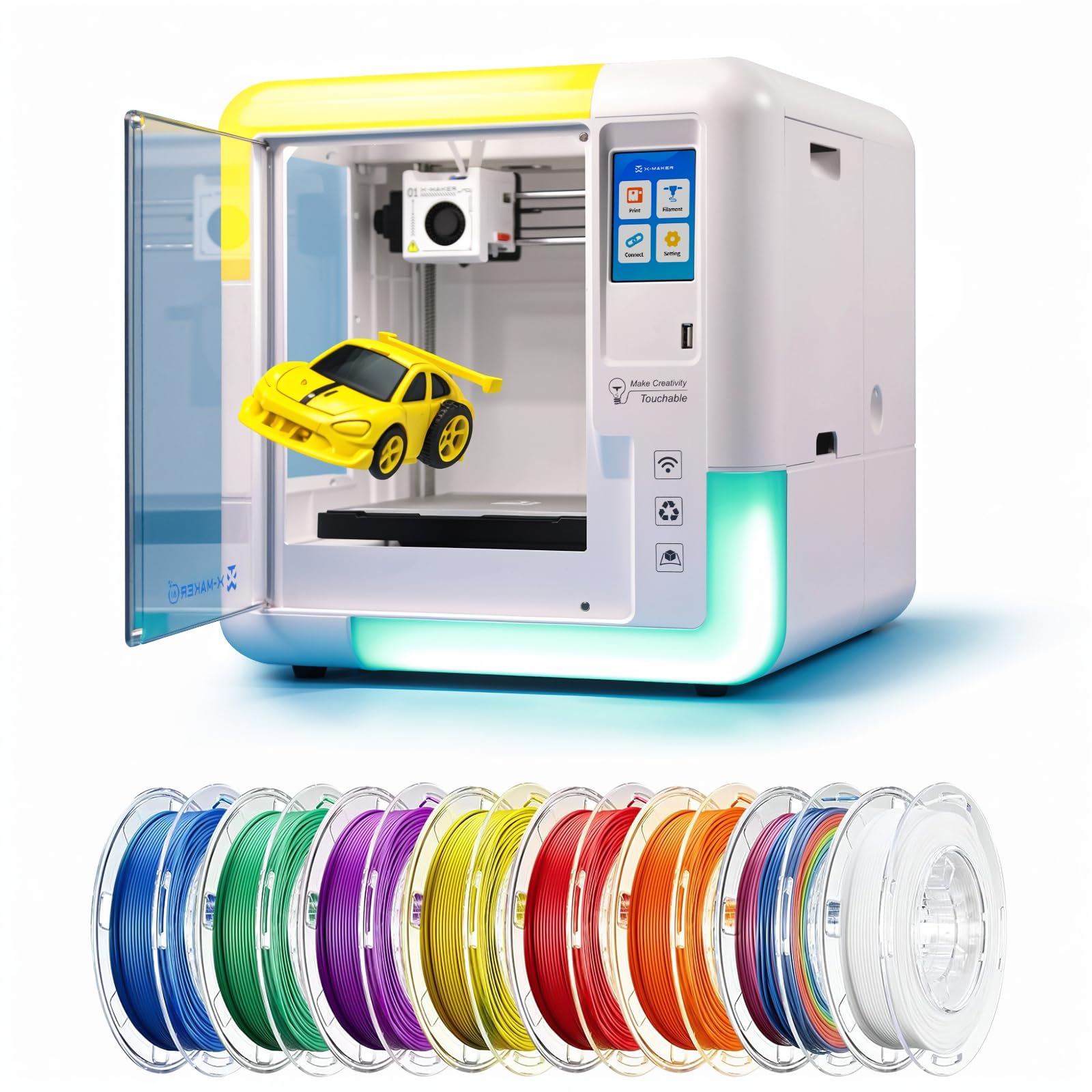
This printer turns a child’s doodle into a 3D model using built-in AI — no CAD skills needed.
The X-Maker AI+ is specifically built for the youngest classroom users, ages 9 through 16. Its AI Doodle feature scans a hand-drawn sketch, voice command, or even a photograph and generates a printable 3D model automatically. That removes the steepest learning curve in 3D printing — design software — and lets a third-grader go from drawing a dragon to holding it in 20 minutes. The printer includes 8 TÜV-tested PLA rolls (so you are set for weeks) and a fully enclosed body that keeps hot parts away from curious fingers. It operates under 50 dB (about as loud as a normal conversation), so it will not disrupt a quiet reading corner or a science lesson happening nearby.
Buyers with children aged 8 to 10 praised the user-friendly app and the instant printing from the built-in 1,500+ model library. One parent noted their child could “add files from free sites” easily. However, the longevity reviews are less reassuring: one buyer mentioned a firmware issue after a few months that made the printer inoperable and described customer support as unhelpful. At 400 mm/s top speed, it is slower than the 600 mm/s Flashforge and Anycubic models (a 50% gap), but for small creations that finish in roughly 20 minutes, the speed is adequate for a single child’s attention span. The ultra-quiet operation is the real classroom superpower — a teacher can let it run in the back of the room without shouting over it.
Unlike the Entina Tina2S which focuses on pure simplicity, the AOSEED adds AI-driven creativity tools that actively help a non-designer make original objects.
Made for Young Makers
- AI Doodle converts voice, text, or photos into printable 3D models
- Under 50 dB noise level — quiet enough for an active classroom
- Fully enclosed body and 8 included PLA rolls for instant start
What to Consider
- 400 mm/s top speed is below the 600 mm/s printers in this list
- Some reliability concerns after months of use, per one buyer’s experience
- Single-color printing only (you can color models after with markers)
Best for elementary and middle-school makerspaces: the AI design tools eliminate the scariest part of 3D printing for kids, and the noise level keeps the peace.
Skip it for a high school engineering lab: the 400 mm/s speed and single-color limit will feel restrictive for older students wanting faster, multi-material prints.
6. Entina Tina2S 3D Printer for Kids & Beginners

At 8.98 pounds, it is 4.3 times lighter than the Bambu Lab P1S — you can lift it onto a cart with one hand.
Not every classroom has a dedicated tech cart. The Tina2S is a mini printer (11.4 x 8.6 x 8.6 inches — 64% smaller than the P1S) that comes fully assembled and pre-calibrated right in the box. You load filament, select a model from the TF card or the 1,500+ cloud library via the Poloprint app, and hit print. The auto bed leveling system handles first-layer adjustment, and the flexible spring steel build plate lets a student pop a finished model off with a gentle bend — no scraping tools needed. The build volume is small (3.9 × 4.7 × 3.9 inches), so you are looking at keychains, action figure parts, and STEM project components rather than large functional brackets.
WiFi wireless printing and app control mean you can send a print job from your desk while the printer sits on a back shelf. The dual Z-axis design (two lead screws supporting the print bed) adds stability that is rare at this size and price. There are no detailed customer reviews in the data to reference, so the assessment here relies entirely on the spec sheet. The clear trade-off is that the Tina2S is a slow, small machine — it lacks the 400-600 mm/s speed of the CoreXY printers above, so a single print will take noticeably longer. For a classroom where one group of students works on a design while another group prints, the slower speed is a manageable constraint.
Compared to the AOSEED X-Maker AI+, the Tina2S is about 15 pounds lighter and significantly cheaper, but it lacks the AI-powered design tools that help kids create original models — you will need to download or design STL files (3D model files) elsewhere.
Portable and Simple
- 8.98 pounds — easily portable between classrooms or storage closets
- Fully assembled and pre-calibrated from the start; no setup frustration
- Auto leveling and flexible spring steel bed for easy first prints
Limitations to Know
- Small 3.9 × 4.7 × 3.9 inch build volume limits project size
- Standard print speed (much slower than the 400-600 mm/s CoreXY options)
- No built-in AI or design tools; you provide your own 3D files
Reach for this for young elementary classrooms on a tight budget: the low weight and fully-assembled nature make it a zero-fuss introduction to 3D printing.
Look elsewhere for older students or fast-paced projects: the small build volume and slower speed will frustrate teens who want to print larger, more complex designs.
Understanding the Specs
Build Volume (Printing Space)
This is the maximum size of the object you can print, measured in millimeters (width × depth × height). A 220×220×220 mm volume lets you print a standard phone case, a small vase, or a handful of chess pieces. The 256×256×256 mm cubes (found on the Bambu Lab P1S, ELEGOO Centauri Carbon, and Anycubic Kobra S1 Combo) give you about 57% more internal volume, which means you can fit larger student projects like a full-size articulated dinosaur or a drone frame in one piece.
Print Speed
Measured in millimeters per second (mm/s), this tells you how fast the print head can move while extruding plastic. Older standard printers crawl at 60-80 mm/s. The CoreXY machines here (Bambu Lab P1S, ELEGOO Centauri Carbon, FLASHFORGE AD5M Pro, Anycubic Kobra S1 Combo) hit 500-600 mm/s. In a classroom, that is the difference between a 20-minute print and a 2-hour print. The Entina Tina2S uses a slower system, so factor in longer wait times.
FAQ
Is a fully enclosed 3D printer required for a classroom?
What is auto bed leveling and why does it matter for beginners?
Can these printers use PLA filament?
How long does it take to set up a classroom 3D printer?
What print speed is fast enough for a single class period?
Which printer is quietest for a classroom?
Can a class share one 3D printer?
What happens if the printer runs out of filament mid-print?
Do these 3D printers require venting or special ventilation?
Can I print multi-color models on these printers?
Final Thoughts: The Verdict
For most classrooms, the best 3d printer for classroom is the Bambu Lab P1S because it combines a 500 mm/s speed, a fully enclosed safety body, and the ability to grow into a multi-color system when your budget allows. If you teach older students and need to print carbon-fiber or high-temperature engineering materials, grab the ELEGOO Centauri Carbon. And for an elementary makerspace where kids as young as 8 need AI-powered tools to create their first designs, the AOSEED X-Maker AI+ is the one to pick.
How We Picked
We do not accept paid placement. Every pick is matched to a real buyer and a real use-case; we do not hands-on test units.
Sources & Methodology
Specifications: manufacturer listings and product documentation. Review insights: verified customer reviews, as of July 2026. Pricing: not shown on this page (it changes often); check the current price via the retailer link.
As an Amazon Associate, Gadgets Feed earns from qualifying purchases. This does not affect which products we feature.
Product prices and availability are accurate as of the date/time indicated and are subject to change. Any price and availability information displayed on Amazon at the time of purchase will apply to the purchase of this product. As an Amazon Associate I earn from qualifying purchases.
CERTAIN CONTENT THAT APPEARS ON THIS SITE COMES FROM AMAZON. THIS CONTENT IS PROVIDED "AS IS" AND IS SUBJECT TO CHANGE OR REMOVAL AT ANY TIME.
Amazon and the Amazon logo are trademarks of Amazon.com, Inc. or its affiliates.