
The single biggest frustration for a hobbyist 3D printer buyer is the time wasted on failed prints, endless calibration, and machines that spend more time being adjusted than actually creating. You need a printer that gets out of its own way so you can focus on the model, not the machine. This guide cuts through the spec-sheet noise to find the machines that deliver reliable, high-quality results right out of the box.
I’m Min — the co-founder and writer behind Gadgets Feed. I’ve spent hundreds of hours analyzing market trends, cross-referencing technical specifications, and studying real user feedback for the most popular resin and FDM printers to separate genuine breakthroughs from marketing hype.
Whether you’re printing tabletop miniatures, functional prototypes, or decorative art pieces, this research-backed guide will help you find the best 3d printer for hobbyists that matches your specific workflow and budget.
How To Choose The Best 3D Printer For Hobbyists
Choosing a 3D printer as a hobbyist means balancing detail resolution, build volume, and ease of use. You don’t need industrial-grade reliability, but you do need a machine that prints consistently without constant tinkering. Here are the key factors to weigh before buying.
Resin vs FDM: Which Technology Fits Your Hobby?
Resin printers (MSLA) deliver ultra-fine detail with XY resolutions as low as 17 microns, making them ideal for miniatures, jewelry, and dental models. FDM printers use spooled filament and are better for larger, functional parts like brackets, cosplay props, or RC car mounts. Resin requires post-processing (washing and curing) and ventilation, while FDM is generally cleaner and easier to set up in a living space. Your choice depends on whether you value surface finish or practical strength more.
Build Volume and What You Can Actually Print
Build volume is measured in millimeters (X × Y × Z). A 220mm³ volume handles most tabletop miniatures in batches, while larger volumes like 300mm+ let you print helmets or tall sculpts in one piece. Keep in mind that larger build plates increase the risk of suction-related failures, especially in resin printers, and require more robust leveling systems to maintain accuracy across the entire surface.
Auto-Leveling and Smart Features That Save Time
The difference between a frustrating first year and a productive one often comes down to bed leveling. Modern printers with automatic leveling sensors and tilt-release vats eliminate the single most common failure point for beginners. Features like AI camera detection for failed prints, resin sensors, and Wi-Fi file transfer also reduce wasted material and time, making them well worth the small premium for most hobbyists.
Quick Comparison
On smaller screens, swipe sideways to see the full table.
| Model | Category | Best For | Key Spec | Amazon |
|---|---|---|---|---|
| ELEGOO Jupiter 2 | Resin | Large detailed prints | 15120×6230 resolution | Amazon |
| Creality K2 Combo | FDM | Multicolor printing | 260mm³ build volume | Amazon |
| QIDI PLUS4 | FDM | High-temp engineering materials | 370°C hotend | Amazon |
| ANYCUBIC Photon Mono M7 PRO | Resin | Fast ultra-high detail | 13312×5120 resolution | Amazon |
| ANYCUBIC Kobra 3 V2 Combo | FDM | Multicolor ease of use | 600mm/s max speed | Amazon |
| ELEGOO Mars 5 Ultra | Resin | Beginner-friendly resin | 18µm XY resolution | Amazon |
| Phrozen Sonic Mini 8K S | Resin | Compact reliable workhorse | 22µm XY resolution | Amazon |
| FLASHFORGE AD5M | FDM | Budget fast printing | 600mm/s speed | Amazon |
| ANYCUBIC Photon Mono 4 Ultra | Resin | Entry-level resin value | 9024×5120 resolution | Amazon |
In‑Depth Reviews
1. ELEGOO Jupiter 2 Resin 3D Printer

With a huge build volume of 302.4 × 161.98 × 300 mm and a staggering 15120 × 6230 pixel resolution (20 × 26 μm XY pixels), the Jupiter 2 is the definitive choice for hobbyists who want to print large objects or full batches of miniatures in a single run. The 16K LCD paired with a fully enclosed light source eliminates stray exposure, delivering uniform results across the entire plate — critical for models with fine surface details like armor textures or organic sculpts.
ELEGOO packed in smart features that reduce the hands-on labor: multi-point auto leveling, a heated tank that maintains a precise 30°C for consistent resin viscosity, and an automated resin feeding system that keeps the vat topped off during long prints. The double-door design and laser-engraved build plate with quick-release mechanism make part removal much less frustrating than fighting a stuck plate with a scraper.
The trade-off is speed — this machine prioritizes quality over velocity, and the large format means replacement parts like the PFA film are more affordable than many competitors. It’s not a beginner’s toy given the size and resin handling requirements, but for the dedicated hobbyist who prints frequently and values detail above all else, this is the most capable machine in its class.
Why it’s great
- Massive 16K resolution for stunning surface detail
- Heated vat and auto resin feed for hands-off long prints
- Cost-effective replacement parts compared to rival large-format printers
Good to know
- No flip-top lid — entire lid must be removed to access build plate
- Large size requires dedicated workspace and compatible wash/cure station
- Not for beginners who don’t want to learn resin post-processing
2. Creality K2 Combo (A) 3D Printer

The Creality K2 Combo redefines what a hobbyist FDM machine can do by bundling a 260mm³ build volume with a multi-filament system that supports up to 16 colors when daisy-chaining multiple CFS units. The Core XY structure hits 600mm/s with a max acceleration of 20,000 mm/s², but more importantly, it maintains print quality with step-servo motors that dynamically adjust torque in under a millisecond — directly reducing layer lines and ringing on detailed prints.
Quiet operation is a standout feature here thanks to the combination of step-servo motors and dynamically balanced fans, running at the noise level of a laptop rather than a workshop tool. The smart auto leveling only probes the target print area rather than the entire bed, cutting setup time while improving first-layer adhesion precisely where it matters. The integrated 720p camera and Creality app let you monitor prints and receive failure alerts remotely.
Some users note that the CFS unit doesn’t accommodate standard cardboard spools without printed adapters, and the AI camera can miss certain failure modes like spaghetti strings. However, the out-of-box experience is strong enough that even beginners can print multi-color models within hours of unboxing. If you want to move beyond single-color FDM printing without buying a separate multi-material unit, this is the most integrated solution available.
Why it’s great
- Up to 16-color printing with multiple CFS units
- Extremely quiet operation suitable for home environments
- Fast bed leveling and easy setup out of the box
Good to know
- Cardboard filament spools may require 3D-printed adapter rings
- AI failure detection is not 100% reliable
- Lacks 5GHz Wi-Fi support in some units
3. QIDI PLUS4 3D Printer

Hobbyists who want to print functional engineering parts with materials like PPS-CF, PPA-CF, polycarbonate, or nylon need a machine that can sustain high temperatures reliably. The QIDI PLUS4 delivers with a 370°C direct-drive hotend and a 65°C active chamber heating system using a 400W heater and dual-layer insulation — preventing the warping and layer separation that plague high-temp filaments on unenclosed printers.
The build volume of 305 × 305 × 280 mm is generous for a chamber-heated printer, and the Core XY structure allows 600mm/s travel speeds without sacrificing accuracy. Independent dual-motor Z-axis screws with 10mm lead screws keep the gantry level over hundreds of print hours. It also runs Klipper firmware, giving power users granular control over speed, acceleration, and pressure advance tuning.
Quality control has been inconsistent — some units arrive with hotend jams or missing filament runout sensors, and the initial setup may require manual intervention rather than being fully plug-and-play. That said, QIDI’s customer support has been responsive for hardware replacement, and the open-source Klipper ecosystem means the community can help resolve issues. For the hobbyist who needs to print strong, heat-resistant parts and is willing to dial in their machine, this is a powerful value.
Why it’s great
- Active 65°C chamber enables reliable high-temp filament printing
- Large build volume with rigid dual-Z support
- Open-source Klipper firmware for advanced tuning
Good to know
- Some units require initial quality control fixes
- Not fully beginner-friendly out of the box
- Customer support response times can vary
4. ANYCUBIC Photon Mono M7 PRO

The Photon Mono M7 PRO pushes resolution to 14K (13312 × 5120) on a 10.1-inch monochrome LCD, delivering a 16.8 × 24.8 μm XY pixel size that can print holes as small as 0.3 mm in diameter. For hobbyists working on highly detailed jewelry patterns, dental models, or intricate steampunk miniatures, this level of precision means no visible layer stepping even under close inspection.
Speed is respectable at 170mm/h using high-speed resin, and the COB LighTurbo 3.0 system combined with Fresnel lenses keeps light uniformity above 90% across the build plate. Intelligent detection adds six layers of error prevention including build plate installation detection, resin level monitoring, and release film lifespan management — all of which reduce wasted prints for the attentive hobbyist. The heated resin vat maintains optimal temperature automatically, which is essential for consistent layer adhesion in cooler rooms.
The learning curve is steeper than entry-level resin printers. Some users report USB folder structure issues and false vat blockage errors that require tweaking light-off delay settings. The 33-pound weight and bulky top cover also demand a sturdy work table. Despite these quirks, once dialed in, the M7 PRO produces surface quality that rivals printers twice its price, making it a strong choice for detail-oriented hobbyists who don’t mind some initial calibration.
Why it’s great
- Exceptional 14K resolution for ultra-fine surface detail
- Heated resin vat for consistent prints in any temperature
- Six intelligent detection systems reduce failure rates
Good to know
- Requires tuning of light-off delay for optimal results
- Heavy and bulky with limited portability
- Some software and USB compatibility quirks reported
5. ANYCUBIC Kobra 3 V2 Combo
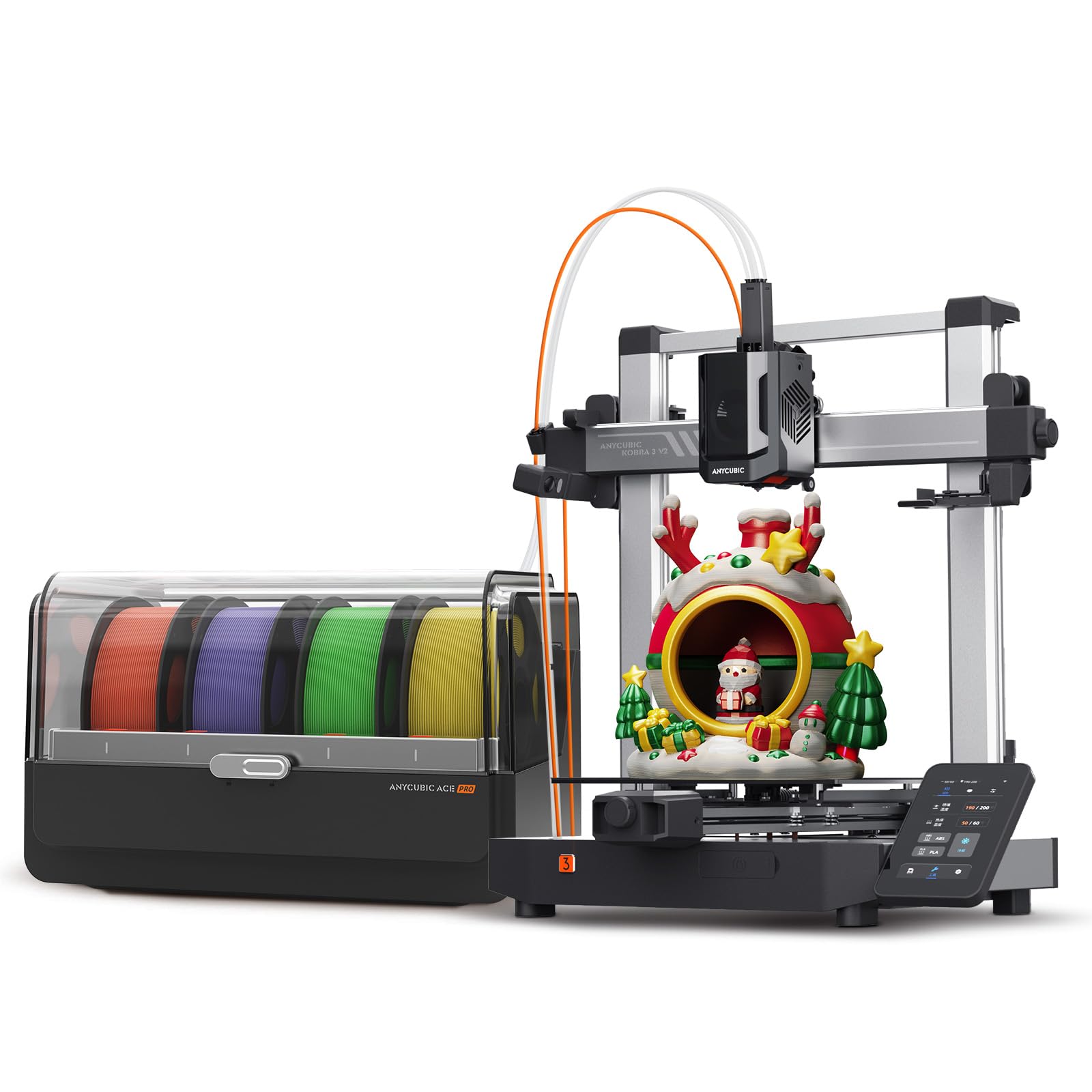
The Kobra 3 V2 Combo brings multicolor FDM printing to a mid-range price point by pairing a 600mm/s Core XY printer with the ACE Pro multi-filament system. The ACE Pro enables 4-color automatic filament switching and includes active drying with adjustable temperatures from 35 to 55°C, maintaining optimal moisture levels for hygroscopic materials like PETG and nylon without requiring a separate dryer.
Setup is genuinely beginner-friendly — users report excellent first-layer adhesion right out of the box with no manual calibration required, thanks to the enhanced auto-leveling system. The 720p camera provides real-time monitoring and time-lapse recording, and the LAN mode enables wireless file transfer without relying on cloud servers. The included nozzle technology reduces material leakage during color changes, keeping purge blobs manageable and minimizing waste.
Some users have flagged a potential malware risk on the included USB flash drive, so it’s wise to discard or reformat the drive before connecting to a main computer. The camera resolution is modest at 720p, and cardboard filament spools may need adapter rings. For the hobbyist who wants multicolor capability without stepping up to the premium Creality K2, the Kobra 3 V2 delivers an excellent balance of features and price.
Why it’s great
- Active filament drying built into the ACE Pro unit
- Excellent out-of-box experience with minimal calibration
- Reliable multicolor printing at a competitive price
Good to know
- USB drive may contain malware — format before use
- Camera quality is basic at 720p
- Cardboard spools require printed adapter rings
6. ELEGOO Mars 5 Ultra Resin 3D Printer
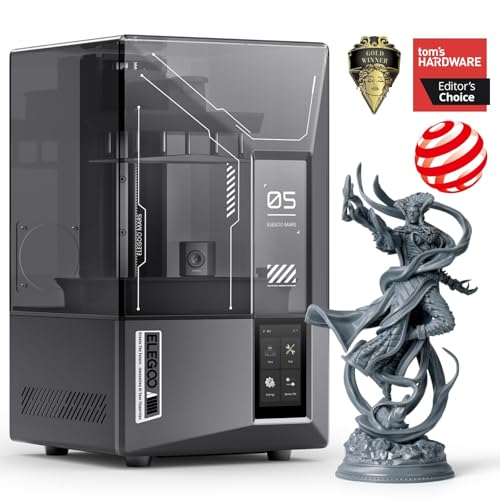
The Mars 5 Ultra bridges the gap between beginner-friendly operation and professional-grade quality with a 7-inch 9K monochrome LCD delivering 18μm XY resolution. Its defining feature is the tilt-release mechanism that peels each layer from the release film as it cures, achieving speeds up to 150mm/h without sacrificing the surface finish that hobbyists expect from a resin printer.
ELEGOO integrated an AI camera that monitors prints in real time, detecting failures like empty build plates or model warps and sending alerts. While the AI detection isn’t perfect and can vary with different resins and model geometries, it dramatically reduces the number of failed prints that waste both resin and time. The smart self-check and automatic leveling make it a true plug-and-print experience — even first-time resin users report successful prints on day one.
Wi-Fi cluster printing allows control of multiple Mars 5 Ultra printers from a single device, which is handy for hobbyists running small production batches. The build volume of 153.4 × 77.7 × 165 mm is compact, so you won’t print helmets or large art pieces, but for miniatures, tabletop gaming figures, and jewelry masters, it’s perfectly sized. The sticky residue and need for ventilation are inherent to resin printing, but the print quality per dollar here is outstanding.
Why it’s great
- Tilt-release mechanism for fast, high-quality prints
- AI camera reduces wasted resin with failure detection
- Excellent print quality with minimal learning curve
Good to know
- AI detection accuracy depends on resin and model type
- Small build volume limits large single-piece prints
- Standard resin odor requires proper ventilation
7. Phrozen Sonic Mini 8K S LCD Resin 3D Printer

The Phrozen Sonic Mini 8K S has earned a reputation as a reliable workhorse in the compact resin printer category. With a 7.1-inch 8K monochrome LCD and 22μm XY resolution, it delivers crisp detail on miniatures, toys, and small appliance parts. The build volume of 165 × 72 × 170 mm is modest but more than adequate for batch printing tabletop gaming armies or small sculpts.
Open-source software compatibility (Lychee, Chitubox, Tango) gives you freedom to use your preferred slicer without being locked into a proprietary ecosystem. The precise Z-axis calibration ensures even and accurate printing across the entire build plate, and the 22-pound weight makes it easy to reposition on a desk or workbench. Users consistently praise the reliability — it produces consistent quality across hundreds of print hours with minimal maintenance beyond standard vat cleaning.
The main omission is the lack of Wi-Fi connectivity; you must transfer files via USB, which can be tedious for frequent users. The metal build plate is functional but the included scraper can damage the surface if used carelessly, and some users recommend buying a spare PFA film set early. For the hobbyist who wants a no-frills, dependable resin printer that just works without premium frills, the Mini 8K S is a proven choice.
Why it’s great
- Extremely reliable print quality over long periods
- Open-source software compatibility with all major slicers
- Compact and lightweight for easy workspace integration
Good to know
- No Wi-Fi — file transfer is USB-only
- Care required when removing prints to avoid plate damage
- Small build volume limits single large-piece printing
8. FLASHFORGE AD5M 3D Printer
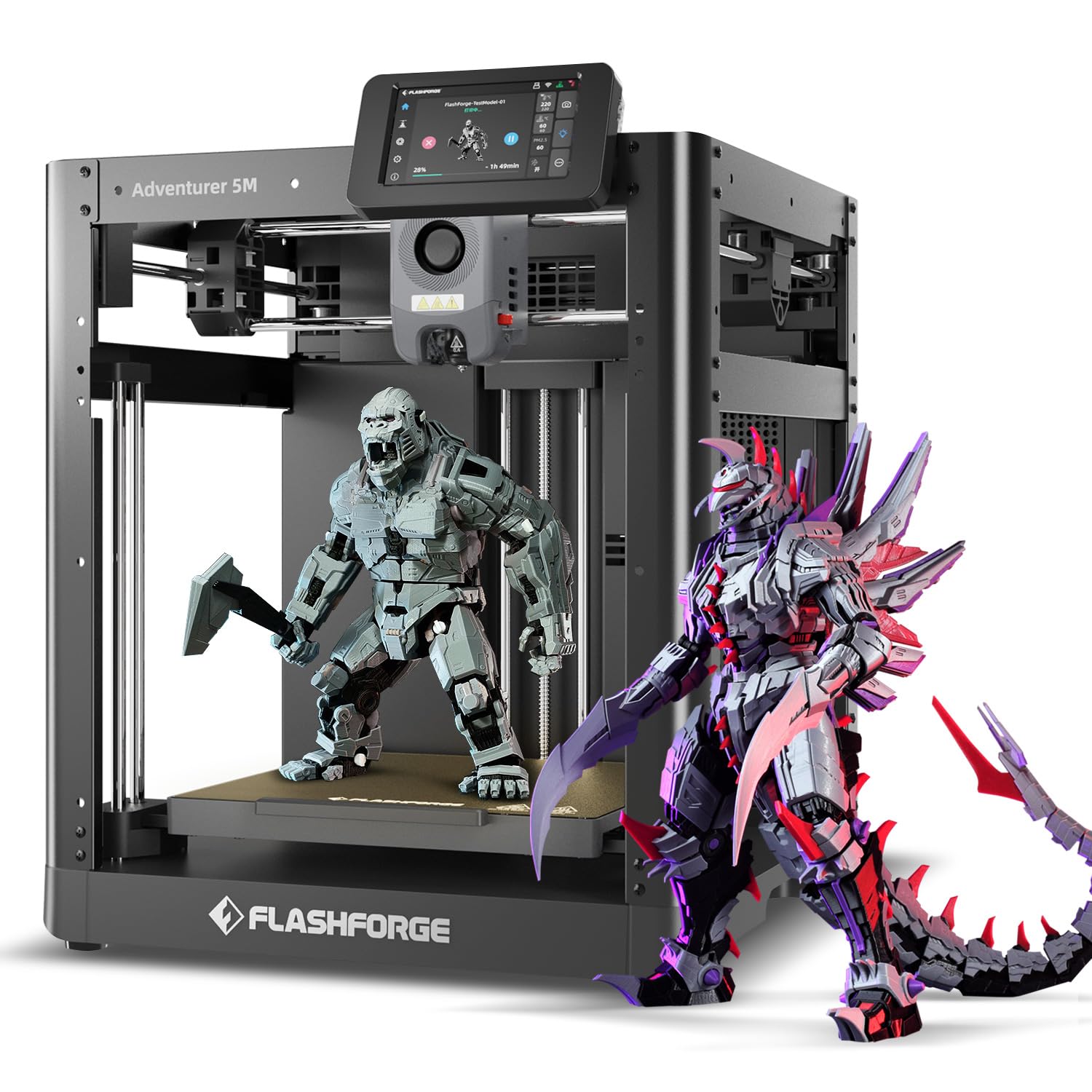
The FLASHFORGE AD5M punches well above its entry-level price with a Core XY structure capable of 600mm/s printing speeds and a 3-second quick-swap nozzle that makes filament changes and maintenance painless. The build volume of 220 × 220 × 220 mm is the sweet spot for most hobbyist projects — large enough for functional parts and cosplay accessories but not so big that it dominates your desk.
One-click full-auto calibration is the headline feature here; it genuinely works, with users reporting practically foolproof first-layer adhesion after a short initial setup. The customizable enclosure allows for temperature stability and contains noise, while upgrade paths for lights and a camera mean the printer can grow with your hobby rather than being immediately outgrown. The included starter projects and 50g of HS PLA filament get you printing immediately.
The touchscreen interface can be a bit finicky for those with larger fingers, and the print quality, while excellent for the price, doesn’t quite match the surface finish of higher-end Core XY machines. A small number of users report adhesion issues with non-test objects that require bed cleaning or recalibration. For the cost-conscious hobbyist who wants fast, reasonably detailed FDM prints without the complexity of resin, the AD5M is an outstanding entry point.
Why it’s great
- Very fast 600mm/s Core XY printing at a low price
- Reliable auto-calibration reduces setup frustration
- Upgradable with lights, camera, and full enclosure
Good to know
- Touchscreen response can be inconsistent
- Surface finish lags behind premium Core XY printers
- Some users experience occasional bed adhesion issues
9. ANYCUBIC Photon Mono 4 Ultra Resin 3D Printer

The Photon Mono 4 Ultra delivers a 10K resolution (9024 × 5120) with a 17 × 17 μm XY pixel size on a 7-inch monochrome screen, producing exceptional detail for its price point. The COB light source with Fresnel lenses maintains a 90% or better light uniformity, reducing dimensional errors between layers. Combined with the ACF release film and intelligent release algorithm, it hits 120mm/h print speeds while maintaining accuracy.
Five intelligent detection features — including printer auto-inspection, residual resin detection, and failed print detection — help beginners avoid common mistakes. The 4.3-inch HD screen with an all-new user interface supports 8 languages, and the build volume of 153.4 × 86.9 × 165 mm is standard for this class, handling most miniatures and small functional parts well. Users transitioning from FDM to resin find the learning curve surprisingly gentle.
The strong resin odor is a recurring note in user feedback, making an enclosure and active carbon filter strongly recommended — especially if printing in a living space. The screen protector application is fiddly, and the FEP film is fragile, requiring care during cleaning. For the hobbyist looking to enter resin printing without a large financial commitment, the Mono 4 Ultra offers the best resolution-to-price ratio in the entry-level segment.
Why it’s great
- Exceptional 10K resolution at a very accessible price
- Fast 120mm/h print speed with intelligent release algorithm
- User-friendly interface ideal for resin beginners
Good to know
- Strong resin odor requires ventilation or an enclosure
- Screen protector application is tricky
- FEP film is delicate and needs careful handling
FAQ
What XY resolution do I need for printing tabletop miniatures?
Can I leave resin in the vat between print sessions?
Final Thoughts: The Verdict
For most users, the 3d printer for hobbyists winner is the ELEGOO Jupiter 2 because its 16K resolution and large build volume produce museum-quality results in a single run, making it the ultimate tool for the dedicated enthusiast. If you want reliable multicolor FDM printing without stepping into resin post-processing, grab the Creality K2 Combo. And for the budget-conscious hobbyist who needs a fast, foolproof FDM printer to start printing today, the FLASHFORGE AD5M offers unbeatable value.