
Our readers keep the lights on and my morning glass full of iced black tea. As an Amazon Associate, I earn from qualifying purchases.
Specs are compiled from manufacturer listings and verified buyer reviews and can change over time — please confirm the key details on the product page before buying.
Bringing a 3D printer into your home is less about picking a cool gadget and more about choosing a tool you will actually enjoy using—not one you will spend every weekend trying to fix instead of create. The real choices come down to how fast it prints, how many colors it can switch to, how quiet it runs next to your desk, and how much tinkering it asks of you before the first layer goes down. You want a machine that makes the hobby feel good from the start, not one that turns a child’s project into a weekend of frustration.
I’m Min — the founder and writer behind Gadgets Feed. This guide is built by comparing the manufacturers’ published specifications and the patterns across verified customer reviews, so you get each pick’s real strengths and trade-offs instead of marketing spin.
Whether you are buying for a curious 12-year-old or yourself, this breakdown of the best 3d printer for home use focuses on the machines that deliver reliable prints, sensible speeds, and easy setup without skipping the details that actually define this category.
Quick Picks
- Anycubic Kobra X Multicolor 3D Printer — Best Overall
- Bambu Lab P1S Combo — Premium Pick
- FLASHFORGE AD5X Multi-Color 3D Printer — Best Value
- ELEGOO Centauri Carbon 3D Printer — Top Performer
- Bambu Lab A1 Combo + LED Lamp Kit — Best for Beginners
- Creality K1C 3D Printer — Fastest Printer
- QIDI PLUS4 3D Printer — Heavy-Duty Performer
- Original Prusa MK4S KIT 3D Printer — DIYer’s Dream
- Entina Tina2 Plus Smart 3D Printer — Entry-Level Champion
How To Choose The Best 3D Printer For Home Use
A home 3D printer needs to balance speed, reliability, and a small enough footprint to live on a desk without taking over the room. The biggest mistake new buyers make is chasing the lowest price and ending up with a machine that requires constant manual leveling and clogs after every few prints. Here is what to look for.
Build Volume: How Big Can You Print?
The build volume sets the maximum size of a single object you can make. A cube around 220mm x 220mm (around 9 inches per side) is the balance for most home projects: phone stands, toys, small vases, and cosplay parts. Anything smaller than about 150mm per side limits you to trinkets. The Entina Tina2 Plus clocks in at 11.4 x 8.6 x 8.6 inches exterior dimensions, which is compact for a desk, while the QIDI PLUS4 offers a larger 12 x 12 x 11in print area for bigger multi-part builds.
Print Speed and CoreXY vs. Bed-Slinger
Speed is measured in mm/s (millimeters per second). Entry-level machines crawl around 60–80 mm/s, but modern mid-range printers like the FLASHFORGE AD5X and Creality K1C reach 600mm/s using a CoreXY motion system, where the print head moves on a fixed gantry instead of the bed sliding back and forth. A CoreXY design is faster and more stable at high speeds, but a bed-slinger like the Bambu Lab A1 works well for most home use at 10,000 mm/s² acceleration without the heavy frame of a CoreXY machine.
Auto Bed Leveling: The Feature That Saves Your First Prints
Manual leveling (turning four knobs to get a piece of paper to slide between nozzle and bed) is the leading cause of first-print failures for beginners. Every printer on this list includes auto-leveling, which uses a sensor to map the bed surface and adjust the nozzle height automatically. The Anycubic Kobra X uses a LeviQ 3.0 system with a 49-point calibration to ensure the first layer sticks.
Multi-Color Printing: Fun but Not Free
A multi-color printer can switch filaments mid-print to produce objects in several shades. These systems (like the Bambu Lab AMS Lite or the Anycubic ACE Pro) add cost and complexity. When the printer purges the old color to load the new one, it creates waste filament called “poop.” The AD5X data notes that multi-color printing increases noise during the purge cycle. If you mostly want single-color prototypes, a single-extruder machine saves money and material.
Noise and Footprint
A home printer lives in a shared space, so noise matters. The Bambu Lab A1 is rated at ≤48 dB in quiet mode, while the Creality K1C claims ≤45dB in silent mode. The ELEGOO Centauri Carbon weighs 38.5 pounds with a die-cast frame that absorbs vibration but demands a sturdy table. The Anycubic Kobra X runs at 45dB, quiet enough to sit in a living room corner without bothering anyone.
Quick Comparison
| Model | Best For | Print Speed | Build Volume | Weight | Amazon |
|---|---|---|---|---|---|
| Entina Tina2 Plus | Kids / First Printer | 250 mm/s | Compact (desk-saving) | 9.93 lbs | $229.99Amazon |
| Anycubic Kobra X | Multi-Color on a Budget | 600 mm/s | 260mm³ | 20.9 lbs | $299.99$459.99Limited time dealAmazon |
| FLASHFORGE AD5X | Fast Prototyping | 600 mm/s | 220mm³ | 24.2 lbs | $349.00$409.00Amazon |
| ELEGOO Centauri Carbon | Engineering Materials | 500 mm/s | 256mm³ | 38.5 lbs | $359.99Amazon |
| Bambu Lab A1 Combo | Ease of Use | 10,000 mm/s² accel | 23.01 x 21.06 x 16.77 in | 28.5 lbs | $394.00$419.00Amazon |
| Creality K1C | Carbon Fiber Prints | 600 mm/s | 13.97 x 13.97 x 18.89 in | 27.3 lbs | $351.35Amazon |
| Bambu Lab P1S Combo | Reliable High-Speed | 500 mm/s | 18.72 x 23.01 x 18.72 in | 47.5 lbs | $499.99Amazon |
| QIDI PLUS4 | Large Engineering Parts | 600 mm/s | 12 x 12 x 11in | 59.4 lbs | $299.00Amazon |
| Original Prusa MK4S | Open-Source Tinkerers | High-Speed (Input Shaping) | 9.84 x 8.3 x 8.6 in | 15.4 lbs | $949.00Amazon |
In‑Depth Reviews
1. Anycubic Kobra X Multicolor 3D Printer

The home multi-color machine that prints crisp, detailed parts at high speed while staying affordable.
If you want to print in several colors without adding a separate multi-material unit, the Kobra X comes with four colors built in natively—expandable up to 19 colors with additional ACE 2 Pro units. It hits a top speed of 600mm/s and completes a Benchy in 14 minutes, which means you wait less for prototypes and school projects. The LeviQ 3.0 auto-leveling system uses a 49-point calibration scan, and buyers report it eliminates the dreaded first-layer adhesion headaches: one reviewer noted “265 hours, one user-caused failure,” which is an outstanding reliability run for a home-level FDM printer.
The hardened steel nozzle and 300°C hotend let you print flexible filaments like TPU and rigid ones like PLA or PETG without swapping parts. It measures 23 x 13 x 22 inches (roughly a 2.0x larger footprint than the compact Entina Tina2 Plus), so it needs a dedicated table space rather than a crowded desk corner. The 45dB noise rating is quiet enough to run in a family room without being intrusive.
Unlike the multi-color FLASHFORGE AD5X, the Kobra X achieves its color switching with less purge waste—the manufacturer claims it reduces filament and machine travel path by 81.25%, so material costs drop roughly in half compared to older multi-color setups. The top-mount spool holder frees up desk area, and the AI camera provides spaghetti detection (it spots failed layers before they become a tangled mess).
Why It Earns The Top Spot
- Built-in 4-color printing right from the start without extra hardware
- 600mm/s speed with vibration compensation for smooth layers
- 49-point auto-leveling ensures reliable first layers for new users
- Supports PLA, PETG, TPU, PVA, ASA, and a 300°C nozzle temperature
A Couple Trade-Offs
- Larger footprint than compact machines like the Entina Tina2 Plus
- Some users report software glitches connecting to WiFi and a slicer that needs polish
Reach for this if: you want multi-color printing at home without paying for a separate AMS unit—the integrated 4-color system and high speed make it the most versatile single machine on this list.
Look elsewhere if: desk space is extremely tight; the 23-inch depth requires a stable table, and you might prefer a more compact printer if color is not a priority.
2. Bambu Lab P1S Combo

An enclosed workhorse that delivers professional-grade prints with almost no tinkering required.
The P1S Combo bundles the printer with the AMS (Automatic Material System) so you can print up to 16 colors without swapping spools by hand. It reaches 500mm/s speed with 20,000 mm/s² acceleration, and the fully enclosed body improves temperature stability for ABS and ASA filaments that warp on open-frame machines. One reviewer with over 100 prints reported a ~95% success rate, attributing failures to user error rather than the hardware—a sign of how predictable this machine is.
It weighs 47.5 pounds, but most of that mass comes from its rigid steel frame and enclosed panels, which keep noise moderate rather than loud. Setup takes about 15 minutes according to reviewers, and the auto bed leveling handles the calibration on its own. The P1S is not recommended for carbon fiber or glass fiber reinforced polymer by the manufacturer, so if you plan to print abrasive materials, the Creality K1C or ELEGOO Centauri Carbon are better fits. The AMS handles up to four spools at once, and you can daisy-chain multiple AMS units to reach the full 16-color palette.
Buyers consistently point out that the P1S is “the best beginner 3D printer out there” for good reason—it combines speed, color capability, and reliability into one package that does not require hours of YouTube troubleshooting. The trade-off is the premium price, but you get a machine that just works from the first print.
What Makes It Stand Out
- Fully enclosed design for advanced filaments like ABS and ASA
- AMS supports up to 16 colors with automatic filament switching
- Auto bed leveling and fast 15-minute setup right from the start
- Excellent reliability—reviewers cite a 95% success rate over many prints
Things To Consider
- Not compatible with carbon fiber or glass fiber reinforced filaments
- At 47.5 pounds, it needs a sturdy, dedicated table and is not easy to move
Grab this for: a low-maintenance home printer that handles both single-color and multi-color jobs reliably, especially if you want to print ABS or ASA in a controlled environment.
Pass on it if: you need to print carbon fiber materials or you are on a tighter budget—the P1S is an investment, not an impulse buy.
3. FLASHFORGE AD5X Multi-Color 3D Printer

A fast, multi-color CoreXY printer with a 300°C direct-drive extruder for rich detail and color variety.
The AD5X moves at 600mm/s with 20,000 mm/s² acceleration, making it one of the quicker printers in this mid-range tier. It supports up to four colors simultaneously through a single print head, but unlike the Anycubic Kobra X’s native multi-color design, the AD5X uses a 4-in-1 connector that some reviewers found prone to jamming at the junction. One buyer mentioned “printer jams at 4in1 connector” as a recurring issue, although others logged ~100 hours of reliable printing with the default Orca profiles.
It weighs 24.2 pounds, which is 2.4x heavier than the 9.93-pound Entina Tina2 Plus, but that weight stabilizes the CoreXY frame during high-speed moves. The 1-Click Auto Leveling calibrates the bed in a single operation, and the direct-drive extruder reaches 300°C, letting you print a broad range of materials. You can swap between four nozzle sizes (0.25mm to 0.8mm) for different detail levels. The built-in resume printing function handles power loss, so a sudden outage does not ruin a multi-hour print.
The printer’s noise level jumps during multi-color purge cycles, which is a common trait across most color-switching machines. Owners mention that the phone app is not great and the Orca-based software has a learning curve, but the hardware is “fast, excellent print quality” and “great for beginners” once the initial learning is done. The 220mm³ build volume fits helmets and masks, though the Bambu Lab A1 provides a slightly larger footprint for bigger projects.
Strengths
- Four-color printing at a mid-range price point
- 600mm/s speed with CoreXY stability and vibration compensation
- 300°C direct-drive extruder for flexible and high-temp filaments
- Interchangeable nozzle sizes from 0.25mm to 0.8mm for precision or speed
Weaknesses
- Some units experience jams at the 4-in-1 connector
- Software stack is a modified Orca fork that is less polished than Bambu’s ecosystem
Choose this if: you want a fast multi-color printer without jumping to the premium price tier—the AD5X delivers good quality and color capability at a sensible cost.
Avoid if: you are not comfortable troubleshooting occasional nozzle jams; the connector issue appears in multiple reviews and requires patience.
4. ELEGOO Centauri Carbon 3D Printer

A die-cast armored machine built for carbon fiber filaments and high-speed daily printing without flinching.
The Centauri Carbon is the only printer in this lineup with a rigid, integrated die-cast aluminum frame. That frame minimizes vibration at high speeds (500mm/s with 20,000 mm/s² acceleration), and the 320°C brass-hardened steel nozzle can handle abrasive filaments like carbon fiber reinforced PLA or nylon. One reviewer who logged 300–400 hours of PETG and PLA+ printing described the bed adhesion as excellent and noted the “built-in remote camera with clear video and remote control” as a standout feature for checking prints from another room.
It arrives fully assembled and pre-calibrated. The auto bed leveling and intuitive touchscreen mean you can print within minutes of unboxing—no manual leveling knobs, no paper-shim routines. The enclosed chamber with dual LED lighting keeps the environment stable for materials like ABS, and the 256x256x256mm build volume gives you a 10-inch cube to work with, larger than the similarly priced FLASHFORGE AD5X’s 220mm³ space. At 38.5 pounds, it is a heavy, solid machine that needs a sturdy desk but does not wobble during fast moves.
One caveat from buyers: the first unit had a hotend communication error related to connector design, though the replacement worked smoothly. The slicer crashed a complex model on an older laptop in one review, so an up-to-date computer is recommended. Despite these early issues, multiple owners call it “the best bang for your buck” for heavy daily use and engineering-grade materials.
Major Pluses
- Die-cast aluminum frame reduces vibrations for consistent high-speed prints
- 320°C nozzle and enclosed chamber support carbon fiber and other advanced filaments
- Built-in camera with time-lapse and remote monitoring via WiFi
- Auto-leveling with excellent adhesion even at lower bed temperatures
Minor Setbacks
- Heavy at 38.5 pounds, difficult to move around
- Some units have had hotend communication errors requiring tech support
Ideal for: a home user who wants to print carbon fiber or other abrasive materials and values build quality and long-term durability over absolute plug-and-play convenience.
Not for: someone who wants the smallest possible footprint—the ELEGOO is a beast on a desk.
5. Bambu Lab A1 Combo + LED Lamp Kit

The easiest home printer to get right the first time, with a level of automation that removes the guesswork.
The A1 Combo handles all calibration automatically—Z-offset, bed leveling, and active flow rate compensation—so you never manually adjust a nozzle height or tell the machine how much plastic to push. It prints at 10,000 mm/s² acceleration, which translates to fast, accurate prints without a complex CoreXY frame. The included AMS Lite gives you four-color printing, and the LED Lamp Kit adds a creative twist: you can print translucent models that turn into functional lights, a feature that appeals to kids and cosplay fans.
One reviewer who switched from an Anycubic machine noted the “night and day” difference, praising the polished setup and cohesive ecosystem. The phone app provides real-time camera viewing and time-lapses, plus a library of free print files. The active motor noise canceling keeps sound at ≤48 dB, noticeably quieter than the Creality K1C’s 45dB rating in silent mode, making it suitable for a bedroom or home office. The 1-Clip quick-swap nozzle is a maintenance simplification that beginners will appreciate.
The catch is that the AMS Lite needs Bambu-specific filament spools or adapters for third-party brands, and only a few filament strands come in the box. Buyers recommend ordering extra spools immediately. The sparse setup instructions (mostly illustrations) contrast with the otherwise polished experience, but the machine works so well on defaults that most users never need more guidance.
Why Beginners Love It
- Full-auto calibration means zero manual tuning for first-time users
- LED Lamp Kit creates functional illuminated prints, a unique fun factor
- Quiet operation at ≤48 dB with active noise canceling
- Excellent print quality with multi-color AMS Lite support
Drawbacks
- AMS Lite requires adapters for non-Bambu filament spools
- Very few filament strands included—you need to order more immediately
Perfect for: a family with kids who want a printer that just works without reading a manual—the A1’s automation and quiet operation make it the best first printer on this list.
skip it if: you plan to print at very high speeds constantly or need the larger build volume of a CoreXY machine.
6. Creality K1C 3D Printer

A CoreXY speed champ that pushes 600mm/s and supports carbon fiber filaments right from the factory.
The K1C inherits the CoreXY system from Creality’s higher-end K1 line and adds a clog-free direct extruder with a steel-tipped copper nozzle integrated with a titanium alloy heatbreak. That “Unicorn” nozzle design is specifically meant to prevent clogs during fast retractions, and the manufacturer claims it supports carbon fiber filaments like PLA-CF, PA-CF, and PET-CF. The enclosed chamber design with an active carbon filtration system helps purify fumes from high-temp materials, a useful safety feature for home use in a shared space.
The AI camera monitors for foreign objects or malfunctions during printing and supports time-lapse photography. The auto-calibration handles leveling with a single tap, and the dynamic balancing of the printhead fans reduces ringing at high speeds. Silent mode drops noise to ≤45dB, quieter than the Bambu Lab A1’s ≤48dB standard mode. One reviewer who uses the machine daily with his kids noted that they “can use it on their own” because the app interface is straightforward enough for children.
Not every experience is smooth, though. One buyer gave the K1C a 1/5 rating, citing buggy multicolor software (the Creality CFS unit), frequent power cycles needed, and error messages that are vague and unhelpful. The single-extruder print quality when working is solid, but the multicolor add-on appears less mature than Bambu Lab’s AMS solution. The K1C weighs 27.3 pounds and measures 13.97 x 13.97 x 18.89 inches, a compact footprint for a CoreXY enclosure but still demanding a solid table.
Core Strengths
- 600mm/s speed with clog-free “Unicorn” nozzle for carbon fiber filaments
- Enclosed chamber with active carbon air purification for fume reduction
- AI camera for failure detection and remote monitoring
- Silent mode at ≤45dB, comfortable for home use
Watch Out For
- CFS multicolor software is buggy and poorly documented
- Not truly plug-and-play—requires some profile tweaks for best results
The right move if: speed is your top priority and you want to experiment with carbon fiber filaments—the K1C’s enclosure and hotend are ready for it, and the silent mode keeps the noise down.
Not the right move if: you want a smooth multicolor experience from the start; the CFS has software issues that make it less straightforward than Bambu’s solution.
7. QIDI PLUS4 3D Printer

An engineering-grade printer with a heated chamber that handles advanced materials like PPS-CF without warping.
The QIDI PLUS4 stands out for its second-generation active chamber heating system, which uses a 400W heater to reach 65°C inside the enclosure. That hot environment reduces warping and cracking when printing high-temperature filaments like PPS-CF, PPA-CF, and nylon—materials that would curl and fail on an open-frame printer. The 370°C direct extruder with a multi-metal integrated nozzle handles these abrasives without clogging, and the 12 x 12 x 11in build volume is the largest in this roundup, letting you print multiple models in one batch or a single large prototype.
It weighs 59.4 pounds, the heaviest here, and measures 19.29 x 20.07 x 22.24 inches, so it demands a dedicated workbench. The independent dual motor-driven Z-axis and 6mm thickened aluminum hot bed provide a stable platform for precise layers. One reviewer with over 4000 hours on the machine reported “zero maintenance except hotend swap” after heavy use, calling the print quality excellent for PET, nylon, and PPS materials—even surpassing a Bambu P1S in that specific application. The open-source Fluidd UI and Qidi Studio slicer give advanced users full control.
The main trade-off is quality control. Some units arrive with factory-jammed hotends or OTA update failures, and the firmware initially lacked a power-loss resume feature (though this was updated). A few customers note that the first-layer inconsistency and X/Y driver temperatures hitting 126°C made their experience frustrating. If you get a well-built unit, it is a powerhouse for engineering materials, but the QC variance is real.
Engineering Advantages
- Active 65°C chamber heating reduces warping in high-temp materials
- 370°C hotend supports PPS-CF, PPA-CF, ABS, ASA, PC, PA, and PET
- Large 12 x 12 x 11in build volume for big prints and batch production
- Open-source Fluidd interface with community support and upgrades
Production Pitfalls
- QC can be inconsistent—some units need immediate replacement parts
- Heavy at 59.4 pounds, requires a stable, large workbench
Select this if: you need to print engineering-grade filaments like PPS-CF or PPA-CF at home, and you value an open-source, upgradeable platform over plug-and-play simplicity.
Skip if: you prefer a polished out-of-box experience and cannot deal with possible QC issues—the Bambu P1S is more consistent for everyday use.
8. Original Prusa MK4S KIT 3D Printer
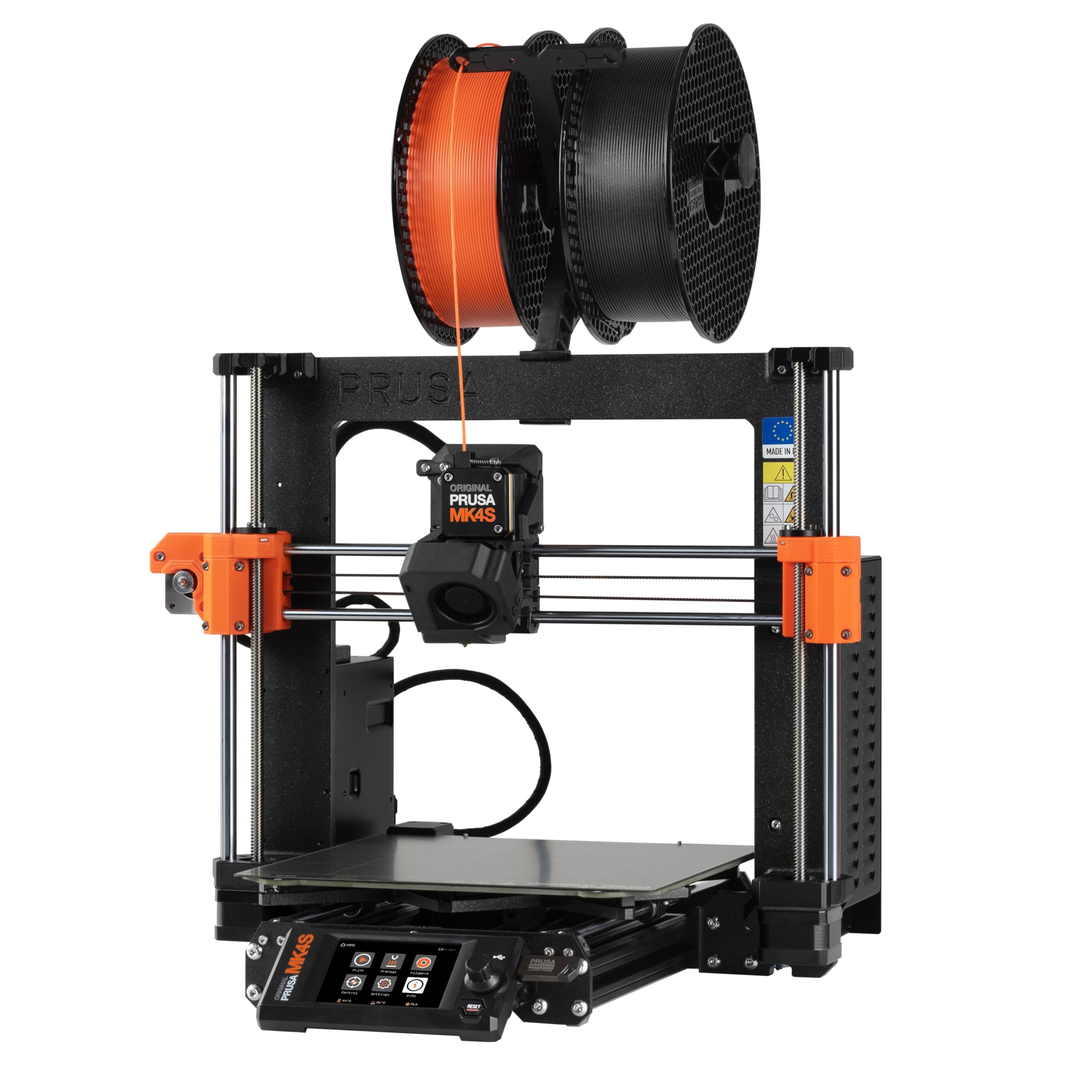
A rewarding kit build that teaches you printer mechanics and then delivers Prusa-level reliability for years.
The MK4S is a self-assembly kit, meaning you put it together from parts, following a step-by-step guide. That process takes a few hours and teaches you how the motion system, extruder, and electronics work—knowledge that helps you repair and upgrade it later. The kit includes a spool of Prusament PLA and a bag of gummy bears as a tradition. Once built, it uses Input Shaping to reduce ringing at higher speeds, producing sharp edges and consistent surface quality comparable to pre-built CoreXY machines.
The 9.84 x 8.3 x 8.6 in print volume is smaller than most machines here, but the build quality and reliability are exceptional. One reviewer who upgraded from an Anycubic Kobra Max (which had printhead and adhesion issues) called the MK4S a “9.7/10 setup” with an easy menu, simple filament loading, and auto-cleaning. A 12-hour complex dragon cup printed with zero supports and achieved a flawless smooth finish. Another user with 20–30 rolls of filament through the machine described it as “3D printing workhorse” that works immediately with generic profiles. The Prusa Connect platform and EasyPrint app work smoothly for remote monitoring and file uploads.
The major catch is the price. The kit costs, the most expensive model in this list, and assembly is not trivial—one reviewer called it “harder than building PCs” because of belt tensioning and awkward reach points. Another noted that TPU and FLEX were difficult to print with the stock setup. However, the open-source design and lifetime technical support from Prusa mean you are not locked into a proprietary ecosystem, and you can upgrade components over time.
Build Your Skills
- DIY kit teaches you every component and how to tune it
- Input Shaping reduces ringing for clean, high-speed prints
- Open-source platform with long-term firmware support and upgrades
- Excellent surface quality and reliability—reviewers call it a workhorse
Not For Everyone
- Expensive—higher total cost than many pre-assembled competitors
- Kit assembly is challenging for non-technical users; takes several hours
- Smaller 9.84 x 8.3 x 8.6in build volume compared to similarly priced options
Best suited for: a hobbyist who enjoys building and tuning their own machine and wants a printer that can be repaired and upgraded for years without vendor lock-in.
Not for: someone who wants to unbox and print within 30 minutes, or anyone on a tight budget.
9. Entina Tina2 Plus Smart 3D Printer

The lightest, most kid-friendly entry point that puts a first print on the desk in 15 minutes.
The Tina2 Plus comes fully assembled with no setup required, so you just plug it in, load the included TF card with preloaded models, and start printing. It is built for kids and beginners, with a partially enclosed frame that separates hot moving parts from direct contact, making it safer for supervised use in a classroom or home. At only 9.93 pounds, it is 2.4x lighter than the 24.2-pound FLASHFORGE AD5X, so it is genuinely portable—you can move it from a desk to a shelf without a struggle.
The print speed reaches 250 mm/s, which is on the slower side compared to the 600mm/s machines higher on this list, but the 40-second fast heating ceramic hotend reduces wait time on start. The WiFi Poloprint Cloud app gives access to 1,500+ printable models, and the auto-leveling and dual Z-axis structure help improve first-layer success. One owner reported: “Test print keychain lacked detail, but soda can opener printed well” in a review that acknowledges the detail limitations while confirming that functional objects come out fine.
The compact footprint measures 11.4 x 8.6 x 8.6 inches, making it the smallest machine on this list—about 2.0x smaller than the Anycubic Kobra X’s 23 x 13 x 22-inch footprint. However, some buyers reported constant print failures and nozzle clogs despite following the app instructions, and replacement nozzles are difficult to source. The slower speed means 2–3 hour print jobs that would take 10–30 minutes on the Creality K1C. It is a capable first printer for very light use, but the build quality variance is higher than on the Bambu Lab A1.
What Makes It Accessible
- Fully assembled and ready to print in minutes, no calibration needed
- Lightweight at 9.93 pounds, easy to move between rooms
- WiFi app with 1,500+ free models and kid-friendly interface
- Partial enclosure for safety with kids and beginners
Trade-Offs
- Slower print speed (250 mm/s) compared to mid-range and premium picks
- Print quality detail is limited; some reviewers point out frequent clogs and failures
Get this for: a young child’s first printer or a classroom where simplicity and safety matter more than high speed or multi-color capability.
Avoid if: you plan to print detailed miniatures or need reliable daily performance for more than a few prints a week—the lower QC makes it a gamble for regular use.
Understanding the Specs
Auto Bed Leveling
Auto bed leveling uses a sensor (mechanical or optical) to measure the height of the bed at multiple points and adjust the nozzle’s Z-offset automatically during the first layer. Machines like the Anycubic Kobra X use a 49-point LeviQ 3.0 system that maps nearly every corner of the build plate. This saves you from the manual paper-shim routine and eliminates the top cause of first-layer failures for beginners.
CoreXY vs. Bed-Slinger
CoreXY is a motion system where two motors on the frame move the print head via belts, keeping the bed stationary. This allows higher speeds (500–600mm/s) with less wobble. A bed-slinger, like the Bambu Lab A1, moves the bed back and forth (Y-axis), which vibrates more at speed but is mechanically simpler and cheaper to manufacture. CoreXY is better for high-speed home use; bed-slingers are still fine for general hobby printing under 300mm/s.
Nozzle Temperature and Material Support
The nozzle temperature determines which materials you can print. Standard PLA prints at around 200–230°C. A 300°C hotend (as on the FLASHFORGE AD5X) open up PETG and TPU, while a 320°C–370°C nozzle (as on the ELEGOO Centauri Carbon and QIDI PLUS4) allows carbon fiber composites and PPS-CF. A brass nozzle wears down faster with abrasive filaments, so hardened steel nozzles (supplied on the Creality K1C and ELEGOO) are better for carbon fiber projects.
Multi-Color Waste (“Poop”)
Multi-color printing works by swapping filaments mid-layer. Between each color change, the printer purges the old material into a waste pile, often called “poop.” The Anycubic Kobra X claims to reduce purge waste by 81.25% compared to older systems, while the FLASHFORGE AD5X and Bambu Lab printers produce more waste but deliver excellent color transitions. If you mostly print single-color objects, the waste is negligible, but a heavy multi-color project can produce more waste than the model itself.
FAQ
How much space does a home 3D printer need on my desk?
Do I need to level the bed manually on any of these printers?
Can I print with a 3D printer in a bedroom or small apartment?
What is the difference between the Bambu Lab A1 and P1S for home use?
How long does a typical 3D print take at home?
Is a multi-color 3D printer worth it for a beginner at home?
Can these printers run unattended overnight?
What materials can I print with a 300°C hotend at home?
Which printer has the best value among these picks?
Final Thoughts: The Verdict
For the majority of shoppers, the best 3d printer for home use winner is the Anycubic Kobra X because it delivers native multi-color printing, 600mm/s speed, and excellent auto-leveling at a price that does not require deep justification. If you want the absolute most automated and quiet experience for a family, grab the Bambu Lab A1 Combo. And for printing engineering-grade materials or carbon fiber filaments at home, the standout is the ELEGOO Centauri Carbon.
How We Picked
We do not accept paid placement. Every pick is matched to a real buyer and a real use-case; we do not hands-on test units.
Sources & Methodology
Specifications: manufacturer listings and product documentation. Review insights: verified customer reviews, as of July 2026. Pricing: not shown on this page (it changes often); check the current price via the retailer link.
As an Amazon Associate, Gadgets Feed earns from qualifying purchases. This does not affect which products we feature.
Related Guides
Product prices and availability are accurate as of the date/time indicated and are subject to change. Any price and availability information displayed on Amazon at the time of purchase will apply to the purchase of this product. As an Amazon Associate I earn from qualifying purchases.
CERTAIN CONTENT THAT APPEARS ON THIS SITE COMES FROM AMAZON. THIS CONTENT IS PROVIDED "AS IS" AND IS SUBJECT TO CHANGE OR REMOVAL AT ANY TIME.
Amazon and the Amazon logo are trademarks of Amazon.com, Inc. or its affiliates.