
You’ve graduated from your first printer. But the jump from “surviving a Benchy” to manufacturing functional prototypes, multi-color models, or engineering-grade parts demands a machine that won’t punish you for chasing speed. The wrong choice at this level turns productive hours into troubleshooting sessions — the right one unlocks print speeds, filament versatility, and surface finish that your first printer never hinted at.
I’m Min — the co-founder and writer behind Gadgets Feed. For this guide, I spent over fifty hours combing through technical specifications, user reports, and real-world print performance data across eleven machines in the -to- range, mapping the exact trade-offs that matter most when you already know how extrusion, retraction, and gantry kinematics work.
Whether you need enclosed chambers for ABS, four-color filament swapping without a separate unit, or a CoreXY frame that hits 600 mm/s without turning layers into spaghetti, this guide breaks down every meaningful spec so you can confidently select the best 3d printer for intermediate users that fits your actual workflow.
How To Choose The Best 3D Printer For Intermediate Users
The difference between a printer for beginners and one for intermediate users isn’t just a higher price tag — it’s the expectation that you’ll understand trade-offs like speed vs. surface finish, material-temperature curves, and how gantry stiffness affects dimensional accuracy at 200 mm/s. You need a machine that gives you adjustable parameters without forcing you to re-level the bed before every print.
Kinematics: Bedslinger vs. CoreXY
Bedslinger designs move the print bed on the Y-axis, which works fine for slow speeds but becomes a liability above 150 mm/s because the mass of the bed creates momentum that causes layer-shifting. CoreXY printers fix the bed and move only the print head using a belt-driven gantry, enabling accelerations of 20,000 mm/s² and sustained speeds of 500–800 mm/s without sacrificing accuracy. For intermediate users printing large functional parts or multi-color models, a CoreXY frame is the baseline for reliable high-speed output.
Enclosure and chamber temperature
If you plan to print ABS, ASA, polycarbonate, or nylon, an enclosed printer with active chamber heating is non-negotiable. Open-frame printers can’t maintain the 50–65 °C ambient temperature needed to prevent warping on tall ABS prints. The QIDI Q1 Pro and Max4 actively heat their chambers; the Bambu Lab P1S relies on passive enclosure plus bed heat to reach sufficient temperatures. Check the maximum chamber temperature spec — 60 °C is the sweet spot for engineering filaments.
Multi-color system design
Not all multi-color systems are equal. Units like the Bambu Lab AMS lite and Anycubic ACE Pro include filament drying, which is critical for materials like PETG and nylon that absorb moisture from the air. Others rely on a shared nozzle with a filament cutter, which creates purge waste (“poop”) — a factor that can waste 15–30% of your filament per multi-color print. Intermediate users should evaluate how much purge material each system generates and whether the print head can perform multi-material swaps without clogging.
Quick Comparison
On smaller screens, swipe sideways to see the full table.
| Model | Category | Best For | Key Spec | Amazon |
|---|---|---|---|---|
| Bambu Lab P1S | Premium Enclosed | Engineering materials, reliability | 500 mm/s, 20,000 mm/s² acceleration | Amazon |
| Anycubic Kobra S1 Combo | Mid-Range Combo | Multi-color with drying | 600 mm/s, ACE Pro filament dryer | Amazon |
| QIDI Q1 Pro | Enclosed Heated Chamber | ABS/PC/carbon fiber | 60 °C active chamber, 350 °C nozzle | Amazon |
| ELEGOO Centauri Carbon | Enclosed CoreXY | Out-of-box speed | 500 mm/s, die-cast aluminum frame | Amazon |
| FLASHFORGE AD5X | Value Multi-Color | Budget multi-color, model railroading | 600 mm/s, IFS filament system | Amazon |
| Bambu Lab A1 Mini Combo | Compact | Desktop multi-color, small parts | 10,000 mm/s² acceleration, ≤48 dB | Amazon |
| Anycubic Kobra X | Entry Multi-Color | Quiet home printing, education | 45 dB, 49-point auto-leveling | Amazon |
| Creality K2 Combo (A) | Large Build Multi-Color | Large models, 16-color capability | 260 mm³ build volume, step-servo motors | Amazon |
| QIDI Max4 Combo | Industrial Large-Format | Large engineering parts, 16-color | 390×390×340 mm, 65 °C chamber | Amazon |
| Original Prusa MK4S | Open-Source Workhorse | Production reliability, open ecosystem | Input shaping, 0.9 ° stepper motors | Amazon |
In‑Depth Reviews
1. Bambu Lab P1S 3D Printer

The Bambu Lab P1S is the printer that redefined what intermediate users should expect at this price tier. Its fully enclosed CoreXY frame, 500 mm/s top speed, and 20,000 mm/s² acceleration mean you can print PLA, PETG, ABS, and ASA without ever touching a bed-leveling knob. The auto-leveling system probes the bed before every print and compensates for any deviation, so the first layer is consistently flat even if you remove and reattach the flex plate.
Add the optional AMS unit and the P1S supports up to 16 colors or multi-material prints, handling filament swaps automatically with a cutter that trims the tip before retraction. Bambu Studio slicer profiles are pre-tuned for each supported filament type — PLA prints at 300 mm/s with layer adhesion that rivals slower machines. The enclosed chamber stabilizes temperature for ABS prints, though users noted that TPU can be finicky on the stock profile due to the direct-drive extruder’s grip tension.
Setup takes under 30 minutes: remove the foam, plug in the PTFE tubes, and run the initial calibration. The 260 mm³ build volume fits large helmets or batches of smaller parts. A built-in camera and filament runout sensor pause the print automatically and notify your phone. The P1S earns its reputation as a workhorse that eliminates the fiddling that frays intermediate users’ patience.
Why it’s great
- Enclosed design supports ABS, ASA, and PA with minimal warping
- Up to 16-color multi-material via optional AMS, with automatic filament swapping
- Auto-leveling is genuinely hands-off — no manual Z-offset tweaking needed
Good to know
- Not recommended for abrasive carbon fiber or glass fiber filaments without hardened nozzle upgrade
- TPU requires tuning the extrusion multiplier and reducing retraction to avoid jams
2. Anycubic Kobra S1 Combo

The Anycubic Kobra S1 Combo targets intermediate users who want multi-color printing without the premium price of a Bambu P1S with AMS. The ACE Pro unit integrates a dual PTC heating module and 360° hot-air circulation that dries filament while it feeds — a feature normally reserved for machines costing twice as much. This is critical for PETG and nylon users who find that even an hour of exposure to ambient humidity degrades layer adhesion and causes stringing.
Print speed hits 600 mm/s with 20,000 mm/s² acceleration, and the LeviQ 3.0 49-point auto-leveling delivers a consistent first layer. The full enclosure maintains chamber temperature for ABS, though it lacks active heating — the bed heat passively warms the interior. The slicer (Anycubic’s OrcaSlicer fork) includes pre-configured profiles that eliminate guesswork, and the Anycubic App supports one-click printing from your phone. Users reported that the ACE Pro’s integrated dryer works well but the drying cycle itself is audible in a quiet room.
The 250 mm³ build volume is 10 mm smaller than the P1S in each dimension, which matters for large models like helmets. Some initial units had extruder and sensor issues, but recent batches include upgraded metal sensor tabs and a PTFE-free hot end that resolved clogging complaints. After 500 hours of use, multiple reviewers bought a second unit — a strong vote of confidence at this price point.
Why it’s great
- ACE Pro filament dryer is built in — no separate drying box needed for PETG or nylon
- Fast 600 mm/s with reliable auto-leveling and flow compensation for smooth surfaces
- Expandable to 8 colors by pairing two ACE Pro units
Good to know
- ACE Pro loud during drying cycle — consider placement away from sleeping areas
- Cardboard spools may not feed smoothly through the ACE Pro; plastic spools recommended
3. QIDI Q1 Pro 3D Printer

The QIDI Q1 Pro is the first printer at its price that includes active chamber heating — not just an enclosure, but a controlled heater that maintains up to 60 °C. This is the key spec for intermediate users who need to print ABS, ASA, polycarbonate, or nylon without warping. The 350 °C bimetal nozzle handles carbon fiber-reinforced filaments and glass fiber nylons without requiring an aftermarket upgrade. The CoreXY frame with independent dual Z-axis motors provides stability at 600 mm/s and 20,000 mm/s² acceleration.
The fully open-source Klipper firmware gives advanced users direct access to acceleration curves, pressure advance tuning, and screw-tilt-adjust macros — all accessible through the web interface. The 1080p HD camera enables real-time monitoring and time-lapse capture, and the 32 GB eMMC storage holds dozens of print files locally so you don’t need to keep a computer tethered. The filament runout sensor is positioned just above the extruder, so it detects jams before they create a void in the print, and the tangle detection prevents failed prints from snagged spools.
Users consistently report out-of-box prints that are flawless within 45 minutes of unboxing. The only compromises are the lack of a built-in carbon filter (it’s available as a printed add-on) and the side-mounted filament spool holder, which can cause wobble with large spools. QIDI’s customer support is frequently praised for same-day replacements — one reviewer had a heater issue resolved within hours. If you need engineering-grade materials without subscribing to a proprietary ecosystem, the Q1 Pro is the clear pick.
Why it’s great
- Active 60 °C chamber heater enables reliable ABS, PC, and nylon printing that fails in enclosed-only printers
- 350 °C nozzle handles carbon fiber and glass fiber filaments without hardware upgrades
- Fully open-source Klipper firmware — no locked profiles or data sharing
Good to know
- No built-in HEPA or carbon filter — expect fumes when printing ABS until you print and install the optional filter box
- Side filament spool mount is flimsy; many users replace it with a printed top-mount adapter
4. Bambu Lab A1 Mini Combo

The Bambu Lab A1 Mini shrinks the P1S experience into a compact bedslinger format without sacrificing the features that intermediate users value most: full-auto calibration, active flow rate compensation, and multi-color printing via the AMS lite. The 10,000 mm/s² acceleration is lower than the P1S’s 20,000, but the machine’s small size means it reaches top speed quickly, and print quality at 300 mm/s is indistinguishable from much larger machines. The 1-clip quick-swap nozzle design lets you change from a 0.4 mm standard to a 0.2 mm for fine detail work in under ten seconds.
The AMS lite handles four colors reliably, though the purge waste is proportionally higher per print because the waste-to-model ratio is worse on smaller builds. The Bambu Handy app provides one-click access to a curated library of models, and the cloud integration sends print status to your phone. Users should note that the A1 Mini needs a rigid surface — a solid desk, not a wobbly table — because the bedslinger motion can cause shaking at high speeds, introducing layer waviness.
At 22 pounds, this is the most portable printer on this list, and the noise level at ≤48 dB means you can run it overnight in a bedroom without disturbance. The build volume of 180×180×180 mm limits you to smaller parts, but for functional prototypes, miniatures, or multi-color toys, it’s an incredibly capable machine that plugs and plays within 20 minutes of opening the box.
Why it’s great
- Multi-color with AMS lite in a compact, desk-friendly footprint
- Fully automatic calibration — leveling, Z-offset, and flow rate all self-tuning
- Near-silent ≤48 dB operation; can run overnight in a shared space
Good to know
- Bedslinger design limits top speed and can shake on lightweight or uneven surfaces
- 180 mm³ build volume forces part splitting for larger models — not a general-purpose printer
5. FLASHFORGE AD5X
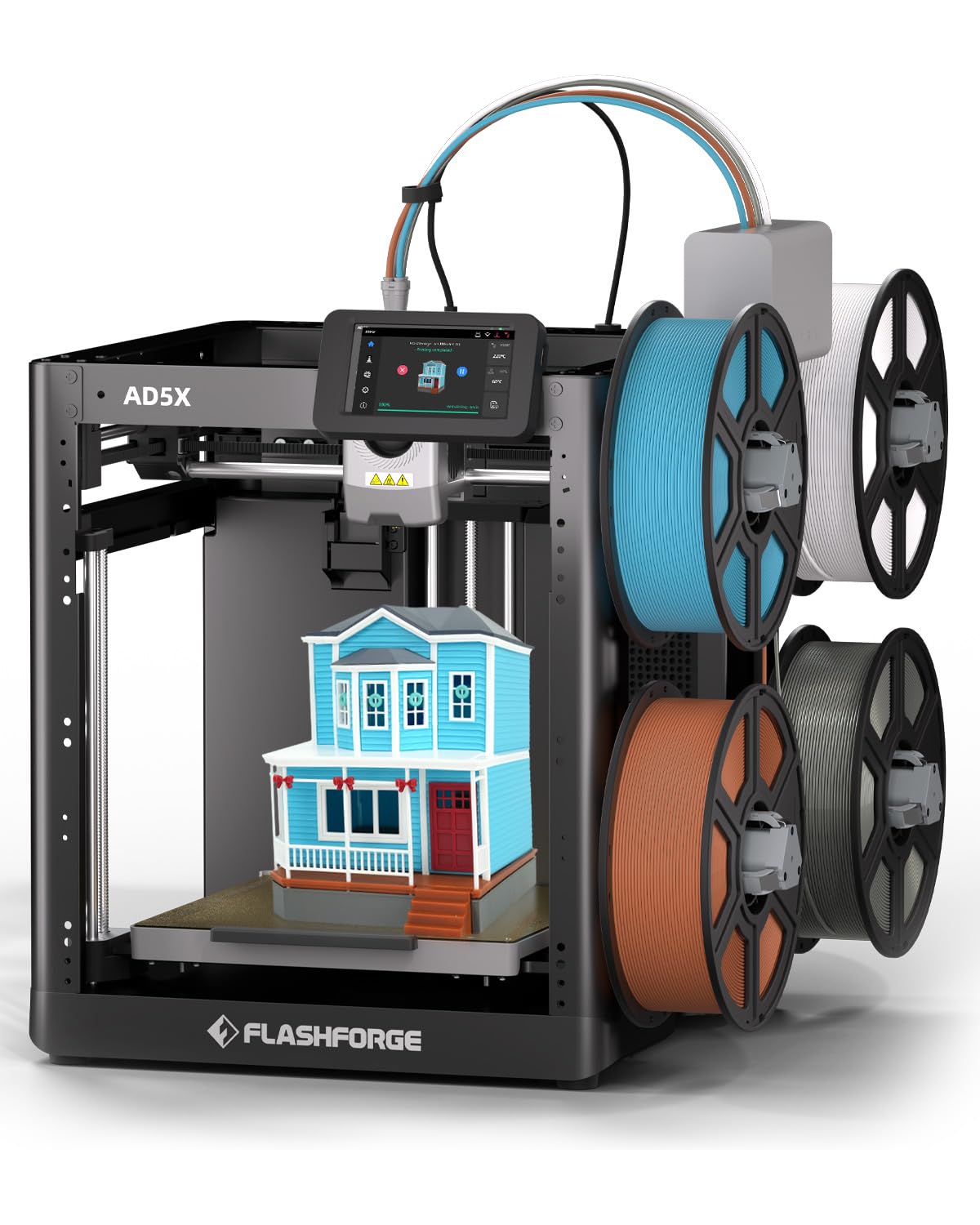
The FLASHFORGE AD5X brings 4-color printing to a price point that competes with single-color machines. Its Intelligent Filament System (IFS) manages four spools simultaneously and switches colors automatically without requiring an external unit — the spools connect directly to the print head, which cuts and retracts filament before the next color loads. The CoreXY structure hits 600 mm/s with 20,000 mm/s² acceleration, and the all-metal frame keeps vibrations low enough for detailed prints like 28 mm tabletop miniatures.
Users who upgraded from older bedslinger printers consistently praise the out-of-box experience. The printer arrives nearly assembled — you just install the spool holder bracket and run the initial leveling — and the company offers a separate enclosure kit for printing ABS. The touchscreen interface is intuitive enough for a beginner but exposes enough parameters (flow rate, temperature, retraction distance) for intermediate tuners. The machine supports flexible TPU prints without modifications, a rarity at this price.
The 220 mm³ build volume is smaller than most mid-range competitors, and the filament path through plastic components has been flagged as a potential wear point over hundreds of hours. A small number of users reported persistent calibration errors after a month of use, with Flashforge opting to send replacement parts rather than replace the unit — a notable customer-service difference from Bambu or QIDI. For the price, however, the AD5X delivers multi-color printing that would have cost three times this amount three years ago.
Why it’s great
- Four spools connect directly — no AMS, no extra hub, no proprietary dry box needed
- Support for TPU and flexible filaments without any hardware modifications
- Enclosure kit available for ABS printing without building a custom box
Good to know
- Plastic filament input components may wear over extended use — consider printing reinforced guides
- 220 mm³ bed is restrictive for large models or helmets
6. ELEGOO Centauri Carbon

The ELEGOO Centauri Carbon is designed for intermediate users who want the fastest path from unboxing to a finished print. It ships fully assembled and pre-calibrated: you remove the packing foam, plug in the power, and the auto bed leveling compensates for any shipping-induced deviations. The 256 mm³ build volume is slightly larger than the Flashforge AD5X and just 4 mm smaller than the P1S, making it a practical option for size-conscious buyers.
Its standout feature is the die-cast aluminum frame, a single-piece structure that resists the torsional flex that plagues bolted-together frames at high speeds. Combined with automatic vibration compensation and pressure advance, the Centauri Carbon prints at 500 mm/s with layer lines that remain straight and consistent — no ghosting on sharp corners even at ludicrous mode. The 320 °C nozzle supports carbon fiber reinforced filament, and the enclosed chamber with dual LED lighting and a built-in camera allows real-time monitoring through Elegoo Slicer via WiFi.
Reviewers who pushed the machine 8–10 hours daily for weeks confirm that the bed adhesion remains reliable without glue or tape, and the dual-sided build plate includes a PLA-specific surface that holds even tall, narrow prints without warping. The main reliability concern is the USB-C cable design, which was stressed in some first-run units and caused print failures; ELEGOO addressed this in later batches, but early adopters had to navigate tech support returns that took up to seven weeks. As a daily driver for PLA and PETG, it’s one of the most effortless machines available.
Why it’s great
- Truly out-of-box printing — no assembly, no manual leveling, no calibration cubes needed
- Die-cast aluminum frame eliminates vibration artifacts at full speed
- 320 °C nozzle handles carbon fiber filaments; enclosed chamber suits advanced materials
Good to know
- Early units had USB-C power cable failures that required lengthy warranty replacement
- No multi-color system — single extruder only, no upgrade path for filament swapping
7. Anycubic Kobra X
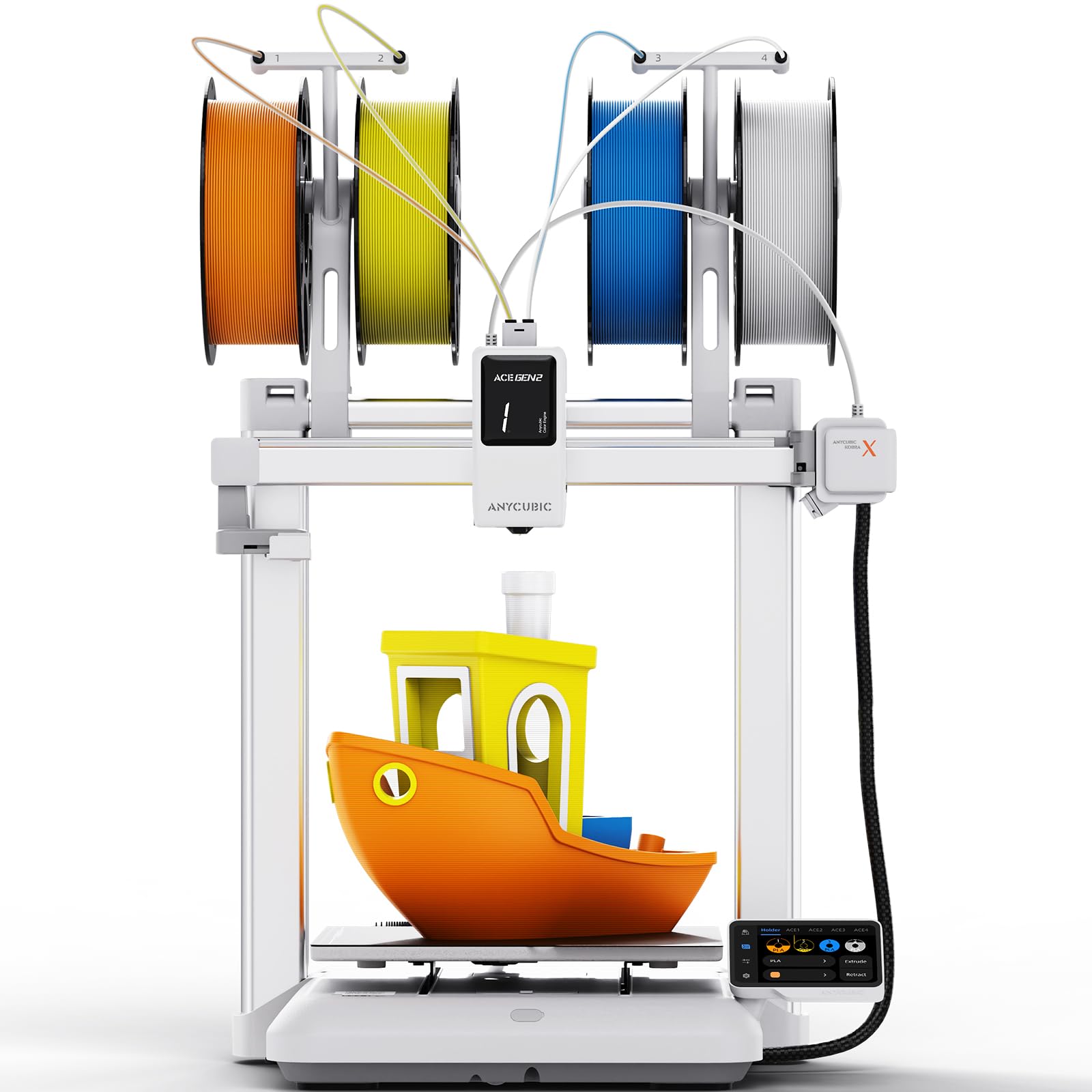
The Anycubic Kobra X combines entry-level pricing with features that intermediate users will appreciate: the ACE Gen 2 system manages up to 16 colors when you daisy-chain four units, the LeviQ 3.0 auto-leveling achieves 0.02 mm accuracy over 49 points, and the built-in 720p camera with AI-powered spaghetti detection pauses prints automatically if the nozzle drags filament or the bed shifts. The 45 dB noise rating means it’s quieter than a normal conversation — you can run it in a living room or study without headphones.
The CoreXY gantry structure and 0.02 mm leveling precision produce professional-quality surface finish, and the ACE Gen 2’s minimal-purge profile wastes less filament per color swap than many competing single-nozzle systems. The printer arrives pre-assembled with a modular design that goes from unboxing to first print in about 15 minutes, making it suitable for educational settings or shared maker spaces where multiple users need to run prints without supervision.
Some users noted that the camera angle is fixed and doesn’t show the entire build plate, so you may miss failures near the back corners. The single-nozzle design still generates purge waste — you’ll need to print a waste bucket or use the included purge wipe — and the spool holders are plastic components that may need replacement over time. The Kobra X’s strength lies in its balance of multicolor capability, quiet operation, and AI safeguards, making it a reliable daily companion for hobbyists who prioritize peace of mind over raw speed.
Why it’s great
- AI spaghetti detection and bed foreign-object detection prevent wasted prints and materials
- 45 dB operation is genuinely quiet — no sleep disturbance when printing overnight
- Expandable to 16 colors through daisy-chained ACE units
Good to know
- 720p camera has a fixed, limited angle — doesn’t cover the entire build plate
- Plastic filament input path may wear; printed reinforcement recommended
8. Creality K2 Combo (A)

The Creality K2 Combo (A) challenges the Bambu P1S on build volume and multi-color capacity. At 260 mm³, it has 8 mm more space in each dimension than the P1S, which is the difference between printing a full-size helmet in one piece versus splitting it into two halves. The CFS (Creality Filament System) supports four spools with a clear path to 16 colors by adding three more CFS units — no proprietary dry boxes, just dry filament storage integrated into each unit.
This eliminates the visible layer bulges that occur when a standard stepper motor overshoots the target position on sharp corners. The AI camera watches for spaghetti failures, idle print heads, and missing build plates — and the auto-leveling sensor probes only the area where your model will be printed, completing the process in under two minutes.
Build quality concerns surfaced in early units: some arrived with defective power cords, missing 5 GHz WiFi support, or CFS feeder errors. The printer weighs 65.9 pounds, so plan for a sturdy table or a dedicated printer stand. The documentation could be more thorough for the K2-specific features. But when everything works, the print quality and multi-color integration match the P1S at a lower price per cubic centimeter of build volume, making it a strong contender for users who print large items regularly.
Why it’s great
- 260 mm³ build volume prints helmets and large assemblies without splitting
- Step-servo motors eliminate layer bulges at high speed and sharp corners
- CFS includes integrated dry storage — spools stay dehydrated during long multi-color prints
Good to know
- Heavy 65.9-pound machine requires a dedicated, sturdy surface
- CFS may not fit standard cardboard spools — you may need to print adapters for 4–5 hours per spool
9. QIDI Max4 Combo

The QIDI Max4 Combo is built for intermediate users who outgrew desktop build volumes. At 390×390×340 mm, it prints parts 55% larger by volume than its predecessor and handles full-size drone frames, automotive ducting, and industrial molds in a single pass. The 800 mm/s top speed with 30,000 mm/s² acceleration is the fastest on this list, enabled by closed-loop motors on the X and Y axes that report position feedback to prevent missed steps even during aggressive motion.
The 65 °C active heated chamber is ten degrees hotter than the Q1 Pro, giving it the thermal headroom to print PPS-CF and other high-temperature engineering filaments that require sustained chamber temperatures above 60 °C. The high-flow 40 mm³/s hot end with hardened steel nozzle handles carbon fiber-reinforced nylon without flow bottlenecks. The QIDI BOX enables up to 16 colors and multi-material prints with intelligent filament level monitoring that pauses printing only when a spool is empty, not when the sensor briefly loses contact.
At 120 pounds, the Max4 Combo is a permanent installation — you will not move it once it’s on the stand. The initial power draw during chamber heat-up is high, and the pre-print process (heating the chamber, purging the nozzle) takes longer than smaller machines. Some users reported a temperamental toolhead sensor that required tilting the machine to reset, and the MMU gears can shred filament if the spool gets tangled. QIDI’s support team is responsive and will replace warped beds or faulty sensors, but the turnaround may take days rather than hours. For users who need industrial-grade output in a desktop-adjacent package, this is the machine to beat.
Why it’s great
- 390 mm³ build volume prints large industrial parts, molds, and full drone frames in one piece
- 65 °C active chamber supports PPS-CF, PA-CF, and other high-temp engineering filaments
- Closed-loop motors on X/Y axes ensure accuracy at 800 mm/s
Good to know
- 120-pound weight requires a dedicated workstation or rolling stand
- Heating and purging cycles add 10–15 minutes to pre-print time
10. Original Prusa MK4S

The Original Prusa MK4S is the printer you buy when reliability and open-source philosophy matter more than top speed or multi-color gimmicks. It ships with input shaping enabled, which applies motion compensation to reduce ringing at higher speeds — a significant upgrade over the MK4 that makes the MK4S competitive with CoreXY machines for print quality. The 9.84×8.3×8.6 inch build volume is modest, but the Printrboard with 0.9° stepper motors produces layer steps that are half the height of standard 1.8° motors, resulting in smoother curves and more accurate Z dimensions.
Prusa’s ecosystem is built on full transparency: the firmware, slicer profiles, and hardware design files are all open-source. You can modify the E-steps, adjust the PID tuning, or install a third-party hot end without voiding any warranty. The Prusa Connect platform provides remote monitoring and print queue management, and the EasyPrint app allows one-click printing from a curated collection. The included 1 kg spool of Prusament PLA Galaxy Black is a nice touch, and the PEI powder-coated spring steel sheet provides exceptional adhesion for PLA and PETG without glue.
The trade-off is speed — the MK4S tops out well below the 500+ mm/s that CoreXY machines offer. Prusa prioritizes dimensional accuracy and first-layer consistency over raw velocity, so you’ll wait longer for large prints. The printer is quiet enough for a home office, and the interactive build instructions (with comments from other users) make the self-assembly kit a rewarding experience. If you value repairability, community support, and the ability to control every aspect of the print process, the MK4S remains the gold standard after a decade of iteration.
Why it’s great
- Fully open-source hardware and firmware — modify, repair, or upgrade without restrictions
- 0.9 ° stepper motors deliver smoother curved surfaces and more accurate Z resolution
- Prusa Connect provides reliable remote monitoring and print queue management
Good to know
- Lower top speed compared to CoreXY machines — expect longer print times for large models
- Small 9.84×8.3×8.6 inch build volume limits single-piece helmet or bracket printing
FAQ
At what point should I upgrade from a beginner printer to an intermediate model?
Can I use any brand of filament with a Bambu Lab printer?
How much purge waste do multi-color printers actually generate?
Is a heated chamber necessary for PLA printing?
What does CoreXY mean and why does it matter for speed?
Final Thoughts: The Verdict
For most users, the best 3d printer for intermediate users winner is the Bambu Lab P1S because it delivers enclosed CoreXY speed, automatic calibration that never fails, and a proven multi-color path via the AMS — all in a package that prints ABS, PETG, and PLA without adjustments. If you want active chamber heating for engineering filaments like polycarbonate and nylon, grab the QIDI Q1 Pro. And for multi-color printing with built-in filament drying at a price that undercuts every competitor, nothing beats the Anycubic Kobra S1 Combo.