
Our readers keep the lights on and my morning glass full of iced black tea. As an Amazon Associate, I earn from qualifying purchases.
Specs are compiled from manufacturer listings and verified buyer reviews and can change over time — please confirm the key details on the product page before buying.
Picking a first 3D printer for a student can feel like decoding a foreign language—nozzle sizes, acceleration rates, and auto-leveling systems—and the wrong pick means frustration, not fun. The machine that gets used daily, not left in a corner, depends on three things: quick setup, dependable prints every time, and room to grow with a young maker’s curiosity.
I’m Min — the founder and writer behind Gadgets Feed. This guide is built by comparing the manufacturers’ published specifications and the patterns across verified customer reviews, so you get each pick’s real strengths and trade-offs instead of marketing spin.
You want a machine that sparks creativity, not a project that needs constant tinkering. Here is the honest breakdown of the best 3d printer for students to help you make the right call for your classroom or home desk.
Our Picks at a Glance


How To Choose The Best 3D Printer For Students
Before you compare speeds and volumes, understand that a student printer lives or dies by its ease of use. A machine that requires manual leveling, intricate setup, and constant tweaking will frustrate a young beginner and end up in a closet. Focus on models that handle the technicalities automatically so the student can focus on designing and creating.
Auto-Leveling: The Beginner’s Best Friend
In the past, getting the print bed perfectly flat was a manual, frustrating dance with paper and knobs. Modern student printers use auto-leveling, where the machine measures the bed and adjusts itself before every print—this means fewer failed first layers and a much better chance of a successful print on the very first try.
Build Volume vs. Desk Space
Build volume tells you the maximum size of an object you can print. A larger volume, like 220x220x220mm, lets you create bigger models and functional parts, but it often means a larger, heavier machine. For a student desk, you need to balance a generous print area with a footprint that doesn’t take over the room, and a weight that can be moved if needed.
Speed and Safety Features
High print speeds are great for impatient young makers, but they can introduce quality issues if the machine isn’t built well. Look for vibration compensation and a sturdy frame to keep prints clean at speed. For home and school use, also check for safety features like filament run-out sensors that pause the print when plastic runs out, and power-loss recovery that resumes a print after an outage.
Quick Comparison
| Model | Best For | Build Volume | Max Speed | Weight | Amazon |
|---|---|---|---|---|---|
| Bambu Lab A1★ Best Overall | Best Overall Reliability | 256mm³ | 10,000 mm/s² | 22 pounds | Amazon |
| Bambu Lab P1SEnclosed Power | Enclosed Precision | 260mm³ | 500mm/s | 38.9 pounds | Amazon |
| Creality K2 SEMulti-Color Maker | Fast Multi-Color | 220x215x245mm | 500mm/s | 27.5 pounds | Amazon |
| Flashforge AD5M | Easy Maintenance | 220x220x220mm | 600mm/s | 22 pounds | Amazon |
| Flashforge Adventurer 5M | Classroom Starter | 8.7″x8.7″x8.7″ | 600mm/s | 23.3 pounds | Amazon |
| Anycubic Kobra X | Multi-Color Value | 260x260x260mm | 600mm/s | 20.9 pounds | Amazon |
| Anycubic Kobra X Combo | 7-Color Projects | 260x260x260mm | 600mm/s | 29 pounds | Amazon |
| Entina Tina2 Basic | Budget-Friendly First Print | 100x105x100mm | — | 6 pounds | Amazon |
In‑Depth Reviews
1. Bambu Lab A1 3D Printer
Our pick — over 4.5★ from 550+ verified ratings; the strongest balance of quality and price.
The classroom workhorse that prints like a dream and runs at library-quiet levels.
The Bambu Lab A1 is the printer that experienced owners say makes their older machines feel obsolete—the thing everyone raves about is the print quality, which stays high and consistent. It pulls this off with a 10,000 mm/s² acceleration rate, which means it reaches top speed almost instantly for fast printing without sacrificing the fine detail students want in their models.
Setup is genuinely plug-and-play for a young maker. Full-auto calibration handles the Z-offset and bed leveling on its own, and the 1-Clip quick swap nozzle makes maintenance a two-second job instead of a stressful one. It is a forgiving machine that lets beginners focus on creating instead of troubleshooting, and Buyers report months of daily use with zero maintenance issues..
The trade-off for all this ease: it’s an open design, so it’s best suited to PLA and PETG materials that don’t need an enclosed chamber. And while it’s ready to go from the start, the multi-color upgrade requires the optional AMS lite unit, which is sold separately. That said, its reliability and quality make it the safest recommendation for students who want their first prints to actually work.
What Makes It a Student Favorite
- Stellar print quality that holds up print after print
- Fully automatic calibration means no manual leveling
- Quiet operation at ≤48 dB won’t disrupt a study space
- Easy 1-Clip nozzle swap for quick maintenance
Honest Limitations
- Multi-color printing needs the separately sold AMS lite
- Open design is not ideal for advanced materials like ABS
- At 22 pounds, it’s not a machine you’ll move around often
The smart pick: If you want the most reliable, high-quality printer for a student to learn on without fighting the machine, this is it.
Think twice if: You specifically need an enclosed printer for advanced materials, or you want multi-color right from the start.
2. Bambu Lab P1S 3D Printer
A fully enclosed speed demon that brings advanced materials into a student’s reach.
When a student’s projects outgrow basic PLA, the Bambu Lab P1S is the upgrade path. Its fully enclosed design means it can handle advanced filaments like ABS and ASA, which are prone to warping on open machines, so a growing maker isn’t limited by their hardware. It hits a top speed of 500mm/s with 20,000 mm/s² acceleration, so even complex models finish without a long wait.
What wins people over is how An 11-year-old can start printing within five minutes of unboxing.. The automatic bed leveling takes the guesswork out of first-layer adhesion, and the Bambu Studio software is praised as intuitive enough for beginners while still offering depth for serious projects. The MakerWorld model library is a built-in source of ready-to-print designs, which is perfect for students looking for inspiration.
The main consideration is size and weight—at 38.9 pounds, this is a permanent desk fixture, not a portable machine. Owners also note it needs a window open for ventilation when printing certain materials. It is a bigger investment, but for a serious young hobbyist it delivers industrial-grade results at a fraction of the cost of professional machines.
Built to grow: This is the pick for the student who’s already hooked and wants a machine that can handle tough materials like ABS and ASA without warping, all at speeds that keep projects moving.
The hefty side: It is the heaviest pick here at 38.9 pounds, so it demands a dedicated, permanent home on a sturdy desk.
3. Creality K2 SE 3D Printer
A speedy compact printer that opens the door to vibrant multi-color creations.
The Creality K2 SE brings high-speed printing to the student desktop with a 500mm/s top speed, and it is tune for fast filaments like Hyper PLA to keep print times short. Setup is praised as quick and guided—you attach the touchscreen, complete the auto-calibration, and you’re printing in minutes. It’s a machine that owners say is “much less fuss” than older Ender models, making it a solid step up for a student who wants reliable speed.
Where it gets notable is color. It supports one Color Filament System (CFS) with 4 spools, and by connecting up to four CFS units, you can print in as many as 16 colors—perfect for figurines and educational models. The rigid aluminum frame with anti-vibration tech keeps prints clean and dimensional accuracy high, even when running fast.
The honest caveat from the owner community is that print quality can be inconsistent from the start—some report flawless results, others hit failed prints that need troubleshooting. Owners also advise keeping a glue stick handy as a release agent, and the included slicer software is described as rough around the edges. It’s a capable machine for the price, but it may ask a bit more patience from a young user than the top pick.
Reach for it if: The student is drawn to multi-color prints and you want a fast, compact machine that won’t dominate the desk.
Look elsewhere if: You want a guaranteed fuss-free experience right from the start, as some units need a bit of tinkering to get perfect.
4. FLASHFORGE AD5M 3D Printer

A beginner-friendly machine with a tool-free nozzle you can swap in seconds.
The FLASHFORGE AD5M is built around easy maintenance, starting with a patent quick-release nozzle. With multiple nozzle diameters available (0.25/0.4/0.6/0.8 mm), a student can switch between high-precision and high-efficiency printing, and the tool-free swap takes as little as 3 seconds—ideal for young users who might be nervous about taking a machine apart. It runs at a rapid 600mm/s top speed with an all-metal CoreXY structure that keeps motion stable and low-noise.
First-timers find the setup manageable at about an hour, and the fully automatic one-click leveling removes the classic beginner hurdle of manual calibration. The flexible double-sided PEI steel plate makes removing models as simple as bending the plate, and one side is specifically designed for printing PETG material. Owners praise the Orca-flashforge slicer as intuitive, and the Flash Maker APP allows for remote monitoring from anywhere.
The catch reported by some owners is reliability over the long haul—a few units stop working after around 20 prints, and the monitor cable connection is described as frustrating. It’s a great value for the speed and features, but it’s worth testing thoroughly within the return window to ensure you got a solid unit.
Why It Stands Out
- Tool-free 3-second nozzle swap is perfect for novice maintenance
- Fully automatic leveling for a flawless first layer
- Flexible PEI plate makes model removal easy
- Remote monitoring via the Flash Maker APP
Watch Out For
- Reliability can be hit-or-miss past 20 prints
- Monitor cable connection is frustrating to set up
- WiFi disconnects reported by some users
Best for: A student who wants fast prints and easy maintenance without the fear of complex part changes.
Not for: Parents who want a completely hands-off machine and aren’t prepared to test and possibly return a dud unit.
5. Flashforge Adventurer 5M 3D Printer

A fast, easy starter with a 20-minute setup that gets young makers printing on day one.
The Flashforge Adventurer 5M is engineered for the classroom, combining a quick 20-minute setup with a 600mm/s hyper-speed print capability. Its 20,000mm/s² acceleration and high-flow nozzle mean a student’s design goes from screen to hand fast—Owners mention it halves typical print times.. It’s a machine where A 9-year-old can achieve successful prints immediately after unboxing., which is exactly what you want for a school environment.
Precision is handled automatically with 25-point bed leveling and pressure-sensor compensation down to 0.01mm, ensuring a perfect first layer without any manual alignment. The industrial-grade CoreXY frame with dual linear rails and anti-vibration tech achieves ±0.1 mm dimensional accuracy, enough for functional engineering prototypes, not just toys. The MagSwitch PEI plate removes in 3 seconds, and the Nozzle X quick-change system swaps in under 15 seconds.
What holds it back is mixed owner sentiment on reliability. While many report professional-grade prints with zero failures, some had units arrive with calibration errors that made setup impossible, and others received refurbished units locked to a previous owner. The fans are also noted to be loud at top speed. It’s a great starter printer, but it’s worth buying new from a reliable source.
Speed demon: This is the pick for a classroom that needs to keep projects moving—the 20-minute setup and 600mm/s speed mean less waiting and more creating.
The lottery factor: Some owners received defective or refurbished units, so inspect yours carefully on arrival to avoid a frustrating start.
6. Anycubic Kobra X Multicolor 3D Printer
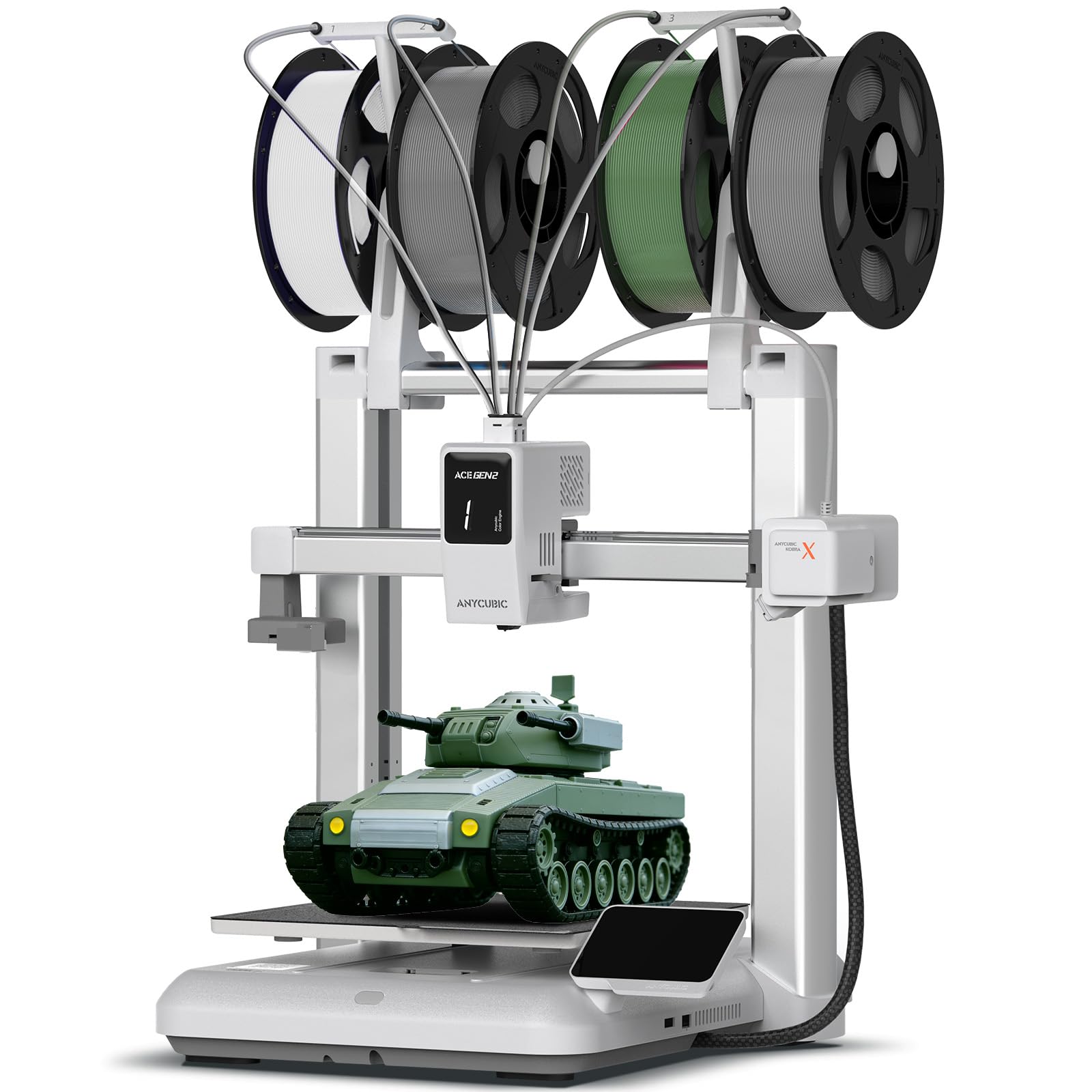
Its intuitive design lets even a first-time user master it quickly..
The Anycubic Kobra X is the printer for the student who wants color without the hassle of manual filament swapping. It features a built-in 4-color system that lets you create vibrant models right away, and it can expand up to 19 colors with four optional ACE 2 Pro units. Owners love that it does color swaps automatically—no need for an AMS—which makes it a fantastic tool for colorful educational projects and toys.
Ease of use is the core pitch. The LeviQ 3.0 system uses 49-point full-auto leveling to guarantee a perfect first layer with zero guesswork, and the printer runs at a quiet ≤48 dB, so it won’t disrupt a study space. It is also smart: a 720P camera provides real-time monitoring, and AI-driven spaghetti detection stops a print that has gone wrong, saving filament and time—a huge plus for supervised student use.
The catch is that this is not a beginner machine despite the easy assembly. Some customers note frequent filament jams and warn that slicer skill is critical for good results. One experienced user noted it’s “not for beginners,” which is a sharp contrast to the Bambu picks. If the student is patient and willing to learn software settings, it rewards with impressive multi-color output.
Pick this if: Your student is set on multi-color prints and you appreciate AI-powered monitoring to catch mistakes before they waste plastic.
skip it if: You want a true plug-and-play machine—this one expects some slicer expertise and patience with occasional jams.
7. Anycubic Kobra X Combo 3D Printer with ACE 2 Pro
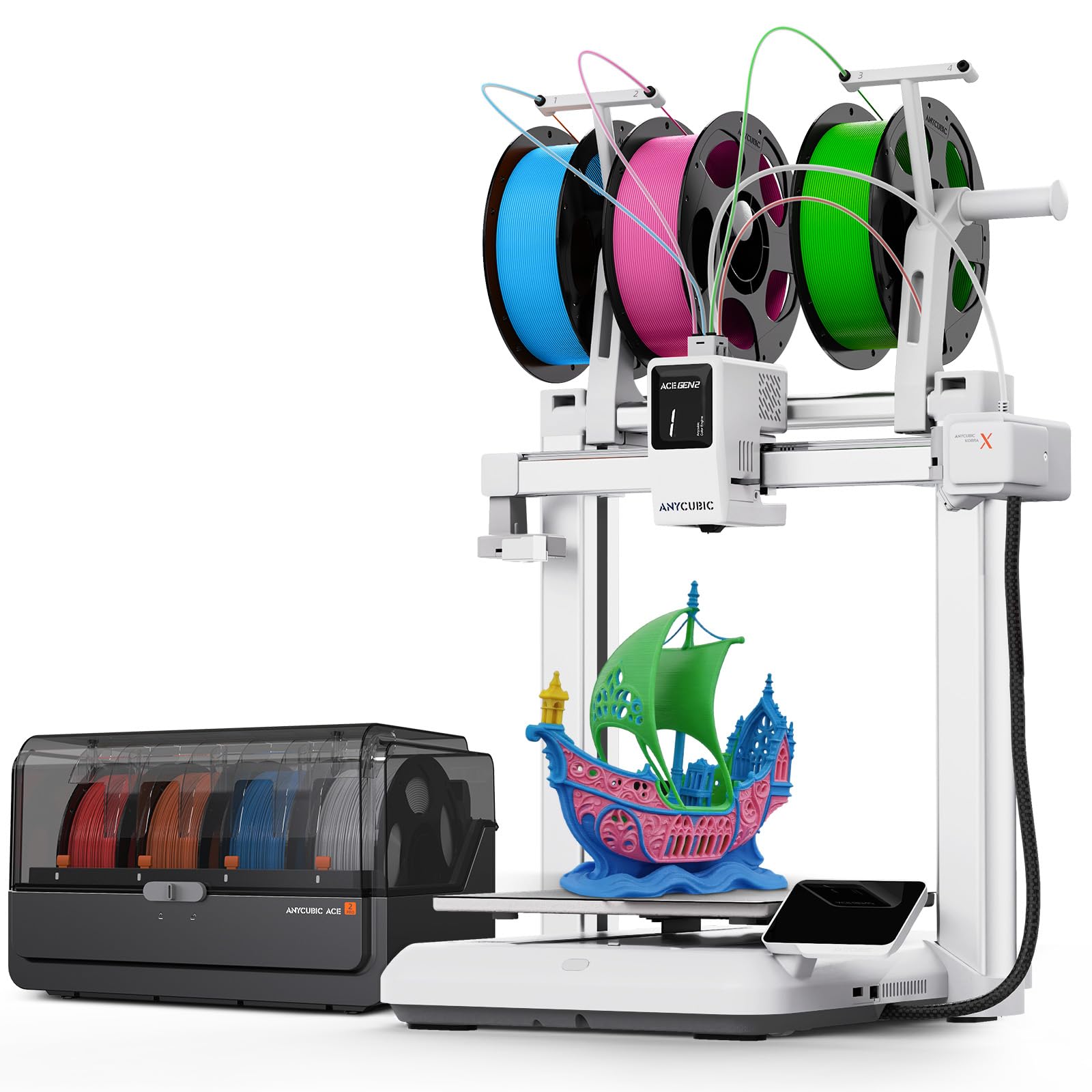
A complete color kit that turns family time into printing time with seven native colors.
The Anycubic Kobra X Combo is the whole package for a student who wants to make colorful gifts and projects without waiting days. It brings Native 7-Color printing straight from the start thanks to the included ACE 2 Pro, and it can expand up to 19 colors for limitless imagination. The 2X faster multi-color speed means a colorful gift for a child can be finished in hours, not days, and Its 50% filament waste reduction means more prints per spool..
It is a reliable workhorse for beginners, with Owners logged 265 hours across PLA, PETG, and TPU with zero adhesion or clogging issues.. Setup is quick, completing within an hour, and the auto-leveling and flexible magnetic bed make it painless to start and finish prints. The recommended print speed of 300mm/s with a max of 600mm/s keeps projects fast without sacrificing the smooth, consistent quality owners praise.
The trade-off is the mixed long-term reliability. While many owners rave about it, a notable share report frequent clogs and jams, and the warranty excludes basic jams—support is described as AI-driven with public guides only. It’s a fantastic value for multi-color printing if you get a good unit, but be prepared for the possibility of self-troubleshooting.
The Color Advantage
- Native 7-color printing from the start, expandable to 19
- Prints 2X faster with 50% less filament waste than single-color models.
- Quiet operation under 48dB for a peaceful home workspace
- Dual-band Wi-Fi for easy remote monitoring
The Real Risks
- Reliability is a coin flip—some units have frequent clogs
- Warranty doesn’t cover basic jams, and support is limited
- At 29 pounds, it’s a heavy, dedicated desk fixture
Best for: Families who want a complete multi-color setup ready to go, with the speed to finish projects in a single afternoon.
Not for: Those who want guaranteed, hands-off reliability—the mixed owner feedback on jams is a real concern.
8. Entina Mini 3D Printers Tina2 Basic

A tiny 6-pound printer that is a genuine first machine, not just a toy.
The Entina Tina2 Basic is the budget-friendly entry point that proves a first printer doesn’t have to be intimidating. It arrives fully assembled, so a student can unbox it and start their first print in as little as 5 minutes using the included TF card with test models and slicing software. Owners consistently describe it as a great starter—one parent notes it’s “not a toy but an actual 3D printer” that their grandson loves, with video tutorials making setup easy.
It is designed for complete beginners with a fully open-source platform, a knob operation for simple control, and one-button filament in/out. The intelligent auto-leveling system means no manual bed leveling, and the flexible removable magnetic build plate lets you pop models off easily. Its compact design—11.4 x 8.6 x 8.6 inches and just 6 pounds—makes it perfect for a small desk or a classroom shelf, and it’s light enough to move around.
The obvious limitation is the small build volume of 100x105x100mm, which caps the size of projects a student can create. It’s also a slower, more basic machine, so it won’t keep up with the high-speed models above. But for a young child’s first foray into 3D printing, or for a classroom on a tight budget, it’s an unbeatable, low-risk way to learn the fundamentals.
Start small: This is the perfect first printer for a young child—it’s fully assembled, forgiving, and comes with video tutorials that make the first print a success.
Know the limit: The 100x105x100mm build volume means bigger projects are off the table, so expect to upgrade when the student’s ambitions grow.
Understanding the Specs
Build Volume
This tells you the maximum size of an object the printer can create, usually shown in millimeters (like 220x220x220mm). A larger build volume means you can print bigger models, functional parts, and multi-piece projects in one go. For students, a mid-size volume is a good balance—it’s big enough for real projects without making the machine too large for a desk.
Print Speed and Acceleration
Speed is often listed in mm/s (millimeters per second) and shows how fast the print head can move. Higher speeds like 600mm/s mean projects finish much faster, which is great for impatient young makers. Acceleration (like 10,000 mm/s²) is the key to that speed—it determines how quickly the printer reaches top speed without losing quality. A well-built frame with vibration control keeps those fast prints clean.
FAQ
What is the best 3D printer for a student to learn on?
Is a fully assembled printer better for a student than a kit?
How much desk space does a student 3D printer need?
What is auto bed leveling and why does it matter?
Can a student 3D printer handle multi-color prints?
What materials can a beginner student use safely?
How long does it take to set up a student 3D printer?
Is a faster 3D printer better for a student?
Final Thoughts: The Verdict
For most students, the 3d printer for students winner is the Bambu Lab A1 because it pairs the strongest reliability and print quality with a fully automatic setup that lets a young maker focus on creating, not troubleshooting. If you want an enclosed machine that can handle advanced materials as skills grow, the Bambu Lab P1S is the upgrade to make. And for the youngest beginners or a budget-conscious classroom, the Entina Tina2 Basic is the low-risk, fully assembled way to start the hobby.
How We Picked
We do not accept paid placement. Every pick is matched to a real buyer and a real use-case; we do not hands-on test units.
Sources & Methodology
Specifications: manufacturer listings and product documentation. Review insights: verified customer reviews, as of August 2026. Pricing: not shown on this page (it changes often); check the current price via the retailer link.
As an Amazon Associate, Gadgets Feed earns from qualifying purchases. This does not affect which products we feature.