
Printing with TPU is a test of patience—the material’s flexibility makes it prone to jamming, stringing, and under-extrusion on machines designed for rigid PLA. Without a direct-drive extruder and precise temperature control, your Benchy will look like a wad of chewed gum. The right hardware solves this: stiff filament paths, all-metal hotends, and proper enclosure heat management turn flexible filament from a headache into a reliable tool for parts that need to bend, grip, or absorb impact.
I’m Min — the co-founder and writer behind Gadgets Feed. For this guide, I’ve spent dozens of hours analyzing technical specifications, reviewing customer failure reports, and cross-referencing extruder gear ratios, hotend maximum temperatures, and Bowden-versus-direct-drive trade-offs to find the machines that genuinely handle TPU at speed without constant babysitting.
After sorting through open-source forums, verified user data on clogs and adhesion, and the latest CoreXY kinematics, this roundup of the 3d printer for tpu filament balances print reliability, material compatibility, and real-world ease of use for hobbyists and production runners alike.
How To Choose The Best 3D Printer For TPU Filament
TPU is a flexible filament that punishes poor extruder design. The three factors below separate printers that print TPU reliably at 50 mm/s from machines that clog after two layers. Each spec directly affects how the printer handles the material’s low stiffness and high friction coefficient.
Direct-Drive Extruder vs Bowden: The Short Path Wins
A Bowden setup pushes filament through a long PTFE tube before it reaches the hotend. For flexible TPU, that distance creates a buckling risk—the filament compresses instead of moving forward. A direct-drive extruder mounts the motor right above the nozzle, reducing the unsupported filament length to under 50 mm. This gives the extruder gears direct control over the wobbly material, minimizing retraction distance and preventing jams. Every printer on this list uses a direct-drive setup.
Hotend Temperature and Nozzle Material
TPU typically prints between 220°C and 250°C, but many users push higher for faster flow. A hotend rated to at least 300°C (preferably 320°C) ensures you can run TPU at the upper end of its range without worrying about PTFE degradation or heat creep. An all-metal heatbreak and a hardened steel nozzle (or brass-hardened composite) resist abrasive wear from filled TPU variants like TPU-CF.
Build Plate Adhesion and Heated Chamber Management
TPU adheres aggressively to PEI-coated spring steel sheets, but it can warp if the bed temperature fluctuates more than ±3°C. A dual-sided PEI plate gives you a textured surface for TPU on one side and a smooth side for PETG. For large TPU prints, a heated chamber—even just a passively enclosed volume—reduces layer separation caused by rapid cooling. Active chamber heating (65°C) helps when printing engineering-grade TPU blends.
Quick Comparison
On smaller screens, swipe sideways to see the full table.
| Model | Category | Best For | Key Spec | Amazon |
|---|---|---|---|---|
| FLASHFORGE AD5M | Mid-Range | Beginner TPU at speed | CoreXY, 600 mm/s, quick-swap nozzle | Amazon |
| ELEGOO Centauri Carbon | Mid-Range | Enclosed TPU with carbon fiber | 320°C nozzle, CoreXY, 500 mm/s | Amazon |
| Creality K2 Combo | Premium | Multi-color TPU with CFS | 260 mm³ build, step-servo motors | Amazon |
| IdeaFormer IR3 V2 | Premium | Continuous belt TPU parts | Conveyor belt, 400 mm/s, Klipper | Amazon |
| Sovol SV08 MAX | Premium | Large-format TPU prototypes | 500 mm³, 700 mm/s, eddy sensor | Amazon |
| QIDI Max4 Combo | Premium | Engineering TPU at scale | 65°C heated chamber, 800 mm/s | Amazon |
| Creality K2 Plus Combo | Premium | Production TPU with multi-color | 350 mm³, dual AI camera, 600 mm/s | Amazon |
| Snapmaker Artisan | Premium | Dual-extrusion TPU on large parts | 400 mm³, dual extrusion, linear rails | Amazon |
| RJOKMT Filament Cabinet | Mid-Range | Storage and dry TPU spools | 180L, 40-spool capacity | Amazon |
In‑Depth Reviews
1. FLASHFORGE AD5M 3D Printer

The FLASHFORGE AD5M delivers CoreXY kinematics at a mid-range price point, enabling 600 mm/s travel speed without the ringing artifacts typical of Cartesian bed-slingers. The all-metal motion system maintains rigidity, and the patent quick-release nozzle lets you swap between 0.25 mm, 0.4 mm, 0.6 mm, and 0.8 mm diameters in three seconds—critical for switching from high-precision PLA to high-flow TPU without disassembling the hotend.
TPU benefits from the fully automatic one-click leveling system, which measures the nozzle-to-bed offset precisely to ensure the first layer squishes evenly. The flexible double-sided PEI steel plate provides excellent adhesion for flexible filaments, and the reverse side handles PETG without glue stick. With a 220×220×220 mm build volume, it suits small to medium TPU parts like gaskets, phone cases, and vibration dampeners.
Orca-flashforge slicer enables one-click batch file transmission and multi-printer network monitoring. The Flash Maker app adds remote print status checks via Wi-Fi. The resume-after-power-loss feature saves the current layer height, so a mid-print shutdown doesn’t ruin a twelve-hour TPU run. Customer reviews note consistent first layers and quiet operation, though the included filament sample is small.
Why it’s great
- Tool-free nozzle swap in 3 seconds supports multiple diameters for TPU tuning
- CoreXY structure reduces moving mass for stable high-speed TPU printing
- Auto bed leveling measures real-time nozzle offset for reliable first layer adhesion
Good to know
- Small 220 mm build volume limits large single-piece TPU parts
- Some users reported extruder board failure within six months of heavy use
2. ELEGOO Centauri Carbon 3D Printer

The Centauri Carbon combines a 320°C brass-hardened steel nozzle with an enclosed chamber and enhanced part cooling, making it one of the few sub-premium printers ready for carbon-fiber-reinforced TPU composites. The CoreXY structure hits 500 mm/s and 20,000 mm/s² acceleration, and the rigid die-cast aluminum frame absorbs vibrations that would otherwise cause ghosting on flexible filament surfaces.
It arrives fully assembled and pre-calibrated, so the first TPU print can start within 30 minutes of unboxing. Auto bed leveling, vibration compensation, and pressure advance work together to produce smooth first layers on the upgraded dual-sided plate. The PLA-specific side offers excellent adhesion at lower bed temperatures, which helps when transitioning between TPU and PLA without changing build surfaces.
A built-in chamber camera with dual LED lighting supports real-time monitoring and time-lapse capture via Wi-Fi. The slicer software includes pre-tuned profiles for TPU, reducing trial-and-error retraction tuning. Users report that the 256×256×256 mm build volume handles large dampeners and custom grips without splitting. The mainboard and hotend are accessible for maintenance, but the USB-C connector on the toolhead has been noted as a fragile point in reviews.
Why it’s great
- 320°C nozzle handles TPU-CF and other abrasive flexible blends
- Pre-assembled out-of-box minimizes setup time for TPU tuning
- Eddy current leveling and pressure advance ensure consistent extrusion
Good to know
- Some units reported hotend communication failures within first week
- USB-C connector on moving toolhead may be prone to wear over time
3. Creality K2 Combo 3D Printer

The K2 Combo integrates the Creality Filament System (CFS) for multi-material switching, which extends to TPU as long as the filament is dry and the direct-drive extruder handles the softer shore hardness. The next-gen direct-drive extruder paired with step-servo motors on the X, Y, and extruder axes allows torque adjustments in under a millisecond, preventing the under-extrusion that plagues Bowden-fed TPU prints.
Its 260×260×260 mm build volume fits mid-sized functional TPU parts, and the pre-assembled design is ready to print after screen installation. Auto leveling probes only the print area, reducing bed preparation time. The AI camera monitors for spaghetti failures and idle time, sending alerts via the Creality app. Silent mode uses dynamically balanced fans and step-servo motors to keep noise below 50 dB during overnight TPU runs.
The CFS unit includes active drying, which is a major advantage for TPU—moisture absorption causes stringing and popping during extrusion. However, the CFS does not support standard spools out of the box; users must print adapter rings, which takes 4–5 hours each. Customer reviews praise the quiet operation and excellent bed adhesion but caution that the AI spaghetti detector did not catch all operator errors.
Why it’s great
- CFS active drying prevents moisture-related TPU print defects
- Step-servo motors adjust torque in real-time for consistent TPU extrusion
- Auto leveling probes only the print area, saving time on large builds
Good to know
- CFS requires printed adapters for non-Creality spools
- Some units experienced CFS slot errors and extruder clogs during multi-material prints
4. IdeaFormer IR3 V2 Conveyor Belt 3D Printer

The IR3 V2 uses a PEI-coated metal conveyor belt that provides an infinite Z-axis for continuous TPU production—no print height limit. This is a specialized machine for small-run manufacturing of flexible parts like wristbands, gaskets, and vibration mounts that repeat identically without manual restart. The belt system eliminates the need for a separate build plate, and the 45-degree print orientation reduces the need for support structures on complex overhangs.
Powered by Klipper firmware, it achieves 400 mm/s with smooth XY motion and a gearbox-integrated roller drive. Auto leveling via the Y-offset strain sensor removes the need for calibration cards, and the hotend supports a wide range of filaments including PLA, PETG, ABS, ASA, TPU, and PP. For TPU specifically, the direct-drive extruder and short filament path keep retraction distances low, minimizing stringing.
The conveyor belt does lose stickiness over time, requiring periodic glue stick application. The HMI is laggy according to some users, and the initial setup instructions are sparse. This is not a beginner machine—customers recommend it as a second or third printer for users who understand Klipper macros and Y-axis offset tuning. The 250×250 mm cross-section is fixed, so part width is constrained.
Why it’s great
- Continuous belt provides infinite Z-axis for batch TPU production
- Klipper firmware enables fine-grained TPU retraction and speed tuning
- PEI-coated belt offers good layer adhesion for flexible materials
Good to know
- Belt loses adhesion over time and requires glue stick reapplication
- Not suitable for beginners; requires understanding of Klipper and Y-offset tuning
5. Sovol SV08 MAX CoreXY 3D Printer
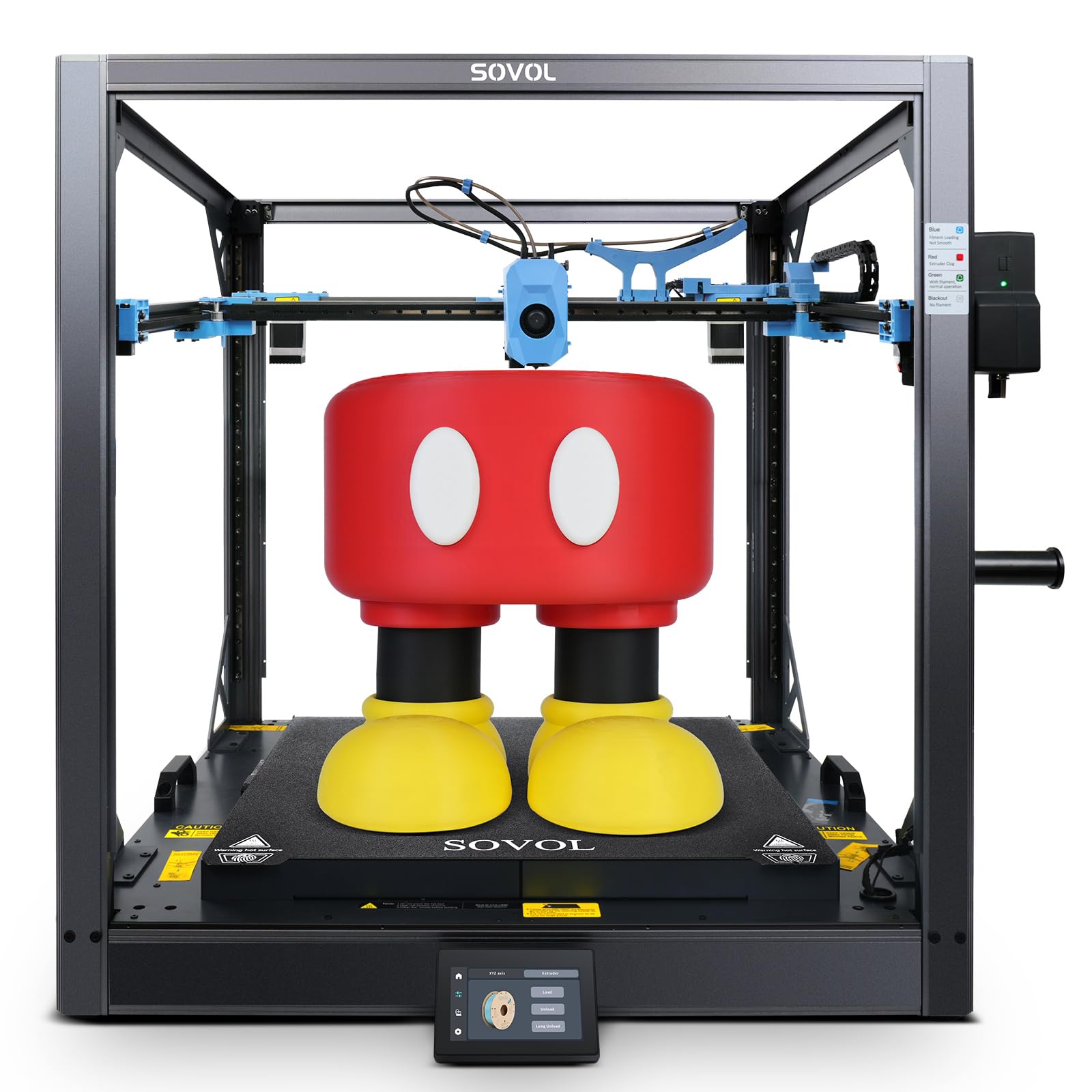
The SV08 MAX offers a 500×500×500 mm build volume—among the largest in this list—combined with CoreXY kinematics that reach 700 mm/s and 40,000 mm/s² acceleration. For TPU, the high-flow 50 mm³/s nozzle and 300°C hotend allow thick layer lines without underextrustion, making it viable for large-format flexible prototype parts like full-size bumpers or custom padding inserts.
The eddy current sensor performs contactless bed leveling at high resolution, detecting microscopic surface deviations to achieve a perfectly level first layer across the massive bed. The auxiliary feeder system includes tangle detection and clog detection—both critical for TPU, where a jam mid-print can waste hours of material. The 8 mm thick aluminum bed with 1300 W heating power provides rapid, even temperature distribution, minimizing warping on large TPU bases.
Customer reviews highlight the open-source Klipper environment: full mainline Klipper, not a closed fork, so users can implement community macros for TPU pressure advance tuning. However, some users reported filament jam errors triggered by the push-pin sensor, and the mainboard fan is loud at stock (a 24V Noctua swap is a common fix). The printer is heavy at 86.8 pounds and requires a sturdy table.
Why it’s great
- Massive 500 mm³ build volume enables single-piece TPU parts without splitting
- Eddy current sensor provides contactless, high-resolution bed leveling
- Open-source Klipper allows advanced TPU pressure advance calibration
Good to know
- Some units experienced filament jam errors triggered by the push-pin sensor
- Stock mainboard fan is loud; aftermarket Noctua replacement recommended
6. QIDI Max4 Combo 3D Printer

The Max4 Combo combines a 390×390×340 mm build volume with a 65°C actively heated chamber, which is rare at this tier and directly beneficial for large TPU prints that cool unevenly and warp. The 40 mm³/s high-flow hotend with hardened steel nozzle handles both standard TPU and abrasive carbon-fiber-reinforced variants like TPU-CF, which would wear a brass nozzle quickly.
Closed-loop motors on the X and Y axes achieve 800 mm/s and 30,000 mm/s² acceleration with real-time position feedback, reducing the layer shift risk on high-retraction TPU moves. The 2 mm lead screw and anti-backlash nut on the Z-axis minimize vertical gaps, which is critical for flexible parts that rely on precise layer alignment for water-tightness or mechanical interlocking.
The built-in AI camera detects spaghetti failures and pauses prints automatically—a valuable safety net for unattended TPU runs. The QIDI BOX accessory adds 16-color multi-material switching, though TPU should be dried before loading to avoid jams in the MMU path. Customer reviews praise the print quality with PPA-CF and ABS-CF but note that initial power consumption is high during chamber preheat, and the UI feels choppy compared to Klipper-based alternatives.
Why it’s great
- 65°C active chamber prevents TPU warping on large prints
- Closed-loop motors provide real-time position feedback for high-speed accuracy
- Hardened steel nozzle handles abrasive TPU-CF without wear
Good to know
- High initial power draw during chamber preheat
- Choppy UI interface; not as smooth as Klipper-based systems
7. Creality K2 Plus Combo 3D Printer

The K2 Plus Combo scales up to a 350×350×350 mm build volume with the same CFS multi-color system, supporting up to 16 colors via four linked CFS units. The next-gen direct-drive extruder reaches 600 mm/s and 30,000 mm/s² acceleration with step-servo motors that dynamically adjust torque—crucial for maintaining constant extrusion pressure on flexible TPU during fast retractions.
Active chamber heating and a high-temp nozzle with hardened steel tip unlock PLA, ABS, PETG, PA-CF, PLA-CF, PET, ASA, and PPA-CF materials, all of which can be blended with TPU in multi-material prints for rigid-flex combinations. The dual AI cameras monitor the chamber for spaghetti failures, foreign objects, and idling, and the anti-tilt auto leveling uses independently motorized Z-axes to compensate for bed tilt in real-time.
The “Matrix” frame uses die-cast aluminum for rigidity, and the dual Z-axis with four linear rods prevents layer shift even at high speeds. A sensor filament cutter automatically snips the filament at the end of a print or when switching spools, reducing waste. Customer reviews highlight minimal setup and excellent print quality, though the assembly instructions are vague, and the printer is very heavy—two people are needed for unboxing.
Why it’s great
- 350 mm³ build volume accommodates large TPU production runs
- Dual AI cameras provide redundant print failure detection
- Active chamber and high-temp nozzle support TPU composites
Good to know
- Very heavy unit at over 65 pounds; requires two people for setup
- Some units required firmware fixes for extruder motor direction
8. Snapmaker Artisan 3D Printer

The Snapmaker Artisan distinguishes itself with dual-extrusion 3D printing, using a 7:5:1 planetary gear ratio that provides high torque for feeding flexible filaments without skipping. The 400×400×400 mm build volume is among the largest enclosed printing spaces, allowing single-piece TPU parts like full-length gaskets or custom padding without splitting. The dual extruder enables soluble support materials for complex TPU geometries that would otherwise be impossible to remove.
Industrial-grade linear rails (CNC-ground steel) deliver micron-level precision across all three axes. The quick-swap modular toolhead system lets you switch between 3D printing, laser engraving (10 W or 40 W), and CNC carving (200 W spindle) in under one minute, making the Artisan a 3-in-1 workshop tool for TPU parts that need post-processing. Auto bed leveling and the 7-inch color touchscreen simplify workflow management.
The Artisan supports over 600 materials, including PLA, ABS, PETG, TPU, and Nylon with the dual extruder. Customer reviews praise the build quality and versatility but note a steep learning curve for the Snapmaker software, and some users report calibration drift after extended use. The price is high for a printer that prints TPU at average speeds (not high-speed CoreXY), and the dual 3D printing module alone retails as a separate version.
Why it’s great
- Dual extrusion enables support materials for complex TPU overhangs
- 400 mm³ build volume fits large single-piece TPU parts
- Quick-swap module system expands functionality beyond printing
Good to know
- Print speed is average (no high-speed CoreXY) for TPU
- Steep learning curve for proprietary Snapmaker software
9. RJOKMT 180L 3D Printer Filament Storage Cabinet
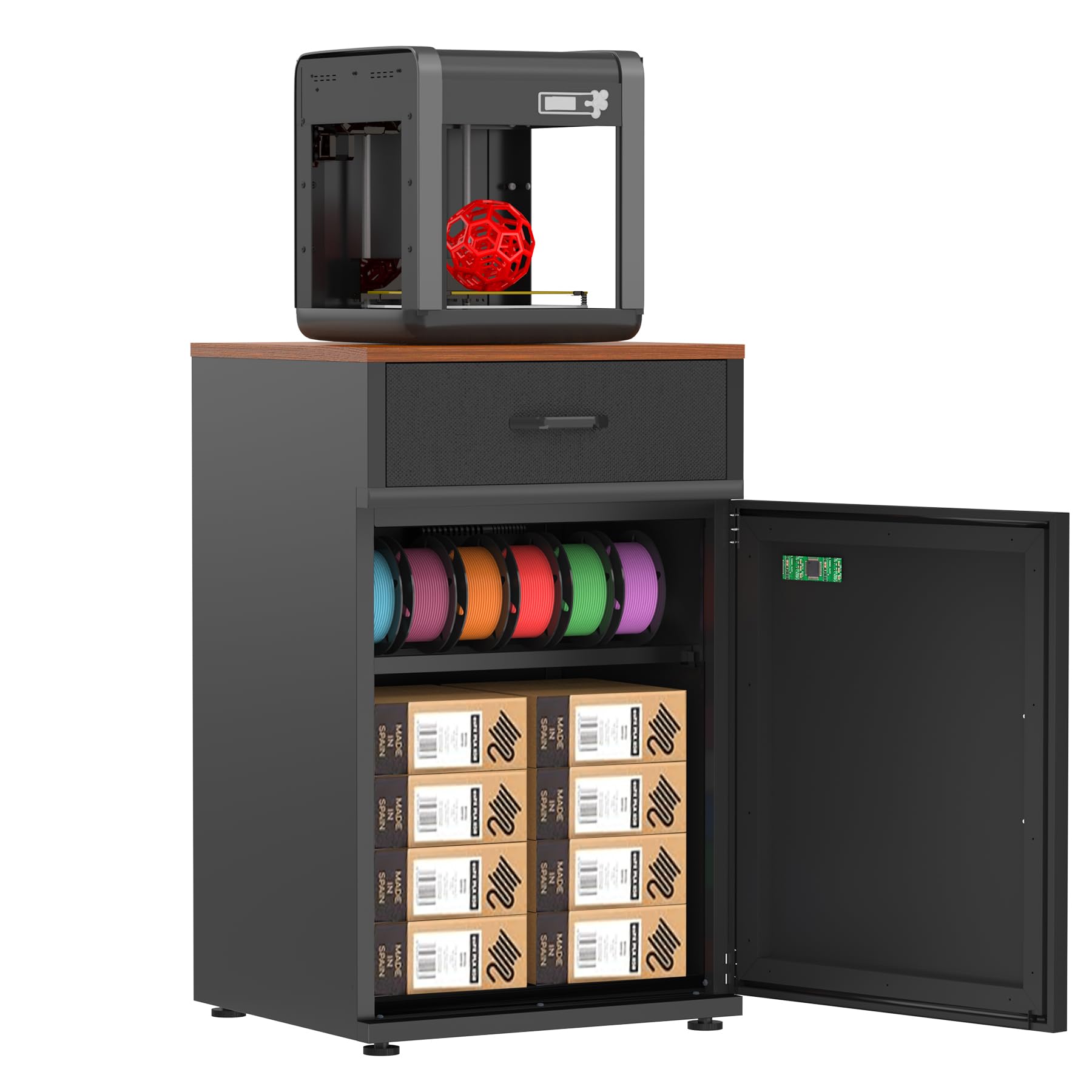
TPU is hygroscopic—it absorbs moisture from the air within hours, turning into a brittle, stringy mess that jams nozzles. The RJOKMT 180L cabinet solves this with an industrial-sealed molecular sieve dehumidifier that maintains 25%–60% relative humidity levels silently, consuming under 8 W on average. The 180-liter interior holds up to 40 spools of PLA, ABS, PETG, TPU, or Nylon filament, making it a practical storage solution for anyone printing TPU regularly.
The cabinet’s reinforced top plate (21×20 inches) supports printers up to 300 pounds, including the Bambu Lab P1S, Creality K2, ELEGOO Centauri Carbon, and FLASHFORGE AD5M. Four adjustable leveling feet absorb 92% of operational vibrations, which directly improves first-layer adhesion for TPU on the printer sitting above. The high-density sealing strip forms an airtight barrier against coastal or seasonal humidity.
Assembly requires an illustrated guide and video walkthrough, and while most customers report straightforward setup, some note that the metal frame arrived with misaligned holes or a crooked display. The cabinet is built to hold weight, but the internal shelf is not full-depth, limiting how spools orient. For users printing TPU in humid climates, this cabinet maintains consistent filament dryness without manual regeneration cycles.
Why it’s great
- Active molecular sieve dehumidifier maintains consistent low humidity for TPU
- Reinforced top plate supports heavy printers for a compact workspace
- Up to 40-spool capacity organizes multiple filament types
Good to know
- Some units arrived with misaligned holes or crooked display panel
- Internal shelf is not full depth, limiting spool orientation
FAQ
Why does my TPU keep jamming mid-print?
What bed temperature should I use for TPU?
Can I print TPU with a Bowden extruder?
What is the maximum speed for printing TPU on a CoreXY printer?
Final Thoughts: The Verdict
For most users, the 3d printer for tpu filament winner is the FLASHFORGE AD5M because its CoreXY kinematics and 3-second quick-swap nozzle make it simple to tune for TPU at speed without a steep learning curve. If you want a fully enclosed machine with a 320°C hotend for abrasive TPU-CF, grab the ELEGOO Centauri Carbon. And for continuous production of small flexible parts, nothing beats the IdeaFormer IR3 V2 conveyor belt system.