
Unboxing a new 3D printer should spark creativity, not frustration. Too many starter kits bury you in hours of manual bed-leveling, wobbly frames, and failed first layers before you ever print a benchy. The right kit flips that script entirely — delivering reliable auto-leveling, a rigid motion system, and a slicer profile that works on day one so you spend your time designing and printing, not troubleshooting.
I’m Min — the co-founder and writer behind Gadgets Feed. I’ve spent hundreds of hours cross-referencing technical specs, evaluating firmware ecosystems, and analyzing real-user feedback on print quality, speed consistency, and long-term reliability to find the kits that actually deliver on their promises for beginners and hobbyists alike.
Whether you are buying for yourself or as a gift, finding the best 3d printer starter kit means choosing a machine that balances ease of use, upgrade potential, and print quality without demanding a steep learning curve right out of the box.
How To Choose The Best 3D Printer Starter Kit
Jumping into 3D printing is exciting, but the wrong starter kit can turn that excitement into a shelf decoration. Focus on three pillars: ease of setup, motion system reliability, and extruder capability. A beginner-friendly machine should remove manual calibration hurdles while offering room to grow as your skills improve.
Auto Bed Leveling is Not a Luxury
Manual bed leveling with a piece of paper is a rite of passage that most modern printers have rightfully eliminated. Look for a kit with a sensor-based auto-leveling system (like CR Touch, inductive probe, or strain sensor) that compensates for small bed imperfections. This single feature is the difference between a perfect first layer on your first print and a frustrating hour of tweaking knobs.
Direct Drive vs. Bowden: Why it Matters for Beginners
A direct-drive extruder mounts the motor directly above the hotend. It provides more consistent extrusion force, handles flexible filaments like TPU without jamming, and reduces retraction distance — all of which lead to fewer failed prints. Bowden setups are lighter but introduce more variables that can confuse a beginner. For a starter kit, a direct-drive system like the Sprite or a compact geared extruder is the safer, more versatile bet.
Speed Claims vs. Real-World Throughput
Manufacturers love to quote theoretical maximum speeds of 600 mm/s, but real-world print speeds are limited by cooling, acceleration, and the model’s geometry. A printer that sustains 150-250 mm/s with good acceleration (20,000 mm/s²) will finish a typical 4-hour print in under 2 hours. More important than raw speed is vibration compensation — look for resonance compensation or input shaping in the firmware to minimize ghosting at higher speeds.
Quick Comparison
On smaller screens, swipe sideways to see the full table.
| Model | Category | Best For | Key Spec | Amazon |
|---|---|---|---|---|
| Creality Ender 3 V3 SE | Mid-Range | Best Value Workhorse | 250 mm/s, CR Touch auto-leveling, Sprite direct drive | Amazon |
| Bambu Lab A1 mini | Mid-Range | Ultra-Fast Beginner Experience | Core XY, full auto calibration, ≤48 dB noise | Amazon |
| FLASHFORGE Adventurer 5M | Mid-Range | Speed + Reliability | 600 mm/s, 20000 mm/s² acceleration, quick-swap nozzle | Amazon |
| Flashforge Adventurer 5M (V2) | Mid-Range | Pro-Grade Features on a Budget | 600 mm/s, Core XY, MagSwitch PEI plate | Amazon |
| Flashforge Adventurer 5M (V3) | Mid-Range | App-Controlled High Speed | 600 mm/s, remote app control, dual cooling fans | Amazon |
| Geeetech Smart 3D Printer | Premium | Fully Assembled for Kids | 250 mm/s, fully assembled, 1:5 gear ratio extruder | Amazon |
| AOSEED X-Maker Joy AI+ | Premium | AI-Driven Kid’s Creator Kit | 400 mm/s, AI Doodle, 8 PLA filaments included | Amazon |
| Creality CFS Multicolor System | Premium | Multicolor Upgrade for K1 Series | 4-roll storage, RFID auto detection, 16-color expandable | Amazon |
| Anycubic Kobra X | Premium | Large Volume Multicolor | 600 mm/s, 4-color built-in, 260x260x260 build volume | Amazon |
In‑Depth Reviews
1. FLASHFORGE Adventurer 5M 3D Printer

The Adventurer 5M delivers an impressive 600 mm/s travel speed with a Core XY motion system that hits 20,000 mm/s² acceleration. That translates to real-world time savings — a typical benchy prints in under 30 minutes. The 50W ceramic heater brings the 0.4mm nozzle to 200°C in just 35 seconds, so you spend less time waiting and more time iterating. The one-click auto-leveling uses a pressure sensor for sub-0.01mm precision, virtually eliminating first-layer failures right out of the box.
Build quality is robust: a rigid aluminum frame and dual linear rails keep Z-wobble to a minimum, while the dual-sided PEI steel plate provides strong adhesion for PLA and PETG and flexes cleanly for part removal. The vibration compensation algorithm noticeably reduces ghosting at high speeds, producing clean edges even on detailed miniatures. The open-frame design works well in ventilated spaces, and the filament run-out sensor automatically pauses prints when a spool runs empty, letting you resume without a restart.
Setup takes roughly 10 minutes — attach two lead screws, connect the ribbon cable, and run the auto-calibration routine. The 2.4-inch color touchscreen is responsive, though some users find the interface slightly unintuitive for advanced settings. The 220x220x220mm build volume is adequate for most starter projects, but larger cosplay pieces or architectural models will feel cramped.
Why it’s great
- Superb 600 mm/s with vibration compensation keeps detail crisp
- Auto-leveling and quick-setup make it truly beginner-friendly
- Filament run-out sensor and power-loss recovery protect long prints
Good to know
- Small 220mm³ build volume limits large projects
- No official enclosure available for temperature-sensitive filaments
- Wi-Fi relies on 5 GHz band, which can confuse some home networks
2. Flashforge Adventurer 5M (V2)

This version of the Adventurer 5M retains the blazing 600 mm/s Core XY speed but adds a MagSwitch PEI build plate that releases prints in under 3 seconds with a simple flex. The 25-point auto-leveling system with pressure-sensor compensation delivers consistent first-layer squish across the entire 220mm³ bed, even when the surface has minor debris. The 50W ceramic heater reaches 200°C in 35 seconds, and the quick-change Nozzle X system lets you swap between 0.25mm and 0.8mm nozzles in under 15 seconds without tools.
The industrial-grade aluminum frame with dual linear rails reduces resonance by 63% compared to typical bed-slingers, enabling 24/7 continuous printing with dimensional accuracy within ±0.1 mm. Flashforge’s proprietary slicer profiles for PLA, PETG, ABS, and ASA are well-tuned, meaning beginners rarely need to tweak temperature or retraction settings. The built-in filament sensor and power-loss recovery add reliability for overnight runs, and the remote monitoring via the Flashforge app provides real-time camera feedback when paired with the optional camera kit.
Setup is the fastest in this class — attach the Z-axis lead screws, level the gantry manually, and run the auto-leveling routine. The touchscreen interface is more intuitive than the original 5M, with clearer icons and a dedicated calibration menu. The included DIY enclosure kit (you print the panels) offers a cost-effective path to enclosed printing for ABS and ASA. The main downside is that the cooling fans at max speed are loud — expect around 55 dB during high-velocity bridging.
Why it’s great
- MagSwitch plate allows instant part removal
- Quick-change nozzles support 0.25-0.8mm for wide material flexibility
- DIY enclosure kit provides upgrade path without buying a new printer
Good to know
- Cooling fans are loud at high speed, may disturb shared spaces
- USB port can detach if lateral pressure is applied to a protruding stick
- Cloud printing features are being phased out, limiting remote access
3. FLASHFORGE Adventurer 5M (V3)

This third SKU of the Adventurer 5M platform emphasizes cooling performance with a dual-channel fan design that improves bridging and overhang quality on steep angles. The Core XY structure still delivers 600 mm/s max travel speed and 20,000 mm/s² acceleration, but the enhanced part cooling means you can print PLA at higher speeds without blobbing or stringing. The 32 mm³/s high-flow nozzle with vibration compensation produces cleaner corners on organic models compared to earlier revisions.
The one-click auto-leveling uses a pressure sensor to achieve a perfectly level bed in seconds. The dual-sided PEI platform is reversible — when one side wears, flip it over for a fresh surface. The versatile nozzle system supports 0.25/0.4/0.6/0.8mm diameters, printing everything from high-detail miniatures to high-flow functional parts. Material compatibility extends to PLA, PETG, ABS, ASA, PLA-CF, and PETG-CF, making this one of the most flexible starter kits in its price tier.
Smart control via the Flash Maker app allows remote monitoring, parameter adjustment, and file sending when paired with the optional 5M camera kit. The 2.4-inch color screen provides a clean interface for local control. Setup remains under 15 minutes, and the pre-tuned profiles in FlashPrint require zero manual calibration. Some users report that the stock sample filament is too short for a full benchy, so order an extra spool of PLA alongside the kit.
Why it’s great
- Dual-channel cooling improves overhang and bridge quality
- Wide material support including carbon-fiber filled filaments
- Removable dual-sided PEI plate extends bed lifespan
Good to know
- Some users experience Wi-Fi dropout after firmware updates
- No simultaneous Wi-Fi and Ethernet connection
- Multi-color printing is not supported without additional hardware
4. Creality Ender 3 V3 SE 3D Printer

The Ender 3 V3 SE represents the smartest evolution of the legendary Ender 3 platform. It trades the old manual bed-leveling nightmare for a CR Touch auto-leveling sensor and a dedicated strain sensor that sets the Z-offset automatically — no more fishing for a piece of printer paper. The 250 mm/s print speed paired with 2,500 mm/s² acceleration cuts print times by roughly 73% compared to the original Ender 3, without sacrificing surface quality on PLA, TPU, or PETG prints.
The Sprite direct extruder is a full-metal, dual-gear design with a 1:5 gear ratio that delivers exceptional extrusion force. This handles flexible filaments like TPU with zero slipping, and the lightweight print head reduces inertia for sharper cornering. The dual Z-axis lead screws eliminate the single-axis wobble that plagued earlier models, and the Y-axis rides on two 8mm hardened-steel linear shafts for consistent accuracy over months of use. The 8.66 x 8.66 x 9.84-inch build volume is generous for a machine at this price level, letting you print larger helmet segments or cosplay accessories.
Assembly requires just three steps and takes roughly 20 minutes from unboxing to first print. The auto filament loading and unloading system simplifies material changes — tap “Extrude” and the filament flows smoothly; tap “Retract” and it pulls back cleanly. The Creality Slicer (a Cura fork) has a dedicated V3 SE profile that usually works without tweaks. A small subset of users report software connectivity issues with the Creality Cloud app, so having an SD card as a backup method is wise.
Why it’s great
- Sprite direct extruder handles both rigid and flexible filaments flawlessly
- Dual Z-axis and linear shafts deliver high dimensional accuracy
- CR Touch + strain sensor make first-layer success automatic
Good to know
- Creality Cloud app can be finicky; standalone SD card is more reliable
- Stock part cooling fan is adequate but not ideal for extreme bridging
- Customer support response times can be inconsistent
5. Bambu Lab A1 mini 3D Printer + LED Lamp Kit
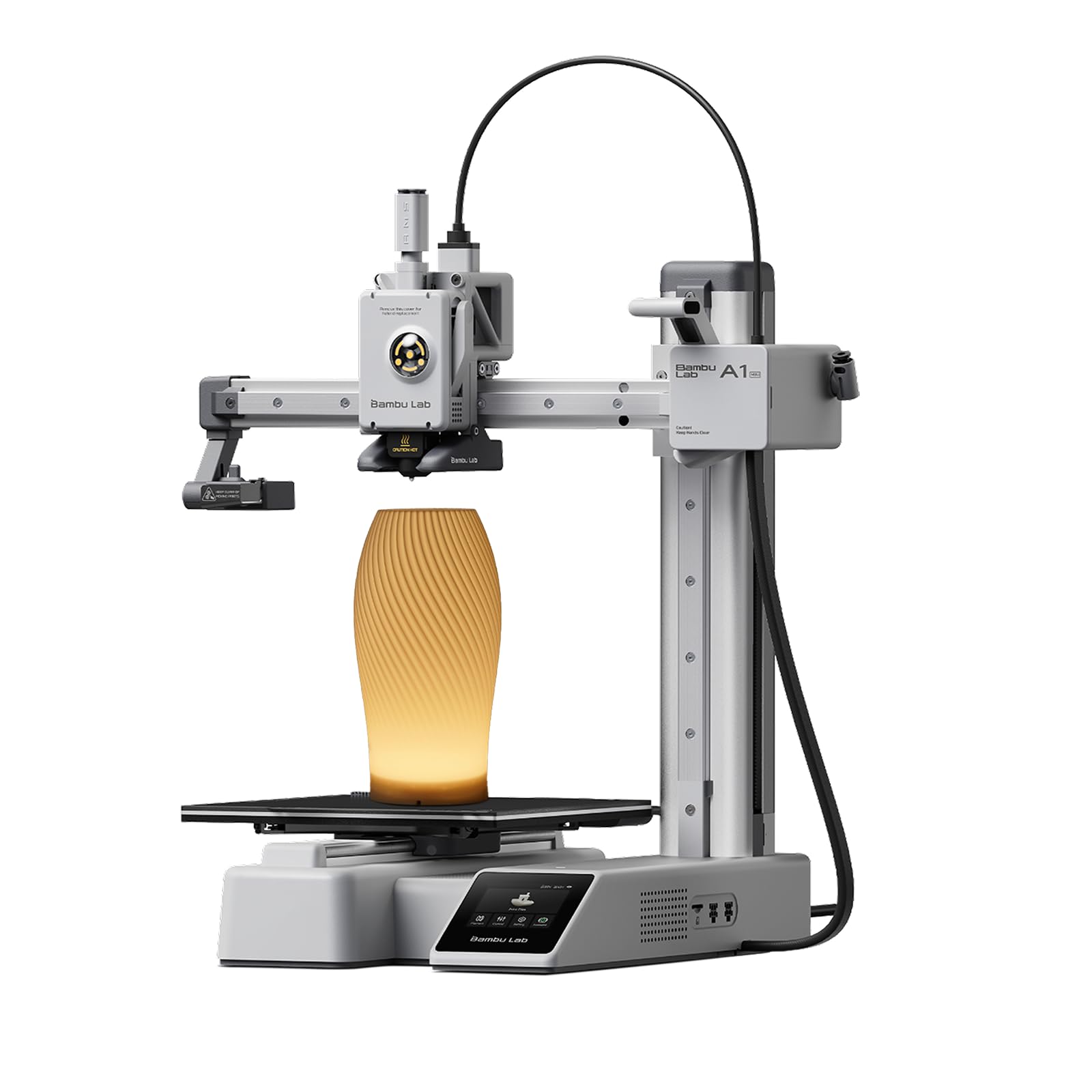
The Bambu Lab A1 mini is engineered for the absolute beginner who just wants to print without learning G-code or manual calibration. It arrives partially assembled — attach the gantry and spool holder, plug in the power, and run the full auto-calibration routine that levels the bed, compensates for Z-tilt, and measures flow rate in under 20 minutes. The included LED Lamp Kit adds a creative twist: print a compatible lamp shade and build a functional decorative light on your first project.
Print quality is exceptional for the compact 180 x 180 x 180mm build volume. The active flow rate compensation dynamically adjusts extrusion during speed changes, eliminating blobs at corner transitions. The direct-drive extruder handles PLA and TPU easily, and the 0.4mm hardened steel nozzle reaches 280°C for PETG and polycarbonate. The noise level sits at ≤48 dB during printing, making it genuinely quiet enough for a bedroom or shared office — the pre-print calibration shake is louder, but that lasts only a minute.
The Bambu Handy app provides cloud-based slicing and monitoring, giving you a live camera feed and print-status notifications. MakerWorld offers thousands of one-click printable models designed specifically for the A1 mini, so you’re never stuck for ideas. The ecosystem is somewhat locked — you’re encouraged to use Bambu-branded filaments and cloud services — but for families and absolute beginners, the simplicity more than compensates for the lack of open-source customization.
Why it’s great
- Setup in under 30 minutes with full auto-calibration
- ≤48 dB noise level fits seamlessly into home environments
- Active flow rate compensation ensures clean corners and overhangs
Good to know
- Build volume is smaller than most competition (180mm³)
- Ecosystem is semi-closed; Bambu-branded filament is recommended
- Auto calibration shake is loud and can be startling in quiet rooms
6. Geeetech Smart 3D Printer for Kids

The Geeetech Smart is a zero-assembly 3D printer designed specifically for younger users and total beginners. It arrives fully assembled in the box — just plug it in, load the filament, and start printing from the 2.4-inch color LCD screen or the Geeetech app. The direct-drive extruder uses a 1:5 gear ratio dual-metal drive that produces enough torque to handle both 0.5kg TPU and PLA spools without skipping. The 16-point full-auto leveling system ensures a perfect first layer every time, ideal for kids who shouldn’t be fiddling with bed screws.
The build volume is compact at 3.94 x 4.33 x 3.94 inches, which is fine for fidget toys, chess pieces, and small action figures but restrictive for anything larger. The 50W hot-end heating rod and efficient heat dissipation keep temperatures stable around 200°C for PLA. The magnetic PEI build plate allows easy removal — no scraping required. The included filament sample is minimal, so buy a 1kg spool of PLA immediately after ordering. The printer’s small footprint (5 x 5 x 5 inches) means it fits on a desk or bookshelf without dominating the space.
Geeetech provides a 30-day replacement policy and a 12-month free repair guarantee, with lifetime technical support. Some units ship with loose wiring harnesses that cause initial power failures — the support team typically provides clear diagrams to resolve this within an hour. The app works for both iOS and Android and supports one-tap printing from a curated library of models. This isn’t a speed demon or a high-volume workhorse, but for a child’s first printer, the out-of-box experience is hard to beat.
Why it’s great
- Fully assembled out of the box — zero construction required
- Auto-leveling and direct-drive extruder simplify the learning curve
- Compact size fits easily on a child’s desk or playroom shelf
Good to know
- Build volume is very small; larger projects are impossible
- Only includes a tiny sample of filament, not a full spool
- Some units need simple wiring reseating before first use
7. AOSEED X-Maker Joy AI+ 3D Printer

The X-Maker Joy AI+ redefines the starter kit by bundling everything a family needs: the printer, 8 rolls of PLA filament in assorted colors, a magnetic build plate, essential tools, and DIY stickers. The AI-powered features are genuinely useful — AI Doodle lets kids create custom 3D models from voice, text, or image prompts without any CAD knowledge. AI MiniMe turns a photograph into a cartoon-style 3D figure, and the built-in AI assistant guides users through every step of the process.
Print speeds range from 220 to 250 mm/s sustained, with peaks up to 400 mm/s, completing small toys in about 20 minutes. The 0.05mm layer resolution produces smooth surfaces on fidgets and figurines. The enclosed design is pinch-resistant and TÜV Rheinland ISO 16000-tested for safe PLA emissions, making it suitable for a child’s bedroom. The quick-release nozzle simplifies filament changes, and the filament run-out sensor pauses printing automatically when a spool empties — critical for unsupervised kid sessions.
The built-in 720P camera provides real-time monitoring through the AOSEED app and can automatically generate time-lapse videos of the entire build process. Parents appreciate the enclosed, quiet operation and the one-tap printing from the app. Access to over 8,000 pre-designed models gives kids an endless library of projects. The print quality is consistent for non-functional decorative items, though thin parts like fidget spinners can be fragile if printed at low infill percentages.
Why it’s great
- AI-driven design tools let kids create original models instantly
- Includes 8 rolls of PLA filament plus all necessary tools
- Enclosed, pinch-resistant design with safe-emission certification
Good to know
- Printed parts can be fragile at low infill settings
- App-based model library may have measurement inaccuracies
- Build volume is moderate; larger prints take many hours
8. Creality CFS Multicolor 3D Printer Filament System

The Creality CFS is not a standalone printer — it is an add-on filament system that upgrades K1 series printers (K1, K1C, K1 MAX, K1 SE) to multi-color printing. Each unit holds four 1kg spools in an airtight, desiccant-lined enclosure that keeps hygroscopic filaments like PETG and PVA dry during long multi-day prints. Linking up to four CFS units allows 16-color printing, where the printer automatically switches filaments between layers without manual intervention.
The RFID detection system reads filament type, color, and remaining length from Creality’s RFID spools, syncing the data directly with the printer and the Creality Print slicer. When a spool runs low, the CFS automatically switches to a matching spool of the same type and color, minimizing waste. The filament mapping feature selects the correct spool from the installed set based on the slicer’s color assignments, so you never accidentally print a fine detail in the wrong shade.
Installation requires the official K1 Series CFS Upgrade Kit for seamless integration — the CFS itself does not connect natively to older non-K1 machines. The system is not compatible with flexible TPU, damp BVOH/PVA, or warped cardboard spools that can jam the feed path. Some K1C users report increased nozzle clogging frequency when running multi-color swaps due to the purging cycle, but the print quality on successful runs is indistinguishable from single-color prints.
Why it’s great
- Airtight storage with desiccant keeps filament dry during long prints
- RFID detection auto-configures color and material for each spool
- Expandable to 16 colors with four linked units
Good to know
- Only works with Creality K1 series printers (requires upgrade kit)
- Not compatible with flexible TPU or cardboard spools
- Increases nozzle clogging frequency due to purging cycles
9. Anycubic Kobra X Multicolor 3D Printer

The Kobra X offers the largest build volume in this comparison at 260 x 260 x 260 mm, making it the go-to choice for printing larger helmets, vases, or architectural models without splitting them into smaller parts. The Core XY motion system reaches 600 mm/s travel speed with Kobra OS vibration compensation, delivering sharp corners even at high accelerations. The LeviQ 3.0 system performs a 49-point full-auto bed leveling in under 2 minutes, ensuring a perfect first layer across the entire big surface.
Built-in 4-color printing (expandable to 19 colors with up to four ACE 2 Pro units) opens up multi-material and multi-color projects without an external box. The adaptive extrusion force compensator automatically adjusts pressure when switching between flexible TPU (68D recommended) and rigid PLA, eliminating the standard swap-based tuning. The hardened steel nozzle reaches 300°C and supports a wide range of filaments including PVA and ASA. The AI-powered monitoring system features spaghetti detection and real-time 720P camera alerts, which significantly reduces failed print waste.
The 15-minute setup time includes attaching the gantry, connecting the ribbon cables, and running the auto-leveling routine. The 4.3-inch touchscreen runs a clean interface that guides you through filament loading and first print selection. Noise levels stay at ≤48 dB during normal printing, making it suitable for home environments. Some users report nozzle clogging issues with certain third-party filaments, but the quick-change nozzle system simplifies cleaning. The included sample filament is minimal; order a few spools in diverse colors to get started immediately.
Why it’s great
- 260mm³ build volume is the largest of any starter kit here
- Built-in 4-color printing with expandability to 19 colors
- AI spaghetti detection and 720P camera prevent waste on failed prints
Good to know
- Some users experience nozzle clogging with third-party filaments
- The quick-change nozzle can be tight to remove without tools
- Auto-leveling may need occasional re-run after power cycles
FAQ
Do I need a 3D printer starter kit if I already own a printer?
What build volume should I look for as a complete beginner?
Is multi-color printing worth the extra cost for a first printer?
What type of filament should I buy for my first 3D printing project?
How loud are these printers during operation?
Final Thoughts: The Verdict
For most users, the best 3d printer starter kit winner is the Creality Ender 3 V3 SE because it marries the proven Ender 3 ecosystem with essential modern upgrades — CR Touch auto-leveling, a Sprite direct extruder, and dual Z-axis stability — at a price that leaves room for filament and upgrades. If you prioritize raw speed and a fully automated calibration experience, grab the FLASHFORGE Adventurer 5M for its 600 mm/s performance and sub-10-minute setup. And for families seeking an AI-driven creative tool that bundles everything including 8 spools of filament, nothing beats the AOSEED X-Maker Joy AI+.