
Getting a child or beginner into 3D printing shouldn’t mean spending hours fighting with bed leveling, slicing profiles, and tiny screws. The best machines in this price range ship fully assembled, auto-level the bed at the press of a button, and connect directly to a phone app so you can start printing a pre-loaded model within minutes — not after a weekend of tinkering.
I’m Min — the co-founder and writer behind Gadgets Feed. I’ve scoured hundreds of customer reviews, compared bed adhesion systems, print volumes, nozzle specs, and software ecosystems to pinpoint the machines that truly deliver a frustration-free first printing experience for families, students, and hobbyists.
After filtering for reliability, ease of use, and print quality, this guide ranks the models that genuinely earn the title of best 3d printer under $100 for beginners who want to create, not troubleshoot.
How To Choose The Best 3D Printer Under $100
For a budget-friendly entry-level printer, the trade-off is usually build size versus feature set. You want a machine that removes friction, not one that introduces it. Focus on these three pillars.
Auto Bed Leveling vs. Manual Leveling
For a child or an absolute beginner, manual leveling (which involves turning knobs and sliding a piece of paper under the nozzle) is the single biggest source of frustration. A printer with auto-leveling uses a sensor to map the bed and compensate for unevenness. This feature alone separates a usable first experience from a return waiting to happen.
Build Volume Realism
In this price tier, most machines offer build volumes around 100x100x100mm or slightly larger. That’s plenty for keychains, phone stands, mini figurines, and STEM project parts. A smaller bed actually works in a beginner’s favor — it reduces the chance of warping and keeps print times short, which means more successful finishes and less wasted filament.
Fully Assembled vs. DIY Kit
Eliminate any printer that requires assembly from loose parts. Every minute spent tightening belts and routing cables is a minute the new user isn’t printing. The machines on this list arrive ready to run after removing packing tape and loading filament. If a product description mentions “easy assembly,” it is automatically filtered out for this guide.
Quick Comparison
On smaller screens, swipe sideways to see the full table.
| Model | Category | Best For | Key Spec | Amazon |
|---|---|---|---|---|
| Portable 3D Printer – Compact FDM | Entry-Level | First-time FDM users needing a low-cost trial | 100x100x100mm build volume | Amazon |
| TINA2S Mini 3D Printer | Beginner | Kids and families wanting one-touch prints | Auto-leveling + WiFi | Amazon |
| Entina Tina2 Basic | Beginner | New users prioritizing dual-Z stability | Dual Z-axis rails | Amazon |
| HEPHI3D TINA2 Basic (Gray) | Mid-Range | Users wanting USB-C offline printing | Dual Z & Y axis rails | Amazon |
| HEPHi3D TINA2C (WiFi) | Premium | Phone-controlled 3000+ model library | WiFi + App + 3000 models | Amazon |
| Geeetech Smart M1S | Premium | Faster printing at 250mm/s with 16-point leveling | 250mm/s speed, PEI plate | Amazon |
| Entina Tina2C (App & WiFi) | Premium | AI photo-to-print and STEM learning modules | Self-cleaning nozzle, AI app | Amazon |
In‑Depth Reviews
1. HEPHi3D TINA2C (WiFi)
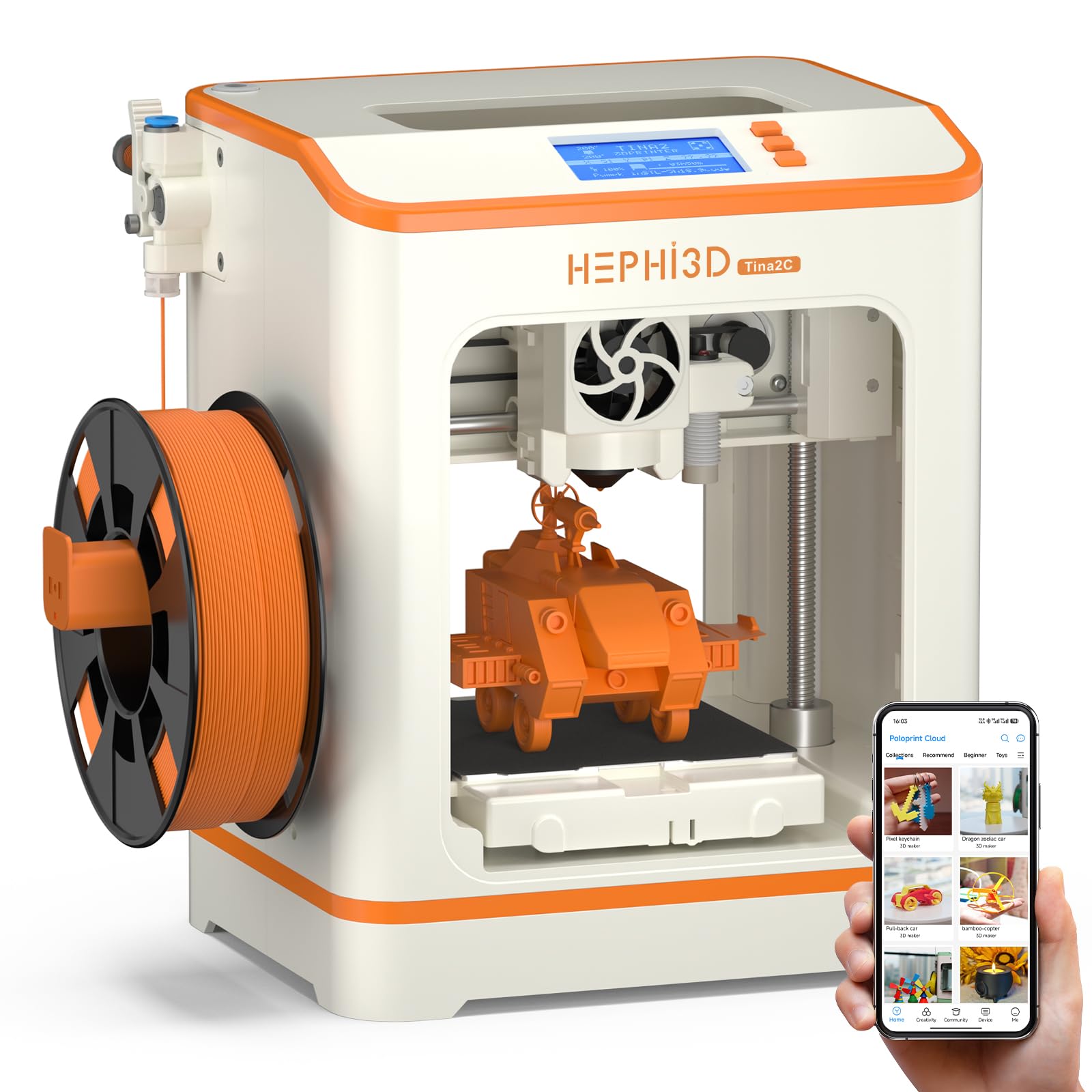
The HEPHi3D TINA2C sits at the top of this list because it removes the two biggest barriers to entry: finding a model to print and transferring files. With over 3,000 pre-loaded models accessible through the Poloprint Cloud app, a beginner can browse, select, and tap “print” from a phone or tablet without touching a computer. The auto-leveling system handles the first-layer calibration, and the flexible magnetic build plate lets you pop off finished parts without a scraper.
The fully assembled unit includes a starter spool of PLA filament, a TF card with test GCODE, and essential tools. The 100x105x100mm build volume is similar to other mini printers, but the 3-second fast-release hotend makes nozzle swaps or clogs far less intimidating for a new user. The print quality at 0.1mm layer height produces clean surfaces on small figurines and functional parts, though taller prints can show minor layer lines.
Some users found the app-based slicing slightly limited for advanced projects, and the WiFi connectivity occasionally drops after a power cycle, requiring a reconnection. The included filament is only enough for a few small test prints, so you will need a 250g spool of 1.75mm PLA soon after unboxing.
Why it’s great
- 3000+ model library accessible from the app — no computer needed
- Auto-leveling and fully assembled out of the box
- 3-second fast-release hotend simplifies maintenance
Good to know
- WiFi connection may need re-pairing after power loss
- Starter filament spool is very small — buy more PLA immediately
2. Fully Assembled Mini 3D Printer (TINA2S)

The TINA2S is the most well-reviewed mini printer in the budget tier, and for good reason: the combination of full assembly, auto-leveling, and a magnetic flexible spring steel bed makes the first print experience nearly foolproof. Owners report that even 11- and 12-year-olds can independently select models from the included SD card, load filament using the one-touch button, and have a successful print within 15 minutes of opening the box.
The dual Z-axis rail design keeps the gantry stable during prints, which improves surface finish on small objects like keychains and board game pieces. The 2.4-inch LCD screen provides clear status feedback, and the open-source slicer compatibility (Cura, Simplify3D, WiiBuilder) gives you room to grow into custom profiles later. The printer works with both WiFi and SD card offline modes.
The build volume (100x105x100mm) is tight for anything larger than a smartphone stand. Some users report that the included filament sample is too small to complete even a small Benchy boat without running out. The magnetic plate requires a glue stick for reliable adhesion with certain PLA colors, which adds a step that the marketing materials don’t emphasize.
Why it’s great
- Fully assembled with auto-leveling — truly unbox-and-print
- Dual Z-axis improves print stability at budget price
- One-touch filament loading and retraction for kids
Good to know
- Starter filament spool is very small — will need refill immediately
- Magnetic bed requires glue stick for dependable first-layer stick
3. Entina Tina2 Basic

The Entina Tina2 Basic differentiates itself from the TINA2S siblings with a knob-operated 2.4-inch LCD interface and explicit emphasis on dual Z-axis rails for alignment stability. The auto-leveling system is one-touch — no paper sliding, no manual fine-tuning. Users report that the printer can go from box to printing a 3D frog within five minutes, thanks to the included TF card with pre-sliced models and the WiiBuilder slicing software.
The build volume is 100x105x100mm — essentially identical to the TINA2S — but the Entina version has a slightly heavier frame (6 pounds) that reduces vibration during faster prints. The flexible magnetic build plate makes model removal as simple as bending the plate, which helps younger users avoid scratching the surface with tools. The printer also supports resume printing after a power outage, which eliminates the heartbreak of a 90% complete print failing due to a bump or glitch.
Some reviewers noted that the included instructions are minimal, and while the first print is easy, learning to slice your own STL files in WiiBuilder requires a separate YouTube search. The printer does not support WiFi — it prints exclusively via SD card or USB cable, which means your phone cannot be used as a controller.
Why it’s great
- Truly five-minute setup from unboxing to first print
- Dual Z-axis rails deliver stable, high-precision small prints
- Power-loss resume function saves failed prints
Good to know
- No WiFi or app control — limited to SD card or USB
- Beginner documentation is sparse beyond the first print
4. HEPHI3D TINA2 Basic (Gray)

This HEPHI3D variant of the TINA2 platform includes both dual Z-axis and dual Y-axis rails, making the gantry noticeably more rigid than single-rail competitors. For a sub- printer, this extra bracing reduces layer shifting and ringing artifacts, which directly improves the surface quality of mechanical parts like gears and snap-fit enclosures. The auto-leveling is identical to the TINA2S — a sensor maps the bed automatically before each print.
The printer supports offline printing via TF card and also includes a USB-C port for direct connection to a computer. This matters for educators who want to manage prints from a school laptop without needing to shuttle SD cards. The magnetic build plate is flexible, and the compact dimensions (8.27 x 8.27 x 11.42 inches) fit easily on a standard desk or bookshelf.
The customer feedback highlights a split: many parents of older children (ages 10–15) report an excellent experience, but some with younger kids (ages 8–9) found the process of saving sliced projects and preparing prints overly complex. The printer is not truly “kid-proof” in the sense that a 9-year-old can independently operate the slicer software — parent involvement is still required for each new model.
Why it’s great
- Dual Z and dual Y rails for exceptional stability
- USB-C connectivity for direct computer control
- Auto-leveling and flexible magnetic bed
Good to know
- Younger children (under 10) may struggle with slicing software
- No WiFi or app — prints are not truly wireless
5. Geeetech Smart M1S

The Geeetech Smart M1S breaks away from the TINA2 family with a focus on speed and a direct-drive extruder. It uses a 50W hot-end heating rod and a dual-drive metal gear extruder with a 1:5 gear ratio that delivers greater torque for consistent extrusion even at higher speeds. The advertised print speed of 250mm/s is significantly faster than the 60-80mm/s typical of the TINA2 models, making it the fastest machine on this list for producing small parts quickly.
The 16-point full-auto leveling system measures the bed at 16 positions before every print, which compensates for tiny surface irregularities better than the 3-5 point systems found on cheaper printers. The PEI print plate provides strong adhesion during printing and lets models pop off after cooling. The 2.4-inch LCD color screen and high-brightness LED lighting give clear visual feedback on progress.
The build volume is smaller than the TINA2 models at 100x110x100mm (roughly 3.94 x 4.33 x 3.94 inches). The included filament sample is minimal — barely enough for two small test prints. Some early units have arrived with connectivity issues (WiFi dropping after shutdown) and a rare auto-leveling sensor failure. Customer support has been responsive with replacements, but the initial quality control is slightly less consistent than the Entina units.
Why it’s great
- Fast print speed of 250mm/s saves significant time
- 16-point auto-leveling for precise first layers
- Direct-drive extruder handles TPU flex filament better
Good to know
- Small build volume limits part size
- Occasional WiFi connectivity issues after shutdown
6. Entina Tina2C (App & WiFi)

The Entina Tina2C leans heavily into educational value. The Poloprint Cloud app includes 20+ creative design modules and STEM learning courses that update regularly. Kids can use the AI-powered photo-to-print feature to turn a snapshot into a 3D model — which is a genuinely engaging way to introduce the concept of 3D scanning without needing expensive equipment. The guided setup walks the user through the first print in as fast as eight minutes.
The printer supports both 2.4GHz WiFi printing and TF card offline mode, so you are not locked into the app ecosystem. The self-cleaning nozzle design reduces clog frequency, which is a common pain point when switching between PLA colors. The rounded edges and low-noise operation (under 50 dB during typical prints) make it safe and unobtrusive for a bedroom or classroom environment.
The build volume is 100x100x100mm — identical to most other mini printers, but the Tina2C weighs 8.16 pounds, suggesting a sturdier frame that absorbs vibration. The included filament sample is still too small for extended projects. The AI photo-to-print feature works best with high-contrast images and requires a steady hand; blurry photos produce unrecognizable results.
Why it’s great
- AI photo-to-print and STEM modules in the app
- Self-cleaning nozzle reduces maintenance for beginners
- Low-noise and safe rounded design for kids
Good to know
- AI photo conversion quality depends on lighting and focus
- Starter filament spool is small — plan a refill purchase
7. Portable 3D Printer – Compact FDM (CAIDAQC)

This is the least expensive printer on the list — a true budget-friendly entry point for anyone who wants to dip a toe into FDM printing without committing heavily. The 100x100x100mm build volume, 0.4mm nozzle, and 0.05-0.3mm layer height range are standard for the class. The printer ships with 10 meters of PLA filament, an 8GB TF card pre-loaded with test models, and a 12V Type-C power adapter.
The compact package weighs only 2.2 pounds, making it genuinely portable — easy to stow in a backpack or move between rooms. The removable build plate helps with model extraction, and the video-guided setup is helpful given the minimalist printed instructions. Owners report that small functional prints (bottle openers, cell phone stands) print reliably at lower speeds, though the printer lacks the dual-rail stability of the more premium options.
The major trade-offs are apparent: manual bed leveling (the printer does not have auto-leveling), a smaller and lighter frame that can introduce vibration artifacts at higher speeds, and a filament holder that some users had to shim with washers to prevent the spool from slipping. The slicer instructions are poorly translated — the video incorrectly prompts the user to select a K7 profile instead of the correct K10 profile, requiring a workaround.
Why it’s great
- Lowest price entry point into FDM 3D printing
- Lightweight (2.2 lbs) and portable for travel or storage
- Includes filament, TF card, tools, and Type-C adapter
Good to know
- Manual bed leveling required — no auto-leveling system
- Slicer profile documentation is confusing and poorly translated
FAQ
Can a 3D printer under $100 really produce usable prints?
How much filament does a beginner actually need to start?
Do these printers work with a Chromebook or tablet?
Final Thoughts: The Verdict
For most users, the best 3d printer under $100 winner is the HEPHi3D TINA2C (WiFi) because its 3000+ model library, auto-leveling, and phone app control eliminate the technical hurdles that usually frustrate beginners. If you want faster print speeds and a direct-drive extruder for flexible materials, grab the Geeetech Smart M1S. And for the lowest entry price with no assembly required, the Portable Compact FDM Printer serves as a functional trial while you learn the basics.