
Our readers keep the lights on and my morning glass full of iced black tea. As an Amazon Associate, I earn from qualifying purchases.
Specs are compiled from manufacturer listings and verified buyer reviews and can change over time — please confirm the key details on the product page before buying.
If you have been put off by the idea of complicated assembly and endless calibration, the current crop of budget-friendly 3D printers is nothing short of a revelation. Models at this price point now handle auto-leveling, deliver print speeds once reserved for machines costing twice as much, and include features like AI monitoring and multi-color support. This guide cuts through the noise to help you pick the best 3D printer under $250 for your specific project needs — whether that is churning out tabletop miniatures, making toys, or learning the ropes.
I’m Min — the founder and writer behind Gadgets Feed. This guide is built by comparing the manufacturers’ published specifications and the patterns across verified customer reviews, so you get each pick’s real strengths and trade-offs instead of marketing spin.
Below, you will find a close look at eight models that prove you do not need to spend a fortune to get excellent results with a 3d printer under $250.
Our Picks at a Glance


How To Choose The Best 3D Printer Under $250
The biggest decision is between FDM and resin technology. FDM (Fused Deposition Modeling) printers melt a plastic filament and lay it down layer by layer. Resin printers use a liquid photopolymer that is cured by a UV light source. Resin delivers far finer detail, making it ideal for miniatures, while FDM is tougher, easier to live with, and better for functional parts and toys.
Auto-Leveling: The Beginner’s Best Friend
Manually leveling a print bed involves turning screws and using a piece of paper to check the gap between the nozzle and the bed — a fiddly process that can wreck your first layer. Auto-leveling uses a sensor to measure the bed and adjust the print path automatically. On nearly every printer in this guide, that means you can start your first print within minutes of unboxing.
Build volume tells you the largest object you can print in one go, while print speed is often a marketing number.
Build volume tells you the largest object you can print in one go. A 220mm cube is generous for most projects, while a 100mm square is tight for anything bigger than a phone stand. Print speed, measured in mm/s, is often a marketing number. Real-world throughput depends on acceleration and the complexity of your model, so focus on a printer that balances a decent volume (at least 180mm on one side) with proven reliability.
A direct-drive extruder lets you print flexible filaments like TPU without jams, while a Bowden setup can struggle with flexibles.
A direct-drive extruder sits right on the print head, letting you print flexible filaments like TPU without jams. A Bowden tube setup has the motor mounted on the frame, which is cheaper but can struggle with flexibles. If you want to print anything beyond standard PLA, a direct-drive extruder is worth the slight premium.
Quick Comparison
| Model | Best For | Tech Type | Build Volume | Print Speed | Amazon |
|---|---|---|---|---|---|
| ANYCUBIC Photon Mono 4★ Best Overall | Detail-rich miniatures | Resin (MSLA) | 6.04″ x 3.42″ x 6.49″ | 70 mm/h | Amazon |
| Bambu Lab A1 miniEcosystem Pick | Beginner-friendly ecosystem | FDM | — | — | Amazon |
| FLASHFORGE Adventurer 5MSpeed Demon | Fast FDM with easy setup | FDM | 220 x 220 x 220 mm | 600 mm/s | Amazon |
| Creality Ender 3 V3 SE | Tinkerers who want speed | FDM | 8.66 x 8.66 x 9.84 “ | 250 mm/s | Amazon |
| Creality SPARKX i7 | AI-assisted and multi-color | FDM | 260 x 260 x 255 mm | 500 mm/s | Amazon |
| Fully Assembled Mini (TINA2S) | Kids and total beginners | FDM | — | — | Amazon |
| Entina Tina2 Basic | Young kids (7+) | FDM | 100 x 105 x 100 mm | — | Amazon |
| ELEGOO Mars 5 | Budget resin with auto-leveling | Resin (MSLA) | 5.65 x 3.53 x 5.91 “ | — | Amazon |
In‑Depth Reviews
1. ANYCUBIC Photon Mono 4
Our pick — over 4★ from 500+ verified ratings; the strongest balance of quality and price.
The resin champion that puts miniatures-level detail within reach of beginners.
If your goal is printing tabletop miniatures, jewelry molds, or highly detailed statuettes, the Photon Mono 4 is the machine to beat. Its 7-inch 10K mono LCD screen delivers a resolution of 9024 x 5120, with each pixel measuring just 17×17 micrometers on the X and Y axes. That translates into model surfaces so smooth you can barely see the layer lines — a texture that feels like injection-molded plastic rather than a 3D print. The LightTurbo matrix light source spreads a stable, uniform beam to reduce rasterization, so you get clean edges even on tiny details like a sword hilt or a figure’s ear.
The user-friendly touches make it approachable for a first-time resin user. The 4-point leveling method means you level the build plate once, tighten four screws, and never touch it again. The laser-engraved print platform provides strong adhesion to prevent warping but still lets you pop the print off cleanly. And if the power goes out, the printer can resume right where it left off, saving you from scrapping a long run. The crowd favorite here is honest about a few things: the build volume of 6.04 x 3.42 x 6.49 inches is compact, so you are making small batches rather than one big bust. And resin printing, by nature, means you need good ventilation and PPE to handle the liquid material.
The most-discussed trade-off across the reviews is reliability — some buyers report high failure rates, while many others describe “zero failed prints so far” and praise the easy cleanup. The consensus is that the Photon Mono 4 is a “God, printer for beginners” that is easy to understand, as long as you go in with realistic expectations about the smaller work area and the occasional learning curve with resin settings.
What wins people over
- Exceptional 17μm pixel resolution gives miniature details a crisp, commercial finish.
- 4-point leveling eliminates the most tedious part of resin printing after one setup.
- Timed UV light source reduces layer lines for an ultra-smooth surface.
The honest limits
- Small build volume means you are printing one or two miniatures per batch.
- Reliability is a split bag — a portion of owners hit print failures or LCD quirks.
- Resin printing requires a ventilated space and protective gear.
Reach for this if: you want the best possible detail at this price level and are willing to set up a dedicated workstation with ventilation.
Look elsewhere if: you need to print large functional parts or want a printer that you can put on a desk without worrying about fumes.
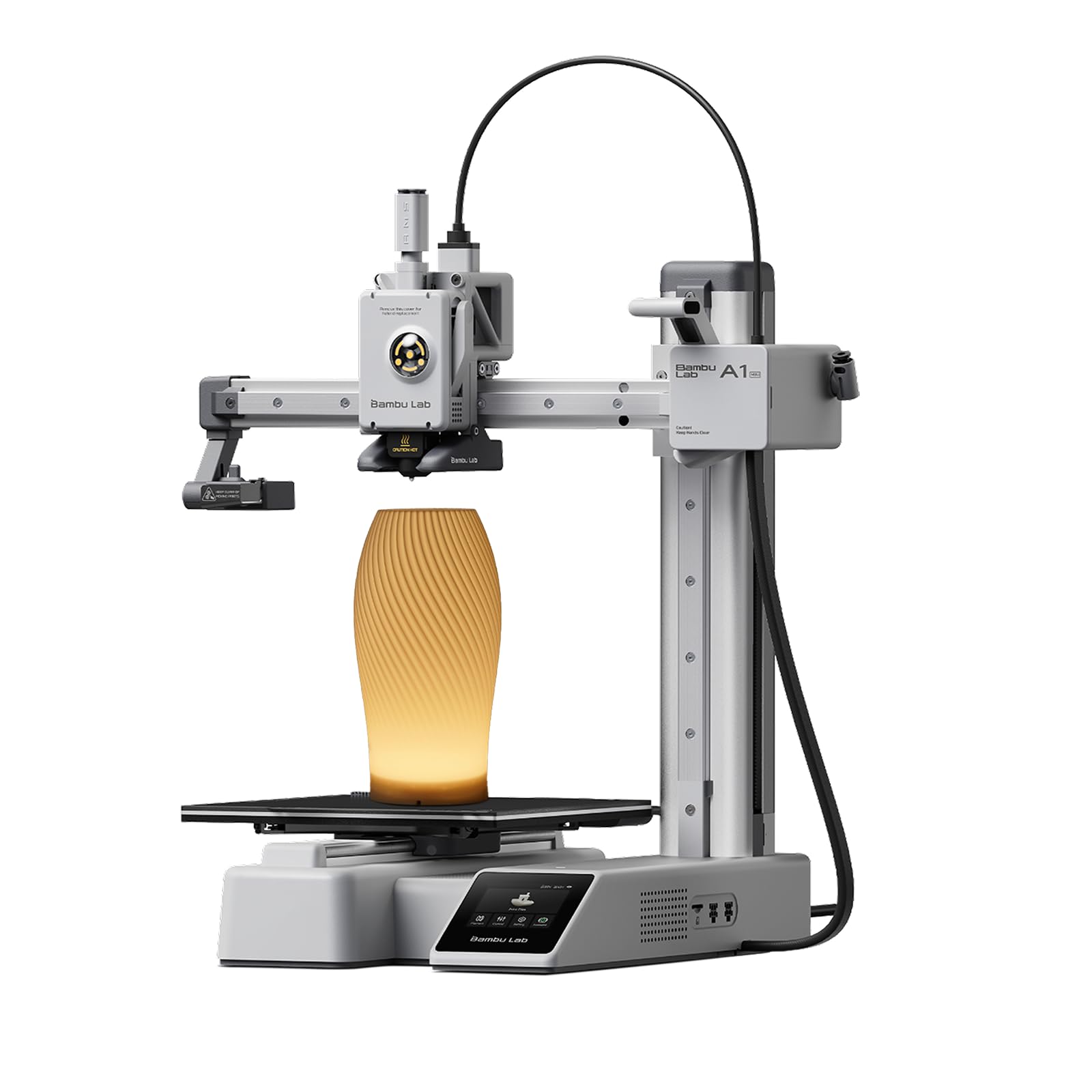
2. Bambu Lab A1 mini + LED Lamp Kit
The easiest path from unboxing to a finished print, backed by a massive model library.
The Bambu Lab A1 mini is not just a printer — it is an ecosystem. The machine arrives mostly assembled, and owners consistently report that setup takes about 15 minutes. Full-auto calibration handles the leveling, nozzle Z-offset, and input shaping before every print, so your first layer is perfect without any paper-fiddling. The printer operates at no more than 48 decibels (quieter than a normal conversation), making it among the most living-room-friendly options at this price.
The real draw is the MakerWorld model library and the Bambu Handy app. You can browse thousands of ready-to-print models from your phone, send a file to the printer, and have it running in moments. The included LED Lamp Kit lets you print and assemble functional decorative lights directly. Most review accounts tell the same story: the A1 mini delivered a month of nonstop successful prints with only rare failures — and those were almost always due to a missing support strut. The build volume is on the smaller side, but that is a trade-off for the speed and quietness. Owners say the print quality is “absolutely fantastic” and that, for the price, “there is no other printer even coming close.”
The Bambu Lab ecosystem is a genuine advantage if you value convenience over total control. Reliability scores as a clear positive across the reviews. If you want to spend your time making things rather than fixing the machine, the A1 mini is the most forgiving entry point in this list.
The catch: its small footprint limits you to smaller models, though most beginners never hit that ceiling before they outgrow the machine.
Best for: anyone who wants a true plug-and-play experience with a rich library of free designs and a quiet footprint.
skip it if: you need a large build volume (over 200mm) or want to print engineering-grade filaments without modifying the hotend.
3. FLASHFORGE Adventurer 5M
A Core XY speedster that gets you from box to print in under ten minutes.
If you value raw throughput and hate waiting, the Adventurer 5M is the fastest FDM printer on this list by a decent margin. Its Core XY system delivers acceleration up to 20,000 mm/s² and a maximum print speed of 600 mm/s — meaning a Benchy boat can finish in under 30 minutes. The 50-watt heating element brings the nozzle to 200°C in just 35 seconds, so you are not standing around waiting for the machine to warm up. Setup is equally brisk: owners mention going from unboxing to the first print in less than 10 minutes, thanks to the one-click auto-leveling and pre-installed sample files.
The print quality is consistently described as “awesome” for a printer at this price point. The dual-sided PEI coated build plate grips PLA and PETG well and gives a textured finish on the bottom layer. Vibration compensation eliminates ghosting (those faint echo lines on fast corners), so the speed boost does not come at the cost of crisp edges. The printer also includes a filament run-out sensor and power-loss recovery, two features that save you from wasting a job due to an empty spool or a flicker.
The main trade-off is the small build volume at 220 x 220 x 220mm, which is fine for most small projects but limits you on helmets or large brackets. Reliability is a mixed bag — some customers note a single unit that is still flawless after a year, while others hit firmware freezes or adhesion issues. The recurring advice is to use Orca Slicer instead of the default software for better control.
Why you will love it
- Blistering 600 mm/s speed with vibration compensation for clean corners.
- Setup in under 10 minutes — fewer cables than most competitors.
- Dual-sided PEI plate gives excellent adhesion for PLA/PETG/TPU.
Where it trips up
- Small build volume (220mm cube) limits bigger projects.
- Firmware can occasionally freeze mid-print.
- No official enclosure kit — not great for ABS or ASA filaments.
Perfect for: beginners and hobbyists who want fast, reliable FDM prints for small functional parts and toys.
Think twice if: you need a large build area or want a machine that is fully enclosed for high-temp filaments.
4. Creality Ender 3 V3 SE

The iconic open-frame printer, now with speed and direct drive at a budget price.
The Ender 3 V3 SE takes the platform that made Creality a household name and gives it a serious speed upgrade. Print speeds reach 250 mm/s with acceleration of 2500 mm/s², which is noticeably faster than the older Ender 3 models. The CR Touch auto-leveling sensor and a strain sensor for automatic Z-offset eliminate the most frustrating part of setup. Most owners assemble the printer in about 20 minutes — three steps — and get to their first print without manual bed-tramming.
The “Sprite” direct extruder is the real standout here: it feeds PLA, PETG, and TPU without jams, and Creality has shipped over 500,000 units globally, so the ecosystem of replacement parts and tutorials is vast. The dual Z-axis lead screws (synced by a timing belt) keep the gantry stable for taller prints, reducing wobble. The 32-bit silent mainboard with advanced stepper motor drives makes it quiet enough to run in a shared room. A notable difference versus the Bambu Lab A1 mini is that the Ender 3 V3 SE weighs only 15.43 pounds compared to 12.1 pounds, giving it a slightly more solid feel on the desk.
The customer feedback is a textbook example of “it depends.” Over 1,200 owners mention reliability, and it is a mixed verdict — many praise the print quality and value, but a significant portion report units that arrived with a warped bed or a failed Y-axis bearing after about 50 prints. This is not a machine for someone who wants zero maintenance. The consensus is that the Ender 3 V3 SE is an “excellent introductory printer for the tinkerer” — someone who enjoys tuning, upgrading, and occasionally fixing a part.
The honest take: unbeatable value for the modding community, but plan on spending a few hours dialing it in and replacing a wear part in the first few months.
Best for: hobbyists who enjoy upgrading their machine and want the largest parts ecosystem in budget FDM.
Not for: anyone who wants a printer that runs perfectly from day one with no adjustments.
5. Creality SPARKX i7
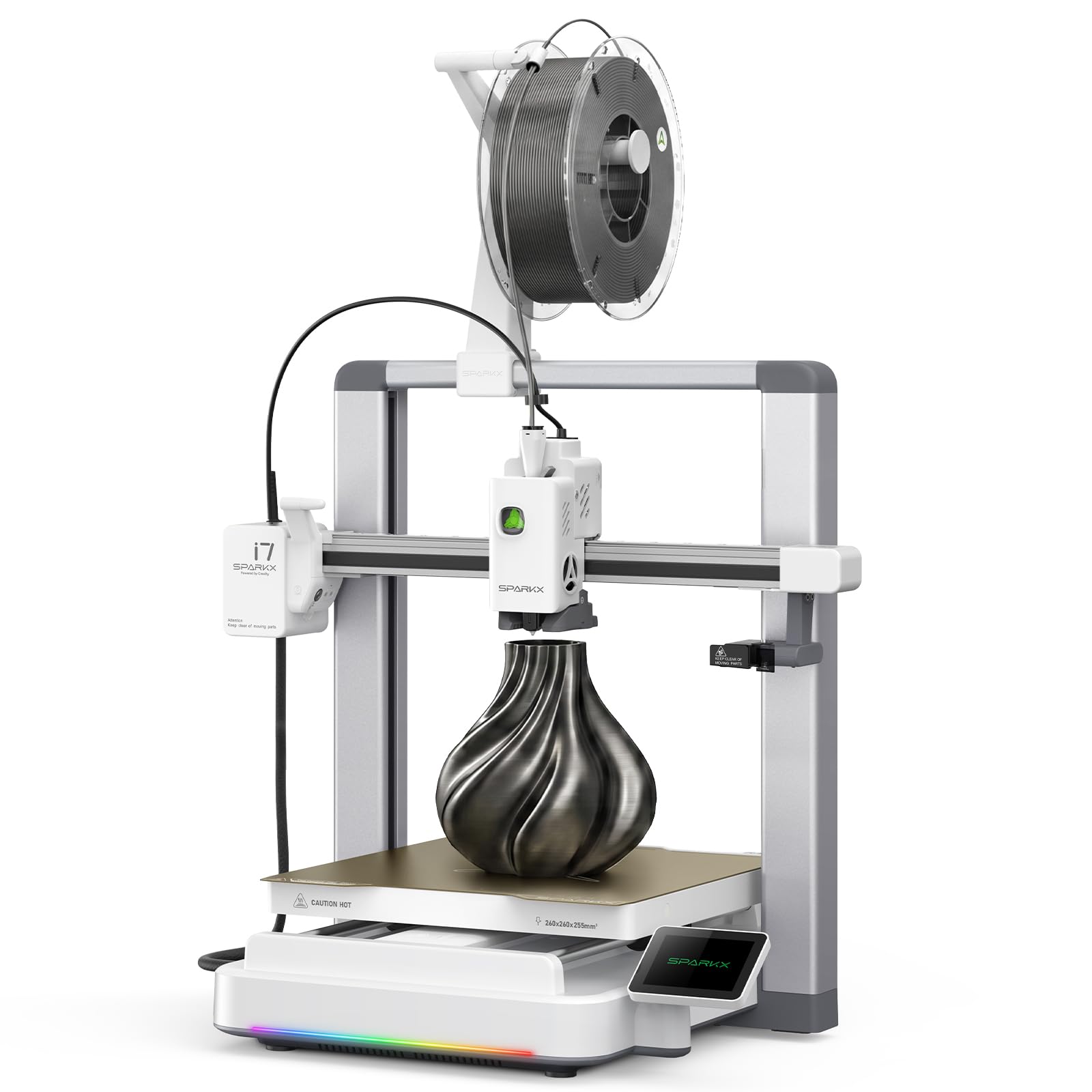
An AI-assisted workhorse that brings multi-color printing within budget reach.
The SPARKX i7 packs features normally found on premium machines into a sub- frame. Its built-in AI camera monitors your print in real time and sends alerts for common failures like spaghetti (a tangled mess) or filament entanglement. The Creality CubeMe AI can convert a portrait photo into a printable 3D model, which is a genuinely useful trick for personalized gifts. The printer is 95% pre-assembled, so setup is about taking it from the start and running the automatic calibration.
The build volume is the largest on this list at 260 x 260 x 255mm — enough for an airless basketball or a large cosplay prop. Print speed maxes out at 500 mm/s, and Pressure Advance and Input Shaping eliminate stringing and ringing. The customizable RGB light bar is a nice touch for a workshop or dorm room, and the Night Mode drops noise to near-silent operation. Multicolor printing requires the optional CFS unit, but the printer itself cuts waste by 50% compared to earlier models.
The early adopter feedback shows a mixed reliability picture. While many owners call it a “surprisingly capable budget 3D printer” that delivers print quality on par with Bambu Lab for single-color PLA, a few note that the all-plastic build feels less premium and that replacement hotends are expensive. The most common fix is to use the FlowPrint mode on the Creality Cloud app for the best results.
What stands out
- Largest build volume (260mm cube) of any printer in this guide.
- AI camera detects print failures and sends alerts to your phone.
- RGB lighting and near-silent Night Mode for home use.
What to watch
- Multi-color requires the CFS add-on, raising the total cost.
- Plastic frame can flex during fast prints if not on a stable surface.
- Hotend replacement parts are more expensive than expected.
Pick this for: large single-color projects or if you want AI-assisted monitoring and the option to add multi-color later.
Pass this by if: you need a rock-solid metal-frame machine for daily production use.
6. Fully Assembled Mini 3D Printer (TINA2S)

A complete starter kit that is ready to print right from the start, perfect for young creators.
This FDM machine is built for one job: making 3D printing dead simple for kids and absolute beginners. It comes fully assembled, so there is no confusing hardware to screw together. The printer includes 10 meters of PLA filament, a microSD card pre-loaded with model designs and slicing software, and a magnetic flexible build plate that lets you peel off finished prints with a gentle flex. One owner said “I bought this for my son’s 7th birthday and he loves it” — a sentiment echoed across numerous reviews.
The auto-leveling bed and dual Z-axis rail keep prints consistent, and the one-touch filament loading and unloading means even a young child can swap colors without help. The printer connects over WiFi and works with Mac, Windows, and Linux, and it is compatible with popular slicing software like Cura and Simplify3D. Most reviews report that the first print comes out beautifully, with a quality that surprised even experienced users. The print quality is the most praised aspect, with 134 owners highlighting it positively.
The compact footprint of 8.3 inches per side makes it easy to fit on a desk. The reliability feedback is mixed — some reviewers point out their unit stopped working after a few weeks, though the majority have trouble-free experiences. The key limitation is the small build bed, but that is a given for a machine aimed at making toys, trinkets, and small educational models.
The bottom line: the best “first day” experience on this list — no build, no tinkering, just print — but be aware that a small percentage of units may have a defect.
Best for: parents who want a gift their child can use immediately without any adult setup time.
Not for: someone who wants to print large objects or who needs industrial-grade reliability.
7. Entina Tina2 Basic

A tiny, safe FDM printer designed for kids aged 7 and up to use independently.
The Tina2 Basic strips away complexity to the absolute minimum. It arrives fully assembled and you can be printing within five minutes of opening the box — just load the filament, insert the microSD card, and tap the knobby interface. The printer is extremely light at only 6 pounds versus the Creality Ender 3 V3 SE at 15.43 pounds, making it easy for a child to carry to their desk. The fully open-source design means you can upgrade parts and customize the software as your skills grow.
The auto-leveling system is simple to use — the bed adjusts itself without any manual turning of screws. The magnetic platform is flexible, so a finished model pops off with a gentle bend. The build volume is a compact 100 x 105 x 100mm, which limits you to small toys and figures, but that keeps the printer quiet and fast enough to hold a child’s attention. Owners of a 7-year-old report that the printer is quiet enough to run in a child’s bedroom.
A single review from an owner who had a defective X-axis unit is worth noting: “X-axis defective out of box; support initially blamed tape/packaging, then advised adjustment.” The printer worked for two prints and then failed, and the owner returned it. That is an uncommon experience — the vast majority of reviews are five stars from parents saying “Keeps kiddos busy for weeks!” The quality control is good but not flawless, so buy from a retailer with a solid return policy.
The honest take: the best choice for a young child (7-10) who wants to make toys and learn 3D printing basics without any dangerous hot parts exposed.
Reach for this if: you are buying for a child under 10 and want the lightest, safest, and most turnkey machine.
Look elsewhere if: you plan to print anything larger than a palm-sized object or need a high-duty-cycle workhorse.
8. ELEGOO Mars 5

An auto-leveling resin printer that makes high-detail printing easier than ever.
The ELEGOO Mars 5 offers a 4K mono LCD screen with a COB light source for detailed prints, but its real selling point is the one-click automatic leveling. Any resin owner knows that leveling the build plate is the most tedious and error-prone step — the Mars 5 takes that pain away entirely. The printer also runs a one-click self-check before each print that verifies the LCD, motor, and light source so you do not waste resin on a faulty machine.
The smart mechanical sensor detects resin shortages and triggers an alarm, and the overheat protection halts the print if the LED temperature exceeds 80°C. The flip-lock build plate is convenient for removing the vat, and the textured plate gives excellent adhesion. Many owners praise the print quality as great for the price, with minimal tweaking needed. The machine is quiet enough to run in a home office, and the compact dimensions (15.75 x 18.5 x 9.06 inches) fit on a small desk.
The honest limit is that the reliability score is mixed. Several owners mention that the build plate screws can strip easily if you over-tighten them, which can render the printer inoperable. A repair usually involves contacting customer support or cleaning the threads with isopropyl alcohol. The image quality is 4K compared to the 10K resolution of the Photon Mono 4, so the Mars 5 is a step down in raw pixel density — though still excellent for most miniature work.
What works
- One-click auto-leveling eliminates the hardest part of resin printing.
- Smart sensor alerts you when resin runs low.
- Overheat protection adds a layer of safety for unattended prints.
What needs care
- Vat screws strip easily — do not over-tighten.
- FEP replacement is tricky and requires a specific technique.
- Lower resolution (4K) compared to the 10K Photon Mono 4.
Perfect for: budget-minded creators who want an easy, auto-leveling resin machine for detailed prints.
Not for: anyone who wants the absolute highest detail or who tends to be rough on hardware and screws.
Understanding the Specs
Resolution & Pixel Size
For resin printers, resolution is measured in micrometers (µm). A smaller number means finer detail. The 17µm pixel size on the ANYCUBIC Photon Mono 4 is excellent — it hides layer lines so well that prints look injection molded. The ELEGOO Mars 5 uses a 4K screen, which is still very sharp for most models, but you will notice a difference on tiny features like a figure’s face.
Direct Drive vs. Bowden Extruder
A direct-drive extruder mounts the motor right on the print head, which lets it push flexible filaments like TPU without the filament bunching up. The Creality Ender 3 V3 SE has a “Sprite” direct extruder that can handle PLA, PETG, and TPU. Bowden systems have the motor on the frame, which is cheaper and slightly lighter but struggles with flexibles. If you plan to print anything beyond standard PLA, look for direct drive.
Build Volume
Build volume is the maximum size of a print, measured in millimeters or inches. A 220mm cube (like the Flashforge Adventurer 5M) can handle a full-size helmet or a large vase. A 100mm cube (like the Entina Tina2) is limited to small toys and phone stands. Think about what you actually want to print — most beginners overestimate the size they need.
Print Speed
Print speed, stated in mm/s, is the rate at which the nozzle moves. Real-world throughput depends on acceleration, model complexity, and infill. High numbers like 600 mm/s (Flashforge Adventurer 5M) mean a Benchy test boat in 30 minutes instead of two hours. But speed is useless without quality features like vibration compensation and pressure advance, which prevent ringing and blobs at corners.
FAQ
Which is better for a beginner, FDM or resin?
Do I need to assemble a 3D printer under $250?
How much does filament cost?
Can I print with multiple colors on a single-extruder printer?
What is the difference between FEP and PEI build plates?
How long does a typical print take?
Do I need a separate wash and cure station for resin?
What software do I need to create 3D models?
What is the most reliable 3D printer under $250 right now?
Final Thoughts: The Verdict
If you want one dependable pick, the best 3d printer under $250 winner is the ANYCUBIC Photon Mono 4 because it delivers stunning 10K resolution in easy-to-use resin package. If you want a truly plug-and-play FDM experience, grab the Bambu Lab A1 mini. And for fast functional prints and cosplay parts, the FLASHFORGE Adventurer 5M is the one to reach for.
How We Picked
We do not accept paid placement. Every pick is matched to a real buyer and a real use-case; we do not hands-on test units.
Sources & Methodology
Specifications: manufacturer listings and product documentation. Review insights: verified customer reviews, as of July 2026. Pricing: not shown on this page (it changes often); check the current price via the retailer link.
As an Amazon Associate, Gadgets Feed earns from qualifying purchases. This does not affect which products we feature.