
Our readers keep the lights on and my morning glass full of iced black tea. As an Amazon Associate, I earn from qualifying purchases.
A stock 3D printer is a capable machine, but it’s tuned to a price point, not to perfection. The extruder slips, the bed level drifts, and the control board whines at a frequency that drives you out of the room. The real performance—the print quality, the material range, the reliability—is locked away behind those stock parts, waiting for the right upgrades to let it out.
I’m Min — the co-founder and writer behind Gadgets Feed. I’ve spent countless hours cross-referencing specifications, analyzing user calibration reports, and comparing the real-world performance data of the most popular aftermarket parts to separate genuine upgrades from placebo hardware. This guide is the result of that deep market research.
Whether you want silent printing, flexible filament capability, or just bed leveling that works every time, we’ve found the best hardware to get you there. This is our curated list of the absolute best 3d printer upgrades you should install next.
How To Choose The Best 3D Printer Upgrades
The best upgrade for your printer depends entirely on what is holding it back. A clog-prone Bowden extruder benefits from a dual-gear or direct drive swap, while a machine with consistent first-layer failures needs an auto bed leveling sensor. Start by identifying your single biggest frustration, then match it to the right component.
Extruder Type: Bowden vs. Direct Drive
The Bowden setup on most entry-level printers pushes filament through a long PTFE tube, which causes delays in retraction and makes printing flexible materials like TPU nearly impossible. A direct drive upgrade mounts the extruder motor directly above the hotend, shortening the filament path to a few inches. This allows for precise retraction under 1mm and reliable extrusion of soft filaments, but it adds weight to the gantry, which can affect print speed on bed slingers if not compensated.
Control Board: 8-bit vs. 32-bit and Stepper Drivers
The stock 8-bit board on many printers is limited in processing power and produces loud stepper motor whine. Upgrading to a 32-bit board, especially one with Trinamic TMC2209 drivers, enables near-silent operation, linear advance, and support for Klipper firmware. This is the upgrade that changes the entire feel of a printer from noisy hobbyist tool to a quiet workshop appliance.
Auto Bed Leveling: Inductive vs. Touch Probe
Manual bed leveling involves repeatedly turning knobs and running a paper test—a process that must be repeated after every print removal. An auto bed leveling sensor like the CR Touch uses a metal pin to probe the bed at multiple points and compensates for slight warps or tilts in the firmware. The CR Touch is a metal probe (metal nozzle safe), while older inductive sensors only work on glass beds. Choose based on your bed surface and whether you want metal nozzle protection.
Quick Comparison
On smaller screens, swipe sideways to see the full table.
| Model | Category | Best For | Key Spec | Amazon |
|---|---|---|---|---|
| Creality Sprite Extruder Pro Kit | Direct Drive + All-Metal Hotend | High-temp materials & quiet operation | 3.5:1 gear ratio, 80N force, dual fan | Amazon |
| Creality Sprite Extruder SE Kit | Direct Drive (No Hotend) | Budget direct drive conversion | 210g weight, 3.5:1 gear ratio | Amazon |
| BIGTREETECH SKR Mini E3 V3.0 | 32-bit Control Board | Silent operation & Klipper support | TMC2209 drivers, STM32G0B1 chip | Amazon |
| Creality CR Touch | Auto Bed Leveling Sensor | Frustration-free first layers | Metal probe, 3 mounting brackets | Amazon |
| Creality Ender 3 Direct Drive Kit | OEM Direct Drive Conversion | Reliable first-time TPU users | 1.7 lb weight, 20-min install | Amazon |
| Redrex Dual Gear Ender 3 Extruder | Dual-Gear Bowden Extruder | Replacing worn stock extruder arm | Nema 17 40Ncm motor, 1A | Amazon |
| ELEGOO Neptune 3 Pro Direct Drive | OEM Replacement Extruder | Neptune 3 Pro/Plus/Max owners | 1.06 lb, fully assembled | Amazon |
In‑Depth Reviews
7. Creality Sprite Extruder Pro Kit

The Sprite Pro is a complete assembly that combines a dual-gear direct drive extruder with an all-metal hotend, capable of hitting 300°C for materials like polycarbonate and Nylon. The 3.5:1 gear ratio delivers 80N of pushing force, which eliminates the need for high retraction distances—you can run retractions under 1mm on PLA and TPU alike. The dual-fan design simulates flow-field mechanics to keep the heat break cool, and the all-metal construction removes the PTFE degradation that causes clogging over time.
Installation is straightforward on Ender 3 series printers, though you should expect to update your firmware and adjust the Z-offset if you also have a CR Touch sensor. The filament path is extremely short, and the assembly comes with a short BLTouch cable, making it a tidy upgrade. Users report a noticeable reduction in stringing and far fewer failed prints when switching from Bowden to this unit.
The only real drawback is the lack of a tension release lever—you’ll need to manually loosen the tension screw before loading or unloading filament. The heat break fan is also louder than the stock fan, which is a minor annoyance on an otherwise silent setup. For anyone who wants to print high-temperature materials or simply get the best print quality out of their Ender 3, this kit remains the gold standard.
Why it’s great
- All-metal hotend eliminates heat creep and PTFE degradation
- 3.5:1 gear ratio provides 80N force for precise extrusion
- Dual fans keep the hotend cool during long prints
Good to know
- No tension release lever for easy filament loading
- Heat break fan can be louder than stock
- Requires firmware update and retraction tuning
5. BIGTREETECH SKR Mini E3 V3.0

The SKR Mini E3 V3.0 is the most popular aftermarket control board for Ender 3 printers for a reason—it replaces the noisy, limited 8-bit board with a 32-bit STM32G0B1 chip and four TMC2209 stepper drivers. The audible difference is dramatic: the high-pitched whine of stepper motors is replaced by a low hum that blends into the background. The board also supports UART mode for the drivers, enabling features like stealthChop and spreadCycle you can configure per-axis.
Upgrading the control board opens up advanced firmware options like Klipper and linear advance, which improve print quality by compensating for pressure buildup in the nozzle. The V3.0 adds three CNC-controlled fan headers, a Micro USB B port for faster PC communication, and an SPI output for external sensors. Despite the small form factor, users report it runs cooler than the V2.0 thanks to a redesigned heat sink over the drivers.
The biggest challenge is firmware configuration. It’s not a completely drop-in replacement—you’ll need to compile Marlin or download a pre-compiled version, and if you have a CR touch, you may need to swap wires to match the pinout. Some users also note that the physical layout is slightly different from stock, requiring a custom mount or careful cable routing. But once set up, the board transforms the printer into a quiet, responsive machine that is a pleasure to run overnight.
Why it’s great
- Near-silent TMC2209 drivers eliminate motor whine
- 32-bit chip enables Klipper and advanced Marlin features
- Dedicated CNC fan headers improve cooling control
Good to know
- Not a true drop-in replacement for all Ender 3 variants
- Requires manual firmware flashing and configuration
- CR touch may need wire swaps for correct pinout
4. Creality Sprite Extruder SE Kit
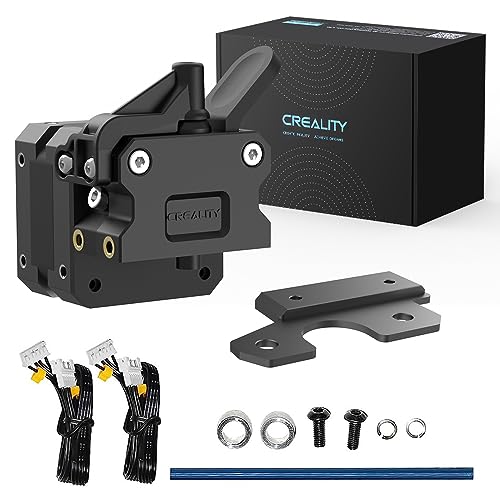
The Sprite SE is the budget-conscious sibling of the Sprite Pro. It uses the same dual-gear direct drive mechanism with a 3.5:1 gear ratio, but it does not include an all-metal hotend—you keep your original hotend. This makes the SE lighter at just 210 grams, reducing the load on the gantry and preserving print speed on bed slingers. It’s a clever design that lets you convert a Bowden printer to direct drive without the expense of a full hotend replacement.
Installation is a 30-minute job requiring minimal disassembly. The kit comes with an isolation column and mounting bracket that work with the original hotend mounting holes. Users report that the adjustable tension spring allows fine-tuning of the grip on the filament, which is critical for materials like TPU that can be squished by excessive pressure. After calibration, the SE prints flexible filament easily and allows fast mid-print color swaps.
One issue reported on the Ender 3 V2 is that the bottom roller offset spacer can be installed reversed, causing gantry wobble—the fix is simply rotating the spacer 180 degrees. The E-steps need to be set to 424.9 via G-code, which can be tricky on stock firmware that doesn’t save settings to EEPROM. Users recommend installing Jyers firmware to permanently save the calibration. For the price, this is the most cost-effective way to unlock direct drive printing.
Why it’s great
- Lighter design preserves gantry speed
- Adjustable tension for different filament types
- Enables fast mid-print filament swaps
Good to know
- No all-metal hotend included—uses stock hotend
- Spacer orientation critical for stable gantry
- Requires E-step calibration to 424.9
6. Creality CR Touch
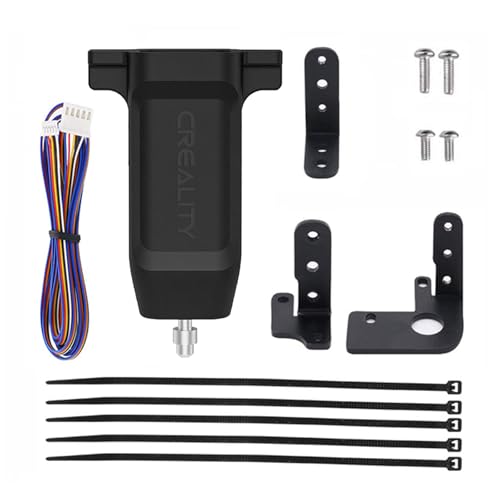
The CR Touch is a bed leveling sensor that uses a retractable metal pin instead of an optical or inductive sensor. The metal pin is crucial because it means you can level over a metal print bed or a glass bed without false triggers, and if your nozzle crashes into the bed, the pin retracts rather than bending. The kit comes with three different mounting brackets to fit a range of Creality printers, including the Ender 3, Ender 5, and CR-10 series.
Installation involves mounting the sensor, plugging it into the Z-endstop port on a compatible 32-bit board (V4.2.2 or V4.2.7), and flashing the CR Touch firmware. Once set up, the sensor probes 5 to 16 points on the bed before every print and firmware-compensates for any tilt or warp. Users who upgrade from manual leveling report that their first-layer adhesion instantly improves and that they almost never have to touch the bed wheels again.
The sensor adds about 20 minutes of setup time, most of which is spent locating and flashing the correct firmware version. Note that the firmware file on Creality’s site is sometimes confusingly organized, but the community has compiled clear guides. The kit does not include zip ties in some batches, so you may need your own for cable management. Despite this minor annoyance, the CR Touch is the easiest way to eliminate the most common cause of failed prints: an unlevel bed.
Why it’s great
- Metal probe is safe for metal and glass beds
- Firmware compensation eliminates manual leveling
- Retracting pin prevents damage on crash
Good to know
- Requires compatible 32-bit motherboard
- Firmware file location can be confusing
- Some kits may not include zip ties
2. Creality Ender 3 Direct Drive Kit

This official Creality kit converts the Bowden setup on Ender 3, Ender 3 V2, and Ender 3 Pro printers to a direct drive extruder. The kit includes a 42-40 stepper motor, a metal hotend, a fan, and extended cables that reach the new extruder position. The all-metal hotend is wear-resistant and allows printing of flexible filament like TPU and PLA without the jamming common in PTFE-lined hotends.
Installation is a straightforward 20-minute job with the included diagram and tools. Users note that the cables are the same length as the originals, so no special cable management is needed. After switching to direct drive, retraction distances drop from 6mm to less than 1mm, drastically reducing stringing on TPU. The kit works immediately after assembly without any firmware changes, though users recommend increasing the nozzle temperature by 10-30°C for the first TPU print to account for the shorter filament heating zone.
One unit had the drive gear wheel fall off hours into a print, but this appears to be an isolated quality control issue. The extra weight on the hotend assembly is noticeable at high print speeds, but at standard speeds it doesn’t affect quality. For users who want a guaranteed compatible conversion that just works with a quick read of the instructions, this kit removes all the guesswork.
Why it’s great
- OEM part ensures perfect fit on Ender 3 series
- Includes all-metal hotend for high-temp materials
- 20-minute install with no firmware changes required
Good to know
- Drive gear wheel had rare quality issue
- Added gantry weight may affect high-speed printing
- Requires temperature adjustment for TPU
1. Redrex Dual Gear Ender 3 Extruder

The Redrex Dual Gear Extruder addresses the most common failure point on stock Ender 3 printers: the plastic extruder arm that cracks under tension. This all-metal replacement uses two gears to grip the filament, distributing the force and preventing the deformation and slipping that leads to inconsistent extrusion. The upgraded idler gear includes washers on both sides, so the sharp gear teeth don’t ride against the plastic arm and chew it up over time.
This extruder is compatible with the entire Ender 3 family, the Ender 5, CR-10 series, and the Voxelab Aquila. The included Nema 17 motor provides 40Ncm of holding torque, which improves motor stability during retraction moves. Users on CR-10 and Ender 3 V2 Neo report easy 15-minute swaps that immediately fix clogging issues caused by the original extruder slipping backward on retractions.
You must calibrate the E-steps from 100 to 139 after installation—a simple G-code command that takes 10 seconds. Some units have lower-quality motors with insufficient stator windings or missing rotor magnetic shielding, causing skipped steps on longer prints. The dual gear pitch is also slightly smaller (7.4mm vs. 11.2mm stock), which means the motor must turn faster to push the same amount of filament. For the price, however, this is a proven fix for the extruder arm failure that kills so many stock printers.
Why it’s great
- All-metal design solves plastic arm cracking issue
- Dual gears provide reliable, non-slip extrusion
- Fits wide range of Creality and clone printers
Good to know
- Motor quality can vary between units
- Must calibrate E-steps to 139 after install
- Smaller gear pitch reduces filament speed
3. ELEGOO Neptune 3 Pro Direct Drive Extruder

This extruder is specifically made for the ELEGOO Neptune 3 Pro, 3 Plus, and 3 Max printers. It arrives fully assembled with the motor, heatsink, and dual-gear mechanism pre-configured, so you simply unplug the old extruder, bolt this one on, and reconnect the ribbon cable. The extruder is tested before shipping, so you may find a small amount of test filament inside the nozzle—this is normal and indicates the unit passed inspection.
Users who replaced a faulty original extruder on the Neptune 3 Plus report that the unit resolved persistent homing failures on all three axes. After installation, the printer ran through its auto-leveling sequence without issue and produced prints identical to Day 1 quality. The kit includes a spare nozzle, which is a welcome addition given that swapping nozzles is often the first troubleshooting step for extrusion issues.
The only notable catch is that this part is model-specific—it does not fit standard Ender 3 printers or other open-frame machines. The price is higher than the DIY alternatives, but the plug-and-play nature means zero firmware configuration or wire swapping. For Neptune 3 series owners dealing with clogging or inconsistent layers, this is the quickest path back to perfect prints.
Why it’s great
- True plug-and-play: no firmware flashing needed
- Fully assembled with motor and heatsink
- Resolves homing and auto-leveling issues
Good to know
- Only compatible with Neptune 3 Pro/Plus/Max
- Higher cost than universal alternatives
- Test filament residue left inside from factory
FAQ
Do I need to calibrate E-steps after upgrading my extruder?
Will a direct drive extruder slow down my printer?
What firmware do I need for the CR Touch sensor?
Can I use a silent board with stock firmware?
Final Thoughts: The Verdict
For most users, the absolute best 3d printer upgrades winner is the Creality Sprite Extruder Pro Kit because it combines a direct drive extruder, an all-metal hotend, and a high-torque gearbox into a single assembly that transforms print quality across all materials. If you want silent operation and advanced firmware features, grab the BIGTREETECH SKR Mini E3 V3.0. And for anyone who has never gotten a perfect first layer consistently, nothing beats the Creality CR Touch.