
Our readers keep the lights on and my morning glass full of iced black tea. As an Amazon Associate, I earn from qualifying purchases.
Specs are compiled from manufacturer listings and verified buyer reviews and can change over time — please confirm the key details on the product page before buying.
You want a calculator that shows digits clearly, has keys that respond every time, and stays put on your desk. The best 4 function calculator for you depends on three things: digit size, key feel, and power source. Here are seven top-rated models, so you can match one to your desk, your bag, and your eyes.
I’m Min — the founder and writer behind Gadgets Feed. This guide is built by comparing the manufacturers’ published specifications and the patterns across verified customer reviews, so you get each pick’s real strengths and trade-offs instead of marketing spin.
The right pick makes daily arithmetic easy, whether you’re managing bills, running a register, or helping a student with homework. 4 function calculator options range from pocket-sized basics to desktop units with huge screens, and this guide helps you match the features to your routine.
Our Picks at a Glance

How To Choose The Best 4 Function Calculator
Every calculator on this list handles the four basics: addition, subtraction, multiplication, and division. The differences that matter are the ones you feel and see every time you use it — the size of the display, the resistance of the keys, and how the device stays powered.
Display Size and Readability
The number of digits a calculator can show is your first clue to its size. An 8-digit screen is fine for quick mental math checks, but a 12-digit display gives you room for larger sums like budgets or inventory totals, so you are less likely to misread a figure. Look for displays described as “large” or “oversized” if your eyes strain at small screens, and note that a tilted or angled screen reduces glare from overhead lights.
Power Source: Battery vs. Solar
Basic calculators usually run one of two ways: on batteries alone, or on a combination of solar cells and a battery backup. Solar-only models can go blank in dim rooms, which is why “two-way power” is such a popular feature — the solar panel handles bright light while a battery takes over in the dark. Check whether the battery is included, since some models require you to supply your own AA or AAA cell.
Key Feel and Layout
How a key feels when you press it decides how fast and accurately you can type. Some buyers love a crisp, clicky response (often described as a “mechanical” feel), while others prefer soft, quiet silicone keys that don’t disturb coworkers. If you type quickly, look for “key rollover,” which means the calculator registers multiple rapid presses correctly instead of dropping a number.
Quick Comparison
| Model | Best For | Display Digits | Power Source | Keys | Amazon |
|---|---|---|---|---|---|
| Casio MH-10M★ Best Overall | Business and retail use | 10-digit | Battery with solar backup | Large, reliable | Amazon |
| Texas Instruments TI-1706 SVPocket Pick | Pocket portability | 8-digit | Solar and battery | Extra-large | Amazon |
| CHAKAKA Mechanical | Cute, clicky desk use | 12-digit | 1 AAA battery | Mechanical, responsive | Amazon |
| Helect H1001 | Crowd-favorite value | 12-digit | Solar and AA battery | Large, smooth | Amazon |
| ROATEE 2-in-1 | Note-takers and students | — | Solar and coin battery | Large, responsive | Amazon |
| iPepul TJSQ | Portable writing pad | 12-digit | 2 lithium batteries | Silicone, quiet | Amazon |
| yxzzhx 5-Inch | Seniors and low vision | 12-digit | Solar and AA battery | Large, raised | Amazon |
In‑Depth Reviews
1. Casio MH-10M Desktop Calculator
Our pick — over 4.5★ from 2,000+ verified ratings; the strongest balance of quality and price.
The durable daily workhorse that keeps a business running smoothly.
For storefronts and office desks, this Casio is the top pick because its 10-digit screen and dedicated cost, sell, and margin keys let you set profit pricing directly, without extra menu steps. The extra-large display cuts input and reading errors at a register, and the quick correction key fixes a slip without restarting the sum. It suits anyone who prices items daily; skip it if you rarely need margin math and prefer a smaller unit.
Power comes from a battery with solar back-up, which means it keeps working whether you’re in a bright showroom or a dim back office. At 7.25 inches wide, it’s a proper desktop presence, yet the whole unit weighs only 68 grams, so it’s easy to move between stations. It’s noticeably larger than a pocket model like the TI-1706 SV (5.72 inches wide), which is exactly the point — you get room to see and press comfortably.
The crowd is overwhelmingly happy here — the functionality is the single most-praised feature, with well over a hundred owners calling it out. The durability is the stuff of office legend: “This calculator is super durable,” and buyers report it shrugs off being thrown into a backpack, briefcase, or desk drawer. The honest trade-off is that a few owners note the plastic body feels less solid than older Casio models, and one mentioned it can wobble slightly on a perfectly flat desk.
Why it wins
- Dedicated cost/sell/margin keys for retail pricing
- Battery plus solar keeps it alive in any light
- Large buttons and screen prevent reading errors
What to know
- Plastic build feels lighter than older Casios
- May wobble slightly on a flat desk
Reach for this if: you run a register, handle inventory, or want a desk calculator that survives daily abuse.
Look elsewhere if: you need something tiny enough to vanish into a shirt pocket — this one is built to sit on a desk.
2. Texas Instruments TI-1706 SV
A small but mighty classic that has been trusted for decades.
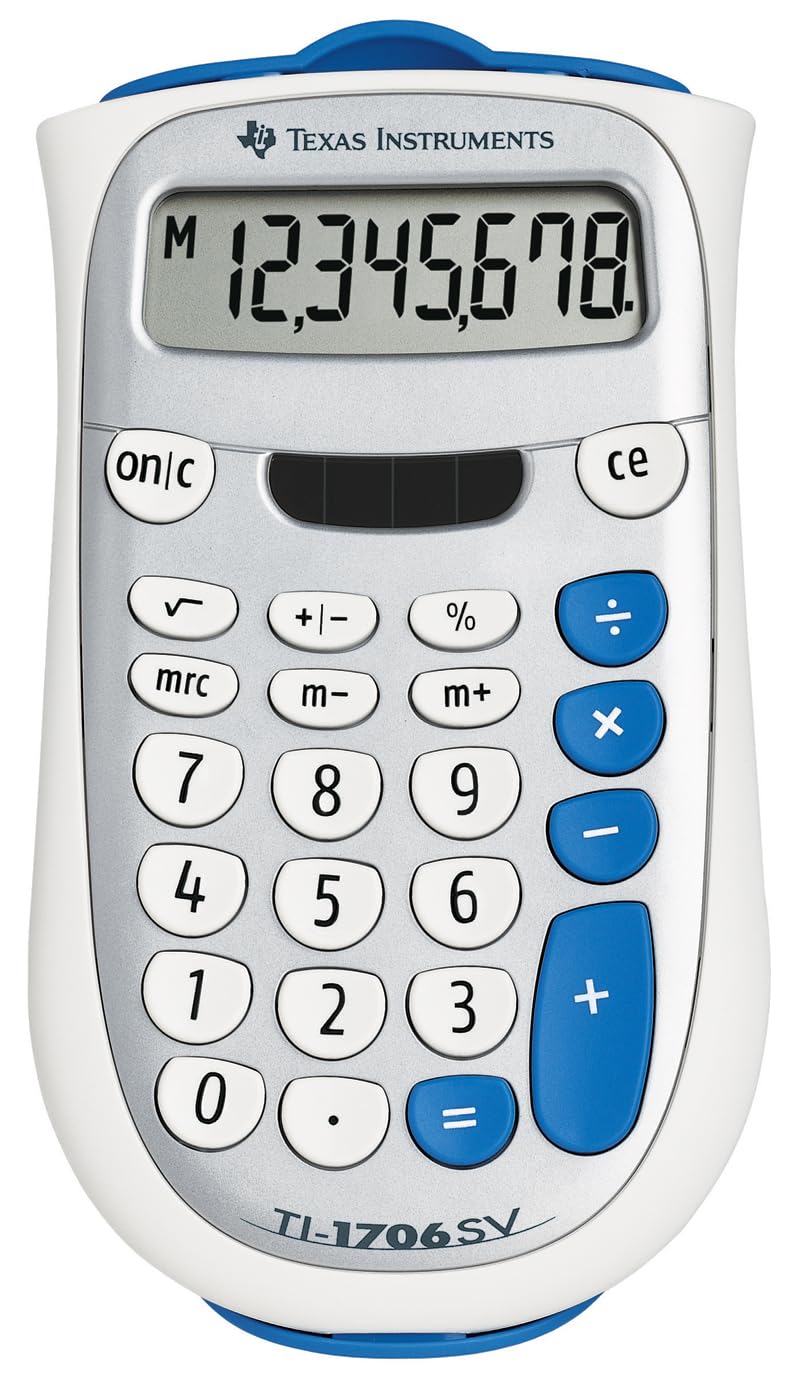
If you want a calculator that slips into a bag or pocket, this Texas Instruments model fits. At 5.72 inches long and 2.88 ounces, it is lighter and shorter than the 12-digit pink models above, though its 8-digit “SuperView” display (a high-contrast screen for easy reading) shows 50% fewer digits — fine for small sums. The slide case tucks onto the back during use, keeping the screen scratch-free in transit. It is for quick, on-the-go math; pass on it if you regularly total long columns of numbers.
Dual power (solar and battery) with an automatic power-down feature means it sips battery and wakes up instantly. The color-coded keyboard has extra-large keys, plus a change sign key for entering negative numbers without a fuss. Owners mention the durability is remarkable — the review pages are full of owners who have “used it daily for years,” with one noting a desk lamp is enough to power it instantly in a dark office.
The main thing to watch is purely cosmetic: the listing’s photo shows purple buttons, but some units ship with blue ones, which disappointed at least one buyer shopping for a specific color. Functionality is what wins people over here, with ease of use the second most-cited strength. If you need a no-frills, dependable unit for classes that ban graphing calculators, this is a proven decade-spanning choice.
Built to outlast trends: the longevity is the story — customers note daily use for years or even decades, which is rare for any gadget.
Grab it for: students, commuters, or anyone who wants a tough, pocketable calculator with a protective case.
Know before buying: don’t order it expecting purple buttons — the color can arrive as blue.
3. CHAKAKA Mechanical Calculator (Pink)

A clicky, cheerful pink calculator that turns desk work into a small pleasure.
This one is for anyone who wants their workspace to feel personal. The pink CHAKAKA brings a 12-digit tilted LCD display paired with round keys that mimic a mechanical keyboard — every press gives you crisp, clicky feedback that many owners find genuinely satisfying. The display is angled so you can read it from multiple positions, which the feedback confirms helps reduce eye strain during long stretches of budgeting or schoolwork.
It runs on a single AAA battery (not included) and auto-shuts off after about 10 minutes of inactivity, so you won’t drain the cell when you walk away mid-task. The non-slip base with four rubber feet keeps it planted, and the oversized, well-spaced keys improve accuracy for slower typists. Compared to the quiet silicone keys of the iPepul below, this one makes its presence known with every click — part of its charm, though not for a silent library.
What wins people over is the combination of looks and function — it draws compliments on a desk, and the big buttons and clear display get steady praise. The honest catch, as buyers put it: “The only thing I do not like is, the keys are hard to push down” — meaning fast, aggressive typists may miss numbers when the keys resist. One owner even bought it for a toddler who loves pressing the raised keys, which tells you the layout is playful as well as practical.
What makes it fun
- Satisfying mechanical keyboard click on every key
- 12-digit angled display readable from multiple angles
- Rubber feet keep it stable while you type
What to weigh
- Keys need a firmer push than soft-touch models
- Fast typists may occasionally skip a number
Best for: someone who wants a cute, personality-filled desk accessory that also does real math.
Think twice if: you type at high speed and need every keypress to register softly — softer keys suit you better.
4. Helect Standard Function Calculator

The most-loved budget calculator for people with big fingers and busy desks.
This is the calculator that tens of thousands of owners have settled on, and the reason is simple: it nails the basics without charging for extras you won’t use. The 12-digit display is large and readable, and the keys are big enough that even owners with “fat fingers” report typing accurately. It runs on two-way power — solar when it’s bright, plus a single AA battery (not included) for darker rooms — so a dead cell in your desk drawer won’t stop you.
Beyond the four functions, it throws in tax and currency conversion plus a profit margin percentage key, which makes it a handy tool for small business owners who don’t need a dedicated till. Reviewers point out the battery life is genuinely long — one owner mentioned a single change in two years of daily use with solar assisting. The keys are smooth and easy to press, though the recurring nitpick is that they feel slightly loose.
The appeal here is value: this is the choice when you want proven reliability at a budget-friendly price, and the sheer volume of happy owners confirms it. The display does not show operation symbols like + or −, which is fine for basic sums but worth knowing if you like to double-check your entry at a glance. The size sits between the compact TI and the wide Casio, making it a balanced middle-ground for a home or office desk.
The value king: big screen, big keys, solar backup, and extra business functions — all at a price that makes it easy to buy one for home and one for work.
Choose this for: an affordable daily driver with the most social proof of any pick here.
Remember: the keys can feel a touch loose, and there’s no on-screen operator symbol to confirm your entry.
5. ROATEE Calculator with Erasable Notepad
A calculator and a reusable notepad fused into one slim, stylish tool.
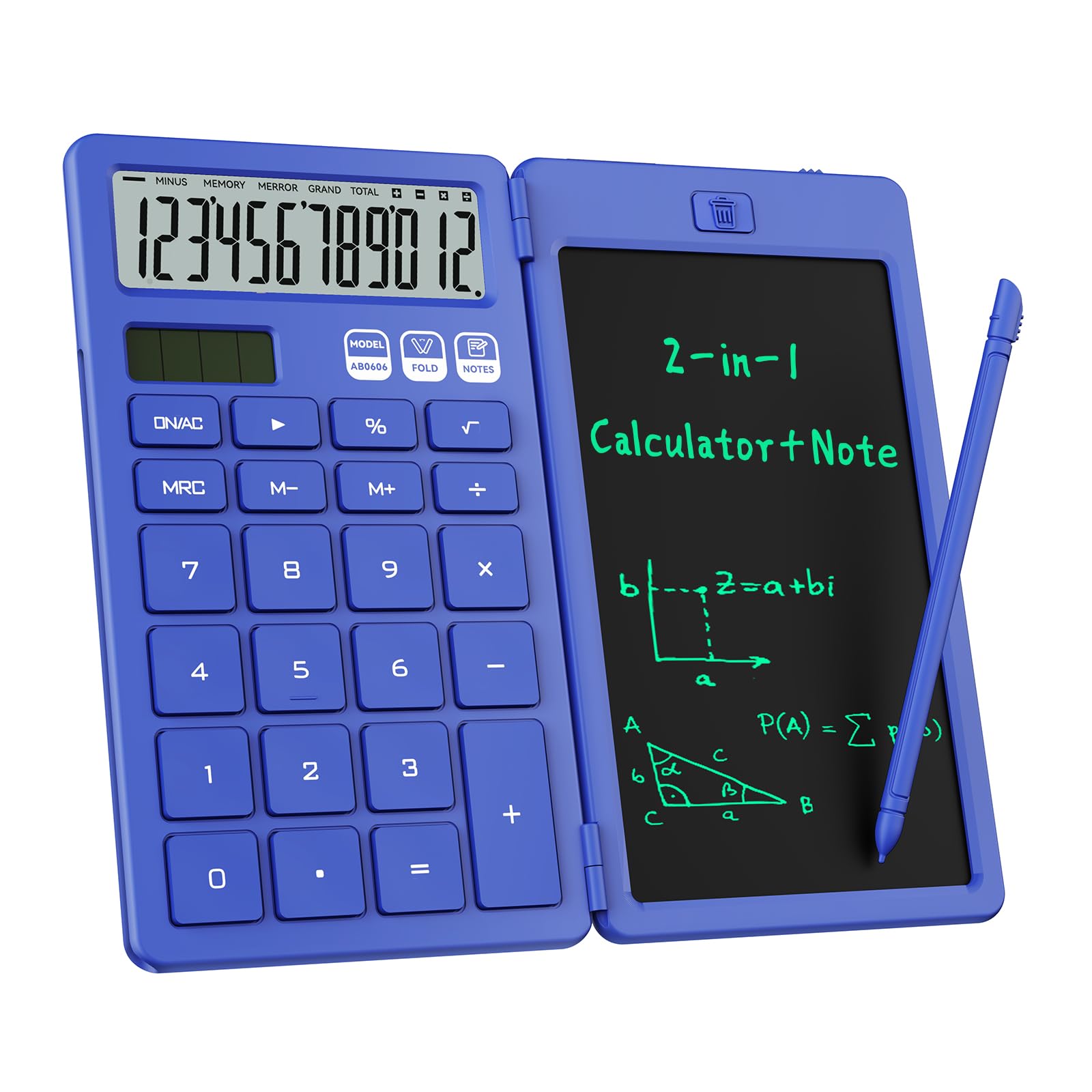
If your work involves jotting down numbers as you calculate — tracking temporary bonuses, sketching out a budget, or doodling while on a call — this ROATEE is a clever fusion. It pairs a basic calculator with an erasable LCD writing pad and a stylus that slides into the side, so you never lose the pen. The design is delightfully compact, weighing just 5 ounces and sized to feel like a phone, making it easy to slip into a bag for school or meetings.
Power comes from both a solar panel and a replaceable coin battery, so you’re not hunting for an outlet. The display is angled for comfortable viewing whether you hold it or lay it flat, and the keys are large, well-spaced, and responsive. The textured surface adds grip, and the whiteboard-style notepad is genuinely useful — though the erase button only works once you remember to open up it, a small quirk worth knowing.
The writing pad is the most-praised feature after basic functionality, with owners calling it perfect for quick notes and describing the pastel pink color as beautiful and stylish. For a middle school student who needs to “work out problems quickly” and doodle between classes, this is a hit. The one recurring note is that the display visibility gets mixed feedback in direct lighting, so it may not be the brightest screen in a sunlit room.
Why it stands out
- Built-in erasable notepad cuts paper waste
- Stylus tucks into the side so it won’t get lost
- Solar plus coin battery means no charging hassle
Small quirks
- Erase button requires the lock to be open up first
- Screen can be harder to read in bright direct light
Grab this if: you’re a student, a note-taker, or a DIY-er who wants to sketch and calculate on one device.
it’s not for you if: you need a high-visibility screen in bright sunlight — a standard LCD without the writing layer may read clearer.
6. iPepul Desk Calculator with Writing Notepad

A feather-light, foldable calculator with a notepad cover for quiet note-takers.
At just 4 ounces with a foldable design, this iPepul is the most portable calculator-plus-notepad combo on the list — compact enough to carry in a pocket and quick to flip open for meeting minutes or phone-call notes. The notepad doubles as a cover, protecting the 12-digit display from dirt and scratches. The keys are made of soft silicone, which keeps typing silent so you won’t disturb a quiet office or classroom — a direct contrast to the clicky CHAKAKA above.
The math side handles up to 12 digits, and the reusable LCD is pitched as reducing paper use since you can write on it over and over. A 1-year protection plan covers you if anything goes wrong, and the included batteries mean it works right from the start. Nursing students and list-makers alike praise the writing pad for cutting down on paper.
Here’s the honest reality: this one gets more mixed feedback than the others. The functionality is the most-discussed topic, and it splits opinions — some call it amazing while others report the writing screen runs dim or doesn’t erase fully. The screen quality and erasability are the two recurring weak points. If you mainly need a portable, quiet calculator with a scratch pad and can tolerate an imperfect writing surface, it’s a fair pick at a budget-friendly price.
What works
- Ultra-light 4 oz foldable body fits in a pocket
- Silent silicone keys suit libraries and meetings
- Notepad cover protects the display when folded
What to expect
- Writing screen can appear dim
- Erasing may leave faint marks
Suits: students and note-heavy workers who want a quiet, portable scratch pad built into their calculator.
Manage expectations: the writing surface isn’t as crisp or fully erasable as a dedicated drawing tablet.
7. yxzzhx Desktop Calculator with 5-Inch Display
The oversized screen that makes every digit easy to read, even from a distance.
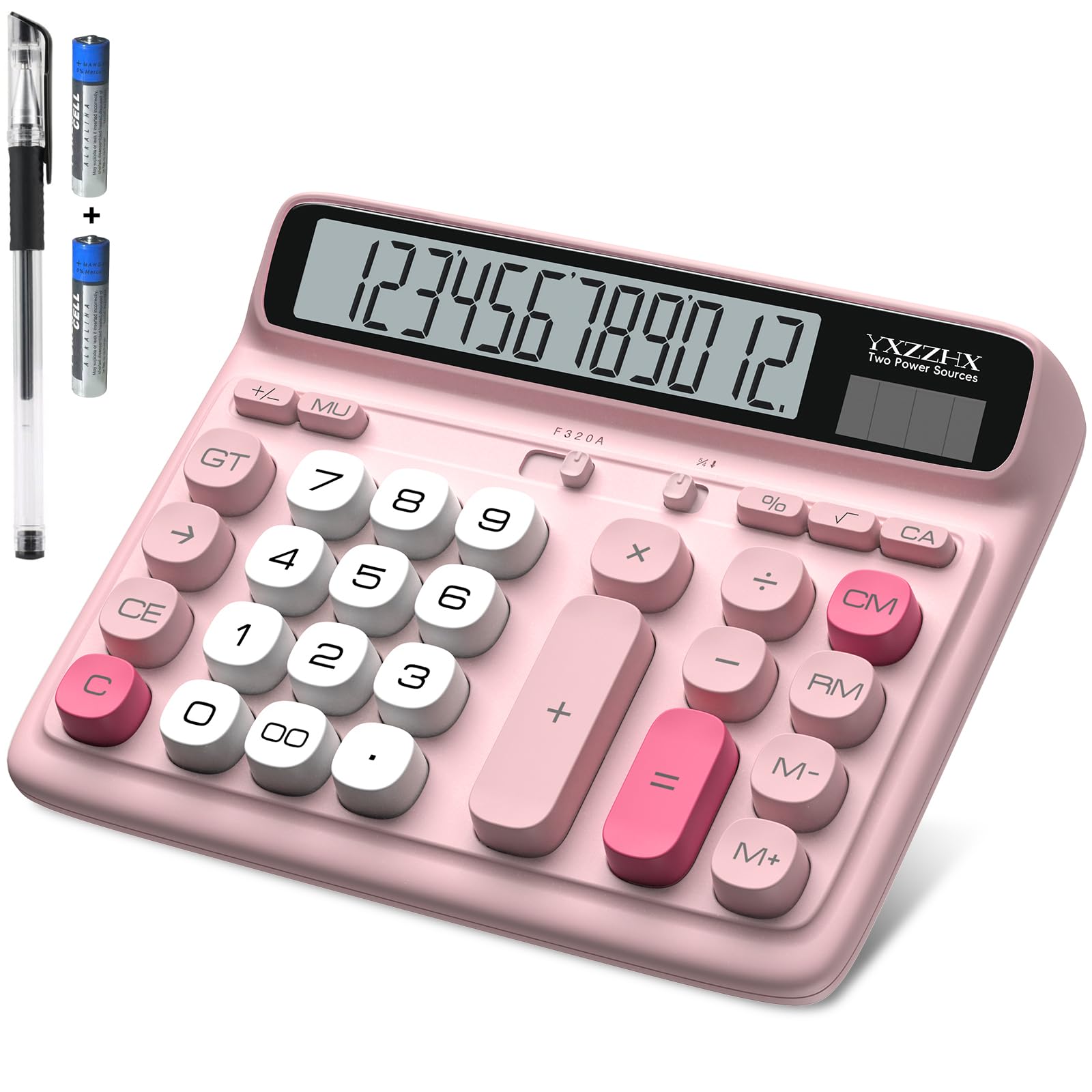
For anyone whose eyes aren’t what they used to be, this is the calculator that solves the problem. It features an extra-large 5-inch LCD screen with a 12-digit display, making figures readable from across a desk — several owners specifically bought it for seniors and praised how easy it is to see. The keys are large, raised, and easy to press, laid out like a computer keyboard, which feels natural for anyone used to typing.
It runs on both solar power and a single AA battery (included, though only one is needed), so it works even in bright rooms with no battery at all. The angled display tilts toward your line of sight, which reduces neck strain during long sessions of bill-paying or accounting. The pink color is a bonus for style, with owners noting the color-coded groups help you find function keys faster.
The strong suit here is pure readability — the oversized screen is what owners rave about most, alongside the big, easy-to-press buttons. Compared to the compact TI-1706 SV, this is a much larger desktop presence, which is precisely the appeal for home offices and aging eyes. It’s a premium-sized display at a mid-range price, and the feedback is consistently positive, with function and size leading the praise.
Clarity first: if reading a small screen is your #1 frustration, this 5-inch display is the most comfortable fix on this list.
Best for: seniors, low-vision users, and anyone who wants a large, easy-to-scan screen for bills and accounting.
Keep in mind: it’s a true desktop unit — not the one to slip into a pocket or small bag.
Understanding the Specs
Display Digits (8 vs 12)
The digit count is the largest number the screen can show at once. An 8-digit display handles grocery math or a quick tip, but a 12-digit screen shows bigger totals — budgets, inventory, or long addition strings — without rounding off. For desk use, 12 digits is the balance; for pocket carry, 8 digits keeps the unit small.
Solar & Battery Dual Power
A “two-way” or “dual power” calculator uses a solar cell in bright light and switches to a battery when the room goes dark. This stops the annoyance of a calculator that dies mid-task. Some models need the battery included with purchase, while others require you to supply your own AA or AAA — check before you buy so a dead unit doesn’t greet you on day one.
Key Rollover and Key Feel
Key rollover means the calculator can register multiple rapid keypresses correctly even if you press the next key before fully releasing the last one — crucial for fast typists who would otherwise see missed numbers. Key feel describes the resistance and sound: mechanical keys click crisply, while silicone keys are soft and silent, so your choice depends on whether you type fast or work in a quiet room.
Tax, Currency, and Margin Keys
Beyond the four basic functions, some calculators add dedicated keys for tax calculation, currency conversion, or profit margin percentage. These are aimed at retail and small-business use, letting you work out a selling price or a margin without memorizing formulas. If you only need arithmetic, these extra keys are harmless; if you run a register, they save real time.
FAQ
What does a “4 function” calculator actually do?
Is a 12-digit display better than an 8-digit one?
Do solar calculators need a battery to work?
Which calculator is best for a senior with poor eyesight?
Will a mechanical-key calculator be too loud for an office?
What is key rollover and why should I care?
Are calculators with a writing notepad worth it?
Can I use a basic calculator for tax or currency conversion?
What batteries do these calculators need?
How do I stop my calculator from making reading errors?
Final Thoughts: The Verdict
Across the board, the 4 function calculator winner is the Casio MH-10M because it marries a large 10-digit display, solar backup, and dedicated business keys into a unit that owners describe as super durable. If you want pocket portability and legendary longevity, grab the Texas Instruments TI-1706 SV. And for a kitchen-table bill session where readability is everything, the yxzzhx with its 5-inch screen is the one to reach for.
How We Picked
We do not accept paid placement. Every pick is matched to a real buyer and a real use-case; we do not hands-on test units.
Sources & Methodology
Specifications: manufacturer listings and product documentation. Review insights: verified customer reviews, as of September 2026. Pricing: not shown on this page (it changes often); check the current price via the retailer link.
As an Amazon Associate, Gadgets Feed earns from qualifying purchases. This does not affect which products we feature.