
Our readers keep the lights on and my morning glass full of iced black tea. As an Amazon Associate, I earn from qualifying purchases.
Specs are compiled from manufacturer listings and verified buyer reviews and can change over time — please confirm the key details on the product page before buying.
Buying a 4GB graphics card today is a game of matching the card to the job, not just grabbing the biggest number. Some of these cards are built for 4K desktop work, others for breathing life into an old office PC, and a few for tearing through esports titles at high frame rates. This guide sorts the nine strongest 4GB options by what they actually do, so you can skip the research and buy the right one the first time.
I’m Min — the founder and writer behind Gadgets Feed. This guide is built by comparing the manufacturers’ published specifications and the patterns across verified customer reviews, so you get each pick’s real strengths and trade-offs instead of marketing spin.
Upgrading an aging office tower or building a budget gaming rig? The right 4 gb graphics card for you depends on your power supply, case size, and the games or apps you actually run.
Our Picks at a Glance


How To Choose The Best 4 Gb Graphics Card
The 4GB class is crowded with cards that look similar but behave very differently. A card that streams 4K video beautifully can struggle to run a modern game at medium settings, and vice versa. You need to match three things: the memory type, the physical size, and the power your system can deliver.
Match the memory type to your workload
The memory type is the single biggest performance clue on the box. GDDR5 and GDDR6 are fast enough for modern games at 1080p, while DDR3 and DDR4 are meant for desktop work, video playback, and light multitasking. A card with faster memory also carries a higher memory clock speed, which measures how quickly the card can move texture data, so you get smoother frames in games.
Check your case size and slot type
Low-profile cards are built for slim, small form factor (SFF) desktops like the Dell OptiPlex or HP EliteDesk. They come with a bracket swap so they fit in either half-height or full-height cases. You also need to confirm the PCIe slot on your motherboard, since these cards can be x4, x8, or x16, and not every slot type is present on every board.
Confirm your power supply budget
Some 4GB cards draw power straight from the motherboard slot and need no extra cables, while others pull up to 85W and ask for a 300W power supply. Check your PSU rating before you buy, because a card that demands more power than your system can supply will cause shutdowns and instability.
Quick Comparison
| Model | Best For | Memory Type | Max Resolution | Power Draw | Amazon |
|---|---|---|---|---|---|
| MSI GTX 1650 Gaming X★ Best Overall | 1080p Gaming | GDDR5 | 7680×4320 | 85 W | Amazon |
| QTHREE GT 730Budget Champion | Multi-Monitor Office | DDR3 | 2560×1440 | 30W | Amazon |
| maxsun GT 1030Compact Pick | Compact 4K Desktop | GDDR4 | 4096×2160 | — | Amazon |
| MSI GT 1030 4GD4 LP OC | Entry-Level Gaming | DDR4 | 3840×2160 | — | Amazon |
| SAPLOS RX 550 | Small Form Factor | GDDR5 | 4096×2160 | — | Amazon |
| maxsun RX 550 | HTPC and SFF Builds | GDDR5 | 7680×4320 | — | Amazon |
| PowerColor RX 6500 XT | 1080p Gaming | GDDR6 | 7680×4320 | <100W | Amazon |
| XFX Speedster RX 6400 | Budget Gaming | GDDR6 | 3840×2160 | — | Amazon |
| GIGABYTE GTX 1050 Ti | Casual Gaming | GDDR5 | 7680×4320 | — | Amazon |
In‑Depth Reviews
1. MSI Gaming GeForce GTX 1650 Gaming X 4G
Our pick — over 4.5★ from 850+ verified ratings; the strongest balance of quality and price.
The dual-fan GTX 1650 that quietly chews through 1080p gaming at high settings
Owners talk about performance first, and the numbers back it up: a 128-bit memory interface (the data path between the GPU and memory) and 4GB of GDDR5 memory (a fast type of graphics memory) push games like GTA 5, CSGO, and Destiny 2 to smooth high-settings play. You can stop lowering graphics menus and just play. It supports three monitors through two DisplayPort 1.4 outputs and one HDMI 2.0b, and its 7680×4320 maximum resolution (8K) means it can drive the biggest displays you can find.
The card runs cool and quiet, with a fan-stop idle that keeps it silent on the desktop. Buyers report around 60C at load and 45-60 FPS on high settings in most games, a balance for budget gamers. It needs only a 300W recommended PSU, and the 85W power draw keeps electricity bills low. One catch: there is no DVI port, so older VGA or DVI-only monitors need a converter.
Owners mention this card ran circles around their previous setups, with one upgrading from a faulty 2015/16 card calling it 1000% better for gaming, streaming, and video editing. The crowd favorite—4.6 stars across 800+ owners—is the clear pick for a budget gaming rig that handles modern titles without stutter.
What wins people over
- High-settings gameplay on popular titles with an overclockable design
- Quiet operation with fan-stop idle for silent desktop work
- Easy installation that owners describe as plug-and-play
What to plan around
- No DVI output means older monitors need an adapter
- Not built for 60+ FPS on every AAA title
- No install CD included despite the listing
Reach for it if: you game at 1080p and want high settings on your favorite titles while staying affordable.
Look elsewhere if: your monitor only accepts DVI or VGA, since this card is HDMI and DisplayPort only.
2. QTHREE GeForce GT 730 4GB
The 30W low-profile workhorse that turns one office PC into a four-screen command center
If your job is spreadsheets, email, and a wall of monitors, this is the card for you. The GT 730 drives up to 4 monitors at once with 2x HDMI, a VGA, and a DisplayPort, and its low-profile design slips into slim ITX chassis and office towers alike. At 30W with no external power supply needed, it is easily friendly to old PCs and weak power supplies, and it supports Windows 11 and DirectX 12 from the start.
The trade-off for that efficiency shows up in the numbers: a 64-bit memory interface and 1000 MHz memory clock are the slowest in this lineup, capping resolution at 2560×1440 rather than 4K. The GT 730 is built for office work and light multimedia, not for gaming, and owners are clear that graphics quality is the weak point. One buyer running a 3×42″ setup at 2560×1440/60Hz says it works flawlessly with an HP Tower 800 G1 and a 300W PSU — the exact scenario this card exists for.
Reliability is the trait owners praise most, with the card earning a reputation for working as promised across dual and triple monitor setups. Customers note it also runs happily on Linux and handles dual HDMI monitors without fuss. If your old PC just needs more screens and a driver that works, this is the budget pick that gets it done.
Why it earns its place
- Four simultaneous monitor outputs from a low-profile card
- 30W power draw with no external connector for weak PSUs
- Compatible with ITX chassis and Windows 11
Know the limits
- Memory clock of 1000 MHz is the slowest here for gaming
- Graphics quality gets negative owner feedback
- Driver downloads can be a hassle per several buyers
Best suited to: office workstations and multi-screen productivity where reliability matters more than raw speed.
skip it if: you plan to game, since the DDR3 memory and 64-bit bus will hold you back.
3. maxsun GeForce GT 1030 4GB GDDR4
The tiny ITX card that slides into any case and wakes up an old desktop
This GT 1030’s ITX form factor (a small circuit board size) is its whole identity — it fits in any case, from a compact HTPC (home theater PC) to a cramped office tower, and its 3.5-inch single fan keeps noise low while pushing airflow across the GPU. For a PC that is only doing desktop work and 4K video, this is an easy five-minute install; one owner dropped it into a Dell T3400 in about 5 minutes. The silver-plated PCB (printed circuit board) and solid capacitors help keep temperatures lower even in tight spaces.
Here is the honest split: the GT 1030 nails 4K desktop and web surfing, but it struggles badly with full-screen 4K video. The 2100 MHz memory clock is strong for this class, and the card boosts up to 1380 MHz, but this is not a gaming card. Owners running it on Windows 7 found the NVIDIA 391.35 driver worked smoothly, and it handles 4K videos from a phone without drama — just keep expectations set to desktop duty rather than media playback.
The performance aspect gets the most discussion in owner feedback, and the verdict is a fit-note: brilliant for old computers and light use, not for gaming or intensive video. Reviewers point out it is a superb value as a backup or spare PC card, with one calling it a stopgap until a bigger build arrives. For reviving a legacy desktop with 4K desktop output, this is the most space-efficient 4GB card here.
Smartest buy for: anyone with an older office PC or HTPC that needs a reliable 4K desktop signal and dead-simple installation.
One honest limit: full-screen 4K video playback stutters, so keep this to desktop tasks and sub-4K media.
4. MSI Gaming GeForce GT 1030 4GD4 LP OC

The 9.6-ounce low-profile card that gives an old micro PC a second life
Owners describe this as the card that rescues a struggling PC, and the proof is in the numbers: a boost clock of 1430 MHz pushes 4GB of DDR4 memory through a DisplayPort 1.4a and HDMI 2.0b. One buyer upgrading a generation-8 i5 PC that was choking at 2560×1440 says the display is now sharper and games run smoothly with the CPU and GPU sitting idle—a worthwhile upgrade that saved an old PC. At 9.6 ounces, it is light enough for the most delicate micro cases.
This is squarely an entry-level gaming and desktop card, not a high-end performer. The 64-bit memory interface keeps it honest, and the 3840×2160 resolution cap means 4K UHD output is available for desktop use even if gaming stays at 1080p. Owners running Windows 11 report no trouble with the board, though some note the architecture is no longer supported by newer NVIDIA driver branches, so check driver support before you commit.
Performance and value for money are the two things owners praise most, with buyers calling it a great entry-level card for Dell computers and a solid Linux upgrade that pairs well with a large-screen TV. The single-fan design stays quiet, and auto-driver installation makes it a genuinely friendly first GPU. For a micro PC or old tower that just needs to feel fast again, this is the smart, measured upgrade.
the balance: a low-profile, low-cost card that revives a struggling desktop and handles entry-level 1080p gaming quietly.
Worth knowing: newer NVIDIA driver support for this older architecture is becoming limited, so verify driver availability for your OS version.
5. SAPLOS Radeon RX 550 Low Profile 4GB

The dual-fan RX 550 built for tiny Dell and HP cases that need a real GPU boost
This card is obsessed with small form factor (SFF) fit, and it shows in the details: a low-profile bracket and a removable VGA port make it perfect for Dell OptiPlex 3070 tiny cases, and owners say it installs without any PSU (power supply unit) cable at all. The 128-bit 4GB GDDR5 memory at 6Gbps and 1071 MHz base clock delivers a meaningful jump over integrated graphics, with one buyer seeing Palworld jump from 7 to 25-30 FPS and lag vanishing on a dual-monitor office setup.
The honest read: this is a 10/10 value card, not a performance king. Owners say it runs Fortnite at 90-120 FPS and FC 25 smoothly, but Time Spy benchmarks around 500 show it is not built for high-demand AAA games. It supports 3 displays at once across VGA, HDMI, and DVI-D, and the dual silent fans keep a quiet desktop for work. One owner flagged a failing heatsink fan after 55 days and struggled to reach support, so treat the warranty terms as a real part of the decision.
Value for money is the trait owners praise most, with buyers calling it a fraction of the cost of high-end GPUs while still playing open-world games decently. The included pair of low-profile brackets means it adapts to either slim or standard towers, though it is genuinely aimed at micro desktops. For an office PC that needs to game a little and work a lot, this is the quiet, tight-fitting answer.
Built for the small case
- Low-profile bracket and removable VGA for SFF and ITX towers
- Dual silent fans keep the desktop quiet
- Meaningful FPS jump over integrated graphics for little money
Size up the limits
- Benchmarks run low by design, so no heavy AAA gaming
- Not meant for standard full-size cases
- An occasional unit has a noisy fan, and support is hard to reach
Made for: Dell OptiPlex and HP tiny towers where case space is tight and a real GPU boost is needed.
Think twice if: you expect high-end gaming performance or prefer a standard tower layout.
6. maxsun AMD Radeon RX 550 4GB Low Profile

The single-slot RX 550 that sips 4W at idle and still outputs 8K
Efficiency is this card’s superpower. Owners measure it drawing just 4W at idle, 6W while streaming, and 24W under 3D load, so it runs cool and works with the weakest power supplies. The low-profile ultra-ITX design fits HP and Dell SFF (small form factor) desktops with tight clearance, and shoppers say a UHD (ultra-high-definition) streaming GPU load dropping from 100% to about 50% after the swap — a dramatic improvement for anyone whose old PC was choking on video.
Functionality is the aspect owners praise most, and the card delivers on it: 512 stream processors and GDDR5 memory running up to 6000 MHz bring smooth games and applications, with 8K resolution output supported through DisplayPort. That 7680×4320 ceiling is the same as the much pricier GTX 1650. But the performance is still entry-level, and one owner admitted needing more frame rate than this card offers, keeping it instead for another project. There is no driver included in the box, so you download the AMD driver yourself.
Buyers report the card turns a work desktop into a capable gaming rig and lifts an underpowered system to mid-level graphics performance, fitting HP EliteDesk 800 G4 and Dell Precision 3450 SFF machines easily. The half-height bracket is included, and the single-slot design keeps the whole build compact. For a small form factor PC that needs 4K video smoothness and 8K capability without the power draw, this is the leanest option on the list.
Grab it for: HTPC and SFF builds where low power draw and 8K output matter more than raw gaming muscle.
Keep in mind: it is entry-level for gaming frames and ships without drivers or software in the box.
7. PowerColor AMD Radeon RX 6500 XT ITX

The compact GDDR6 card that squeezes 50-60 FPS medium out of most games
This is the card for the budget builder who still wants real gaming performance. The RX 6500 XT brings GDDR6 memory at 18.0 Gbps, a game clock of 2610 MHz, and a boost clock of 2815 MHz, which together handle most games at 1080p on low or medium settings. Owners mention 50-60 FPS in titles like Warzone 2.0, calling it a solid step up from an RX 550 thanks to its 1024 stream processors. It also supports a 7680×4320 maximum resolution for the biggest displays.
There is a hard requirement that changes your buying decision: this card needs a PCIe Gen 4 motherboard slot, or it loses around 20% of its performance. That is the recurring catch in owner feedback. It also skips H.265 encoding and decoding, so VR gaming and some streaming setups are out of the question. On the positive side, it runs cool at under 100W, works with a weak PSU, and stays silent at idle — though one owner notes the fan gets whiny under load.
Value for money is what owners praise most, especially as a budget build option that is cheaper than the NVIDIA 3050 Ti and easy to upgrade later. The fan is silent at idle and the card fits compact cases like the K39, giving a great size-to-performance ratio. For a small gaming build that wants genuine muscle in a tiny frame, this is the strongest performer in the 4GB class here.
Where it flexes
- GDDR6 memory at 18.0 Gbps for smooth 1080p gaming
- Runs cool and under 100W, working with weak power supplies
- Compact ITX size with great performance per square inch
Where it trips up
- Crucially needs PCIe Gen 4 or it loses ~20% performance
- No H.265 encoding means no VR or heavy streaming
- Fan goes whiny under load for some owners
Your pick if: you have a PCIe Gen 4 motherboard and want the most gaming power possible in a compact budget build.
Not for you if: you are eyeing VR gaming or streaming, since the missing H.265 support blocks those uses.
8. XFX Speedster SWFT105 Radeon RX 6400

The PCIe-powered RX 6400 that turns an OptiPlex into a gaming machine
Performance is the trait owners talk about most, and the RX 6400 delivers it with a boost clock up to 2321 MHz and 4GB of GDDR6 memory at 16 Gbps. It runs games at 1440p 60 fps in some titles, fits small form factor PCs, and draws all power from the PCIe slot—no extra cables needed. Owners use it to turn a Dell Optiplex with an i7-4770 into a competent gaming PC for titles like MK11 and Tekken 7, with ray tracing support as a bonus.
The physical design is where the feedback splits. The card ships low-profile ready with a bracket included, but swapping the bracket requires removing about 10 screws including the shroud, which owner after owner calls tedious. There is also real disagreement on thermals and noise: some find it fast and quiet under load, while others report it runs extremely hot and crashes frequently, and the fan gets loud. An occasional unit arrives faulty, though the return process is praised as fast and painless.
Owner consensus lands on this being a best-value budget card that turns an otherwise useless office desktop into a capable rig. It supports a 3840×2160 maximum resolution, and customers note the price is fair even when it is not being scalped. For a small form factor gamer who wants a real GPU without touching the power supply, this is the card that punches above its frame — just budget time for the bracket swap.
What it does best
- PCIe-powered with no extra connector for easy installs
- Runs games at 1440p 60 fps with ray tracing support
- Low-profile ready with bracket included for SFF builds
Heads up
- Bracket swap is a tedious 10-screw job removing the shroud
- Thermals and noise are genuinely split among owners
- An occasional unit arrives faulty, though returns are easy
Best for: turning a Dell OptiPlex or similar office tower into a budget gaming PC with zero PSU upgrades.
Prepare for: a fiddly bracket swap and a warmer, louder card than premium models.
9. GIGABYTE GeForce GTX 1050 Ti OC 4GB
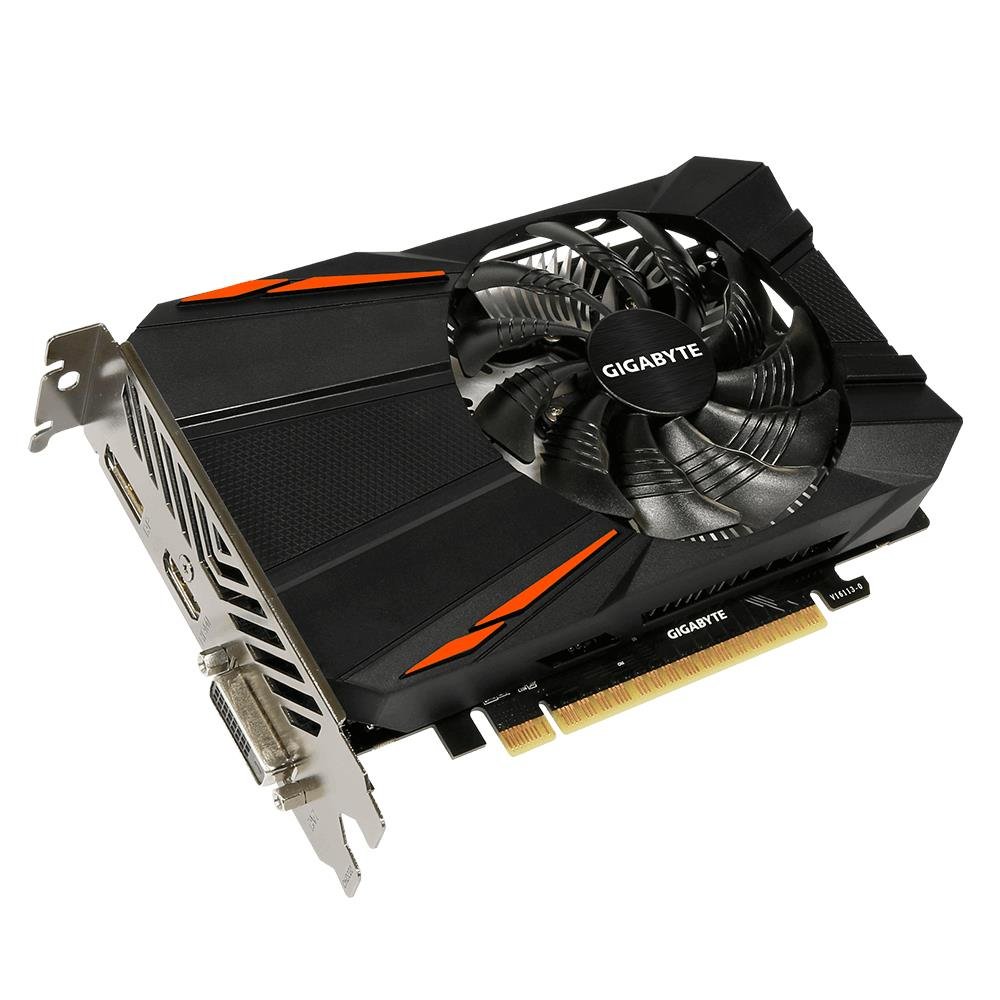
The proven GTX 1050 Ti that pairs a 90mm fan with DVI output for old monitors
This is the card people buy when they want something that just works, no drama. The GTX 1050 Ti runs a clock of 1316 MHz with 4GB of GDDR5 memory on a 128-bit interface, and its custom-designed 90mm fan keeps it quiet while gaming — owners call the install easy and the graphics excellent in World of Warcraft. It excels for beginner and intermediate gamers, running newer games on ultra or high settings in a Dell OptiPlex 3010 with 16GB of RAM and an i5.
The defining feature for some buyers is the output layout: DP, HDMI, and DVI, which means it natively drives older VGA-era monitors through a simple HDMI-to-VGA converter. Many older cards dropped DVI entirely, so this one wins over owners with legacy displays. The NVIDIA Pascal architecture delivers the improved power efficiency that makes it an easy drop-in for older towers. Buyers upgrading from integrated graphics call it a wonderful leap, though a few note the price has climbed well above what the card originally cost.
Performance is consistent and dependable, which is exactly what its fans want, with the 7680×4320 maximum resolution matching the highest-end cards on this list. It does not have the flashiest specs, but it is a proven, quiet, reliable 4GB card that has earned its reputation over years of service. For a casual gamer with a full-size tower and an older monitor, this is the trustworthy choice that never surprises you.
Count on it for: quiet, dependable 1080p gaming on a full-size tower, especially if you need a native DVI port.
The honest note: the price has crept up over the years, so weigh it against newer budget cards with similar muscle.
Understanding the Specs
Memory Type and Clock Speed
The memory type is the clearest signal of what a 4GB card can do. GDDR6 is the fastest here, followed by GDDR5, then GDDR4 and DDR3. The memory clock speed, measured in MHz, tells you how fast the card can feed texture data to the GPU — the 2100 MHz on the maxsun GT 1030 is more than double the 1000 MHz on the QTHREE GT 730, which is why the latter is office-bound.
Maximum Resolution and Outputs
The maximum resolution tells you the ceiling for your display, from 2560×1440 on the GT 730 up to 7680×4320 on several higher-end cards. The outputs matter just as much: a card with two DisplayPorts and an HDMI drives three monitors, while a card with four ports including VGA can drive four. Count your monitors before you buy.
FAQ
Will a 4GB graphics card fit in my small form factor PC?
What is the difference between GDDR5 and DDR4 memory in a 4GB card?
Do I need a new power supply for a 4GB graphics card?
Will a 4GB graphics card run games at 4K resolution?
What is the difference between a low profile card and a standard full-height card?
How many monitors can a 4GB graphics card support at once?
Is the 64-bit memory interface on the GT 730 too slow for anything?
Do these cards work with older operating systems like Windows 7 or Linux?
What is the difference between 4GB GDDR6 and 4GB DDR3 performance?
Final Thoughts: The Verdict
If you want one dependable pick, the 4 gb graphics card winner is the MSI GTX 1650 Gaming X because it pairs a 128-bit GDDR5 interface with high-settings 1080p gaming and quiet dual fans for a crowd-pleasing balance of price and muscle. If you need a low-power card for a small office PC with four monitors, grab the QTHREE GT 730. And for turning a tiny OptiPlex into a real gaming rig without touching the power supply, the XFX RX 6400 is the one to reach for.
How We Picked
We do not accept paid placement. Every pick is matched to a real buyer and a real use-case; we do not hands-on test units.
Sources & Methodology
Specifications: manufacturer listings and product documentation. Review insights: verified customer reviews, as of August 2026. Pricing: not shown on this page (it changes often); check the current price via the retailer link.
As an Amazon Associate, Gadgets Feed earns from qualifying purchases. This does not affect which products we feature.