
A single-nozzle 3D printer forces you into a compromise: either paint every model by hand, waste kilograms of filament on purge towers for color changes, or stick with monochrome parts that lack visual and functional complexity. A true 4-head (or multi-tool) 3D printer changes that equation entirely — it allows independent material switching, support-structure printing with dissolvable filament, and multi-color production without the material overhead that plagues single-extruder systems. The engineering difference is not subtle; it determines whether your prototype is a proof of concept or a finished product.
I’m Min — the co-founder and writer behind Gadgets Feed. This guide comes from weeks of cross-referencing technical specifications, reading hundreds of verified buyer reports, and analyzing the chamber temperatures, motion systems, and material compatibility lists that define whether a multi-head setup actually delivers on its promise.
Whether you’re prototyping engineering-grade parts or running a small print-on-demand shop, finding the right 4 head 3d printer requires understanding how tool-head independence, chamber heating, and extruder temperature ceilings affect your real-world output.
How To Choose The Best 4 Head 3D Printer
A multi-head setup is a significant investment, and the wrong choice means you pay for extruders you never use or struggle with material incompatibility. The three factors below separate a productive multi-material system from a constant troubleshooting headache.
Independent Tool-Head Architecture vs. Shared Gantry Systems
Not all “multi-head” printers are created equal. An IDEX (Independent Dual Extruder) system, like the Raise3D E2, allows each print head to move independently — you can print two identical parts in duplication mode, create mirrored versions, or use one head for model material and the other for dissolvable support without ever crossing paths. In contrast, a multi-material unit like the Creality K2 Combo or QIDI BOX setup uses a single tool head that switches filaments, which produces significant purge waste every time it changes color or material. If your workflow demands zero-waste material separation or simultaneous dual-part production, IDEX is the superior architecture.
Active Chamber Heating and Extruder Temperature Ceilings
A printer that advertises “multi-material” but cannot sustain a chamber temperature above 45°C will fail on engineering-grade filaments like PPA-CF, PPS-CF, or PC. The QIDI PLUS4 and QIDI Max4 Combo maintain a 65°C actively heated chamber, which dramatically reduces warping on large-format ABS, nylon, and carbon-fiber composites. The Prusa CORE One caps at 55°C — sufficient for most materials but marginal for the highest-temperature industrial polymers. Additionally, the extruder nozzle must reach at least 370°C (as the QIDI PLUS4 does) to reliably melt PPS-CF and PPA-CF without clogs. A 300°C hotend, common on older models like the Dremel 3D45, limits you to standard PLA, PETG, and ABS — effectively wasting the multi-head capability if you need industrial-grade materials.
Build Volume and Material Waste Profile
Larger build volumes (390 x 390 x 340 mm on the QIDI Max4) allow you to print full-size parts without splitting models, but they also require longer purge cycles in multi-material mode. A single-nozzle system with a color-change unit (like the Creality CFS or QIDI BOX) consumes a measurable amount of filament — sometimes 20-30 grams per transition — which adds up quickly on multi-color projects. If you are running a print-on-demand business with high throughput, the Prusa XL’s five independent tool heads eliminate purge waste entirely because each material has its own dedicated extruder and nozzle. For a hobbyist creating occasional multi-color models, the purge waste of a CFS-based system is manageable; for a professional prototyping shop, the independent tool-head approach pays for itself in material savings alone.
Quick Comparison
On smaller screens, swipe sideways to see the full table.
| Model | Category | Best For | Key Spec | Amazon |
|---|---|---|---|---|
| Prusa XL 5-Toolhead | Premium | Zero-waste multi-material production | 5 independent tool heads | Amazon |
| Raise3D E2 IDEX | Premium | Independent dual extruder parts production | IDEX technology, 300°C nozzle | Amazon |
| QIDI Max4 Combo | Premium | Large-format engineering-grade prints | 390x390x340 mm build, 65°C chamber | Amazon |
| MZK A3 DTF Printer | Premium | DTF apparel transfer printing | i3200 printhead, 1440 dpi | Amazon |
| QIDI PLUS4 | Mid-Range | High-temp materials with fast speed | 370°C hotend, 65°C chamber | Amazon |
| Creality K2 Combo (A) | Mid-Range | 16-color printing with CFS unit | 260x260x260 mm, 600mm/s speed | Amazon |
| Prusa CORE One | Premium | Reliable enclosed CoreXY workhorse | 55°C active chamber, 250x220x270 mm | Amazon |
| Creality K2 SE Combo | Mid-Range | Entry-level multicolor printing | 500mm/s speed, CFS auto-switching | Amazon |
| ELEGOO Jupiter 2 | Mid-Range | Large-format resin with 16K resolution | 302.4×161.98×300 mm, 16K LCD | Amazon |
| Anycubic Photon P1 | Mid-Range | Dual-color resin printing | 14K LCD, dual-vat, 8000 cps resin | Amazon |
| Dremel 3D45-01 | Premium | Beginner-friendly enclosed printer | All-metal nozzle, 280°C hotend | Amazon |
In‑Depth Reviews
1. Prusa XL 5-Toolhead CoreXY 3D Printer

The Prusa XL 5-Toolhead is the only consumer-accessible printer that dedicates an independent extruder and nozzle to each of its five material slots. This architecture completely eliminates the purge waste that plagues single-nozzle multi-material systems — every color change is instantaneous, and there is no cross-contamination between materials. The segmented heated bed uses intelligent zoning to keep energy focused only on the area being printed, which reduces warping on large ABS and nylon parts that would otherwise curl on a uniformly heated plate.
With a build volume of 14.17 x 14.17 x 14.17 inches and a CoreXY motion system, the XL handles frequent tool changes without losing precision or introducing ghosting artifacts. The open-source Prusa ecosystem gives you full control over firmware and slicer profiles, and the printer integrates seamlessly with Prusa Connect for remote monitoring. Users report that the printer ships with some assembly required (the extruder assembly and LCD must be mounted), but the fit and finish of the all-metal frame justify the attention to detail.
The 5-tool-head platform is genuinely aimed at professional prototyping and small-batch production — it is not a casual hobbyist machine. The 75-pound weight and large footprint require a dedicated workspace. For anyone who needs multi-material prints without the waste, the Prusa XL sets the ceiling for what a multi-head system can achieve.
Why it’s great
- Zero purge waste per color change saves kilograms of filament over time
- Segmented bed heating improves energy efficiency and reduces warping at scale
- Full open-source firmware and software with no forced cloud logins
Good to know
- Partial assembly required out of the box, including extruder mounting
- Significant upfront investment compared to single-nozzle multi-material alternatives
2. Raise3D E2 Desktop 3D Printer

The Raise3D E2 is a true IDEX machine: both extruders ride on independent gantries, meaning they can print two identical copies simultaneously, create mirrored pairs, or work in tandem for dissolvable support structures. The duplication mode alone cuts production time for small parts in half, which is a significant advantage for anyone running a small batch workshop. The video-assisted offset calibration system walks you through aligning both tool heads, and the auto bed leveling ensures that the first layer adheres consistently across the entire 330 x 240 x 240 mm bed.
The 300°C all-metal hotend supports PLA, ABS, PETG, TPU, TPE, nylon, and carbon-fiber infused filaments, though users report that the flexible build plate makes model removal straightforward even with high-adhesion materials like PC. The 7-inch touchscreen interface is polished, and the HEPA air filtration keeps the enclosure safer for indoor use. Power loss recovery and dual filament run-out sensors mean the E2 can handle overnight or weekend prints without babysitting.
The primary criticism from the community is inconsistent quality control — some units arrive with print-head calibration issues that require support intervention, and the third-party seller policy can complicate warranty claims. However, when the E2 is properly tuned, it outperforms most single-extruder competitors by delivering two functional prints in the time it takes others to complete one.
Why it’s great
- True independent dual extruder motion halves production time for duplicate parts
- Video-assisted calibration makes tool head alignment accessible to intermediate users
- HEPA filtration and fully enclosed design reduce fumes during high-temp printing
Good to know
- Some units arrive with factory calibration issues requiring support tickets
- Third-party sellers may void direct Raise3D support if issues arise
3. QIDI Max4 Combo 3D Printer

The QIDI Max4 Combo delivers the largest build volume in this roundup at 390 x 390 x 340 mm, and it achieves that size without sacrificing chamber temperature control. The 65°C active heating system, combined with the Polar Cooler (sold separately), creates stable printing conditions for ABS-CF, PPA-CF, and PC — materials that delaminate or warp badly in unheated or poorly insulated frames. The closed-loop motors on the X and Y axes push print speed up to 800 mm/s with 30,000 mm/s² acceleration, though most users settle around 200-300 mm/s for high-quality engineering-grade parts.
The Max4 pairs with the QIDI BOX multi-filament unit to support up to 16 colors, and the independent filament cutter inside the tool head enables clean material swaps. The 40 mm³/s high-flow hotend with a hardened steel nozzle handles abrasive carbon-fiber nylons without nozzle wear becoming a recurring replacement cost. The built-in AI camera detects spaghetti failures and pauses printing automatically, which is a genuine time-saver on prints that run for multiple days.
The downside is weight and power draw: the Max4 weighs 120 pounds and requires a dedicated 15-amp circuit. The initial setup time for the combo unit is longer than a single-extruder machine, and users note that the touchscreen UI can feel slightly laggy compared to Klipper-based competitors. For users who need to print large functional prototypes in engineering-grade materials, the Max4 Combo offers a combination of size, temperature range, and multi-material expandability that is hard to match.
Why it’s great
- Massive 390 x 390 x 340 mm build volume handles full-size industrial parts
- 65°C chamber and 40 mm³/s hotend reliably print high-temp composites
- AI camera with failure detection saves hours on long-duration prints
Good to know
- 120-pound weight requires a sturdy, dedicated workbench
- Polar Cooler accessory is sold separately despite being featured in marketing
4. MZK A3 DTF Printer
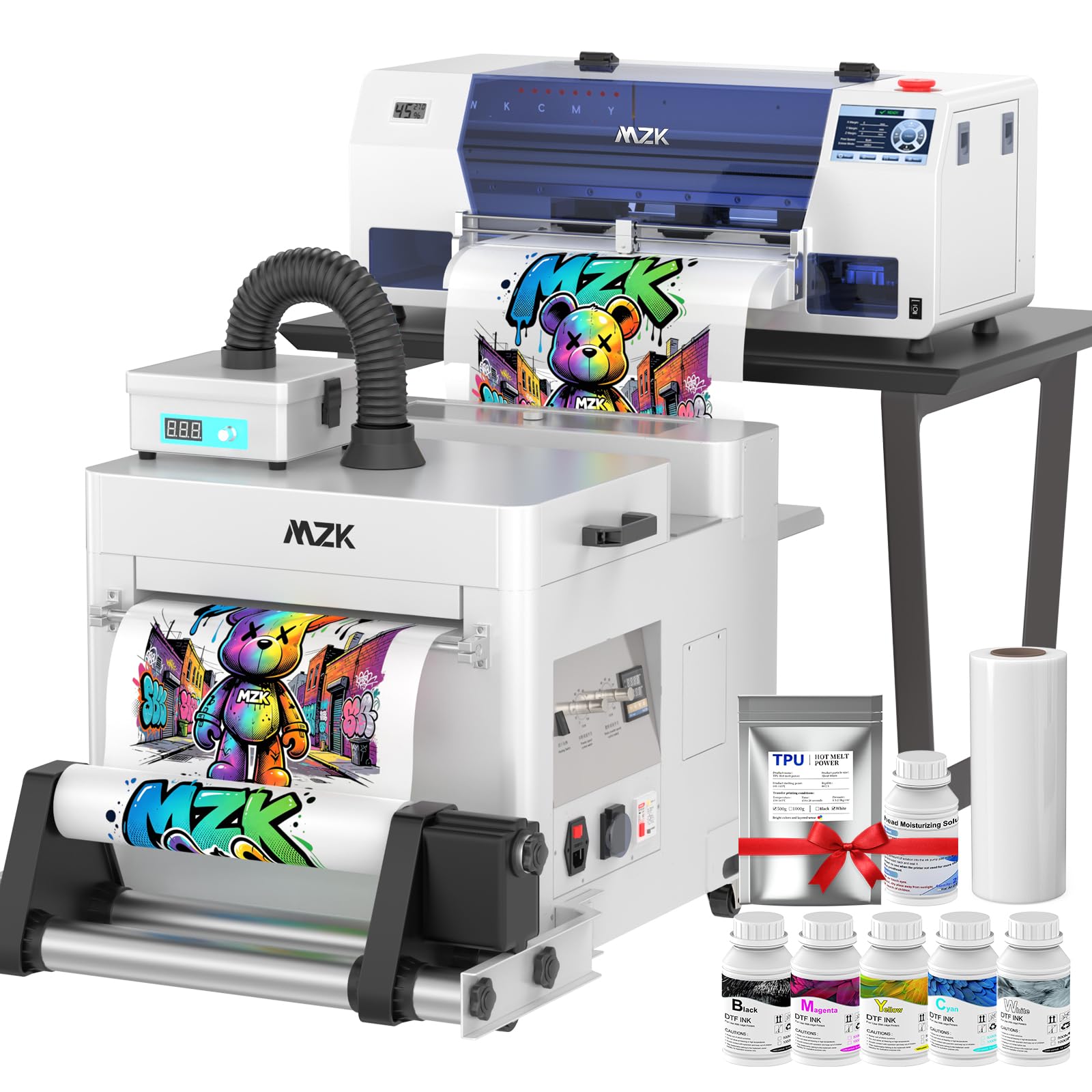
The MZK A3 is a DTF (direct-to-film) printer, not an FDM or resin 3D printer — it prints CMYK+White ink onto a transfer film that is then heat-pressed onto fabric. The i3200 industrial printhead delivers A3-sized transfers in roughly 2 minutes and A4 transfers in 1 minute, which is approximately five times faster than consumer-grade L1800-based DTF machines. The G7 color calibration and 2880 x 1440 dpi resolution provide gradient transitions and fine text detail that meet commercial apparel standards.
The smart timed cleaning system and holiday mode prevent nozzle clogging during periods of inactivity, which is the most common failure point in DTF printing. The dual ink-level alarm system — low ink and waste ink — prevents mid-job interruptions and mess. The 5-inch touchscreen gives you direct control over print settings and maintenance cycles without requiring a connected computer. The printer ships with 500 ml of CMYK+White ink, DTF film, hot-melt powder, and a tool kit, so the initial run does not require additional purchases.
The 2-year free ink and powder program (shipping costs apply) significantly reduces ongoing material expenses for a small business owner. The main limitation is the learning curve: DTF printing requires correct curing temperatures and pressure settings on the heat press, and the printer itself occupies substantial desk space at 35 x 16 x 15 inches. For custom apparel shops and POD businesses, the MZK A3 delivers commercial throughput at a price point that makes per-print costs competitive with screen printing for short runs.
Why it’s great
- i3200 industrial printhead prints A3 transfers in ~2 minutes, five times faster than consumer alternatives
- Smart timed cleaning and holiday mode prevent nozzle clogs during idle periods
- Included CMYK+White inks, film, and powder reduce initial setup costs
Good to know
- DTF workflow requires a separate heat press for film transfer onto fabric
- Steep initial learning curve for curing temperature and pressure settings
5. QIDI PLUS4 3D Printer

The QIDI PLUS4 is engineered for users who need to print PPS-CF, PPA-CF, and other ultra-high-temperature filaments without upgrading the hotend. The 370°C multi-metal integrated nozzle uses an 80W heating cartridge to maintain stable extrusion temperatures even at higher flow rates, and the 65°C actively heated chamber with dual-layer insulation keeps the entire print environment stable enough to prevent warping on 12 x 12 x 11-inch nylon prints. The second-generation active chamber heating system uses a 400W heater with an air circulation design to maintain temperature uniformity within ±1°C.
The CoreXY motion system supports speeds up to 600 mm/s, but most users report excellent surface quality at 150-200 mm/s with engineering materials. The printer runs Klipper firmware, which gives you web-based control via Fluidd and integration with QIDI Studio and OrcaSlicer. The HD camera provides real-time monitoring and time-lapse recording, and the filament break and wrap sensors stop the print automatically to prevent wasted material.
The most common complaint involves inconsistent quality control — some units arrive with a factory-jammed hotend or bed leveling issues that require immediate support contact. QIDI support is generally responsive, but the back-and-forth can delay a new user’s first print by several days. For an experienced maker who needs a dedicated high-temp machine, the PLUS4 offers a price-to-performance ratio that undercuts most competitors with similar chamber specifications.
Why it’s great
- 370°C hotend handles PPS-CF and PPA-CF without modification
- 65°C active chamber with air circulation eliminates warping on large ABS prints
- Klipper firmware with Fluidd web interface gives advanced users full tuning control
Good to know
- Quality control inconsistency requires thorough inspection upon arrival
- Multi-color add-on (QIDI BOX) is sold separately and not included
6. Creality K2 Combo (A) 3D Printer

The Creality K2 Combo pairs the K2 printer with a single Creality Filament System (CFS) unit for out-of-the-box four-color printing, and you can daisy-chain up to four CFS units for a maximum of 16 colors. The CFS handles filament drying, auto-switching, and color recognition, which removes the most tedious parts of multi-color setup. The K2 itself uses three step-servo motors — one in the extruder and one on each X/Y axis — that dynamically adjust torque in under a millisecond to maintain extrusion consistency across color changes at speeds up to 600 mm/s.
The 260 x 260 x 260 mm build volume is generous for a desktop format and supports PLA, PETG, ABS, PLA-CF, and PETG-CF materials. The smart auto leveling system probes only the area relevant to the print, cutting bed-preparation time significantly compared to full-grid leveling. The AI camera monitors for spaghetti failures, idling, and other print anomalies and can pause the job automatically. The printer ships about 95% pre-assembled — you install the touchscreen and a few panels, and the first print can start within 30 minutes of unboxing.
The main tradeoff is that the K2 uses a single-nozzle color-change system, meaning every filament transition dumps a purge block. Users report that a four-color print can consume 20-35 grams of filament per color change, which adds up quickly on complex models. The CFS also has trouble with larger spools (over 1 kg) unless you print adapter rings. For someone who wants multi-color capability without buying a five-tool-head machine, the K2 Combo delivers impressive color range at a much lower entry point.
Why it’s great
- Expandable to 16 colors by connecting four CFS units
- Step-servo motors maintain extrusion consistency at 600 mm/s printing speed
- Nearly pre-assembled with smart auto leveling for fast first prints
Good to know
- Single-nozzle color changes generate significant purge waste per transition
- CFS has limited compatibility with spools over 1 kg without printed adapters
7. Original Prusa CORE One

The Prusa CORE One is an enclosed CoreXY machine engineered for reliability across a wide range of materials — PLA, PETG, ASA, PC, and nylon all print consistently thanks to the 55°C active chamber temperature control. The all-steel exoskeleton frame and dual-Z lead screws keep the gantry rigid enough to minimize ghosting at higher speeds, and the Prusa ecosystem (Slic3r-based software, PrusaConnect, and the Printables model repository) provides a seamless workflow from slicing to monitoring. The printer comes fully assembled and tested, with a 1 kg spool of Prusament PLA Galaxy Black included.
The 250 x 220 x 270 mm build volume is smaller than the QIDI Max4 but adequate for most functional parts and prototypes. The removable spring-steel print sheets with PEI coating provide excellent adhesion for PLA and PETG out of the box, and switching to a satin sheet (included) improves release for TPU and PC. The printer runs a 32-bit controller with Trinamic drivers, keeping noise levels low enough for shared workspaces without enclosing the printer in an additional cabinet.
The main disadvantage is the 55°C chamber ceiling — it handles ABS and PC well but is marginal for PPA-CF and PPS-CF, which prefer a 65-70°C environment. Prusa’s lifetime technical support and strong open-source community offset this limitation for users who do not need the highest-temperature industrial polymers. The CORE One is a buy-it-for-life investment that rewards users who value reproducibility and long-term reliability over raw speed.
Why it’s great
- Fully assembled and tested out of the box with Prusa-level quality control
- 55°C active chamber enables consistent printing of ASA, PC, and nylon
- Lifetime technical support and large open-source community for troubleshooting
Good to know
- 55°C chamber is insufficient for the highest-temperature industrial composites
- Build volume is smaller than competing CoreXY machines in the same price tier
8. Creality K2 SE Combo 3D Printer
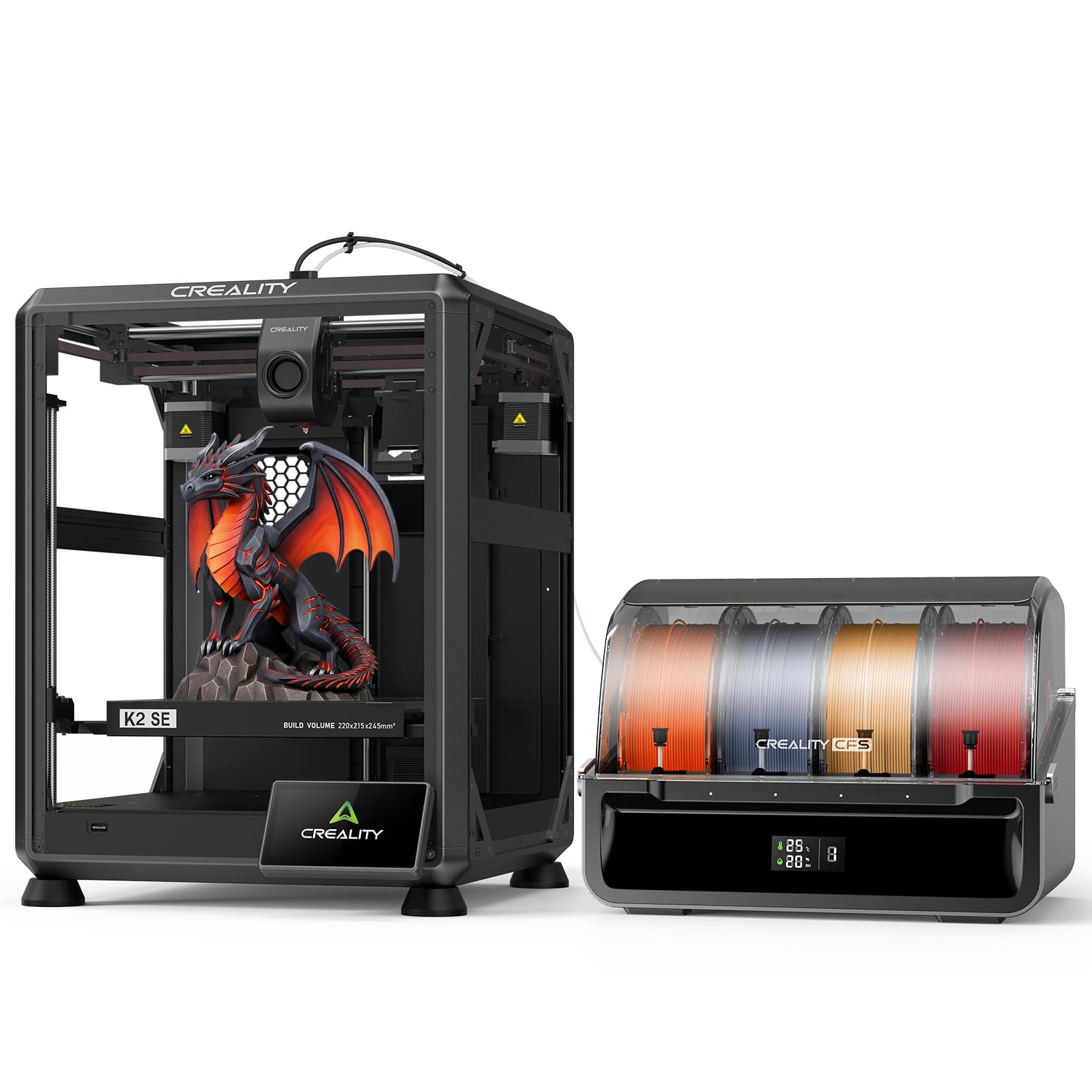
The Creality K2 SE Combo is the most budget-friendly entry into multi-color printing in this lineup, pairing the K2 SE printer with a single CFS unit for automatic four-color filament switching. The die-cast aluminum alloy frame minimizes vibration during high-speed printing, and the next-gen direct-drive extruder with hardened steel gears feeds flexible TPU and rigid PLA with equal consistency. The smart auto leveling system probes only the print area, reducing the leveling time to under a minute, and the Creality OS interface manages multi-filament spools and expert-mode tuning from the touchscreen.
With a build volume of 220 x 215 x 245 mm, the K2 SE is compact enough for a standard desk while still accommodating functional prototypes and decorative multi-color models. The 500 mm/s maximum print speed with 20,000 mm/s² acceleration means single-color prints finish quickly, though multi-color prints still incur purge waste during color transitions. The “Skip the failure model” function is useful for batch printing — if one model on the plate fails, the printer can skip it and continue the rest of the job.
The biggest limitation is software reliability. Several users report that the Creality OS mobile app and cloud connectivity features are buggy, with issues ranging from failed firmware updates to persistent connection drops. The printer also uses a proprietary connector for the CFS, and the SD card slot placement is awkward (upside-down). For a beginner who wants to experiment with multi-color printing without a large financial commitment, the K2 SE Combo is a practical starting point, but expect to spend time troubleshooting the software.
Why it’s great
- Budget-friendly entry into multi-color FDM printing with CFS auto-switching
- Solid die-cast aluminum frame minimizes vibration at 500 mm/s speeds
- Smart auto leveling probes only the print area for faster bed preparation
Good to know
- Creality OS mobile app and cloud connectivity have reported reliability issues
- SD card slot placement is upside-down, making access and removal awkward
9. ELEGOO Jupiter 2 Resin 3D Printer

The ELEGOO Jupiter 2 is a large-format resin printer with a 16K monochrome LCD (15120 x 6230 resolution) and a 20 x 26 µm XY resolution, which produces castable details and smooth surface finishes that FDM printers cannot match. The build volume of 302.4 x 161.98 x 300 mm is 2.5 times larger than the Saturn 4, making it suitable for printing cosplay helmets, dental models, or multiple miniatures in a single run. The fully enclosed light source eliminates light leaks from external windows, ensuring uniform exposure across the entire build area.
The automatic resin system includes a smart tank heater that maintains a precise 30°C preheat temperature, an auto-feed pump that keeps the vat topped off, and a multi-point auto-leveling system that adjusts the build plate without manual intervention. The double-door design and quick-release film system make vat maintenance and part removal more accessible than the single-piece hoods on smaller resin printers. The built-in HDR camera provides real-time monitoring with usable detail in both bright and dim lighting, and the Wi-Fi cluster management system lets you control multiple Jupiter 2 units from one interface.
The primary drawback is the learning curve for large-format resin printing — the FEP film suction forces are higher at this scale, and tuning lift speeds for consistent adhesion requires some trial and error. The printer is physically large (27.95 x 20.08 x 19.29 inches) and heavy at 63.8 pounds, so it needs a sturdy, level surface. For users who need the largest practical one-piece resin prints, the Jupiter 2 delivers a resolution-to-volume ratio that few competitors match.
Why it’s great
- 16K LCD with 20 x 26 µm XY resolution produces castable surface details
- Smart tank heater and auto-resin feed system simplify large-format printing
- Wi-Fi cluster management supports remote monitoring of multiple printers
Good to know
- Large build volume requires careful tuning of lift speeds to avoid FEP adhesion failures
- Heavy and physically large footprint demands a dedicated, sturdy workspace
10. Anycubic Photon P1 Resin 3D Printer
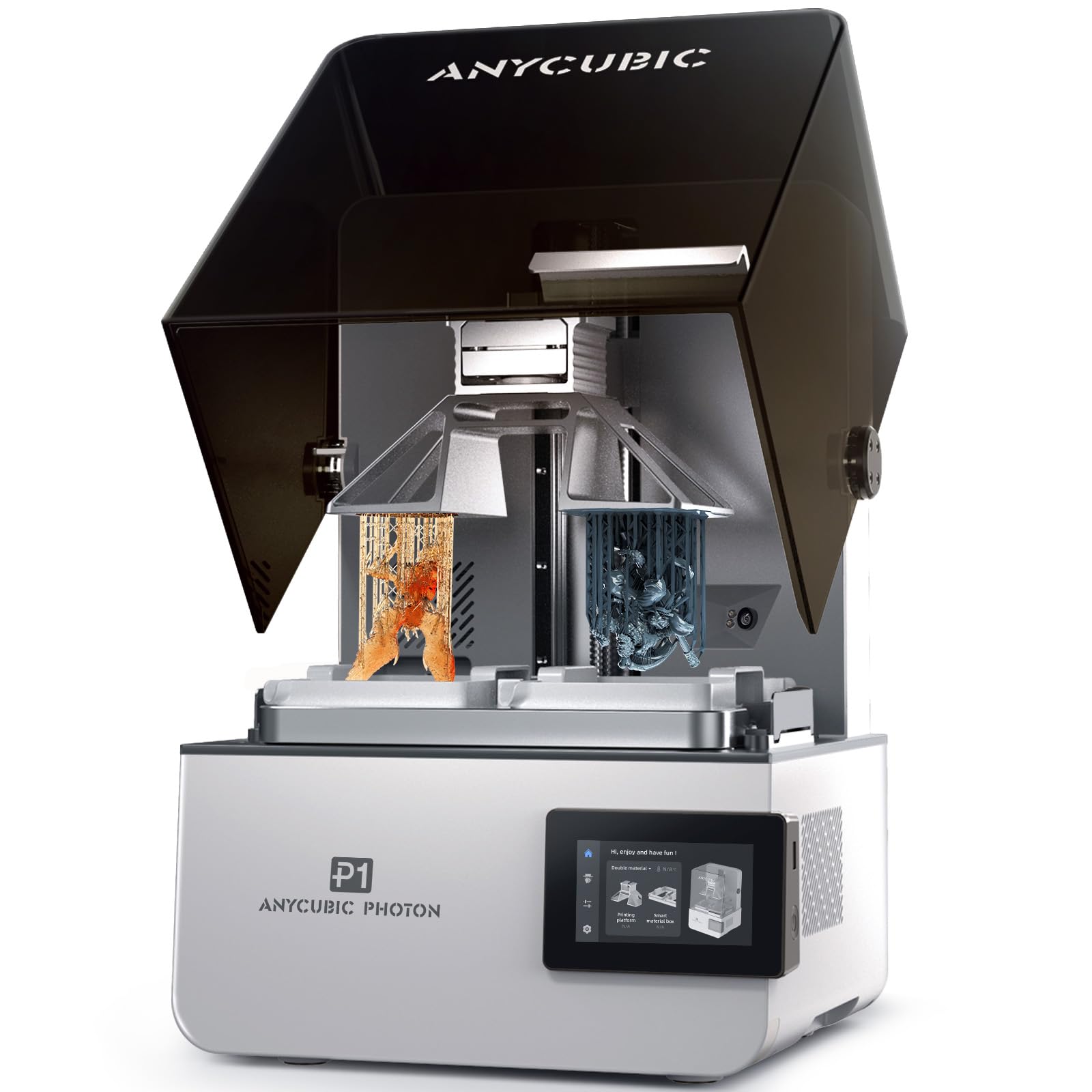
The Anycubic Photon P1 is a resin printer that supports true dual-color and dual-material printing — you can switch between two different resins in the same print job without manually swapping vats. The printer uses two separate vats (one for each material) and an intelligent switching mechanism that pauses the print, moves the build plate over the second vat, and resumes the exposure sequence. The 14K 10.1-inch monochrome LCD delivers a 16.8 x 24.8 µm XY resolution, which captures crisp edges and fine geometry in both materials.
The ball screw Z-axis and dual linear rails provide the consistent lift motion required for dual-material prints where layer adhesion between two resins needs to be precise. The Smart Leveling 3.0 system includes factory calibration and real-time pressure feedback across four corners, so manual bed leveling is eliminated. The heated vat maintains resin temperatures between 20°C and 40°C, which allows printing of ultra-high-viscosity engineering resins up to 8,000 cps — 40 times the viscosity of standard resins — without pre-heating the material separately.
Some users report that the dual-color setup has a learning curve, particularly when calibrating the offset between the two vat positions and managing resin waste during the transition. The Photon Workshop 4.0 slicer handles most multi-material settings well but can crash on complex nested models. For dental labs, jewelry casters, or hobbyists who need multi-material prints in a single build, the Photon P1 offers a dedicated workflow that reduces post-processing assembly time significantly.
Why it’s great
- True dual-vat system prints two different materials in a single job without manual swaps
- Heated vat handles high-viscosity resins up to 8,000 cps for professional applications
- Ball screw Z-axis and dual linear rails ensure consistent layer positioning
Good to know
- Dual-color calibration has a steep learning curve and requires precise offset tuning
- The dual-vat kit is sold separately from the base printer unit
11. Dremel 3D45-01 DigiLab 3D45

The Dremel 3D45-01 is a fully enclosed FDM printer designed for educational and office environments where low odor and ease of use are priorities. The 5-inch full-color touchscreen with intuitive icons replaces the cryptic menus common on open-source printers, and the printer can go from unboxing to the first print in under 15 minutes with zero assembly. The all-metal nozzle heats to 280°C, supporting PLA, PETG, ABS, nylon, and ECO-ABS, and the heated glass build plate reaches 100°C to improve adhesion for the latter three materials.
The RFID-equipped filament spools auto-configure print settings — the printer reads the spool tag and adjusts nozzle and bed temperatures, retraction, and cooling fan speed automatically. This eliminates guesswork for beginners and reduces failed prints from incorrect material profiles. The built-in carbon and particulate filter keeps fumes low enough that the printer can run in a classroom or home office without external ventilation. The filament run-out sensor pauses printing when a spool empties, and power-loss recovery resumes the job after an interruption.
The drawbacks are clear: the 6.7 x 10 x 6-inch build volume is the smallest in this roundup, and the proprietary Dremel filament spools are both expensive and undersized (0.75 kg vs. standard 1 kg). The DigiLab slicer is based on an older version of Cura and lacks advanced features like variable layer height and tree supports. For a beginner who wants a reliable, turnkey printer for learning the basics of FDM, the 3D45 delivers a polished experience, but experienced users will outgrow its capabilities quickly.
Why it’s great
- RFID auto-configuration removes material profile guesswork for beginners
- Fully enclosed with carbon/particulate filter for low-odor indoor operation
- No assembly required — ready to print within 15 minutes of unboxing
Good to know
- Build volume is the smallest in this lineup at 6.7 x 10 x 6 inches
- Proprietary filament spools are more expensive and contain less material than standard
FAQ
Does a 4-head 3D printer always mean four independent nozzles?
What is purge waste and how does it affect multi-material printing costs?
Can a budget multi-head printer handle carbon fiber nylon filaments?
Final Thoughts: The Verdict
For most users, the 4 head 3d printer winner is the Prusa XL 5-Toolhead because it eliminates purge waste entirely, provides independent material control for up to five filaments, and runs on reliable open-source firmware that you own completely. If you want large-format engineering-grade printing without the five-tool-head investment, grab the QIDI Max4 Combo for its 390 mm build cube and genuine 65°C chamber. And for 16-color model creation at a more accessible price point, nothing beats the Creality K2 Combo with its expandable CFS system.