
The promise of a single machine that die-cuts, embosses, and inks a complete card is what pulls most paper crafters toward a multi-function system. But the reality is that most “versatile” machines on the market are simply manual die cutters with a few bundled accessories — they can’t print, scan, or laser-etch. The true 4-in-1 craft machine combines physical die-cutting, embossing, and either an inkjet print head or a laser module in one chassis, letting you move from digital design to finished project without swapping devices.
I’m Min — the co-founder and writer behind Gadgets Feed. For this guide, I spent dozens of hours cross-referencing platform dimensions, cutting force, material compatibility lists, and real-user workarounds from over thirty verified purchase reviews to separate the genuine multi-mode workhorses from the rebranded manual presses.
Whether you need a quiet manual press for weekend card batches or a full laser-cutter that also prints and blade-cuts, the right 4 in 1 craft machine saves table space and project time by merging functions that used to require three separate benchtop devices.
How To Choose The Best 4 In 1 Craft Machine
A genuine multi-function craft machine is more than just a die cutter with extras. You need to evaluate the physical opening width, the type of cutting mechanism (manual roller vs. automated blade vs. laser), and how many of the advertised “modes” are actually built into the same chassis versus being separate add-ons you must swap manually.
Opening Width and Platform Length
The maximum material width your machine can feed is defined by its opening slot. A 9-inch opening accepts A4 cardstock and standard 6-inch embossing folders, but if you regularly work with 12×12 scrapbook pages or long border dies, you need a platform that can handle at least a 12-inch pass. Measure your most common die lengths before choosing.
Manual Crank vs. Automatic Drive
Manual machines give you tactile feedback and cost less, but the consistent pressure you get depends on how smoothly the roller bearings are machined. Automatic digital cutters — like the Cricut and xTool models — use a motor-driven carriage that maintains uniform speed and downward force, which is critical for kiss-cutting sticker sheets or scoring thick chipboard without tearing.
The True 4-in-1 Definition
Many manual machines advertise as “multi-function” simply because they include a few dies and folders in the box. A true multi-process unit combines die-cutting, embossing, and at least one of the following in a single device: inkjet printing, pen drawing, or laser engraving. If you need to print and cut in one action, look for a machine with a built-in print head or a “print then cut” registration system.
Quick Comparison
On smaller screens, swipe sideways to see the full table.
| Model | Category | Best For | Key Spec | Amazon |
|---|---|---|---|---|
| xTool M1 Ultra | Digital 4-in-1 | Laser + print + blade | 10W laser, 1000+ materials | Amazon |
| Cricut Maker 4 | Digital Cutter | 300+ materials, engraving | Adaptive Tool System | Amazon |
| Cricut Explore 5 | Digital Cutter | 100+ materials, vinyl | Bluetooth + Design Space | Amazon |
| Sizzix Big Shot | Manual Press | Heavy-duty die cutting | 6-inch opening, 73 dies | Amazon |
| Spellbinders Platinum 6 | Manual Press | Universal plate system | 6-inch foldable platform | Amazon |
| CraftGenes Manual | Manual Starter | Foldable storage | 9-inch opening, pink | Amazon |
| Find Scrapblooms 9″ | Manual Starter | A4 embossing folders | 9-inch, 19 lbs weight | Amazon |
| Joelver Maker | Manual Starter | Portable, 20+ dies | 9-inch, foldable | Amazon |
| Anna Griffin Empress Plates | Accessory Set | Large dies, magnetic mat | 8.6 x 13.5 inch plates | Amazon |
In‑Depth Reviews
1. xTool M1 Ultra Laser Cutter and Engraver Machine

The xTool M1 Ultra is the only unit in this roundup that genuinely integrates four distinct processes — laser engraving, inkjet printing, blade cutting, and pen drawing — inside a single chassis. The 10W diode laser handles wood, leather, acrylic, and anodized aluminum, while the inkjet module lets you print full-color designs before the blade or laser cuts the outline. Switching modules takes about three seconds using the Easy Swap mechanism, which eliminates the friction of moving materials between separate machines.
The RA2 Pro rotary attachment extends capabilities to cylindrical objects like water bottles and tumblers, and the riser base with honeycomb panel accommodates taller materials for deep engraving passes. Users report that the laser module delivers crisp detail on glass and paper, though the inkjet print quality is rated as serviceable rather than photographic. The bundled software (XCS) includes Artimind AI for converting text to artwork, and one-click parameter presets simplify the learning curve for beginners.
Some users note that the included exhaust fan triggers error codes during extended sessions, and upgrading to an inline fan solves ventilation issues. The Snapshot camera alignment feature has mixed reviews regarding precision, but the laser and blade cutting functions consistently receive high marks for accuracy. For crafters who need a single desktop station that engraves, prints, cuts, and draws, this is the most complete package available.
Why it’s great
- True 4-in-1 with laser, print, blade, and pen modules
- 10W laser cuts and engraves 1000+ materials including metal
- RA2 Pro rotary supports cylindrical items
Good to know
- Inkjet print quality is adequate, not photo-grade
- Included fan may need replacement for long sessions
- Snapshot alignment can require manual recalibration
2. Cricut Maker 4 Smart Cutting Machine

The Cricut Maker 4 is an automatic digital cutting machine that expands on the standard blade-cutter formula by supporting over 300 materials through its Adaptive Tool System. You can swap in tools for scoring, engraving, debossing, perforating, and foiling — effectively turning it into a multi-process station even though it lacks a built-in print module. The 12-inch cutting width handles full-page sticker sheets and 12×12 cardstock, and the Print-Then-Cut feature works with any home inkjet printer to register and cut around full-color printed designs.
Bluetooth connectivity to the Design Space app (free on mobile and desktop) gives access to 3,000+ images and 1,000+ project templates. The Maker 4 is noticeably faster and quieter than previous generations, and users upgrading from the Maker 3 or Explore 3 report that the motor-driven carriage maintains more consistent speed on intricate cuts. The machine weighs over 15 pounds, providing stability during engraving passes on dense materials like leather and balsa wood.
The main limitation is that this is not a print module — it cannot print ink directly onto materials. You must print your designs externally and then load them into the machine for the cut step. Additionally, the Design Space app pushes free trial prompts for the paid Cricut Access subscription, which can feel intrusive. For crafters who already own a printer and want an ultra-precise cutter that can also score, foil, and engrave, the Maker 4 delivers professional-grade results.
Why it’s great
- Adaptive Tool System for engraving, debossing, foiling, and perforating
- 12-inch cutting width handles full-page and large format materials
- Fast, quiet motor with consistent pressure
Good to know
- No built-in printer — requires separate inkjet for Print-Then-Cut
- Recurring subscription prompts in the software
- High up-front investment compared to manual presses
3. Cricut Explore 5 Essential Bundle
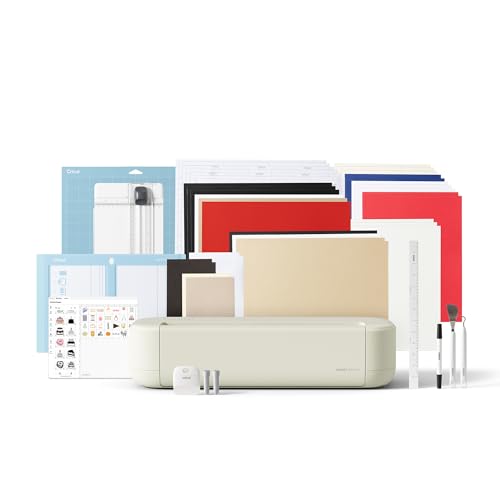
The Cricut Explore 5 is the newest generation of Cricut’s mid-range digital cutter, and the Essential Bundle packs enough materials (Smart Vinyl, iron-on, cardstock, printable vinyl, and Insert Card Sets) to complete up to 65 projects out of the box. It precision-cuts over 100 materials including vinyl, iron-on, cardstock, and printable media, and the snap-in pen holder allows for drawing and writing without any adapters. The 12-inch cutting width is the same as the Maker 4, but the Explore 5 uses a finer-point blade rather than the Adaptive Tool System, which limits its material range and prevents engraving or debossing.
The machine is 30% more compact than previous Explore models, and the taupe color scheme blends into a home office aesthetic. Bluetooth pairing to the Design Space app is seamless, and the “Load and Go” feature speeds up repeat cuts. Users report that the Explore 5 handles thin materials like printable sticker paper and heat transfer vinyl with zero pressure adjustment needed, and the Print-Then-Cut registration marks are read reliably after a one-time calibration.
The biggest gap compared to a true multi-process machine is that the Explore 5 cannot engrave, emboss, or cut dense materials like leather or chipboard. The blade is optimized for flexible and paper-based media. The Essential Bundle includes 25 premium images and one font as bonus digital content, but the free Design Space library provides plenty of starting assets. This is an excellent entry point for vinyl decal, sticker, and card makers who want digital precision at a mid-range investment.
Why it’s great
- Bundle includes supplies for 65 projects right out of the box
- Compact, sleek design with reliable Bluetooth
- Fast and accurate on vinyl, cardstock, and sticker paper
Good to know
- Cannot engrave, deboss, or cut thick materials like leather
- Fine-point blade limits material thickness
- Software requires internet connection for Design Space
4. Sizzix Big Shot Starter Kit
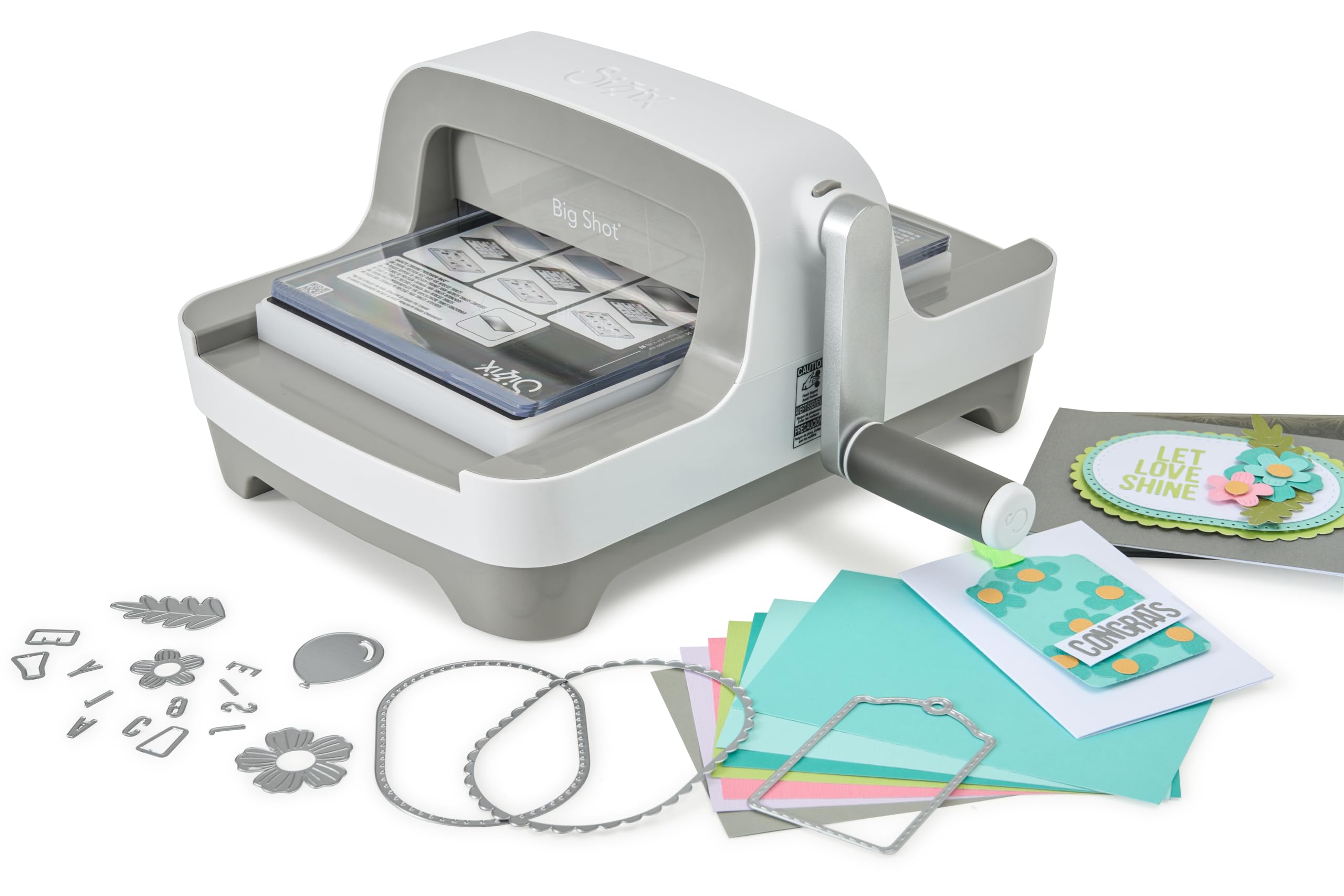
The Sizzix Big Shot has been a staple in paper crafting since 2001, and the latest redesign retains the same rock-solid steel roller mechanism while adding a clip-on handle that stores underneath the machine when not in use. The 6-inch opening width is narrower than the 9-inch manual competitors, but the reputation for consistent pressure across the entire platform is unmatched. The Starter Kit includes a Multipurpose Platform, one pair of cutting pads, 73 Thinlits Dies, one 3D embossing folder, and an assortment of textured cardstock — enough content to explore die-cutting and embossing immediately without buying extras.
Users who previously owned manual machines from other brands report that the Big Shot never jams or stalls on multi-layer embossing folders, and the smooth crank handle requires minimal effort even for dense cardstock. The updated grey color scheme and compact footprint fit easily on a shelf or craft desk. The machine weighs about 11 pounds, providing enough heft to stay planted during cranking without being immovable.
The main trade-off is the fixed 6-inch opening, which means you cannot pass A4 paper through without folding or trimming it first. Long border dies that exceed 6 inches are also incompatible. Additionally, some users note that the Thinlits dies included in the kit are delicate and can bend if not used with the correct platform shims. For card makers who focus on standard A2 or 5×7 cards and value industrial-grade durability, the Big Shot remains a benchmark manual press.
Why it’s great
- Proven steel roller mechanism with legendary reliability
- 73 Thinlits dies and embossing folder included
- Clip-on handle stores under machine for clean storage
Good to know
- 6-inch opening limits material to A2 card sizes
- Included Thinlits dies can bend under heavy pressure
- Manual crank requires physical effort for thick stacks
5. Spellbinders Platinum 6 Die Cutting and Embossing Machine

The Spellbinders Platinum 6 uses a Universal Plate System that accepts practically every brand’s dies and embossing folders on the market — a flexibility that manual press users value most when their collection spans Sizzix, Spellbinders, and generic off-brand dies. The foldable side panels drop the width from 13.6 inches to just over 5 inches for storage, making it the most space-efficient manual press in this lineup. The machine ships with a 3D embossing folder and die set, plus the platform has printed sandwich instructions directly on the surface, reducing the guesswork for new users.
Users who upgraded from older Cuttlebug machines report that the Platinum 6 cuts cleanly with no rough edges and embosses deeply without folders getting stuck mid-roll. The machine is compatible with the Spellbinders BetterPress Letterpress System and the Glimmer Hot Foil System, which adds letterpress printing and foil transfer capabilities to your workflow. The unit weighs 10 pounds, making it lighter than the Sizzix Big Shot while still providing enough crank resistance for dense cardstock.
The cutting plates (designated as “C” plates) tend to develop deep scoring lines over time, which is a normal wear pattern for all manual presses, but replacement plates are readily available from Spellbinders. The 6-inch platform width imposes the same size restriction as the Big Shot — you cannot feed full A4 sheets or large scrapbook pages. For card makers who value cross-brand compatibility and the ability to fold the machine away into a drawer, the Platinum 6 offers the best space-to-capability ratio.
Why it’s great
- Universal Plate System works with dies from any brand
- Folds to a 5-inch depth for easy storage
- Compatible with BetterPress Letterpress and Glimmer Hot Foil systems
Good to know
- Cutting plates develop surface scoring with heavy use
- 6-inch opening restricts large format projects
- Heavier than some competitors at 10 pounds
6. CraftGenes Manual Die Cutting Machine (Pink)

The CraftGenes Manual Die Cutting Machine offers the same 9-inch opening width found in more expensive units but at a price point that competes with starter die cutters. The foldable side panels collapse the machine profile for shelf storage, and the hand crank provides consistent manual pressure without needing batteries or an electrical outlet. The complete starter set includes two die cuts, two embossing folders (A4 and 5×7 inch), a clear stamp set, colorful cardstock, and the full complement of cutting plates (13mm, 3mm, and 2mm thicknesses), so you can emboss and die-cut immediately after unboxing.
Users who switched from a smaller Sizzix machine note that the CraftGenes cuts very well for the price, with clean edges on cardstock and thin metal sheets. The heavy ABS construction (over 10 pounds) keeps the machine stable during cranking, and the pink color option appeals to crafters who want a personalized aesthetic on their desk. The included instructions clarify the plate sandwich order for both embossing and die-cutting, though some users report needing to add or remove a shim layer to dial in the perfect pressure for dense paper stacks.
The main cost saving comes from the plastic roller mechanism, which may not last as long as all-metal presses under daily heavy use. Some users report that the plates can warp slightly over time, though flipping them over mitigates the issue. For hobbyists who need a 9-inch opening for A4 folders and border dies but don’t want to invest in a premium brand, the CraftGenes delivers reliable performance at a substantial discount.
Why it’s great
- 9-inch opening accepts A4 paper and long dies
- Foldable sides for compact storage
- Complete starter bundle with plates, dies, and folders
Good to know
- Plastic roller may wear faster than all-metal presses
- Plates can warp; flipping them solves the issue
- Requires manual shim adjustment for optimal pressure
7. Find Scrapblooms 9 Inch Opening Die Cutting Machine
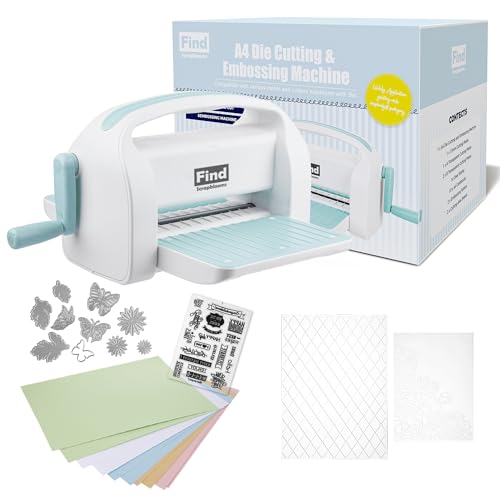
The Find Scrapblooms 9-inch die cutting machine is built around heavy acrylic plates that deliver consistent embossing pressure across the full surface area. The machine includes two magnetic pads, which are a useful addition for holding steel-rule dies in place during cranking. At 19 pounds, this is the heaviest manual machine in the budget tier, and that mass translates to stability — the unit stays planted even when you’re cranking through thick embossing folders or complex multi-layer die cuts.
Users who own multiple manual cutters report that this machine outperforms their previous units in both cut cleanliness and embossing depth. The larger 9-inch opening fits corner embossing folders that would exceed a 6-inch platform, and the A4 paper passes through without folding or trimming. The bundle includes 10 pieces of colorful cardstock, two die cuts, one clear stamp set, and two embossing folders (A4 and 5×7 inch), plus the full plate set (3mm, 2mm, and 13mm).
The plate layering instructions can be confusing for first-time users. Several reviews mention that following the provided sandwich order resulted in incomplete cuts, and the correct technique required removing one of the two B-plates from the sandwich. Once the proper stack is figured out, the machine produces crisp, clean results. The weight also makes it less portable than foldable competitors, so it’s best suited for a dedicated craft desk where it can stay set up.
Why it’s great
- Heavy 19-pound build provides rock-solid stability
- Large 9-inch opening fits A4 sheets and corner folders
- Includes two magnetic pads for precise die placement
Good to know
- Plate sandwich instructions may need user experimentation
- Very heavy — not portable between rooms
- Requires manual cranking with no motor assist
8. Joelver Maker Manual Die Cutting Machine Starter Kit

The Joelver Maker Starter Kit is the most cost-effective way to get a full die-cutting and embossing station with a 9-inch opening. The blue machine includes over 20 professional-quality steel dies, embossing folders, and cutting pads, giving beginners a substantial library of shapes and textures to start crafting immediately. The hand crank operation requires no electricity, and the foldable design collapses for storage when the craft table needs to be cleared for other activities.
Users consistently praise the sturdy construction and smooth cranking action, noting that the machine cuts and embosses well straight out of the box. The 9-inch slot accommodates standard A4 paper and most embossing folders found on the market, and the included plates are thick enough to resist warping during the first several months of use. One clever tip from the community is to use cheap vegetable cutting mats as plate protectors, which extends the life of the included cutting plates significantly.
The Joelver Maker is heavy at nearly 19 pounds, which makes it stable during use but less portable than its foldable design suggests. Some users report that certain dies require multiple passes for a complete cut, though this is common across most manual machines when the plate stack height isn’t perfectly tuned. For the price, the value is exceptional — you get a 9-inch opening, 20+ dies, and the ability to emboss and cut without needing to buy accessories separately.
Why it’s great
- Over 20 steel dies included in the starter kit
- 9-inch opening fits A4 paper and standard folders
- Foldable for compact storage despite heavy build
Good to know
- Heavy at 19 pounds — not truly portable
- Some dies may need two passes for clean cuts
- Plate protectors recommended to extend lifespan
9. Anna Griffin Scrapbooking Die-Cutting & Embossing Plates System

The Anna Griffin Empress Full Plates Set is not a standalone machine but rather a specialized accessory kit designed for the Anna Griffin Empress die cutting machine. The large 8.6 x 13.5 inch plates are built to handle oversized journaling and folder dies that measure 12 to 16 inches — sizes that would exceed the platform limit of most standard manual presses. The strong magnetic mat holds metal crafting dies firmly in place, preventing shifting during the cut cycle, which is especially useful when positioning multiple small dies for a single pass.
Users report that these plates produce precise, clean cuts on every run with no tearing or incomplete designs. The thick, durable plastic resists warping even after repeated passes through the Empress machine. The set acts as a drop-in upgrade for Anna Griffin owners who want to cut larger projects without the frustration of misaligned dies. The included magnetic sheet is particularly praised for its holding power, allowing card makers to pack multiple border dies and layering pieces onto one pass.
The main concern is plate availability — users note that individual plates are not sold year-round, which creates a stocking issue for a consumable item that eventually wears out. Some crafters recommend buying a set of smaller magnetic plates as a backup for odd-sized dies. This set is only compatible with the Anna Griffin Empress machine, so it won’t work with other manual presses. For Empress owners who cut large dies regularly, these plates are essential for maintaining accuracy and throughput.
Why it’s great
- Large 8.6 x 13.5 inch size handles oversized journaling dies
- Strong magnetic mat holds multiple dies in place
- Thick plastic resists warping and delivers consistent cuts
Good to know
- Only compatible with Anna Griffin Empress machine
- Individual replacement plates not always in stock
- Consumable item — plates wear out with heavy use
FAQ
Can I use standard Sizzix dies in a 9-inch manual machine?
What is the difference between a 4-in-1 craft machine and a standard die cutter?
How many passes does a manual machine need to cut thick cardstock?
Can a Cricut Explore 5 engrave or deboss materials?
Final Thoughts: The Verdict
For most users, the 4 in 1 craft machine winner is the xTool M1 Ultra because it genuinely integrates laser engraving, inkjet printing, blade cutting, and pen drawing in one compact unit with real module-swapping speed. If you want a premium digital cutter that handles 300+ materials and offers engraving and debossing tools, grab the Cricut Maker 4. And for a budget-friendly manual press that gives you a 9-inch opening and starter dies without breaking the bank, the CraftGenes Manual Die Cutting Machine delivers excellent value for cardmakers and scrapbook enthusiasts.