
If your PC case sounds like a server room taking off, your fan controller is the single component standing between you and a quiet desk. A proper 4-pin PWM fan controller synchronizes pulse-width modulation signals, letting your motherboard or a manual dial adjust RPMs dynamically instead of forcing fans to run at a fixed scream. Without one, the motherboard’s limited fan headers often force splitters that starve individual fans of feedback or overload the header’s current capacity.
I’m Min — the co-founder and writer behind Gadgets Feed. I’ve spent countless hours cross-referencing datasheets, reading through hundreds of verified user reports, and comparing PWM duty-cycle ranges, total power budgets, and connector compatibility to separate the controllers that work reliably from those that introduce more problems than they solve.
After hours of research and spec analysis, I’ve curated this list to help you find the ideal best 4 pin pwm fan controller for your build, whether you need a simple manual knob or a premium eight-channel hub.
How To Choose The Best 4 Pin PWM Fan Controller
Buying a PWM fan controller goes beyond simply counting ports. You must account for total current draw, the type of power input the controller expects, and whether you want manual override or motherboard pass-through. Overlooking any of these leads to throttled fans or a melted connector.
Total Power Budget and Per-Port Limits
Every controller has a maximum total wattage — often 60W (5A at 12V) for mid-range models. Each port typically supports up to 2A, but the total combined current cannot exceed the board’s rating. If you connect six high-speed 140mm fans pulling 0.4A each, you stay within limits. But if you hook up industrial-grade server fans that draw 1.5A per unit, you’ll blow past the ceiling. Always sum the amps listed on your fans’ labels before buying.
Power Input Options: SATA vs. Type-C vs. Barrel Jack
SATA power connectors from the PSU deliver clean 12V at high amperage, making them the most reliable option for hubs running five or more fans. Some controllers add a DC barrel jack (5.5×2.5mm) or Type-C PD input for external power supply flexibility — essential for open-frame test benches or DIY cooling projects where you don’t have a PSU nearby. Type-C models that support QC3.0/PD3.0 also provide voltage-status LED feedback, which helps during troubleshooting.
Manual Knob vs. Motherboard Pass-Through
A manual potentiometer lets you override the motherboard’s fan curve, which is useful for water-cooling setups or acoustically sensitive environments where you want a fixed low RPM regardless of CPU load. Motherboard pass-through hubs, on the other hand, send the PWM signal from a single header to all connected fans — this preserves automatic speed ramping but gives you zero individual fan control. Some premium hubs combine both approaches, letting you insert an inline controller like the Noctua NA-FC1 between the motherboard and the hub.
Warranty and Build Materials
Plastic housings are common in budget controllers, but premium units use ABS or alloy steel with magnetic mounting plates. Check for safety certifications like UL or CE, especially on hubs that handle more than 30W, as unregulated boards can overheat under sustained load. A six-year warranty from manufacturers like Noctua signals higher quality and better long-term reliability than generic no-name boards with no support.
Quick Comparison
On smaller screens, swipe sideways to see the full table.
| Model | Category | Best For | Key Spec | Amazon |
|---|---|---|---|---|
| Noctua NA-FH1 | Premium Hub | High-airflow builds with 8 fans | 54W via SATA, magnetic mount | Amazon |
| Thermaltake Commander FP | Premium Hub | Reliable 10-port SATA hub | SATA input, 10 fan ports | Amazon |
| Noctua NA-FC1 | Premium Controller | Manual speed override with No-Stop mode | 3-fan splitter, 300 RPM floor | Amazon |
| TUMMASTER J-10 ARGB Hub | Mid-Range Combo | ARGB sync with PWM for 10 fans | 5V-3pin ARGB, remote control | Amazon |
| OwlTree PC071a | Mid-Range Manual | Compact controller with Type-C PD input | 60W, 10-LED duty indicator | Amazon |
| OwlTree PC042 | Entry-Level Manual | Budget 6-fan knob controller | SATA + DC5525, 60W total | Amazon |
| Delinx 60WFS | Entry-Level Variable Voltage | Voltage-based speed control for 2/3/4-pin fans | 3-12V digital display, 5-way splitter | Amazon |
In‑Depth Reviews
1. Noctua NA-FH1 8 Channel Fan Hub

The Noctua NA-FH1 is the most thoughtfully engineered fan hub in its class, supporting up to eight 4-pin PWM fans — both 12V case fans and 5V Noctua units — through a combined SATA and 4-pin input system. The SATA line delivers up to 54W, while the 4-pin pass-through carries the RPM and PWM signal from your motherboard, meaning every fan receives identical speed commands without overloading your board’s header. Four strong magnets secure the hub to any steel panel instantly, and numbered, lit sockets with safety fuses protect against overcurrent and shorts.
User feedback highlights the NA-FH1’s dead-silent operation and ability to control RPM accurately even with eight high-static-pressure Noctua NF-A14s running simultaneously. The LED indicators help diagnose connection faults at a glance. The only caveat is price — this hub costs roughly double most six-port alternatives — but the build quality, UL/CE certification, and six-year warranty justify the premium for long-term builds.
If you run multiple fans and want absolute reliability without extra noise or heat from the hub itself, the NA-FH1 sets the benchmark. It also works seamlessly alongside the NA-FC1 manual controller if you need a manual override dial somewhere in your loop.
Why it’s great
- Magnetic mounting makes placement fast and tool-free.
- Dual SATA + 4-pin input handles up to 54W without straining the motherboard header.
- Safety fuses and UL/CE certification for worry-free high-load operation.
Good to know
- Premium pricing compared to generic eight-port hubs.
- No individual fan speed control — all ports share a single PWM signal.
2. Thermaltake Commander FP SATA Powered 10 Port Fan Hub

Thermaltake’s Commander FP is a straightforward, no-nonsense hub that feeds up to ten 4-pin PWM fans via a direct SATA power connection, completely bypassing the motherboard’s current limitations. The copper-based internal traces keep resistance low, and the blue LED power indicator gives you instant status feedback. It ships with reusable beaded cable ties, Velcro tabs, and a PWM signal cable for tidy routing inside the chassis.
Reviewers routinely praise this hub for being “boring in the best way” — every port works out of the box, unlike some competitors’ hubs that ship with one or two dead headers. One user reported running ten Noctua NF-A12x25 fans at full speed for months without the hub getting warm. The main limitation is the lack of any manual speed control or RGB pass-through; it is purely a PWM signal repeater powered by SATA.
For builders who want a simple, dependable solution to expand their motherboard’s fan count without any gimmicks, the Commander FP is a proven choice. It also fits tight spaces well at 3.2 x 1.7 x 0.7 inches.
Why it’s great
- 10 independent ports cover even the most fan-heavy radiator setups.
- Direct SATA power eliminates motherboard header strain.
- Included cable ties and Velcro simplify cable management.
Good to know
- No manual speed dial or RGB/ARGB support.
- Blue LED cannot be disabled.
3. Noctua NA-FC1 4-Pin PWM Fan Controller
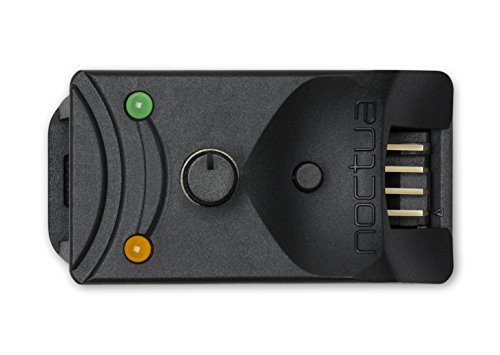
The Noctua NA-FC1 is a compact, precision manual controller designed for users who want to override motherboard fan curves entirely. A single rotary knob adjusts the PWM duty cycle from effectively 0% to 100%, with a “No Stop” mode that floors the RPM at 300 to prevent BIOS fan errors. It includes a 3-way splitter cable so you can control up to three fans from one unit, and the whole package is backed by a six-year warranty.
Users with water-cooling loops found the NA-FC1 ideal for dialing in a fixed pump speed or keeping radiator fans at an inaudible 600 RPM during idle. The build quality is classic Noctua: the dial feels substantial, and each detent is crisp. The main complaint is that the input and output plugs sit at opposite ends, which can twist the cables in tight spaces, and the 3A current limit prevents it from driving high-power server fans.
It can also slot inline between your motherboard and a hub like the NA-FH1, giving you manual control over an entire array. The price is steep for a three-fan controller, but the reliability and low-noise performance are unmatched at this size.
Why it’s great
- No-Stop mode prevents the fan from stalling below 300 RPM.
- Six-year warranty reflects exceptional build confidence.
- Can be used as a standalone controller or inline with a hub.
Good to know
- Only controls up to three fans without a separate hub.
- Opposite-end connectors can create cable twisting in tight bays.
4. TUMMASTER J-10 ARGB Fan Hub 10-Port

The TUMMASTER J-10 is a dual-function hub that merges PWM fan control with 5V-3pin ARGB lighting management, supporting up to ten fans across five PWM and five ARGB channels. It connects to your motherboard via single PWM and ARGB headers for signal pass-through, while SATA provides power for both fan speed and lighting. An included RF remote lets you switch between 20+ RGB preset modes without needing software.
Builders with motherboards lacking ARGB headers appreciated the hub’s ability to add controllable lighting without upgrading boards. The magnetic mounting feet hold the lightweight plastic chassis securely, and the hub remembers your last RGB setting after a power cycle. The instructions are minimal pictograms, but the TUMMASTER website hosts a more detailed manual. A handful of users found the ARGB pass-through from the motherboard unreliable, so treat the remote as your primary lighting interface.
At roughly the cost of a single name-brand fan, this hub is an excellent value for anyone building a bling-heavy rig on a budget. Just verify your fans use 5V-3pin ARGB (not 12V-4pin RGB) before plugging them in.
Why it’s great
- Combines PWM and ARGB control in one SATA-powered unit.
- RF remote (no line-of-sight needed) for instant lighting changes.
- Lightweight magnetic mounting simplifies placement.
Good to know
- Instructions are basic pictograms — online manual required.
- Motherboard ARGB pass-through can be inconsistent.
5. OwlTree PC071a Type-C PWM Fan Controller
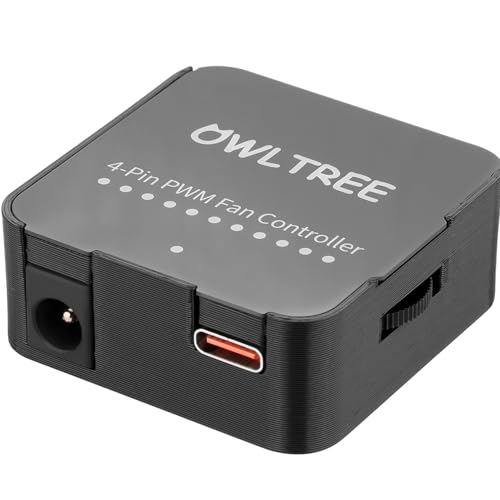
The OwlTree PC071a stands out for its dual power input system: a Type-C port that supports QC3.0/PD3.0 at 12V and a DC 5.5×2.1mm barrel jack. The 10-LED ring on the front indicates the PWM duty cycle in 10% increments, and its color shifts from blue (normal) to orange (voltage below 11.8V) to red (below 8.4V), providing real-time voltage feedback. It fits in a cube just 1.7 inches per side, making it one of the most compact six-fan controllers available.
Users building desk fan projects out of spare PC fans love the Type-C input — a 65W GaN charger easily powers six fans simultaneously. The manual dial provides smooth, repeatable speed adjustment, and the voltage-status LEDs caught several users’ attention for flagging underpowered adapters before they caused issues. That said, a small number of reports mention inconsistent wattage delivery when more than four fans are connected over Type-C; using the barrel jack with a proper 12V adapter resolves this.
If you need a small, portable controller for testing benches or DIY projects where a PSU isn’t practical, the PC071a delivers flexibility that few competitors match.
Why it’s great
- Type-C PD input allows powering from any 65W+ charger or power bank.
- 10-LED ring gives instant visual feedback on duty cycle and voltage health.
- Very compact at 1.7 x 1.7 x 0.78 inches.
Good to know
- Some units lose power delivery consistency over Type-C under heavy load.
- Not compatible with 3-pin or 2-pin fans for speed control.
6. OwlTree PC042 4-Pin PWM Fan Controller
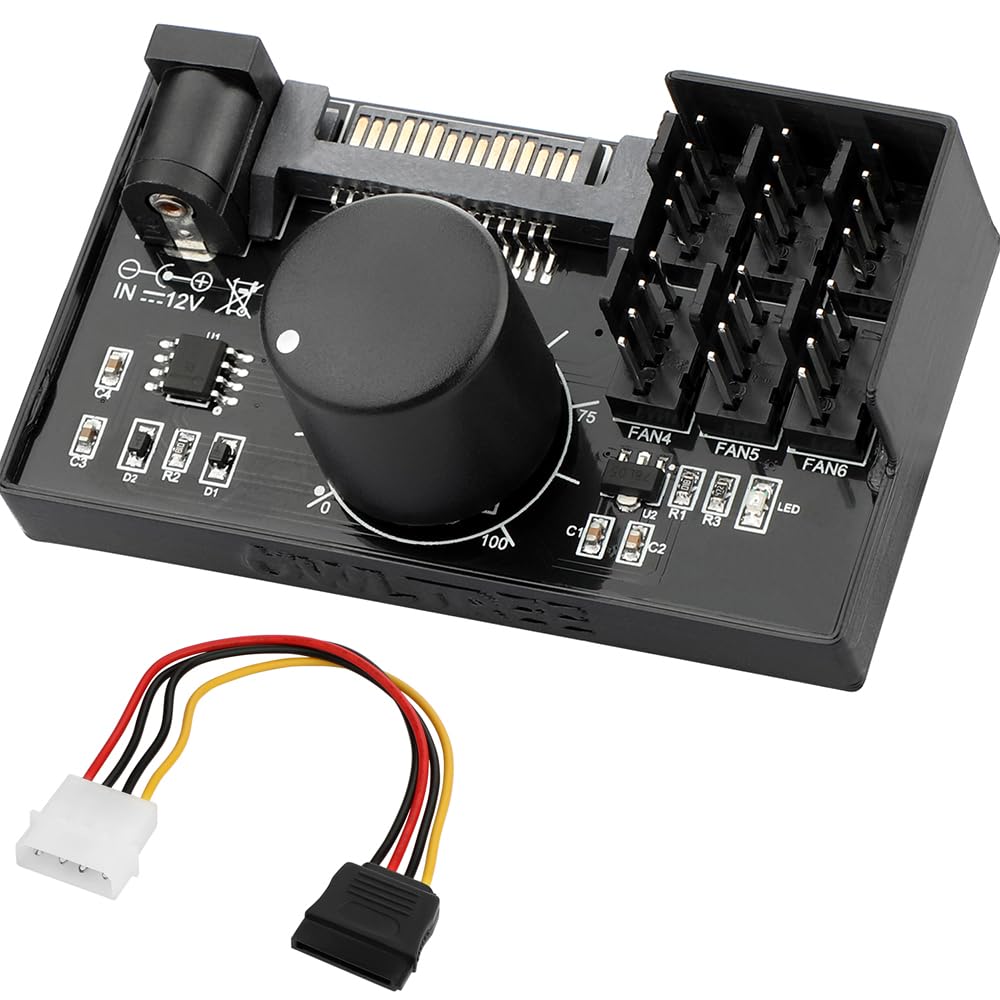
The OwlTree PC042 is a no-frills manual knob controller that supports up to six 4-pin PWM fans via SATA or a 5.5×2.5mm DC barrel input. It pushes a 60W (5A) total budget with each port handling up to 2A, and the PWM duty cycle adjusts from 1% to 99%. The board itself is compact at 2.7 x 1.6 x 0.7 inches, and the dial rotates smoothly across the full range.
Most users praise it for powering GPU fans on open-frame mining rigs or driving three 360mm radiators from an external PSU. However, a minority report that the board struggles with even a single high-current fan — one user noted the speed stayed constant and the board grew hot, indicating a potential manufacturing variance or inadequate thermal management on some units. The lack of a power-off position at the minimum dial setting means fans never truly stop unless you unplug them.
At the entry-level price, the PC042 works well for standard case fan arrays drawing under 4A total. For heavy-duty server fans, step up to the SATA-only Thermaltake Commander FP.
Why it’s great
- Supports both SATA and DC barrel power input for flexible use.
- 1-99% PWM range offers granular speed control.
- Small footprint fits into tight controller bays.
Good to know
- Minimal power output may not handle high-current server fans.
- No off position on the dial — fans run even at the lowest setting.
7. Delinx 60WFS Adjustable Power Adapter with 5-Port Fan Splitter
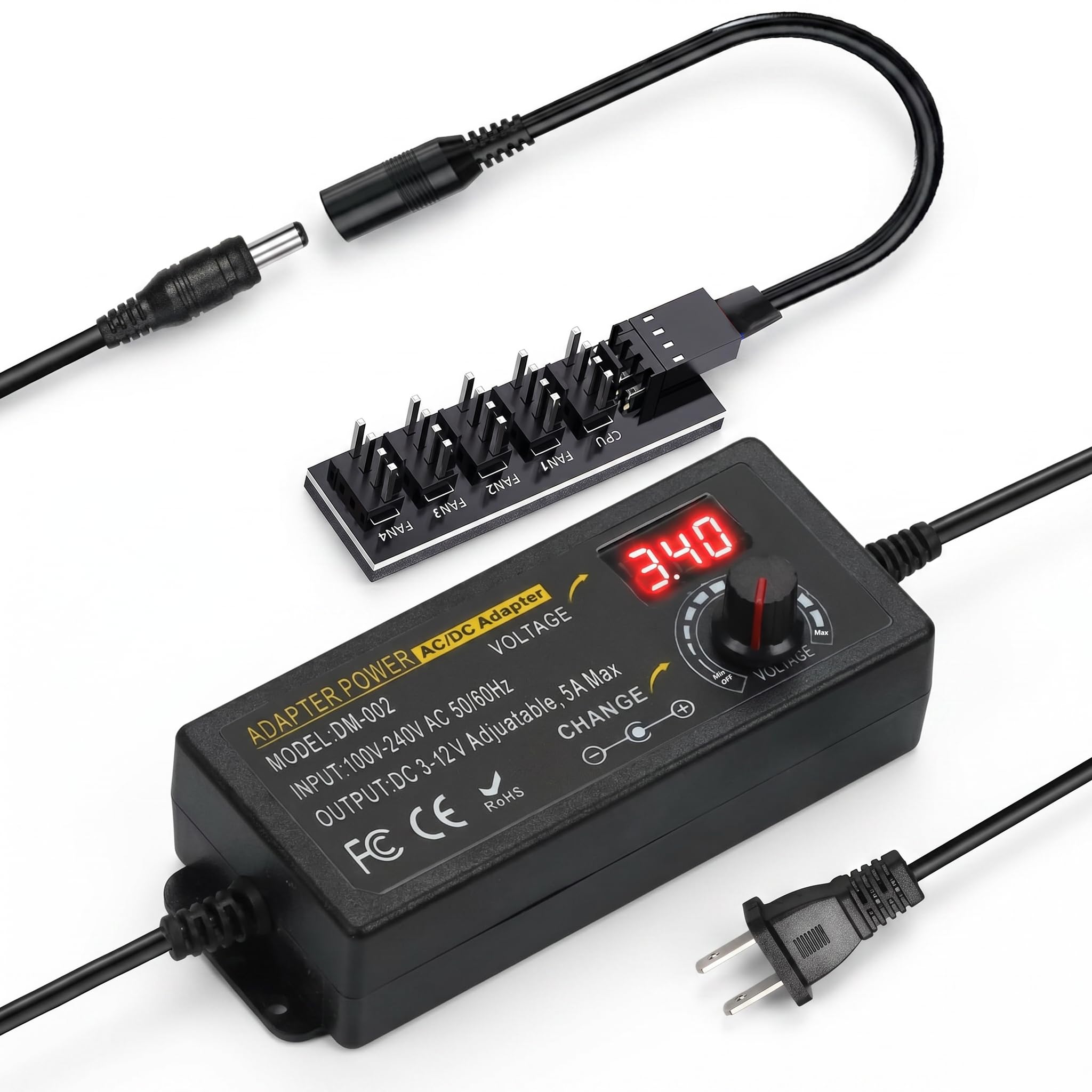
The Delinx 60WFS takes a voltage-based approach rather than standard PWM, letting you dial the output from 3V to 12V via a physical knob with a digital readout. This makes it compatible with 2-pin, 3-pin, and 4-pin fans alike since it varies voltage rather than duty cycle. It includes a 35cm DC5521-to-5-port splitter cable, so you can run up to five fans from a single AC adapter brick rated at 60W and 5A.
Users mounting 120mm Noctua fans in 3D printer enclosures love that the voltage dial retains its setting after a power loss. The built-in over-voltage, over-current, and short-circuit protections add peace of mind for DIY electronics projects. A minor design flaw is the dial’s slight rotational play, making exact voltage tuning tricky — 12.0V on the display may actually be 12.3V on the multimeter. Also, the exposed live pins on the splitter need female-to-female extensions for safe desktop use.
This unit is best suited for non-PC applications like cabinet cooling, router ventilation, or external test rigs where you need to control fan speed without a motherboard PWM signal.
Why it’s great
- Voltage-based control works with 2/3/4-pin fans regardless of PWM support.
- Digital voltage display and safety protections built into the AC adapter.
- Dial setting persists through power cycles.
Good to know
- Dial play makes precise voltage selection difficult.
- Splitter connector leaves live pins exposed — extra cables needed.
FAQ
Can I use a 4-pin PWM fan controller with 3-pin fans?
How do I know if my power supply can support a SATA-powered fan hub?
Why does my fan controller hub feel hot after hours of use?
Final Thoughts: The Verdict
For most users, the best 4 pin pwm fan controller winner is the Noctua NA-FH1 because it delivers top-tier build quality, magnetic mounting, safety fuses, and the highest total power headroom for air-cooled or water-cooled builds with many fans. If you want a manual override dial with the smoothest low-speed operation, grab the Noctua NA-FC1. And for a budget-friendly 10-port hub that just works without any surprises, nothing beats the Thermaltake Commander FP.