
Our readers keep the lights on and my morning glass full of iced black tea. As an Amazon Associate, I earn from qualifying purchases.
Specs are compiled from manufacturer listings and verified buyer reviews and can change over time — please confirm the key details on the product page before buying.
If your computer’s single network port is the bottleneck for a home lab, NAS, or software firewall, a 4 port ethernet card fixes that by adding four separate connections through one PCIe slot — effectively turning a desktop into a server, router, or virtual machine host. For most buyers, the Intel I340-T4 is the one worth starting with, because its native driver support and consistent 900+ Mbps speeds solve the two biggest headaches: compatibility and throughput.
I’m Min — the founder and writer behind Gadgets Feed. This guide is built by comparing the manufacturers’ published specifications and the patterns across verified customer reviews, so you get each pick’s real strengths and trade-offs instead of marketing spin.
Here are the top 4 port ethernet card options for servers, firewalls, and power users, broken down to help you choose the right one for your setup.
Our Picks at a Glance


How To Choose The Best 4 Port Ethernet Card
The controller chip is the first decision you make, and it determines driver support and stability more than any other part of the card.
Match the Chip to Your Operating System
Intel-based cards like the I350 shine on Windows, Linux, and bare-metal hypervisors because drivers are built into most kernels. Broadcom BCM5719 cards are the go-to for FreeBSD and pfSense firewalls but can be pickier elsewhere. Realtek chips are the budget-friendly option but often need a manual driver download.
Check Your Slot and Case Space
Most of these cards are PCIe x4, which means they physically fit into x4, x8, or x16 slots. Measure your case before buying — a full-height bracket won’t fit a slim mini-tower. Most cards ship with both, but a few need you to request the low-profile bracket separately.
Quick Comparison
| Model | Best For | Controller | Slot Type | Data Rate | Amazon |
|---|---|---|---|---|---|
| Intel I340-T4★ Best Overall | Virtualization servers | Intel 82580 | PCIe 2.0 x4 | 1000 Mbps | Amazon |
| EDUP BCM5719Firewall Favorite | FreeBSD firewalls | Broadcom BCM5719 | PCIe 2.1 x4 | 1000 Mbps | Amazon |
| NICGIGA I350Speed Demon | Speed-focused upgrades | Intel I350 | PCIe 2.1 x4 | 1000 Mbps | Amazon |
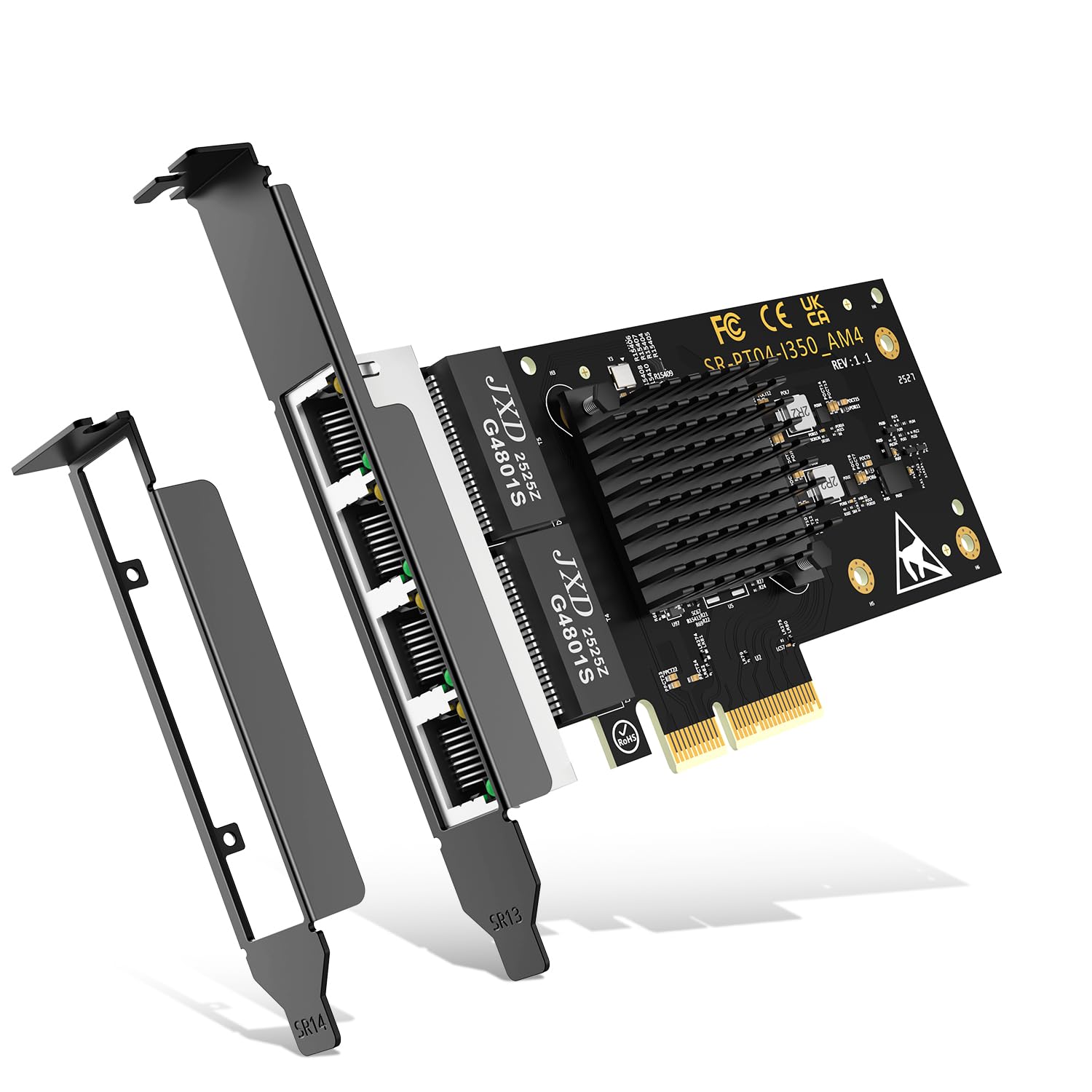
| ipolex I350-AM4 | Small form factor builds | Intel I350-AM4 | PCIe 2.1 x4 | 1000 Mbps | Amazon |
| Binardat Realtek | Budget multi-OS setups | Realtek RT8111H | PCIe x1/X4/X8/X16 | 100 Mbps | Amazon |
| H!Fiber I350 | Passively cooled servers | Intel I350 | PCIe 2.1 x4 | 1000 Mbps | Amazon |
| ipolex 2.5G RTL8125BG | Multi-gigabit LANs | Realtek RTL8125BG | PCIe 2.1 x4 | 2.5 Gbps | Amazon |
| 10Gtek I350 | Hardware offload | Intel I350 | PCIe 2.1 x4 | 1000 Mbps | Amazon |
| ULANSeN BCM5719 | ESXi and Proxmox VMs | Broadcom BCM5719 | PCIe x4 | 1000 Mbps | Amazon |
In‑Depth Reviews
1. Intel Ethernet Server Adapter I340-T4
Our pick — over 4.5★ from 150+ verified ratings; the strongest balance of quality and price.
The virtualization favorite that turns a NAS into a speed demon
This card tops the list because its Intel 82580 controller and igb driver are recognized natively by Linux and ESXi 7.0, so your hypervisor accepts it without a fight — a key win for home lab builders who hate driver hunting. Replacing an older 450 Mbps PCI NIC with this card consistently delivers over 900 Mbps, a tangible upgrade for FreeNAS storage servers. It runs over PCI Express 2.0 x4 and drops into x4, x8, or x16 slots, fitting most motherboards.
The honest trade-off is the bracket situation. Several buyers report the full-height bracket missing from the OEM packaging, so check the box before you start. The core performance is excellent, but the accessory situation is worth a look first.
server-grade quad ports
- Native driver support across Linux, FreeNAS, and ESXi 7.0
- Delivers consistent 900+ Mbps after swapping out older NICs
- Solid value compared to single-port Intel cards
older chipset limits
- Full-height brackets have been missing from some OEM packages
- Windows 10 does not support NIC teaming (fine on Win7/Server 2012)
data centers: virtualized firewalls and datastores, where compatibility and speed matter more than a fancy box.
home builds: your case needs a full-height bracket and you do not want to source one separately.
2. EDUP 4 Port Gigabit Network Card
The Broadcom card that gives FreeBSD and OPNsense zero hiccups
If you are building a software firewall, this is the card to grab, because its original Broadcom BCM5719 controller is accepted by the BSD kernel without driver tussles — owners mention it as plug-and-play on OPNsense and FreeBSD. It is a PCIe 2.1 x4 card that works in x4, x8, or x16 slots and supports 100 meters of CAT5/CAT6/CAT7 cabling, so you can run long links to a file server or remote workstation. Both low-profile and full-height brackets come in the box.
The control-chip advantage here is the flip side of the Intel I340-T4 above — Broadcom is the right answer for BSD, while Intel wins on Windows hypervisors. One owner found only one of four NICs showing up, pointing to a firmware hiccup, so test all ports early.
tight budgets: pfSense and OPNsense builds where Broadcom driver maturity is the deciding factor.
heavy workloads: Windows-heavy setups, where Intel controllers get more smooth driver support.
3. NICGIGA 4 Port Gigabit Network Card
The crowd favorite that hits 2 Gbps with zero driver hunting
This pick wins on plug-and-play speed: its Intel I350 chip is recognized immediately on Windows 11 machines with no driver installation needed, and Users report speeds exceeding 2 Gbps on AMD motherboards, outperforming the Intel I340-T4’s 900+ Mbps on similar platforms. The card runs on PCI Express 2.1 x4 and drops into x4, x8, or x16 slots. It ships with both standard and low-profile brackets, so it fits desktops, workstations, and mini-tower cases. The heatsink on top keeps transmission stability in check.
The honest catch is reliability over the long haul. Most buyers are happy, but a few report the card failing after about 10 months of use. The heat sink helps, but this is not a card you set and forget forever.
metal bracket sturdy
- Immediate recognition on Windows 11 with no driver install
- Exceeds 2 Gbps on modern AMD motherboards
- Install takes less than 5 minutes
driver quirks noted
- Some units have failed around the 10-month mark
- Reliability gets mixed feedback as time goes on
stable rigs: you want multi-gig speeds on Windows with a sub-5-minute install.
novice users: your setup runs 24/7 and needs proven year-round stability.
4. ipolex 4 Port Gigabit Ethernet NIC

The low-profile workhorse for turning desktops into routers and sensors
This card is the right answer when a tiny case needs four gigabit ports, because its Intel I350-AM4 controller is recognized immediately by Linux and Proxmox — making it a default pick for turning spare desktops into pfSense routers or Security Onion sensor nodes. It ships with both low-profile and full-height brackets, fitting standard towers and slim mini cases. Energy Efficient Ethernet and DMA Coalescing offload CPU work and reduce idle power draw.
The one thing to respect is slot choice. Installing it in a PCIe x1 slot next to a power-hungry video card caused a full system brick in one case — give it a proper x4 slot with breathing room. It is a third-party board using an Intel chip, not a genuine Intel card, so authenticity is worth a glance before you buy.
simple setups: you need a compact, low-profile card for a firewall or sensor build in a slim case.
advanced needs: you only have a x1 slot free and a heavy GPU sitting right next to it.
5. Binardat 4 Port Gigabit PCIe Network Adapter

The flexible budget pick that fits x1 slots and Macs alike
This is the most versatile cheap option on the list because it works in x1, x4, x8, or x16 PCIe slots and supports Windows, Linux, and even Mac OS — rare among quad-port cards, since most need at least x4, making it the fallback when your motherboard only has a narrow slot free. The Realtek RT8111H controller is recognized automatically by Linux through the r8169 driver without recompiling the kernel. It supports Jumbo frames and 802.1Q VLAN tagging, giving you the basics for a home lab without the premium price. The default is a standard bracket, with a low-profile bracket included.
The catch is driver maintenance. Windows users need to download drivers manually, and the generic driver only connects at 2.5 Gbps until you update from the Realtek site. Ports also enumerate in an unusual order — 1-3-4-2 instead of sequential — which is a quirk you will have to live with.
small cases: you need four ports in a x1 slot or a multi-OS machine on a tight budget.
full towers: you want a true Intel controller with smooth Windows driver handling.
6. H!Fiber Gigabit 4 Port NIC

The passively cooled I350 that holds a full gigabit without breaking a sweat
This card is built for servers that cannot afford a noisy fan, using a genuine Intel I350 controller with a passive heatsink — customers note it running at low temperatures while copying files at a full gigabit per second, and the heatsink even has a tunnel for a zip-tie 40mm fan if you want extra cooling. It works beautifully with pfSense — one owner ran two LACP link aggregation groups without issues. It supports Windows, Windows Server, Linux, and VMware ESXi 5/6, though it does not support Mac OS or Bypass Mode. The box includes both low-profile and full-height brackets.
The recurring warning is physical fit: newer Dell SFF models can be a mismatch, with the card extending the cover. Measure your chassis before committing.
quiet PCs: quiet, passively cooled builds where pfSense and Debian are the daily drivers.
hot rooms: your machine is a newer Dell SFF that could fight the card’s fit.
7. ipolex 2.5G Ethernet Card 4 Port

The 2.5G upgrade for those who outgrew gigabit but skipped 10G
When gigabit is not enough but 10-gig hardware is overkill, this card lands in the balance, pushing 2.5 Gbps per port via a Realtek RTL8125BG controller with an ASMedia ASM1812 — a real step up for NAS transfers and raw video workflows compared to the 1 Gbps of every other card on this list. Owners describe it serving data at blistering speeds. It runs on PCIe 2.1 x4 and supports Jumbo Frames, Wake on LAN, DPDK, iSCSI, and FCoE. Includes a 30-day free return and a 3-year warranty. Linux and Windows 11 both work, though Windows 11 may need a Windows 10 driver.
The honest limits are real: it does not support ESXi 7/8, FreeBSD, PXE, or VLANs, and when all four ports run at once, the total rate cannot be full. Fan reliability is also a recurring complaint — plan for extra cooling or expect to replace it.
fast LANs: your network is moving past 1 Gbps and you want four ports of 2.5G copper.
gigabit only: you run ESXi 7+, FreeBSD, or need VLAN support from the card.
8. 10Gtek 1000Mbps Gigabit Converged Adapter

The I350 that excels at hardware-offloaded traffic on ESXi labs
If your server runs ESXi 6.5 in a lab, this card is a proven workhorse because its stable Intel igb driver handles hardware-offloaded network traffic exceptionally well — the kind of workload that would normally eat CPU cycles, keeping your host free for VMs. ESXi and Proxmox both pick it up without complaint. It runs on PCI Express 2.1 x4, works in x4, x8, or x16 slots (not x1), and comes with both low-profile and full-height brackets. Linux and BSD users get a genuine Intel MAC prefix and a low 2.8W draw, mimicking a real Intel card at a lower cost.
The trade-off is authenticity: some buyers confirm it shows up as genuine Intel, while others note it is not a true Intel card. It also does not support link aggregation in Windows 10. For ESXi and Linux servers, those limits rarely matter.
virtualization: ESXi 6.5 labs and Linux servers that benefit from hardware offload and low power draw.
plug-and-play: Windows 10 users who want link aggregation from the start.
9. ULANSeN Broadcom BCM5719 Quad-Port Adapter

The Broadcom card that splits each port to its own VM with IOMMU
This is the card for virtual machine builders who want to assign one network port per VM, because its NetXtreme BCM5719 chipset works with Intel Z690 IOMMU grouping — letting you split each port to a separate VM cleanly, a capability the Intel I340-T4 does not specifically offer. Proxmox recognizes it from the start. Four independent gigabit ports run at full line-rate simultaneously, with TCP Segmentation Offload and Receive Side Scaling reducing host CPU load. It is a PCIe x4 card compatible with x8 and x16 slots, and it ships with a low-profile bracket.
The catch is operating system fussiness. It works flawlessly with pfSense and ESXi, but FreeBSD 15 and QEMU/KVM setups can struggle — one owner saw only one interface attach. Stick to the officially supported hypervisors and it is a solid workhorse.
enterprise servers: you run Proxmox or ESXi and need IOMMU-based port assignment for VMs.
newer OSes: your stack depends on FreeBSD or QEMU/KVM compatibility.
Understanding the Specs
Controller Chip Matters More Than You Think
Intel I350 and I340 chips are the gold standard for compatibility, with drivers built into Linux, Windows, and hypervisor kernels. Broadcom BCM5719 is the pick for BSD-based firewalls like pfSense. Realtek is the budget option that often needs a manual driver download but supports a wider range of PCIe slot sizes.
The x4 Lane Question
Most quad-port cards run on PCIe 2.1 x4, which gives enough bandwidth for four gigabit ports. A x4 card fits in x4, x8, or x16 slots. If you only have a x1 slot free, look for a Realtek-based card that explicitly states x1 support — most Intel and Broadcom cards will not fit.
FAQ
Will a 4 port ethernet card work in my x16 graphics card slot?
Do I need to install drivers for an Intel-based quad port card?
Can I use all four ports at full speed at the same time?
Is a 4 port ethernet card good for a pfSense firewall?
What is the difference between low-profile and full-height brackets?
Does a 4 port ethernet card support link aggregation?
Will this card work in a small form factor Dell or HP computer?
What is the difference between a 1G and 2.5G quad port card?
Final Thoughts: The Verdict
The 4 port ethernet card with the best balance for most home labs is the Intel I340-T4 — the native driver support and consistent 900+ Mbps speeds make it tough to top for virtualization and NAS builds. If you are building a BSD-based firewall, the EDUP Broadcom card is the smoother fit. And for those moving past gigabit, the ipolex 2.5G delivers the faster ceiling you are after.
How We Picked
We do not accept paid placement. Every pick is matched to a real buyer and a real use-case; we do not hands-on test units.
Sources & Methodology
Specifications: manufacturer listings and product documentation. Review insights: verified customer reviews, as of August 2026. Pricing: not shown on this page (it changes often); check the current price via the retailer link.
As an Amazon Associate, Gadgets Feed earns from qualifying purchases. This does not affect which products we feature.