
Our readers keep the lights on and my morning glass full of iced black tea. As an Amazon Associate, I earn from qualifying purchases.
Specs are compiled from manufacturer listings and verified buyer reviews and can change over time — please confirm the key details on the product page before buying.
You have a PS5, a Fire Stick, maybe a Nintendo Switch or a Blu-ray player. But your TV has only two HDMI ports. Every time you want to watch something different, you are behind the TV, unplugging cables. A 4 port HDMI switch fixes that instantly — it turns that single port into four, so all your devices stay plugged in and ready.
I’m Min — the founder and writer behind Gadgets Feed. This guide is built by comparing the manufacturers’ published specifications and the patterns across verified customer reviews, so you get each pick’s real strengths and trade-offs instead of marketing spin.
The real question is which switch actually delivers a clean picture, switches reliably, and supports the resolution your devices need. After sorting through the specs and real buyer experiences, here is everything you need to know to pick the right 4 port hdmi switch for your setup.
Quick Picks
- ROOFULL 4 Ports 8K HDMI 2.1 Switch — Best Overall
- Kinivo 8K HDMI Switch (SW-840BN) — Premium Pick
- OREI 8K 4×1 HDMI 2.1 Switch — Top Performer
- Philips 4 Device HDMI Switch (SWV9484B/27) — Best Value
- NEWCARE HDMI Switch 4 in 1 Out — Compact Pick
- Anber-Tech 4K HDMI Switch 4×1 — Budget Champion
- OREI 4K Multi HDMI Viewer UHD-401MV — Multi-Viewer
How To Choose The Best 4 Port HDMI Switch
Not every switch handles every device the same way. The three things that decide whether you get a flawless picture or a frustrating blank screen are the HDMI version, the bandwidth, and how the switch decides which device to show. Here is what to look for.
HDMI Version and Bandwidth (Why It Matters)
An HDMI 2.0 switch tops out at 18Gbps and can handle 4K at 60Hz. That is fine for most streaming sticks and older consoles. But if you own a PS5, Xbox Series X, or a gaming PC that pushes 4K at 120Hz, you need an HDMI 2.1 switch with 48Gbps bandwidth. Without that higher bandwidth, your games will be locked to a lower refresh rate, and you lose features like VRR (variable refresh rate, which reduces screen tearing) and ALLM (auto low latency mode, which keeps input lag low).
Switching Method: Auto, Remote, or Manual
A switch that detects a newly powered-on device and automatically sends its signal to the TV sounds great — and it can be, until it is not. The catch is that many devices (PS5, Apple TV, Fire Stick) continue to send a small electrical signal even when turned off. This confuses the auto-switching logic, causing the switch to get stuck or cycle randomly. For a reliable setup, you want a switch with a manual IR remote as the primary control, with auto-switching as a bonus that you can ignore when it misbehaves.
HDCP Pass-Through and Streaming Devices
HDCP (High-bandwidth Digital Content Protection) is the copy-protection handshake between your streaming box and your TV. If a switch has poor HDCP support, you will see a black screen or an error message when trying to watch Netflix, Disney+, or a Blu-ray. Look for a switch that explicitly states HDCP 2.2 or 2.3 pass-through — without it, your streaming devices may refuse to show anything.
Quick Comparison
On smaller screens, swipe sideways to see the full table.
| Model | Best For | Max Resolution | Bandwidth | Switching Method | Amazon |
|---|---|---|---|---|---|
| ROOFULL 4 Ports 8K HDMI 2.1 | Gamers needing 4K@120Hz | 8K@60Hz / 4K@120Hz | 48Gbps | Remote + Manual + Auto | $39.99$42.99PrimeAmazon |
| Kinivo 8K HDMI Switch | Premium all-in-one home theater | 8K@60Hz / 4K@120Hz | 48Gbps | Remote + Auto | $79.99$84.99Amazon |
| OREI 8K 4×1 HDMI 2.1 | Next-gen console setup | 8K@60Hz / 4K@120Hz | 48Gbps | Remote + Manual + Auto | $44.99Amazon |
| Philips SWV9484B/27 | Reliable all-around use | 4K@60Hz | 18Gbps | Wireless Remote + Manual | $39.99Amazon |
| NEWCARE HDMI Switch 4 in 1 Out | Budget-friendly entry point | 4K@60Hz | 18Gbps | Remote + Auto + Manual | $19.99$21.99Amazon |
| Anber-Tech 4K HDMI Switch 4×1 | Simple plug-and-play | 4K@60Hz | 18Gbps | Remote + Auto + Manual | $21.99Amazon |
| OREI UHD-401MV MultiViewer | Multi-screen viewing | 4K@60Hz | 18Gbps | Remote + Front-Panel Buttons | $189.99Amazon |
In‑Depth Reviews
1. ROOFULL 4 Ports 8K HDMI 2.1 Switch

The one that actually does 4K 120Hz with game consoles and has a two-year warranty to back it up.
This is the switch for anyone who owns a PS5 or Xbox Series X and actually wants to see 4K at 120Hz on their screen. It runs on the official HDMI 2.1 standard with a 48Gbps data path, versus 18Gbps on a standard HDMI 2.0 switch. While the less expensive NEWCARE switch tops out at 4K@60Hz, the ROOFULL hits the next tier — 8K@60Hz — so it is prepared for future displays. It also passes through HDR10+ and Dolby Vision, so the colors and contrast from your streaming apps look exactly as intended.
Buyers report that the auto-switching works consistently, especially when paired with an LG C5 TV, and that the remote has separate on/off buttons — a small detail that makes daily use less frustrating. One owner mentioned that after a year a port started acting up, and the company replaced it without hassle, which lines up with the stated 2-year warranty. The catch is the cable length limit: to actually get 8K@60Hz or 4K@120Hz, the total length of your input and output HDMI cables must stay within 10 feet. That means your devices need to sit fairly close to the switch.
True next-gen performance: The 48Gbps bandwidth and full VRR/ALLM support make this the pick for a high-end gaming setup, but the 10-foot cable restriction means you need to plan the layout of your entertainment center carefully.
Reach for this if: you have a PS5 or Xbox Series X and want verified 4K@120Hz with HDR and VRR working at the same time.
Look elsewhere if: your devices are scattered more than 10 feet from the switch, or you only need basic 4K@60Hz.
2. Kinivo 8K HDMI Switch (SW-840BN)

A sleek metal switch that passed every HDMI handshake test buyers threw at it.
The Kinivo 840BN shares the same 48Gbps bandwidth and 8K@60Hz / 4K@120Hz capabilities as the ROOFULL, but it sets itself apart with build materials — 24K gold-plated connectors and an aluminum alloy shell that helps with heat dissipation. Owners mention that it is the only switch they tested that passed a verified 100% lossless 4K/120Hz signal from a PS5 and a MacBook Pro side-by-side, while keeping the signal clean. It also comes with a two-year warranty and US-based customer support, which is a stronger safety net than most competitors offer.
One owner noted in their review that the auto-switching does not work as “smartly” as they hoped, which matches the product note: devices like Apple TV, Fire TV, Xbox One, and PS5 keep a low voltage even when off, so they do not fully support auto-switching. Plan to use the remote as your main method. At 200 grams (about 7 ounces), it weighs less than the Philips switch at 227 grams, but feels more premium in hand thanks to the metal body. If you want a clean home theater and care about the physical feel of your components, this is the one to get.
The Build
- Aluminum alloy shell with 24K gold-plated connectors for clean signal transfer
- Two-year warranty with lifetime US-based customer support
The Catch
- Auto-switching does not behave reliably with PS5 or Apple TV — stick to the remote
Built for the long haul: The Kinivo is for someone who wants premium materials and reliable signal pass-through, and does not mind using the remote to switch inputs every time.
Not for you if: you depend entirely on auto-switching to cycle between your streaming devices.
3. OREI 8K 4×1 HDMI 2.1 Switch

A small-box HDMI 2.1 switch that gamers can stick behind the TV and forget about.
This OREI switch matches the same 8K@60Hz and 4K@120Hz ceiling as the ROOFULL and Kinivo, but it adds explicit support for VRR (Variable Refresh Rate, which prevents screen tearing during fast movement) and ALLM (Auto Low Latency Mode, which automatically switches your TV to a low-lag gaming mode). Customers note it works perfectly with a Switch 2, Xbox Series X, and PS5, and that the switch time between devices is about two seconds — fast enough that you do not sit waiting. One reviewer noted they double-sided taped it to the back of their TV because it is small enough to stay out of sight.
This is the one that stands out if you prefer a manual switch above auto-switching, because it offers both the front button and the IR remote as equal options. Unlike some switches that push you toward auto-detection, the OREI lets you pick your preferred input every time with zero guesswork. The 1-year warranty is shorter than the 2-year terms from ROOFULL and Kinivo, but the build quality in the reviews holds up — no consistent failure reports. If you want HDMI 2.1 at a slightly lower entry price than the Kinivo, this is your best bet.
Console-ready combo: The combination of VRR, ALLM, and a reliable remote makes this the simplest way to get full next-gen console performance from a four-port switch.
Choose this if: you want verified 4K@120Hz with VRR and need a small-footprint switch that hides behind the TV.
Pass on this if: you want a longer warranty than 1 year or prefer an aluminum shell over plastic.
4. Philips 4 Device HDMI Switch (SWV9484B/27)

A reliable 4K switch from a household name with a lifetime warranty that beats every other pick on protection.
The Philips SWV9484B/27 is capped at 4K@60Hz (not 8K, not 120Hz), so it is not for high-end gaming. But for a living room setup with a streaming stick, a Blu-ray player, and a set-top box, it is the most trustworthy pick. Reviewers point out that it switches much faster than their previous switch, with changes taking between 1 and 2 seconds. The wireless remote is wafer-thin, but one buyer mentioned the buttons would be easier to label if they were arranged in a vertical column instead of the horizontal row. It supports HDCP 2.0, which covers most streaming services, and at 227 grams it has a solid heft that says “quality” without being heavy.
The biggest differentiator here is the limited lifetime warranty from Philips. No other switch in this lineup offers that. If the switch fails in year four or year ten, Philips will replace it. That single detail makes this the smartest buy for a non-gaming home theater where you want to plug it in and forget it. The one trade-off: there is no auto-switching. You press the button on the remote or the top of the unit to cycle through the four inputs. That is actually a bonus for many, because auto-switching is the feature that causes the most complaints in other switches.
The confidence
- Limited lifetime warranty — class-leading protection in this category
- Shoppers say 1-2 second switching, faster than many competitors
The Limit
- 4K@60Hz only — no 120Hz support for gaming consoles
- No auto-switching; you must use the remote or the front button
Buy-it-for-life pick: If you want one switch that will be replaced for free no matter when it breaks, and you do not need 120Hz, the Philips is the obvious choice.
skip it if: you need HDMI 2.1 bandwidth for a PS5 or Xbox Series X at high refresh rates.
5. NEWCARE HDMI Switch 4 in 1 Out
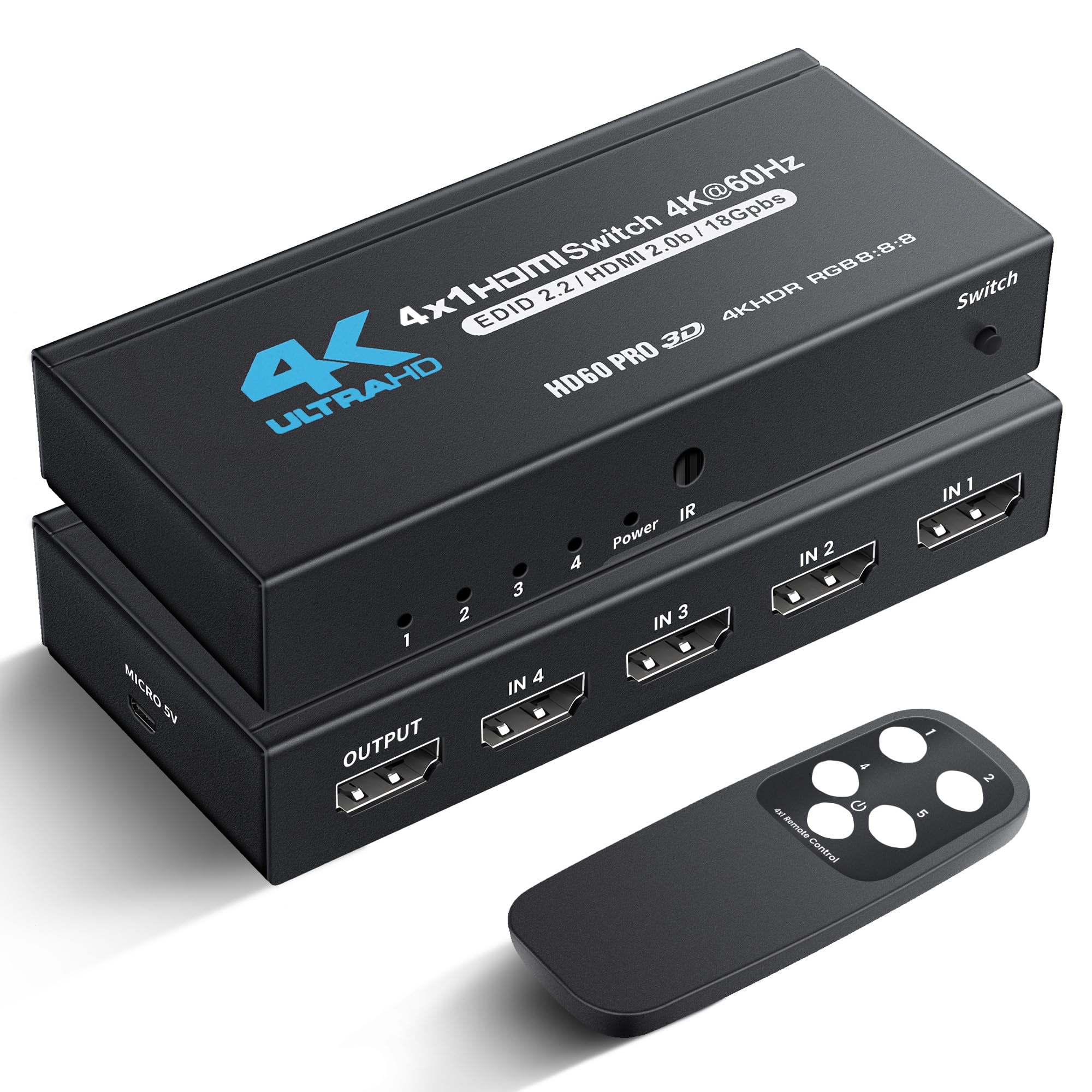
A budget-priced switch that buyers report actually works with PS5 at 4K 120Hz through an HDMI 2.1 cable.
The NEWCARE is a 4K@60Hz switch with 18Gbps bandwidth, which puts it squarely in the HDMI 2.0 category — officially below the 48Gbps of the ROOFULL or Kinivo. But here is the interesting part: several owners mention that it works with PS5 and PC on HDMI 2.1 at 4K 120Hz after swapping out a faulty HDMI 2.0 cable. It supports Dolby Vision and Atmos, so your streaming movies will still look and sound great. The IR remote has a range of up to 26 feet, which covers most living rooms.
The catch is physical. The switch is very lightweight, and customers note you will need double-sided tape or a zip tie to mount it behind your TV. One owner reported that the manual switching function did not work for them, though the auto-switching did. Another reviewer loved the compact metal case and said customer service was excellent. For the price, this is the best entry point into four-port switching, but be prepared for possible quirks with the manual switch and budget for mounting tape.
Surprisingly capable for the cost: It is a 4K@60Hz switch on paper, but real-world PS5 buyers managed 4K 120Hz with the right cable — still, consider it a bonus, not a guarantee.
Grab this if: you are on a tight budget and want a compact switch for a mix of streaming devices and maybe one console.
Pass if: you need guaranteed, verified 4K@120Hz or prefer a heavier unit that sits without tape.
6. Anber-Tech 4K HDMI Switch 4×1

The least expensive four-port switch here, but owners say to watch out for the one-year reliability wall.
The Anber-Tech runs at 4K@60Hz over HDMI 2.0, the same class as the NEWCARE, and includes an IR remote with a claimed auto-switching feature. It supports HDCP 2.2 and HDR10, so basic streaming and console use will work fine. Some buyers had a positive experience, calling it “excellent quality” and praising the remote. The plug-and-play setup is genuinely simple — you plug in your devices, connect the power adapter, and it starts working.
But the reliability data tells a different story than the marketing. One verified review says “Stopped working after ~1 year,” while another says both units they tried failed within a month with a random blue screen and no sound or picture. The warranty is only 6 months, which is the shortest of any switch on this list. Another reviewer mentioned the remote works inconsistently and that one port failed to recognize a game system unless a different device was also powered on. For the price, the Anber-Tech works well initially, but the pattern of early failures makes it a gamble. If your budget is extremely tight, it might be worth the risk — but the NEWCARE above costs slightly more and has a 1-year warranty, which makes it the safer bet.
What Works
- Truly plug-and-play — no setup steps beyond connecting power
- IR remote lets you switch from the couch
The Risk
- Multiple reports of failure after a few months to one year
- Only a 6-month warranty, the shortest in this comparison
Only if the budget cannot budge: For a spare bedroom or temporary setup where a failure is an inconvenience, not a crisis — but for a daily driver, pay a few dollars more for the NEWCARE or Philips.
Avoid if: you need this switch to last more than a year without issues.
7. OREI 4K Multi HDMI Viewer UHD-401MV
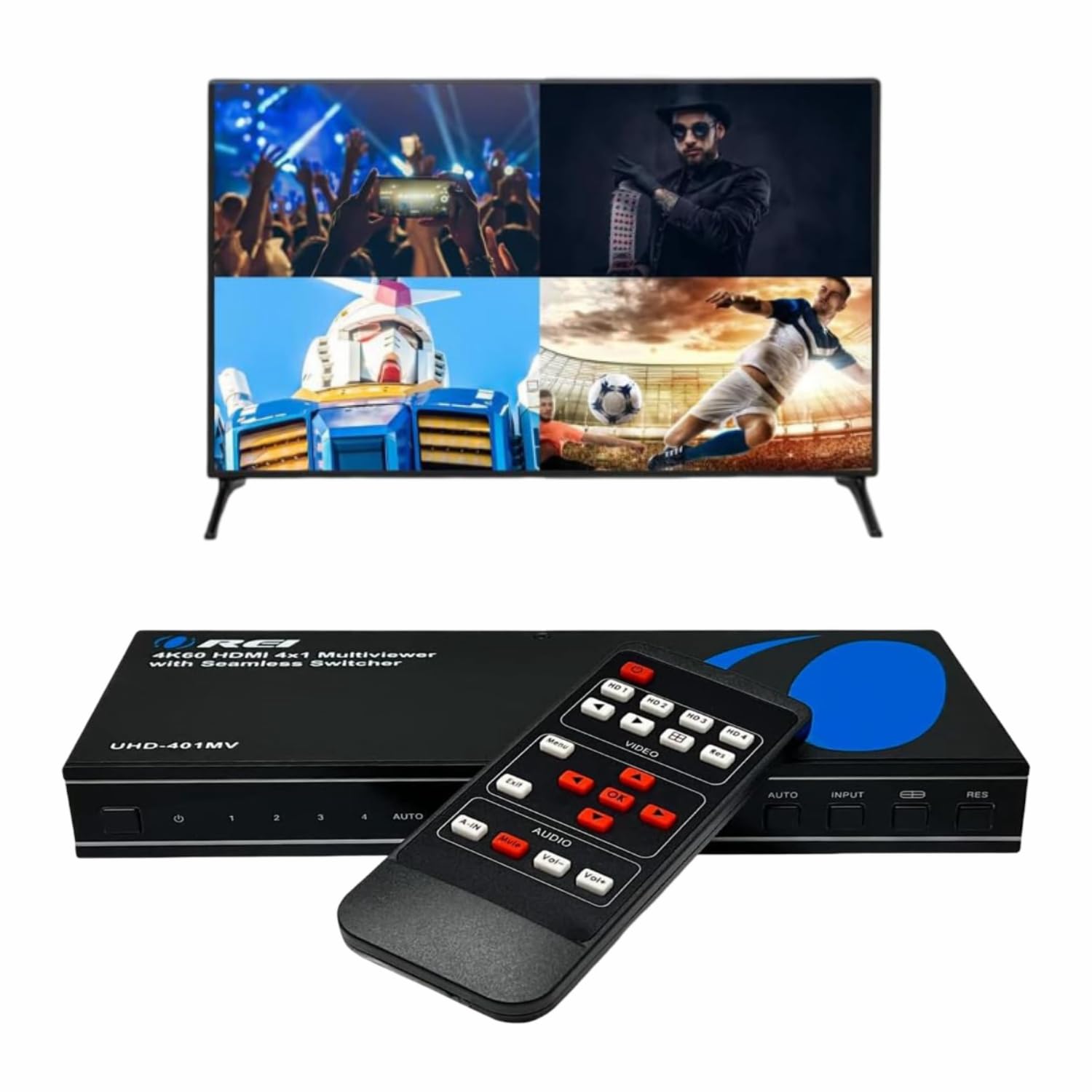
Not just a switch — this one shows four screens at once, perfect for multitasking or gaming.
The OREI UHD-401MV is a completely different product from every other switch here. Instead of just picking one input to show on your TV, it can display all four inputs simultaneously in a quad-split layout, or two side-by-side, or one big picture with a smaller picture-in-picture inset. That makes it the pick for someone who needs to monitor multiple security cameras, run four computers on one 4K monitor, or host a four-player split-screen gaming session. It supports 4K@60Hz across all modes, and the output includes both optical audio (for a sound bar or AV receiver) and L/R analog audio.
Reviewers point out the video quality is excellent, with clear text even when splitting a 43-inch monitor into four 1920×1080 quadrants. One customer observed that it works as a multi-viewer for churches and businesses that need to display multiple video feeds simultaneously. The catch is the remote. Multiple reviewers call it cheap and slow, requiring hard button presses and direct line-of-sight to the unit. The UI is described as unintuitive, and changing modes takes several keystrokes. The unit also runs warm during extended use. If you simply need to switch between four devices one at a time, the standard switches above are cheaper and easier. But if you want to see everything at once, this is the only option that does it.
The Power
- Five display modes including quad-split and picture-in-picture
- Optical audio output and L/R analog output for flexible sound setup
The Friction
- Remote feels cheap and the menu is slow to navigate
- Runs warm, and audio does not follow the active screen selection automatically
Made for multi-screen pros: If you need to watch four camera feeds, four game consoles in split-screen, or four computers on one monitor, the OREI MultiViewer is the only serious choice here.
Do not buy if: you only need to switch between devices one at a time — the simpler HDMI 2.1 switches above do that better for a fraction of the cost.
Understanding the Specs
HDMI 2.0 vs HDMI 2.1
This is the single most important spec for a switch. HDMI 2.0 handles 18Gbps of data, which is enough for 4K video at 60 frames per second (the smoothness standard for most streaming movies). HDMI 2.1 goes to 48Gbps, unlocking 4K at 120 frames per second — the target for PS5 and Xbox Series X games that support high refresh rates. HDMI 2.1 also carries VRR (variable refresh rate), which stops the screen from tearing when the game’s frame rate jumps around, and ALLM (auto low latency mode), which tells your TV to drop processing delays automatically. If you game on a modern console, HDMI 2.1 is worth the extra spend.
Auto-Switching vs Manual Switching
Auto-switching sounds wonderful: the switch detects which device just turned on and immediately shows it on screen. The problem is that most modern devices (PS5, Apple TV, Fire Stick, Xbox One) continue feeding a tiny trickle of voltage through the HDMI cable after you turn them off. This voltage tricks the switch into thinking the device is still active, so the auto-switching either does nothing or jumps randomly between inputs. That is why every reliable switch on this list also includes an IR remote or a physical button — you need a way to override auto-switching on purpose. Consider auto-switching a bonus feature, not a primary buying reason.
FAQ
Will any 4 port HDMI switch work with my PS5 at 4K 120Hz?
Do I need a powered HDMI switch with an AC adapter?
What does HDCP 2.2 or 2.3 mean for a switch?
Why does my switch show a blue screen or no signal?
Can I connect devices with different resolutions to the same switch?
Is there input lag when using an HDMI switch?
How long do HDMI switches typically last?
What is the difference between a switch and a splitter?
Will an 8K HDMI switch work with my 4K TV?
Can I use a 4 port HDMI switch with a sound bar or AV receiver?
Final Thoughts: The Verdict
For most buyers, the 4 port hdmi switch winner is the ROOFULL 4 Ports 8K HDMI 2.1 Switch because it delivers verified 48Gbps bandwidth, 4K@120Hz support, and a 2-year warranty at a mid-range price. If you want a premium aluminum build with the same 8K capability, grab the Kinivo 8K HDMI Switch. And for a reliable, simple 4K setup where long-term confidence matters most, the Philips SWV9484B/27 stands out with its limited lifetime warranty.
How We Picked
We do not accept paid placement, and we did not hands-on test every unit. Instead, we match each pick to a real buyer and use-case by comparing the manufacturers’ published specifications against the patterns in verified customer reviews — so you get each pick’s real strengths and trade-offs instead of marketing copy.
Sources & Methodology
Specifications: manufacturer listings and product documentation. Review insights: verified customer reviews, as of July 2026. Pricing: not shown on this page (it changes often); check the current price via the retailer link.
As an Amazon Associate, Gadgets Feed earns from qualifying purchases. This does not affect which products we feature.
Product prices and availability are accurate as of the date/time indicated and are subject to change. Any price and availability information displayed on Amazon at the time of purchase will apply to the purchase of this product. As an Amazon Associate I earn from qualifying purchases.
CERTAIN CONTENT THAT APPEARS ON THIS SITE COMES FROM AMAZON. THIS CONTENT IS PROVIDED "AS IS" AND IS SUBJECT TO CHANGE OR REMOVAL AT ANY TIME.
Amazon and the Amazon logo are trademarks of Amazon.com, Inc. or its affiliates.