
Our readers keep the lights on and my morning glass full of iced black tea. As an Amazon Associate, I earn from qualifying purchases.
Specs are compiled from manufacturer listings and verified buyer reviews and can change over time — please confirm the key details on the product page before buying.
Four computers, one monitor, one keyboard, one mouse — that is the whole promise of a 4 port HDMI USB KVM switch, and it is the fastest way to clear four machines’ worth of clutter off a single desk. The trick is picking one that keeps your windows where you left them and does not choke on your own monitor’s resolution. Get those two things right and switching between a work laptop, a home tower, and a pair of test boxes becomes a button press on the KVM.
I’m Min — the founder and writer behind Gadgets Feed. This guide is built by comparing the manufacturers’ published specifications and the patterns across verified customer reviews, so you get each pick’s real strengths and trade-offs instead of marketing spin.
Most of the frustration people report depends on one of three things: EDID emulation (a chip that remembers your monitor’s settings so windows stay put), USB cable requirements, or power. Below you will find the shortlist ranked by how well each handles those, with honest limits spelled out, because the right 4 port hdmi usb kvm switch depends far more on your monitor than on the box itself.
Our Picks at a Glance

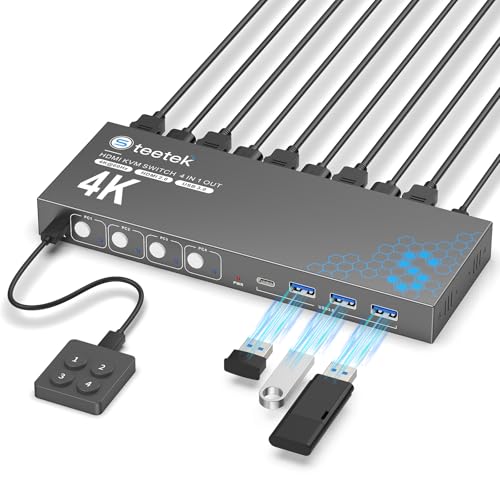
How To Choose The Best 4 Port HDMI USB KVM Switch
A 4 port KVM switch is a small box that lets four computers share one monitor and one set of keyboard and mouse. You press a button, and the screen and your input devices jump to the next machine. That sounds simple, and on paper it is — the box is mostly an HDMI switch and a USB hub. The trouble is that monitors and operating systems do not always agree about what happens at the moment of switching, which is where the real buying decisions live.
Start With EDID Emulation, Not Resolution
EDID (Extended Display Identification Data) is the little handshake where your monitor tells your computer what resolutions it supports. When you switch a KVM away from a PC, that PC briefly loses the handshake and reacts by rearranging every window on the desktop. EDID emulation fixes this by having the switch remember the monitor’s profile and keep presenting it to each computer. On the picks here that support it, your windows stay exactly where you left them. If you work across four machines all day, EDID emulation is the feature that decides whether the switch is useful or maddening.
Then Check That Your Cables and Monitor Match the Claimed Resolution
A switch advertising 4K@60Hz can only deliver 4K@60Hz if your monitor, graphics card, and the HDMI cable in between all support it. The same is true of 8K@60Hz and 4K@120Hz boxes. Cable length matters too — several makers specifically ask for short runs to hold high resolution. Buy the tier your monitor actually runs at, and skip paying for 8K if your display tops out at 4K.
Count the USB Cables You Own Before Anything Else
Every computer needs two connections to the switch: one HDMI cable for video and one USB cable for keyboard, mouse, and any shared peripherals. Some units ship with all four USB cables, some ship with none. A few models also require a separate power adapter for stable USB operation, and that adapter is not always in the box. Check the included-parts list so you are not hunting for cables on day one.
Decide How You Want to Switch
Every unit here has a physical button on the panel. Most add a wired remote so you can bury the box behind your monitor and keep the switch within reach. What almost none of them offer is keyboard hotkey switching — a real surprise for anyone coming from a hotkey-driven KVM. If tapping a key combination is how you work, check that detail carefully before buying.
Quick Comparison
| Model | Best For | Max Resolution | USB Ports | Switching | Amazon |
|---|---|---|---|---|---|
| UGREEN HDMI KVM Switch 4 Computers★ Best Overall | Overall balance of features and brand support | 4K@60Hz | 4x USB 3.0 + 2x USB 2.0 | Button + desktop controller | Amazon |
| MISOTT 8K60Hz 4 Port KVM SwitchSharpest Picture | High-resolution video work and gaming | 8K@60Hz / 4K@120Hz | USB 3.0 | Button + external controller | Amazon |
| Hearvo USB 3.0 HDMI KVM Switch S7415HMost Proven | Widest real-world track record | 4K@60Hz | 4x USB 3.0 | Button + wired remote | Amazon |
| PVBCTCSID USB3.0 HDMI KVM Switch | Metal build and remote switching | 4K@60Hz | 4x USB 3.0 | Button + IR remote | Amazon |
| DXchip 8K HDMI 2.1 KVM Switch | Highest refresh rate on the list | 8K@60Hz / 4K@144Hz | 4x USB 3.0 | Button + wired controller | Amazon |
| ANGEET 4 Port HDMI KVM Switch | Plug-and-play simplicity | 4K@60Hz | 4x USB 3.0 | Button + wired remote | Amazon |
| ANXQQ 4K HDMI KVM Switch | Small footprint on a crowded desk | 4K@60Hz | 4x USB 3.0 | Button + 1.5m remote | Amazon |
| AOOCOO KVM Switch HDMI 4K@60Hz | Compact wired-remote setup | 4K@60Hz | 4x USB 3.0 | Button + wired remote | Amazon |
In‑Depth Reviews
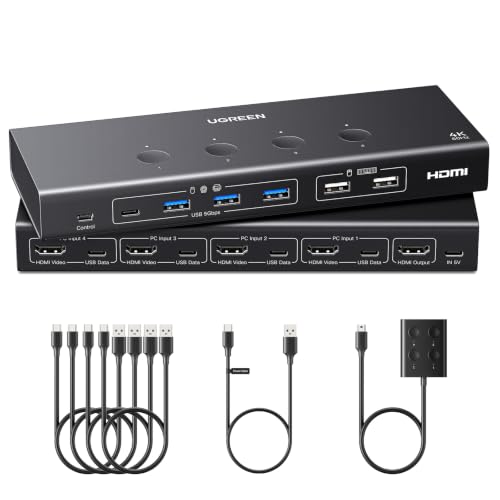
1. UGREEN HDMI KVM Switch 4 Computers Share 1 Monitor, 4K@60Hz, 6 USB Ports
Our pick — 4.5+★ from 80+ verified ratings; the strongest balance of quality and price.
Six USB ports and a desktop controller make this the one that keeps your whole desk attached to four machines at once.
The number that earns this box its spot is six: four USB 3.0 ports plus two USB 2.0 ports, sharing flash drives, printers, webcams, and external drives across all four computers. USB 3.0 moves data at up to 5Gbps (gigabits per second), while the USB 2.0 pair runs at 480Mbps — so a large video file copies in seconds on the blue ports and slower on the black ones. It also has the most physical connections of any pick here, which means fewer dongles and hubs fighting for space.
EDID emulation is built in and switched on by holding the button for about five seconds until the indicators flash three times. Once active, each computer keeps seeing your monitor and its resolution, so windows stay put instead of scattering across the desktop every time you switch. That is the single biggest quality-of-life feature in this category, and UGREEN handles it the same way the pricier 8K boxes do — with the added advantage that this one also runs 1080P240Hz for high-refresh gaming panels.
The catch is the cable situation. Every computer needs both an HDMI cable and a USB A to C data cable running to the switch, and neither the HDMI cables nor the power adapter come in the box — only the four USB-A to C cables do. UGREEN also states plainly that docking stations are not supported. If your four machines are laptops on docks, that limitation matters more than any spec on this page.
What earns it the top slot
- Six USB ports — four at USB 3.0’s 5Gbps speed, two at 480Mbps
- EDID emulation keeps window positions intact across switches
- 4K@60Hz with HDMI 2.0, HDCP 2.2/1.4, 3D and HDR support
- Desktop controller lets you hide the box and switch from the desk
- Works across Windows, MacOS and Linux with no software
Where it asks more of you
- HDMI cables and the power adapter are not included
- Docking stations are explicitly unsupported
- Each PC needs its own USB A to C data cable to pass peripherals
Reach for it when: you run four desktop machines directly, want the most USB devices shared at once, and can supply your own HDMI cables and power brick.
Look elsewhere if: your computers connect through docking stations — this one will not pass that setup.
2. MISOTT 4 Port HDMI KVM Switch 1 Monitor 4 Computers, 8K60Hz 4K120Hz USB 3.0
This is the only box on the shortlist that pushes 8K@60Hz, and it does 4K at 120Hz while it is at it.
When resolution is the deciding factor, this one wins outright: 8K at 7680 x 4320 and 60Hz, or 4K at a smooth 120Hz for gaming and video scrubbing. That is double the vertical pixel count of every 4K@60Hz pick here, which matters if you edit high-resolution footage or design in fine detail all day. It also runs the longest of the group at 10.24 inches, so it fills a stretch behind your monitor rather than hiding in a corner.
Switching is a single button press or the included external desktop controller — no software, no drivers, no setup steps. USB 3.0 ports move files at up to 5Gbps and stay backward compatible with USB 2.0 peripherals, so an older printer or scanner still works. The maker also notes hotkey switching is not supported, which is worth knowing before you buy if you are used to tapping a key combination.
Here is the honest part: 8K@60Hz only shows up if your PC, monitor, and HDMI cables all support it. Feed this box a 4K monitor and you get 4K — you simply paid for headroom you may never use. Buy it for a display you already own at 8K@60Hz or 4K@120Hz, not for the promise of one you might buy later.
Resolution insurance: 8K@60Hz and 4K@120Hz give you genuine headroom for a future display upgrade, and the included power supply and external controller mean fewer extras to chase down.
Buy it only for the panel you have: if your monitor tops out at 4K@60Hz, a cheaper 4K box delivers the same picture you will actually see.
The fit: video editors, designers, and gamers with a high-resolution or high-refresh display already on the desk.
The mismatch: a 1080P or plain 4K@60Hz monitor will leave most of this box’s capability unused.
3. Hearvo USB 3.0 HDMI KVM Switch for 4 Computers 1 Monitor, 4K@60Hz, S7415H
Eight hundred ratings deep, this is the box that the most people have actually lived with for months.
Sheer volume of owner experience is the reason this one climbs so high — 4.0+ stars across 800+ ratings, which is the largest track record on this page by a wide margin. What wins people over is simple reliability: it switches when asked, it sets up without a driver, and the wired remote lets you bury the box and keep the button on the desk. The recurring gripe is compatibility, particularly with MacBooks, and power supply quirks come up often enough to plan for.
On paper it is a straightforward 4K@60Hz unit with HDCP 2.2 (the copy-protection handshake streaming services require), so HDCP-protected content plays without blackouts. Adaptive EDID automatically tune display settings to hold a stable image across switches, and it is backward compatible with 4K@30Hz, 2K, 3D and 1080P. You also get a full kit in the box: HDMI cable, four USB 3.0 cables, wired remote, and four anti-slip pads.
Where it earns a caution: this is a PC-and-Mac box first. If your four machines are MacBooks, expect a rougher ride than the rating suggests, and test the first one before you commit the other three. For a desk full of Windows towers, though, it is the safest bet on the list.
The track record: more real-world history than any other pick here, with the full cable kit included so setup day is not a scavenger hunt.
The Mac question: compatibility is the mixed note in its feedback, with MacBooks singled out — check yours first if that is your setup.
Best for: a Windows-heavy desk where you want the least-surprising, best-documented box and everything included in one order.
Think twice if: all four of your computers are MacBooks — this is the one area its feedback flags.
4. PVBCTCSID USB3.0 HDMI KVM Switch 4 Computers EDID 4K@60Hz

An aluminum chassis and an infrared remote that works from across the room, not just from the desk edge.
Build quality is what this one leads with — an aluminum body rather than the plastic shell most of this category uses, and that is also the thing owners single out most. The switching is genuinely different too: a pushbutton on the panel, or an infrared remote you can aim at the switch or at an included IR extender placed outside the work area. That means you can tuck the box in a cabinet and still change computers without leaving your chair.
Video tops out at 4K@60Hz and steps back cleanly through 4K@30Hz, 1080P@60Hz and 720P@60Hz. Four USB 3.0 ports run at up to 5Gbps — the maker puts that at ten times USB 2.0’s speed — for keyboards, mice, printers, scanners and cameras, all backward compatible with older USB 2.0 gear. It is plug-and-play across Windows, Vista, XP, Mac OS, Linux and Unix, and a power adapter and four USB A-A cables come in the box.
Two things to plan around. Hotkey switching is not supported, so it is the remote or the button, nothing else. And the box wants its own USB power supply connected — its feedback flags connectivity without one — so budget a free outlet near the switch.
Why it earns a look
- Aluminum construction instead of plastic, with an IR remote and extender
- Four USB 3.0 ports at 5Gbps, backward compatible with USB 2.0
- Power adapter and cables included in the box
- Works across Windows, Mac OS, Linux and Unix
What to know up front
- No keyboard hotkey switching — remote or button only
- Needs its own USB power supply connected for reliable operation
- 4K@60Hz ceiling, no 8K support
Pick it when: you want a metal box you can hide in a cabinet and control from across the room by remote.
Pass if: keyboard hotkeys are how you switch today, because this one does not offer them.
5. DXchip 8K HDMI 2.1 KVM Switch 4 Computers 1 Monitor, 4 Port 4 In 1 Out

A 4K@144Hz ceiling makes this the fastest-moving picture on the list, built on an HDMI 2.1 foundation.
If you game on a high-refresh panel, refresh rate is the number that matters, and 4K@144Hz beats every other pick here including the 4K@120Hz MISOTT. It handles 8K@60Hz too, and steps down through 4K@30Hz and 1080P for older displays. The HDMI 2.1 labeling is the reason it can carry that much through a single cable. The maker is candid that final resolution depends on your graphics card, monitor, cables and adapters — and that cable runs should stay at or under 1.5M to hit peak performance.
EDID emulation here is switchable rather than fixed: hold the PC1 button for three seconds to turn the emulator on or off. Leave it on for multitasking and your window layout stays exactly where you left it across switches. Off, and you get clean handshakes for troubleshooting a stubborn display. Four USB 3.0 ports at 5Gbps handle keyboard, mouse, printer, scanner or camera, though the maker is explicit that each PC needs its own USB cable to the KVM for those devices to work.
The realistic caution is cabling. A box tuned for 8K and 4K@144Hz is only as fast as the HDMI cable feeding it, so long runs will quietly cap you well below the rated ceiling. Keep cables short and certified and it delivers; stretch a thin old cable across the room and it will not.
The high-refresh case: 4K@144Hz is the headline, and it is the only pick here that pairs it with switchable EDID so your window layout survives every switch.
The cable tax: peak resolution requires short, capable HDMI runs at or under 1.5M — long or cheap cables will dethrottle the whole chain.
Suits you if: a 144Hz monitor and a gaming or motion-heavy workflow are already on your desk and you keep cables short.
Not for you if: you need long cable runs across a room — that setup caps you below this box’s rated ceiling.
6. ANGEET 4 Port HDMI KVM Switch 4K@60Hz with EDID Emulation

Driver-free on Windows, Mac, Linux and Chrome OS — plug in the cables and it works, no software to fight.
Cross-platform plug-and-play is this box’s selling point. It works without drivers on Windows, Mac OS, Linux and Chrome OS, and it is compatible with HDMI sources including PS5, PS4, TV boxes, desktops and laptops. The EDID emulation is the better kind, too — it stores the display’s resolution and refresh rate so that when you switch away and back, your original window positions are still there rather than shuffled. For a conference room or classroom where different machines get plugged in daily, that is the feature that keeps sessions smooth.
Video runs to 4K@60Hz and steps back through 4K@30Hz and 2560×1440@120Hz — that last one is a nice touch for ultrawide monitors, which many budget KVMs mishandle. Four USB 3.0 ports transfer at up to 5Gbps for sharing keyboards, mice, printers and flash drives. The kit is thorough: four USB 3.0 cables, an HDMI 2.0 cable, a wired remote, and a power adapter all come with it, plus a year of coverage.
The trade-off is that wired remote. It is a tethered control, not a wireless one, so you get a cable running to where you want the button. Fine if the switch sits within reach behind the monitor; less tidy if you were hoping to control it across the room.
Standout strengths
- Driver-free on Windows, Mac OS, Linux and Chrome OS
- EDID emulation that preserves window positions across switches
- Handles 2560×1440@120Hz for ultrawide monitors
- Full kit: four USB cables, HDMI cable, remote and power adapter
Worth knowing
- The remote is wired and tethered, not wireless
- 4K@60Hz ceiling rather than 8K or 120Hz at 4K
Go with it for: mixed Windows/Mac/Chrome OS desks and shared rooms where a new machine gets plugged in every day.
skip it if: you need untethered control from across the room — this remote has a cable.
7. ANXQQ 4K HDMI KVM Switch 4 Computers 1 Monitor, EDID, 4 USB 3.0 Ports
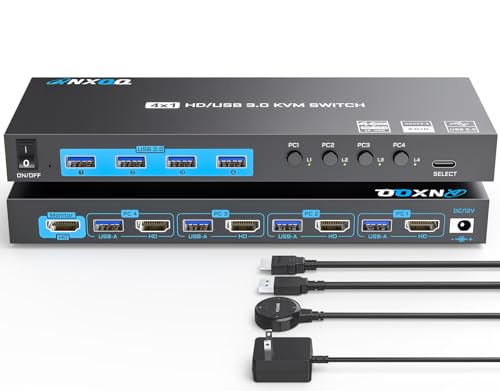
A small metal box with four buttons and LEDs, built to disappear behind a monitor instead of joining the clutter.
Space is at a premium on a four-computer desk, and this is one of the slimmer options in the group. Four physical buttons map to PC1 through PC4, each with its own LED, so a glance tells you which machine is live. A 1.5m wired remote gives you a second way to switch without leaning behind the monitor. Every computer needs its own HDMI and USB cable run to the box, and the maker asks that you keep those cables short — under 5ft — for reliable high resolution.
EDID is on board, so switching from PC1 to PC2 and back leaves PC1’s desktop layout exactly as it was. Video runs to 4K@60Hz and steps back through lower resolutions. The USB side is four 3.0 ports at 5Gbps — the maker puts that at ten times USB 2.0 — feeding a webcam, printer, or external drive across all four machines, backward compatible with USB 2.0. It plays nicely with Windows 11 down through XP, plus Mac OS, Linux and Chrome OS.
Two practical notes. Hotkey switching is not on the menu, so it is the panel buttons or the remote. And the maker recommends plugging in the DC/12V power supply for stable operation — it comes in the box, but it does need an outlet.
Small and straightforward: four labeled buttons with LEDs, a 1.5m remote, and an 12V adapter included — a tidy fit for a crowded desk.
The cable constraint: the maker wants HDMI runs under 5ft for high resolution, so this is not the box for a monitor across the room.
Made for: a compact four-machine setup where the box lives behind the monitor and cable runs stay short.
Not ideal if: your monitor sits far from the computers — the short-cable guidance caps your resolution.
8. AOOCOO KVM Switch HDMI 4K@60Hz with Simulation EDID for 4 Computers

A compact 4-in-1-out switch that shares four USB 3.0 devices and keeps your windows in order.
Simulation EDID (a chip that remembers your monitor’s settings) is the feature to care about here — the switch stores your display’s resolution and refresh rate so that when you hop from PC1 to PC2 and back, PC1’s windows are still in the order you left them. It also auto-identifies the best resolution when a new display is connected, which saves fiddling on first setup. Video runs to 4K@60Hz (sharp enough for detailed spreadsheets) and 2K@120Hz (smoother motion for video editing), backward compatible to lower resolutions.
Four USB 3.0 ports run at up to 5Gbps and recognize wireless keyboards, mice, printers and scanners, dropping back to USB 2.0 and USB 1.1 devices without complaint. You switch via the panel button or the included wired remote — practical if the box sits out of reach behind a monitor. It is a compact unit, so it tucks into a small gap rather than commanding desktop real estate.
Its owner feedback is more mixed than most here — quality reads strong, but functionality draws the split verdict, which usually means the basics work and the edges need care. Buy it knowing your HDMI and USB cables must both run to each PC, and that the highest resolution depends on all three pieces of the chain agreeing.
Good to have
- Simulation EDID preserves window order across switches
- 4K@60Hz and 2K@120Hz support with auto resolution detection
- Four USB 3.0 ports at 5Gbps, backward compatible to USB 1.1
- Compact body with wired remote included
Where to stay alert
- Functionality draws a split verdict in owner feedback
- Requires both HDMI and USB cables from every computer
Works well if: you want a compact EDID-equipped switch with a wired remote and you are comfortable checking the cable setup twice on install.
Better to look further if: you want a long proven track record — this one’s history is shorter.
Understanding the Specs
EDID Emulation
EDID is the handshake where your monitor tells the computer which resolutions it can display. Without emulation, a KVM briefly cuts that link when it switches away, and Windows or Mac OS reacts by rearranging your windows. EDID emulation stores the monitor’s profile inside the switch and keeps presenting it, so each computer believes it is still connected. On a four-machine desk this is the difference between switching freely and re-arranging your desktop four times an hour.
USB 3.0 vs USB 2.0 Ports
USB 3.0 moves data at up to 5Gbps, while USB 2.0 caps at 480Mbps. For a keyboard or mouse, either is plenty. For moving large files to a shared external drive, or connecting a webcam, USB 3.0 is what keeps you from waiting. A switch with a mix — like four 3.0 and two 2.0 — lets you put the fast peripherals on the fast ports.
Resolution and Refresh Rate
4K@60Hz means 3840 x 2160 pixels refreshed 60 times a second. 8K@60Hz roughly quadruples that pixel count, and 4K@120Hz or 4K@144Hz doubles the refresh. Higher numbers mean smoother motion and finer detail — but only if your monitor, graphics card and HDMI cable all support them. A switch cannot create resolution your display does not have.
Switching Methods
Every unit here has a panel button. Most add a wired remote so you can place the box out of sight and still switch. A few support an infrared remote that works from across the room. Almost none support keyboard hotkeys, so check that if hotkeys are how you work. Whichever method you choose, the switch happens in a press — the difference is only whether your hand is on the box, the wired remote, or the IR remote.
FAQ
Do I need one USB cable per computer, or just HDMI?
Will EDID emulation stop my windows from rearranging?
Does a 4 port KVM switch need its own power supply?
Can I use a KVM switch with a laptop docking station?
Do these switches support keyboard hotkey switching?
What resolution can I actually get from a 4K@60Hz KVM?
Does the HDMI cable length affect picture quality through a KVM?
Will my USB 2.0 printer and older peripherals work with a USB 3.0 KVM?
Can I connect a gaming console to one of these switches?
How fast is the file transfer between computers and a shared drive?
Final Thoughts: The Verdict
For most desks, the 4 port hdmi usb kvm switch to reach for is the UGREEN HDMI KVM Switch — six USB ports, working EDID emulation, and a desktop controller make it the most complete package here. If your monitor out-resolves a 4K@60Hz box, the MISOTT 8K model covers the high-resolution end. And if you value a genuinely long track record over brand polish, the Hearvo S7415H is the box more people have actually lived with — just check the MacBook question first if that is your setup.
How We Picked
We do not accept paid placement. Every pick is matched to a real buyer and a real use-case; we do not hands-on test units.
Sources & Methodology
Specifications: manufacturer listings and product documentation. Review insights: verified customer reviews, as of November 2026. Pricing: not shown on this page (it changes often); check the current price via the retailer link.
As an Amazon Associate, Gadgets Feed earns from qualifying purchases. This does not affect which products we feature.