
That single cramped USB-A port on your ultrabook is a bottleneck you shouldn’t have to live with. A quality 4-port USB 3.0 hub transforms one connection into four dedicated lanes, letting you keep your mouse receiver, keyboard dongle, flash drive, and external SSD plugged in simultaneously without the constant shuffle of swapping cables.
I’m Min — the co-founder and writer behind Gadgets Feed. I’ve spent countless hours analyzing data transfer benchmarks, build material density, and port power delivery specifications to separate the hubs that deliver consistent 5 Gbps throughput from those that drop connections under load.
Whether you need a permanent desk dock or a travel companion that disappears into a bag, the best 4 port usb 3.0 hub balances physical durability with electrical stability so your workflow never stutters.
How To Choose The Best 4 Port USB 3.0 Hub
Every 4-port hub appears identical in marketing photos, but the internal controller chip, power delivery design, and physical construction separate a reliable tool from a frustration that corrupts your data or disconnects mid-transfer. Here’s what to evaluate before clicking buy.
Bus-Powered vs. Self-Powered Design
A bus-powered hub draws all its electricity from your laptop or PC’s single USB port. This works fine for low-draw devices like mice, keyboards, and flash drives. But if you plan to connect two or more bus-powered external hard drives or power-hungry peripherals simultaneously, you will encounter dropouts, slow transfer speeds, or device failure. A self-powered hub includes an external power adapter that delivers the full 900mA per port required by the USB 3.0 specification, ensuring stable operation regardless of load.
Data Transfer Consistency
Every hub advertises “up to 5Gbps,” but real-world throughput depends on the quality of the controller chip (VIA, Genesys Logic, or Microchip) and the electrical shielding inside the enclosure. Cheap hubs with poorly shielded ports introduce signal noise that throttles performance when multiple devices transfer simultaneously. Look for hubs with independent power regulation per port if you regularly move large video files or run backup software.
Physical Form Factor and Cable Length
A hub that’s too small might crowd your ports, while one with a cable shorter than 12 inches forces your laptop into an awkward position. For desktop use, a cable of 2 feet or longer gives you placement flexibility. For travel, an ultra-compact design with an integrated 5-inch tail fits neatly into a laptop sleeve pocket. Also check port spacing — some hubs cram ports so tightly that two wide USB drives cannot sit side by side.
Quick Comparison
On smaller screens, swipe sideways to see the full table.
| Model | Category | Best For | Key Spec | Amazon |
|---|---|---|---|---|
| SABRENT HB-UM43 | Mid-Range | Individual port control | Individual LED power switches | Amazon |
| Anker Ultra Slim | Mid-Range | Build quality & warranty | Heat-resistant enclosure | Amazon |
| Cable Matters Ultra Mini | Mid-Range | Travel portability | 1 oz weight, 5-inch cable | Amazon |
| Acer UH501 | Mid-Range | Extra power input | 5V USB-C power port | Amazon |
| ORICO Clamp Hub | Premium | Desk mounting | Aluminum, adjustable clamp | Amazon |
| Belkin F4U058TT | Premium | Powered high-power devices | AC-powered, 5Gbps transfer | Amazon |
| StarTech.com ST4300USB3 | Premium | IT Pro reliability | 900mA per port powered | Amazon |
In‑Depth Reviews
1. SABRENT 4-Port USB 3.0 Hub (HB-UM43)

The SABRENT HB-UM43 stands apart from the crowd with individual LED-lit power switches for each of its four USB 3.0 ports. This feature lets you disconnect a specific device without unplugging the cable — a genuine convenience when you need to reset a stubborn flash drive or save power on a laptop running on battery. The slim ABS enclosure measures just 3.44 by 1.28 inches and weighs 2.2 ounces, making it unobtrusive on any desk.
Data transfer reaches the full 5 Gbps ceiling that USB 3.0 allows, and the 2-foot cable provides enough slack to position the hub away from your laptop’s cramped port area. Multiple verified buyers report flawless operation with audio interfaces like the Topping E30II DAC and Allen & Heath PX5 on M4 MacBook Airs, which is a strong indicator of clean power delivery and stable signal integrity.
One caveat: the electronic power switch resets on MacBook Pro reboots, which may disrupt Time Machine backups. This hub is also explicitly not designed for charging tablets or phones. For users who prioritize per-port control and a proven track record with sensitive audio gear, the SABRENT delivers category-leading reliability at a mid-range price point.
Why it’s great
- Individual on/off switches with LED indicators per port
- Proven compatibility with audio interfaces and DACs
- Lightweight 2.2 oz design with 2-foot cable
Good to know
- Power switch resets on MacBook Pro reboot
- Not intended for charging devices
2. Belkin 4-Port USB 3.0 Hub (F4U058TT)

Belkin’s F4U058TT is a self-powered hub that includes an AC adapter, ensuring each of its four USB-A ports receives consistent power for reliable operation with external hard drives, printers, and even fast charging of connected devices. The slim profile and 2.24-ounce weight make it travel-ready, while the SuperSpeed USB 3.0 cable delivers the full 5 Gbps data rate for moving large media files or backing up projects.
Customer feedback highlights its ability to drive three self-powered external hard drives simultaneously on a 2012 MacBook Pro — a workload that chokes bus-powered hubs. The hub is backward compatible with USB 2.0 peripherals, so your older flash drives and keyboards work without issue. The enclosure material feels substantial in hand, and the compact footprint fits neatly on a crowded desk or inside a laptop bag.
Some Mac users report intermittent disconnects on Retina MacBook Pros, particularly with bus-powered devices. The Micro-B receptacle can feel less sturdy than a fixed-cable design. For users who need a powered hub for demanding multi-drive workflows and value the Belkin brand’s warranty support, this remains a strong premium choice.
Why it’s great
- AC-powered for stable multi-drive operation
- Compact, travel-friendly design at 2.24 oz
- Backward compatible with USB 2.0 devices
Good to know
- Occasional disconnect issues with Retina MacBook Pros
- Micro-B connection point may feel less durable
3. StarTech.com 4-Port USB 3.0 Hub (ST4300USB3)

StarTech.com built the ST4300USB3 for IT professionals who cannot tolerate dropped connections or data corruption. This powered hub delivers up to 900mA per port via its included power adapter, exceeding the USB 3.0 specification and ensuring that bus-powered hard drives, DVD burners, and multiple flash drives all operate at full speed simultaneously. The 3.7 by 2.7 by 0.9-inch footprint is remarkably compact for a powered unit.
Transfer speeds consistently hit the 5 Gbps ceiling in benchmarks, and users report flawless daisy-chaining with additional hubs without signal degradation. The hub functions without the power adapter in low-load scenarios, but StarTech strongly recommends using it for any workload involving storage devices. The 2-year warranty and lifetime multilingual technical support add peace of mind for commercial or mission-critical setups.
The included 2A power supply technically falls short of the total 3.6A required to fully populate four ports to spec. Some users also note that the USB-A ports sit closely together, making it impossible to plug in two wide flash drives side by side. For those who prioritize electrical stability and professional-grade build over port spacing, the StarTech delivers exceptional reliability.
Why it’s great
- 900mA per port with included power adapter
- Daisy-chain capable without speed loss
- 2-year warranty with lifetime tech support
Good to know
- Ports too close for wide USB drives side by side
- Included 2A power supply is underspec for full load
4. ORICO USB 3.0 Hub Clamp

ORICO’s clamp hub solves the “where do I put this?” problem by attaching directly to your monitor or desk edge via an adjustable screw mechanism that accommodates thicknesses from 0.39 to 1.26 inches. The aluminum alloy enclosure dissipates heat rapidly and feels substantial — no cheap plastic creak here. The 4.92-foot USB data cable gives you generous positioning freedom.
Each of the four USB 3.0 ports delivers full 5 Gbps speeds, and an extra power supply port lets you connect an optional adapter for high-power devices. The plug-and-play design requires no drivers on Windows, Mac, Linux, or Chrome OS. Users with permanent desk setups love that the clamp hub keeps ports accessible without cluttering the work surface.
The clamp’s rubber padding may not fit all desk thicknesses — some users had to remove the rubber pad to attach it to standard office desks. The included power adapter is not included in the box, so you must purchase one separately if you plan to power high-draw peripherals. For a clean desk aesthetic with strong build quality, the ORICO clamp hub is a uniquely practical solution.
Why it’s great
- Clamp mount keeps desk clutter-free
- Aluminum enclosure for heat dissipation
- Long 4.92-foot USB data cable
Good to know
- Power adapter not included
- Clamp may not fit thicker desks without modification
5. Cable Matters Ultra Mini 4 Port USB Hub
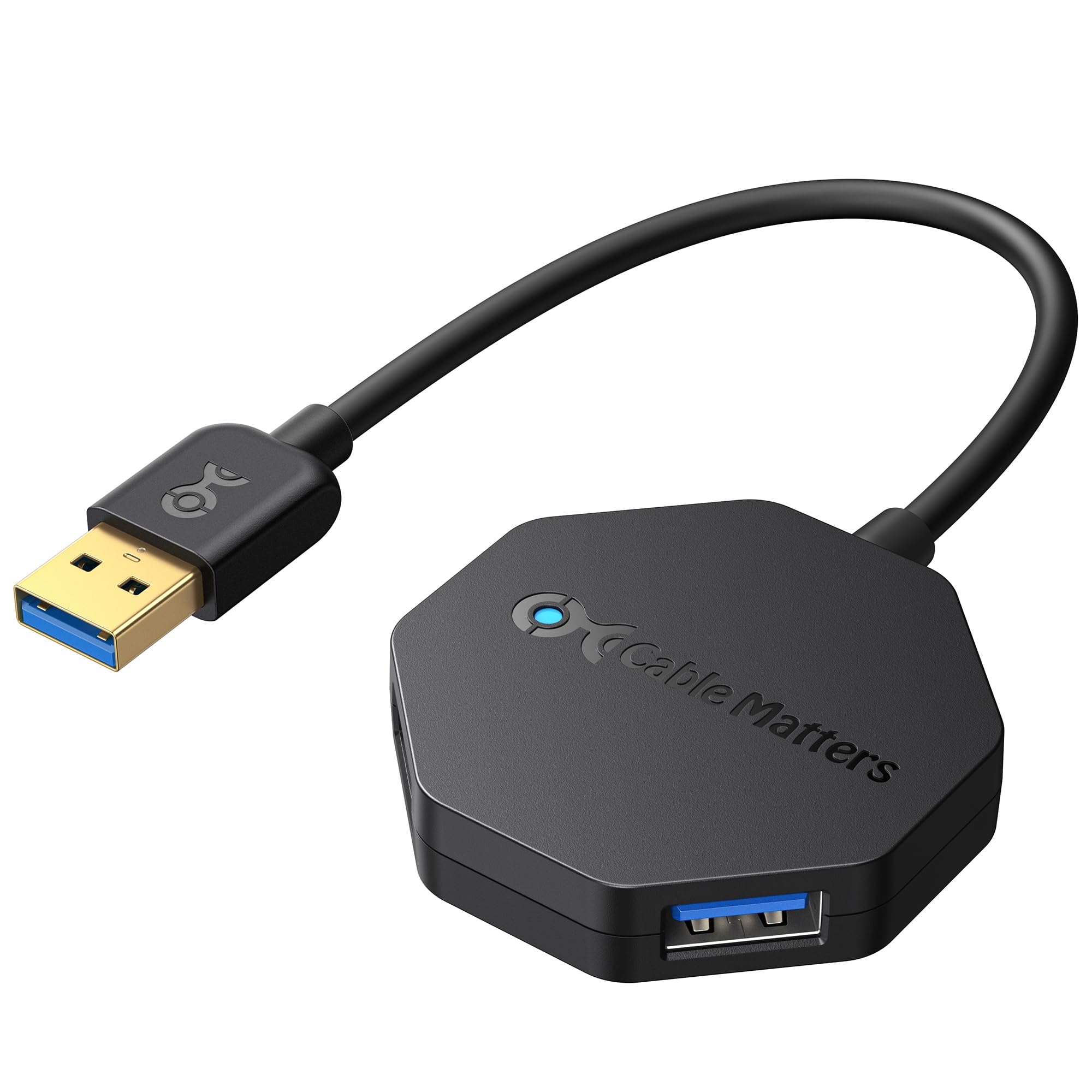
At just 1 ounce with a footprint of 2 by 2 by 0.4 inches, the Cable Matters Ultra Mini is the most travel-friendly hub in this lineup. The octagonal shape provides generous spacing for all four ports despite the tiny size, and the integrated 5-inch flexible cable tucks back into the hub body for zero-bulk storage in a laptop bag pocket. The bus-powered design means no wall wart to carry.
Performance meets the 5 Gbps standard, and over-current protection safeguards connected devices. Backward compatibility with USB 2.0 and 1.1 ensures older peripherals work without issue. Users frequently pair this hub with MacBook Airs for on-the-go expansion, and the octagonal layout prevents the common problem of adjacent plug bodies blocking each other.
Some users report cursor-jumping issues when using Logitech MX Master mouse receivers through this hub, a quirk that disappears when connecting the receiver directly to the laptop. The short 5-inch cable can also feel restrictive for desktop use where the hub must sit farther from the machine. For frequent travelers who prioritize minimal weight and small volume above all else, the Cable Matters delivers exactly that.
Why it’s great
- Ultra-light 1 oz design perfect for travel
- Octagonal layout prevents port blockage
- Over-current protection for connected devices
Good to know
- 5-inch cable is too short for desktop use
- Compatibility issue with Logitech MX Master receiver
6. Acer 4 Port USB 3.0 Hub (UH501)

Acer’s UH501 introduces a clever hybrid approach: a dedicated USB-C power input port (labeled “IN 5V”) that supplies external power to stabilize data transfers on the four USB-A ports. This means you can use a standard phone charger to provide the extra juice needed for external hard drives without buying a proprietary power brick. The built-in GL3510 controller chip manages thermal performance well, keeping data safe during long transfers.
Each port delivers up to 5 Gbps, and the 0.7-foot cable keeps the hub close to your laptop — ideal for portable setups where you don’t want excess cable slack. The LED indicator confirms power status at a glance, and the lightweight 1.6-ounce ABS body slips easily into a bag. Compatibility spans Windows, macOS, Chrome OS, and Linux.
Without the external USB-C power connected, the hub cannot reliably run external HDDs — the power port is strictly for feeding the USB-A ports, not for data or charging other devices. One user accidentally connected a high-voltage router adapter and blew a capacitor, indicating limited over-voltage protection. For users who need a compact portable hub that can optionally accept supplementary power, the Acer offers flexibility at a mid-range price.
Why it’s great
- USB-C power input stabilizes HDD transfers
- GL3510 chip provides good thermal management
- Lightweight and highly portable
Good to know
- Requires external power for hard drives
- Limited over-voltage protection on power input
7. Anker Ultra Slim 4-Port USB 3.0 Hub

Anker’s Ultra Slim 4-Port Hub is the entry-level champion for users who need a simple, reliable port expansion without frills. The plastic enclosure is precision-designed for heat resistance and durability, and the 4.23 by 1.23 by 0.39-inch footprint is slim enough to slide under a laptop stand. Transfer speeds reach 5 Gbps, enough to move an HD movie in seconds.
Verified buyers consistently praise instant port recognition on Lenovo Legion laptops and single-port ultrabooks. The hub handles mouse, keyboard, USB drive, and even external HDD duty without hiccups, as long as total power draw stays within what the host port can supply. The 18-month warranty is a welcome safety net at this price tier.
Like all bus-powered hubs, it cannot charge phones or tablets, and populating all four ports with high-power devices may exceed system power limits — some users need to replug when connecting power-hungry gear. The 2-foot cable is adequate but not generous for desktop setups where the PC tower sits under a desk. For a straightforward, no-compromise budget option from a trusted brand, the Anker delivers exactly what it promises.
Why it’s great
- Reliable plug-and-play with major laptop brands
- Heat-resistant construction for long-term use
- 18-month warranty from a top-tier brand
Good to know
- Not designed for device charging
- May need replug with high-power peripherals
FAQ
Can I charge my phone through a 4-port USB 3.0 hub?
Why do my external hard drives disconnect when using a bus-powered hub?
Will a 4-port USB 3.0 hub slow down my data transfer speed?
Final Thoughts: The Verdict
For most users, the best 4 port usb 3.0 hub winner is the SABRENT HB-UM43 because its individual port switches and proven compatibility with sensitive audio gear deliver practical value that no other hub matches at a mid-range price. If you need to power multiple external hard drives without dropouts, grab the StarTech.com ST4300USB3. And for keeping your desk clutter-free, nothing beats the ORICO Clamp Hub.