
Our readers keep the lights on and my morning glass full of iced black tea. As an Amazon Associate, I earn from qualifying purchases.
Specs are compiled from manufacturer listings and verified buyer reviews and can change over time — please confirm the key details on the product page before buying.
Your RTX 4070’s power connector is the one spot where a cheap mistake can fry your whole graphics card. You need a cable or adapter that clicks in fully, uses thick enough wire, and handles the card’s power without getting hot. Here are the nine best 4070 power connector options, judged by what actually matters: build quality, wire gauge, length, and if you need a straight cable or a 90-degree bend.
I’m Min — the founder and writer behind Gadgets Feed. This guide is built by comparing the manufacturers’ published specifications and the patterns across verified customer reviews, so you get each pick’s real strengths and trade-offs instead of marketing spin.
Whether you are replacing a melted adapter or just want a cleaner build, these picks cover every scenario for the 4070 power connector.
Our Picks at a Glance


How To Choose The Best 4070 Power Connector
The RTX 4070 family uses a 16-pin (12+4) port, but not all power solutions are the same. You have three paths: a direct cable from a PCIe 5.0 power supply, a male-to-female extension that works with your existing PSU cables, or a 90-degree adapter for tight cases.
Direct Cable vs. Extension vs. Adapter
Cables that plug straight into a PCIe 5.0 power supply are the cleanest option but only work if your PSU has that port. Extensions like the EZDIY-FAB connect your GPU to your existing 8-pin PSU cables, which is why they need two or three free ports. Adapters are the shortest fix, often adding just a few centimeters to change the angle near the card.
Why 16AWG Wire Beats Thinner Options
The wire gauge tells you how much current the cable can carry without heating up. Most quality options use 16AWG tinned copper, which supports up to 600W and keeps voltage stable. Some cheaper cables use thinner 18AWG wire, which is why you see recurring complaints about warmth under load. For a 4070, 16AWG is the safe baseline.
Type A vs. Type B Right-Angle Connectors
If your case is tight against the side panel, a 90-degree connector is your friend. The direction the cable exits matters: Type A works when the cable should point down or up from the card, while Type B suits cards where the connector sits below the cable routing. Checking your GPU’s port orientation before buying saves you a return.
Connection Depth and Seating
The 12VHPWR design is sensitive to partial insertion. A connector that is not fully seated can create resistance and heat. Look for cables with solid alloy copper terminals and a snug fit, and check that you hear a click when the plug goes in. Several buyers report that a properly seated third-party cable solved black-screen issues that the stock adapter caused.
Quick Comparison
| Model | Best For | Connection Style | Wire Gauge | Length | Amazon |
|---|---|---|---|---|---|
| EZDIY-FAB 12VHPWR PSU Cable★ Best Overall | Direct PSU-to-GPU with clean routing | Male-to-Male (PSU to GPU) | 16AWG | 60 cm | Amazon |
| JOYJOM 90-Degree AdapterAngled Fix | Bending cable away from side panels | Female-to-Male Extension | 16AWG | 5.9 in | Amazon |
| JOYJOM 2×8-Pin Type A2-Port Value | Replacing OEM adapter with two 8-pin ports | 16-Pin to 2×8-Pin | 16AWG | 15 cm | Amazon |
| JOYJOM 3×8-Pin Type A | High-wattage cards needing three PSU ports | 16-Pin to 3×8-Pin | 16AWG | 15 cm | Amazon |
| AsiaHorse 12VHPWR Extension | White-themed builds with extra length | Female-to-Male Extension | 16AWG | 30 cm | Amazon |
| EZDIY-FAB Sleeved Extension | Flexible routing with cable combs | Female-to-Male Extension | 16AWG | Varies | Amazon |
| Fasgear 2×8-Pin Extension | Neat 30cm extension with 4 combs | 16-Pin to 2×8-Pin | 16AWG | 30 cm | Amazon |
| Bangfun 90-Degree 3×8-Pin | Small cases needing 13-inch reach | 16-Pin to 3×8-Pin | 16AWG | 13 in | Amazon |
| Fasgear 3×8-Pin Extension | Triple 8-pin setups on high-end cards | 16-Pin to 3×8-Pin | 16AWG | 30 cm | Amazon |
In‑Depth Reviews
1. EZDIY-FAB 12VHPWR PSU Sleeved Cable
Our pick — over 4.5★ from 200+ verified ratings; the strongest balance of quality and price.
The cleanest single-cable route from a PCIe 5.0 power supply straight into your GPU.
This cable replaces the mess of adapters entirely if your PSU has a native 12VHPWR port. It runs 60 centimeters, which owners mention is long enough for just about any system, and the pre-installed cable combs keep the wires perfectly parallel for a tidy look.
The 16AWG tinned copper wire and alloy copper terminals are rated for 600W, ensuring stable power delivery. It connects directly from the PSU to the GPU’s 16-pin port, so there is no daisy-chaining and no extra bulk behind the card. Customers note it works in RTX 5070 and 5080 builds with a snug fit and solid pins.
One small gripe owners mention is the exposed sense pin cable lacking a cover for a fully clean aesthetic. The trade-off is minor against a cable that has been running since early spring without any heat issues, even in high-load gaming sessions.
Why It Wins Builds
- 60cm length fits large and mid-tower cases without strain
- 16AWG tinned copper rated for 600W keeps things cool
- Adjustable wire keepers act like a quick zip to tame messy cables
Small Caveats
- Needs a PCIe 5.0 PSU port, so older power supplies are out
- Exposed sense pin wire lacks a cover for a flawless look
Reach for it if: you have a PCIe 5.0 power supply and want one clean, cool-running cable instead of a nest of adapters.
Look elsewhere if: your PSU only has 8-pin ports that need a separate extension cable with adapters.
2. JOYJOM 90-Degree Right Angle Adapter
A right-angle savior for cards jammed against the side panel of your case.
When your GPU’s 16-pin port sits close to the glass, a straight cable bends at a sharp angle that risks damage over time. This Type B adapter routes the cable cleanly downward, which reviewers point out fixed their RTX 4090 OC cards jammed against the case and allowed the side panel to close properly.
Its 16AWG and 24AWG tinned copper wires are rated for 600W, with alloy copper terminals for stable current. Shoppers say no warmth during max-load gaming sessions, and the snug, flush fit means no wiggling once it clicks in. The connector head is smaller than some competing 90-degree adapters, which helps on cards with heatsinks that block big plugs.
The main thing to check is orientation: Type B suits cables routing below the GPU in a horizontal install. Buyers on a 350W card confirm it works perfectly fine, and those running 4090s appreciate the reduced strain on the port.
What It Solves
- Prevents the original 90-degree bend from damaging your GPU port
- Runs cool under load with no melting reports
- Smaller head fits GPUs with shell or heatsink blocking
Before You Buy
- Choose Type B only if your cable routes below the card
- The cable is slightly rigid, so plan your routing path
Grab this for: anyone with a tight case who wants to stop stressing about the stock cable bending against the glass.
Think twice if: your GPU port faces a direction that needs Type A routing instead.
3. JOYJOM 12VHPWR to 2×8-Pin Type A
A short, angled bridge that swaps out the stock adapter for a cleaner two-8-pin setup.
This Type A adapter converts your GPU’s 16-pin port into two 8-pin connections, which is ideal for power supplies without a native PCIe 5.0 port. Its 16AWG tinned copper and alloy terminals are rated for 600W, and buyers report a solid, satisfying click when seated.
At 15 centimeters, it is short by design, so it is best for cards where the stock adapter is too long or bends awkwardly. The right-angle Type A direction works for cables that need to route up or down depending on your build. Owners have run it for months without issues, and one called it the fix that saved a new build.
A key note from owners: use two separate PCIe cords from your PSU, not a daisy-chained single cable. That avoids power shutdowns under load. The 90-degree angle also may not clear large CPU coolers, so measure your clearance first.
Solid Points
- Snaps in solidly with a firm, secure connection
- Runs stable for months in real builds
- Works with two unoccupied 8-pin PSU ports
Watch Outs
- Needs two separate PCIe cords, not a daisy chain
- 90-degree angle may hit large CPU coolers
Best suited for: builders with an 8-pin-only PSU who want a short, angled bridge instead of a floppy stock adapter.
skip it if: your cooler overhangs the GPU area where the angle needs to fit.
4. JOYJOM 16-Pin to 3×8-Pin Type A

The cable that owners swear by for replacing a faulty stock adapter on a 4080 Super.
If your GPU’s original cable has caused crashes, this three-8-pin adapter is a proven replacement. Owners mention it works better than the OEM cable, solving issues where the PC bugged out and restarted. It is a 12VHPWR replacement that fits and works well with cards like the 4070 Ti Super, even in eGPU docks.
It uses 16AWG tinned copper rated for 600W with alloy terminals, needing three free 8-pin PSU ports. The Type A right angle routes the cable cleanly downward, which suits cases with a bottom-mounted PSU. Owners with an Asus TUF 4080 OC confirm the socket sits flush with the cooler.
The biggest win is reliability. One owner’s original 4090 cable suddenly stopped working, and this replacement has run fine through benchmarks and games since. Quality and compatibility are what win people over here.
Reliability First
- Fixes black-screen and restart issues from faulty stock cables
- Fits Asus TUF 4080 OC flush with the cooler
- Works in eGPU docks like the AOOSTAR AG02 v2
Requirements
- Needs three free 8-pin PSU ports to function
- Type A direction is fixed, so check your GPU orientation
Choose this if: your current cable has caused crashes and you want a beefy three-8-pin replacement that just works.
Pass if: your PSU only has two spare 8-pin ports.
5. AsiaHorse 12VHPWR Extension Cable
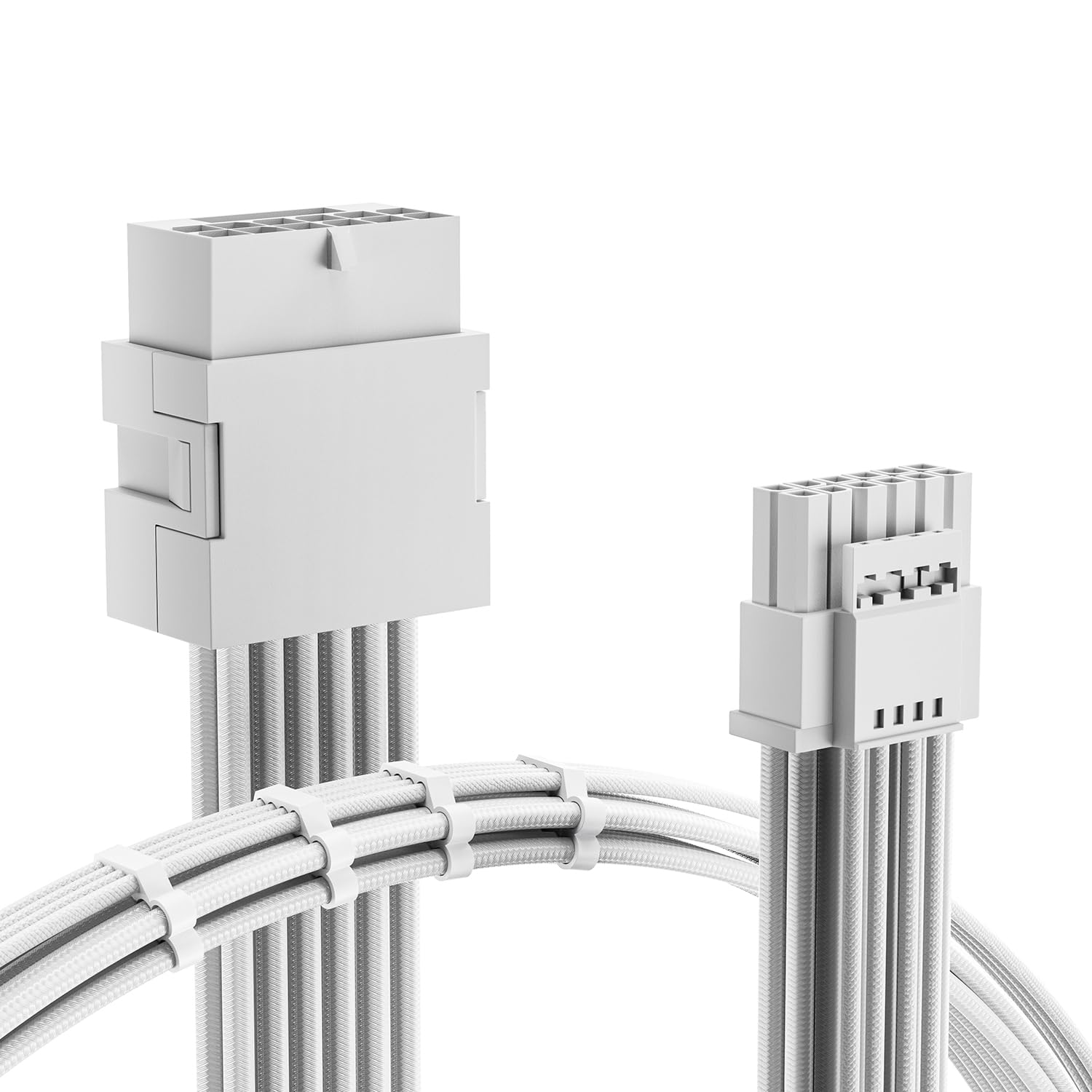
A white sleeved extension that makes a clean build look even cleaner.
This extension is for anyone doing a white-themed PC who wants the GPU power cable to match. It measures 30 centimeters, giving plenty of reach, and comes with four cable combs per cable for a uniform look. Owners describe the feel as high quality with a knitted polyester-like netting.
Rated for 600W, it uses 16AWG tinned copper and alloy terminals with a 50A maximum current. Buyers have run it on an ROG Astral 5080 overclocked to 3200MHz at a 450W limit for months without melting. The standard crimp terminals make installation easier by avoiding small cable gaps.
One owner bought it just to decorate the PC and found the quality obvious by touch, calling it better than anything at a lower price. If you need a white accent that also delivers stable power, this fits the bill.
Looks and Runs
- Pure white sleeving matches clean, light-themed builds
- 30cm length offers flexible routing options
- Holds up at 450W limits with no heat issues
Keep in Mind
- It is an extension, so you still need the stock PSU cable
- White color shows dust more than black cables
Perfect for: white-themed builds where the stock black cable ruins the aesthetic.
Not for: users who want a single cable straight from the PSU without an extension.
6. EZDIY-FAB 16-Pin Sleeved Extension

The flexible extension that owners say handles hours of gaming without getting warm.
This male-to-female extension connects your GPU to the original 1-to-4 power adapter or a PCIe 5.0 PSU cable. Its 16AWG tinned copper and alloy terminals are rated for 600W, and four cable combs keep routing tidy. Customers note it handles the power needed for a GPU with no issue and never gets any amount of heat during long gaming sessions.
The soft nylon braided material is durable and flexible, making it a breeze to route and manage. Owners with an Asus 5080 Prime overclocked to 3200MHz confirm the cable did not get hot at all. It is only an extension, so do not plug it directly into your PSU — it needs the original cable behind it.
The honest caveat is fit and length are mixed for some. One owner noted a permanent odd bend that resists straightening, while others found the length perfect. Compatibility with certain power supplies varies, so check your PSU’s output before buying.
The Perks
- Very flexible nylon braid makes routing easy
- Runs cool even overclocked to 3200MHz
- Four combs keep the cable perfectly organized
The Trade-Offs
- Not a direct PSU cable; needs the stock adapter behind it
- A few units arrive with a permanent kink in the cable
Best for: anyone who wants a flexible, cool-running extension that is easy to bend around tight corners.
Consider another if: you need a fixed, perfectly straight cable with no possibility of a kink.
7. Fasgear 16-Pin to 2×8-Pin Extension

A tidy 30cm extension with four transparent combs that keeps even big builds looking neat.
This Fasgear cable extends your GPU’s 16-pin port to two 8-pin connections, running 30 centimeters compared to the stock 10cm cable. Its 16AWG tinned copper is rated for 600W, and the 12V-2×6 connector works with 12VHPWR ports. Owners have used it for months on cards like the 4070 Super and 5070 Ti without issues.
Quality is what wins people over here, with the alloy copper terminals providing stable current. The four transparent cable combs keep the sleeved extension orderly. It is available in white or black, and reviewers point out the installation is easy with a great appearance.
One honest note: for the 4080 or 4090, this 2-to-1 adapter may be risky above 300-400W, so it is best paired with a high-end ATX 3.0 PSU. The cable length gets mixed feedback, with some wishing it were longer and others finding it just right.
Neat Package
- 30cm reach compared to the stock 10cm cable
- 16AWG tinned copper prevents oxidation
- 4 transparent combs for clean cable management
Be Careful
- 2-to-1 design is risky for 4080/4090 above 300-400W
- Length is mixed — some owners want more reach
Reach for this: if you have a 4070-class card and want a tidy 30cm extension with combs included.
Step up if: you run a 4080 or 4090 and need a 3×8-pin or 4×8-pin configuration for stability.
8. Bangfun 90-Degree 3×8-Pin Cable

A 13-inch right-angle lifeline for small cases where the glass panel fights the cable.
When a case is too tight for the stiff stock cable, this 90-degree adapter gives you room to bend. At 13 inches, it offers much more slack than factory cables, which is why one owner called it cheaper than buying a new PC case. It converted a faulty Zotac 4080 Super stock cable that caused black screens and fan spikes into a stable setup.
It supports 450W to 600W output (peak 600W) via 16AWG tinned copper in a nylon braided sleeve. The high-density flexible protective sleeve makes routing easier in tight spaces. Buyers with RTX 4080, 5070 Ti, and 5080 cards report no temperature issues and a solid connection.
The connection quality is solid, though a few owners note the connectivity can be mixed depending on the card’s port orientation. It is also note the stock adapters on some cards are garbage, and this replacement fixes that without fuss.
Space Saver
- 13-inch length gives plenty of room in small cases
- 90-degree angle lets the glass panel close properly
- Replaces faulty stock cables that cause black screens
Check First
- 90-degree direction may not suit every GPU port layout
- Connectivity feedback is mixed on some cards
Ideal for: small-form-factor builds where the stock cable fights the side panel and you need length plus a bend.
Not ideal if: your GPU port faces a direction this 90-degree angle does not match.
9. Fasgear 16-Pin to 3×8-Pin Extension

A triple-8-pin extension that feeds high-wattage cards while keeping wires tidy.
This Fasgear extension converts your GPU’s 16-pin port into three 8-pin connections, rated for 600W output. It runs 30 centimeters, giving you more reach than the original 10cm cable, and includes four transparent cable combs. Buyers with an RTX 5070 Ti on a 750W power supply confirm it works perfectly.
The 16AWG tinned copper wire delivers stable voltage, and the 12V-2×6 connector is backward compatible with 12VHPWR ports. Owners praise the cable management, noting it is long enough and easy to bend. One buyer inserted a Corsair temperature probe to monitor it and has seen no melting over days of use.
Quality is the top praise here, though a few units arrive missing the clips for the GPU wires. The length also gets mixed feedback, with some finding it just long enough and others wanting more. A single harsh review warns about burn risk, but the overwhelming majority report stable, cool operation.
Power and Order
- 600W output with stable 16AWG tinned copper
- 30cm length with 4 combs for easy management
- Backward compatible with 12VHPWR ports
Minor Gripes
- Some units ship missing the clip for GPU wires
- Length is mixed — a few wish it were longer
Pick this for: a high-end card needing three 8-pin ports and a neat 30cm run with combs included.
pass on it if: your PSU only has two spare 8-pin ports; this needs three.
Understanding the Specs
16AWG vs. 18AWG Wire
AWG stands for American Wire Gauge, and a lower number means thicker wire. Thicker 16AWG tinned copper carries more current with less resistance, which means less heat under load. Many quality cables also use tinned copper to prevent oxidation over time. The 12VHPWR design needs thick wire to safely handle the 600W some cards can draw.
12VHPWR vs. 12V-2×6
These are two generations of the same 16-pin (12+4) connector. The newer 12V-2×6 has slightly shorter power pins and longer sense pins, which helps ensure a fully seated connection. The two are backward compatible with each other, so a 12V-2×6 cable works in a 12VHPWR port on your 4070. The key is that both use the same 12+4 pin layout.
FAQ
Will a 12VHPWR cable work with my RTX 4070?
How many 8-pin ports do I need for a 4070 power connector?
What is the difference between Type A and Type B right-angle connectors?
Is a 90-degree adapter safe for my GPU?
Can I use a 600W rated cable with a lower-power 4070?
Why does my 12VHPWR cable get warm during gaming?
What is a direct PSU cable versus an extension cable?
How do I know if my cable is fully seated?
Final Thoughts: The Verdict
For the majority of shoppers, the 4070 power connector winner is the EZDIY-FAB 12VHPWR PSU Cable because it is the cleanest single-cable solution with a proven cool-running 16AWG build. If you need to bend the cable away from a tight side panel, grab the JOYJOM 90-Degree Adapter. And for a white-themed build that still delivers stable power, the AsiaHorse Extension is the one to reach for.
How We Picked
We do not accept paid placement. Every pick is matched to a real buyer and a real use-case; we do not hands-on test units.
Sources & Methodology
Specifications: manufacturer listings and product documentation. Review insights: verified customer reviews, as of August 2026. Pricing: not shown on this page (it changes often); check the current price via the retailer link.
As an Amazon Associate, Gadgets Feed earns from qualifying purchases. This does not affect which products we feature.