
Our readers keep the lights on and my morning glass full of iced black tea. As an Amazon Associate, I earn from qualifying purchases.
Specs are compiled from manufacturer listings and verified buyer reviews and can change over time — please confirm the key details on the product page before buying.
Buying a 4K 120Hz monitor is a big decision, and the biggest question is usually: “Which one is actually worth it?” You want a screen that makes games fluid and work sharp, without paying for unused features. This guide breaks down the best options by what they do well, so you can match a monitor to your space, your graphics card, and your budget.
I’m Min — the founder and writer behind Gadgets Feed. This guide is built by comparing the manufacturers’ published specifications and the patterns across verified customer reviews, so you get each pick’s real strengths and trade-offs instead of marketing spin.
From fast IPS panels to deep-contrast OLEDs, here is the definitive rundown of the top 4k 120hz monitor picks for gamers and creators alike.
Our Picks at a Glance


How To Choose The Best 4K 120Hz Monitor
Picking the right 4K 120Hz monitor means balancing panel technology, connection ports, and desk size. We’ll walk through the key specs that decide which screen fits your setup.
Panel Type: IPS, VA, or OLED
The panel determines your viewing angles, contrast, and color. IPS panels offer wide viewing angles and accurate colors, making them great for work and gaming. VA panels deliver higher contrast ratios for deeper blacks, which is good for movies and dark games. OLED is the premium choice, with perfect blacks and vibrant colors, but it comes at a higher price.
Refresh Rate and Response Time
Refresh rate, measured in hertz (Hz), is how many times the screen updates per second. A 120Hz or higher rate makes motion look smooth, especially in fast-paced games. Response time is how quickly a pixel changes color, measured in milliseconds (ms). A lower response time, like 1ms, means less motion blur and ghosting in fast scenes.
Connectivity and Features
To run 4K at 120Hz, you need the right cables and ports. HDMI 2.1, DisplayPort 1.4, and DisplayPort 2.1 are all capable of the data load. Features like Adaptive Sync (G-Sync or FreeSync) prevent screen tearing by syncing the monitor’s refresh rate with your graphics card’s frame rate. Also, consider built-in speakers, USB hubs, and ergonomic stands.
Quick Comparison
| Model | Best For | Panel & Refresh | Resolution | Response Time | Amazon |
|---|---|---|---|---|---|
| KTC 32″ H32P22P★ Best Overall | Value 4K performance | Fast IPS, 165Hz | 3840 x 2160 | 1ms | Amazon |
| Dell S3225QSEye Comfort Pick | Eye comfort & work | VA, 120Hz | 3840 x 2160 | 0.03ms | Amazon |
| Samsung 27″ Odyssey G7Compact Powerhouse | High refresh dual-mode | Fast IPS, 180Hz | 3840 x 2160 | 1ms | Amazon |
| Samsung 37″ Odyssey G7 | rich curved gaming | VA, 165Hz | 3840 x 2160 | 1ms | Amazon |
| LG 37G800A-B | Curved value with USB-C | VA, 165Hz | 3840 x 2160 | 1ms | Amazon |
| LG 32GX850A-B OLED | Glossy OLED clarity | OLED, 165Hz/330Hz | 3840 x 2160 | 0.03ms | Amazon |
| LG 32GX870A-B OLED | High-refresh OLED gaming | OLED, 240Hz/480Hz | 3840 x 2160 | 0.03ms | Amazon |
| MSI MPG 321CURX | Curved QD-OLED immersion | QD-OLED, 240Hz | 3840 x 2160 | 0.03ms | Amazon |
| MSI MPG 322URX | Flat QD-OLED performance | QD-OLED, 240Hz | 3840 x 2160 | 0.03ms | Amazon |
| ASUS ROG PG27UCDM | Compact high-PPI gaming | QD-OLED, 240Hz | 3840 x 2160 | 0.03ms | Amazon |
| ASUS ROG PG32UCDM | Premium large OLED | QD-OLED, 240Hz | 3840 x 2160 | 0.03ms | Amazon |
In‑Depth Reviews
1. KTC 32 Inch 4K Gaming Monitor (H32P22P)
Our pick — over 4.5★ from 2,500+ verified ratings; the strongest balance of quality and price.
The crowd-pleasing 32-inch value pick that lets you have 4K clarity and smooth gaming without the OLED price tag.
This KTC monitor is the definition of getting a lot for your money. It packs a 3840 x 2160 resolution with a 165Hz refresh rate, which is a step above the 120Hz baseline and feels buttery smooth in fast games. The Fast IPS panel delivers a 1ms response time, so you won’t see much ghosting or blur when the action gets intense.
Color performance is a highlight here, with a 121% sRGB color gamut and a 3000:1 contrast ratio that makes images look vivid and rich. The monitor also supports both FreeSync and G-Sync Adaptive Sync, which helps prevent screen tearing. Connectivity is future-proof with HDMI 2.1 and DP 1.4 ports, plus a 100mm x 100mm wall mount option for flexible setups.
The 3000:1 contrast ratio here is 3x deeper than the 1000:1 on the Samsung 27″ Odyssey G7, so dark scenes look noticeably richer. Buyers report it’s “excellent for what I wanted it for: another monitor for programming,” praising the sharp text and high build quality. It’s a fantastic choice for both productivity and gaming, though some owners would have preferred a larger screen than the 32 inches offered.
What wins people over
- Sharp text and great color accuracy for work
- Smooth 165Hz refresh for gaming
- Flexible connectivity with HDMI 2.1
Who should think twice
- Not the best for extreme contrast in dark rooms
- Some owners wanted a bigger screen size
Reach for it if: you want a large, sharp, high-refresh 4K screen for a mix of coding, design, and gaming without spending premium money.
Look elsewhere if: you are set on OLED-level blacks, since this is an IPS panel, not OLED.
2. Dell 32 Monitor S3225QS
The all-day comfort specialist that pairs a high-contrast VA panel with serious eye-care tech for marathon work sessions.
This Dell is built around the idea of comfort without compromise. Its standout feature is ComfortView Plus, which reduces harmful blue light emissions to ≤35% while keeping colors accurate. That means you can work for hours without the usual eye strain and still trust the color on your screen for creative work.
The screen uses a VA panel with a 1500:1 contrast ratio, which gives you deep blacks as described in buyer reports: “Great 32″ 4K 120Hz; well-calibrated colors, deep blacks at 35% brightness.” It covers 99% sRGB and 95% DCI-P3, and has an ultra-low 0.03ms response time that is a 33.3x faster response than the 1ms you get on the Samsung 27″ Odyssey G7. Owners mention the refresh rate is a smooth 120Hz, which pairs well with serious work and light gaming.
The image quality is what wins people over most, with owners consistently praising the “excellent picture quality” and “fantastic resolution.” However, the VA panel has a trade-off: the image washes out when viewed from extreme angles. It’s a great all-rounder for professionals who want a big, sharp, comfortable screen, but it’s not the best pick if you need wide viewing angles or plan to do competitive gaming.
Solid performer: Exceptional for office work and content consumption with its deep blacks and eye comfort. A good choice if you prioritize all-day comfort and sharp text over the very highest refresh rates.
Best for: anyone who spends 8+ hours a day staring at a screen and wants a sharp, color-accurate, 4K display that’s easy on the eyes.
Not ideal for: group viewing setups where people sit off to the side, due to VA panel viewing angles.
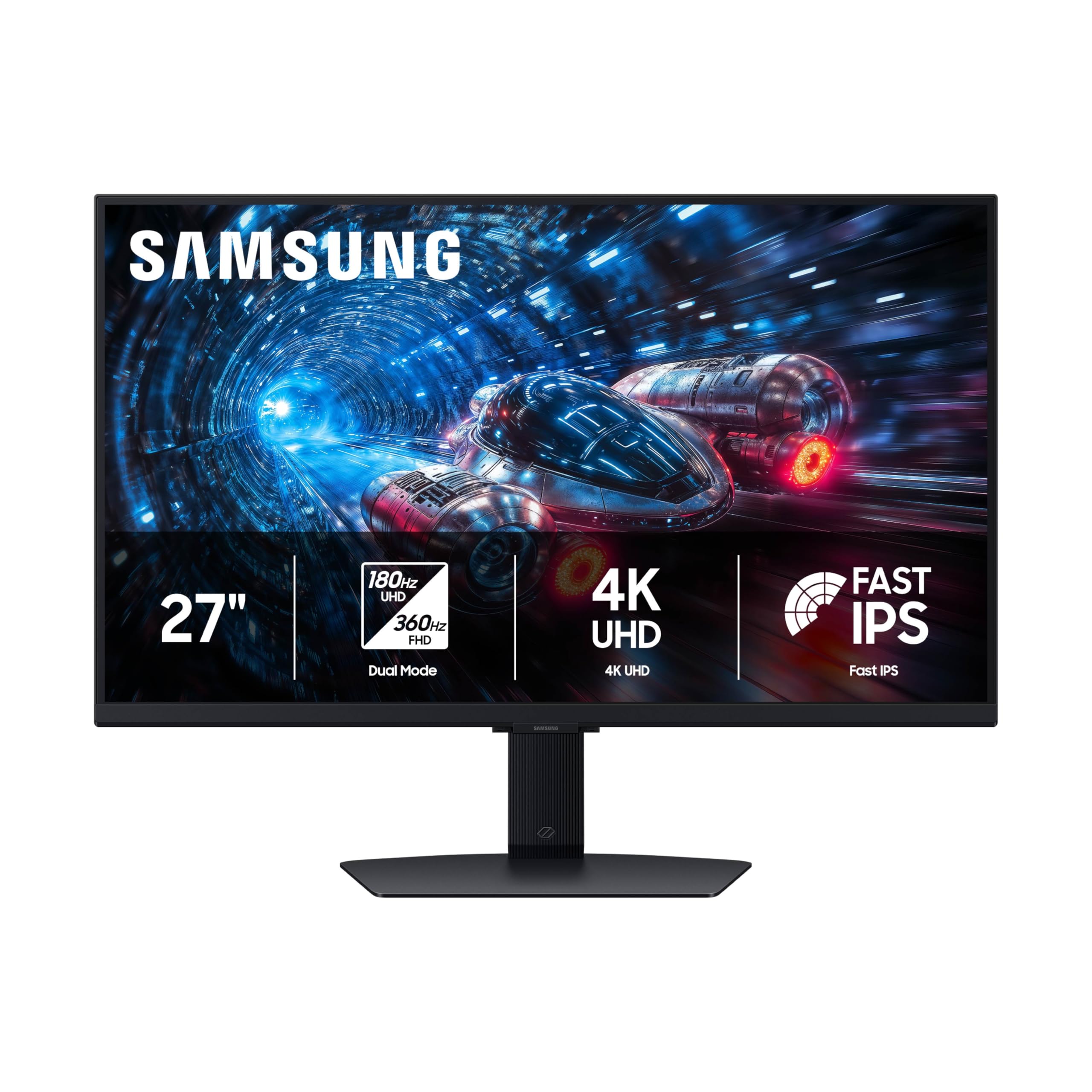
3. Samsung 27″ Odyssey G7 (G70F)
The shape-shifter that jumps from 4K 180Hz to 1080p 360Hz, giving you speed or sharpness at the touch of a button.
This 27-inch Samsung is unique because of its dual-mode feature. It lets you run at 180Hz in 4K UHD for gorgeous, detailed gaming, or switch to 360Hz in Full HD for competitive esports where speed is everything. With 4x the pixel density of FHD, the 4K mode delivers true-to-life visuals that are incredibly crisp.
The Fast IPS panel ensures colors stay consistent across the whole screen, and the near-instant 1ms response time (GtG) minimizes lag. It’s also compatible with G-Sync and AMD FreeSync Premium, which work together to reduce screen tearing and stuttering. Customers note “no dead pixels, no backlight bleed; bright, vibrant, sharp text,” and they love the sturdy stand and easy mount.
However, the 1000:1 contrast ratio is a 3x gap compared to the 3000:1 on the KTC 32-inch, so it doesn’t produce as deep blacks. It also has no built-in speakers, so you will need your own audio solution.
Speed demon: For competitive gamers who want the option of extreme refresh rates without losing the 4K sharpness for story-driven titles, this is a brilliant, compact choice.
Pick this if: you are a gamer who plays both cinematic AAA titles and fast esports shooters and wants one monitor for both.
skip it if: deep blacks for horror games or movies are your priority, as the contrast ratio is lower than VA panels.
4. Samsung 37″ Odyssey G7 (G75F)

A massive 1000R curved screen that wraps around your vision for a level of immersion flat panels just can’t match.
If immersion is your goal, this is the monitor to beat. The 37-inch 1000R curved display is designed to wrap around your field of view, pulling you into games and movies. It runs at 4K UHD resolution with a 165Hz refresh rate and a near-instant 1ms response time (GtG) for smooth gameplay.
The VESA DisplayHDR 600 certification means it delivers more contrast with deeper blacks and brighter whites, which makes dark scenes in games and films look far clearer. It uses a VA panel with a 3000:1 contrast ratio, which is excellent for that deep, cinematic look. Reviewers point out “this thing is a monster. Super smooth. Very bright,” and praise the deep colors and lack of blurriness.
Owners consistently call the display quality and picture quality top-tier, noting it’s a huge upgrade from flatter, older screens. For console gamers on PS5, it delivers true 4K at 120Hz performance with crisp graphics. While it doesn’t have the 240Hz of some OLED rivals, most owners say the difference is minimal and that the immersion this large curve provides is what really matters.
Immersion first
- Deep 3000:1 contrast for dark scenes
- Large 37-inch curved field of view
- Great for console gaming at 4K 120Hz
Reality check
- It’s huge and heavy, needs a solid desk
- Not the 240Hz some hardcore PC gamers want
Perfect for: gamers who want a cinematic, console-focused experience and prioritize a huge, enveloping screen over raw refresh rate.
Think twice if: you have a small desk or need a monitor that fits easily on a standard mount or arm.
5. LG 37G800A-B UltraGear

The 37-inch curved monitor that doubles as a laptop dock with its versatile USB-C port.
This LG UltraGear is a fantastic all-rounder, combining a big curved screen with excellent productivity features. The 37-inch 4K UHD display runs at a fluid 165Hz with a 1ms response time, making it great for gaming. It features VESA DisplayHDR 600 for brighter, more dynamic visuals.
Where this monitor really shines is its connectivity. It has a USB Type-C port with 65W Power Delivery, which means you can plug in a compatible laptop with a single cable that carries both video and power. This makes it a superb choice for a desk setup that blends work and play. Shoppers say it’s “rich for 8-hour workdays” and boosts productivity, while also being great for gaming.
The 4000:1 contrast ratio beats the 3000:1 on other VA monitors like the Samsung 37″ G7, giving it excellent depth in dark scenes. Owners praise the image quality and the non-reflective screen. However, some have noted it’s a heavy monitor, so it’s not ideal for a monitor arm, and the price-to-performance ratio is considered good value for the daily driver it becomes.
Work-play bridge: It nails the balance between a serious gaming display and a productivity hub, with the USB-C connection being the feature that separates it for laptop users.
Go for it if: you use a laptop for work and a desktop for gaming, and want one big monitor that connects both easily.
Pass on it if: you plan to mount it on a monitor arm, as its weight makes that setup tricky.
6. LG 32GX850A-B UltraGear OLED

The gorgeous glossy OLED that makes colors pop and blacks look truly infinite in the right lighting.
This is your entry point into OLED gaming, and it’s a stunning one. The 32-inch 4K UHD glossy OLED panel delivers lifelike color and perfect, inky blacks thanks to a 1.5M:1 contrast ratio. It’s VESA DisplayHDR True Black 400 certified and covers 98.5% of the DCI-P3 color gamut, making everything from games to movies look spectacularly vibrant.
Speed is not sacrificed for beauty. It has a dual-mode feature that lets you run at 165Hz in 4K UHD or switch to 330Hz in Full HD for fast-paced esports. The near-instantaneous 0.03ms (GtG) response time means virtually no ghosting or lag. It’s both NVIDIA G-SYNC Compatible and AMD FreeSync Premium Pro certified for tear-free gaming. Buyers report the upgrade from IPS to this OLED was “a crazy difference,” with true blacks and amazing colors.
The glossy screen is the defining feature here — it offers more vibrant colors than a matte display, but it is reflective. Owners advise it works best in a room without direct natural light on the screen. While some saw a slight glare in bright rooms, the vast majority find the visual payoff worth it, describing it as one of the best 4K displays they’ve used.
The OLED advantage
- Perfect blacks and vibrant, rich colors
- Fast dual-mode refresh rates
- Clean, professional design
A fair caveat
- Glossy screen reflects light in bright rooms
- Burn-in is a consideration, though tools help
Perfect for: gamers and creators who want the best possible picture quality and can control the lighting in their room.
Not for: brightly lit rooms with lots of windows, where the reflective glossy screen will show glare.
7. LG 32GX870A-B UltraGear OLED

The speed king, hitting a blistering 480Hz in Full HD mode while keeping 4K at a fast 240Hz.
If you’re chasing the absolute highest frame rates in esports, this LG OLED is built for you. It’s a VESA Certified Dual Mode monitor, allowing you to play in 4K UHD at up to 240Hz or switch to Full HD at an incredible 480Hz via a hotkey. This makes it perfect for both graphically rich, slow-paced games and ultra-fast competitive shooters.
The Micro Lens Array+ technology delivers a typical brightness of 275 nits and a peak brightness of up to 1300 nits, making it one of the brightest OLED panels around. It also has a 1.5M:1 contrast ratio for perfect blacks and is both G-Sync Compatible and FreeSync Premium Pro certified. Buyers are impressed, noting the OLED blacks are “superior to LCD” and the low input lag is great for FPS games.
This monitor is a step up in speed from the LG 32GX850A-B, which tops out at 330Hz in its Fast mode. Owners praise the display quality heavily, and the built-in speakers with DTS Headphone:X provide surprisingly decent audio. It’s a premium investment, but for players who want the smoothest possible motion, it’s a top-tier choice.
Competitive edge: The 480Hz Full HD mode gives you a massive advantage in fast games, while the 4K 240Hz mode keeps your single-player titles looking drop-dead gorgeous.
Worth the money if: you are a serious esports player or gamer who wants the absolute best motion clarity money can buy.
Overkill for: casual gamers or those who mostly play single-player story games and won’t use the extreme refresh rates.
8. MSI MPG 321CURX QD-OLED

The curved QD-OLED that wraps you in 4K 240Hz perfection, with a KVM switch for smooth multi-device control.
This MSI brings the incredible color and contrast of QD-OLED to a curved 1700R panel, creating an rich gaming experience. It runs at a native 4K UHD resolution with a blazing 240Hz refresh rate and a super-fast 0.03ms GtG response time. The 3rd-Gen QD-OLED panel is known for stunning image quality and vibrant colors.
A standout feature here is the built-in KVM switch, which lets you control multiple devices (like a work laptop and a gaming PC) with just one keyboard, mouse, and monitor. It also has a USB-C port with 98W Power Delivery, so it can charge your laptop while connected. Buyers call it “absolute visual perfection for a high-end setup,” noting the deep blacks and zero input lag.
The monitor is VESA DisplayHDR True Black 400 certified and features MSI OLED Care 2.0 to help prevent burn-in. Owners emphasize the “vibrant QD-OLED colors” and how the high refresh rate feels responsive. It lacks built-in speakers, so be prepared to use a headset or external ones, but its performance and feature set make it a favorite among gamers who want an edge.
Why it stands out
- rich 1700R curve with QD-OLED colors
- KVM switch and 98W USB-C for multi-device setups
- Super-fast 0.03ms response time
Consider this
- No built-in speakers
- Requires firmware updates for best HDR
Choose this if: you have multiple computers on your desk and want a single, stunning curved monitor with smooth switching between them.
pass on it if: you need built-in speakers to save desk space, as you’ll need to source your own audio.
9. MSI MPG 322URX QD-OLED

A flat 32-inch QD-OLED that delivers uncompressed 4K at 240Hz with future-proof DisplayPort 2.1a.
This MSI model is for those who want the raw performance of QD-OLED without the curve. It features a 3rd Gen QD-OLED panel with a 240Hz refresh rate and 0.03ms GtG response time, making it a top-tier choice for competitive gaming. The real highlight is its DisplayPort 2.1a (UHBR20) port, which offers up to 80Gbps of bandwidth for native, lossless 4K at 240Hz.
With a 99% DCI-P3 color gamut and VESA DisplayHDR True Black 400 certification, the picture quality is jaw-dropping. Owners mention it delivers “crisp 3840 x 2160 resolution” with “jaw-dropping color accuracy.” The built-in KVM switch works flawlessly across laptops, Chromebooks, and PCs, making it a versatile hub for a multi-device setup.
Owners love the built-in speakers, which are decent for a monitor, and appreciate the included DP 2.1 cable. The 3-year burn-in warranty offers confidence for OLED ownership. While the flat screen might lack the immersion of a curved display, it offers a pure, uncompressed signal path that future-proofs your setup for the next generation of graphics cards.
Tech leader: With its DisplayPort 2.1a, this is among the most technically advanced monitors here, delivering uncompressed high-refresh 4K for the absolute best image quality.
Best for: enthusiasts with high-end graphics cards who want the cleanest, most future-proof connection and a flat screen.
Consider the curve: if you want an rich wrap-around view, the MSI 321CURX model offers that instead.
10. ASUS ROG PG27UCDM
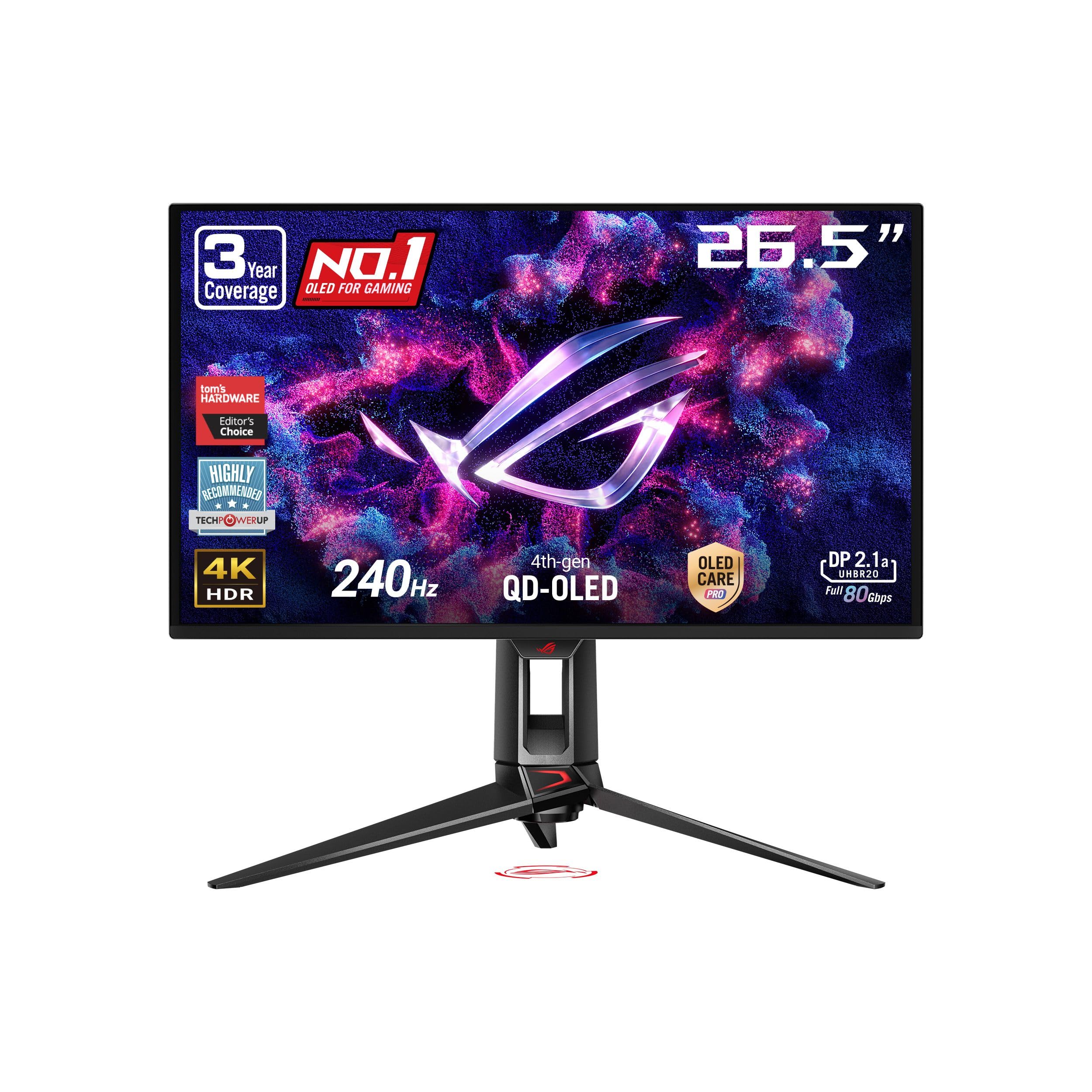
The 27-inch 4K OLED that packs an ultra-sharp pixel density, perfect for crisp text and detailed gaming.
If you prefer a smaller, sharper screen, this ASUS ROG is a brilliant choice. The 27-inch 4K (3840 x 2160) QD-OLED panel packs pixels tightly for a hyper-sharp image. It runs at a fast 240Hz with a 0.03ms response time, making it incredibly responsive for gaming.
The latest 4th-gen QD-OLED technology provides sharper imagery and crisp text, addressing a common complaint about OLED text rendering. It also features ASUS OLED Care Pro with a Neo Proximity Sensor that detects when you step away and switches to a black screen to reduce burn-in risk. This monitor is loaded with connectivity, including DisplayPort 2.1a UHBR20 with full 80Gbps bandwidth and USB-C with 90W Power Delivery.
Buyers with powerful GPUs like the RTX 5090 find the HDR and Dolby Vision visuals “stunning, sharp, bright, and versatile.” While some note that Windows fonts can look slightly soft due to the pixel layout, this is a minor issue for most. It’s an expensive option, but for gamers who value a compact desk footprint and the absolute sharpest image, it’s a top-tier performer.
Sharp shooter
- Very high pixel density for sharp 4K text and images
- Advanced burn-in protection with proximity sensor
- Fast 240Hz with 0.03ms response
Things to know
- No built-in speakers
- Requires a very powerful GPU for full 4K performance
Ideal for: gamers on a 27-inch desk who want the sharpest possible 4K image and the latest connection standards.
Not ideal for: those who want a larger screen or need built-in audio, as this compact model has neither.
11. ASUS ROG PG32UCDM

The 32-inch 4K 240Hz QD-OLED that hits the balance of size, speed, and stunning picture quality.
The ASUS ROG PG32UCDM is the monitor that most enthusiasts settle on because it does everything exceptionally well. Its 32-inch 4K (3840 x 2160) QD-OLED screen is the perfect size for both rich gaming and productive desk work. The 240Hz refresh rate and 0.03ms response time make it one of the fastest and smoothest displays you can buy.
Picture quality is where this monitor truly shines. It offers true black performance, deep colors, and crisp visuals. Buyers rave about the “crisp display, deep colors, and true black performance.” It supports VESA DisplayHDR 400 True Black, covers 99% of the DCI-P3 gamut, and supports Dolby Vision, making it superb for both HDR gaming and content consumption.
It also has a well-regarded heatsink and graphene film for heat management to reduce burn-in risk, plus a 3-year warranty with burn-in coverage. Owners note its “razor-sharp” performance on the Xbox Series X and with high-end PCs. While it’s a premium investment, the combination of size, speed, and picture quality makes it the monitor to beat. While some OLED rivals cover 98% DCI-P3, this one hits the full 99% for extra color volume.
Why it’s the top pick
- Excellent 32-inch size for gaming and work
- Fantastic HDR with deep blacks and vivid colors
- Fast 240Hz with G-Sync support
The honest trade-off
- Value for money is subjective; it’s a big investment
- Some buyers reported occasional black screen flicker
Worth every dollar if: you want the definitive high-end 4K gaming experience without compromise, and you can pair it with a powerful graphics card.
Look elsewhere if: your budget is tight or your main focus is office work, where the premium cost of OLED isn’t as valuable.
Understanding the Specs
Panel Technology
This is the core of the monitor. IPS (In-Plane Switching) gives you great color and wide viewing angles, making it ideal for work and general use. VA (Vertical Alignment) offers higher contrast and deeper blacks but has narrower viewing angles. OLED (Organic Light-Emitting Diode) is the premium choice, offering perfect blacks, infinite contrast, and vibrant colors, but it costs more and needs careful management to avoid burn-in.
Refresh Rate and Adaptive Sync
The refresh rate (Hz) tells you how many times the screen redraws per second. Higher is smoother for gaming. Adaptive Sync technologies like G-Sync (NVIDIA) and FreeSync (AMD) match the monitor’s refresh rate to your graphics card’s frame rate. This eliminates screen tearing and stuttering for a much smoother visual experience.
FAQ
Do I need a powerful graphics card to run a 4K 120Hz monitor?
What is the difference between G-Sync and FreeSync?
Is an OLED monitor worth the extra cost?
Can a PS5 or Xbox Series X run these monitors at 4K 120Hz?
What is the ideal screen size for a 4K monitor?
How long does an OLED monitor last before burn-in occurs?
What does a 0.03ms response time mean for gaming?
Can I use a 4K 120Hz monitor for office work and programming?
What is the difference between DisplayPort 1.4 and DisplayPort 2.1?
Final Thoughts: The Verdict
For the majority of shoppers, the top 4k 120hz monitor is the ASUS ROG PG32UCDM because it perfectly balances a large 32-inch screen with the fast 240Hz refresh rate and stunning QD-OLED colors. If you want deep blacks and vibrant colors without the premium curve, you should grab the MSI MPG 322URX. And for a more budget-conscious entry into 4K gaming, the KTC 32-inch is the one to reach for, offering high refresh and great color at a fraction of the price.
How We Picked
We do not accept paid placement. Every pick is matched to a real buyer and a real use-case; we do not hands-on test units.
Sources & Methodology
Specifications: manufacturer listings and product documentation. Review insights: verified customer reviews, as of August 2026. Pricing: not shown on this page (it changes often); check the current price via the retailer link.
As an Amazon Associate, Gadgets Feed earns from qualifying purchases. This does not affect which products we feature.