
Our readers keep the lights on and my morning glass full of iced black tea. As an Amazon Associate, I earn from qualifying purchases.
Specs are compiled from manufacturer listings and verified buyer reviews and can change over time — please confirm the key details on the product page before buying.
Jumping to a 4K 32-inch gaming monitor is a bigger decision than just buying a bigger screen. You are choosing between panel technologies that change how games look and feel, from the inky blacks of OLED to the bright, fast response of IPS. This guide breaks down the real differences—refresh rates, response times, contrast, and color—so you pick the one that matches your gaming setup and your GPU’s muscle, not just the most impressive spec sheet.
I’m Min — the founder and writer behind Gadgets Feed. This guide is built by comparing the manufacturers’ published specifications and the patterns across verified customer reviews, so you get each pick’s real strengths and trade-offs instead of marketing spin.
After comparing OLED and LCD options, you’ll know exactly which 4k 32 inch gaming monitor fits your games, your desk, and the graphics card you already own.
Our Picks at a Glance



How To Choose The Best 4K 32 Inch Gaming Monitor
Before you look at any screen, check what your PC can drive. Running a game at 4K resolution is far more demanding on your graphics card than 1440p or 1080p. If your GPU can’t hit high frame rates at 4K, a super-fast 240Hz screen won’t feel smooth; you’ll be paying for speed you never see.
Panel Technology: OLED, VA, or IPS
This is the single biggest choice you’ll make. OLED panels deliver perfect blacks and incredible contrast because each pixel switches off individually, which is why the top picks here boast contrast ratios like 1500000:1. VA panels offer strong contrast for the money—often 3000:1—but colors can wash out when you view them from an angle. Fast IPS panels give you the widest viewing angles and accurate colors, but their contrast ratio typically sits around 1000:1, so blacks look more like dark gray in a dark room.
Refresh Rate and Response Time
Refresh rate is how many times the screen updates per second. A 120Hz panel shows double the frames of a basic 60Hz display, while 240Hz is four times smoother. Pair that with a fast response time (measured in milliseconds, like 0.03ms GTG) to avoid ghosting, where fast-moving objects leave a trail. For competitive shooters, this combination makes motion look nearly blur-free. For slower story games, a lower refresh rate is perfectly fine.
Adaptive Sync and Your GPU
Adaptive sync stops screen tearing by syncing the monitor’s refresh rate to your graphics card’s output. You’ll see G-Sync Compatible (which works with Nvidia cards) and AMD FreeSync in the specs. If you have an Nvidia card, you want G-Sync Compatible support; if you have an AMD card, look for FreeSync Premium. Both do the same job—smooth, tear-free frames—so match the feature to the brand of GPU you own.
Quick Comparison
| Model | Best For | Panel & Contrast | Refresh Rate | Response Time | Amazon |
|---|---|---|---|---|---|
| ASUS ROG PG32UCDM★ Best Overall | Overall 4K OLED champion | QD-OLED | 1500000:1 | 240 Hz | 0.03 ms (GTG) | Amazon |
| Dell S3225QSBest Value | Work & play on a budget | VA | 1500:1 | 120Hz | 0.03ms | Amazon |
| CRUA 4K 160HzBudget Curve | Budget curved immersion | VA | 3000:1 | 160Hz | — | Amazon |
| CRUA 4K 240Hz | Budget high-refresh curved | VA | 3000:1 | 240Hz | — | Amazon |
| Samsung Odyssey G7 (G70D) | Smart TV features + gaming | IPS | 1000:1 | 144Hz | 1ms (GtG) | Amazon |
| LG 32GX850A-B | Dual-mode OLED value | OLED | 1500000:1 | 165Hz / 330Hz | 0.03ms | Amazon |
| MSI MPG 321URX | Productivity + gaming OLED | QD-OLED | Extremely high | 240Hz | 0.03ms GtG | Amazon |
| LG 32GX870A-B | Elite dual-mode speed | OLED | 1500000:1 | 240Hz / 480Hz | 0.03ms | Amazon |
| MSI MPG 321CURX | Curved QD-OLED immersion | QD-OLED | 1500000:1 | 240Hz | 0.03ms | Amazon |
| Samsung Odyssey Neo G8 | Bright HDR with mini-LED | VA | 1M:1 | 240Hz | 1ms (GTG) | Amazon |
| ASUS ROG PG32UCDP | Top-tier dual-mode WOLED | WOLED | High | 240Hz / 480Hz | — | Amazon |
In‑Depth Reviews
1. ASUS ROG PG32UCDM 32 Inch 4K 240Hz OLED Gaming Monitor QD-OLED
Our pick — over 4.5★ from 550+ verified ratings; the strongest balance of quality and price.
The QD-OLED panel delivers 1500000:1 contrast and 99% DCI-P3 color for class-leading vibrancy.
This is the benchmark for what a 4K gaming monitor should be. The QD-OLED panel delivers a contrast ratio of 1500000:1, which is a staggering 1000 times deeper than a typical VA panel’s 1500:1, so blacks are truly black and bright highlights pop without washing out. Colors are the star here, covering 99% DCI-P3 gamut with a true 10-bit depth, and the 240Hz refresh rate is double the speed of a standard 120Hz display, making fast motion look incredibly fluid.
It runs at a blazing 0.03ms (GTG) response time, which effectively eliminates ghosting in fast-paced shooters. Beyond raw speed, ASUS added a custom heatsink, advanced airflow, and a graphene film to manage heat and reduce the risk of burn-in, plus a 3-year warranty that includes burn-in coverage. The USB-C port delivers 90W of power, so a single cable can charge a laptop and send a video signal simultaneously. As buyers report: “Sharp 4K, vibrant colors, deep OLED blacks, smooth 240Hz, well-built 32″.”
The trade-off is the price tag, which some owners feel is steep despite the quality. The G-SYNC Compatible support keeps things tear-free for Nvidia users, and a uniform brightness setting keeps luminance level across the whole display. If you want the most vibrant, deepest picture available in a 32-inch gaming screen, this is the one.
What wins people over
- OLED contrast and color that make games look transformative
- 240Hz refresh with 0.03ms response for blur-free motion
- 90W USB-C power delivery for single-cable laptop setups
What to weigh before buying
- High cost that some owners consider overpriced despite the quality
- Single DisplayPort means you’ll want a hub for multiple devices
Reach for this if: you want the absolute best 4K OLED picture and have the GPU to feed a 240Hz panel.
Look elsewhere if: your budget is tight, since the premium price is the main criticism from owners.
2. Dell 32 Monitor S3225QS, 4K UHD VA, 120Hz, FreeSync Premium, Eye Comfort
A VA panel with 1500:1 contrast and 120Hz refresh balances work and play affordably.
If you split your time between spreadsheets and shooters, this Dell is a smart compromise. Its VA panel offers a 1500:1 contrast ratio and covers 99% sRGB plus 95% DCI-P3, delivering true-to-life colors and solid depth for both work and play. The 120Hz refresh rate is double a basic 60Hz display, powered by AMD FreeSync Premium to keep frame pacing smooth and tear-free.
The 0.03ms response time is exceptionally low, rivaling far more expensive panels. What makes it a standout for long sessions is ComfortView Plus, which reduces harmful blue light emissions to ≤35% without wrecking color accuracy. Owners consistently praise the image quality and crisp text, with some noting the 32-inch size is “ideal at 2ft” for desk work. As owners mention: “Great 32″ 4K 120Hz monitor.”
You’ll need to use DisplayPort or USB-C to get the full 4K experience from a Mac, since HDMI proved incompatible in testing. VA panels also wash out colors when viewed from sharp angles, so sit directly in front of it. The built-in speakers are a bonus for casual listening, though audiophiles will want dedicated ones.
Balanced choice: For a 4K monitor with serious gaming chops and proven all-day comfort features, this is the value pick that doesn’t feel like a compromise.
Pick this for: mixed work-and-play use on a budget, where low blue light and crisp text matter as much as refresh rate.
Think twice if: you need wide viewing angles or plan to watch from off-center, since VA panels wash out from the side.
3. CRUA 32″ 4K UHD 160Hz Curved Gaming Monitor, 1500R, AMD FreeSync, White
A 1500R curve and 160Hz refresh deliver rich gaming on a budget.
This CRUA brings the immersion of a curved screen to the budget tier. The 1500R curvature wraps around your field of view, and the 160Hz refresh rate keeps fast action smooth—a step above the 120Hz of the Dell above. The VA panel’s 3000:1 contrast ratio is double the Dell’s 1500:1, giving deeper blacks and stronger detail for dark game scenes.
Colors are boosted with a 120% sRGB gamut, and the integrated RGB lighting adds flair to a gaming desk. It’s also a flexible workhorse with HDMI 2.1, DP 1.4, and 75x75mm wall-mount support. One very cool trick: the 12V DC input means you can wire it directly into an RV, boat, or camper setup without an inverter, which some owners say makes it ideal for van life.
You get consistently praised picture quality for the price—owners call it “great quality” and “amazing for the price.” The honest downside is reliability: a handful of customers note units stopping unexpectedly after a few months, though many others report trouble-free use over six months. Brightness tops out at 320 cd (candelas per square meter, a measure of screen luminance), which can struggle in very sunny rooms, so keep it away from direct window light.
rich on a budget: You get the curve, the refresh rate, and the contrast for far less than premium brands, with reliability being the main lottery—if you win, it’s a steal; if you lose, you may face an early failure.
Choose this if: you want a curved 4K screen with high refresh and RGB for the lowest possible entry cost.
skip it if: you need guaranteed long-term reliability or plan to game in a very bright room.
4. CRUA 32″ 4K UHD 240Hz Curved Gaming Monitor, 1500R VA, Speakers, PIP/PBP
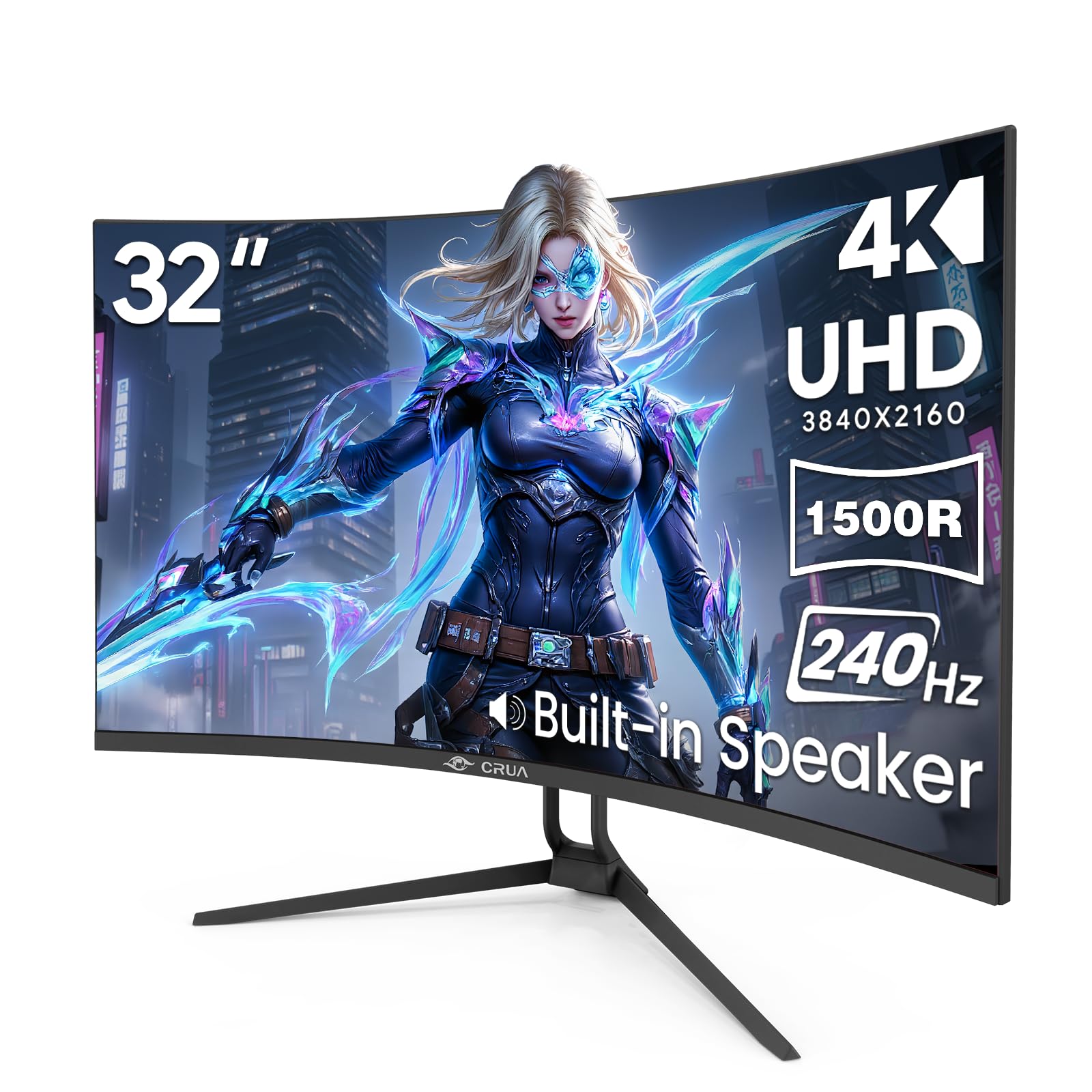
A 240Hz VA panel with 3000:1 contrast offers premium speed at a budget price.
This CRUA delivers a 240Hz refresh rate that is four times faster than a standard 60Hz display, putting it on par with panels costing three times as much. Paired with AMD FreeSync, it dynamically syncs with your graphics card to kill screen tearing and micro-stutter. The VA panel backs it up with a 3000:1 contrast ratio and a peak brightness of 300cd/m², so dark scenes have real depth.
What sets this model apart is its PIP/PBP dual-screen functionality, letting you view two input sources at once on the same 32-inch canvas. Two HDMI 2.1 ports and two DP 1.4 inputs make it easy to switch between a PC and a PS4/5 or Xbox without swapping cables. The stand tilts from -5° to 15°, and a rear RGB lighting system casts a glow for late-night sessions.
Owners highlight the “sharp picture, great colors,” and excellent value. One noted it has been “a standout for work” after adjusting the screen to their liking. The recurring fit note is that HDR (high dynamic range, which boosts contrast and color) looks washed out with color issues, and sound quality is just passable—so treat HDR as a checkbox, not a feature. For raw refresh speed on a budget, it’s hard to argue with, especially if you play fast-paced shooters.
Speed-first pick: You’re getting premium-tier 240Hz motion at a budget price, with the caveat that HDR and audio are basic.
Best suited to: competitive gamers who want maximum refresh rate without spending premium money.
Not ideal for: HDR enthusiasts or anyone who expects rich built-in audio.
5. Samsung 32″ Odyssey G7 (G70D) 4K UHD IPS 144Hz Smart Gaming Monitor

A 144Hz IPS panel with built-in Smart TV apps streams content without a PC.
This Odyssey G7 is unique in this lineup because it’s not just a monitor—it’s a smart display. The built-in Gaming Hub and Smart TV apps let you stream content without a PC, and the NQM AI Processor upscales lower resolutions to nearly 4K for sharper images. It doubles as a mini PC with apps, which owners say works great with both Xbox Series X and PC setups.
At the core is a Fast IPS panel with a 144Hz refresh rate and a near-instant 1ms (GtG) response time. The 178º wide viewing angle keeps colors consistent from any position, which is the key advantage over VA panels. It supports both G-Sync compatibility and AMD FreeSync Premium, so whichever GPU you own, you get smooth, tear-free gameplay. DisplayHDR 400 enhances contrast for better shadow detail.
The Dynamic Black Equalizer automatically brightens dark scenes to reveal hidden enemies. However, the “Quality” aspect draws the most attention from owners with mixed feedback—picture quality is praised, but functionality draws complaints, including needing to manually power the computer on and off. It’s a versatile screen, but you’re paying for the smart features, so consider whether you’ll actually use them.
Multifunctional gaming: A bright IPS panel with console-friendly smart features, best appreciated by those who’ll use the TV apps.
Grab this if: you want one device for gaming plus streaming apps without a PC running.
Pass if: you want pure PC gaming with zero smart-TV quirks, since the functionality draws mixed owner feedback.
6. LG 32GX850A-B 32″ UltraGear 4K UHD Glossy OLED Gaming Monitor, Dual-Mode 165Hz/330Hz

A glossy OLED with dual-mode 165Hz/330Hz switches resolution for competitive play.
This LG delivers OLED’s perfect blacks and vibrant colors at a more accessible price than many rivals. The glossy panel uses Micro Lens Array+ technology for a typical brightness of 275 nits, making it brighter than previous UltraGear OLED displays. The crowd favorite is the display quality—sharp white text against inky black contrast is what owners rave about.
The standout feature is Dual-Mode: play graphically rich story games in 4K at up to 165Hz, then hit a hotkey to switch to Full HD at up to 330Hz for competitive FPS and racing titles. That flexibility means one monitor serves both cinematic single-player and twitchy multiplayer. It’s validated as G-SYNC Compatible and equipped with AMD FreeSync Premium Pro, so it’s tear-free on either GPU brand.
The 0.03ms response time eliminates ghosting, and the clean, professional design avoids the aggressive gamer aesthetic some buyers dislike. The trade-off is the glossy finish—owners note it produces “a terrible glare if there is any light in the room,” though most agree the vibrant colors are worth it. It’s an OLED gateway that doesn’t break the bank as badly as the flagship models.
The highlights
- Dual-Mode lets you switch between 4K 165Hz and Full HD 330Hz instantly
- G-SYNC Compatible and FreeSync Premium Pro for any GPU
- Professional design without distracting gaming RGB
The honest downsides
- Glossy screen reflects light in bright rooms
- Input switching between multiple PCs can be finicky
Perfect for: gamers who want OLED quality plus the option of ultra-high frame rates for competitive play.
Consider a matte screen if: your setup sits in a room with lots of natural light, since glare is the main complaint.
7. MSI MPG 321URX QD-OLED, 32″ 4K UHD Quantum Dot OLED Gaming Monitor

A QD-OLED with KVM and 90W USB-C excels at both office work and gaming.
This MSI is a rare OLED that genuinely excels at both office work and gaming. The 31.5″ QD-OLED panel pushes 1.07 billion colors (10-bit) with incredible accuracy at ΔE ≤2, and VESA DisplayHDR True Black 400 certification means deep black levels. It runs at a high 240Hz refresh rate with an ultra-low 0.03ms GtG response time, so it’s a massive upgrade from a standard 1440p IPS display.
What makes it a productivity winner is the KVM support with PIP/PBP, letting you control multiple devices with one keyboard, mouse, and monitor. The 90W USB Type-C port charges your laptop while sending a video signal. MSI’s OLED Care 2.0 and Gaming Intelligence AI help protect against burn-in, which is the main worry for OLED owners who use their screen for static work.
The picture quality is “breathtakingly beautiful,” with owners calling the HDR support fantastic and the colors accurate. A notable catch: Mac users report that only one monitor works at a time in dual-monitor setups unless you disable DSC and lock DisplayPort. The 4-way adjustable stand is stable but bulky, so measure your desk first. It’s a top pick if you want one screen for deadlines and dungeons.
Dual-duty OLED: Combines a gorgeous QD-OLED panel with KVM and USB-C charging, making it ideal if your monitor is also your office hub.
Reach for it if: you split time between color-accurate work and gaming and want KVM convenience.
Think twice if: you use a dual-monitor Mac setup, since that config needs extra configuration to work.
8. LG 32GX870A-B 32-inch UltraGear 4K UHD OLED Gaming Monitor, Dual-Mode 240Hz/480Hz

A dual-mode OLED with 240Hz/480Hz modes delivers elite speed for esports.
This is LG’s fastest UltraGear OLED, and it’s a VESA Certified Dual Mode monitor. Switch between 4K UHD at up to 240Hz for rich, story-driven games, or drop to Full HD at up to 480Hz for lightning-fast FPS, MOBA, and racing titles—all via a simple hotkey. That 480Hz mode is the highest refresh rate in this entire lineup, making it the definitive choice for esports purists who also want a gorgeous 4K panel for everything else.
The Micro Lens Array+ technology delivers a typical brightness of 275 nits and a peak brightness of up to 1300 nits, making it UltraGear’s brightest OLED display. VESA DisplayHDR True Black 400 certification with a 1.5M:1 contrast ratio means dark scenes look impeccable. Both NVIDIA G-SYNC Compatible and AMD FreeSync Premium Pro are supported, so it plays nice with any high-end GPU.
It ships with a 2-year limited warranty covering the OLED panel, plus OLED Care tools like pixel cleaning. The built-in speakers offer “crisp, clear” sound that one owner found better than their headset. The honest caveats: sound quality drew complaints from some for being “wimpy,” and a matte coating can look grainy on static bright pages. For pure speed headroom, this is the one.
Speed ceiling: A 480Hz mode that competitive players will feel immediately, wrapped in a screen that still does 4K justice.
Built for: esports players who refuse to compromise on refresh rate but still want a premium 4K OLED for other games.
Not for: anyone who relies on built-in speakers for serious audio, since sound quality is a recurring complaint.
9. MSI MPG 321CURX QD-OLED, 32-Inch, 4K UHD, 1700R Curved OLED Monitor, 240Hz

The curved 3rd-gen QD-OLED that wraps your peripherals in color.
MSI’s curved take on the QD-OLED formula uses a 1700R curvature that wraps the 32-inch screen gently around your field of view. The 3rd-Gen QD-OLED panel delivers stunning image quality with a fast 0.03ms GtG response time and a smooth 240Hz refresh rate. With a contrast ratio of 1500000:1, blacks are so deep that owners joke their cursor “needs a headlamp.”
Color accuracy is excellent with QD Premium Color ensuring Delta E ≤2, and VESA DisplayHDR True Black 400 certification handles HDR content beautifully. The KVM function lets you control multiple devices with one set of peripherals, and the USB-C port delivers a hefty 98W of power delivery—enough to charge most laptops. Console Mode provides HDMI 2.1 at UHD 240Hz with full 48 Gbps bandwidth for next-gen consoles.
Owners call the HDR experience in games like Cyberpunk 2077 “revelatory,” and the OLED Care 2.0 reduces burn-in risk. MSI’s Gaming Intelligence App creates per-game viewing settings. The trade-off: there are no built-in speakers, and the glossy QD-OLED surface picks up fingerprints. The 3-year burn-in warranty does ease concerns for most buyers, making this a strong curved alternative to the flat ASUS at number one.
Curved immersion: Pairs the immersion of a 1700R curve with true QD-OLED color and console-ready HDMI 2.1 at 240Hz.
Ideal for: gamers who prefer a curved field of view and want laptop charging via USB-C without a separate power brick.
Go flat if: you need built-in speakers or do color-critical work on a curve, since this panel has neither.
10. Samsung 32″ Odyssey Neo G8 (G85NB) 4K UHD 240Hz 1000R Curved Gaming Monitor

Mini-LED brightness that gives even OLED a run for its money.
If you want searing HDR highlights without worrying about OLED burn-in, this Samsung is a fascinating alternative. Its Quantum Mini LED technology with Quantum Matrix Control produces a stunning 2,000 nit peak brightness and a 1,000,000:1 contrast ratio, which is why it earned a “Best of Innovation” award at CES 2022. The 1000R curvature mirrors the arc of the human eye for deep immersion, though owners note it takes about two weeks to get used to the aggressive curve.
It’s one of the first 4K gaming monitors to hit a 240Hz refresh rate with a 1ms (GTG) response time and AMD FreeSync Premium Pro support. The matte display absorbs reflections rather than bouncing them, keeping you focused in bright rooms. HDR content looks “amazing,” and the deep blacks approach what you’d see on an OLED panel.
The honest reality: owners praise the monitor quality and appearance, but picture quality and flickering draw mixed feedback, and durability concerns appear in some reports. A top-tier GPU like an RTX 4090 or 7900XTX is essentially required to drive 4K at 240Hz. If you have the horsepower and want a bright, curved HDR monster that isn’t OLED, this is the pick.
HDR-first choice: 2,000-nit peak brightness and mini-LED contrast make this the brightest HDR performer here, with burn-in freedom as a bonus.
Look here if: you want intense HDR brightness and don’t want to think about OLED burn-in at all.
Be cautious if: you have a mid-range GPU, since hitting 240Hz at 4K demands a flagship card, and some reviewers point out flicker or reliability issues.
11. ASUS ROG PG32UCDP 32 Inch 4K 240Hz OLED Gaming Monitor
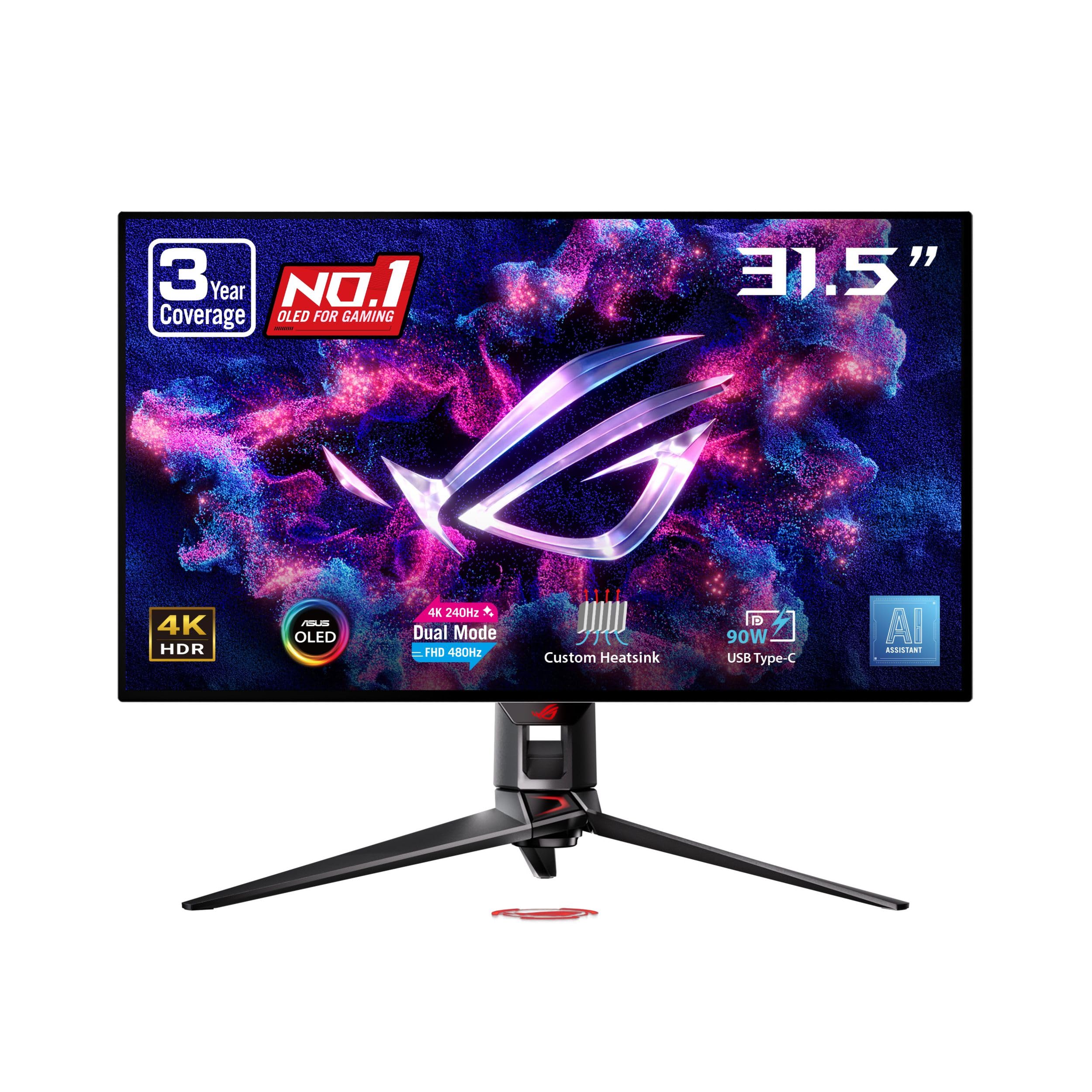
ASUS’s dual-mode WOLED pairs 4K cinematic depth with esports-grade speed.
This ASUS flagship brings dual-mode versatility to the ROG line: play in 4K at up to 240Hz, or switch to Full HD at up to 480Hz for competitive titles. It uses a WOLED panel covering 99% DCI-P3 color space with true 10-bit depth, and the ROG-exclusive OLED Anti-Flicker technology reduces flicker during refresh-rate fluctuations. The custom heatsink provides exceptional passive cooling to protect the panel.
Advanced AI features like dynamic AI Crosshair, AI Sniper, and AI Visual aim to improve your gameplay. The uniform brightness setting keeps luminance consistent, and DisplayWidget Center software lets you access OLED Care functions with a mouse. It’s backed by a 3-year warranty with ARR and burn-in coverage, and the USB-C port delivers 90W of power—enough to charge a laptop while driving the display.
Owners call it “a truly visually transformative experience,” praising the crisp text at 100% scaling and a matte anti-glare finish that handles bright rooms well. The honest complication: reliability draws negative feedback, with some reporting failures after about a month of use, and value-for-money is considered “unacceptable at its price point” by a few. Non-4K content also looks blurry unless you enable integer scaling. For dual-mode flexibility, the LG above offers similar features for less.
Why it stands out
- 480Hz Full HD mode for esports, 240Hz 4K for everything else
- Matte anti-glare finish that minimizes reflections in bright rooms
- 90W USB-C charging plus 3-year burn-in warranty
Where it stumbles
- Reliability worries, with a minority reporting failures within a month
- Soft-looking lower resolutions without integer scaling enabled
Choose this for: a premium dual-mode WOLED (a type of OLED panel that can switch between two refresh-rate modes) with sturdy burn-in protection and AI gaming assists—ideal if you want top-tier motion clarity and confidence about screen longevity.
Explore other options if: reliability is your top priority or budget is a factor, since the feature set overlaps with lower-priced dual-mode OLEDs.
Understanding the Specs
Understanding Contrast Ratio
This number tells you how deep the blacks can go compared to the brightest white. A higher ratio means dark scenes have more depth and shadow detail, which is crucial for spotting enemies hiding in dark corners. The premium OLED panels here hit 1500000:1 because each pixel turns off completely, while a VA panel like the Dell’s tops out around 1500:1, and IPS panels often sit near 1000:1. If you game in a dark room, this spec matters more than almost any other for perceived image quality.
The Burn-In Question
OLED burn-in is the fear that keeps some buyers away, and it happens when static elements like a taskbar or HUD leave a permanent ghost image. The top picks here fight back with custom heatsinks, graphene films, and pixel-cleaning routines (often called OLED Care). ASUS backs its panels with a 3-year warranty including burn-in coverage, and LG covers the OLED panel for 2 years. If you use your monitor for 8 hours of spreadsheets daily, consider a VA or mini-LED option like the Samsung Neo G8 instead, or enable auto-hide on your taskbar.
FAQ
Do I need a 240Hz monitor if my graphics card can’t hit 240 FPS at 4K?
What is the difference between G-Sync Compatible and FreeSync Premium?
Will a 32-inch 4K monitor work with my PS5 or Xbox Series X?
What is dual-mode on a monitor and do I need it?
Is OLED worth the extra cost over a VA or IPS gaming monitor?
Does a curved monitor make a difference for gaming?
Why do some specs say 0.03ms and others say 1ms response time?
Can these monitors double as a TV for streaming?
Does the stand allow height adjustment?
What should I do about OLED screen burn-in as a daily user?
Final Thoughts: The Verdict
For most gamers, the best 4k 32 inch gaming monitor is the ASUS ROG PG32UCDM, which delivers a spectacular 1500000:1 contrast ratio and 240Hz refresh rate to deliver a flawless gaming experience. If you’re weighing value and work-play balance, the Dell S3225QS offers an excellent VA panel at a much more accessible price. And for esports players who crave absolute speed, the LG 32GX850A-B lets you double your frames to 330Hz with its dual-mode display—an appealing step up without jumping straight to a top-tier flagship.
How We Picked
We do not accept paid placement. Every pick is matched to a real buyer and a real use-case; we do not hands-on test units.
Sources & Methodology
Specifications: manufacturer listings and product documentation. Review insights: verified customer reviews, as of September 2026. Pricing: not shown on this page (it changes often); check the current price via the retailer link.
As an Amazon Associate, Gadgets Feed earns from qualifying purchases. This does not affect which products we feature.