
Our readers keep the lights on and my morning glass full of iced black tea. As an Amazon Associate, I earn from qualifying purchases.
Specs are compiled from manufacturer listings and verified buyer reviews and can change over time — please confirm the key details on the product page before buying.
Most buyers walk into a 4K 32-inch TV search assuming they will have to settle for a smaller, lower-resolution screen to get the compact size they need. The reality is that native 4K resolution (3840 x 2160 pixels) is now available in the 32-inch class, and the choice is no longer about whether it exists but which one actually fits your room, your desk, and how you plan to use it day to day.
I’m Min — the founder and writer behind Gadgets Feed. This guide is built by comparing the manufacturers’ published specifications and the patterns across verified customer reviews, so you get each pick’s real strengths and trade-offs instead of marketing spin.
Whether you are setting up a small apartment, a desk workstation, or a bedroom gaming corner, you need a screen that delivers sharp detail without overwhelming the space. This article picks apart the top models to help you choose the best 4k 32 inch tv for your specific setup and budget.
Our Picks at a Glance


How To Choose The Best 4K 32 Inch TV
A 32-inch 4K TV sits in a unique spot — it packs the sharpness of a 4K monitor into a package small enough for a desk or a tight corner. To get the best pick for your room, focus on three things: the display technology (specifically, whether it uses a VA or QLED panel), the smart platform, and the connectivity ports you will actually plug into.
Display Technology — VA vs QLED
Most 32-inch 4K TVs use a VA (Vertical Alignment) panel, which naturally delivers a high contrast ratio (you will often see 3000:1 in the specs). That means deeper blacks in a dark room. QLED (Quantum Dot LED) is a step up — it uses a layer of quantum dots to produce a wider color volume, often advertised as “100% Color Volume” and over a billion shades. If you watch a lot of HDR movies or play colorful games, QLED makes the extra vibrancy visible even on a small screen.
Smart Platform — Streaming Apps and Voice Control
Your 32-inch TV needs built-in apps, but the experience differs by platform. Google TV (found on some smart monitors) gives you a clean interface with direct Netflix licensing and Google Assistant voice control. Samsung’s Tizen OS (on the QLED models) offers Samsung TV Plus live channels, the Gaming Hub for cloud gaming without a console, and Bixby/Alexa support. Check which platform lists the exact streaming services you subscribe to — not all platforms carry every app.
Connectivity — USB-C Power Delivery and HDMI 2.1
If you plan to use the TV as a monitor, a USB-C port with 65W power delivery (PD) is a standout — it charges your laptop while sending video through a single cable. For gaming, HDMI 2.1 on a 4K 60Hz panel gives you the bandwidth for full 4K at 60 frames per second, though you won’t get 120Hz on most 32-inch models. Standard ports like USB-A and Bluetooth let you attach a soundbar, keyboard, or external drive without a hub.
Quick Comparison
| Model | Best For | Display Tech | Resolution | Contrast Ratio | Amazon |
|---|---|---|---|---|---|
| KTC A32Q8★ Best Overall | Best Value/Monitor Combo | VA | 3840 x 2160 | 3000:1 | Amazon |
| Samsung QN32Q60DAlso Great | Best Overall Picture | QLED | 3840 x 2160 | Dual LED | Amazon |
| Samsung Q8F QLED | Best QLED under | QLED | 4K (3840 x 2160) | High | Amazon |
| Samsung M70F | Best for Productivity | LED | 3840 x 2160 | 3000:1 | Amazon |
| Samsung Movingstyle Essential | Best for Portability | LED | 3840 x 2160 | 3000:1 | Amazon |
In‑Depth Reviews
1. KTC 32 Inch 4K Smart Monitor (A32Q8)
Our pick — over 4★ from 1,500+ verified ratings; the strongest balance of quality and price.
A 4K smart monitor that doubles as a TV and charges your laptop through a single cable.
The KTC A32Q8 is the most versatile option in this list because it blurs the line between monitor and TV. It runs a full Google TV system with a Netflix license built-in, so you get streaming apps like Netflix, Prime Video, and YouTube without a separate box — and it works with Hey Google voice commands via the included remote. The 3840×2160 VA panel delivers a 3000:1 contrast ratio, giving you noticeably deeper blacks than a typical office monitor.
Where this really stands apart is the 65W PD USB-C port. Plug a compatible laptop in via a single Type-C cable and the monitor charges the laptop at 65W while sending 4K video — no separate power brick needed. It also has HDMI 2.1, DisplayPort 1.4, and a built-in KVM switch, letting you control two devices (like a work laptop and a gaming PC) with one keyboard and mouse. The dual 5W speakers with Dolby Audio are surprisingly capable for a monitor, and buyers call the 4K picture “sharp with great value for the size.”
On the downside, the VA panel has narrower viewing angles than IPS, so the image shifts if you sit off-center. The 60Hz refresh is fine for streaming and general use but not for fast competitive gaming. The plastic build feels cheaper than a premium TV, though at this price, the feature set is hard to match.
The biggest advantages
- 65W USB-C PD charges a laptop and sends 4K video over one cable
- Google TV system with official Netflix license and voice remote included
- Built-in KVM switch lets you control two devices with a single keyboard and mouse
Trade-offs to know
- Narrow viewing angles common to VA panels — side seating loses contrast
- 60Hz only; no high refresh rate for esports gaming
- Build materials feel lighter and less premium than a dedicated TV
Pick this if: you need one screen for both a laptop workspace and streaming — the 65W USB-C power delivery and Google TV make it the only true all-in-one in this size class.
skip it if: you want the absolute best TV picture quality and don’t need the laptop-charging or KVM features — the QLED options above deliver richer colors.
2. Samsung QN32Q60D (2024 Model)
A QLED panel that packs a billion colors into a 32-inch frame for under.
If you want the most effective picture on a small screen, the Q60D is the pick. The 100% Color Volume with Quantum Dot technology transforms light into over a billion shades, and the Dual LED backlight adapts automatically to match your content — so dark scenes stay deep without washing out bright highlights. You also get the Quantum Processor Lite with 4K upscaling, meaning standard-def video gets bumped closer to 4K clarity.
Buyers report the blacks are “incredibly deep” and that the sound from Object Tracking Sound Lite creates a convincing 3D surround effect that follows on-screen movement. The Motion Xcelerator smooths fast action with less lag and blur, useful for sports and console gaming. It lacks 120Hz refresh rate, a limitation one reviewer noted, but at 60Hz with VRR (Variable Refresh Rate) it handles most gaming well.
On the smart side, Samsung Tizen OS gives you streaming apps plus the Gaming Hub for cloud gaming without a console. The AirSlim design mounts nearly flush to the wall, and the TV is Pantone Validated — meaning color accuracy is certified by the industry color experts at Pantone, useful if you do any photo editing on it.
What stands out
- 100% Color Volume with Quantum Dot for over a billion color shades
- Object Tracking Sound Lite delivers 3D surround from virtual top channels
- Quantum Processor Lite upscales any content to near-4K quality
Room for improvement
- Limited to 60Hz refresh, not 120Hz for competitive gaming
- Not the brightest panel; some backlight bleed noted on all-black screens
- App bar setup reported as unintuitive by some buyers
Reach for this if: you prioritize picture quality above everything else — the QN32Q60D delivers the richest colors and deepest blacks in the 32-inch class, backed by a brand you can trust for updates.
Look elsewhere if: you need a high refresh rate for fast-paced PC gaming, or you want USB-C power delivery for a laptop setup — this TV lacks that port.
3. Samsung Q8F QLED 4K Smart TV

The only 32-inch TV one buyer could find that delivers true native 4K at a QLED level.
The Q8F sits in a rare spot — a 32-inch QLED TV with Quantum HDR and over a billion color shades, bundled with a 2-year warranty and an AUX HDMI 2.0 cable. The Quantum Dot technology delivers vivid color and contrast that outpaces what standard LED panels can produce, making HDR movies and games look punchy even in a small room. The slim metal bezel design adds a premium look that fits well in a living room or mounted on a wall.
One buyer review captures the appeal precisely: “This is the only 32-inch TV I’ve come across that features 4K.” The same reviewer notes excellent picture quality, low power usage, and solid performance for gaming and streaming. The 60Hz VRR (Variable Refresh Rate) helps reduce screen tearing during console games. The Tizen OS gives you streaming apps and voice control through the included remote. It also includes a streaming bundle with Brain.fm, Daily Burn, and Galaxy TV, plus the CPS extended protection plan.
The catch is it does not support 1440p input, meaning if you connect a PC that outputs at 1440p, you will not get a clean signal — you need to set it to 4K or 1080p. The remote and interface also have a learning curve, as buyers mention. Overall, this is a QLED TV that fills a gap with no direct competitor at this size and feature level.
Why it ranks high
- Native 4K QLED panel with Quantum HDR for over a billion color shades
- Slim metal bezel design that mounts flush to the wall
- Bundled with 2-year warranty (1 year manufacturer + 1 year CPS) and HDMI cable
Limitations
- No 1440p input support — PC output must be set to 4K or 1080p
- Includes an AUX HDMI 2.0 cable, not the latest 2.1 standard
- Remote and Tizen interface have a moderate learning curve per buyers
Buy this if: you want a no-compromise 32-inch QLED TV with HDR, and you appreciate having a bundled warranty for extra confidence.
Pass if: you need 1440p gaming support or you prefer a simpler remote — the interface takes getting used to.
4. Samsung M70F Smart Monitor (2025)
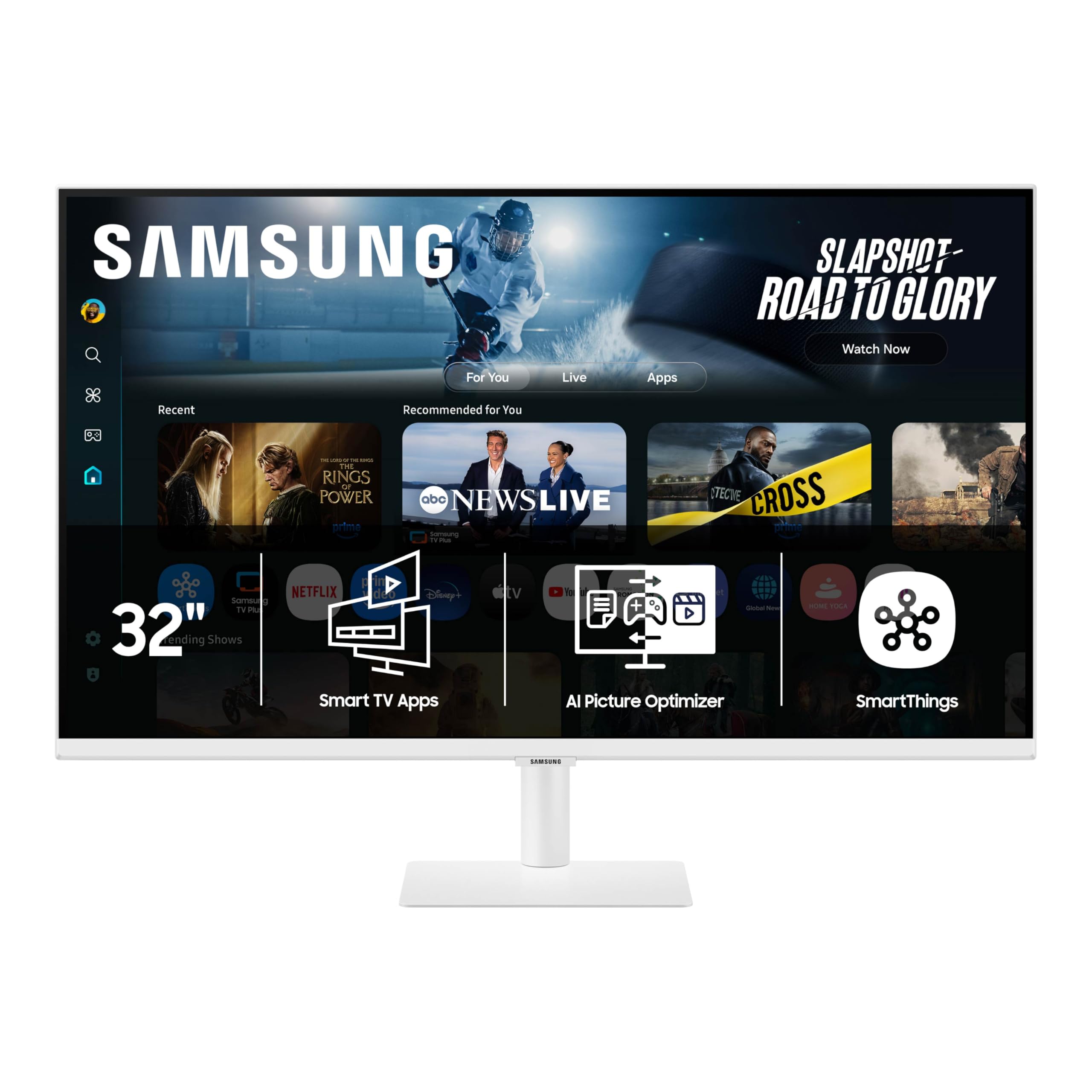
A 4K monitor that pulls double duty as a smart TV, with AI that adjusts visuals and sound to your room.
The M70F is built for the person who wants one screen for work by day and streaming by night. The 4K UHD LED panel delivers 3840 x 2160 resolution with a 3000:1 contrast ratio, giving you sharp text and deep blacks. The USB-C port handles data, video, and device charging all at once, so you connect a laptop with a single cable. It also has HDMI and USB-A ports for extra peripherals or a second screen. The monitor includes height adjustment and a tiltable stand, making it easier to find an ergonomic viewing angle.
Samsung Vision AI adds two features worth noting: AI Picture Optimizer adapts the visuals for whatever you are doing — boosting contrast for games or reducing eye strain for documents — and Active Voice Amplifier analyzes background noise and automatically adjusts dialogue volume, so you catch every word in a loud room. You also get Samsung TV Plus for live channels, the Gaming Hub for cloud gaming, and SmartThings to control smart home devices from a 3D Map View. The Samsung Knox security layer keeps monitor data safe, a genuine plus if you use it for sensitive work.
Owners mention great screen quality with no dead pixels or vignetting, and easy assembly. A common caution in reviews: one buyer says the included HDMI cable is “very low quality” and that the 4K picture looks washed out until you replace it with a better cable. The treble-heavy sound is another complaint — reviewers recommend external Bluetooth audio for better tone. The 60Hz refresh is adequate for productivity and streaming but not for fast-paced gaming.
Productivity perks
- USB-C handles single-cable video, data, and device charging
- AI Picture Optimizer adjusts contrast and brightness for the task at hand
- Active Voice Amplifier boosts dialogue volume automatically in noisy rooms
Watch out for
- Included HDMI cable reported as low-quality — plan to replace it for sharp 4K
- Sound is treble-heavy; external speakers or a soundbar recommended
- One buyer experienced monitor focus issues after the return period
Ideal for: a home office setup where you swap between spreadsheets, video calls, and Netflix — the AI features and single-cable USB-C make the M70F the most flexible productivity screen in the 32-inch class.
Not ideal for: buyers who want deep, room-filling sound from the built-in speakers, or anyone on a tight budget — the entry-level options below offer a lower cost of entry.
5. Samsung Movingstyle Essential (F-LS32FM70-MSR)
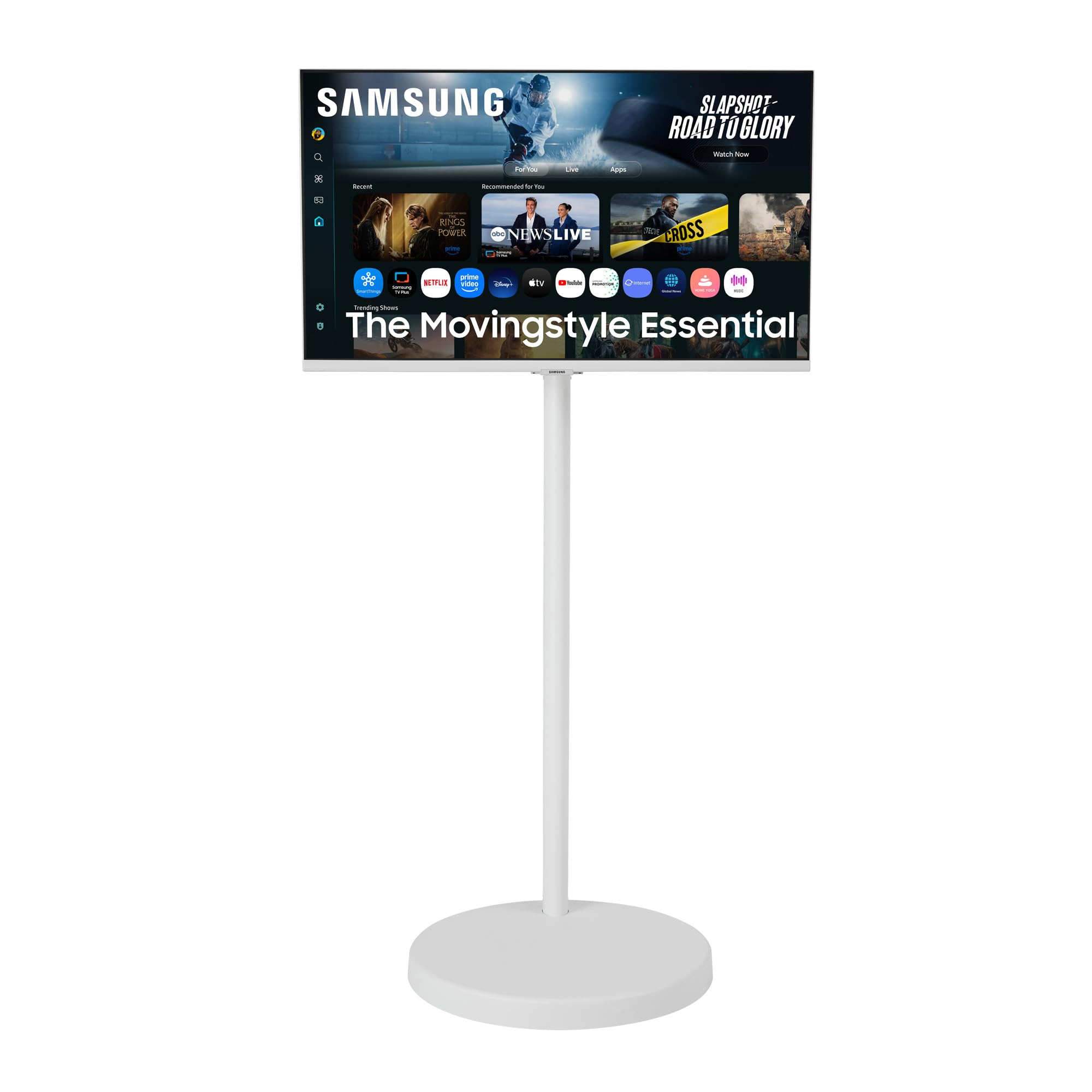
A 4K smart TV on a weighted rolling stand that follows you from room to room.
The Movingstyle Essential is the most unique pick in this lineup because it is a complete 32-inch 4K smart monitor on a height-adjustable rolling stand with hidden urethane wheels. The weighted base is heavy enough that pets cannot knock it over, and customers note it rolls “easily” on hard floors — though one reviewer notes it is “hard on carpet.” The NQM AI Processor handles picture optimization, and the 3000:1 contrast ratio with 300 Candela brightness delivers clear, bright 4K content anywhere you roll it.
The monitor pivots, swivels, and tilts, so you can dial in the perfect angle whether you are sitting at a desk or lounging on a sofa. The built-in Smart TV Apps (via Samsung’s platform) mean you do not need a separate streaming device, and the Gaming Hub lets you play cloud games without a PC or console. The classic white cylindrical column and rounded base design keeps the look clean and minimalist. Buyers in small apartments and ADUs love it — one reviewer says “perfect for my small apartment” because they can roll the TV in front of seating areas as needed.
The price is the highest in this guide, driven mainly by the custom rolling stand rather than a superior panel. The 300 nit brightness matches the M70F, but the QLED models above have richer color volume. Some buyers found the TV’s software forces an auto-start to Samsung TV Plus after updates, which they found intrusive. If you do not need the rolling feature, you pay a premium for convenience you might not use.
Unique strengths
- Height-adjustable rolling stand with heavy weighted base for stability
- Monitor pivots, swivels, and tilts for any viewing angle
- Built-in Smart TV Apps and Gaming Hub with no external box required
Sacrifices
- Premium price driven by the rolling stand, not a superior display panel
- Rolling stand is heavy and harder to move on carpet than hard floors
- Forced auto-start of Samsung TV Plus content reported after updates
Ideal if: you live in a small space or move between rooms frequently — the rolling stand with a weighted base gives you a movable 4K screen that stays stable and looks clean.
pass on it if: your TV will stay in one place — the QN32Q60D delivers a better QLED panel for the same or less money, and the M70F gives you USB-C flexibility for less.
Understanding the Specs
VA panel vs QLED
VA (Vertical Alignment) panels are common in 32-inch 4K TVs. They hit contrast ratios around 3000:1, meaning dark scenes stay genuinely dark with deep blacks — great for a dim room. QLED (Quantum Dot LED) takes the same VA foundation and adds a quantum dot layer that boosts color volume, often hitting “100% Color Volume” with over a billion shades. If you watch HDR movies or colorful animation, QLED makes the colors pop more visibly than a standard VA panel can produce.
USB-C with Power Delivery
USB-C Power Delivery (PD) on a 32-inch 4K TV, like the 65W PD port on the KTC, means you connect a compatible laptop with a single cable that both sends 4K video to the screen and charges the laptop at up to 65W. That removes the need for a separate laptop charger, keeping your desk clean. Without USB-C PD, you need both an HDMI cable for video and a separate power brick for the laptop. This matters most if you plan to use the TV as a primary workstation monitor.
FAQ
Will a 4K 32-inch TV work as a computer monitor?
Does a 32-inch 4K TV look noticeably sharper than a 1080p 32-inch TV?
Which 32-inch 4K TV has the best picture quality?
Can I mount a 32-inch 4K TV on a wall?
How many HDMI ports do I need on a 32-inch 4K TV?
What is the difference between a 4K TV and a 4K smart monitor used as a TV?
Does a 32-inch 4K TV come with a remote control?
Is 60Hz good enough for a 32-inch 4K TV?
How long does a 32-inch 4K TV typically last?
Can I play Xbox or PlayStation on a 32-inch 4K TV?
Final Thoughts: The Verdict
For most buyers, the best 4k 32 inch tv is the Samsung QN32Q60D because it combines QLED color performance, reliable upscaling, and a full smart TV experience at a sweet-spot price. If you want a single screen for both a laptop workstation and streaming, grab the KTC A32Q8. And for someone who needs to move the TV between rooms, the standout is the Samsung Movingstyle Essential.
How We Picked
We do not accept paid placement. Every pick is matched to a real buyer and a real use-case; we do not hands-on test units.
Sources & Methodology
Specifications: manufacturer listings and product documentation. Review insights: verified customer reviews, as of July 2026. Pricing: not shown on this page (it changes often); check the current price via the retailer link.
As an Amazon Associate, Gadgets Feed earns from qualifying purchases. This does not affect which products we feature.