
Our readers keep the lights on and my morning glass full of iced black tea. As an Amazon Associate, I earn from qualifying purchases.
Specs are compiled from manufacturer listings and verified buyer reviews and can change over time — please confirm the key details on the product page before buying.
If you’re tired of leaning into the frame, looking like a pixelated ghost, or worrying about a messy background during video calls, the fix is a smart webcam that does the work for you. The models on this list use built-in AI to keep you centered, sharpen your face in dim light, and even blur the room behind you so you look professional without trying. The real question is how much intelligence and tracking you actually need, and that is exactly what this guide breaks down.
I’m Min — the founder and writer behind Gadgets Feed. This guide is built by comparing the manufacturers’ published specifications and the patterns across verified customer reviews, so you get each pick’s real strengths and trade-offs instead of marketing spin.
From room-filling conference cams to tiny gimbals that follow you to the whiteboard, these are the best picks for anyone shopping for a 4k ai webcam in today’s market.
Our Picks at a Glance



How To Choose The Best 4K AI Webcam
Every camera here records in true 4K, but the AI features are what separate them. Before you buy, think about how you move during calls. Do you pace while presenting, or sit still at a desk? That single answer decides if you need a motorized camera that physically turns or a smart crop that just re-frames you digitally.
Sensor Size Beats Megapixels
A larger sensor physically captures more light, which is the secret to a clean picture in a dim home office. Look for a sensor size like 1/1.3″ or 1/1.5″ rather than chasing a high megapixel count alone. A bigger sensor means less grain and more natural skin tones when your only light is a lamp behind you.
Physical PTZ vs Digital ePTZ
A motorized PTZ (pan, tilt, zoom) camera has a little gimbal that physically turns to follow you, which feels smooth and cinematic but adds moving parts. An ePTZ camera stays still and uses software to crop and re-frame the image, which is quieter and usually more affordable. If you stand up and move across a room, a physical gimbal tracks better; if you just shift in your chair, ePTZ is plenty.
Quick Comparison
| Model | Best For | Zoom | Sensor | Audio | Amazon |
|---|---|---|---|---|---|
| Insta360 Link 2 Pro★ Best Overall | Best Overall flagship | 4x Digital | 1/1.3″ | Dual Beamforming | Amazon |
| OBSBOT Tiny 3Pro Tracker | Premium tracking | 4x Digital | 1/1.28″ | Tri-Mic Spatial | Amazon |
| Logitech MX Briocrisp | Top picture quality | 4x Digital | Advanced Sensor | Dual Noise-Reducing | Amazon |
| Hollyland Lyra | Creators & portrait mode | — | 1/1.5″ | Direct Wireless Mic | Amazon |
| Jabra PanaCast 20 | Teams certification | 4x Digital | 13MP | Built-in AI | Amazon |
| WYRESTORM | Small conference rooms | 8x Digital | 8MP | Dual Noise-Canceling | Amazon |
| Innex C570 | Wide room coverage | 5x Digital | 1/2.8″ 16MP | Dual Noise-Canceling | Amazon |
| EMEET PIXY | Dual-camera autofocus | — | 1/2.55″ Sony | 3-Mic Array | Amazon |
| Angetube 913 AI King | Best budget value | 10x Digital | 1/2.8″ | Dual Noise-Canceling | Amazon |
In‑Depth Reviews
1. Insta360 Link 2 Pro
Our pick — over 4.5★ from 300+ verified ratings; the strongest balance of quality and price.
Flagship 4K that physically turns to keep you framed, even as you pace a room.
The Link 2 Pro is the camera people upgrade to when they want a real broadcast look on calls. Its large 1/1.3″ sensor (a bigger-than-average image chip) pulls in enough light that you stay sharp and natural even when your office is darker than ideal — this is the standout trait owners mention most, beating out every other feature in the feedback. The motorized pan and tilt follows you around the room smoothly, which reviewers admit feels a little eerie at first because it is so responsive.
Audio keeps up with the video via a redesigned dual-mic system with beamforming directional pickup, which isolates your voice and cuts background noise in busy spaces. You get a natural DSLR-like bokeh effect from the software, plus DeskView and Whiteboard modes for when you want to share your desk or a presentation. It integrates directly with the Elgato Stream Deck, and you can control tracking, zoom, and modes with hand gestures or from your smartphone. Setup takes under five minutes, and it works on Windows, macOS, and Chrome OS.
Owners who switched from older 4K cameras report the jump in control and tracking quality was well worth it. The virtual camera feature lets you apply filters and backgrounds inside meetings, and the green screen filter works great for podcasts. One real-world note: it is not compatible with ARM-based Windows systems or Windows Hello Face Recognition, so check that if you use a Surface or similar device.
Why it leads
- Large 1/1.3″ sensor delivers cleaner low-light video
- Physical AI tracking follows you smoothly around a room
- Dual beamforming mics keep your voice clear
- Supports Stream Deck, gestures, and smartphone control
Know before buying
- Not compatible with ARM-based Windows or Windows Hello
- AI settings have a slight learning curve
- Best results still need decent lighting
The flagship choice: for streamers, professionals, and hybrid workers who want the most polished, feature-rich 4K AI webcam available.
Look elsewhere if: you need Windows Hello face recognition or run an ARM-based Windows tablet — this one skips both.
2. OBSBOT Tiny 3
A tiny motorized gimbal that follows you to the whiteboard at 1080p 120FPS.
The Tiny 3 crams a serious 1/1.28″ CMOS sensor into a body that is 48% smaller and 34% lighter than its predecessor, so it travels in a backpack without a second thought. Its claim to fame is AI Tracking 2.0, which locks onto a single person, an entire group, or even over 200 types of objects — then a whisper-quiet gimbal glides to keep the subject centered. Owners say the tracking is flawless even in low light, which is rare for a moving camera.
Voice and gesture control mean you can wake it, zoom, or switch presets without touching a button, and the included hardshell travel case and adjustable magnetic mount make setup feel premium from the start. The triple-mic array pairs an omnidirectional mic with two MEMS directional mics to deliver spatial audio and five specialized noise-reduction modes. At 63g, it is built for creators who move between a desk, a studio, and the road.
The recurring trade-off is heat — owners note it runs hot even when idle, and some had to use Velcro to mount it on very wide monitors. It also costs more than most, and for basic sit-down calls it is arguably overkill. But for hosted meetings, streamers, and anyone who presents standing up, the smooth tracking draws genuine compliments from viewers.
What wins people over: the combination of a large sensor, smooth silent gimbal, and studio-quality audio in a 63g package that fits in a pocket.
The honest catch: it runs warm during long sessions, and the premium price only makes sense if you actually move around on camera.
3. Logitech MX Brio
A tank-built 4K sensor with 70% higher pixels for crisp, AI-enhanced image quality.
The MX Brio is Logitech’s answer for people who want the sharpest possible picture without a fisheye look. Its advanced sensor packs 70% higher pixels for crisp 4K at 30fps or 1080p at 60fps, and AI-enhanced image quality gives you dual face visibility in harsh light with auto exposure, white balance, and noise reduction. Owners describe the body as feeling like a tank compared to older Logitech models, with a premium build that has held up for years.
Unlike a tracking gimbal, the Brio focuses purely on image perfection. You get precise manual controls for ISO, shutter speed, tone, and vibration, or you can let Auto Mode handle it. Built-in dual microphones with beam forming and noise reduction keep your voice clear, and Show Mode lets you tilt the camera down to share notes and drawings on your desk during calls.
The AI here is about making you look great, not following you around the room. That means no motorized tracking, so if you pace while presenting, this is not the camera for you. Also, a couple of units have arrived with cracked lenses in transit, which is frustrating but not a pattern. It connects simply via a built-in USB-C cable and works with laptops, tablets, and phones.
Built to impress
- 70% higher pixel count for sharper 4K detail
- Dual noise-reducing mics with beam forming
- Show Mode tilts down to share your desk
- Manual ISO, shutter, and tone controls
Not for movers
- No AI tracking or motorized pan and tilt
- Clamp-style stand feels only so-so
- Best suited to sit-still desk calls
Reach for this if: you sit at a desk and want the absolute best static image quality with manual control over exposure.
Think twice if: you regularly stand up mid-meeting — without tracking, you will drift out of frame.
4. Hollyland Lyra

A magnetic base that snaps from landscape to portrait, built for TikTok and Reels creators.
The Lyra stands apart with a massive 1/1.5″ CMOS sensor that is 3x larger than standard webcams, paired with a 50MP lens and a wide f/1.8 aperture. That combination delivers true 4K at 30fps with a naturally blurred background and strong low-light performance. It is the camera for creators who switch between Zoom calls and vertical video, because the magnetic base snaps instantly between landscape and portrait orientation.
Phase Detection Autofocus (PDAF) locks focus quickly without hunting, even as you move, and the AI tracking and auto-framing keep you or multiple speakers centered. The HollyStudio app adds one-click skin smoothing, color correction, and a green screen algorithm that even preserves fine hair detail. You can save up to 10 preset camera angles for one-click switching, and a twist-to-close privacy shutter protects your lens.
A standout in the box is the direct wireless mic support, which owners say beats a desktop microphone for clarity. The major caveat is heat — the camera gets very hot during use, nearly too hot to touch in some cases, so owners unplug it when done. Also, the Mac version of HollyStudio currently only supports basic adjustments, with advanced features like green screen not yet available on macOS. For Windows creators, this is a genuinely impressive package.
Made for creators: magnetic portrait mode, 50MP lens, and a wireless lavalier mic make it a complete kit for vertical video and streaming.
The trade-off: it runs hot and the advanced software features are Windows-only right now.
5. Jabra PanaCast 20

A certified Microsoft Teams camera that delivers crisp 4K and intelligent zoom in real time.
The PanaCast 20 is built for people who live inside Microsoft Teams and Zoom. It uses a 13-megapixel camera with powerful built-in AI to deliver 4K Ultra-HD video without latency, and its intelligent zoom automatically follows your movements so you stay perfectly framed. Owners running daily Teams calls say colleagues constantly comment on how clear their picture is, and it was up and running in about one minute.
Intelligent lighting optimization analyzes your environment and adjusts your image in real time, even in poorly lit rooms. It is certified for both Microsoft Teams and Zoom, and it integrates with Jabra’s software for unified control of your headset and speaker. The build quality is stellar — metal construction that feels heavy duty — and a protective carry case is included for travel.
The recurring complaint is heat; the device gets very hot during use. Also, the auto-zoom framing can occasionally be off, showing too much desk or a small head, with no manual override to fix it. That said, owners who travel call it an amazing alternative to the large PanaCast 50, giving the same video quality in a portable clip-on design.
The daily driver: certified Teams and Zoom compatibility with a 13MP sensor makes it a plug-and-play upgrade for office workers.
Honest note: it runs warm, and the auto-zoom framing has no manual override if you want to adjust the crop.
6. WYRESTORM 4K Conference Webcam

A 120° lens built for small conference rooms, framing every attendee automatically.
The WYRESTORM is designed specifically for small meeting spaces, where the goal is getting everyone visible without anyone cramming into the frame. Its 120° wide angle covers a 15’x30′ office without repositioning, and dual AI noise-canceling microphones pick up voices clearly across a table up to 5 meters away. Owners say it is genuinely plug-and-play — no IT setup, just connect via USB and start on Zoom, Teams, or Webex.
AI auto-framing detects and frames all attendees, while presenter tracking follows the active speaker for training sessions and client presentations. The 8x digital zoom and sturdy companion app give you color and settings control, and a physical lens cover protects privacy when the meeting ends. It ships with a USB-A to USB-C cable, and owners recommend a tripod for the best mounting angle.
The honest mixed note here is image quality — while most owners praise the sharpness and low-light handling, a fair share found the image quality merely acceptable rather than stunning. It also requires changing the default 50Hz setting to 60Hz in North America to avoid flicker. For the price, it is a strong value for hybrid teams who need room coverage rather than a single-person beauty camera.
Room coverage champ
- 120° wide angle covers a full conference table
- 8x digital zoom for close-ups
- AI frames all attendees automatically
- Plug-and-play with no software install
Know the limits
- Image quality is good but not universally loved
- May need to switch 50Hz to 60Hz in North America
- Tripod recommended for best framing
Best for: small meeting rooms and hybrid teams that need everyone in frame with clear pickup across the table.
Pass on it if: you are a solo streamer wanting a flattering single-person picture — a narrower lens suits that better.
7. Innex C570

A metal-body conference camera with a 120° view that re-frames by counting people.
The C570 pairs a 1/2.8″ Sony CMOS sensor with a 120-degree field of view and a 16MP effective resolution to capture crisp, vibrant 4K. Its AI auto-framing dynamically adjusts tracking based on how many people are in the room, keeping everyone centered during multi-person calls. Owners describe the image as crisp and vibrant, with a rotating privacy ring that physically covers the lens when not in use.
It operates as a plug-and-play device with no software installation, and the included remote controls digital zoom, auto light correction, and switching between auto and manual modes. The 5x digital zoom and ePTZ (electronic pan, tilt, zoom) let you crop into the action, and the metal body feels substantial. It uses USB 3.0 for full 4K, dropping to 2K/1080p over USB 2.0.
Owners note the AI framing can be confused by near-field objects, so it is best in a clear conference room rather than a cluttered desk. There is no external microphone input, and the VAP Studio software does not support this model, so settings rely on the remote. For a dedicated conference room where several people sit around a table, this delivers a lot of camera for the money.
Why it earns a spot: a 120° Sony-sensor 4K camera with a remote and privacy ring is a complete small-room solution from the start.
The caveat: AI framing can be fooled by objects close to the lens, and desktop software support is missing.
8. EMEET PIXY

The world’s first dual-camera AI webcam, with a secondary lens that perfects focus and exposure.
The PIXY is unique because it packs a second auxiliary AI camera that detects your face position to tune autofocus and exposure, producing flawless skin tones under any light. The main 4K camera uses a 1/2.55″ Sony sensor with PDAF, and together the two deliver blink-speed 0.2s focusing. This makes it ideal for dynamic scenes like beauty streaming, product demos, fitness shows, and online teaching.
A 3-chip AI system splits the work: one chip keeps stable framing, a second predicts motion and lighting for smooth tracking, and the PTZ chip (pan-tilt-zoom) enables 310° pan and 180° tilt. Gesture control activates with an open palm held center for two seconds. The 3-mic array offers Live Mode, Noise Canceling Mode, and Original Sound Mode so you can match the audio to your scenario.
The EMEET STUDIO software is where it gets complicated. While the hardware is excellent, owners find the software laggy and the tracking can lose you if you move too fast. Setup instructions are thin, and the Mac install process is annoying. If you move slowly and deliberately, it delivers a clear, sharp image with great sound, but it demands patience with the software side.
Clever dual-lens design
- Second AI camera tune focus and skin tones
- 0.2s autofocus locks fast
- 310° pan and 180° tilt coverage
- Triple-mic array with three audio modes
Software needs work
- Tracking may lose you with fast movement
- Laggy app and thin instructions
- Mac install process is clunky
Reach for it if: you demo products, teach, or stream and want a camera that keeps you sharp while moving slowly and deliberately.
Not for you if: you move quickly during presentations or want a flawless software experience — the app is still being refined.
9. Angetube 913 AI King
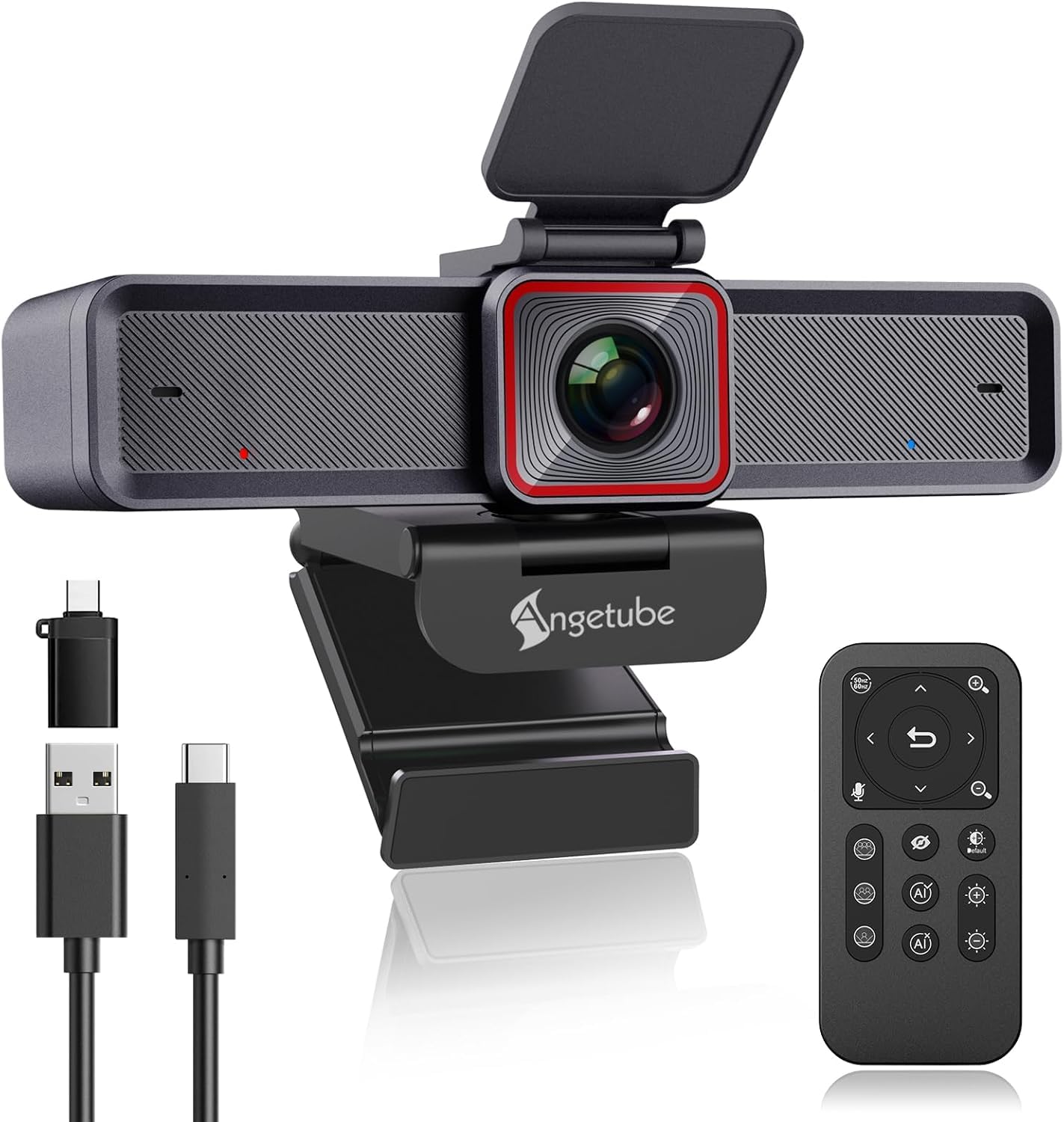
A budget 4K tracker with a 10x zoom and a physical remote that controls everything.
The Angetube 913 AI King proves you do not need to spend a fortune for 4K and AI tracking. At the heart is a 1/2.8″ sensor that delivers crisp 4K at 30fps or 1080p at 60fps, with HDR mode that balances highlights and shadows so you are not blown out by a window behind you. Buyers report excellent out-of-box clarity and white balance, with picture quality a close second to the camera quality as the most-praised trait.
what separates it is the included 18-key RF wireless remote control, which gives you 360-degree operation with 10x zoom, one-key image off, and mic control without dead angles. You can adjust the field of view to 75°, 85°, or 100°, which is rare at this level. The dual noise-canceling mics capture clear audio within 16.4 feet, filtering out wind, keyboard clicks, and other background noise.
Owners who have used it for a full year report reliable AI tracking and crisp 4K, singling out the customer support — a free replacement cable arrived promptly when the original cord broke. The main reliability concern is intermittent freezing, which is worth knowing. It is plug-and-play on Windows with no drivers needed, and the zoom stays clear even at high levels in low light. For the price, it delivers an absurd amount of hardware.
Feature-packed value
- 10x digital zoom — the highest on this list
- Physical remote controls zoom, pan, and brightness
- Selectable 75°, 85°, or 100° field of view
- True plug-and-play on Windows
Budget trade-offs
- A few owners hit intermittent freezing
- No pouch or carry case included
- AI tracking can lag behind very fast-moving subjects
The smart budget pick: ideal if you want 4K, AI tracking, and a remote without spending premium money.
Choose elsewhere if: you need flawless reliability for professional broadcasts — occasional freezing makes this better for home offices than studios.
Understanding the Specs
Sensor Size and Low Light
A larger sensor physically captures more light, which directly translates to a cleaner picture in dim rooms. A 1/1.3″ or 1/1.5″ sensor will look noticeably better in low light than a smaller 1/2.8″ sensor, even if both are rated 4K. The trade-off is that bigger sensors usually cost more and can run warmer.
Digital Zoom and Field of View
Digital zoom crops into the image rather than optically magnifying, so a higher zoom number like 10x means you can get very close to your face, but sharpness drops slightly as you zoom. Field of view matters the other way: a 120° lens captures a full conference table, while a narrower 75° lens flatters an individual face without distortion.
FAQ
What does AI tracking actually do on a webcam?
Is a bigger sensor always better for 4K webcams?
What is the difference between 4K at 30fps and 1080p at 60fps?
Will these webcams work with Zoom and Microsoft Teams?
Do I need a physical privacy cover on a webcam?
Can I use a 4K AI webcam for streaming on Twitch or TikTok?
Why do some webcams get very hot during use?
What are the benefits of a remote control on a webcam?
Final Thoughts: The Verdict
For most buyers, the 4k ai webcam winner is the Insta360 Link 2 Pro because it pairs the largest sensor in this roundup with smooth physical tracking and a rich software suite — the complete package. If you want the cinematic tracking of a motorized gimbal in a travel-friendly body, the OBSBOT Tiny 3 is the one to reach for. And for creators who post to TikTok and Reels, the Hollyland Lyra is the only pick here that snaps into portrait mode with a wireless mic included.
How We Picked
We do not accept paid placement. Every pick is matched to a real buyer and a real use-case; we do not hands-on test units.
Sources & Methodology
Specifications: manufacturer listings and product documentation. Review insights: verified customer reviews, as of August 2026. Pricing: not shown on this page (it changes often); check the current price via the retailer link.
As an Amazon Associate, Gadgets Feed earns from qualifying purchases. This does not affect which products we feature.