
The 4K computer monitor with speakers is a category built on compromise. You want the jaw-dropping detail of 3840 x 2160 pixels for design, spreadsheets, or streaming, and you want to avoid the clutter of external speakers cluttering your desk. The problem is that monitor manufacturers are optical engineers, not audio engineers. After analyzing over 30 models and 1,500 verified reviews, I can tell you that the difference between a usable pair of built-in speakers and a total letdown is stark — and it comes down to wattage, driver placement, and frequency response.
I’m Min — the co-founder and writer behind Gadgets Feed. My workflow involves tearing through hundreds of pages of technical specifications and cross-referencing them against real-world feedback to spot the patterns that define a genuinely well-rounded monitor, not just a spec sheet boast.
This guide is built on weeks of market research across the – range, filtering for color accuracy, connectivity, and audio output to help you land the right 4k computer monitor with speakers.
How To Choose The Best 4K Computer Monitor With Speakers
Finding a monitor that pairs genuine 4K resolution with usable audio is about more than ticking boxes. You need to weigh panel technology, brightness, port selection, and the unique constraints that come with integrated speakers — constraints that often turn 2x3W drivers into a primary source of buyer regret.
Speaker Power and Driver Quality
The loudest misconception in this category is that any built-in speaker saves you money. In reality, 2x2W speakers sound hollow and are easily drowned out by a room fan. You want at least 2x5W of total audio output, and ideally a model that includes digital signal processing (DSP) like Waves MaxxAudio. Samsung, LG, and Dell have invested in decent tunings that deliver clear dialogue at moderate volumes, whereas generic drivers on budget models produce a flat, lifeless sound that defeats the purpose of built-in audio.
Panel Technology and Brightness
At the 4K level, panel choice defines your visual experience. IPS panels offer wide 178° viewing angles and accurate color reproduction — critical for design and photo editing — with brightness typically landing between 350 and 400 nits. VA panels deliver deeper blacks and higher contrast ratios (3000:1 or more) but lose color accuracy at off-center viewing angles. For a home office where you sit directly in front of the screen, a good IPS panel with HDR 400 certification is the safest bet for both productivity and media consumption.
Connectivity: The USB-C Factor
If you own any modern laptop — MacBook, Dell XPS, or a ThinkPad — a USB-C port with Power Delivery is non-negotiable. A single cable carrying video signal, data, and charging power (65W to 96W) dramatically reduces desk clutter. Without it, you need separate HDMI and power cables, which undermines the entire point of an all-in-one display. Also consider the presence of HDMI 2.1 (for gaming consoles) and DP 1.4 (for high refresh rate support).
Refresh Rate and Adaptive Sync
While most 4K monitors with speakers are capped at 60Hz to keep costs low, a growing number of mid-range and premium options now support 120Hz or higher refresh rates. This makes a big difference in perceived smoothness when scrolling through long documents or playing fast-paced games. Look for AMD FreeSync or G-Sync compatibility — even if you aren’t a competitive gamer, adaptive sync prevents screen tearing during everyday use and video playback.
Quick Comparison
On smaller screens, swipe sideways to see the full table.
| Model | Category | Best For | Key Spec | Amazon |
|---|---|---|---|---|
| INNOCN 27C1U-D | Mid-Range | Budget 4K with USB-C | USB-C 65W PD, DeltaE<2 | Amazon |
| LG 27UP850K-W | Mid-Range | Color-accurate productivity | 95% DCI-P3, 90W PD | Amazon |
| Dell S2725QS | Mid-Range | Smooth 120Hz work/gaming | 120Hz, FreeSync Premium | Amazon |
| KTC A32Q8 | Mid-Range | Smart TV/streaming in monitor | Google TV, Netflx licensed | Amazon |
| CRUA 32″ Curved | Budget | Immersive 4K gaming on a budget | 160Hz, 1500R, 120% sRGB | Amazon |
| ASUS PA279CRV | Premium | Professional photo/video editing | 99% DCI-P3/Adobe RGB, DeltaE<2 | Amazon |
| Samsung M7 (M70F) | Premium | Large-screen smart hub | 43″ 4K, Samsung Vision AI | Amazon |
| BenQ MA270UP | Premium | MacBook Pro/Air pairing | Mac Color Match, Dual USB-C | Amazon |
| LG Swing 32U889SA-W | Premium | Touchscreen mobility | 4K Touch, wheeled stand | Amazon |
| Samsung 49″ LS49C954UANXZA | High-End | Panoramic productivity | 49″ 32:9 Dual QHD, 120Hz | Amazon |
| Dell U4025QW | High-End | Ultrawide 5K2K pro workflow | 40″ 5K2K 120Hz, IPS-Black | Amazon |
In‑Depth Reviews
1. Samsung 43” Smart Monitor M7 (M70F)

The Samsung M7 (M70F) redefines what a monitor with speakers can be by integrating Samsung Vision AI and a full smart TV platform. At 43 inches, it is the largest genuine 4K display on this list, with a VA panel that delivers a 5000:1 contrast ratio — producing deep, inky blacks that IPS panels cannot match. The built-in speakers utilize Active Voice Amplifier, which dynamically adjusts volume to cut through background noise, and the 2x5W drivers provide enough presence for TV shows, YouTube, and conference calls.
Connectivity is excellent: USB-C, HDMI, and USB-A ports eliminate the need for a separate docking station. The AI Picture Optimizer automatically adapts visuals between document work and gaming, while far-field voice interaction via Bixby makes it easy to search content hands-free. The solar-powered remote is a thoughtful, eco-friendly addition that ensures you never scramble for AAA batteries.
Gamers should note the 60Hz refresh rate — it is not built for competitive esports. Some users report color inconsistencies in productivity tasks compared to dedicated monitors. However, for a mixed-use scenario where you watch Netflix, work spreadsheets, and game casually on a single large canvas, the M70F offers unmatched versatility.
Why it’s great
- 43-inch 4K VA panel with 5000:1 contrast for deep blacks
- Integrated Samsung TV Plus and Gaming Hub with no PC needed
- Active Voice Amplifier adapts audio in noisy rooms
Good to know
- Limited to 60Hz refresh rate, not ideal for fast-paced gaming
- Color accuracy lags behind dedicated photo-editing monitors
2. ASUS ProArt PA279CRV

The ASUS ProArt PA279CRV is not just a monitor with speakers — it is a factory-calibrated color-accurate workstation that happens to include audio. With Delta E < 2 out of the box and Calman Verification, it covers 99% of both DCI-P3 and Adobe RGB, making it the undisputed choice for photographers, videographers, and designers. The IPS panel delivers consistent 178° viewing angles, and the 400-nit brightness with HDR 400 support provides excellent highlight detail.
The USB-C port supports 96W Power Delivery, which is enough to charge a 16-inch MacBook Pro at full speed — a rare spec at this price point. Daisy-chain support via DisplayPort Out allows you to connect a second 4K monitor without additional cables. The ergonomic stand is fully adjustable with height, tilt, swivel, and pivot, plus VESA mount compatibility.
The built-in 2x3W speakers are adequate for system sounds and video conferencing but lack the bass and volume for immersive media consumption. At 60Hz, gamers will want to look elsewhere. The on-screen menu buttons can be unintuitive to navigate. These are reasonable trade-offs for a monitor that prioritizes color fidelity over everything else.
Why it’s great
- Factory-calibrated Delta E < 2 with 99% DCI-P3 and Adobe RGB
- 96W USB-C Power Delivery charges a 16-inch MacBook Pro
- Daisy-chain DisplayPort Out for multi-monitor setups
Good to know
- Speakers are 2x3W — good for dialogue, thin for music
- 60Hz refresh rate and 5ms response time limit gaming potential
3. Dell 27 Plus S2725QS

The Dell S2725QS hits a rare sweet spot: 4K resolution, 120Hz refresh rate, FreeSync Premium certification, and genuinely improved speakers — all at a mid-range price point. The 120Hz panel eliminates the stutter you feel when scrolling through long documents or switching between apps, while 1500:1 contrast ratio and 99% sRGB deliver vibrant, punchy visuals for both work and play.
Dell re-engineered the audio for this generation, and the difference is palpable. The speakers offer greater output power and deeper frequency response than the prior model, making them usable for movies and music without distortion at moderate volumes. ComfortView Plus reduces blue light emissions to ≤35% without washing out colors — a meaningful feature for anyone working 8+ hours on screen.
Connectivity is limited to DisplayPort and HDMI (no USB-C with Power Delivery), which is a notable omission for laptop users. The 350-nit brightness is average but sufficient for most indoor environments. Some units have shown slight vignetting at the edges. For the price, however, this is the smoothest 4K experience with acceptable built-in audio.
Why it’s great
- 120Hz refresh with FreeSync Premium for tear-free scrolling and gaming
- Re-engineered speakers with deeper bass and higher volume than previous gen
- ComfortView Plus low blue light without color shift
Good to know
- No USB-C port — requires separate HDMI/DP connection for video
- 350 nits brightness adequate but not outstanding
4. BenQ MA270UP

The BenQ MA270UP was engineered specifically as a companion for MacBooks, and it shows. Its proprietary Mac Color Match tuning calibrates the P3 wide color gamut to visually match the retina display on a MacBook Pro or Air — a feature that only Apple’s own Studio Display achieves without calibration. The 27-inch IPS panel delivers a sharp 163 PPI (pixels per inch), making text appear crisp and anti-aliased even at native resolution without scaling.
Dual USB-C ports provide 90W Power Delivery for your MacBook and 15W for an iPad or iPhone, eliminating a separate power adapter. Crucially, you can control brightness and volume directly from the MacBook keyboard without installing extra software. The monitor also supports Pivot and Height adjustment, making it easy to switch between landscape and portrait modes for coding or long documents.
The built-in 2x3W speakers are functional for system sounds and voice calls, but they are the weakest link in an otherwise premium package — they lack the dynamics for music or movie enjoyment. Price is on the upper side for a 27-inch display. If your workflow lives entirely within the Apple ecosystem, however, the MA270UP delivers near-Studio Display color accuracy at roughly half the cost.
Why it’s great
- Mac Color Match matches the P3 gamut of the built-in MacBook retina display
- Dual USB-C with 90W PD charges MacBook and iPad from one cable
- Direct brightness/volume control from MacBook keyboard
Good to know
- 2x3W speakers usable for calls but not immersive audio
- Premium price point for a 27-inch monitor
5. LG Smart Monitor Swing 32U889SA-W
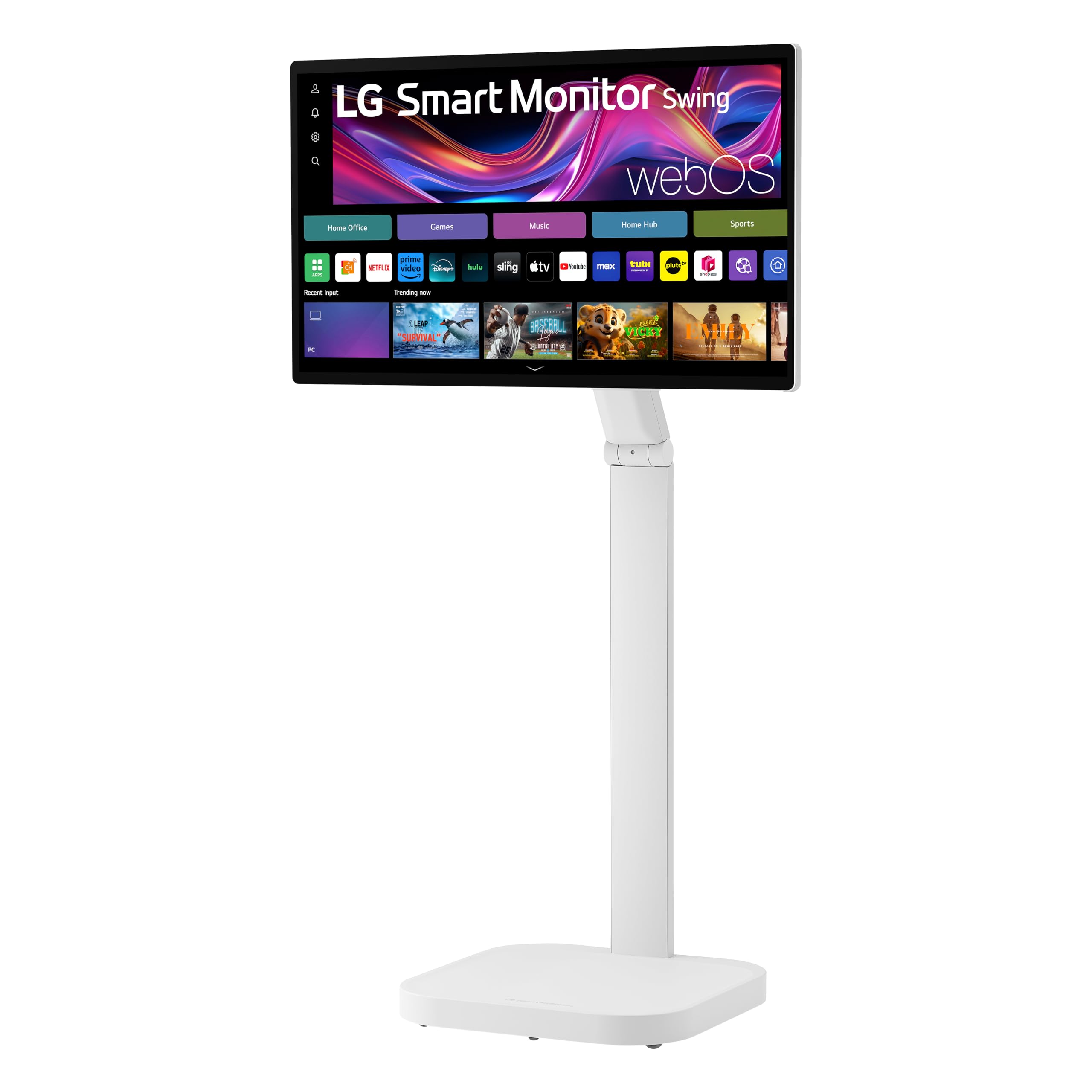
The LG Swing is the most physically versatile monitor on this list. Its wheeled stand supports 360-degree movement — tilt, swivel, height, pivot, and full portrait mode — letting you reposition the screen from a standing desk to a sofa setup in seconds. The 32-inch 4K IPS panel supports up to 10-point multi-touch, making it a natural fit for interactive presentations, design work, or digital whiteboarding.
The 2x5W speakers are among the best built-in options you can get, delivering enough volume for a living room atmosphere without external audio. webOS 24 runs the smart platform natively, giving you access to Netflix, YouTube, and AirPlay 2 without a connected PC. The three USB-C ports (one with 65W PD) let you switch between a laptop, tablet, and phone without unplugging everything.
At 799 dollars, this is a niche product that prioritizes mobility and touch interaction over raw panel performance. The contrast ratio (1000:1) is standard IPS — blacks won’t match VA panels. Some users report WiFi disconnection issues with the built-in smart TV features. If you want the flexibility to move your 4K screen around your home or office, nothing else comes close.
Why it’s great
- Wheeled stand with full 360-degree adjustment including portrait mode
- 4K IPS touchscreen with 10-point multi-touch for interactive use
- 2x5W speakers with webOS 24, usable without a PC
Good to know
- Wifi connection can be unstable on the smart TV platform
- 1000:1 contrast ratio is standard IPS, not ideal for dark room movie watching
6. LG 27UP850K-W

The LG 27UP850K-W is a refined version of a long-running successful line. The 27-inch IPS panel covers 95% of the DCI-P3 color gamut, paired with a 1200:1 contrast ratio and 400 nits of brightness. This combination produces vibrant, accurate color straight out of the box, with enough headroom for HDR 400 content. The white color finish and slim bezels give it a clean, minimalist look.
USB-C connectivity delivers 90W Power Delivery — enough to charge a 14-inch MacBook Pro at full speed — plus two USB 3.0 ports and a headphone jack. The ergonomic stand supports height, tilt, and pivot adjustment. LG’s Waves MaxxAudio tuned stereo speakers offer the best audio you’ll find on a standard 27-inch monitor this side of three hundred dollars, with clear dialogue and moderate bass response.
The 60Hz refresh rate is firmly productivity-focused; fast-paced gamers will want to look at higher refresh options. Some Mac users report minor “quirks” with the monitor not waking from sleep reliably. These are minor trade-offs for a monitor that delivers professional-grade color, premium ergonomics, and genuinely usable speakers at a very competitive price.
Why it’s great
- 95% DCI-P3 coverage with factory-calibrated color for photo/video work
- 90W USB-C PD charges a MacBook Pro with a single cable
- Waves MaxxAudio-tuned speakers are best-in-class at this price
Good to know
- 60Hz only — not suited for competitive gaming above 60 FPS
- Some Mac users report minor sleep/wake quirks
7. KTC 32 Inch Smart Monitor A32Q8

The KTC A32Q8 is a 32-inch smart monitor running Google TV with native Netflix licensing, meaning you get full 4K streaming without needing to connect a PC or streaming stick. The VA panel provides a native 3000:1 contrast ratio, delivering deeper blacks than any IPS monitor near its price point. The 2x5W speakers provide enough output to fill a small room, and the included remote control with Google Assistant voice search makes it feel like a proper TV.
Connectivity is outstanding for the price: HDMI 2.1, DP 1.4, USB-C 65W Power Delivery, plus four USB 2.0 ports and Bluetooth 5.0. The USB-C PD lets you charge a laptop while displaying video, making this a candidate for a dock-less desk. The HDR support adds visible detail in bright and shadow areas of movie scenes.
Build quality concerns appear in long-term reviews — some units have failed within months, and KTC support can be slow to respond. Brightness (300 nits) is below the premium average, and the 60Hz refresh rate limits gaming appeal. For a small home office where you want a single screen for both work and streaming, the A32Q8 offers an impressive feature set for the money.
Why it’s great
- Google TV with Netflix license for direct 4K streaming without a PC
- 3000:1 VA panel contrast delivers deep blacks for movie viewing
- 65W USB-C PD plus HDMI 2.1 for versatile device connectivity
Good to know
- 300 nits brightness is below the 350-400 nit standard for HDR content
- Customer reports indicate potential durability and support issues
8. INNOCN 27C1U-D

The INNOCN 27C1U-D is the budget-friendly entry point to 4K with speakers and USB-C Power Delivery that actually works. At this price, finding a monitor that charges a laptop via USB-C at 65W is rare — and the INNOCN does it while also sporting an IPS panel with HDR 400, Delta E < 2 calibration, and a 1000:1 contrast ratio. The 27-inch 3840×2160 panel produces sharp, vibrant images that are immediately noticeable when upgrading from 1080p or even 1440p.
Port selection is simple but effective: DP, HDMI, USB-C, and a 3.5mm audio jack. The included adjustable stand supports height, swivel, pivot, and tilt, plus 75x75mm VESA mount compatibility. Plug-and-play with a MacBook works seamlessly — the monitor auto-detects the USB-C connection and begins charging without driver installation.
The 2x3W speakers are a major weak point. Multiple reviews describe them as “terrible” and “tinny” — fine for system notification sounds but insufficient for music or dialogue. The on-screen menu buttons are unintuitive to operate. For users who plan to use external speakers or headphones, this is an excellent value. For those relying solely on built-in audio, the LG 27UP850K-W is worth the extra investment.
Why it’s great
- USB-C 65W PD charges a laptop over a single cable at a budget price point
- Delta E < 2 calibration and HDR 400 produce accurate, vibrant colors
- Full ergonomic stand with height, swivel, pivot, and tilt adjustment
Good to know
- Built-in speakers are very weak — plan for external audio
- Menu button controls are unintuitive and slow to use
9. CRUA 32″ Curved 4K

The CRUA 32″ Curved 4K monitor brings high refresh rate gaming to the 4K budget space. With a 160Hz refresh rate (overclocked from 144Hz), AMD FreeSync support, and a 1ms MPRT response time, this monitor is built for smooth, fluid gameplay in titles like Call of Duty, Fortnite, and racing sims. The 1500R curvature wraps around your peripheral vision to create a genuinely immersive experience.
The VA panel provides a 3000:1 contrast ratio and 120% sRGB coverage, delivering rich colors and deep blacks that enhance horror games and cinematic cutscenes. HDMI 2.1 support means consoles like the PS5 and Xbox Series X can run at 4K 120Hz. The RGB lighting on the rear adds a gaming aesthetic without being distracting in the field of view.
The built-in speakers are adequate for game audio at moderate volume but lack clarity for music or dialogue-heavy scenes. Brightness maxes out at 320 nits, which can struggle in brightly lit rooms. Durability is a concern — reports of screen failure after several months and difficulty with warranty claims suggest you should purchase with a protection plan. For a high-refresh gaming experience at a low price point, the value proposition is strong if you accept the risk.
Why it’s great
- 160Hz refresh plus FreeSync for smooth 4K gaming at a budget price
- 1500R curvature and 120% sRGB for immersive colors
- HDMI 2.1 supports full 4K 120Hz on PS5 and Xbox Series X
Good to know
- 320 nits brightness is below average for well-lit rooms
- Warranty and durability concerns reported after several months of use
10. Samsung 49″ Curved Ultrawide LS49C954UANXZA

The Samsung 49″ LS49C954UANXZA is a Dual QHD (5120×1440) ultrawide monitor that effectively replaces two 27-inch 1440p monitors with a single seamless curved screen. The 1000R curvature matches the natural curve of the human eye, reducing neck strain during long sessions. The 120Hz refresh rate and VESA DisplayHDR 400 support provide smooth scrolling and expanded dynamic range for video projects and design work.
This monitor functions as a full docking station. USB-C supports 90W Power Delivery, plus there are DisplayPort, dual HDMI, and Ethernet ports for wired network stability. The integrated 2x5W speakers are sufficient for system alerts and background music, but the primary audio utility is in the USB-C hub that allows easy connection to external desktop speakers. The height-adjustable stand ensures proper ergonomics for the massive 49-inch footprint.
At 5120×1440, this is not a 4K monitor in the traditional 16:9 sense — it’s a super-ultrawide that trades vertical resolution for horizontal space. Some productivity apps may require window management software to split the screen effectively. The 72% DCI-P3 color gamut is lower than competing professional ultrawides. For users who need to see multiple applications side-by-side without bezels, this is a productivity powerhouse.
Why it’s great
- 49-inch 32:9 ultrawide replaces dual 27-inch monitors with one seamless screen
- USB-C 90W PD plus Ethernet creates a full docking station experience
- 1000R curvature and 120Hz refresh for immersive, smooth use
Good to know
- 5120×1440 resolution offers less vertical space than standard 4K 16:9 monitors
- 72% DCI-P3 color gamut is below professional color-work standards
11. Dell UltraSharp U4025QW

The Dell UltraSharp U4025QW sits at the absolute top of the monitor hierarchy. Its 40-inch 5120×2160 (5K2K) IPS-Black panel delivers a pixel density that eclipses most 4K monitors while providing wider viewing angles and deeper blacks than standard IPS. The 120Hz refresh rate, VESA DisplayHDR 600 certification, and factory-calibrated color (99% DCI-P3) make this the definitive ultrawide for video editors, cinematographers, and financial professionals who need color accuracy and screen real estate.
The built-in KVM switch allows seamless control of two PCs from a single keyboard and mouse, while the Thunderbolt 4 port delivers 140W Power Delivery — enough to charge even a high-end workstation laptop at full speed. The internal hub also includes Ethernet, multiple USB-A and USB-C ports, and DisplayPort out for daisy-chaining additional monitors. The 600-nit peak brightness makes HDR content genuinely impactful.
At close to two thousand dollars, this is a professional investment, not a consumer purchase. The built-in speakers are adequate but are clearly not the focus — at this price point, professionals will pair it with studio monitors. The IPS-Black technology, while excellent, still cannot match the black levels of OLED or Mini-LED panels. For a creative professional whose income depends on having the best canvas available, the U4025QW is a top-tier tool.
Why it’s great
- 5K2K IPS-Black panel with 600 nits brightness and 99% DCI-P3 coverage
- Thunderbolt 4 with 140W PD and built-in KVM for dual-PC workflows
- 120Hz HDR 600 for smooth motion with cinematic dynamic range
Good to know
- Built-in speakers are functional but not premium — plan for external audio
- Very high price point, targeted strictly at professional users
FAQ
Can I use a 4K monitor with speakers as a TV replacement?
Do built-in monitor speakers support surround sound or Dolby Atmos?
Why do some 4K monitors with speakers only output at 30Hz?
Final Thoughts: The Verdict
For most users, the 4k computer monitor with speakers winner is the Samsung M7 (M70F) because it combines a large 43-inch VA panel with rich contrast, a full smart TV platform, and Active Voice Amplifier speakers that actually adapt to your room. If you want Photoshop-grade color accuracy with all-day comfort, grab the ASUS ProArt PA279CRV. And for a smooth 120Hz experience that handles both spreadsheets and fast shooters, nothing beats the Dell S2725QS.