
Our readers keep the lights on and my morning glass full of iced black tea. As an Amazon Associate, I earn from qualifying purchases.
Specs are compiled from manufacturer listings and verified buyer reviews and can change over time — please confirm the key details on the product page before buying.
Picking a TV with HDMI 2.1 isn’t about bragging rights—it’s about making your new console or gaming PC actually look and feel the way it should. A standard TV can leave fast action blurry and struggle to keep up with quick switches in frame rate, which is exactly what HDMI 2.1 fixes. This guide walks you through the real specs that matter for smooth gaming and crisp movies, and highlights three 65-inch sets that deliver on the promise without the fluff.
I’m Min — the founder and writer behind Gadgets Feed. This guide is built by comparing the manufacturers’ published specifications and the patterns across verified customer reviews, so you get each pick’s real strengths and trade-offs instead of marketing spin.
Whether you are chasing a buttery-smooth 144Hz refresh for competitive shooters or a reliable workhorse for movie nights, understanding the hardware behind a 4k hdmi 2.1 tv is the only way to ensure you get the performance you are paying for.
Quick Picks
How To Choose The Best 4K HDMI 2.1 TV
Not every HDMI 2.1 port is created equal. Some support the full 48Gbps bandwidth, while others cap at lower speeds that won’t deliver 4K at 120Hz with HDR. Focus on these three specs to separate a true gaming TV from marketing talk.
Native Refresh Rate vs. Motion Rate
Native refresh rate is the physical limit of the panel—how many times per second it can actually redraw the image. If you plan to play games at 120 fps or 144 fps, you need a panel with a native 120Hz or 144Hz refresh rate. Motion Rate is a marketing trick that combines backlight scanning and software interpolation to claim a higher number (like 240 or 288). It may smooth out movie motion, but it does not deliver the real low-lag frame-by-frame response a console or PC needs. Always look for the native refresh rate in hertz in the specs.
Variable Refresh Rate (VRR) and Auto Low Latency Mode (ALLM)
VRR (Variable Refresh Rate) means the TV’s screen syncs its refresh rate to the game’s frame rate moment-to-moment, which gets rid of screen tearing and stutter when the fps dips. ALLM (Auto Low Latency Mode) tells the TV to automatically switch into a low-lag game mode when you boot up a console—no digging through menus. Both are core features of the HDMI 2.1 spec, but check that they are listed, as some cheaper sets leave them out to cut costs.
Backlight Technology and HDR Peak Brightness
For HDR (High Dynamic Range) content to really pop—bright highlights in a dark scene, rich color volume—you need a panel with local dimming and decent peak brightness. Look for Full Array Local Dimming or MiniLED backlighting, which control individual zones of the screen so dark areas stay black while bright areas stay vibrant. Typical starter numbers to look for: at least 600 nits peak brightness and multiple local dimming zones. Without these, HDR will look flat.
Quick Comparison
| Model | Best For | Native Refresh Rate | Backlight Type | Base Depth | Amazon |
|---|---|---|---|---|---|
| iFFALCON 65U85 | High-fps console & PC gaming | 144Hz | MiniLED | — | $499.99$699.99Limited time dealAmazon |
| Hisense U6 Series (65U6HF) | Value-focused HDR movies & light gaming | 60Hz | Full Array Local Dimming (QLED) | 3.1 Inches | Amazon |
| Panasonic 65W70BP | Budget-friendly smart TV with basic HDMI 2.1 | 60Hz | Standard LED (HDR Bright Panel) | 11.46 Inches | from $369.05Amazon |
In‑Depth Reviews
1. iFFALCON 65″ 4K MiniLED Smart TV (65U85)
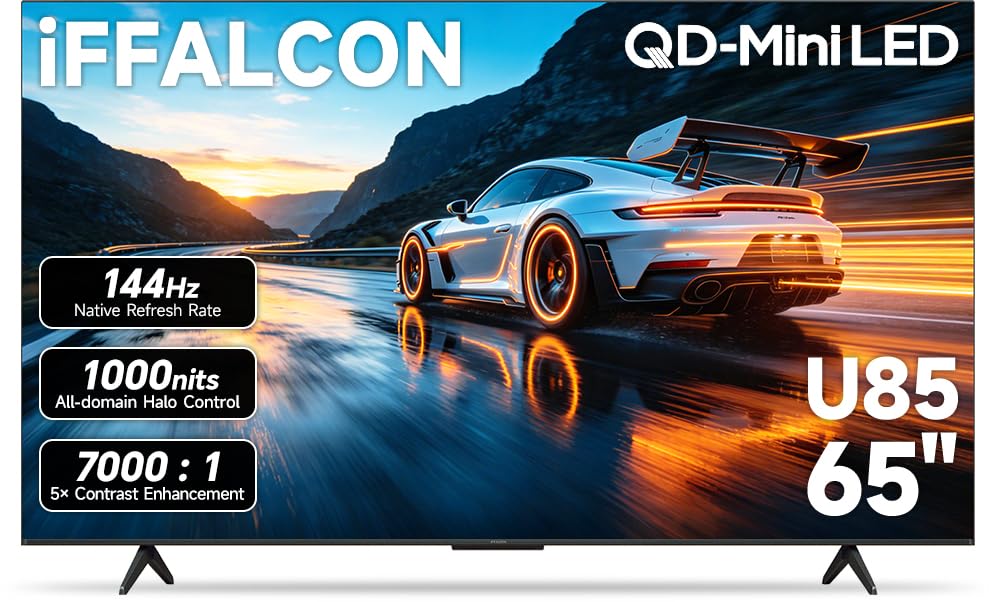
The gaming-focused panel that actually runs 144Hz native and keeps your console fed.
This is the one pick that genuinely open up what HDMI 2.1 can do for a gamer. Where the Panasonic and Hisense options below run at a 60Hz native refresh rate, the iFFALCON 65U85 has a native 144Hz panel—at 144Hz native versus the Panasonic’s 60Hz native. That difference means fast-paced games on a PS5 or Xbox Series X animate without blurring, and if you connect a gaming PC capable of pushing frame rates that high, the screen keeps up fluidly. The set also supports VRR (Variable Refresh Rate) from 48Hz up to 144Hz, and even pushes to 288Hz in a boosted mode, which handles the quickest frame-rate dips during intense battles.
Reviewers report that it “runs 120 fps with games that allow it and the graphics are phenomenal,” noting the vibrance comes partly from the MiniLED backlight and a 7,000:1 contrast ratio. Dolby Vision Gaming and IMAX Enhanced certification mean HDR movies and game cutscenes get that theater-style dynamic tone mapping—deep blacks next to bright highlights—with no manual adjustments needed. All four HDMI ports are version 2.1, so you can plug in two consoles and a soundbar without trading away 4K@144Hz support. The built-in 50W 2.1-channel audio (two tweeters plus a woofer) also gets praise from buyers who say the sound is “premium” and has “a big sub woofer built in,” making it one of the few TVs here that could serve as a living room centerpiece without an immediate soundbar upgrade. The catch is physical depth: this set is thicker than the ultra-slim Hisense U6, which some wall-mounters might find distracting.
Game-ready hardware
- Native 144Hz panel with VRR up to 288Hz for tear-free gameplay
- MiniLED backlight delivers strong peak brightness (~1,000 nits) for HDR impact
- Four true HDMI 2.1 ports—unusual at this level
One physical trade-off
- Slightly thicker chassis than ultra-slim competitors, may protrude on a wall mount
- Some buyers report the 120Hz+ modes need specific game support to be activated
Reach for this if: your primary use is gaming on PS5, Xbox Series X, or a high-fps PC—the native 144Hz panel and full HDMI 2.1 port suite are a clear step up.
Look elsewhere if: you only watch movies and stream TV at 60 fps; a simpler 60Hz panel will save you money and give you a slimmer profile.
2. Hisense 65″ Class U6 Series ULED 4K UHD Smart Fire TV (65U6HF, 2024)

The budget-friendly 65-incher that packs QLED color and local dimming into a slim frame.
This Hisense U6 makes the most sense for the buyer who wants rich HDR performance—Quantum Dot (QLED) wide color gamut and Full Array Local Dimming with up to 32 zones—but does not need the high refresh rate of the iFFALCON above. At a native 60Hz refresh rate, it handles console gaming at 60 fps cleanly, and reviewers confirm that “auto game mode works well with PS5.” The HDMI 2.1 (eARC) port supports a 240 Motion Rate (a software-interpolated claim, not native), which can smooth sports and some movie pans, but for pure frame-rate gaming the iFFALCON is the better tool. Where the Hisense pulls ahead is its depth: at 3.1 inches base depth, it is dramatically slimmer than the Panasonic’s 11.46 inches—a difference of 3.1 inches compared to 11.46 inches—making it much easier to wall-mount or set on a narrow stand.
One long-term owner notes the U6 has been an “excellent TV with no issues after nearly a year,” specifically praising the upscaling of 720p content from streaming services and older consoles. The peak brightness of 600 nits is respectable at this tier—enough to make Dolby Vision HDR content look punchier than a standard LED TV, though obviously less intense than the 1,000-nit iFFALCON. The bezel-less design gives it a sleek look that won’t overpower a room, and the foot position is narrow enough to fit on smaller furniture. The catch is the Fire TV operating system: multiple reviewers mention persistent ads on the home screen and a convoluted interface, with one buyer noting occasional Wi-Fi issues and a short power cable around 6-8 feet. If the built-in software bothers you, a cheap streaming stick via HDMI solves it instantly, but the hardware’s picture quality is the real reason to buy.
Picture-first budget pick
- QLED quantum dot panel with Full Array Local Dimming for vibrant HDR color
- Slim 3.1-inch depth—easy to wall mount or place on shallow furniture
- Well-reviewed long-term reliability: several owners mention zero issues after a year
Software and sound caveats
- Fire TV interface has persistent ads and can feel sluggish; some buyers find it intrusive
- Native 60Hz panel limits high-fps gaming; the “240 Motion Rate” is interpolated, not raw performance
- Downward-firing speakers can sound muffled; external soundbar recommended for dialogue clarity
Ideal for: a movie enthusiast or casual console gamer who wants strong HDR and color for under the mid-range budget, and prefers a slim profile that blends into the room.
Not for: serious competitive gamers who need native 120Hz or 144Hz—the 60Hz panel will become a bottleneck in fast shooters.
3. Panasonic W70 Series (2025 Model) 65″ LED 4K Ultra HD Smart Fire TV (65W70BP)

A name-brand entry-level set that brings HDMI 2.1 to the budget aisle, with some reliability risks.
This Panasonic W70 Series is the most affordable way to get an HDMI 2.1 port on a 65-inch screen, but it arrives with clear limitations that the higher-tier picks don’t share. Like the Hisense, it has a 60Hz native refresh rate, so it cannot match the iFFALCON’s fluid gaming at higher frame rates. What it does offer for the price is an HDR Bright Panel powered by a 4K Studio Color Engine with MEMC (Motion Estimation Motion Compensation) technology—basically software that inserts extra frames to smooth out fast-moving sports or action movies. It also has Fire TV built-in with Alexa, and Bluetooth 5.0 for connecting wireless headphones or speakers. One reviewer who rated it five stars called it “a name brand TV that is easy to set up and isn’t overpriced,” praising the picture quality and under-10-minute QR code setup.
The trade-offs are significant enough that buyers should read the negative reviews carefully. Several customers note serious reliability issues: the first unit arrived with a black screen, and a replacement “has extremely slow Fire TV, frequent buffering/freezing even on high-speed internet.” One owner adds that after months of use the “TV turns on randomly, crashes when navigating, remote power button failed.” The base depth of 11.46 inches is also the deepest of the three—a depth of 11.46 inches versus the Hisense’s 3.1 inches—so this set needs a very wide TV stand and will not look flush on a wall. Between the inconsistent quality control and the bulky footprint, the Panasonic is best treated as a cautious “buy at the lowest possible price” option, ideally with a good return policy. The iFFALCON and Hisense both offer stronger hardware and proven reliability for a small step up in budget.
Low-cost HDMI 2.1
- Includes an HDMI 2.1 port for basic console connectivity at 60Hz
- HDR10+ and MEMC motion smoothing improve movie and sports clarity
- Setup is very fast—several reviewers mention the QR code wizard under 10 minutes
Noteworthy reliability warnings
- Multiple reviews report defective units (black screens, frequent freezing, random power cycles)
- Deep 11.46-inch base takes up a lot of stand space; not wall-mount friendly
- Slow Fire TV processor leads to sluggish app switching and buffering
Only consider if: the budget is extremely tight and you need a name-brand 65-inch TV with an HDMI 2.1 label—just be prepared to return a unit if problems appear.
Skip it and spend a bit more on: the Hisense U6 or iFFALCON 65U85, which both have better reliability track records and superior HDR/gaming hardware for the extra cost.
Understanding the Specs
Native Refresh Rate
The physical speed at which the TV’s panel redraws the image, measured in hertz (Hz). A 60Hz panel refreshes 60 times per second, which handles standard TV and console gaming at 60 fps just fine. A 120Hz or 144Hz panel is needed for games that run above 60 fps, because the screen will show every frame a high-end console or PC sends. The iFFALCON 65U85 is the only pick here with a native 144Hz panel—the Panasonic and Hisense both run at 60Hz.
MiniLED vs QLED vs Standard LED
MiniLED uses thousands of tiny LEDs as a backlight, which allows the TV to dim very small zones of the screen independently. That gives you deep black next to bright highlights—great for HDR movies. QLED (used by the Hisense) uses a quantum dot layer on top of a standard LED backlight to produce richer, more accurate colors. Standard LED (the Panasonic) lights the whole screen evenly with fewer zones, so dark scenes look grayish and HDR has less punch.
FAQ
Do I need a native 120Hz or 144Hz TV for PS5?
What is the difference between VRR and ALLM?
Will a 60Hz TV work with an Xbox Series X?
How many HDMI 2.1 ports do I need?
What is Dolby Vision Gaming?
Is it worth paying more for MiniLED over QLED?
Will this TV work with a soundbar?
Why do some Fire TV units run slowly?
Final Thoughts: The Verdict
Across the board, the 4k hdmi 2.1 tv winner is the iFFALCON 65U85 because its native 144Hz panel, four HDMI 2.1 ports, and MiniLED HDR brightness genuinely deliver the smooth, vivid experience HDMI 2.1 promises. If you want a slim, budget-friendly set with great color for movies and casual gaming, grab the Hisense U6 Series (65U6HF). And for the tightest budget where you still need the HDMI 2.1 label, the Panasonic W70 Series (65W70BP) gets the job done—but buy with a return policy ready.
How We Picked
We do not accept paid placement. Every pick is matched to a real buyer and a real use-case; we do not hands-on test units.
Sources & Methodology
Specifications: manufacturer listings and product documentation. Review insights: verified customer reviews, as of July 2026. Pricing: not shown on this page (it changes often); check the current price via the retailer link.
As an Amazon Associate, Gadgets Feed earns from qualifying purchases. This does not affect which products we feature.
Related Guides
Product prices and availability are accurate as of the date/time indicated and are subject to change. Any price and availability information displayed on Amazon at the time of purchase will apply to the purchase of this product. As an Amazon Associate I earn from qualifying purchases.
CERTAIN CONTENT THAT APPEARS ON THIS SITE COMES FROM AMAZON. THIS CONTENT IS PROVIDED "AS IS" AND IS SUBJECT TO CHANGE OR REMOVAL AT ANY TIME.
Amazon and the Amazon logo are trademarks of Amazon.com, Inc. or its affiliates.