
The difference between a stream that pops and one that flops often comes down to a single, silent component in your rig. You can have the fastest PC and the best camera, but if your capture card introduces a stutter or a second of delay, your audience checks out. For console gamers, handheld enthusiasts, and anyone looking to broadcast high-resolution gameplay, the signal chain from your source to your streaming software needs to be airtight.
I’m Min — the co-founder and writer behind Gadgets Feed. I’ve spent countless hours dissecting datasheets, parsing chipset capabilities, and tracking latency metrics across dozens of 4K capture solutions to find which models actually deliver on their promises without introducing unwanted artifacts.
This guide is built to help you pick the absolute best 4k hdmi capture card for your specific setup, whether you are a competitive streamer chasing high-refresh passthrough or a creator needing uncompressed video for post-production.
How To Choose The Best 4K HDMI Capture Card
Not all 4K capture cards are built the same. The chipset inside dictates what formats are possible, how much latency you’ll feel, and whether your prized console will even output a signal. Here are the three critical filters you should apply before clicking buy.
Passthrough vs. Capture Resolution
A card that captures at 4K60 is common, but one that also passes through 4K144 or 4K120 with VRR is rare. If you game on a high-refresh monitor, the passthrough spec is what saves you from tearing and stutter. Entry-level cards often lock passthrough to 4K60, which is fine for RPGs but painful for fast-paced shooters.
Color Format and Bit Depth
YUY2 and NV12 are the most common uncompressed formats for high-quality capture. MJPEG is compressed and often introduces macro-blocking in dark scenes. If you plan to edit or color-grade your footage, a card that supports YUY2 at 4K30 or 4K60 is a far better investment than one limited to MJPEG at those resolutions.
Audio Channel Support
Many cards only pass stereo audio, which is fine for basic streaming. If you want to capture party chat on consoles or record 5.1 surround, you need a card with a dedicated 3.5mm audio input or one that explicitly supports multi-channel audio over HDMI. Skipping this check often leads to frustrating workarounds later.
Quick Comparison
On smaller screens, swipe sideways to see the full table.
| Model | Category | Best For | Key Spec | Amazon |
|---|---|---|---|---|
| Elgato 4K Pro | Internal PCIe | Ultra-low latency dual-PC | 8K60 passthrough, 4K60 HDR10 capture | Amazon |
| AVerMedia GC553G2 | External USB-C | High-refresh console streaming | 4K144 passthrough, 4K60 YUY2 capture | Amazon |
| ASUS TUF CU4K30 | External USB-C | Durable all-round streaming | 4K30 capture, 4K60 HDR passthrough | Amazon |
| OREI VC-8KTUSB3 | External USB 3.0 | Multi-format pro workflows | 8K60 input, 4K60 capture, integrated audio mixing | Amazon |
| PORTTA DX20R | External USB-C | Budget-friendly VRR capture | 4K60 capture, built-in status display | Amazon |
| UGREEN 25173 | External USB-C | Multi-audio streaming setup | 4K60 capture, triple 3.5mm ports | Amazon |
| GENKI ShadowCast 3 Pro | External USB-C | Ultra-portable console capture | 4K60 MJPEG capture, zero-lag passthrough | Amazon |
| SoundBeast 4K Box | Standalone Recorder | Analog-to-digital archiving | 5″ LCD, 4K30 capture, SD card recording | Amazon |
| AVMATRIX UC2018 | External USB-C | SDI/HDMI professional capture | 1080P60 YUY2 uncompressed, SDI + HDMI input | Amazon |
In‑Depth Reviews
1. Elgato 4K Pro

The Elgato 4K Pro is an internal PCIe capture card that sidesteps USB bandwidth limitations entirely. By installing directly into a desktop motherboard slot, it achieves sub-millisecond latency and supports a staggering 8K60 passthrough while capturing 4K60 HDR10 simultaneously. This is the solution for dual-PC streamers who cannot tolerate even a single frame of delay.
HDMI 2.1 input lets you pass through VRR and high refresh rates up to 240Hz at 1080p, making it a perfect companion for PS5 Pro and Xbox Series X. The included software suite offers Flashback Recording, which captures up to four hours of buffer footage so you never miss a highlight. The PCIe form factor also means zero cable clutter and no external power brick.
On the downside, installation requires a free PCIe x4 or larger slot and a desktop tower — it will not work with laptops or mini PCs. Some users report that the card is picky about HDMI cable quality, occasionally splitting the signal into quadrants if the cable is substandard or too long. The utility software adds a small processing delay that is best bypassed by running the card through OBS directly.
Why it’s great
- True 8K60 passthrough with HDMI 2.1
- Zero perceivable latency for competitive play
- Flashback Recording captures highlights retroactively
Good to know
- Desktop PCIe installation only — no laptop support
- Very sensitive to HDMI cable quality and length
2. AVerMedia GC553G2 Live Gamer Ultra 2.1

The AVerMedia GC553G2 is the external card to beat if you need HDMI 2.1 bandwidth without opening your PC case. It passes through 4K144 HDR with VRR intact, meaning your PS5 or high-end gaming PC sees no difference between a direct connection and a routed one. Capture tops out at 4K60 using YUY2 or NV12 formats, delivering clean footage for streaming and recording alike.
Party chat support is a standout feature — plug a gaming headset directly into the card to capture console voice audio without extra cables or splitters. The built-in 5.1 channel audio capture adds depth for viewers who have surround sound setups. Customizable RGB lighting syncs with Windows Dynamic Lighting, MSI software, or AVerMedia’s own tool for aesthetic integration.
Some caveats: the card requires a USB-C 3.2 Gen 2 port for full bandwidth, and ultrawide monitor support (3440×1440) is inconsistent depending on your GPU. A few users have reported garbled audio at 4K144 capture, though this appears to be resolved with firmware updates. It also runs warm under extended use, so adequate airflow is recommended.
Why it’s great
- Native 4K144 HDR/VRR passthrough via HDMI 2.1
- 5.1 channel audio capture for immersive streams
- Direct party chat input without extra cables
Good to know
- Ultrawide resolution support is spotty
- Requires high-end USB-C 3.2 Gen 2 for peak performance
3. ASUS TUF Gaming CU4K30

ASUS brings its TUF gaming ethos to capture with the CU4K30, an external box wrapped in a durable alloy shell that can survive packed backpacks and crowded desks. It captures at 4K30 and passes through 4K60 HDR, making it a solid choice for streamers who prioritize signal stability over raw capture resolution. The unit is certified for OBS Studio, ensuring plug-and-play compatibility without driver hunting.
The integrated USB-C connection uses the UVC standard, so it is recognized instantly by Windows, macOS, and even some Linux builds. Audio passthrough for controller and headset connections lets you share team comms on stream without a complicated mixer setup. The slim footprint is smaller than a smartphone, fitting easily into any ITX build or travel case.
Some users have reported crackly audio on the left channel at default settings, which can often be fixed by adjusting the sample rate in OBS. A few also note intermittent disconnections that require unplugging and replugging the USB cable. The capture is limited to 4K30, which is fine for 30 fps titles but falls short for fast-paced 60 fps content.
Why it’s great
- Rugged metal build for travel and daily use
- OBS certified for immediate setup
- Compact form factor fits any desk or bag
Good to know
- Capture maxes out at 4K30, not 4K60
- Intermittent USB disconnection reported by some users
4. OREI VC-8KTUSB3
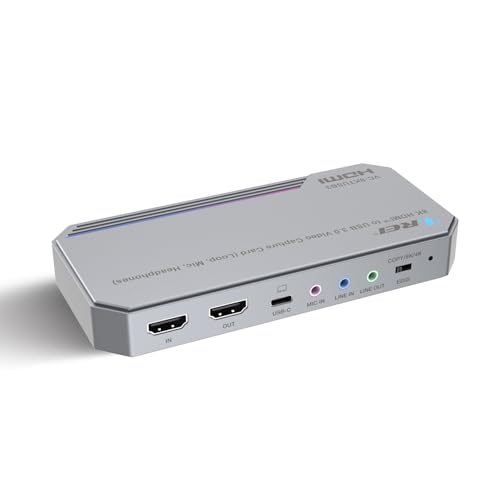
The OREI VC-8KTUSB3 punches above its price bracket by accepting an 8K60 HDMI input while capturing at a full 4K60. The USB 3.2 Gen 1 interface provides 5Gbps of bandwidth, ensuring stable video transmission even during high-motion scenes. It supports YUY2, NV12, and MJPEG formats, giving you flexibility between uncompressed quality and file size efficiency.
A built-in audio mixer allows you to blend HDMI audio with a separate mic and line-in input, creating a single audio source for OBS or Streamlabs — no virtual audio cable software required. The zero-delay HDMI loop-out port lets you monitor your source on a second display without any processing lag. The metal chassis feels substantial and dissipates heat effectively during long sessions.
On the downside, the unit lacks rubber feet, so it slides around on smooth surfaces. The bright LED strip on the front cannot be dimmed or turned off, which may be distracting in a dark streaming room. It also runs warm to the touch after several hours, though it remains stable without dropped frames.
Why it’s great
- Accepts 8K60 input for future-proofing
- Onboard audio mixing eliminates virtual cable complexity
- Zero-delay HDMI loop-out for real-time monitoring
Good to know
- No rubber feet — slides on smooth surfaces
- Bright LED strip cannot be dimmed
5. PORTTA DX20R
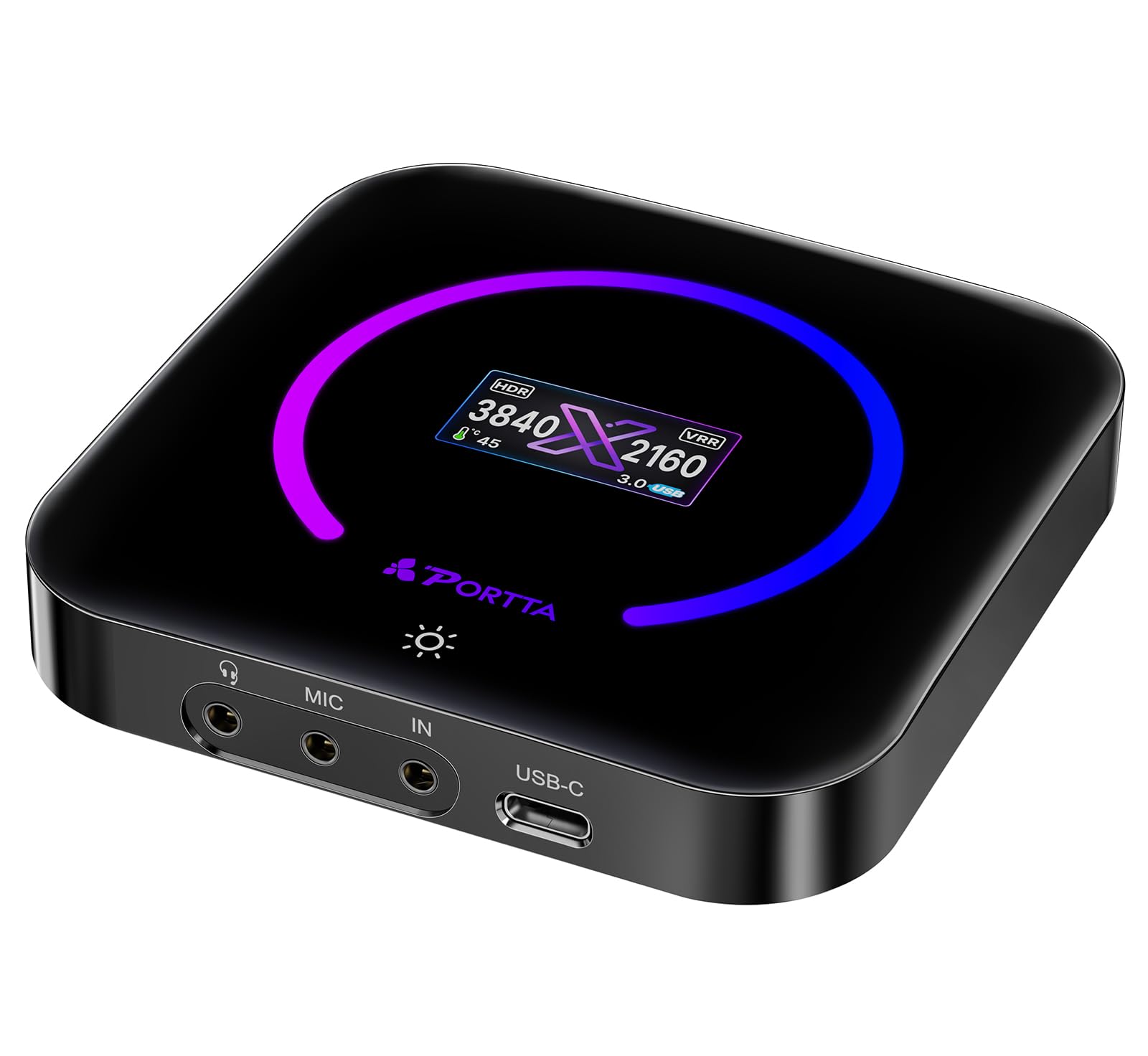
The PORTTA DX20R is a surprisingly feature-dense capture card at a budget-friendly price point. It captures 4K60 using YUY2, NV12, or RGB24 formats, all while passing through VRR and HDR for tear-free gaming on a high-refresh monitor. A tiny OLED display on the unit itself shows the current input resolution, signal status, and internal temperature — a rare convenience at this price.
The PORTTA CapHub utility software gives you granular control over EDID, VRR modes, and audio mixing settings. Plug-and-play compatibility with Windows, macOS, and Linux means no drivers to install for basic operation. The included HDMI and USB-C cables are high-quality and long enough for most desk setups. Weighing just 68 grams, it is also one of the lightest cards on this list.
Some users have noted minor PC recognition hiccups on first connection, usually resolved by restarting the capture software. The card gets warm during extended 4K capture, though the built-in screen helps you monitor the internal temp. The OLED display is small and can be hard to read from across the desk.
Why it’s great
- Built-in OLED status display for real-time diagnostics
- Supports VRR and HDR passthrough
- Very lightweight and includes quality cables
Good to know
- Minor software recognition issues on first boot
- Small OLED screen is difficult to read from a distance
6. UGREEN 25173

UGREEN’s 25173 capture card is built for streamers who need audio flexibility. It packs three 3.5mm jacks — one for headphones, one for a microphone, and one for a line-in mixer — allowing you to manage multiple audio sources without an external audio interface. Capture goes up to 4K60 using MJPEG, with support for YUY2 and NV12 at lower resolutions.
The aluminum chassis features seven RGB lighting modes for those who want their streaming setup to pop visually. Input and loop-out support 4K60 with VRR and HDR, keeping your monitor experience smooth. It works out of the box with Windows, macOS, Linux, and even iOS 17 and Android devices, making it versatile for mobile streaming setups.
Audio quality is a notable weak point — some users report that the captured audio is roughly 15dB quieter than the source, with audible digital noise from the HDMI signal. Linux support is also less reliable, with some resolutions and formats not working outside of Windows or macOS. The RGB lighting cannot be turned off if you prefer a stealthier look.
Why it’s great
- Triple 3.5mm jacks for headphone, mic, and line-in
- RGB lighting and aluminum body for style and cooling
- Works with iOS and Android for mobile streaming
Good to know
- Captured audio is noticeably quieter with digital noise
- Linux resolution support is incomplete
7. GENKI ShadowCast 3 Pro
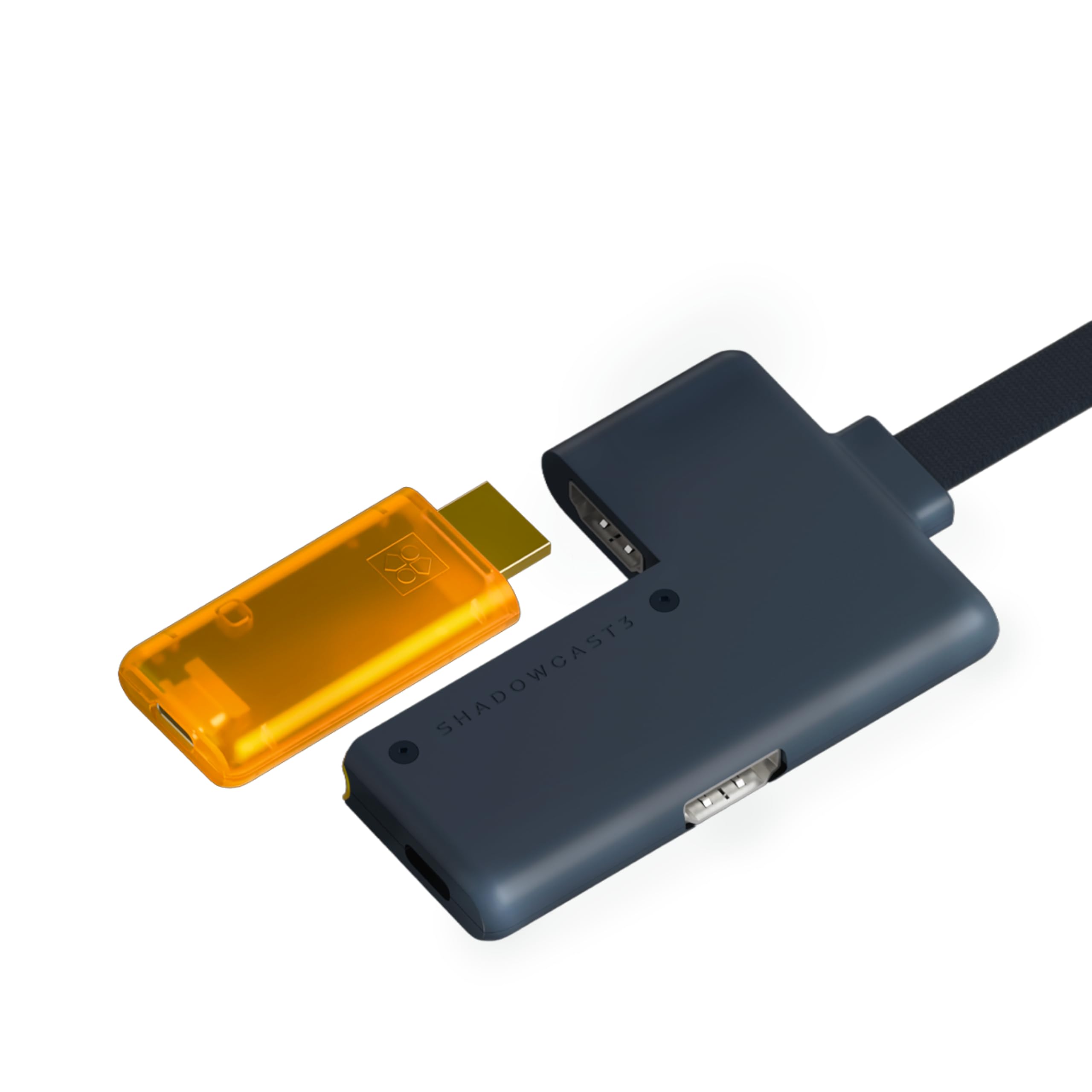
The GENKI ShadowCast 3 Pro is purpose-built for portability. Its entire footprint is smaller than a pack of gum, and it requires no external power — the USB-C bus provides everything it needs. Despite its tiny size, it manages a native zero-latency HDMI passthrough module, so you can play on your main monitor with zero lag while streaming to a secondary device.
Capture supports 4K60 in MJPEG, and the MS2130S chipset allows for YUY2 at 4K25 and NV12 at higher frame rates. The unit is instantly recognized as a camera feed by OBS, Streamlabs, Zoom, and Discord, making it ideal for turning a DSLR into a webcam or capturing Switch 2 footage on an iPad via the Genki Studio app. Four interface ports (HDMI in, HDMI passthrough, USB-C capture, and passthrough power) keep connections organized.
The main trade-off is that lossless YUY2 capture above 30Hz can produce encoding artifacts, and the MJPEG format at 4K60 is compressed. The passthrough also requires a separate USB power source if you want to use the downstream power supply feature. The LED indicator blinks when no signal is detected, which can be slightly distracting.
Why it’s great
- Ultra-compact and fully bus-powered
- Native zero-latency HDMI passthrough
- Works seamlessly with iPad and laptops via Genki Studio
Good to know
- Lossless YUY2 capture limited to 4K25
- Passthrough power supply requires separate USB power
8. SoundBeast 4K HD Video Capture Box
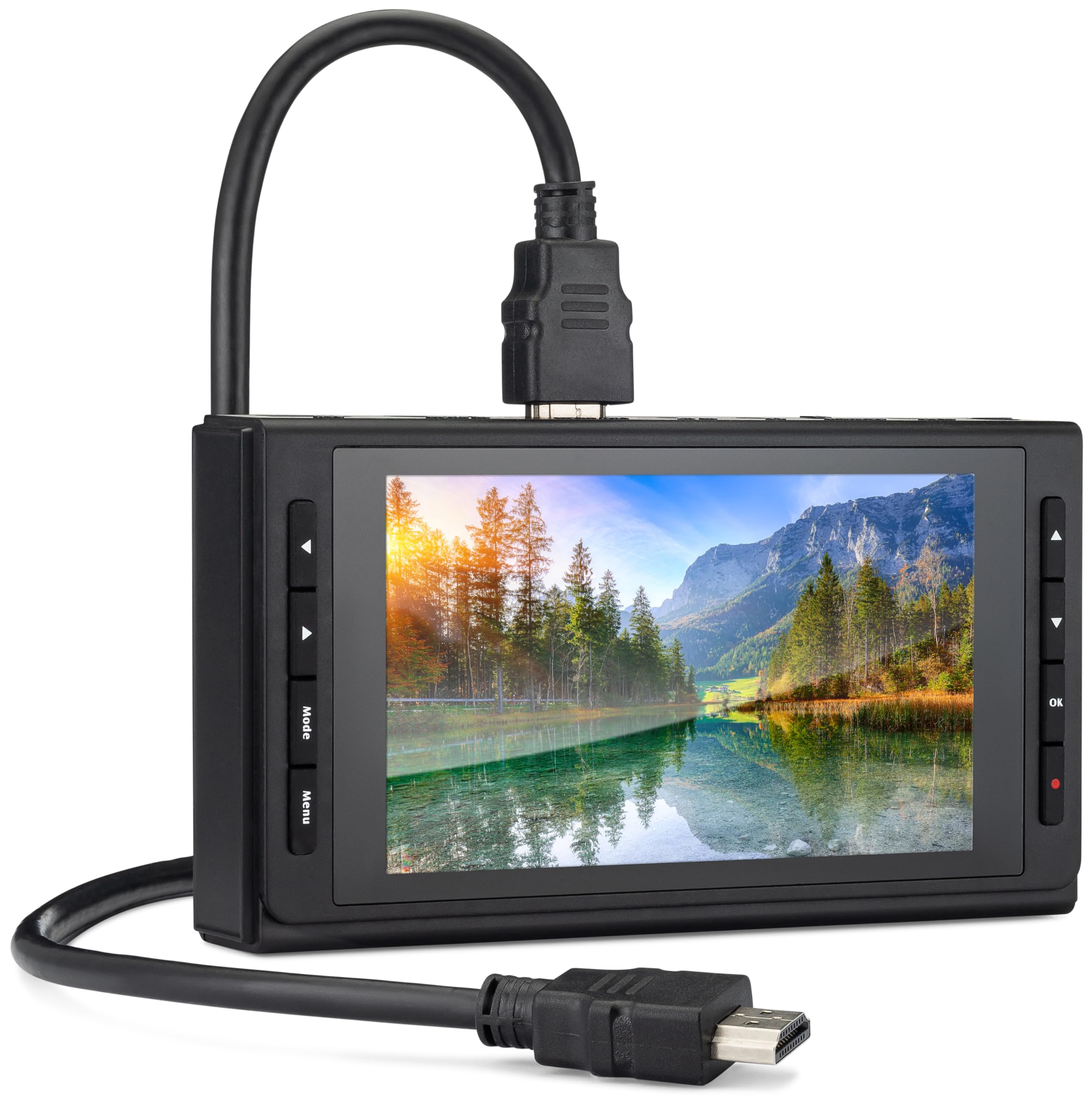
The SoundBeast 4K Capture Box is a completely different beast — it is a standalone recorder that does not require a PC at all. It features a 5-inch LCD screen and a built-in speaker, allowing you to preview and play back footage directly on the device. It captures 4K30 or 1080P60 to an SD card, USB flash drive, or USB hard drive using MP4 format, making it perfect for digitizing old VHS tapes or recording gameplay without a computer.
Analog inputs via AV, RCA, and S-Video let you connect vintage cameras, VCRs, and camcorders. The included remote control makes it easy to start and stop recordings from across the room. For live streaming, it can route video through USB to a PC running OBS, though this is Windows-only — Mac and XSplit users are out of luck.
The monitoring screen runs at roughly 20fps and is dull and blurry, so it is not a replacement for a proper field monitor. The UI and menus are slow and clunky to navigate. Importantly, this device cannot record or display content-protected HDMI sources — it will show a black screen if you try to capture from a streaming box or Blu-ray player.
Why it’s great
- Fully standalone — no PC needed for recording
- Accepts analog AV and S-Video inputs for legacy media
- Includes remote control and 5-inch preview screen
Good to know
- Monitoring screen is low resolution and runs under 30fps
- Cannot record content-protected HDMI sources
9. AVMATRIX UC2018

The AVMATRIX UC2018 is built for professional environments where SDI cameras are still the standard. It accepts both HDMI and 3G-SDI inputs, automatically detecting the active signal source. Capture is uncompressed YUY2 at 1080P60, ensuring pixel-perfect video for telemedicine, online education, and church streaming where every detail matters.
The USB 3.0 Type-C output delivers up to 200MB/s transfer speeds, keeping latency negligible. A dedicated 3.5mm line-in port lets you mix an external audio source with the HDMI or SDI audio before it reaches the computer. The unit is tiny at just 92x58x19mm and weighs 205 grams, making it easy to mount behind a rack or attach to a camera rig.
The main limitation is resolution — it caps out at 1080P60, so it is not suitable for 4K capture. Some users have reported difficulty reaching AVMATRIX customer support when issues arise. The unit also does not include a USB cable, so you will need to supply your own USB 3.0 Type-C cable for operation.
Why it’s great
- Dual HDMI and 3G-SDI inputs for professional cameras
- Uncompressed YUY2 capture at 1080P60
- Extremely compact and lightweight for rig mounting
Good to know
- Limited to 1080P60 — no 4K capture
- Does not include a USB cable in the box
FAQ
What is the difference between passthrough and capture resolution?
Can I use a 4K capture card with a Nintendo Switch 2?
Final Thoughts: The Verdict
For most users, the best 4k hdmi capture card winner is the AVerMedia GC553G2 because it delivers HDMI 2.1 passthrough at 4K144 with VRR in a simple USB-C form factor that works with both consoles and PCs. If you want uncompressed YUY2 capture and a built-in audio mixer, grab the OREI VC-8KTUSB3. And for the ultimate low-latency dual-PC setup, nothing beats the Elgato 4K Pro.